Dynamics 365
 Power Platform
 Dynamics
 Cloud & Productivity
What are AI Agents in Dynamics 365 Business Central?

Artificial intelligence is becoming more practical inside ERP systems, and Dynamics 365 Business Central is no exception. Microsoft continues to expand AI agents that can take on defined business processes, reduce manual work, and help teams manage growing transaction volumes more efficiently.
In this guide, we explain what AI agents in Business Central are, how they work, which agents are available, where they can add value, how they compare with Copilot, and what organizations should know about pricing and custom agent options.
At a glance
AI agents in Dynamics 365 Business Central are AI-powered workers that use business data, instructions, and permissions to complete defined ERP tasks with limited human input. Business Central includes the Sales Order Agent, Payables Agent, and Expense Agent, along with options for building custom agents. Unlike Copilot, which assists users while they work, AI agents can independently carry out multi-step processes and involve users when review, clarification, or approval is needed.
What is Microsoft Dynamics 365 Business Central?
Microsoft Dynamics 365 Business Central is a cloud-based enterprise resource planning (ERP) system designed for growing and mid-market organizations. It brings core business functions into a single platform, including finance, supply chain management, inventory, sales, purchasing, and project management. Because it is part of the broader Dynamics 365 ecosystem, Business Central connects natively with applications such as Microsoft 365, Power BI, Power Platform, and other Dynamics 365 apps, enabling consistent data flow across the organization.
Beyond core ERP functionality, Business Central is built to support operational efficiency and informed decision-making. The platform includes embedded reporting, role-based dashboards, and configurable workflows that reflect how teams actually work. Increasingly, Business Central relies on embedded intelligence and automation to reduce manual effort, surface insights from data, and support faster, more accurate business processes across finance and operations.

What are AI agents in Business Central?
AI agents in Business Central are AI-powered workers that can complete defined business tasks with limited human input. They use Business Central data and instructions to understand what needs to be done, take permitted actions, and involve users when a decision, exception, or approval requires human attention.
Unlike traditional automation, which follows fixed rules and predefined steps, AI agents can use business context to determine how to complete a task. For example, an agent may interpret information from an email or document, find the related records in Business Central, prepare a transaction, and ask a user to review it when needed.
Business Central agents operate within assigned profiles and permissions, helping organizations maintain control over the data and actions an agent can access. Their activity can also be reviewed, giving users visibility into the work completed by the agent. Microsoft provides built-in agents for specific Business Central processes and is expanding options for organizations to create custom agents for their own workflows.
Benefits of AI agents in Business Central
AI agents can reduce the amount of manual work required to manage routine business processes in Dynamics 365 Business Central. By handling repetitive tasks and high-volume activity, agents allow users to spend more time on exceptions, analysis, and decisions that require human judgment.
Key benefits of AI agents in Business Central include:
- Reduced manual effort: Automate repetitive and time-consuming tasks that would otherwise require user input.
- Faster processing: Complete high-volume business activities more quickly and consistently.
- Improved accuracy: Reduce manual data entry and the errors that can come with repetitive processing.
- Greater scalability: Handle growing transaction volumes without the same increase in administrative work.
- Better use of staff time: Allow employees to focus on exceptions, analysis, customer needs, and higher-value work.

Evaluate AI agents for Business Central
Rand Group helps organizations identify where AI agents add value and align them with existing Business Central processes. The result is practical automation that supports users without adding unnecessary risk.
How AI agents work in Business Central
AI agents in Business Central use AI reasoning, business data, and defined instructions to complete assigned tasks. Instead of waiting for a user to guide every step, an agent can determine what actions are needed within its assigned role and continue working until the task is complete or human input is required.
Business Central applies permissions and profiles to control what an agent can access and do. This helps ensure that agents only work with the data, pages, and actions needed for their assigned responsibilities. Users can also review agent activity and step in when a decision, exception, or approval requires human judgment.
At a practical level, AI agents in Business Central rely on several core elements:
- Instructions and scope: Define the agent’s purpose, responsibilities, and the work it is expected to complete.
- Business data: Provide the records, transactions, and other context the agent needs to understand and complete a task.
- Permissions and profiles: Control which Business Central data, pages, and actions the agent can access.
- Tasks and triggers: Start the agent’s work based on the process it is designed to handle.
- Actions and human oversight: Allow the agent to complete permitted steps independently while involving users when review or intervention is needed.
Together, these elements allow AI agents to automate multi-step work while maintaining visibility and control inside Business Central.
AI agents available in Business Central today
Microsoft continues to expand the AI agents available in Dynamics 365 Business Central. Built-in agents currently support sales order processing, accounts payable, and employee expenses. Organizations can also create custom AI agents for processes that are not covered by Microsoft’s standard agents.
Each agent is designed around a specific business process rather than general-purpose automation. This allows the agent to work with the relevant Business Central data, documents, and workflows while involving users when review or approval is needed.
Sales order agent
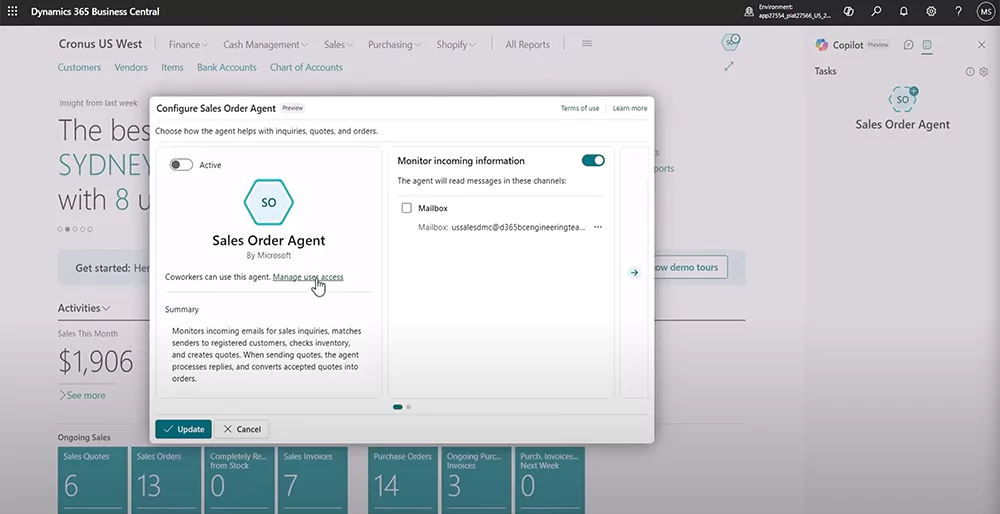
The Sales Order Agent in Business Central automates the intake and processing of customer requests received by email. It monitors a designated mailbox, interprets requests, identifies customers and products, checks item availability, and creates sales quotes or orders using real-time Business Central data.
The agent handles defined steps of the sales process independently while involving users when review, clarification, or approval is needed. Organizations can control how the agent operates and review its activity through the agent task experience. Business Central also supports multiple Sales Order Agents within the same company, allowing organizations to configure agents for different mailboxes or sales processes.
Key capabilities of the Sales Order Agent include:
- Monitoring a shared email inbox for customer requests for quotes or orders
- Identifying customers by matching sender information to Business Central records
- Interpreting product requests, including descriptions that do not exactly match item names
- Checking item availability and requested quantities
- Creating sales quotes with applicable pricing, taxes, quantities, and delivery information
- Drafting email responses and attaching sales documents
- Requesting user input when clarification, review, or approval is needed
- Converting quotes into sales orders as the customer request progresses
Payables agent
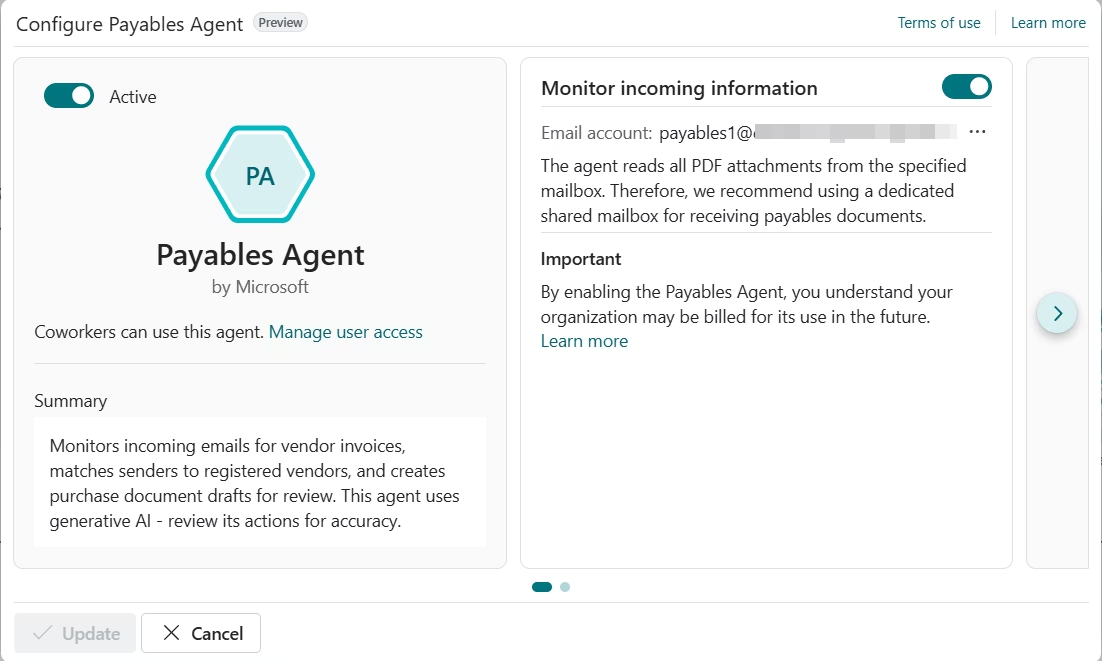
The Payables Agent in Business Central automates vendor invoice processing by monitoring a designated mailbox, analyzing incoming PDF invoices, and preparing purchase document drafts. It uses invoice data, Business Central records, and purchase history to reduce the manual work required to register vendor invoices.
The agent also supports three-way matching between purchase invoices, open purchase orders, and receipts. AI helps identify matching orders and lines even when the vendor invoice does not include a clear purchase order reference. Users can review and correct the agent’s work before the draft is finalized as a purchase invoice, while posting remains under user control.
Key capabilities of the Payables Agent include:
- Monitoring mailboxes for incoming vendor invoice emails
- Importing invoice PDFs into Inbound E-Documents
- Extracting invoice details using document intelligence
- Identifying vendors and creating purchase document drafts
- Matching invoices to open purchase orders and receipts
- Using invoice history and Business Central data to improve line-level matching
- Processing multiple invoice attachments separately
- Requesting user review or assistance when information cannot be identified with enough confidence
Expense Agent
The Expense Agent automates much of the employee expense process, from receipt intake through expense report preparation. The agent can extract receipt information, categorize and itemize expenses, create expense records, group expenses into reports, and support review and approval. The capability is currently available as a production-ready preview.
Employees can submit receipts through the Expense Agent web app or by email without needing a Business Central license for receipt submission. The agent then processes the information in Business Central, helping reduce manual expense entry for employees and finance teams.
Key capabilities of the Expense Agent include:
- Accepting receipts through the Expense Agent web app or a configured mailbox
- Extracting details such as merchant, date, amount, currency, and payment method
- Categorizing and itemizing expenses
- Creating expense records automatically
- Grouping expenses into expense reports
- Applying expense rules and supporting approval processes
- Sending reminders for outstanding expense activity

Custom AI agents
Organizations can also create custom AI agents for Business Central processes that are not covered by Microsoft’s built-in agents. Custom agents can be designed around specific roles, workflows, industry requirements, or business rules while using Business Central data and permissions.
There are two primary approaches for creating custom agents connected to Business Central:
- Business Central custom agents: Microsoft’s AI development toolkit allows teams to prototype agents directly in Business Central using instructions, tasks, profiles, and permissions. Production agents can then be developed as AL extensions using the Business Central Agent SDK.
- Copilot Studio agents: Copilot Studio provides a low-code approach for building agents that can work across Business Central and other applications. The Business Central MCP server and Power Platform connector give approved agents access to Business Central data and actions based on configured permissions.
Power Platform can extend custom AI agents with additional data, automation, and AI capabilities. Power Automate can trigger workflows and actions across Business Central and connected systems. Dataverse can provide shared business data and context, while AI Builder can add capabilities such as document processing, classification, and prediction.
This gives organizations flexibility to build an agent around the scope of the process. A Business Central-specific workflow may be best suited for a native agent, while a process that spans ERP, CRM, Microsoft 365, or other applications may be better suited for Copilot Studio.
To explore this topic in greater detail, read our guide to custom AI agents in Dynamics 365 Business Central.

Common use cases for AI agents in Business Central
AI agents in Business Central are best suited for processes that require more than a simple rule or workflow. They are especially useful when work involves interpreting emails or documents, matching information across records, handling exceptions, or completing several steps before a user needs to get involved.
Common use cases for AI agents in Business Central include:
- Reducing manual order entry: AI agents can interpret customer requests received by email, identify the correct customer and products, check availability, and prepare sales documents without requiring employees to rekey the request into Business Central.
- Matching vendor invoices to purchasing activity: Agents can extract invoice data and compare it with purchase orders, receipts, vendors, and historical transactions. This is particularly useful when invoice details are incomplete, inconsistent, or do not include a clear purchase order reference.
- Streamlining employee expense processing: AI agents can turn receipt images and emails into structured expense records, categorize expenses, group them into reports, and move them into the appropriate review and approval process.
- Managing exceptions instead of routine transactions: Custom agents can monitor defined business processes and bring unusual, incomplete, or high-risk transactions to a user’s attention. This allows employees to spend less time reviewing normal activity and more time resolving issues that require judgment.
- Supporting multi-step finance and operations processes: A custom agent can gather information from several Business Central records, complete permitted actions, and prepare the next step for review. This can be useful for processes that require context from customers, vendors, transactions, inventory, or other related records before action can be taken.
- Coordinating work across connected systems: Copilot Studio agents can support processes that begin in Business Central but also require data or actions from CRM, Microsoft 365, Dataverse, or other connected applications. This can reduce manual handoffs between systems and keep information moving through a broader business process.
The strongest use cases are processes where AI interpretation adds value. If a process follows the same rule every time, standard Business Central workflows or Power Automate may provide a simpler and more predictable solution.
To explore additional scenarios, read our guide to real-world examples of AI agents for ERP and business operations.
AI agents vs. Copilot in Business Central
Copilot and AI agents both bring artificial intelligence into Dynamics 365 Business Central, but they support users in different ways. Copilot assists users while they work by answering questions, analyzing data, summarizing information, suggesting values, and helping complete specific tasks.
AI agents take a more active role in a defined business process. They can receive work, interpret information, complete permitted steps, and involve a user when review, clarification, or approval is needed. This makes agents better suited for processes that would otherwise require someone to repeatedly move work from one step to the next.
Copilot and AI agents can also complement each other. Copilot helps users work more efficiently inside Business Central, while agents can take over defined portions of a process that no longer require continuous user involvement.
Pricing and cost of AI agents in Business Central
Selected AI agents in Business Central use consumption-based pricing through Microsoft Copilot Credits. Copilot Credits measure the AI interactions and actions an agent performs, so usage depends on the agent, transaction volume, and work required to complete each task.
Microsoft supports prepaid capacity and pay-as-you-go billing. Under the pay-as-you-go model, Copilot Credits cost $0.01 per credit. Microsoft also offers Copilot Studio capacity packs with 25,000 Copilot Credits for $200 per month, billed annually. If prepaid capacity is available, Business Central uses those credits before pay-as-you-go billing.
The Sales Order Agent, Payables Agent, and Expense Agent consume different amounts of Copilot Credits because each performs different actions. The examples below show how usage can translate into monthly costs using the $0.01 pay-as-you-go rate.
Scenario 1: Sales Order Agent pricing example
The Sales Order Agent consumes Copilot Credits as it interprets customer emails, checks item availability, creates or updates sales documents, and prepares responses. The number of credits used can also increase when the agent processes attachments.
A typical Sales Order Agent request includes:
- Analyze incoming email: 2 Copilot Credits
- Check item availability: 5 Copilot Credits
- Create or update a sales quote or sales order: 5 Copilot Credits
- Generate a response email: 2 Copilot Credits
- Process an attachment with usable sales data, assumed for 50% of requests: 5 Copilot Credits
Average credits per request:
2 + 5 + 5 + 2 + (5 × 0.5) = 16.5 Copilot Credits
Monthly usage example:
- 100 customer requests per month
- 16.5 Copilot Credits per request on average
Monthly Copilot Credit usage:
16.5 × 100 = 1,650 Copilot Credits
Estimated pay-as-you-go cost:
1,650 × $0.01 = $16.50 per month
Actual usage varies based on the number of customer requests, attachments, and actions the agent performs.
Scenario 2: Payables Agent pricing example
The Payables Agent consumes credits for each vendor invoice it processes and for each invoice line it interprets. Microsoft estimates 50 Copilot Credits to process an invoice and create the purchase document draft, plus 5 credits for each invoice line.
A typical Payables Agent invoice includes:
- Process the invoice and create the purchase document draft: 50 Copilot Credits
- Process invoice lines, assuming an average of three lines: 15 Copilot Credits
Total per invoice:
50 + 15 = 65 Copilot Credits
Monthly usage example:
- 100 vendor invoices per month
- Average of three invoice lines per invoice
Monthly Copilot Credit usage:
65 × 100 = 6,500 Copilot Credits
Estimated pay-as-you-go cost:
6,500 × $0.01 = $65.00 per month
Emails that do not contain a valid invoice attachment do not consume Copilot Credits.
Scenario 3: Expense Agent pricing example
The Expense Agent uses a simpler consumption model. Microsoft charges 50 Copilot Credits per receipt processed, regardless of the complexity of the expense. This covers the process from receipt extraction and categorization through itemization, expense report grouping, and approval.
Total per receipt:
50 Copilot Credits
Monthly usage example:
- 100 receipts per month
- 50 Copilot Credits per receipt
Monthly Copilot Credit usage:
50 × 100 = 5,000 Copilot Credits
Estimated pay-as-you-go cost:
5,000 × $0.01 = $50.00 per month
At the pay-as-you-go rate, this equals approximately $0.50 per receipt. Actual monthly cost depends on receipt volume and the billing model used by the organization.
Partner with Rand Group for AI agents in Business Central
AI agents can create meaningful efficiencies in Business Central, but the right approach depends on the process, data, controls, and systems involved. Rand Group helps organizations identify where built-in or custom AI agents make sense, determine where traditional automation may be a better fit, and implement solutions that align with existing Business Central processes.
Rand Group has been helping organizations improve their business technology since 2003. With more than 3,000 successful engagements, 1,200+ clients, and a 90% client retention rate, our team brings experience across Business Central, Dynamics 365, Power Platform, software engineering, integrations, data, and AI. Rand Group was also named Microsoft Americas Channel Emerging Partner of the Year.
Rand Group can help with:
- AI agent strategy: Identify and prioritize practical use cases for AI agents in Business Central.
- Built-in AI agents: Configure and optimize Microsoft-delivered agents for your business processes.
- Custom AI agents: Design and develop agents for workflows that require a more tailored approach.
- Governance and security: Define permissions, approvals, testing, and controls for agent activity.
- Ongoing support: Refine agents and automation as your processes and Microsoft AI capabilities evolve.
What our clients say about us
“Rand Group has become a resource we can lean on when we are trying to improve or digitize a process. Because of the time spent with our business, the team can go beyond the superficial layers and help us get to solutions that have a material impact on operations.”
– Scott Rolston, President, Stucchi USA
“Some partners seemed like they did not understand who we were as a company, but Rand Group took the time to understand our services and how we work. That made us feel much more comfortable moving forward.”
– Susanna Stewart, Director of Finance & Administration, M&H Enterprises
“Rand Group felt like part of our team, not a group that was there just to get the project done and move on. We wanted to build the environment the right way the first time.”
– Laza Assany, Controller, Henry Resources LLC
“Rand Group has been top-notch—professional, responsive, and very proactive. You can tell their internal processes are really sound. We come up with ideas, and they help us figure out what will actually work in the system, whether it’s configuration, reporting, or technical support.”
– Derek Atwood, Subs for Pools
Key takeaways
- AI agents in Dynamics 365 Business Central can complete multi-step ERP tasks with limited human input.
- Business Central includes AI agents for sales order processing, accounts payable, employee expenses, and custom workflows.
- AI agents work within defined instructions, permissions, and controls while involving users when review or approval is needed.
- Copilot assists users while they work, while AI agents can take responsibility for defined business processes.
- Selected Business Central AI agents use consumption-based pricing through Microsoft Copilot Credits.
- AI agents are best suited for processes where interpretation and reasoning add value beyond fixed rules and workflows.
Frequently asked questions (FAQs)
What are AI agents in Dynamics 365 Business Central?
AI agents in Dynamics 365 Business Central are AI-powered workers that can interpret business data, follow instructions, and complete defined ERP tasks with limited human input. They can handle multi-step processes while involving users when review, clarification, or approval is needed.
Which AI agents are available in Dynamics 365 Business Central?
Dynamics 365 Business Central includes the Sales Order Agent, Payables Agent, and Expense Agent, along with options for building custom AI agents. These agents support sales order processing, vendor invoices, employee expenses, and organization-specific workflows.
What processes can AI agents automate in Business Central?
AI agents can automate processes such as sales order intake, vendor invoice processing, expense management, exception handling, and other multi-step workflows. Custom agents can extend automation to additional Business Central and cross-system processes.
What is the difference between AI agents and Copilot in Business Central?
Copilot assists users while they work, while AI agents can independently complete defined business processes. Copilot is used for tasks such as chat, summaries, analysis, Autofill, and bank reconciliation assistance, while agents can process incoming work and complete multiple steps with limited user involvement.
What is the difference between AI agents and traditional automation in Business Central?
Traditional automation follows fixed rules, while AI agents can interpret context and determine how to complete a defined task. Processes that always follow the same rule may still be better suited for Business Central workflows, Power Automate, or other rule-based automation.
How much do AI agents in Business Central cost?
Selected Business Central AI agents are priced through Microsoft Copilot Credits based on usage. Organizations can use prepaid Copilot Credit capacity or pay-as-you-go billing, with total cost depending on the agent and transaction volume.
Can you build custom AI agents for Business Central?
Yes, organizations can build custom AI agents for Business Central-specific and cross-system processes. Microsoft supports native Business Central agent development as well as broader agents built with Copilot Studio, Power Platform, and connected Microsoft technologies.
How secure are AI agents in Business Central?
AI agents in Business Central operate within defined permissions, profiles, and access controls. Organizations can limit the data and actions available to an agent, review its activity, and require human involvement for sensitive decisions or approvals.
Get started with AI agents in Business Central
AI agents can help organizations reduce manual work and improve how routine processes move through Business Central. The best place to start is with a clearly defined process where AI can add value beyond standard rules or workflows and where the right level of human oversight can be established.
Rand Group can help you evaluate built-in and custom AI agents, identify the right use cases, and determine how agents fit within your broader Business Central environment. Contact us to discuss your AI agent strategy and next steps.