Dynamics 365
 Power Platform
 Dynamics
 Cloud & Productivity
AP automation in Microsoft Dynamics 365 Business Central

Manual accounts payable processes can slow your business down more than you realize. Finance teams often spend hours entering invoices, chasing approvals, and correcting costly errors. As invoice volumes grow, these inefficiencies only become more difficult to manage. AP automation for Microsoft Dynamics 365 Business Central helps organizations eliminate these bottlenecks by streamlining invoice processing, automating approvals, and improving visibility into cash flow. Instead of relying on disconnected systems and manual entry, your team can manage the entire AP lifecycle within a single, connected platform.
In this blog, we will explore how AP automation works in Business Central, what tools are available, and what we see in real-world implementations.
What is AP automation for Business Central?
AP automation in Business Central means creating a smooth, largely hands-off invoice flow from the moment an invoice arrives to the moment a payment goes out.
Instead of manually keying invoice data, routing paper for approval, and reconciling payments line by line, your team works from a single, connected system. The process follows four core stages:
Business Central supports each of these stages with built-in tools. However, the depth of automation available depends on how you configure and extend the platform. That is why understanding both native capabilities and third-party options is important.
Why AP automation matters for growing businesses
Before diving into the tools, it is important to understand the impact. In our experience working with finance teams, AP automation consistently delivers improvements across five areas:
- Faster invoice processing: Automation reduces manual entry and accelerates approvals. Many organizations cut processing time significantly once workflows are standardized.
- Fewer errors and stronger controls: Manual entry introduces risk. Automated validation against purchase orders and vendor records helps catch discrepancies early.
- Improved cash flow visibility: Real-time insight into liabilities allows finance leaders to manage working capital more effectively and capture early-payment discounts.
- Stronger vendor relationships: Consistent, timely payments build trust and can improve vendor terms over time.
- Scalability without added headcount: As invoice volume increases, automation allows finance teams to scale without increasing overhead.

Business Central’s native AP automation tools
Microsoft has invested heavily in building AP automation for Business Central, with native tools designed to streamline invoice processing and approvals.
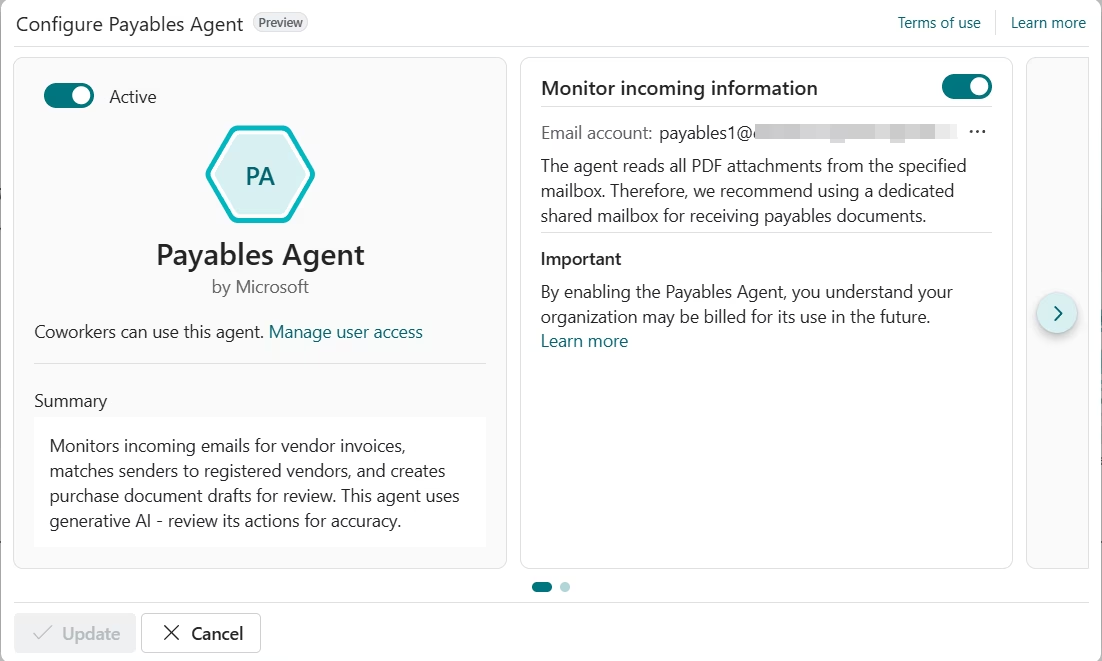
The Payables Agent
The Payables Agent is one of Microsoft’s most significant AI investments in Business Central. It monitors a shared Microsoft 365 email inbox for incoming vendor invoices. When an invoice arrives as a PDF, the agent picks it up automatically. It then creates a draft purchase invoice in Business Central for your team to review before posting.
The agent uses your existing purchase history and accounting policies to suggest the right accounts and coding. This means less manual judgment work and faster processing, especially for recurring overhead expenses like rent, utilities, and software subscriptions.
Azure Document Intelligence (OCR)
Business Central uses Azure Document Intelligence to process invoice PDFs. This optical character recognition (OCR) technology extracts key data fields from invoices, including vendor name, invoice number, date, and line items. The extracted data is stored in Business Central as an e-document, ready for validation and matching.
This eliminates the manual re-keying of invoice data, which is one of the most time-consuming and error-prone steps in traditional AP processes.

Approval workflows
Business Central includes a built-in workflow engine. You can configure approval workflows to route invoices based on amount thresholds, vendor type, department, or other criteria. Approvers receive notifications and can act directly from their inbox or within Business Central, keeping the process moving without paper or email chains.

Copilot for invoice and PO matching
Microsoft Copilot in Business Central can analyze PDF invoices and match them against purchase orders. It identifies line items, flags discrepancies within tolerance thresholds, and prepares invoices for posting. This reduces manual effort and helps finance teams focus on exceptions rather than routine matching.
Together, these tools give Business Central users a strong native foundation for AP automation. However, for organizations with high invoice volumes or complex workflows, extending the platform with additional tools may be necessary.

Where native tools may not be enough
While Business Central provides strong native capabilities, not every organization can rely on them alone. In real implementations, we often see additional complexity that goes beyond what the platform handles out of the box.
- Multi-entity environments add complexity when each legal entity has its own chart of accounts, tax configurations, currencies, and approval requirements. Managing all of that inside a single, standardized AP workflow requires more flexibility than native Business Central tools typically provide.
- High invoice volumes can quickly turn remaining manual touchpoints into bottlenecks. At scale, automated capture, intelligent routing, and exception-based review become essential rather than optional.
- Complex approval hierarchies go beyond simple dollar thresholds. Approvals may depend on cost center, project, vendor relationship, or expense type, which often requires more nuanced routing logic than the built-in workflow engine supports.
- Multiple invoice formats and intake channels are perhaps the most common source of friction we see. Vendors send invoices by email, EDI, supplier portals, and paper, and each channel requires a different capture approach that native tools alone may not fully address.
In these cases, third-party tools or purpose-built extensions are not a workaround. They are a necessary part of a complete AP automation strategy.

Thinking about Business Central licensing and costs?
Before you build out your AP automation strategy, make sure you understand your licensing options. Download our free Microsoft Dynamics 365 Business Central pricing and licensing guide to get a clear picture of what Business Central costs and what is included.
Extending Business Central with third-party AP tools
For organizations with more advanced requirements, extending Business Central can provide greater control and scalability. When evaluating any third-party AP tool, look for these key criteria:
- Pre-built Business Central connectors so data flows without custom coding
- AI-powered invoice capture that improves accuracy over time
- Custom approval workflows that match your governance requirements
- Multi-entity support for businesses running multiple companies in Business Central
In addition to third-party tools, Rand Group also offers purpose-built Business Central apps that extend the platform’s AP and payment capabilities without complex customization.
Electronic Banking App
The Electronic Banking App for Business Central extends AP automation beyond invoice approvals by streamlining payment processing and bank reconciliation. It enables finance teams to automate remittance generation, process mass vendor payments, and reconcile transactions directly inside Business Central instead of relying on disconnected banking portals and manual reconciliation workflows.

EDI 365 app
For organizations processing large volumes of vendor transactions, the EDI 365 app helps automate the exchange of invoices and purchasing documents directly inside Business Central. This reduces manual entry, improves transaction accuracy, and streamlines AP workflows for businesses managing high invoice volumes across trading partners and suppliers.

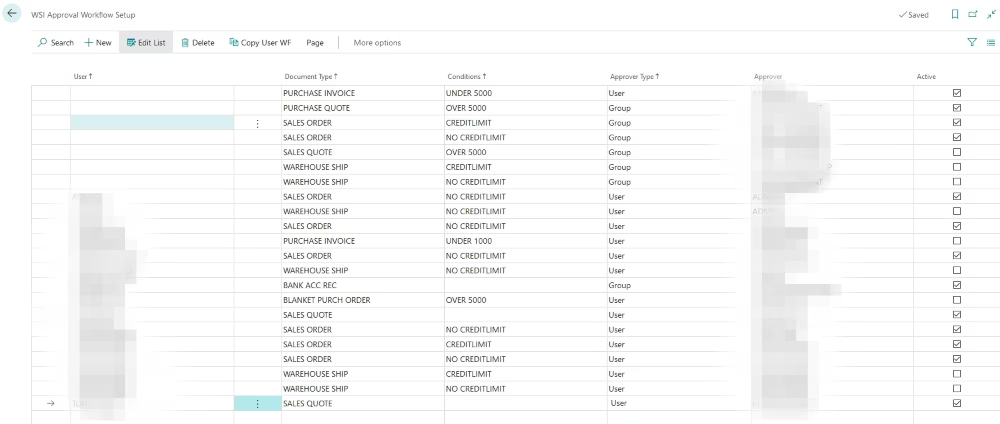
Custom Workflow Approvals app
Standard Business Central approval workflows are useful, but they have limits. The Custom Workflow Approvals app extends Business Central with flexible, rule-based approval routing. It allows organizations to enforce consistent, auditable controls that match how their business actually operates. This app is particularly helpful for strengthening segregation of duties across the AP process.
Real-world example: How we helped Dairy Products Inc. close faster with Business Central
At Rand Group, we work with finance teams every day that are managing critical business processes in tools that were never designed for them. That was exactly the situation at Dairy Products Inc., a dairy merchandising company that buys and sells cheese, non-fat dry milk, whey, butter, and cream across domestic and international markets.
When Dairy Products came to us, they were running on an aging trading ERP that no longer supported how their business operated. Over time, their team had moved key financial activity into Excel. That meant increased risk, limited visibility, and significant manual effort built into every close cycle.
We implemented Microsoft Dynamics 365 Business Central as their financial system of record. To make sure trading activity flowed directly into accounting without manual transfers, we integrated Business Central with their commodity trading and risk management platform. Their team now manages treasury, payables, receivables, and financial reporting in one connected environment.
We also integrated Business Central with their banking systems. That integration allowed their finance team to reconcile cash transactions directly inside Business Central, eliminating the back-and-forth between disconnected systems. The impact was immediate. Dairy Products achieved a 50% faster monthly close and significantly more reliable reconciliation across the business.
As Sam Rentz, Corporate Controller at Dairy Products Inc., shared: “There’s a deep level of knowledge at Rand Group. The team was attentive, well organized, and the entire process was clearly planned from the start.”
Read the full Dairy Products Inc. case study to learn more about what we built together.

Ready to automate accounts payable in Business Central?
From AI-powered invoice capture to automated approval workflows and payment processing, Rand Group helps you get more out of your Business Central investment. Our team of certified Microsoft experts will work with you to design an AP automation strategy that fits your business and delivers results from day one.
What we see in real AP automation projects
After more than 20 years of implementing Business Central across many different industries, we have learned that technology is only part of the equation. The organizations that get the most out of AP automation are the ones that invest equally in process design and change management. Here is what we consistently see go wrong, and why it matters before you begin.
- Approval bottlenecks often slow automation down. Even with the right tools in place, unclear or undocumented approval structures can stall the entire process. Many organizations discover mid-implementation that their approval rules exist informally, in people’s heads rather than on paper. This creates delays and exceptions that automation cannot resolve on its own.
- OCR accuracy is not perfect on day one. Initial capture accuracy can vary depending on invoice quality and vendor format diversity. Organizations that are not prepared for this often lose confidence in the system early. The reality is that AI-powered OCR learns and improves with use, but it requires patience and a process for reviewing and correcting exceptions in the early weeks.
- Teams resist new workflows more than new technology. The biggest adoption failures we see have nothing to do with the software. They happen when finance teams are not involved early enough, when training is rushed, or when leadership does not visibly support the change. Automation shifts how your AP team works day to day, and that transition needs to be managed carefully.
- Trying to automate everything at once creates risk. Organizations that scope their first AP automation project too broadly tend to struggle. Too many variables, too many edge cases, and too little time to validate each one before go-live. The pattern we see in successful projects is almost always the same: start focused, prove the value, then expand.

How to build your AP automation strategy
Now that you know what to watch out for, here is how to build a strategy that avoids those pitfalls and sets your project up for long-term success.
- Start with process mapping. Before selecting any technology, document how invoices enter your business today. Identify where invoices come from, what formats you receive, who approves them, and where exceptions tend to occur. This exercise surfaces the bottlenecks that automation needs to solve and helps you prioritize where to start.
- Align automation with governance. Consider your invoice volume, vendor communication channels, and procurement policies. Automation should reinforce your existing financial controls, not replace them. Make sure your workflows reflect how your business actually operates, not just how it is documented on paper.
- Start with low-risk use cases. Choose a well-defined, manageable starting point. A single invoice type, a specific vendor category, or one department is often enough to build confidence, surface edge cases, and refine your approach before rolling out more broadly. This reduces disruption and builds user trust in the system.
- Do not overlook segregation of duties. AP automation must support, not undermine, your internal controls. The person who approves an invoice should not also be the person who posts the payment. Business Central’s role-based permissions and approval workflows help enforce this separation. Learn more about Business Central segregation of duties and how to design controls that hold up under audit.
Why partner with Rand Group for AP automation in Business Central
Implementing AP automation effectively requires more than turning on features. It requires aligning technology with your financial processes, compliance requirements, and organizational structure.
Rand Group helps organizations assess their current AP processes, identify practical automation opportunities, and implement solutions that align with business needs and regulatory requirements. With over 20 years of experience implementing Microsoft Dynamics 365 Business Central across manufacturing, distribution, and professional services, our team brings deep platform knowledge and real-world experience to every engagement.
We also help organizations take advantage of Microsoft AI capabilities inside Business Central. Whether your team is exploring Copilot for the first time or considering agent-driven AP automation, our AI workshops help you identify practical opportunities, build a governance framework, and roll out AI confidently.
Finally, we provide ongoing support and optimization so your AP automation continues to perform as your business grows and as Microsoft releases new capabilities.
Frequently asked questions
What is AP automation for Microsoft Dynamics 365 Business Central?
AP automation in Microsoft Dynamics 365 Business Central uses built-in tools and integrations to streamline the full accounts payable process. This includes capturing invoice data, validating it against purchase orders, routing approvals, and posting payments automatically. The goal is to reduce manual work, improve accuracy, and give finance teams better visibility into cash flow.
What is the Payables Agent in Dynamics 365 Business Central, and how does it work?
The Payables Agent is an AI-powered tool built into Business Central. It monitors a shared Microsoft 365 email inbox for vendor invoices, extracts data using Azure Document Intelligence, and creates draft purchase invoices for team review. It uses purchase history and accounting policies to suggest correct coding and account assignments. Learn more about AI agents in Dynamics 365 Business Central.
How does AP automation in Business Central improve invoice processing and approval workflows?
AP automation removes manual data entry by using OCR and AI to capture invoice details automatically. Invoices are then routed through approval workflows based on rules like amount or department. This reduces processing time, improves accuracy, and creates a clear audit trail for every transaction.
What are the biggest challenges of managing accounts payable manually in Business Central?
Manual AP processes are time-consuming and error-prone. Common issues include duplicate payments, data entry mistakes, delayed approvals, and missed early-payment discounts. As invoice volume grows, these inefficiencies increase costs and slow down financial operations.
Can Business Central integrate with OCR tools for invoice processing?
Yes. Microsoft Dynamics 365 Business Central integrates natively with Azure Document Intelligence to extract invoice data from PDFs automatically. Businesses with more complex needs can also use certified third-party tools from Microsoft Marketplace to enhance document capture and processing capabilities. Learn more about extending Business Central with apps.
Do I need third-party tools for AP automation in Business Central?
Not always. Microsoft Dynamics 365 Business Central includes strong native capabilities like OCR, approval workflows, and AI-powered invoice processing. These are often enough for small to mid-sized organizations with moderate invoice volumes.
However, third-party tools may be beneficial if your business:
- Processes high volumes of invoices
- Operates across multiple entities
- Requires advanced approval controls or compliance workflows
- Receives invoices in many formats or channels
In these cases, extending Business Central with certified apps can improve scalability, accuracy, and control without heavy customization.
What are the benefits of automating the accounts payable process in Business Central?
AP automation helps finance teams process invoices faster and more accurately. Many organizations see significant reductions in processing time and fewer errors. Additional benefits include better cash flow visibility, improved vendor relationships, stronger fraud controls, and the ability to scale operations without increasing headcount. Learn more about Business Central tips and tricks to maximize productivity.
Next steps
AP automation in Business Central is not a future initiative. It is available today, and the tools are maturing rapidly. With Microsoft’s native Payables Agent, Azure Document Intelligence, and Copilot capabilities, combined with purpose-built apps from Rand Group, your finance team can move from manual invoice processing to strategic financial oversight.
The key is to start with a clear process map, align automation with your governance requirements, and adopt incrementally. Most importantly, partner with a team that understands both the technology and the financial processes behind it.
Rand Group has helped organizations across industries transform their AP operations using Business Central. Whether you are just getting started or looking to optimize an existing environment, contact Rand Group today.