Microsoft Copilot Credits explained: usage, costs, and limits

Microsoft has expanded usage-based AI pricing across many of its products and services, raising new questions about cost, control, and business value for finance and IT leaders. Copilot Credits help measure and bill certain AI agents, actions, APIs, and services, but the cost depends on what the AI does, how often it runs, and which tools or data it uses. This guide explains Copilot Credits in plain terms and shows how to evaluate usage against real business outcomes.
At a glance
Microsoft Copilot Credits are a usage-based way to pay for certain AI agents, actions, and services across Microsoft products. The cost depends on what the agent does, how often it runs, and which tools or data sources it uses. For business leaders, the key question is not simply how many credits an agent consumes, but whether the work it completes creates enough value to justify the cost.
Table of contents
- What are Microsoft Copilot Credits?
- What uses credits, and what is already included?
- How credit usage turns into cost
- Why two similar tasks can cost very different amounts
- The CFO question: is it worth the spend?
- How to control Copilot Credit spending
- Common Copilot Credit mistakes to avoid
- Why work with Rand Group?
- Key takeaways
- Frequently asked questions
What are Microsoft Copilot Credits?
A quick note on terms. Microsoft Copilot is Microsoft’s AI assistant, and newer versions can complete multi-step tasks called agents. Credits pay for the work those agents perform.
One credit costs $0.01 under standard pay-as-you-go pricing in the United States. The credits consumed by an individual task depend primarily on the work performed rather than on a fixed per-user charge. However, the number of users and how often they run the agent directly affect total organizational consumption.
Three concepts are important to understand:
- Credits are tied to the work performed. Depending on the experience, consumption may be measured by responses, actions, operations, API calls, or the models, runtime, context, and tools involved. One request can trigger several types of credit consumption behind the scenes.
- Credits are different from user licenses. A license grants access, while credits fund the AI work that access enables.
- Credits are pooled and managed at the tenant level, so you plan and govern them centrally.
Here is the basic flow to keep in mind:
A user request or business event → an AI agent performs the work → Copilot Credits are consumed → usage appears in your reporting.
What uses credits, and what is already included?
Microsoft does not bill every Copilot experience the same way. Some capabilities come with an existing subscription, and others are metered and draw down credits. Most organizations use both models at once.
The table below shows the general pattern. Always confirm the specifics for your licenses, since entitlements change over time.
Some licenses also include AI or agent usage as part of the subscription. That means an organization may already have access to certain Copilot capabilities without an additional Copilot Credit charge. What is included depends on the product and license, so check the entitlements attached to your existing licenses before estimating additional credit needs.
Copilot Studio consumption also depends on the agent and scenario. Credits may be consumed when users interact with an agent or when the agent retrieves information, responds to prompts, takes actions, runs workflows, or invokes AI tools and custom skills. Confirm the applicable entitlements and rates for the specific agent before estimating cost.
Two assumptions cause most of the confusion. The first is thinking a Microsoft 365 Copilot license unlocks unlimited agent use. The second is thinking every Copilot prompt adds a charge. Neither is true, so it pays to know which category your use case falls into.
How credit usage turns into cost
Microsoft offers pay-as-you-go and prepaid purchasing options. Pay-as-you-go bills at $0.01 per credit based on actual consumption during the billing month, with no upfront commitment. The Copilot Credit Pre-Purchase Plan is a one-year, pay-upfront option that provides a pool of credits and volume-based discounts. Unused prepaid credits expire at the end of the annual term, and usage above the available balance may require additional credits or pay-as-you-go billing. Pricing can vary by agreement and program.
The cost of any single task depends on four things, and understanding them explains why costs vary so much:
- The model. Heavier reasoning models cost more per task than lighter ones.
- The context retrieved. Reading files, email, and records consumes credits before any answer appears.
- The tools called. Each system the agent touches adds work.
- The runtime. Managed cloud orchestration runs agents and keeps them working across tasks, including long-running work. Tasks that require more orchestration may consume more credits.
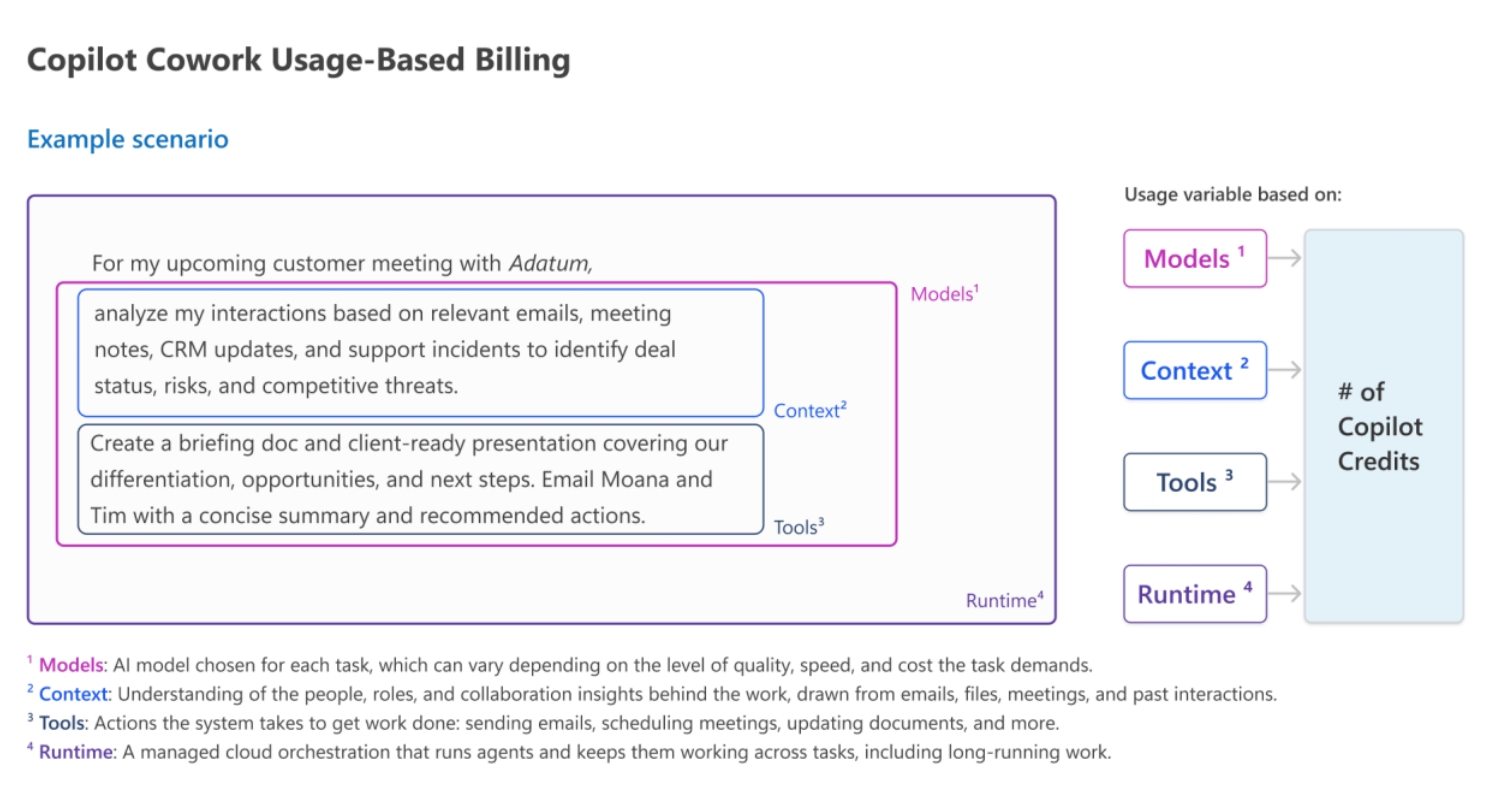
That second point surprises people most. The meter runs during context retrieval, not just the visible answer. A task that feels like a ten-second reply may have spent most of its credits quietly reading your data.
You can estimate a simplified monthly pay-as-you-go figure with basic arithmetic:
Estimated monthly cost = expected monthly credits × price per credit.
The table below shows that simplified pay-as-you-go calculation at the standard rate. These are illustrative figures, not a Microsoft quote or a prediction for a specific agent. Prepaid plans may produce a different effective cost because of purchasing commitments and volume discounts.
Several factors push consumption higher. More agent runs, more users, longer tasks, knowledge lookups, document processing, external connector calls, and repeated retries all add up. Testing and evaluation can consume credits too.
Why two similar tasks can cost very different amounts
The same agent can be inexpensive or costly depending on the work it performs. A simple answer may require little processing, while a task that searches business data, calls tools, and completes several steps can consume much more.
Microsoft’s Copilot Cowork provides a useful example. For planning purposes, Microsoft estimates that a light task may consume about 100 to 300 credits, a medium task about 300 to 700 credits, and a heavy task more than 700 credits. Actual consumption varies based on the models, context, tools, and runtime involved.
For example, preparing a simple update from Microsoft 365 information generally requires less work than analyzing a large set of business data, gathering information from multiple sources, and completing several actions.
That is why two requests that look similar to a user can have very different costs behind the scenes. Treat any task estimate as a starting point and confirm actual consumption through testing before you budget.
The CFO question: is it worth the spend?
A low credit price does not make an agent valuable. A higher-cost agent can still be a smart investment if it removes expensive manual work or reduces risk.
The goal is not to spend as few credits as possible. The goal is to make sure the credits fund work that returns more than it costs. Here is a straightforward way to get there.
- Step 1: Define the business process. Document who does the work today, how often it happens, how long it takes, and where errors or delays occur.
- Step 2: Estimate usage. Project monthly agent runs, users, transactions, workflow actions, seasonal peaks, and exceptions.
- Step 3: Estimate the credit cost. Use current pricing, a pilot, and real usage reporting rather than theory alone.
- Step 4: Estimate the business value. Measure saved hours, faster processing, fewer errors, added capacity, and reduced risk.
- Step 5: Include the full cost. Add licenses, implementation, integration, data preparation, governance, training, and support to the credit cost.
- Step 6: Set an acceptable range. Agree on an expected monthly cost, a warning threshold, a spending cap, and a review date.

See what a Copilot business case looks like for you
Rand Group can help you estimate usage, model the cost, and connect Copilot spending to measurable outcomes for your business.
How to control Copilot Credit spending
Usage-based pricing does not have to mean unpredictable bills. A few habits keep spending in your control.

Start with one focused use case
Choose a use case with a clear owner, measurable volume, and a real pain point. Run a controlled pilot limited by group, department, or time period, so you gather real numbers before you scale.

Monitor actual consumption
Compare usage against your estimate, and track cost by agent so you can see what drives spend. Microsoft’s administrative tools provide centralized spend and usage monitoring, spend policies, usage thresholds, and credit allocation controls. Available controls may vary by workload, billing setup, and administrative experience. You can also model spend up front using representative usage assumptions.

Set budgets and spending guardrails
For workloads billed through Azure, Azure Cost Management can be used to create budgets and alerts at scopes such as subscriptions and resource groups. A budget is primarily a monitoring tool rather than a guaranteed hard stop, so organizations that need stronger protection may pair alerts with automated actions or other workload controls. These guardrails are especially important for autonomous or long-running agents, where unexpected behavior can consume substantially more resources than planned.

Use AI only where it adds value
If a task can be handled reliably by a formula, workflow, validation rule, or standard automation, using an AI call may add cost and variability without adding business value.

Right-size the model to the task
Providers now offer a range of models from lightweight and low-cost to premium and reasoning-heavy. Match each task to the least expensive model that does the job well, and reserve premium models for work that truly needs them.

Separate development from production
Keep testing activity separate so it does not hide your true production cost. Review agents for waste, such as redundant tool calls, unnecessary steps, and failed retries.

Choose the right purchasing model
Use pilot data to decide whether pay-as-you-go, capacity packs, or a prepaid plan best fits your expected usage.
Sound data governance and AI readiness sits underneath all of this. Clean, well-governed data reduces wasted lookups and keeps agents efficient.
Common Copilot Credit mistakes to avoid
Across real deployments, the same missteps drive most budget surprises. In our experience at Rand Group, these are the ones to watch, and how to get ahead of them.
- Estimating from a demo, not production. Early estimates are often modeled on a clean demo, so real usage runs higher once live traffic and exceptions appear. Pilot with real data before you commit a budget.
- Assuming a Copilot license covers unlimited agent use. Some experiences are included, and others are metered, so confirm which category your use case falls into.
- Estimating cost without estimating volume. A cheap credit adds up fast at high volume, so size the volume first.
- Launching autonomous agents without spending guardrails. Event-triggered agents can run without a person prompting each step, so set usage thresholds, alerts, budgets, and appropriate workload controls before launch to reduce the risk of unexpected spending.
- Measuring usage without measuring value. Reports show spend, not whether the work improved, so track business outcomes too.
- Prepaying before you know your baseline. Discounts help, but unused credits can expire, so learn your real usage first.
Avoiding these comes down to one discipline: measure a real pilot, then scale what the evidence supports.


Build a Copilot roadmap your whole team can stand behind
Our Microsoft AI Strategy & Roadmap Workshop brings finance, IT, and operations together to align on AI vision, set guardrails, and sequence adoption with confidence.
Why work with Rand Group?
Rand Group helps organizations evaluate Copilot and AI agents based on business value, operational fit, and long-term manageability. We start with the process and the outcome, not the technology alone.
Our consultants help you define the use case, estimate usage, review licensing, and build a business case you can defend. We then support agent design, Dynamics 365 Copilot implementation, security and governance, pilots, and ongoing optimization through our AI and machine learning services. If you want a structured starting point, our Microsoft AI workshops help you assess readiness and prioritize use cases.
We will not promise an exact credit cost before an agent is designed and tested. The real value of an experienced partner is a reliable estimate, a controlled pilot, and a plan to monitor actual consumption.
Key takeaways
- Microsoft Copilot Credits measure AI work for selected agents, actions, APIs, and services.
- Not every Copilot experience adds a charge, and not every license covers unlimited use.
- Consumption depends on volume, task complexity, tools, and how the agent is built.
- Compare credit cost against measurable outcomes, not against the price of a credit alone.
- A controlled pilot gives finance, IT, and operations the best basis for budgeting and scaling.
Frequently asked questions
What are Microsoft Copilot Credits?
They are a usage-based billing unit for certain Microsoft AI agents, actions, APIs, and services. Consumption depends on the work performed and how the agent is designed.
How much does a Microsoft Copilot Credit cost?
The standard United States pay-as-you-go price is $0.01 per credit. Confirm current regional pricing, agreement terms, and purchasing options for your organization.
Does Microsoft 365 Copilot include Copilot Credits?
It includes many core experiences within the per-user subscription. Some agents, APIs, and usage-based services consume credits separately.
What activities consume the most credits?
Complex, multi-step work drives higher use, especially generative responses, document processing, data grounding, external tools, and autonomous actions.
Can a company limit Copilot Credit spending?
Yes. Organizations can monitor spending, configure spend policies, define usage thresholds, manage credit allocation, and limit access during a pilot. The specific controls available depend on the workload, billing setup, and administrative experience.
Do unused Copilot Credits roll over?
It depends on the purchasing model. Pay-as-you-go has no prepaid balance. Under the one-year Copilot Credit Pre-Purchase Plan, unused credits expire at the end of the annual term. Other purchasing constructs may have different terms.
What happens when credits run out?
The result depends on the purchasing and billing configuration. Under the Copilot Credit Pre-Purchase Plan, an organization can purchase additional credits or use pay-as-you-go billing when its available prepaid balance is exceeded.
How can a business tell if Copilot Credits are worth it?
Estimate monthly volume and cost, then weigh the full solution cost against gains in labor, speed, accuracy, capacity, and risk. A pilot gives the clearest evidence.
Next steps
Microsoft Copilot Credits do not have to make AI spending unpredictable. You can manage the model by choosing a focused use case, estimating volume, running a pilot, setting spending limits, and measuring the result.
The strongest business cases look past the price of a single credit. They show what the agent will accomplish, what the full solution costs, and how you will know it is working. To build that plan for your organization, contact Rand Group to talk through a practical Microsoft Copilot strategy.