Microsoft Copilot consulting services: Strategy, deployment, governance, and adoption

Most organizations do not struggle to buy Microsoft Copilot licenses. The harder question is where to begin. Microsoft has packed so much into Copilot — Microsoft 365 Copilot for everyday productivity, Copilot capabilities across Dynamics 365, and Copilot Studio for custom agents — that the real challenge is choosing where to focus and how to aim those capabilities at your goals. Copilot consulting services exist to close that gap. They turn broad potential into adopted, governed, and measurable results rather than scattered experiments.
Much of the answer depends on what your organization is ready for. Copilot adoption is a journey, not a single switch. Microsoft 365 Copilot is usually the first step, agents inside your existing applications the second, custom Copilot Studio agents the third, and pro-code solutions the fourth. Each step builds the trust, data, and habits the next one needs.
This is why decision-makers keep arriving at the same question. If I hire a Copilot consultant, what will they actually do before, during, and after deployment? This blog answers that stage by stage, so you know what a good engagement looks like.
At a glance
What are Microsoft Copilot consulting services?
Microsoft Copilot consulting services cover the strategy, governance, technical readiness, and change-management work that turns Copilot capability into daily value. Depending on your technical readiness, that may include Microsoft 365 Copilot, Copilot capabilities across Dynamics 365, custom agents in Copilot Studio, or a mix. Most organizations use all of them over time, so readiness usually matters more than strategy when deciding where to start.
The path tends to be predictable. Many organizations begin with Microsoft 365 Copilot to change how people work, which builds trust in AI. From there, they turn on the agents baked into apps like Business Central or Finance & Operations. Super users then emerge and start Copilot Studio projects, designing and governing custom agents. Eventually, leadership wants larger pro-code initiatives that a consultant can build too.
A consultant’s role runs deeper than training and building. A good consultant also coaches you on the best tools for each scenario and helps you get ready. That means getting your data in the right place, surfacing it to users where they need it, and putting the right governance around it. This matters because most pilots underdeliver for one reason: readiness. The data was not prepared, the governance was missing, or the output never reached the user in a usable form.
It also helps to separate two roles. A trainer teaches your team how to use Copilot features. A consultant decides which use cases to pursue, in what order, and how you will measure success. Training alone rarely produces lasting adoption.
An AI engagement also differs from a traditional rollout. An ERP or CRM project has a defined go-live, while Copilot adoption is more iterative. Governance, enablement, and refinement continue well after launch.

Why organizations hire a Copilot consultant
Many teams ask a fair question first: can we not just turn Copilot on and let people figure it out? Some employees will experiment, but without clear use cases, governance, training, and success measures, adoption usually stalls and value becomes hard to prove.
That challenge becomes more complex when an organization moves beyond individual productivity tools into Dynamics 365 Copilot capabilities or custom agents. Business processes, application data, integrations, agent actions, and security controls all have to be considered alongside user adoption.
A Copilot consultant can help determine which AI tool or approach best fits the outcome the organization is trying to achieve, then guide the strategy for deploying it effectively.
A consultant exists to prevent the four failure patterns that show up again and again in Copilot projects.
- Apply proven best practices. A Copilot consultant brings experience from other deployments to help you make better decisions around setup, governance, licensing, and rollout from the start.
- Poor data quality and governance. Copilot can make existing data, permissions, security, and governance weaknesses more consequential because information becomes easier to find and use.
- Weak change management. New workflows meet resistance when communication and training are missing, and engagement drops quickly after launch.
- No way to measure return. Without agreed metrics, leaders cannot tell whether Copilot is delivering value or simply generating activity.
What a Copilot consultant does before, during, and after deployment
The table below gives a quick map of a typical engagement. The sections that follow explain each phase in more detail.
Before deployment: strategy, readiness, and data
This pre-deployment phase is often underestimated. A good consultant helps address critical questions early, before they become costly problems.
- Define why, and how you will measure success. A consultant helps leadership agree on the outcomes Copilot should deliver, who owns the solution, and how success will be measured. This is also where you decide whether you are adding AI for a real business reason or simply because everyone else is.
- Prioritize high-impact use cases. Rather than chasing everything at once, a consultant helps you sequence use cases by impact and complexity. Common early opportunities can include reporting, customer service, sales productivity, finance processes, and employee onboarding, depending on the Copilot products your organization is considering.
- Assess AI readiness. A structured readiness assessment reviews the environments and systems that will support your Copilot strategy. For Microsoft 365 Copilot, this includes areas such as identity, access, organizational data, and permissions. Dynamics 365 initiatives also require consideration of application data, security roles, workflows, and business processes. Copilot Studio projects may introduce additional requirements around environments, connectors, authentication, agent actions, and external data sources.
- Ensure consistent data and processes. AI solutions often depend on a high volume of consistent, reliable data and repeatable business processes. Because real-world data and workflows are not always standardized, a consultant can help identify inconsistencies that could reduce the accuracy or reliability of the AI system that depends on them.
- Fix data governance and permissions. For Microsoft 365 Copilot, users generally continue to operate within the permissions they already have, so existing oversharing and permission sprawl can become larger concerns once information is easier to discover. A consultant helps tighten access, apply appropriate information protection and governance controls, and reduce unnecessary exposure. Copilot Studio and Dynamics 365 initiatives may require additional controls based on which data, systems, connectors, and actions an AI experience is allowed to use.
You can read more in our blog on what data governance is and why you need it and our explainer on responsible AI in Microsoft Copilot.

Secure your data before you enable AI
Copilot can amplify existing data and access risks, so governance needs to come before broad adoption. Rand Group’s Data Governance and AI Readiness service assesses your Microsoft environment, remediates exposure, and builds the governance foundation for confident Copilot adoption.
During deployment: pilot, configure, and manage change
With a roadmap and a governed environment in place, deployment can begin in a controlled way. The aim during this phase is to prove value on a small scale before you expand.
- Start with a controlled pilot. Together you select a pilot group and a set of well-governed use cases, then agree on what success looks like for that group. This keeps early exposure limited while you validate that permissions, policies, data, workflows, and AI behavior work as expected.
- Work in iterative sprints. Unlike a rigid linear rollout, Copilot deployment works best with regular feedback and refinement. A consultant helps you move deliberately from an initial use case or prototype to a production-ready experience, adjusting as you learn. When custom agents are involved, this also gives the team an opportunity to test agent behavior, integrations, actions, and exceptions before broader deployment.
- Configure guardrails and access. During rollout, the consultant configures and validates the permissions, security, governance, and administrative controls that determine what information users and AI experiences can access and what actions they can perform. For Copilot Studio, this may also include controls around environments, connectors, authentication, data policies, publishing, and agent access.
- Manage the human side. Technical deployment does not guarantee that employees will change how they work. A consultant helps you communicate the why, deliver role-based training, and support change management with champions who can answer questions and model good habits.
After deployment: adopt, measure, and optimize
Go-live is the starting line, not the finish line. This phase is where a Copilot investment either compounds into real value or slowly fades, and a consultant helps make sure it is the former.
- Support adoption and ownership. A consultant provides ongoing education, so your team can manage and own the solution, rather than depending on outside help for every change.
- Change management. AI can change process flows, employee responsibilities, and how people complete everyday tasks. A consultant helps communicate those changes, prepare users, provide role-based guidance, and reinforce new ways of working so the technology is adopted consistently across the organization.
- Measure real value, not just activity. Using available Copilot and application analytics, your consultant tracks adoption and impact while keeping the focus on business value rather than raw usage counts. High activity does not automatically mean a strong return.
- Govern and manage at scale. As you add more Copilot experiences, use cases, and agents, governance, security, ownership, and day-to-day management become more important. A consultant helps you keep oversight in place as usage grows and establish appropriate controls for the AI agents you introduce over time.
- Build a Center of Excellence. A cross-functional Center of Excellence keeps AI initiatives aligned, shares knowledge, and prevents departments from building disconnected tools. It is one of the most effective ways to avoid fractured, siloed AI.
- Keep optimizing. Ongoing optimization means reviewing results, refining where needed, and expanding into new use cases, so the solution keeps improving as your needs change. That can include refining Microsoft 365 Copilot adoption, introducing additional Dynamics 365 AI capabilities, or building and improving custom agents in Copilot Studio.
Our related blog on how finance and operations teams can prepare for AI without creating data risk explains how this discipline plays out in practice.
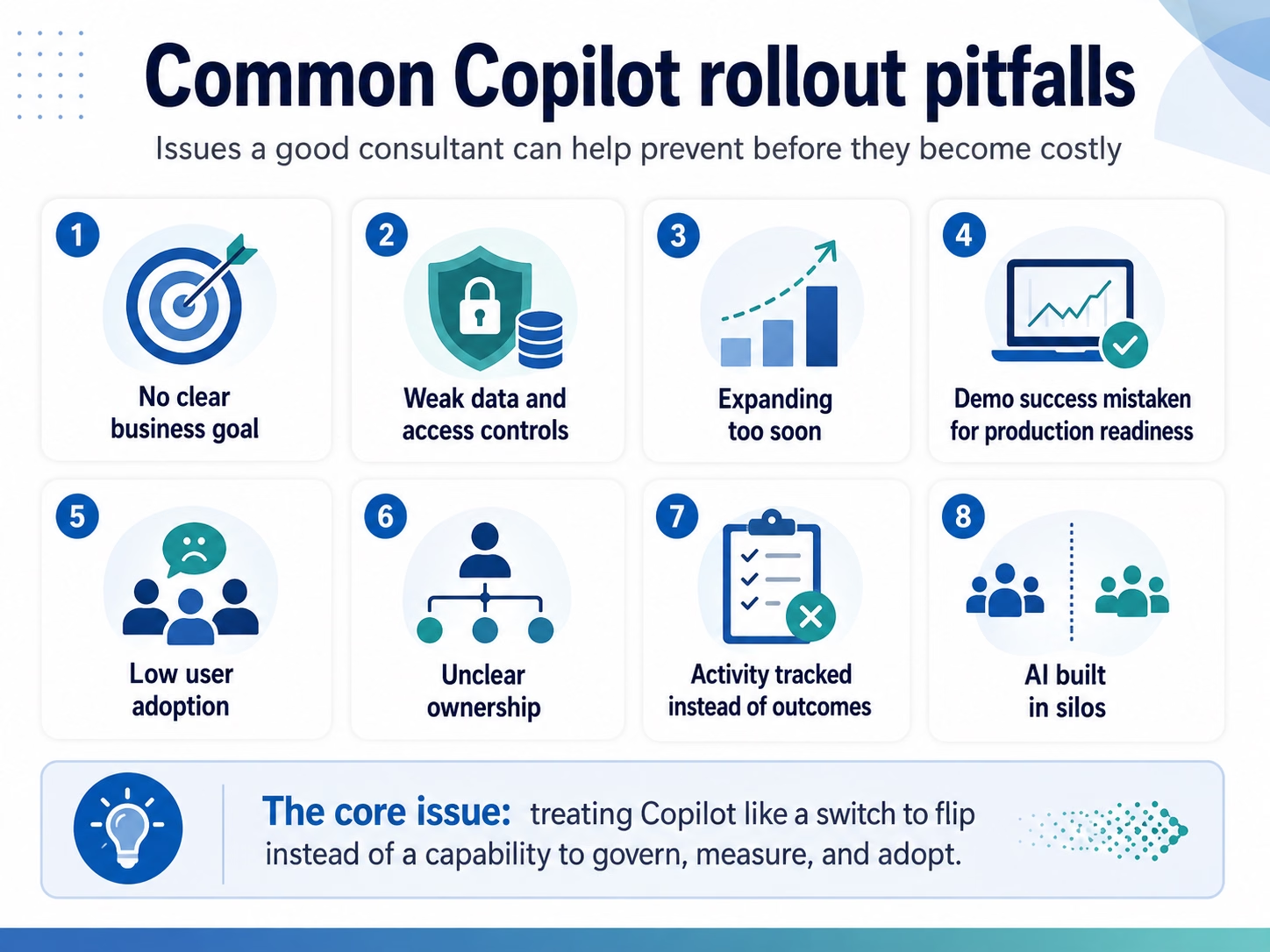
Common Microsoft Copilot deployment mistakes a consultant should help you avoid
These mistakes are not hypothetical. Across the Copilot and Microsoft engagements our team runs for organizations throughout North America, the same avoidable problems surface again and again, and each one is far cheaper to prevent than to repair after go-live. A good consultant helps you sidestep each of these before it costs time, money, or trust.
- Starting without a specific business objective. Teams deploy AI but cannot say what outcome they expect, which makes success impossible to measure.
- Skipping data, security, and permissions reviews. Existing oversharing or poorly controlled access becomes a larger concern when AI makes information easier to find and use.
- Scaling before validating a pilot. Organizations expand licenses, use cases, or agents without first proving that the selected scenarios actually work.
- Treating a demo as proof of production readiness. Real data, permissions, integrations, exceptions, and workflows create very different conditions than a clean demo environment.
- Ignoring user adoption. This is where many projects quietly stall. You are not just switching on a tool — you are changing how people work, and that shift does not happen on its own. Without clear communication, role-based training, and champions who model the habits, even a flawless deployment rarely gets people to work differently.
- Leaving ownership unclear. Someone needs clear responsibility for AI use cases, agents, governance, and outcomes.
- Measuring usage instead of value. High activity does not automatically mean the organization is getting a return.
- Allowing departments to build AI in silos. Disconnected tools, agents, policies, and data practices can create fractured AI that is hard to govern.
The thread running through all of these is the same. Teams treat Copilot as a product to switch on rather than a capability to govern, measure, and adopt, and an experienced consultant designs the engagement specifically to close that gap before it becomes costly.
How long does a Microsoft Copilot deployment take?
How long a Copilot deployment takes depends on the type of deployment, the size of your environment, and the state of your data. Based on Rand Group’s experience delivering Copilot and AI engagements, most projects fall within the 4 to 12 week range. Microsoft 365 Copilot adoption, agent activation, Copilot Studio work, and pro-code development each have different requirements, so the timelines below reflect Rand Group’s typical delivery expectations for each type of engagement.
Across all of these, data readiness is the biggest swing factor. Heavy oversharing and permission sprawl can stretch the preparation stage far more than the rollout itself. Most Copilot work is front-loaded, so expect more effort at the start than at the end.
Microsoft’s own guidance agrees, and its account of managing Copilot governance internally encourages teams to fix oversharing and set governance controls before broad deployment. Rushing that readiness work is one of the most common causes of Copilot problems, so a realistic timeline is a feature, not a delay.
How much do Microsoft Copilot consulting services cost?
There is no single price for Copilot consulting because the cost depends on your environment, goals, and deployment type. Your overall investment generally includes two components: Microsoft licensing and technology costs and consulting services for strategy, readiness, governance, deployment, and adoption.
As with timelines, consulting costs vary by deployment type. The figures below reflect Rand Group’s typical starting investment for consulting services. Microsoft licensing, consumption-based usage, Azure services, and other applicable technology costs are separate.
Several factors drive the consulting portion of the cost.
- Size of your environment. More users, sites, applications, environments, and content mean more to assess, secure, and govern.
- State of your data. Heavy oversharing, legacy file storage, permission sprawl, or inconsistent business data can take more remediation effort than a clean, well-governed environment.
- Licensing complexity. Advanced governance tools and mixed license types can add scope to the work.
- Number of phases you engage. A focused readiness assessment is a smaller commitment than a full lifecycle program that includes remediation, rollout, governance, and adoption support.
- Custom agents and workflows. Building tailored Copilot Studio agents can add design, integration, testing, security, and governance effort.
- Dynamics 365 scope. Deployments involving multiple Dynamics 365 applications, processes, integrations, or AI use cases may require additional configuration and testing.
Copilot consulting can also be approached in phases. Organizations may begin with readiness or a focused use case before expanding into additional users, agents, or business processes. A scoping discussion with Rand Group can provide a more accurate estimate based on your environment and objectives.

Build your Microsoft AI roadmap
Move from scattered experimentation to a clear, governed plan. In the Microsoft AI Strategy and Roadmap Workshop, Rand Group helps your executives, IT leaders, and business leaders align on an AI vision, set practical guardrails, and sequence Copilot adoption so it scales with control and delivers measurable value.
Why organizations choose Rand Group for Copilot consulting services
Rand Group evaluates the evolving AI landscape to identify the right technology for each use case, with deep expertise in Microsoft 365 Copilot, Copilot Studio, and AI across Dynamics 365. We start with your business needs first, then determine where AI can deliver practical value.
We also look beyond deployment to make sure AI supports your broader strategy and is adopted successfully across the organization. Because we use these tools in our own business every day, our recommendations are grounded in practical experience, not theory.
Our structured, phased approach helps reduce risk, support adoption, and keep AI initiatives aligned with measurable business outcomes. As a leading Microsoft partner across North America, Rand Group brings experience across industries and organization sizes and was named the Microsoft Americas Channel Emerging Partner of the Year.
Hear what our clients say
Across Rand Group’s broader technology consulting and implementation work, our clients describe the collaborative, hands-on approach we bring to projects.
“Rand Group as a whole made us feel like we always knew who to call if there was an issue, and they always took it seriously. We were very happy overall.” – Susanna Stewart, Director of Finance & Administration, M&H Enterprises
“Working with Rand Group has been a game-changer for us. We felt fully supported the entire way, and whenever issues came up, the team was right there problem-solving with us. The financial visibility we gained has been huge, and it’s already improving our project profitability. When you add all of this together, the system truly pays for itself very fast.” – Danielle Johnson, Director of Data Systems, A-Z Process Solutions
Key takeaways
- Copilot value comes from adoption and governance, not from simply assigning licenses or enabling features.
- A Copilot strategy may include Microsoft 365 Copilot, Copilot capabilities across Dynamics 365, custom agents built with Copilot Studio, or a combination of all three.
- A consultant works across three stages: readiness before, controlled rollout during, and measurement and optimization after.
- Data, permissions, security, and governance should be reviewed before scaling AI, with the exact controls depending on the Copilot technologies and systems involved.
- The right consultant focuses on measurable business value and helps your team own the solution long term.
Frequently asked questions
How long does a Microsoft Copilot deployment take?
A typical Microsoft Copilot engagement can take approximately 4 to 12 weeks, depending on the size of your environment, the state of your data, and the number and complexity of the use cases you want to support. Projects involving significant remediation, custom Copilot Studio agents, external integrations, or more complex Dynamics 365 use cases may take longer.
What types of Microsoft Copilot can a consultant help with?
A Microsoft Copilot consultant can help organizations plan and deploy Microsoft 365 Copilot, evaluate and adopt Copilot and AI capabilities across Dynamics 365 applications, and design custom agents and workflows with Copilot Studio. The right combination depends on your business processes, data, existing Microsoft environment, and AI goals.
What is the difference between a Copilot consultant and a trainer?
A trainer teaches your team how to use Copilot features. A consultant decides which use cases to pursue, in what order, and how to measure whether they are working, then helps you govern and sustain the results. For more advanced initiatives, a consultant may also help design integrations, configure Dynamics 365 AI capabilities, or build and govern Copilot Studio agents.
Do we need to fix our data before enabling Copilot?
In most cases, you should review your data and access controls first. Microsoft 365 Copilot works within the access users already have, so oversharing and misconfigured permissions should be addressed before broad deployment. Dynamics 365 and Copilot Studio initiatives may introduce additional considerations around application security, connectors, external data, agent permissions, and the actions an AI experience can perform.
Why do Copilot pilots stall?
Pilots usually stall when data is not ready, goals are unclear, use cases are poorly selected, or adoption support is missing. More advanced projects can also stall when integrations, agent behavior, security, or governance requirements are discovered too late. A structured approach that addresses these issues before scaling provides a stronger path to a full rollout.
Turn Copilot into measurable results
Copilot can deliver real, lasting value, but only when deployment is done with intention. Whether your roadmap includes Microsoft 365 Copilot, AI capabilities across Dynamics 365, custom agents in Copilot Studio, or a combination of these technologies, a consultant helps you prepare your data and environment, prove value through controlled deployment, and build the adoption and governance habits that turn AI investments into measurable results.
If you would rather move from experimentation to execution with confidence and control, contact Rand Group to talk through your Copilot goals.