Is Microsoft Copilot worth it? Here’s what we’ve learned

AI adoption is accelerating across nearly every industry, but many business leaders are still trying to answer a practical question before investing further: Is Microsoft 365 Copilot actually worth it? In our experience, the answer depends less on the technology itself and more on how organizations plan to use it, who receives access, and whether expectations are realistic from the start.
At Rand Group, we’ve tested Microsoft 365 Copilot extensively both internally and with clients across multiple industries. We’ve seen organizations gain measurable productivity improvements in areas like meeting follow-up, information retrieval, and executive communication. We’ve also seen companies struggle when they expect Copilot to fully automate work without addressing governance, user adoption, or process readiness.
The organizations seeing the best results are treating Copilot as a productivity accelerator embedded within existing workflows, not as a standalone AI strategy.
At a glance
Microsoft 365 Copilot can be worth the investment for employees who spend significant time in meetings, email, research, document creation, analysis, and finding information across Microsoft 365. The strongest business case comes from giving paid licenses to roles with clear, frequent use cases rather than assuming every employee will receive the same value.
For organizations still evaluating Copilot, a practical approach is to use Microsoft 365 Copilot Chat where appropriate, prioritize paid Microsoft 365 Copilot licenses for employees with stronger work-grounded use cases, and expand based on adoption and measurable results. Governance, data quality, process readiness, and employee training can be just as important as the technology itself.
Table of contents
- What is Microsoft Copilot?
- Why organizations are evaluating Copilot now
- Where Microsoft 365 Copilot delivers the most value
- How Microsoft Copilot agents are expanding AI use cases
- Where organizations should maintain realistic expectations
- What successful Copilot deployment requires
- Common mistakes organizations make with Microsoft Copilot
- Understanding Microsoft Copilot pricing and ROI
- Who may not need a paid Microsoft 365 Copilot license?
- Is Microsoft Copilot worth it for your organization?
- Why organizations choose Rand Group for Microsoft Copilot consulting and implementation
- Key takeaways
- Frequently asked questions about Microsoft Copilot
What is Microsoft Copilot?
Microsoft Copilot is Microsoft’s family of AI tools designed to help employees work with information, create content, analyze data, and complete tasks across Microsoft products. Within Microsoft 365, organizations can access Copilot in several different ways depending on the level of AI assistance and business context employees need.
- Microsoft 365 Copilot Chat provides secure AI chat and web-grounded assistance for eligible Microsoft 365 users. It can support tasks such as research, drafting, summarization, brainstorming, and working with information a user provides directly in the chat experience.
- Microsoft 365 Copilot adds deeper work-grounded capabilities across Microsoft 365. Depending on the application and the information a user is authorized to access, Copilot can work with organizational context from files, emails, meetings, chats, and other Microsoft 365 content. It also integrates more deeply with applications such as Word, Excel, PowerPoint, Outlook, and Teams.
- Copilot Studio agents extend Copilot beyond individual productivity. Organizations can use Copilot Studio to create agents designed around specific roles, knowledge sources, workflows, or business processes, such as internal IT support, employee onboarding, sales assistance, customer service, or policy retrieval.
Rather than requiring employees to learn a completely separate AI platform, these Copilot experiences can fit into tools and workflows organizations already use. The right option depends on whether an employee needs general AI assistance, access to work context across Microsoft 365, or an agent built around a specific business process.
From a business perspective, Copilot’s real value comes from reducing time spent on lower-value administrative work and making information easier to find, analyze, and use.
However, one pattern we consistently see is that organizations often underestimate how much Copilot’s effectiveness depends on the quality of their underlying Microsoft environment. If Teams data is disorganized, documents lack governance, or SharePoint permissions are inconsistent, Copilot may surface incomplete, outdated, or irrelevant information. In other words, Copilot can amplify both operational strengths and operational weaknesses.
For a broader overview of Microsoft Copilot capabilities, business benefits, and practical adoption examples, see our guide to Microsoft Copilot features, benefits, and real-world use cases.
Microsoft 365 Copilot options compared
Microsoft now offers different ways to access AI capabilities across Microsoft 365. Understanding the differences is important because not every employee needs the same Copilot experience.
Why organizations are evaluating Copilot now
Most companies exploring Copilot are not simply looking for AI experimentation. They are trying to solve practical operational problems. Common concerns include:
- Too much time spent in meetings
- Growing email volume and communication overload
- Difficulty locating institutional knowledge
- Inconsistent documentation
- Employee productivity concerns
- Delayed decision-making due to fragmented information
- Pressure to modernize operations using AI
In our work with clients, leadership teams are especially interested in whether Copilot can reduce administrative burden for executives, project managers, sales leaders, analysts, consultants, and operational managers who spend large portions of their day communicating, summarizing, researching, analyzing, and coordinating.
Organizations that already rely heavily on Microsoft 365 tend to see the fastest adoption because Copilot integrates directly into existing workflows.

Determine where Microsoft Copilot fits in your organization
Not sure which employees need Microsoft 365 Copilot or where AI can create measurable value? Rand Group can help you evaluate use cases, governance, readiness, adoption, and how Copilot fits into your broader Microsoft strategy.
Where Microsoft 365 Copilot delivers the most value
The Microsoft 365 Copilot experience has expanded considerably since its initial release. Teams meeting support and email summarization remain practical use cases, while Microsoft has continued advancing what Copilot can do within Word, Excel, PowerPoint, organizational search, and specialized agents.
The important question is no longer simply whether Copilot has a feature. Organizations should ask whether that capability removes enough repetitive work or improves enough decisions to justify the investment for a specific role.
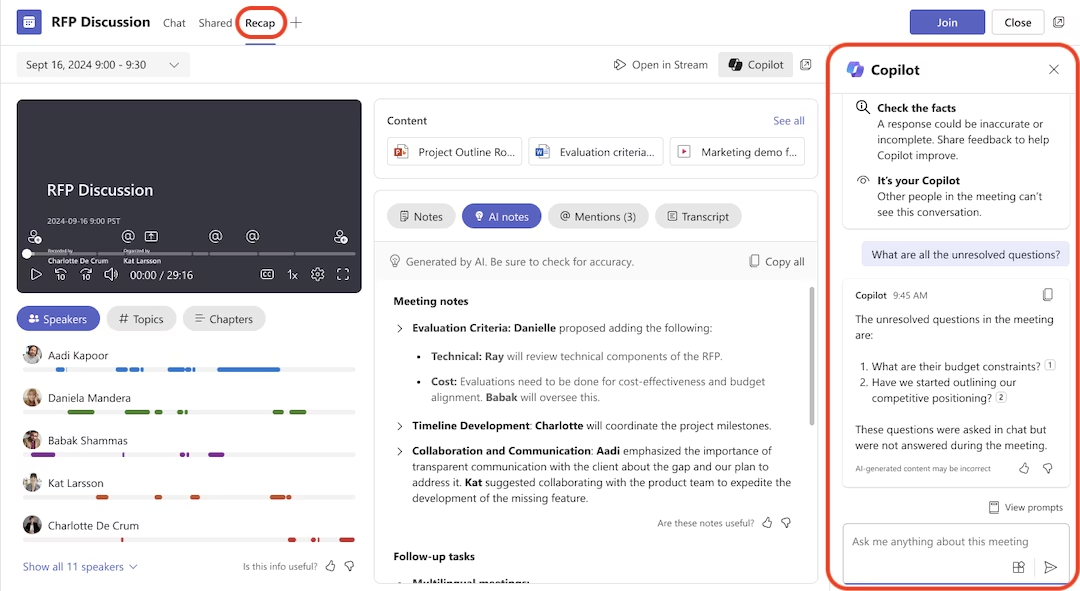
Copilot in Teams for meeting recaps and follow-up
From our experience using Copilot, Teams meeting recaps remain one of Copilot’s strongest and most practical capabilities.
When meetings are recorded and transcribed, Copilot can summarize discussions, identify decisions, surface action items, and support follow-up. Microsoft has also added new ways to catch up. Podcast-style audio recaps and video recaps let employees review a meeting quickly or jump straight to key moments. For organizations with heavy meeting schedules, this cuts the administrative work that piles up afterward.
More recently, Copilot in Teams has moved beyond post-meeting summaries and into the meeting itself:
- Facilitator agent: Captures notes in real time, keeps track of the agenda, logs decisions as they happen, and extracts action items with assigned owners while the conversation is still underway.
- Interpreter: Provides real-time translation so participants on global or hybrid teams can speak and follow along across languages.
- Intelligent call recap: Extends Copilot’s meeting intelligence to Teams phone and VoIP calls rather than scheduled meetings alone.
Executives, managers, project leaders, and client-facing teams often gain the most here. They spend large portions of their day moving between meetings while trying to track decisions and next steps.
This matters operationally because one of the hidden costs of frequent meetings is poor follow-through. Important action items can become buried in chat threads, handwritten notes, or memory. Copilot can make it easier to organize and retrieve that information.
In one recent engagement, we worked with a leadership team that was struggling to keep up with post-meeting follow-through across multiple departments. By using Teams recordings and Microsoft Copilot meeting recaps, managers were able to reduce the amount of time spent manually organizing notes, identifying action items, and preparing follow-up communication. The biggest improvement was not just time savings. It was greater visibility and accountability around decisions and next steps across teams.
Organizations should still validate important decisions and action items before relying on AI-generated summaries for client communication, formal documentation, or executive reporting.
Copilot in Outlook for managing communication
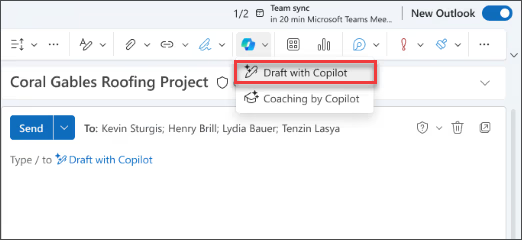
Many organizations initially think of Copilot for Outlook primarily as an email-writing tool. Its value can extend further into summarization and helping employees work through high volumes of communication.
Copilot can help employees summarize lengthy email threads, draft responses, identify important information within conversations, and prepare for follow-up work. Newer drafting experiences bring Copilot directly into the compose window, where employees can select part of a draft and adjust its length, tone, or structure inline rather than switching to a separate chat.
More significantly, Copilot in Outlook has begun to take on the inbox itself rather than only the message in front of the user. It can help prioritize incoming email, surface the messages that need a response, draft follow-ups, and set up rules to keep the inbox organized. On mobile, a hands-free voice experience can summarize unread mail and guide employees through replying, archiving, flagging, and other triage actions. Copilot can even step in on communication the user misses, delegating unanswered Teams phone calls and returning a summary to follow up on later.
For executives, project leaders, sales professionals, consultants, and other employees managing significant email volume, these capabilities can reduce the amount of time spent repeatedly reading long conversations or reconstructing context. Email drafting itself tends to produce more mixed value.
Copilot works best when employees use it for:
- Responding to routine communication
- Summarizing previous conversations
- Creating an initial draft
- Reworking tone or structure
- Standardizing repetitive responses
It tends to provide less value for nuanced conversations, relationship-driven communication, or highly contextual client interactions.
In some situations, employees may spend nearly as much time editing an AI-generated message as they would writing the email themselves. This is especially true in consulting, professional services, sales, and leadership roles where tone, judgment, and relationship management matter.
Copilot in Word for creating and refining documents
Copilot in Word has advanced well beyond generating a paragraph or summarizing a document.
The biggest change is Agent Mode. Microsoft made Copilot’s agentic capabilities in Word, Excel, and PowerPoint generally available, so Copilot can now take multi-step, app-native actions directly in your documents while you stay in control. In Word, this is generally available on Windows, web, and Mac for Microsoft 365 Copilot users. It works in the same document your team is editing, so you can coauthor and iterate without creating or reconciling copies.
The approach is more deliberate than a single response. Word’s agent uses a multi-turn reasoning process that mirrors how a consultant works, planning, researching, drafting, and reviewing rather than producing a one-shot output, with validation loops that check reasoning and refine drafts along the way.
Copilot’s drafting support has also grown more practical for longer documents. It can now insert and update tables of contents, and manage headers, footers, page numbers, dates, and footnotes, so formatting stays consistent as the document evolves.
Practical use cases include:
- Creating initial drafts from source material
- Summarizing lengthy documents
- Restructuring existing content
- Rewriting sections for different audiences
- Creating executive summaries
- Incorporating feedback into drafts
- Organizing information into a clearer document structure
- Accelerating report and proposal development
This makes Word especially useful for employees who regularly produce reports, proposals, documentation, project updates, or executive communications. The biggest gain often comes from getting to a usable first draft faster.
However, Copilot does not remove the need for subject matter expertise. Client-facing documents, technical recommendations, executive communications, legal or compliance-related material, and branded content still require employees to validate facts, refine messaging, and make sure the final document reflects the organization’s standards.

Copilot in Excel for data analysis and workbook creation
Excel is one of the applications where Copilot has changed the most.
Earlier versions focused on answering questions about data, generating formulas, and basic analysis. Copilot now works directly inside the workbook. With agentic capabilities generally available, Copilot can make changes directly in your workbook, from formulas to tables to visuals, so you can move from questions to decisions. This is generally available in Excel on Windows, web, and Mac for Microsoft 365 Copilot users.
Microsoft has added controls to keep those edits transparent. Excel now includes a Chat/Edit switcher, step-by-step reasoning, and a way to understand the changes Copilot made. Plan mode outlines the steps Copilot intends to take before any edits are applied, so users can review the plan and stay in control of high-impact tasks. For larger jobs, the Excel agent can generate multi-sheet workbooks with formulas, projections, dashboards, and scenarios.
Two other additions are worth noting. Copilot can now use Python directly within Excel, and users can choose between models, including OpenAI GPT and Claude.
Copilot in Excel can assist with:
- Analyzing data and identifying trends
- Building and editing workbook content
- Generating and explaining formulas
- Creating charts and visualizations
- Organizing information into tables
- Supporting multi-step analysis
- Summarizing findings
For finance, operations, and sales teams, this can cut the time spent on repetitive analysis or structuring a new workbook.
Even so, human validation matters here, arguably more than before. Copilot now makes changes rather than just suggesting them. A formula can work while resting on the wrong business assumption. A summary can accurately describe a workbook whose underlying data is stale or incomplete. Financial reports, forecasts, budgets, and operational models should still be reviewed by someone who understands the source data and the business context. Copilot can increasingly work on the spreadsheet, but it does not remove the need to validate the spreadsheet.

Copilot in PowerPoint for presentation development
PowerPoint has also become more capable as Microsoft has expanded Copilot beyond basic slide generation.
Copilot’s agentic capabilities are now generally available in PowerPoint as well, allowing multi-step, app-native actions inside a presentation. The focus is co-creation rather than one-shot decks. Copilot’s editing experiences help you build presentations that are clear, visual, and on brand.
Brand consistency is a notable part of this. Copilot respects your organization’s templates and themes, using approved colors, layouts, object styles, and images, so presentations stay consistent without extra effort. It also helps with existing decks. You can sharpen a slide’s main message, simplify dense bullets, and turn text into clearer visuals like timelines, diagrams, and charts without redesigning from scratch.
Copilot in PowerPoint can help employees:
- Create presentations from source material
- Build an initial presentation structure
- Rewrite or reorganize slide content
- Generate and refine visual content
- Summarize information for presentation use
- Reduce the time required to create a first version of a deck
These features are most useful when an employee has the source information but needs to shape it into a presentation quickly.
However, presentation generation still requires judgment. An AI-generated deck may hold useful information without telling the story in the right order. Executive presentations, sales decks, board materials, and client deliverables often need refinement to improve the narrative, emphasis, and business context. For many organizations, the strongest use case is accelerating the first version rather than expecting a finished deliverable without review.

Copilot for organizational search and knowledge retrieval
One of Copilot’s most practical capabilities is its ability to help users retrieve organizational information. Many organizations struggle with institutional knowledge scattered across Teams chats, SharePoint sites, emails, meeting recordings, and documents. Microsoft 365 Copilot can use work information that the individual user is authorized to access, helping employees search and synthesize information across their Microsoft 365 environment.
Users might ask questions such as:
- “What decisions were made about this project last quarter?”
- “Summarize recent conversations with this client.”
- “Find the latest pricing document.”
- “What issues were discussed during the recent implementation meetings?”
This can be particularly valuable for:
- Employee onboarding
- Project transitions
- Executive reporting
- Client account management
- Cross-functional collaboration
- Reviewing historical decisions
- Preparing for meetings
- Finding information after employee turnover
Faster access to historical conversations, documents, and decisions can reduce knowledge silos and improve continuity across teams.The benefit may become even greater as organizations grow and employees have more information to search through.
How Microsoft Copilot agents are expanding AI use cases
The Microsoft Copilot ecosystem is increasingly moving beyond individual productivity assistance. Microsoft provides specialized agents for certain types of work, while Copilot Studio allows organizations to develop agents around specific business processes and organizational needs.
These capabilities can create additional value, but they also make governance, workflow design, security, and cost management more important.
Researcher, Analyst, and other Microsoft 365 Copilot agents
Microsoft has expanded Microsoft 365 Copilot with pre-built agents designed for specialized work. Researcher is designed for complex, multi-step research using information from the web and, when available and permitted, organizational sources such as files, emails, meetings, and chats. Analyst focuses on analyzing data, identifying trends, performing calculations, and creating reports from data sources.
These agents can help employees:
- Analyze large volumes of information
- Compare documents or datasets
- Summarize complex research
- Surface trends and insights
- Build structured reports
- Review multiple sources
- Support strategic decision-making
For leadership teams, analysts, consultants, and other knowledge workers, these capabilities can reduce the amount of time spent gathering, organizing, and performing initial analysis of information.
From what we’ve seen, the strongest productivity gain often comes from accelerating early-stage research and synthesis rather than replacing the final analysis. Human review and subject matter expertise remain important, especially for strategic recommendations, financial decisions, or client-facing deliverables.
Copilot Studio and custom AI agents
Many organizations are also moving beyond Microsoft’s built-in Copilot functionality and exploring custom AI agents through Copilot Studio.This allows businesses to create role-specific or department-specific AI assistants connected to defined knowledge, systems, workflows, and business rules.
We’re seeing organizations use custom agents for:
- Internal IT support
- HR onboarding
- Policy and documentation retrieval
- Sales support
- Customer service workflows
- ERP and CRM knowledge access
- Project coordination
- Repetitive internal requests
One pattern we consistently see is that organizations achieve stronger adoption when agents solve specific operational problems rather than attempting to become broad, all-purpose assistants. Successful organizations usually start with a focused use case, validate business value, and then expand functionality over time.
Organizations should also account for how agents are licensed and consumed. Microsoft now uses Copilot Credits to measure usage across eligible agent experiences, and the amount consumed can vary based on the agent, traffic, orchestration, knowledge sources, and tools it uses. For that reason, organizations should estimate expected production volume and monitor consumption alongside the business value the agent creates.
In our experience, this is where data governance and process readiness matter most. Agents that retrieve information or take action are only as reliable as the data, permissions, and workflows behind them.
Where organizations should maintain realistic expectations
Microsoft has made significant improvements to Copilot, but more functionality does not eliminate the need for human judgment. Organizations should set expectations around what AI can accelerate and where employees still need to review, validate, or make the final decision.
That distinction becomes more important as Copilot moves from simply generating suggestions toward performing more complex work inside Microsoft 365 applications.
AI-generated work still requires review
Copilot can create presentations, edit documents, analyze spreadsheets, summarize meetings, conduct research, and draft communication. Even so, AI-generated work still requires review before employees use it for important business decisions or external communication.
Potential issues include:
- Generic or repetitive language
- Missing business context
- Incorrect assumptions
- Unsupported statements
- Misinterpretation of source information
- Weak storytelling
- Output that does not follow organizational standards
The appropriate level of review depends on the task. An internal meeting summary might require a quick accuracy check. A financial analysis, executive presentation, client proposal, contract-related document, or strategic recommendation requires much more scrutiny.
Copilot results can be inconsistent
Organizations should also prepare employees for variation in results. The quality of an AI response can depend on the prompt, available source information, permissions, context, and complexity of the task. Similar prompts do not always produce equally useful outputs.This means organizations should avoid designing critical processes around the assumption that every Copilot result will be complete and correct.
For repeatable business processes, teams should establish:
- Clear prompts and instructions
- Trusted information sources
- Review requirements
- Escalation points
- Defined responsibilities for the final decision
The objective should be to use Copilot where it makes a process faster or easier while maintaining appropriate controls.
Copilot accelerates expertise rather than replacing it
Copilot can reduce administrative work and help experienced employees complete certain tasks faster, but it does not replace business judgment, operational knowledge, or industry expertise.
The strongest results usually come when Copilot supports employees who understand the task well enough to recognize whether the output is useful, incomplete, or incorrect.
As Copilot becomes more capable, this expertise becomes more important, not less.
See Microsoft 365 Copilot in action
Still deciding if Copilot is worth the investment? Watch our in-depth walkthrough to see real examples of meeting recaps, email summaries, and AI-powered search in action. Get a transparent look at where Copilot delivers immediate value—and where expectations should be managed.

What successful Copilot deployment requires
One of the most important lessons we’ve learned is that successful Copilot adoption is rarely just a technology project. Organizations that see stronger long-term results typically address governance, process readiness, and user adoption early rather than treating AI as a simple software rollout.
Data governance and permissions
Microsoft 365 Copilot grounds responses in organizational data the user already has permission to access, which makes existing governance and permission structures especially important. If permissions are overly broad, organizations may become concerned about information exposure. If governance is inconsistent or poorly managed, Copilot may return incomplete, outdated, or unreliable information.
Before deployment, organizations should evaluate areas such as SharePoint permissions, Teams governance, file structure consistency, data retention policies, information classification, and broader security controls. Based on our experience, many organizations uncover existing governance gaps during AI readiness assessments that were already creating operational inefficiencies long before Copilot was introduced.
Change management and user adoption
One of the most overlooked aspects of AI implementation is user behavior. Simply assigning Copilot licenses does not guarantee adoption or measurable ROI.
Successful organizations typically define role-specific use cases, provide prompt training, establish AI usage guidelines, share practical examples internally, identify internal champions, and track productivity improvements over time. Without structured adoption efforts, employees often either underuse Copilot entirely or expect unrealistic outcomes that lead to frustration and inconsistent usage.
Process readiness
AI tools perform best when organizations already have reasonably standardized operational processes. For example, Teams meeting recaps become significantly more valuable when employees consistently record meetings, assign action items, and store documents in predictable locations.
Organizations with inconsistent workflows often struggle to maximize value because AI cannot fully compensate for operational disorder. In many cases, Copilot amplifies the effectiveness of existing processes rather than fixing broken ones.
Common mistakes organizations make with Microsoft Copilot
In our experience, several common mistakes consistently limit the value organizations receive from Copilot. Avoiding these problems can help organizations create a more realistic deployment strategy and improve their ability to measure whether Copilot is delivering meaningful business value.
Rolling it out to everyone immediately
Not every role benefits equally from a paid Microsoft 365 Copilot license, especially during the early stages of adoption. Organizations often achieve stronger ROI by starting paid licenses with executives, department leaders, project managers, sales teams, client-facing consultants, and employees with heavy meeting schedules or communication workloads. Other employees may be able to start with Microsoft 365 Copilot Chat, which is included with eligible Microsoft 365 subscriptions, before the organization determines whether a paid license provides enough additional value for their role.
A phased rollout allows organizations to validate use cases, improve governance, refine training approaches, and measure business value before expanding licensing more broadly.
Expecting AI to replace expertise
Copilot can accelerate administrative tasks and improve productivity, but it does not replace business judgment, operational knowledge, or industry expertise.
Organizations that rely too heavily on AI-generated content without human review often introduce inaccuracies, inconsistent messaging, weak strategic thinking, or poor-quality communication. In practice, the strongest results usually come when Copilot supports experienced employees rather than attempting to replace them.
Ignoring governance and security considerations
Many organizations focus on AI functionality before evaluating governance and security readiness. This can create risk around data exposure, permission management, information accuracy, compliance requirements, and client confidentiality.
In our experience, governance should be treated as part of the implementation strategy from the beginning rather than addressed after deployment. Organizations that establish clear governance policies early tend to achieve smoother adoption and stronger long-term trust in AI-generated outputs.
Measuring usage instead of business value
High Copilot usage does not automatically mean the organization is receiving a strong return. Employees may use Copilot frequently for tasks that save very little time, while another employee might use it less often for a process that saves several hours each month.
Organizations should therefore measure Copilot against the business process it is meant to improve, such as meeting follow-up time, time spent finding information, report preparation time, document development time, speed of research, response times, employee adoption, and quality or consistency improvements. Usage data tells you whether employees are using Copilot, but business measures help determine whether that usage actually matters.
Understanding Microsoft Copilot pricing and ROI
For enterprise organizations, Microsoft 365 Copilot is currently priced at $30 USD per user per month when paid yearly, or $31.50 per user per month when paid monthly with an annual commitment. Microsoft 365 Copilot is an add-on that requires a qualifying Microsoft 365 plan. For organizations with hundreds or thousands of employees, that investment can become significant very quickly. This makes it important to determine which users have strong enough use cases to justify a paid Copilot license rather than assuming every employee needs one.
From what we’ve seen, Copilot delivers the strongest ROI for employees who spend significant time managing meetings, email, reporting, document summaries, and cross-functional work. Executives, project managers, sales teams, consultants, and other knowledge workers often see the greatest value because small daily time savings can add up over time. To better understand the broader financial impact of AI adoption, see our analysis on how much AI can save a company and how organizations are measuring operational ROI from AI initiatives.
ROI should not be measured by labor savings alone. Faster access to information, better meeting follow-through, improved responsiveness, more consistent documentation, and less context switching can also create meaningful business value.
Organizations using agents or extending Copilot should also account for potential consumption-based costs. Licensing and usage charges can vary based on the Copilot license and how agents are used. Learn more in our guide to Copilot credits.
To measure ROI, track Copilot adoption alongside the process being improved, such as time saved, meeting follow-up time, information retrieval time, and improvements in the speed or quality of work.
Who may not need a paid Microsoft 365 Copilot license?
Microsoft 365 Copilot can create significant value for certain employees, but that does not mean every employee needs the same license. A paid Microsoft 365 Copilot license may be harder to justify for employees who:
- Rarely work in Teams, Outlook, Word, Excel, or PowerPoint
- Spend little time creating or reviewing documents
- Attend few meetings
- Perform most of their work in systems outside Microsoft 365
- Have few knowledge-intensive tasks
- Primarily perform structured transactional work
- Only need occasional general AI assistance
- Cannot identify recurring Copilot use cases for their role
Microsoft 365 Copilot Chat may provide a practical starting point for employees who want secure AI assistance but do not yet have enough work-grounded use cases to justify the broader Microsoft 365 Copilot experience.
This distinction matters because successful AI adoption should not be measured by how many licenses an organization purchases.The goal is to match the right AI capabilities to the employees and processes where they can generate meaningful value.
Is Microsoft Copilot worth it for your organization?
In our experience, Microsoft Copilot is worth the investment for organizations that deploy it intentionally and align usage with real operational needs.
Today, practical use cases include:
- Teams meeting recaps and follow-up
- Organizational search and knowledge retrieval
- Email summarization
- Document drafting and editing
- Spreadsheet analysis and workbook assistance
- Presentation development
- Research and data analysis
- Specialized agents and workflow assistance
Word, Excel, and PowerPoint have also advanced beyond the more limited Copilot experiences available when Microsoft first introduced the product. Microsoft is increasingly enabling Copilot and its agents to perform multi-step tasks rather than simply generate one response to one prompt.
The organizations seeing the best results are not treating Copilot as a replacement for employees. Instead, they are using it to reduce administrative workload, improve access to information, and allow employees to focus more time on higher-value work.
As Microsoft continues investing heavily in AI capabilities, we expect Copilot’s functionality, contextual awareness, and workflow integration to evolve quickly over the next several years.

Build a practical Microsoft AI strategy
Our Microsoft AI Workshops help organizations evaluate practical use cases, identify operational opportunities, assess data readiness, and develop an adoption strategy aligned with real business goals. These workshops can be particularly valuable for organizations that want to move beyond experimentation and establish a sustainable approach to AI across Microsoft 365, Dynamics 365, and the broader Microsoft ecosystem.
Why organizations choose Rand Group for Microsoft Copilot consulting and implementation
Successfully adopting Microsoft Copilot requires more than simply enabling AI features inside Microsoft 365. In our experience, organizations achieve the strongest results when AI initiatives are aligned with operational goals, governance requirements, user workflows, and long-term technology strategy.
At Rand Group, we help organizations move beyond AI experimentation and develop practical, business-focused approaches to Microsoft Copilot adoption. Our team works with companies to assess AI readiness, identify high-value use cases, improve governance, support user adoption, and align Microsoft AI investments with measurable business outcomes.
Because we work across Microsoft 365, Dynamics 365, ERP systems, analytics, automation, and cloud technologies, we help organizations understand how Copilot fits into broader operational processes—not just individual productivity tasks.
We also bring real implementation experience across industries including manufacturing, distribution, construction, professional services, and nonprofit organizations. This allows us to provide guidance grounded in operational realities, adoption challenges, and scalability considerations rather than generic AI trends.
Whether your organization is evaluating Microsoft Copilot for the first time or expanding existing AI initiatives, Rand Group helps you make informed decisions based on practical experience, operational needs, and long-term business value.
Key takeaways
- Microsoft 365 Copilot tends to provide the strongest value when paid licenses are assigned to employees with clear, frequent use cases instead of being deployed uniformly across every role.
- Teams meeting support, organizational search, email summarization, Word, Excel, PowerPoint, research, and analysis can all provide practical productivity opportunities.
- Word, Excel, and PowerPoint have advanced significantly, but important documents, spreadsheets, and presentations still require human review.
- Microsoft 365 Copilot Chat can provide an entry point for eligible Microsoft 365 users who may not need a paid Microsoft 365 Copilot license.
- Organizations using custom agents should evaluate Copilot Credit consumption alongside licensing costs and expected business value.
- Governance, permissions, process readiness, training, validation, and adoption remain critical to achieving meaningful business value from Copilot.
Frequently asked questions about Microsoft Copilot
Is Microsoft 365 Copilot worth the cost for most businesses?
Microsoft 365 Copilot can deliver strong ROI for businesses that rely heavily on meetings, email communication, document creation, research, and collaboration across Microsoft 365. In our experience, organizations see the most value when paid licenses are deployed strategically to executives, project managers, sales teams, consultants, and other knowledge workers who regularly manage large amounts of information and communication. Not every role requires the same level of Copilot access. Organizations can also use Microsoft 365 Copilot Chat, which is included with eligible Microsoft 365 subscriptions, as an entry point for employees who may not need a paid Microsoft 365 Copilot license.
What are the best use cases for Microsoft Copilot?
The best Microsoft Copilot use cases typically involve reducing administrative workload and improving access to information. Organizations commonly use Copilot for Teams meeting recaps, email summarization, document drafting, organizational search, presentation development, and workflow automation inside Microsoft 365 applications. More advanced organizations are also beginning to use AI agents, Copilot Studio, and ERP-integrated automation to streamline operational processes, improve employee productivity, and accelerate decision-making across departments.
What are the biggest limitations of Microsoft Copilot?
Microsoft 365 Copilot still requires human oversight. AI-generated documents, presentations, analysis, emails, and recommendations can contain inaccuracies, lack important business context, or require additional editing before they are ready for use. Copilot’s effectiveness also depends heavily on the underlying Microsoft environment. Poor permissions, outdated information, inconsistent file management, and weak governance can reduce the usefulness of its responses.
How should companies prepare for Microsoft Copilot implementation?
Successful Microsoft Copilot implementation usually requires more than simply purchasing licenses. Organizations should evaluate data governance, SharePoint permissions, Microsoft Teams structure, security policies, user adoption planning, and workflow readiness before deployment. In our experience, companies that invest in change management, employee training, and clearly defined AI use cases tend to achieve much stronger long-term adoption and ROI than organizations that roll out Copilot without a structured strategy.
Which employees benefit most from Microsoft Copilot?
Microsoft Copilot typically provides the greatest value for employees who spend large portions of their day managing communication, meetings, documentation, reporting, or cross-functional collaboration. Executives, managers, consultants, project leaders, sales teams, and client-facing employees often see the strongest productivity improvements because Copilot helps reduce time spent searching for information, summarizing conversations, drafting documents, and managing follow-up tasks. Organizations with highly operational or transactional roles may see more limited immediate value depending on workflow structure and Microsoft 365 usage.
Do Microsoft Copilot agents cost extra?
They can. Agent costs depend on the Microsoft Copilot license, the type of agent, and how it is used. Microsoft uses Copilot Credits to measure consumption for eligible AI and agent experiences, so organizations building or deploying agents should estimate expected usage and monitor consumption as part of their AI budget.
What is the difference between Microsoft 365 Copilot and Copilot Chat?
Microsoft 365 Copilot Chat is included with eligible Microsoft 365 subscriptions and provides secure AI chat with web-grounded capabilities. A paid Microsoft 365 Copilot license provides broader work-grounded capabilities using organizational information that the user is authorized to access, along with deeper integration across Microsoft 365 applications. For organizations deciding where to start, Copilot Chat can provide an entry point while paid licenses are prioritized for roles that need more advanced capabilities.
How much does Microsoft 365 Copilot cost?
For enterprise organizations, Microsoft 365 Copilot is currently priced at $30 USD per user per month when paid yearly, or $31.50 per user per month when paid monthly with an annual commitment. A qualifying Microsoft 365 subscription is also required. Because licensing costs can add up quickly across a large workforce, organizations should evaluate which employees have use cases that can justify the investment.
Next steps
At Rand Group, we help organizations understand, implement, and maximize the value of tools like Microsoft Copilot. Whether you’re evaluating features, need assistance with setup, or want a tailored demo, our experts are ready to support your journey with Microsoft AI and productivity solutions. Ready to discover how Microsoft 365 Copilot can transform your business? Contact Rand Group today to schedule a consultation or request a tailored demo. Let us help you make confident, informed decisions about Copilot and your broader Microsoft 365 investments.