Understanding Microsoft Copilot: Features, benefits, and real-world examples

AI is everywhere right now—and one of the names you’ve likely heard more than once is Microsoft Copilot. It’s showing up in Microsoft 365, Dynamics 365, Teams, Outlook, and even Windows. But with all the buzz, many business leaders still ask the same question:
“What does Copilot actually do?”
If that sounds familiar, you’re in the right place. This article breaks down Microsoft Copilot in simple, non-technical terms and shows real examples of how it works. Whether you’re exploring Copilot for the first time or looking to understand its value for your team, this guide will help you make sense of the essentials.
What is Microsoft Copilot?
Microsoft Copilot is an AI assistant built into the Microsoft applications your team already uses—Word, Excel, Outlook, Teams, and Dynamics 365. Instead of switching to a separate tool or chatbot, you interact with Copilot right inside your everyday workflows.
Think of Copilot as a fast, knowledgeable assistant that can:
- Summarize meetings and documents
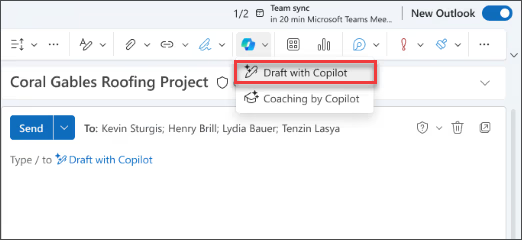
- Draft emails, proposals, and reports
- Pull insights from large data sets
- Find the information you need instantly
- Recommend next steps based on your business data
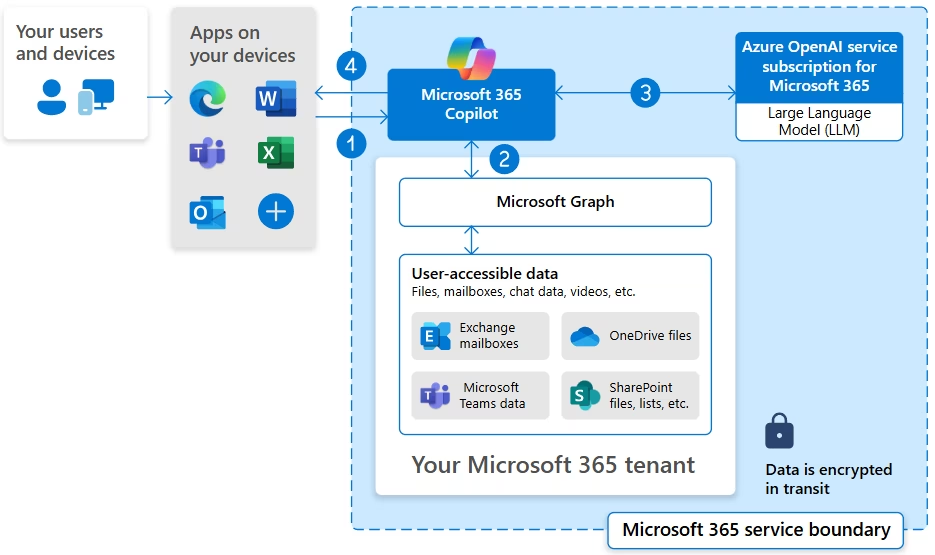
What makes Copilot powerful is not just its ability to understand natural language—it’s the fact that it works inside your apps and draws from the data your organization already has.
How does Copilot work?
At a high level, Copilot brings together three things:
- Large language models
These models interpret meaning, understand context, and generate human-like text. - Your organizational data
Emails, files, CRM records, SharePoint documents, calendars, meeting transcripts—whatever you already have permission to access. - Microsoft apps you use daily
Copilot lives directly inside Word, Excel, Outlook, Teams, PowerPoint, and Dynamics 365.
The result is an intelligent assistant that doesn’t just answer questions—it understands your business context and performs real tasks.
Why Microsoft Copilot matters for businesses
Copilot isn’t simply a time-saving tool. It enhances how people think, plan, communicate, and solve problems. By removing repetitive work and surfacing important insights quickly, it frees your teams to focus on high-value activities.
Organizations are seeing benefits such as:
- Faster document creation
- Quicker decision-making through data insights
- Better customer engagement
- Reduced manual effort in sales, service, and operations
- More consistent and accurate communication
And unlike stand-alone AI tools, Copilot is fully integrated, secure, and governed by Microsoft’s enterprise-grade compliance standards.
Real use case examples
Copilot is already transforming work across countless roles. Here’s what it looks like in action.
1. In Microsoft Word: Draft documents instantly
Scenario:
You need a proposal, but pulling together past documents, meeting notes, and spreadsheets would take hours.
What you ask Copilot:
“Create a proposal using our meeting notes and last quarter’s sales numbers.”
What happens next:
Copilot scans your Teams meeting recap, Outlook emails, and Excel performance data. Within seconds, you have a complete first draft that includes structure, key points, and data references.
Business impact:
Teams spend less time on initial drafts and more time refining the message.
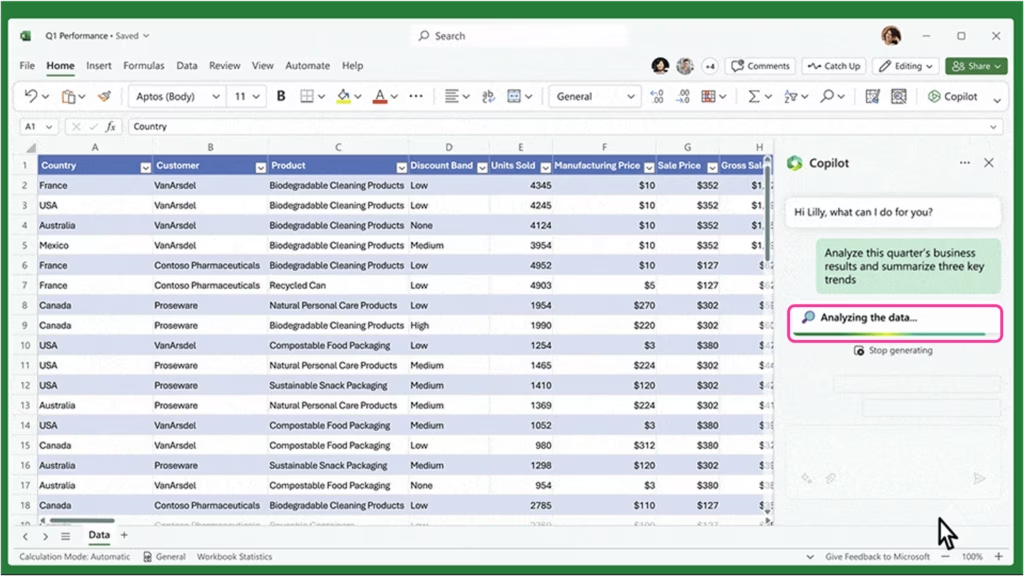
2. In Microsoft Excel: Analyze data without formulas
Scenario:
You want to identify growth trends across product lines—but don’t want to build pivot tables.
What you type:
“Show me which product line grew the fastest year over year.”
What Copilot does:
It reviews your dataset, runs calculations, generates visual charts, and presents insights in plain language.
Business impact:
Employees without deep Excel skills can still extract meaningful insights—improving decision-making across the organization.
3. In Microsoft Outlook: Summarize and respond faster
Scenario:
You open a long email thread that spans multiple days and several stakeholders.
You ask Copilot:
“What do I need to reply to in this thread?”
What you receive:
A concise summary of decisions, open questions, deadlines, and suggested responses.
Business impact:
Teams spend less time reading and more time acting.
4. In Dynamics 365 Sales: Personalize outreach at scale
Scenario:
A sales rep wants to follow up after a meeting but doesn’t want to manually pull CRM data.
You say:
“Draft a follow-up email to the client I met with yesterday.”
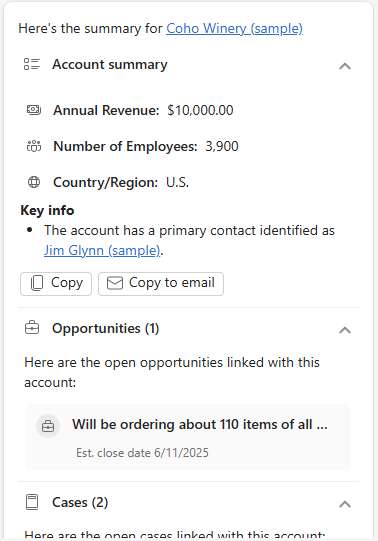
What Copilot generates:
A personalized email that references:
- The opportunity stage
- Deal size
- Products discussed
- Recent CRM activity
Business impact:
Sales teams save time and send more relevant, timely communication that enhances pipeline velocity.
5. In Dynamics 365 Customer Service: Resolve cases faster
Scenario:
Your service team needs visibility into trending customer issues.
You ask Copilot:
“What are the top issues customers are reporting this week?”
What Copilot provides:
A summary of common ticket themes, suggested responses, and links to similar historical cases.
Business impact:
Agents resolve cases faster, and managers get clearer insight into emerging problems.

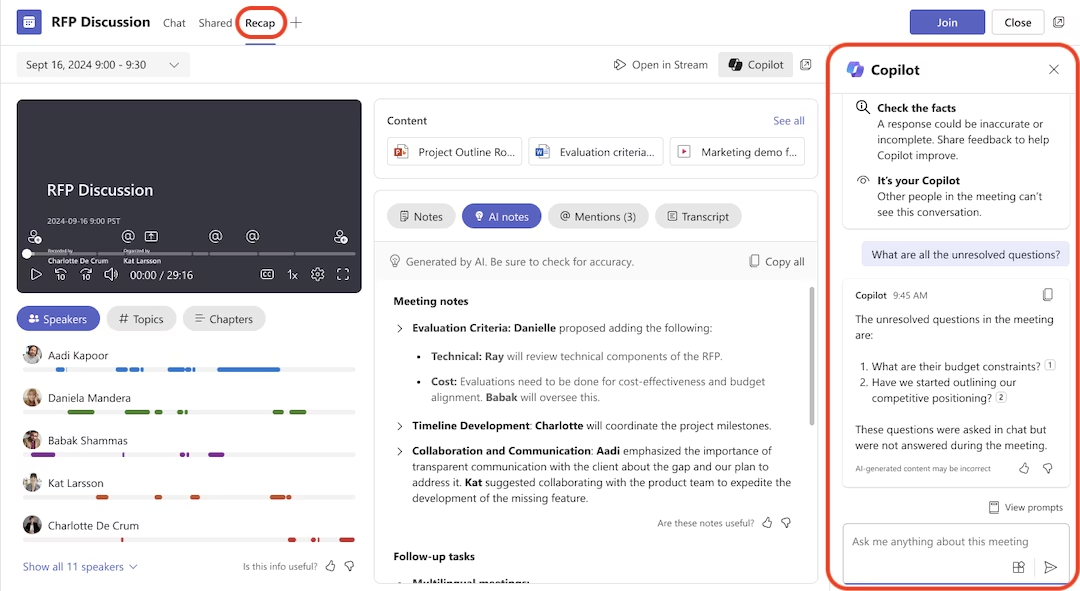
6. In Microsoft Teams: Get instant meeting recaps
Scenario:
You miss a meeting—or join late—and need to quickly catch up.
You ask Copilot:
“What did I miss?”
You receive:
A structured summary that includes:
- Key points
- Action items
- Decisions
- Transcript excerpts
Business impact:
Teams stay aligned without slowing down productivity.
What makes Copilot different?
Many AI tools can generate text. Some can analyze data. Others can summarize content. What sets Microsoft Copilot apart is its deep integration into your business ecosystem.
Copilot is unique because it offers:
- Context-awareness: It understands your emails, meetings, files, and organizational data.
- Embedded workflows: It works directly inside familiar apps.
- Enterprise-grade security: Your data stays within your Microsoft environment, governed by your access controls.
- Consistency: Copilot behaves similarly across apps, reducing learning curves.
These advantages make Copilot a reliable tool for organizations that want AI to support—not disrupt—their workflow.
Getting started with Copilot
Copilot is available through specific Microsoft 365 and Dynamics 365 licenses or as an add-on. But the value you get depends on how well it is configured and aligned with your organizational data and processes.
Before implementing Copilot, organizations benefit from:
- Reviewing data accessibility and security
- Identifying priority use cases
- Training teams on effective prompt-writing
- Ensuring proper licensing and permissions
- Integrating Copilot with Dynamics 365 apps
A strategic rollout makes Copilot far more impactful.
Next steps
At Rand Group, we help organizations integrate and optimize Microsoft Copilot across Microsoft 365 and Dynamics 365. Whether your goal is to increase productivity, accelerate sales processes, or reduce customer service backlogs, our experts can help you identify high-value use cases and build an AI adoption plan tailored to your organization. Ready to see what Copilot could do for your team? Contact Rand Group today to explore Copilot solutions for your business.