Dynamics 365
 Power Platform
 Dynamics
 Cloud & Productivity
The complete guide to Dynamics 365 Contact Center

Microsoft Dynamics 365 Contact Center is an AI-powered, cloud-based platform for managing customer interactions across voice and digital channels. It combines omnichannel engagement, intelligent routing, self-service, Copilot, AI agents, analytics, and contact center management tools in one connected environment.
This guide explains how Dynamics 365 Contact Center works, how it differs from Dynamics 365 Customer Service, and the capabilities available for service representatives and supervisors. It also covers AI and automation, deployment options, pricing and editions, CRM integration, purchasing paths, and how to determine whether Dynamics 365 Contact Center is right for your organization.
At a glance
Dynamics 365 Contact Center is Microsoft’s cloud-based contact center platform for managing voice and digital customer interactions. It supports omnichannel engagement, intelligent routing, conversational IVR, self-service, Copilot, AI agents, workforce management, and real-time analytics. Organizations can deploy Dynamics 365 Contact Center with Dynamics 365 Customer Service or connect it with another supported CRM, including Salesforce, and choose Digital, Voice, or Digital + Voice licensing based on their channel requirements.
What is Dynamics 365 Contact Center?
Microsoft Dynamics 365 Contact Center is an AI-powered, cloud-based contact center solution that helps organizations manage customer conversations across voice and digital channels. It brings voice calls, live chat, email, SMS, social messaging, and other digital interactions into a single workspace, giving representatives one place to manage customer engagements.
Dynamics 365 Contact Center uses intelligent routing to direct each interaction to the right representative based on factors such as skills, availability, capacity, priority, and customer context. It also provides real-time visibility into queues and contact center activity, helping supervisors manage workloads and service levels.
Key Dynamics 365 Contact Center capabilities include:
- Omnichannel engagement across voice and digital channels
- A unified workspace for managing customer interactions
- Intelligent routing based on skills, availability, capacity, and customer context
- AI-powered self-service with conversational interactive voice response (IVR)
- Copilot and AI assistance for summaries, responses, transcription, and other tasks
- Real-time monitoring, analytics, and operational dashboards
- Cloud-based scalability to support changing customer service demand
Dynamics 365 Contact Center can integrate with Dynamics 365 Customer Service or work with an organization’s existing CRM. This gives businesses flexibility to modernize their contact center while keeping the customer management systems and processes that already work for them.
Dynamics 365 Contact Center vs. Dynamics 365 Customer Service
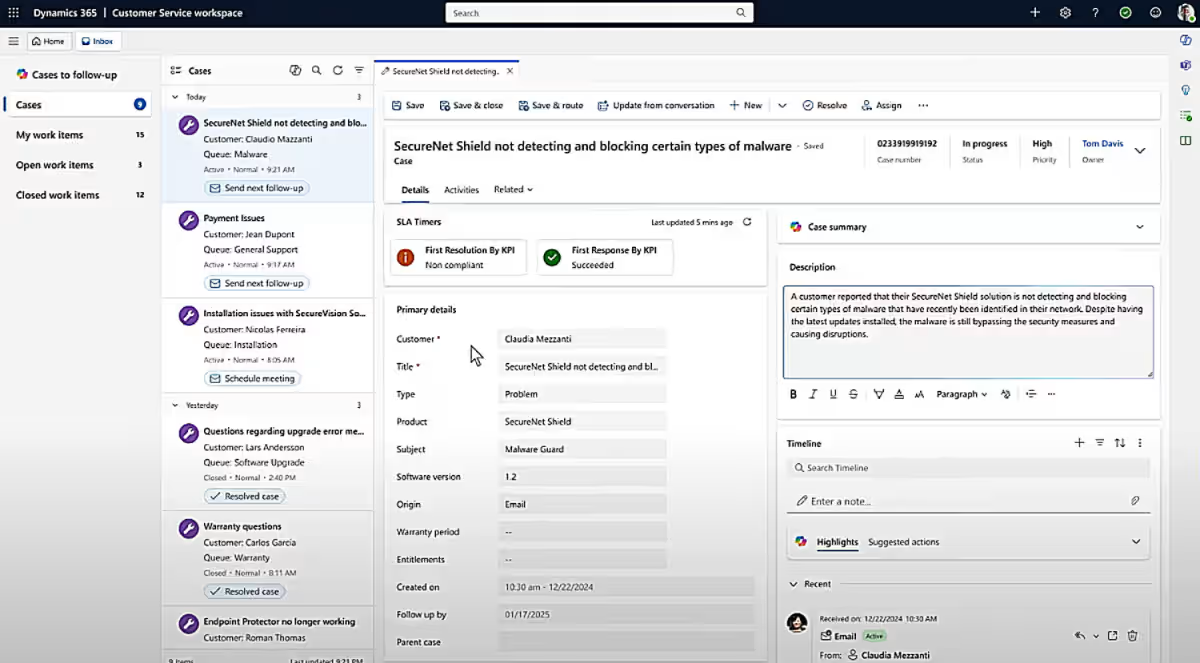
Dynamics 365 Contact Center and Dynamics 365 Customer Service both support customer service operations, but they manage different parts of the customer experience. Dynamics 365 Customer Service focuses on managing customer issues and resolution processes, while Dynamics 365 Contact Center focuses on managing conversations across voice and digital channels.
The two applications can work together as part of a connected Microsoft service environment, but Dynamics 365 Contact Center does not require Dynamics 365 Customer Service. It can also integrate with other supported CRM systems. For a more detailed comparison, read Microsoft Dynamics 365 Customer Service vs. Dynamics 365 Contact Center: What is the difference?.
Dynamics 365 Customer Service
Dynamics 365 Customer Service is a CRM application for managing the complete lifecycle of customer support issues. It gives service teams structured tools for case management, customer history, knowledge management, service-level agreements, entitlements, queues, and resolution workflows.
D365 Customer Service is especially useful when an issue requires work beyond a single conversation. A case can remain open across multiple interactions, move between teams, follow escalation processes, and maintain a complete history until the issue is resolved.
Dynamics 365 Contact Center
Dynamics 365 Contact Center manages the communication layer between customers and service teams. It brings voice calls, chat, SMS, messaging, and other digital interactions into a unified workspace and helps organizations route, handle, monitor, and analyze those conversations.
The platform is designed for contact center operations where interaction volume, routing, response times, and real-time visibility are important. It can complement Dynamics 365 Customer Service or connect contact center capabilities with another CRM.
Key differences
The key difference between Dynamics 365 Customer Service and Dynamics 365 Contact Center is the role each application plays in customer service. D365 Customer Service manages customer issues and the processes used to resolve them, while D365 Contact Center manages the conversations and channels used to engage with customers.
Organizations may use one or both applications depending on their service model. When used together, Dynamics 365 Customer Service provides the customer service and case management foundation, while Dynamics 365 Contact Center provides the voice and digital engagement layer for managing customer interactions at scale.
Dynamics 365 Contact Center capabilities
Dynamics 365 Contact Center brings together the channels, routing, voice, agent tools, analytics, and integrations needed to manage modern contact center operations. These capabilities help organizations connect customers with the right resources, give service representatives better context, and provide supervisors with greater visibility across every interaction.
Omnichannel engagement and agent workspace
Dynamics 365 Contact Center brings voice and digital conversations into a unified workspace so service representatives can manage customer interactions without constantly switching between systems. Conversations can maintain context across channels and sessions, helping teams deliver a more consistent experience regardless of how a customer chooses to engage.
Key omnichannel capabilities include:
- Voice, live chat, email, SMS, web, mobile, and social messaging
- A unified workspace for managing customer conversations
- Persistent conversation history across interactions and channels
- Real-time translation for supported digital conversations
- Seamless transitions between communication channels

Intelligent routing and queue management
Unified routing helps direct each customer interaction to the most appropriate service representative. Routing decisions can consider skills, availability, capacity, priority, queue membership, and customer context, helping organizations distribute work more effectively and reduce unnecessary transfers.
Key routing and queue capabilities include:
- Skills-based and automatic routing
- Routing based on availability and capacity
- Priority-based queue management
- Customer context used to inform assignments
- Workload distribution across voice and digital channels
Voice, IVR, and customer self-service
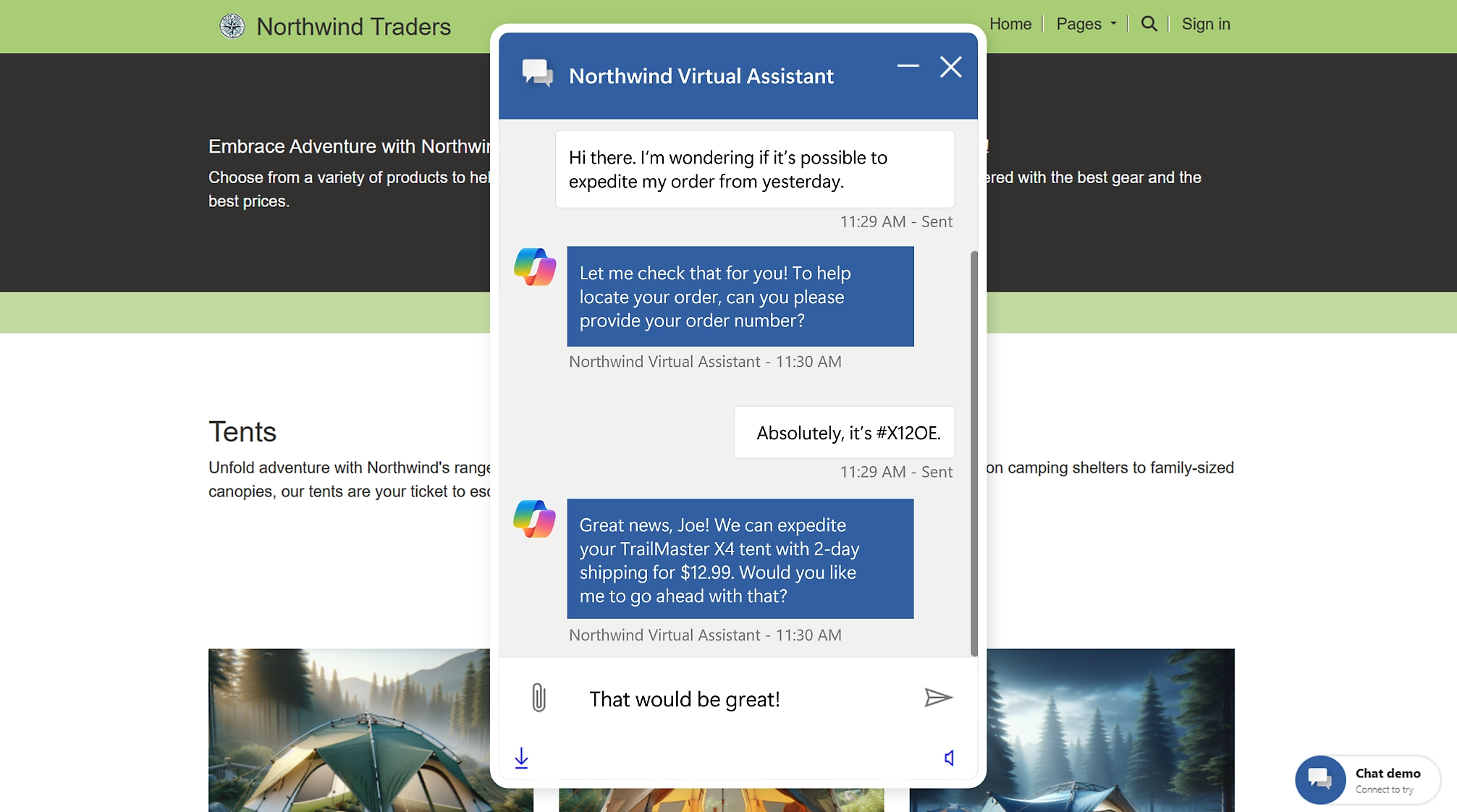
Dynamics 365 Contact Center supports both assisted and self-service voice experiences. Organizations can use conversational interactive voice response (IVR), virtual agents, and digital self-service to help customers complete routine tasks without waiting for a representative while still providing a clear path to human assistance when needed.
Key voice and self-service capabilities include:
- Inbound and outbound calling
- Conversational IVR with natural language interactions
- Digital self-service through virtual agents and chat
- Call recording, transcription, transfers, and voicemail
- Context-aware self-service using customer and CRM data
- Escalation from self-service to a service representative
Customer context and collaboration
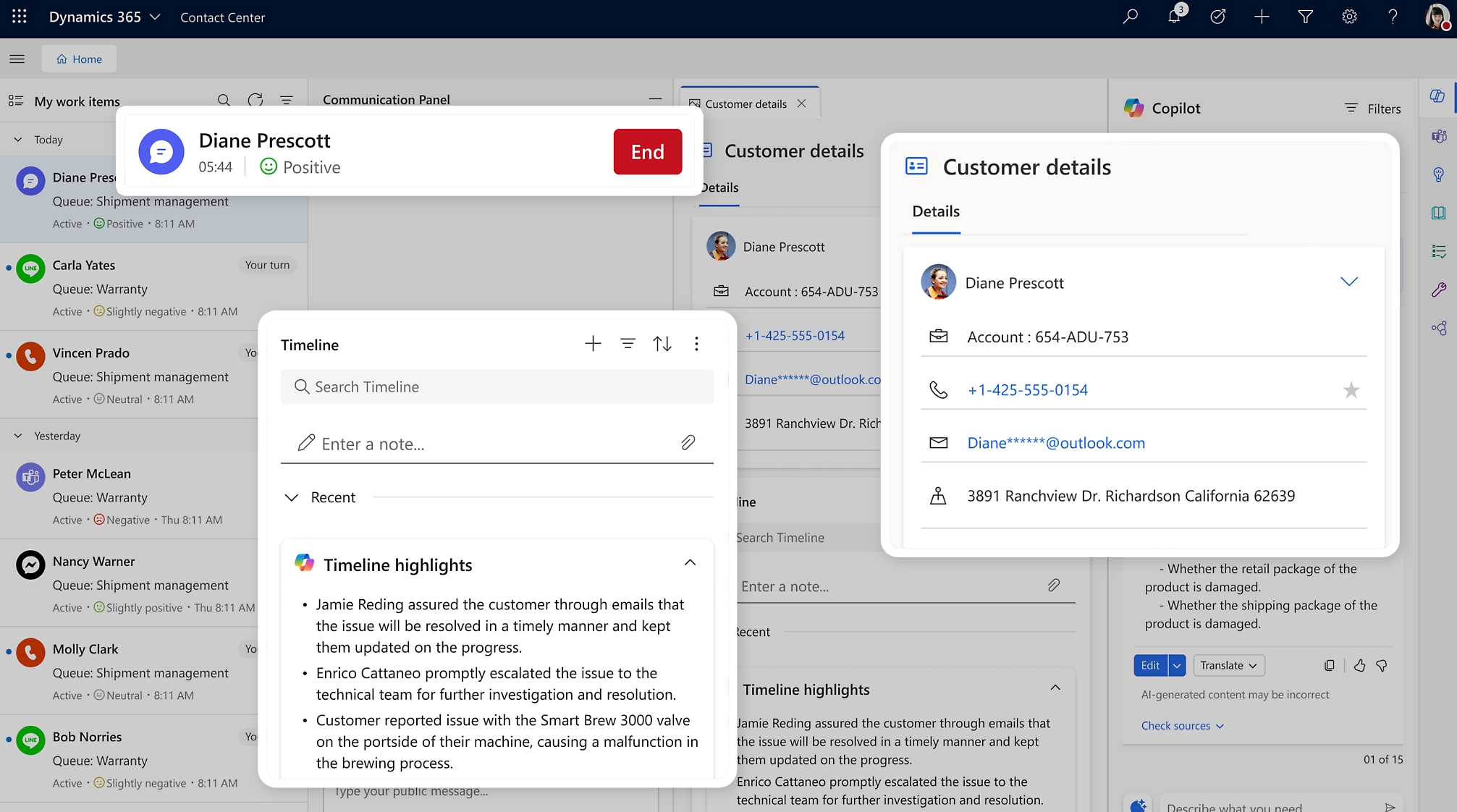
Service representatives can access customer information while managing an interaction, giving them more context about who they are helping and why the customer is contacting the organization. Dynamics 365 Contact Center can surface interaction history, sentiment, topics, and CRM data while also allowing representatives to collaborate with subject-matter experts when additional help is needed.
Key customer context and collaboration capabilities include:
- Customer interaction and conversation history
- CRM case and customer information
- Sentiment and conversation context
- Access to relevant knowledge
- Collaboration with experts through Microsoft Teams
- Context that follows the customer across interactions
Supervision, workforce, and performance management
Dynamics 365 Contact Center gives supervisors visibility into contact center activity through real-time dashboards, historical reporting, and monitoring tools. These capabilities help leaders understand demand, manage representative workloads, track service levels, and identify areas where staffing or processes may need to change.
Key operational capabilities include:
- Real-time queue and workload monitoring
- Historical reporting and performance dashboards
- Service-level and interaction metrics
- Representative skills, capacity, and allocation visibility
- Workforce management integration
- Live session monitoring and supervisor assistance
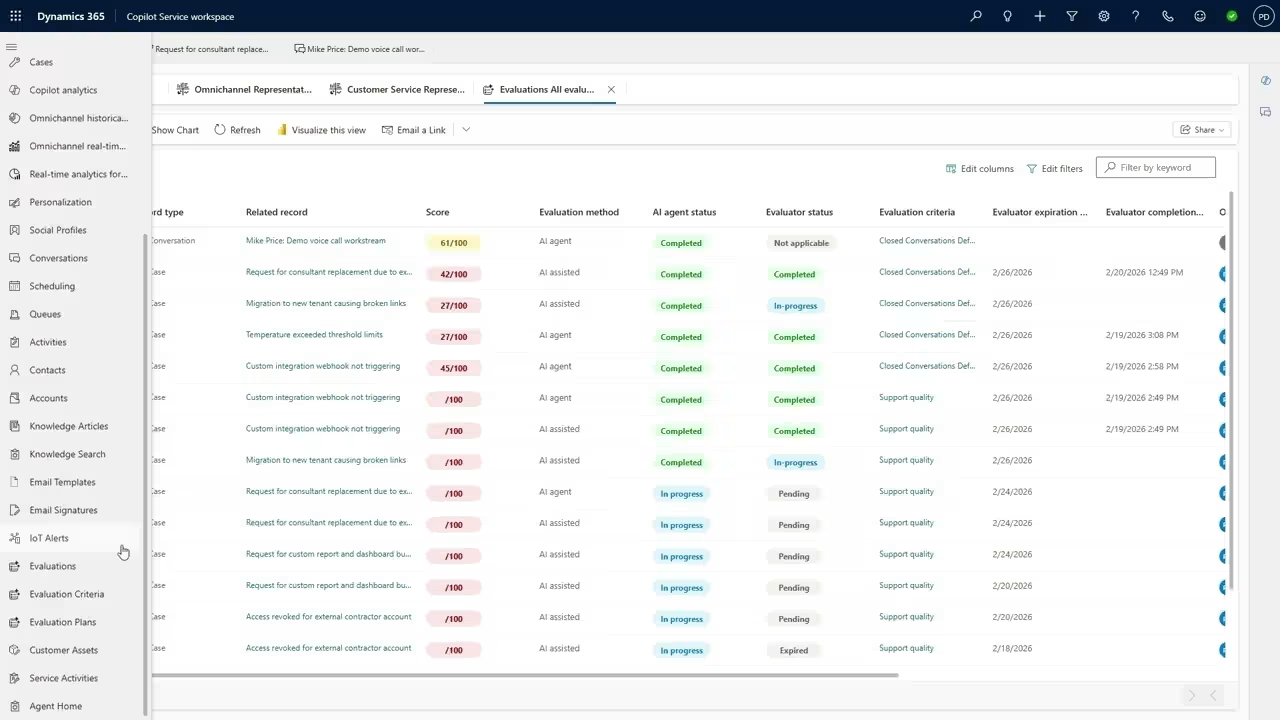
- Quality and performance insights

Integration and extensibility
Dynamics 365 Contact Center can connect with Dynamics 365 applications, other supported CRM systems, and business data across an organization. Microsoft Dataverse and Power Platform provide additional options for connecting data, automating workflows, building applications, and adapting contact center processes to specific business requirements.
Key integration and extensibility capabilities include:
- Integration with Dynamics 365 Customer Service
- Connectivity with supported third-party CRM systems
- Microsoft Dataverse for connected interaction data
- Power Automate for workflow automation
- Power Apps for custom applications and experiences
- Microsoft Teams integration for collaboration
- Telephony integration with Microsoft Teams Phone and Azure Communication Services

AI and automation in Dynamics 365 Contact Center
AI is built throughout Dynamics 365 Contact Center to support self-service, assist service representatives, and improve contact center operations. Copilot provides real-time assistance during customer interactions, while AI agents can perform specialized tasks such as identifying customer intent, maintaining knowledge, evaluating quality, and resolving routine requests.
Copilot and AI capabilities
Copilot helps service representatives work more efficiently by providing information and assistance within the flow of an interaction. AI is also used across voice and digital channels to understand customer intent, support conversations, and reduce manual work before, during, and after an engagement.
Key Copilot and AI capabilities include:
- AI-generated conversation summaries and suggested next steps
- Suggested responses and email drafts based on customer context
- Knowledge retrieval to surface relevant information during an interaction
- Real-time sentiment and conversation insights
- Live transcription and translation for supported interactions
- Conversational IVR and AI-powered voice self-service
- Intelligent routing informed by customer needs and interaction context
- Automated assistance that reduces manual documentation and repetitive tasks

AI agents in Dynamics 365 Contact Center
Dynamics 365 Contact Center includes specialized AI agents designed to automate service tasks and continuously improve customer experiences. Some work directly with customers, while others operate behind the scenes to improve knowledge, quality, intent recognition, and contact center administration.
AI agents available for Dynamics 365 Contact Center include:
- Customer Assist Agent: Provides autonomous self-service for routine requests while supporting service representatives during more complex interactions.
- Quality Assurance Agent: Evaluates interactions and provides quality, compliance, and coaching insights to help supervisors improve service.
- Service Operations Agent: Helps configure, govern, and optimize contact center operations while reducing reliance on specialized technical expertise.
- Customer Intent Agent: Analyzes customer conversations across channels to identify emerging intents and improve self-service experiences.
- Customer Knowledge Management Agent: Uses insights from case notes and other service content to help keep knowledge articles accurate and current.
- Custom AI agents: Allows organizations to build agents tailored to their processes, workflows, and data using Microsoft Copilot Studio.
Organizations can use these agents individually or as part of a broader AI strategy based on their service model and automation goals. For a deeper look at how each agent works, read our guide to AI agents in Dynamics 365 Contact Center.
Common AI and automation use cases
AI can support both routine customer requests and more complex contact center work. The right use cases depend on interaction volume, service processes, available data, and where automation can reduce effort without creating friction for customers.
Common examples include:
- High-volume customer support: AI agents can handle routine questions about orders, returns, account information, or other common requests before human assistance is needed.
- Conversation summarization: Copilot can summarize lengthy calls or digital conversations and capture key details, reducing time spent on after-call documentation.
- Translation and transcription: AI can transcribe voice interactions and translate supported conversations to help service teams communicate across languages.
- Sentiment and intent identification: AI can identify customer sentiment and intent during an interaction, helping teams respond appropriately and route conversations more effectively.
- Knowledge retrieval: Copilot can surface relevant knowledge and customer information during an interaction so service representatives spend less time searching across systems.
- Quality management: AI can evaluate interactions at scale and identify coaching, compliance, and service quality opportunities that supervisors may need to address.
How is Dynamics 365 Contact Center deployed?
Dynamics 365 Contact Center is a cloud-based solution hosted within Microsoft’s cloud environment. Organizations can deploy modern contact center capabilities without maintaining traditional on-premises contact center infrastructure.
D365 Contact Center can be deployed alongside D365 Customer Service or connected with another supported CRM, including Salesforce. This allows organizations to modernize their contact center while continuing to use their existing CRM as the system for managing customer data and service processes.
A D365 Contact Center deployment typically includes configuring communication channels, routing and queues, telephony, self-service, AI capabilities, integrations, security, and reporting. The specific deployment approach depends on your existing technology environment, service processes, channel requirements, and integration needs.

Get the D365 Contact Center pricing and licensing guide
Dynamics 365 Contact Center licensing includes multiple editions, purchasing paths, user requirements, capacity entitlements, and add-ons. Download the guide for a complete breakdown of pricing, licensing options, and how to choose the right approach for your organization.
How much does Dynamics 365 Contact Center cost?
Dynamics 365 Contact Center is licensed on a per-user, subscription basis. Each contact center representative needs the appropriate license based on whether they handle digital interactions, voice interactions, or both.
Microsoft offers monthly, annual, and multi-year subscription terms. Monthly terms provide greater flexibility but are typically more expensive, while annual and multi-year agreements can provide more predictable pricing. Organizations can add users during the subscription term, while reductions generally occur at renewal.
Dynamics 365 Contact Center pricing depends on the communication channels each user needs. The U.S. list prices below are based on annual billing:
- D365 Contact Center Digital: $95 per user, per month. Provides access to digital contact center capabilities for channels such as chat, messaging, SMS, email, and social interactions.
- D365 Contact Center Voice: $95 per user, per month. Provides access to voice contact center capabilities, including calling, routing, conversational IVR, transcription, and other voice features.
- D365 Contact Center Digital + Voice: $110 per user, per month. Combines digital and voice capabilities for representatives who need to manage customer interactions across both channel types.
The appropriate license depends on how each contact center representative engages with customers. Organizations that already use Dynamics 365 Customer Service may also qualify for different Contact Center purchasing options, which can affect the total licensing cost.
Compare Dynamics 365 Contact Center editions
Dynamics 365 Contact Center is available in three editions based on the channels each user needs. All three include core service representative, integration, and analytics capabilities, while the main differences are whether digital channels, voice, or both are included.
Is Dynamics 365 Contact Center right for your organization?
Dynamics 365 Contact Center is a strong fit for organizations that manage a high volume of customer interactions and need to coordinate service across voice and digital channels. It is designed for teams that want to modernize contact center operations with intelligent routing, self-service, AI assistance, and real-time operational visibility.
Dynamics 365 Contact Center may be a good fit for organizations that:
- Support customers across voice, chat, email, SMS, messaging, and social channels and want to bring those interactions into one platform
- Manage moderate to high interaction volumes and need intelligent routing, queues, and workload management
- Want to replace or consolidate separate telephony, messaging, and contact center technologies
- Want to introduce AI-powered self-service, Copilot assistance, and AI agents into customer service processes
- Need real-time dashboards, quality insights, and performance analytics to improve contact center operations
- Use Dynamics 365 Customer Service and want to add advanced voice and digital engagement capabilities
- Use Salesforce or another CRM and want modern contact center capabilities without replacing their existing CRM
- Use Microsoft Teams, Power Platform, or other Microsoft technologies and want deeper integration across service, collaboration, and automation
The right fit ultimately depends on your service model, existing technology, interaction volume, and channel requirements. For organizations that need a scalable platform for managing customer conversations across channels, Dynamics 365 Contact Center provides a flexible foundation that can evolve as service and AI requirements change.
How to get Dynamics 365 Contact Center
Dynamics 365 Contact Center is a cloud-based solution available through Microsoft and its partner network. A Microsoft partner can help with licensing, implementation, integrations, configuration, training, and ongoing support.
There are three primary purchasing paths for D365 Contact Center:
- Standalone D365 Contact Center: License D365 Contact Center independently without D365 Customer Service. Organizations can choose D365 Contact Center Digital, D365 Contact Center Voice, or D365 Contact Center Digital + Voice.
- D365 Customer Service Enterprise with a D365 Contact Center add-on: Organizations using D365 Customer Service Enterprise can add D365 Contact Center Digital, D365 Contact Center Voice, or D365 Contact Center Digital + Voice capabilities to their existing environment.
- D365 Customer Service Premium: D365 Customer Service Premium combines D365 Customer Service Enterprise with D365 Contact Center Digital + Voice for organizations that need both customer service management and a complete omnichannel contact center.
The right purchasing path depends on your existing CRM, required communication channels, and licensing needs. A Microsoft partner can help evaluate these options and determine the right approach for your D365 Contact Center deployment.

Get Dynamics 365 Contact Center
Modernize customer engagement with Dynamics 365 Contact Center across voice and digital channels. Rand Group can help you evaluate licensing, plan your deployment, and implement the right contact center solution for your organization.
Partner with Rand Group for Dynamics 365 Contact Center
Rand Group helps organizations evaluate, implement, integrate, and support Dynamics 365 Contact Center across the full solution lifecycle. Our team brings together Dynamics 365 consultants, software engineers, integration specialists, AI experts, and customer engagement professionals to align the platform with your service processes, CRM environment, communication channels, and business goals.
Since 2003, Rand Group has completed more than 3,000 successful engagements for more than 1,200 clients, with a 90% client retention rate. Rand Group was also recognized as the 2025 Microsoft Americas Channel Emerging Partner of the Year.
Rand Group’s Dynamics 365 Contact Center services include:
- Contact center strategy and licensing: Define requirements, evaluate purchasing paths, and select the right Dynamics 365 Contact Center licenses.
- Dynamics 365 Contact Center implementation: Configure channels, routing, queues, self-service, representative experiences, and reporting around your service model.
- CRM and system integrations: Connect Dynamics 365 Contact Center with Dynamics 365 Customer Service, Salesforce, telephony, Microsoft Teams, and other business applications.
- AI and automation: Enable Copilot, AI agents, self-service, and automated workflows that improve service representative productivity and customer experiences.
- Training and user adoption: Prepare representatives, supervisors, and administrators with role-based training and practical guidance.
- Ongoing support and optimization: Resolve issues, enable new capabilities, refine routing and workflows, and continuously improve contact center performance.
Contact Rand Group to discuss your Dynamics 365 Contact Center strategy and next steps.
What our Dynamics 365 clients say
“Customer service is huge and Rand Group nails it every time. Their consultants are always so positive and patient and extremely responsive. I can’t say enough good things about them.”
– April Chambers, PatientCare EMS Solutions
“Rand Group has consistently thought outside of the box in ways I haven’t experienced with other providers. They’ve always offered multiple workable options to address our unique challenges, going beyond what we initially requested.”
– Erin Underwood, VP & CFO, Petroplex Acidizing Inc.
Key takeaways
- Dynamics 365 Contact Center is a cloud-based platform for managing voice and digital customer interactions in one environment.
- Dynamics 365 Contact Center can work with Dynamics 365 Customer Service or integrate with another supported CRM such as Salesforce.
- Dynamics 365 Contact Center combines omnichannel engagement, intelligent routing, self-service, analytics, and workforce management capabilities.
- Copilot and AI agents in Dynamics 365 Contact Center help automate routine service, assist representatives, and improve quality and knowledge management.
- Dynamics 365 Contact Center is available through standalone, Dynamics 365 Customer Service Enterprise add-on, and Dynamics 365 Customer Service Premium purchasing paths.
- D365 Contact Center Digital, D365 Contact Center Voice, and D365 Contact Center Digital + Voice provide different channel options based on how representatives engage with customers.
Frequently asked questions
What is Microsoft Dynamics 365 Contact Center?
Microsoft Dynamics 365 Contact Center is an AI-powered, cloud-based platform for managing customer interactions across voice and digital channels. It combines omnichannel engagement, intelligent routing, self-service, Copilot, AI agents, analytics, and contact center management tools in one environment.
What is the difference between Dynamics 365 Contact Center and Dynamics 365 Customer Service?
Dynamics 365 Contact Center manages customer conversations and communication channels, while Dynamics 365 Customer Service manages customer issues and resolution processes. Dynamics 365 Customer Service focuses on cases, knowledge, SLAs, and service workflows, while Dynamics 365 Contact Center focuses on voice, messaging, IVR, routing, queues, and contact center operations.
Does Dynamics 365 Contact Center require Dynamics 365 Customer Service?
No, Dynamics 365 Contact Center does not require Dynamics 365 Customer Service. Organizations can use Dynamics 365 Contact Center as a standalone solution with another supported CRM or combine it with Dynamics 365 Customer Service.
Can Dynamics 365 Contact Center integrate with Salesforce or another CRM?
Yes, Dynamics 365 Contact Center can connect with Salesforce and other supported CRM systems. This allows organizations to modernize their contact center without replacing the CRM they already use.
What channels does Dynamics 365 Contact Center support?
Dynamics 365 Contact Center supports voice and digital channels including live chat, email, SMS, web, mobile, and social messaging. Organizations can choose Dynamics 365 Contact Center Digital, Dynamics 365 Contact Center Voice, or Dynamics 365 Contact Center Digital + Voice based on their channel requirements.
How much does Dynamics 365 Contact Center cost?
Dynamics 365 Contact Center starts at $95 per user, per month based on U.S. list pricing with annual billing. Dynamics 365 Contact Center Digital and Dynamics 365 Contact Center Voice are $95 per user, per month, while Dynamics 365 Contact Center Digital + Voice is $110 per user, per month.
What AI capabilities are available in Dynamics 365 Contact Center?
Dynamics 365 Contact Center includes Copilot and AI capabilities for conversation summaries, suggested responses, knowledge retrieval, sentiment insights, transcription, translation, conversational IVR, and intelligent routing. It also includes specialized AI agents for customer assistance, quality assurance, service operations, intent discovery, and knowledge management.
Who should use Dynamics 365 Contact Center?
Dynamics 365 Contact Center is best suited for organizations that manage moderate to high volumes of customer interactions across voice and digital channels. It is particularly useful for teams that need intelligent routing, self-service, AI assistance, real-time analytics, and a scalable platform that can integrate with their existing CRM.
Modernize your contact center with Dynamics 365 Contact Center
Dynamics 365 Contact Center gives organizations a cloud-based platform for managing customer conversations across voice and digital channels. Intelligent routing, self-service, Copilot, AI agents, analytics, and workforce management can help teams reduce manual work, improve service representative productivity, and deliver more consistent customer experiences.
Choosing the right licensing, CRM integration, channels, and implementation approach is important to getting long-term value from the platform. Rand Group can help you evaluate, implement, integrate, and optimize Dynamics 365 Contact Center around your service requirements. Contact us to discuss your Dynamics 365 Contact Center strategy and next steps.