Dynamics 365
 Power Platform
 Dynamics
 Cloud & Productivity
Microsoft Dynamics 365 Customer Service vs. Dynamics 365 Contact Center: What is the difference?

Understanding Dynamics 365 Customer Service vs Dynamics 365 Contact Center starts with recognizing that the products address different parts of the customer service journey. Dynamics 365 Customer Service focuses on cases, service processes, knowledge, and customer records, while Dynamics 365 Contact Center focuses on managing voice and digital interactions.
Microsoft offers two closely related products for addressing these expectations: Microsoft Dynamics 365 Customer Service and Microsoft Dynamics 365 Contact Center. Because the solutions share certain capabilities and can be deployed together, their roles are not always immediately clear.
The primary difference is their operational focus. Dynamics 365 Customer Service is a customer relationship management application built around cases, service processes, knowledge, service-level agreements, and long-term customer records. Dynamics 365 Contact Center is a cloud contact center platform focused on managing real-time customer conversations across voice and digital channels.
The right choice depends on whether an organization needs to improve how it manages customer issues, modernize how customers communicate with service teams, or address both requirements through an integrated service environment.
At a glance
Dynamics 365 Customer Service manages cases, service processes, knowledge, and long-term issue resolution, while Dynamics 365 Contact Center manages voice and digital customer interactions. Organizations may need one or both solutions depending on their CRM, communication channels, service workflows, and integration requirements.
Table of contents
- What is Dynamics 365 Customer Service?
- What is Dynamics 365 Contact Center?
- Dynamics 365 Customer Service vs Dynamics 365 Contact Center: The central difference
- Where the products overlap
- Can Dynamics 365 Contact Center work with another CRM?
- When Dynamics 365 Customer Service may be the priority
- When Dynamics 365 Contact Center may be the priority
- When an organization needs both products
- How to choose the right Microsoft service architecture
- Implementation considerations that affect both solutions
- Why choose Rand Group
- Frequently asked questions about Dynamics 365 Customer Service and Dynamics 365 Contact Center
What is Dynamics 365 Customer Service?
Microsoft Dynamics 365 Customer Service helps organizations manage the complete lifecycle of customer support issues. It provides a structured CRM environment in which service representatives can create cases, review customer histories, apply entitlements, follow defined resolution processes, and document outcomes. Organizations planning a deployment can explore Rand Group’s Dynamics 365 Customer Service implementation guide for additional planning considerations.
Case management is central to the application. A case creates a persistent business record for an issue, request, complaint, or question. It can remain open across multiple interactions, move between teams, follow escalation rules, and retain the information needed for reporting and future service. Microsoft also supports service-level agreements, queues, knowledge management, routing, analytics, and Copilot capabilities within the Customer Service environment.
This structure is valuable when service work extends beyond a single conversation. For example, resolving a warranty claim may require collecting supporting documents, obtaining approval, coordinating with another department, ordering a replacement, and communicating several updates to the customer. Dynamics 365 Customer Service provides the process and data model needed to manage that work consistently.
It can also connect service activity with the broader Microsoft business application environment. Customer accounts, contacts, activities, cases, knowledge articles, and other Dataverse records can provide representatives with a more complete view of the customer relationship. For a broader overview of the application, read What is Dynamics 365 Customer Service?

What is Dynamics 365 Contact Center?
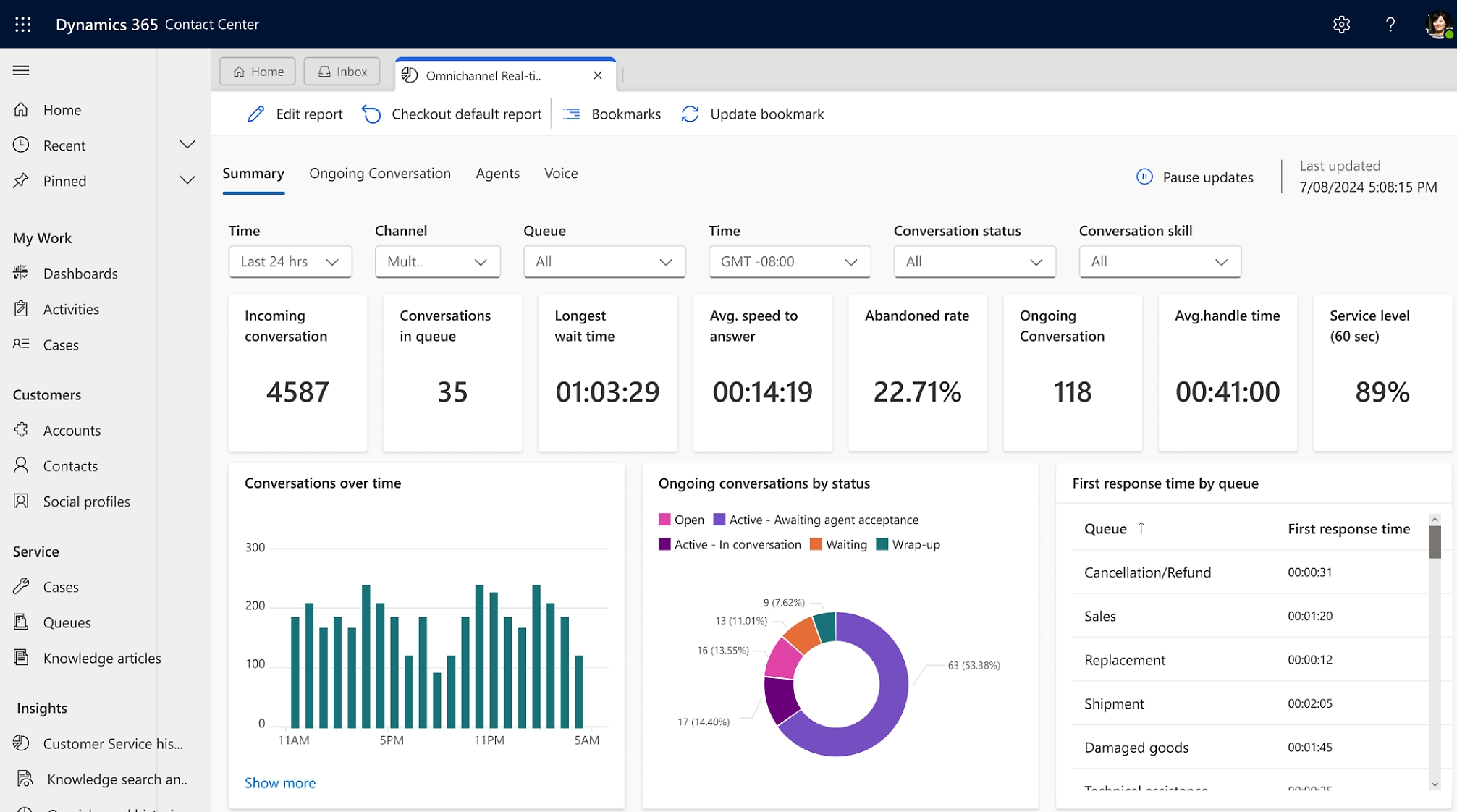
Microsoft Dynamics 365 Contact Center is a cloud-based contact center as a service platform designed to manage customer conversations across channels. Its purpose is to help organizations receive, route, handle, monitor, and analyze interactions such as telephone calls, live chat, SMS, and other digital messages.
The solution brings communication channels into a common agent workspace and applies unified routing to determine how incoming work should be assigned. Routing can consider factors such as availability, capacity, priority, queue membership, and representative skills. Microsoft describes unified routing as an enterprise capability that matches work items with suitable service representatives based on work requirements and representative capabilities.
Contact Center supports several capabilities associated with high-volume service operations:
- Voice, chat, SMS, and digital messaging channels
- Automatic and skills-based routing
- Interactive voice response and virtual agents
- Call transcription, recording, sentiment, and real-time assistance
- Supervisor monitoring and operational dashboards
- Conversation summaries and AI-assisted responses
- Collaboration with subject-matter experts through Microsoft Teams
These features help organizations manage the immediate interaction between a customer and a service representative. Microsoft also supports voice functions such as inbound and outbound calling, voicemail, transfers, call recording, transcription, supervisor monitoring, and queue announcements.
The result is a platform focused on engagement orchestration: how the conversation enters the organization, where it goes, how it is handled, and how contact center performance is measured. Rand Group’s complete guide to Dynamics 365 Contact Center provides a more detailed look at its capabilities and use cases.
Dynamics 365 Customer Service vs Dynamics 365 Contact Center: The central difference
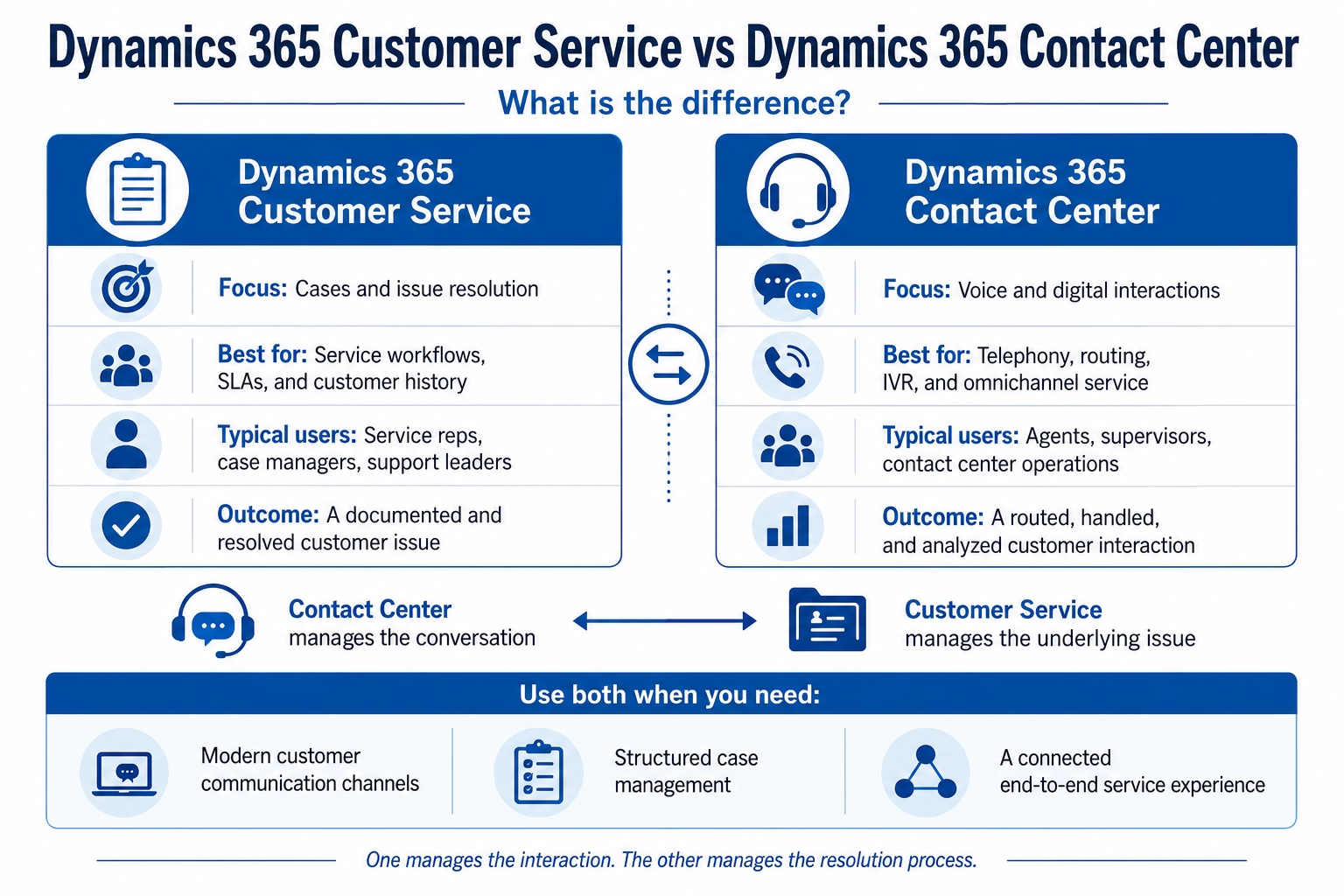
When comparing Dynamics 365 Customer Service vs Dynamics 365 Contact Center, the clearest distinction is the type of work each product manages. Customer Service manages the customer issue and its resolution process, while Contact Center manages the live or asynchronous interaction through which the customer communicates with the organization.
This distinction is more useful than comparing individual features because some capabilities appear in both product documentation. For example, routing, knowledge, Copilot, analytics, and agent productivity tools can span the broader Microsoft service architecture. The products should be evaluated according to the operating model an organization is building, not simply according to a feature checklist.
Where the products overlap
Microsoft has designed Dynamics 365 Customer Service and Dynamics 365 Contact Center to work within a connected service ecosystem. As a result, organizations will see areas of overlap.
Both products can contribute to a representative’s ability to understand the customer, find information, receive AI assistance, and complete service work. Knowledge management, for example, can help representatives search for approved answers while handling either a case or a conversation. Microsoft documents knowledge capabilities across Customer Service and Contact Center, including article authoring, internal search, external knowledge sources, and connections with AI agents.
Important areas of overlap include:
- Unified representative experience: Representatives can work from a common service workspace rather than switching continuously between disconnected applications.
- Knowledge assistance: Relevant articles can help representatives give more accurate and consistent answers.
- Copilot and AI capabilities: AI can summarize conversations, draft responses, surface knowledge, and assist with certain case activities.
- Unified routing: Work can be directed according to queues, skills, capacity, and business-defined rules.
- Analytics: Managers can review service activity, representative performance, operational demand, and customer experience indicators.
- Microsoft Teams collaboration: Representatives can consult specialists without leaving the service context.
The overlap does not make the applications interchangeable. It reflects Microsoft’s effort to connect CRM records, channel engagement, automation, and AI within one service architecture.
When evaluating the products, organizations should separate shared representative tools from the foundational capabilities they need to license, configure, and govern.
Can Dynamics 365 Contact Center work with another CRM?
Dynamics 365 Contact Center is not limited to organizations using Dynamics 365 Customer Service as their CRM. Microsoft positions it as a contact center platform that can bring engagement capabilities to a CRM system of the organization’s choice.
This deployment option is important for organizations that have already invested in another CRM but want to modernize telephony, routing, digital engagement, representative assistance, or contact center analytics.
In this model, Dynamics 365 Contact Center manages the communications layer while an integration connects relevant customer and service information from the existing CRM. The representative experience must be designed carefully so that customer identification, screen pops, interaction records, authentication, and follow-up activities move reliably between systems.
A standalone Contact Center deployment may be appropriate when an organization:
- Intends to retain its existing CRM
- Needs to replace a legacy contact center platform
- Wants to consolidate voice and digital channels
- Requires more advanced routing or representative assistance
- Wants to introduce Microsoft contact center capabilities in phases
The presence of an integration option does not eliminate implementation complexity. Data ownership, system-of-record decisions, interaction synchronization, security, latency, and reporting responsibilities must all be defined.
Organizations using Dynamics 365 Customer Service can generally pursue a more embedded Microsoft architecture. Organizations using another CRM should complete a detailed integration assessment before deciding how representatives will access and update customer information.
When Dynamics 365 Customer Service may be the priority
Dynamics 365 Customer Service is usually the more logical starting point when the primary business problem involves inconsistent case handling rather than communication infrastructure.
A service team may already be able to receive email and telephone calls but lack a structured way to document issues, assign ownership, monitor deadlines, or understand the customer’s complete support history. Representatives may use shared mailboxes, spreadsheets, personal notes, or disconnected ticketing tools. Managers may have limited visibility into backlogs, escalation risks, repeat issues, or service-level performance.
Customer Service can address these process and data challenges by providing:
- Centralized case and customer records
- Defined case stages and resolution processes
- Queues, assignments, and escalation logic
- Service-level agreements and entitlement tracking
- Searchable knowledge articles
- Dashboards and service reporting
- Automation through Power Automate and Dataverse
- Copilot assistance for summaries, questions, and written responses
Together, these capabilities can help service teams create more consistent processes and reduce delays caused by unclear ownership or fragmented information. Learn more about how Dynamics 365 Customer Service helps teams close cases faster.
The application is also relevant when service work requires coordination beyond the contact center. Cases may need participation from finance, operations, product teams, field service, technical specialists, or account management. A CRM-based case record provides continuity as responsibility moves through the organization.
In practical terms, Customer Service is the priority when the organization needs to answer: What is the customer’s issue, who owns it, what must happen next, and has the organization met its service commitment?
When Dynamics 365 Contact Center may be the priority
Dynamics 365 Contact Center should receive greater emphasis when the main challenge is the customer engagement environment.
An organization may already have workable CRM processes but rely on aging telephone infrastructure, separate chat applications, limited digital channels, or basic routing rules. Representatives may need to move between several tools during an interaction. Supervisors may lack real-time visibility into queues, conversation quality, call demand, or representative capacity.
Contact Center becomes particularly relevant when service operations require:
- A modern cloud voice platform
- Integrated voice and digital conversations
- Skills-based or capacity-based routing
- Interactive voice response and self-service
- Call transcription and real-time assistance
- Supervisor monitoring, consultation, or intervention
- Conversation-level operational analytics
- A consolidated representative desktop
- Integration with Microsoft Teams or an existing CRM
The platform can also support organizations that want to automate common inquiries before they reach a human representative. Copilot Studio agents and other AI capabilities can help collect information, identify intent, complete defined actions, or transfer the conversation with context when human assistance is needed.
Contact Center is therefore the priority when the organization needs to answer: How should customers reach us, how should each interaction be routed, and how can representatives handle conversations more effectively?
When an organization needs both products
The Dynamics 365 Customer Service vs Dynamics 365 Contact Center decision is not always an either-or choice. Many service organizations need both structured case management and modern contact center capabilities to create a connected customer service environment.
Consider a manufacturer that supports equipment customers. A customer calls because a machine has stopped operating. Contact Center receives the call, identifies the customer, routes it to a qualified representative, transcribes the conversation, and supports the representative with relevant knowledge.
Customer Service then provides the case record used to document the failure, verify entitlement, track the service-level agreement, coordinate technical escalation, arrange parts or field service, and record the final resolution. The initial call may last 15 minutes, but the case could continue for several days.
A combined deployment should be designed around the end-to-end journey:
- How the customer is identified and authenticated
- When a conversation should create or update a case
- What information representatives need during the interaction
- How routing rules reflect skills, customer priority, and issue type
- When automation can resolve an inquiry without human involvement
- How unresolved work moves to another team
- Which data supports reporting, quality management, and continuous improvement
The goal is not simply to implement two applications. It is to create a connected operating model in which communication, customer data, service processes, and accountability reinforce one another.
How to choose the right Microsoft service architecture
A product selection should begin with service requirements rather than licensing assumptions. Organizations should document the current customer journey, representative workflow, system landscape, channel strategy, and desired reporting model.
The following questions can guide the assessment:
- Are customer issues managed as structured cases today?
- Do issues continue across multiple conversations or departments?
- Which voice and digital channels must be supported, and does the current telephony platform need to be replaced?
- Does the organization plan to retain another CRM?
- How sophisticated must routing, IVR, recording, and supervisor tooling be?
- Which inquiries can be handled through self-service or AI agents?
- What customer, case, and conversation data must representatives see, and which system should own that information?
- What compliance, residency, consent, and recording requirements apply?
The answers may point toward Customer Service, Contact Center, or an integrated deployment. They may also support a phased program. For instance, an organization could first standardize case management and knowledge, then introduce digital messaging and voice once its foundational service processes are stable.
Technology should follow the service operating model. Automating an unclear process or moving fragmented channels into a new platform will not resolve underlying ownership, data, or governance problems.

Choose the right Dynamics 365 Customer Service deployment
Dynamics 365 Customer Service is available in multiple editions designed to support different service requirements and user needs. This guide explains the differences between the Professional and Enterprise editions, including licensing, pricing, user types, and key capabilities.
Implementation considerations that affect both solutions
Successful implementation requires more than activating features. Both products influence representative workflows, customer data, reporting, security, and day-to-day service management.
Organizations should give particular attention to process design, data readiness, integration architecture, and adoption. Case categories, queues, routing rules, knowledge content, escalation paths, and representative capacity models must reflect actual operating conditions.
Several implementation priorities deserve early attention:
- Define the service model: Establish which inquiries become cases, how issues are categorized, and how work moves between teams.
- Design routing deliberately: Avoid replicating outdated queue structures without reviewing skills, capacity, priority, and escalation needs.
- Prepare knowledge content: AI and representative assistance are more effective when approved information is current, searchable, and governed.
- Clarify data ownership: Identify whether Dynamics 365, another CRM, or an external platform owns each customer and interaction record.
- Address voice requirements early: Telephone numbers, carriers, connectivity, recording, emergency calling, and regional availability may affect the solution design.
- Plan reporting before configuration: Define the metrics needed for case resolution, conversation performance, quality, demand, and customer outcomes.
- Support representative adoption: Representatives and supervisors need role-based training built around realistic service scenarios.
Microsoft voice deployments can involve different connectivity and operational considerations, including number provisioning, calling scenarios, queues, IVR, recording, and Azure Communication Services consumption. These requirements should be evaluated before the implementation plan and budget are finalized.
A phased implementation can reduce risk, but each phase should still support a coherent target architecture. Temporary integrations or manual processes should not become permanent obstacles to unified service reporting and customer visibility. An experienced Dynamics 365 CRM implementation partner can help align configuration, integration, data, and adoption decisions with the organization’s service strategy.

Find the right Dynamics 365 service solution
Not sure whether Dynamics 365 Customer Service, Dynamics 365 Contact Center, or a combination of both is the right fit for your organization? Rand Group can help you assess your service processes, communication channels, CRM environment, and integration requirements.
Why choose Rand Group
Selecting between Dynamics 365 Customer Service and Dynamics 365 Contact Center requires more than comparing feature lists. The decision affects customer experience, service processes, telephony, data architecture, integrations, reporting, security, and the day-to-day work of representatives and supervisors.
Rand Group helps organizations evaluate these requirements within the context of their broader Microsoft environment. Our consultants work with stakeholders to understand current service challenges, define the desired operating model, and determine whether the organization needs Customer Service, Contact Center, or an integrated deployment.
Our approach includes:
- Service process assessment: We examine how customer requests are received, categorized, routed, escalated, and resolved across teams.
- Solution and architecture planning: We help define the roles of Dynamics 365, Microsoft Dataverse, Power Platform, Microsoft Teams, telephony services, and external business systems.
- Integration strategy: We identify how customer, case, conversation, and operational data should move between Dynamics 365 and other platforms.
- Configuration and implementation: We configure cases, queues, routing, knowledge, service-level agreements, channels, automation, analytics, and representative workspaces around defined business requirements.
- Adoption and optimization: We support testing, training, deployment, and continued improvement as service volumes and customer expectations change.
Rand Group’s Microsoft experience allows our teams to evaluate customer service requirements as part of a broader business technology strategy. This helps organizations avoid isolated decisions that improve one channel or department while creating new reporting, integration, or data management challenges elsewhere.
Frequently asked questions about Dynamics 365 Customer Service and Dynamics 365 Contact Center
What is the difference between Dynamics 365 Customer Service and Dynamics 365 Contact Center?
Dynamics 365 Customer Service is designed to manage customer cases, service histories, knowledge, service-level agreements, entitlements, and resolution workflows. Dynamics 365 Contact Center is designed to manage customer interactions across voice, chat, SMS, and other digital channels. Customer Service focuses on resolving the underlying issue, while Contact Center focuses on receiving, routing, handling, and analyzing the customer conversation.
Do I need Dynamics 365 Customer Service to use Dynamics 365 Contact Center?
No. Dynamics 365 Contact Center can be deployed with Dynamics 365 Customer Service or integrated with another supported CRM platform. Organizations that already have a CRM may use Contact Center to modernize voice, digital engagement, routing, and agent tools while retaining their existing customer system. However, integration planning is important to ensure customer records, interaction history, and follow-up activities remain connected.
Can Dynamics 365 Customer Service and Dynamics 365 Contact Center be used together?
Yes. The two products are often used together because they address different parts of the customer service journey. Dynamics 365 Contact Center manages the live or asynchronous interaction, while Dynamics 365 Customer Service manages the case, service process, knowledge, and long-term resolution work. A combined deployment can give agents access to customer history, communication channels, routing, case management, and AI-assisted tools within a connected Microsoft environment.
Which organizations should choose Dynamics 365 Customer Service?
Dynamics 365 Customer Service is a strong fit for organizations that need structured case management, consistent service workflows, knowledge management, escalation processes, and visibility into customer support history. It is especially useful when issues remain open across multiple interactions, require coordination between departments, or must be tracked against service-level agreements and entitlements.
Which organizations should choose Dynamics 365 Contact Center?
Dynamics 365 Contact Center is a strong fit for organizations that need to modernize telephony, consolidate voice and digital channels, improve routing, support self-service, or provide supervisors with better operational visibility. It is particularly relevant for high-volume service environments that need IVR, queue management, call recording, transcription, real-time agent assistance, and contact center analytics.
Next steps
The right approach to Dynamics 365 Customer Service vs Dynamics 365 Contact Center depends on your service processes, communication channels, existing CRM, and integration requirements.
Rand Group can help you compare the solutions and develop a practical implementation roadmap. Contact our team to discuss which Dynamics 365 service solution, or combination of solutions, fits your organization.