Dynamics 365
 Power Platform
 Dynamics
 Cloud & Productivity
Microsoft Dynamics 365 Customer Service implementation guide

A Dynamics 365 Customer Service implementation is the process of deploying, configuring, and optimizing Microsoft’s customer service platform to align with your support operations and business goals. It involves system setup, case workflow design, integrations, data migration, user training, and change management to ensure the platform delivers measurable service improvements.
This Microsoft Dynamics 365 Customer Service implementation guide explains what the platform is, how licensing works, implementation options, timelines, costs, and common challenges. Use this guide to plan a successful Dynamics 365 Customer Service implementation and choose the right approach for your organization.
- What is Dynamics 365 Customer Service?
- Dynamics 365 Customer Service licensing options
- What is a Dynamics 365 Customer Service implementation?
- What are the benefits of a Dynamics 365 Customer Service implementation?
- What are my Dynamics 365 Customer Service implementation options?
- What are the steps for a successful Dynamics 365 Customer Service implementation?
- How long does it take to implement Dynamics 365 Customer Service?
- How much does it cost to implement Dynamics 365 Customer Service?
- Common Dynamics 365 Customer Service implementation challenges
- Benefits of working with the right implementation partner
- Why Choose Rand Group for Dynamics 365 Customer Service implementation?
- Frequently asked questions
What is Dynamics 365 Customer Service?
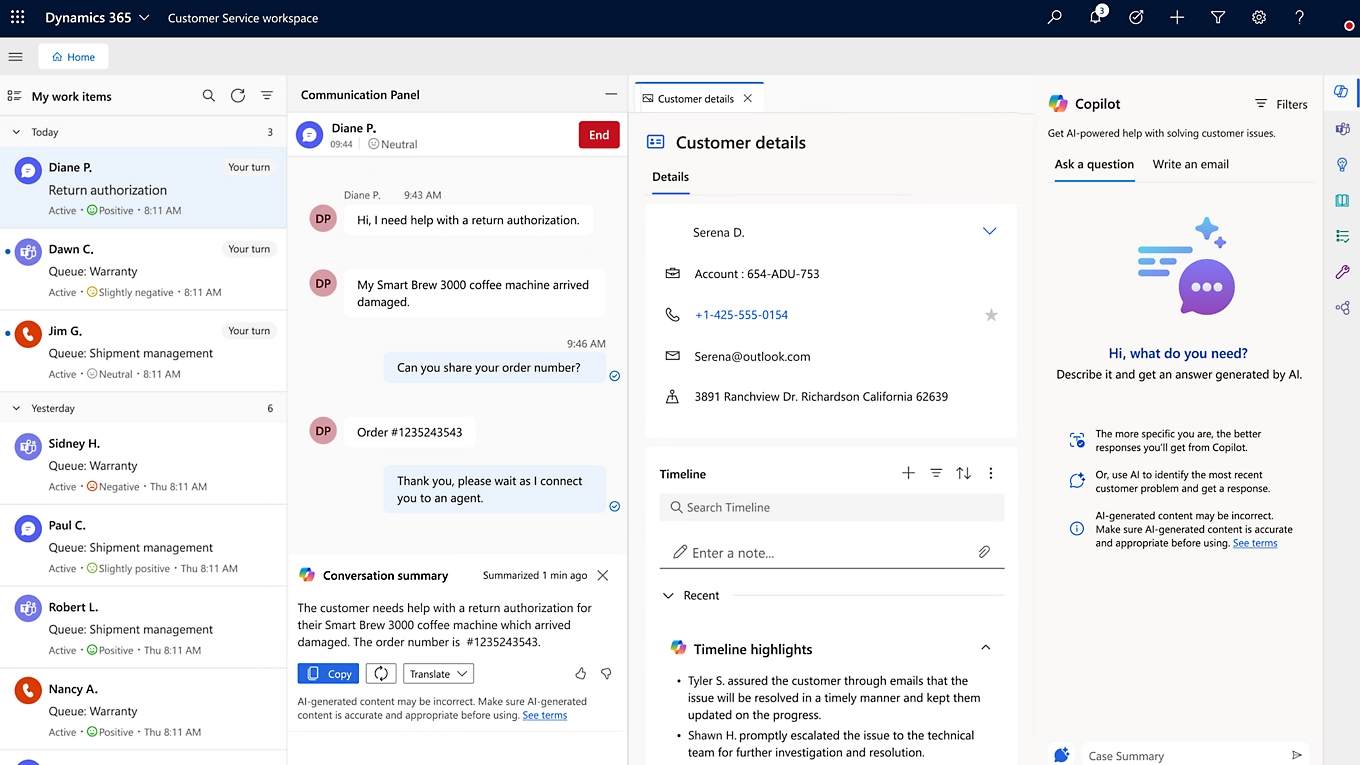
Microsoft Dynamics 365 Customer Service is a cloud-based customer relationship management (CRM) platform designed to help organizations manage and scale their support operations. It centralizes case management, customer interactions, service-level agreements (SLAs), and performance reporting in one unified system. Built on Microsoft Azure, the platform supports secure, reliable, and scalable service delivery for organizations of all sizes.
Dynamics 365 Customer Service connects email, chat, voice, and digital messaging into a single workspace. Agents can see a complete customer history, including prior cases, contracts, entitlements, and communication records. This unified view reduces repetitive questions, improves response quality, and helps teams resolve issues faster. The full range of Dynamics 365 Customer Service capabilities includes case management, unified routing, knowledge management, SLA enforcement, omnichannel engagement, and AI-driven automation. Because it integrates with Microsoft 365, Teams, Power BI, and other Dynamics 365 applications, organizations can extend service data across the broader Microsoft ecosystem.
When enhanced with AI agents and Copilot, Dynamics 365 Customer Service becomes an intelligent service platform. AI can automate repetitive workflows, recommend next-best actions, and monitor service quality in real time. Copilot assists agents by drafting contextual responses, summarizing case history, and retrieving relevant knowledge using natural language prompts. Together, these capabilities help organizations improve resolution speed, strengthen customer satisfaction, and operate more efficiently across all service channels.
Dynamics 365 Customer Service licensing options
Dynamics 365 Customer Service is licensed on a per-user, subscription basis. Each named user who needs access to the system must have their own license. Pricing varies based on the edition selected and the level of functionality required. Organizations can choose from three primary editions depending on service complexity, automation needs, and contact center requirements.
The three available editions include:
- Dynamics 365 Customer Service Professional: $50 per user/month (paid yearly). This edition is designed for organizations with less complex service processes. It includes core case management, knowledge management, a self-service customer portal, and foundational reporting to support structured support operations.
- Dynamics 365 Customer Service Enterprise: $105 per user/month (paid yearly). Enterprise expands on Professional by adding advanced capabilities such as unified routing, customer service insights, embedded analytics, and deeper customization. It is intended for organizations with higher service volume, multiple teams, or more complex workflows.
- Dynamics 365 Customer Service Premium: $195 per user/month (paid yearly). Premium includes all Enterprise functionality plus an integrated contact center solution with digital and voice capabilities. It delivers a Copilot-first experience, AI-driven automation, and full capacity entitlements for both Customer Service and Contact Center applications.
To learn more, read our Dynamics 365 Customer Service licensing and pricing guide.

Unlock the power of Dynamics 365 Customer Service
Ready to improve response times, increase agent productivity, and deliver more connected customer experiences? Request a demo or consultation to see how Dynamics 365 Customer Service can modernize your support operations and help your team resolve cases faster.
What is a Dynamics 365 Customer Service implementation?
A Dynamics 365 Customer Service implementation is the process of deploying, configuring, and optimizing the platform to align with an organization’s service operations and support strategy. This includes setting up case management workflows, service-level agreements (SLAs), omnichannel engagement, knowledge management, and reporting. Implementation also involves configuring security roles, defining routing rules, integrating with existing systems, and preparing agents through structured training. The goal is to create a centralized, scalable service environment that improves response times, increases visibility, and strengthens customer satisfaction.
Because every organization manages support differently, a Dynamics 365 Customer Service implementation must be tailored to specific business requirements. Service volume, channel mix, escalation processes, compliance needs, and reporting expectations all influence system design. A structured implementation typically follows defined phases such as discovery and solution design, configuration and build, testing and validation, deployment, and user adoption. When executed with clear planning and governance, implementation transforms fragmented support processes into a connected, data-driven service model that supports long-term operational growth.
What are the benefits of a Dynamics 365 Customer Service implementation?
A Dynamics 365 Customer Service implementation delivers measurable improvements in efficiency, service quality, and long-term return on investment. By centralizing case management, automating routing, standardizing service processes, and enabling AI-driven assistance, organizations reduce manual effort and improve resolution speed. Real-time visibility into performance metrics allows leaders to identify bottlenecks and optimize staffing. Over time, this structured and data-driven service model improves customer satisfaction, lowers operational costs, and increases agent productivity.
According to a Forrester Total Economic Impact™ study and Microsoft-published results, organizations modernizing service operations with Dynamics 365 Customer Service have reported the following outcomes:
0 %
return on investment over 3 years
0 %
reduction in call handling time
0 %
improvement in first-call resolution
Beyond the measurable ROI, a Dynamics 365 Customer Service implementation improves day-to-day operations in meaningful ways. It creates a structured service environment where agents have the tools, data, and automation needed to perform at a higher level.
Key benefits include:
- Greater service consistency across email, chat, voice, and digital channels
- Improved visibility into service performance, case backlogs, and operational metrics
- Increased agent efficiency through AI-powered recommendations and Copilot assistance
- Reduced manual routing and administrative workload
- Enhanced customer experience through faster, more accurate resolutions
When properly implemented, Dynamics 365 Customer Service becomes a foundation for scalable, predictable, and high-quality customer support.
What are my Dynamics 365 Customer Service implementation options?
Organizations implementing Dynamics 365 Customer Service typically choose between managing the project internally, partnering with a certified Microsoft expert, or selecting a rapid activation versus full digital transformation approach. The right option depends on internal expertise, service complexity, timeline expectations, and long-term strategy. Understanding these Dynamics 365 Customer Service implementation options helps you balance cost, risk, speed, and scalability before starting your deployment.
Self-implementation
Some organizations choose to manage their Dynamics 365 Customer Service implementation internally. This approach means internal IT teams and service leaders handle system configuration, case workflow design, security roles, omnichannel setup, integrations, data migration, and user training. While self-implementation may appear more cost-effective at first, it requires deep familiarity with Dynamics 365 Customer Service architecture, licensing, routing logic, service workflows, and reporting frameworks.
Because Dynamics 365 Customer Service impacts case intake, escalation paths, performance monitoring, and customer communications, misconfiguration can create operational risk. Incomplete routing rules, poorly structured security roles, or inconsistent SLA setup can directly affect response times and service quality. Self-implementation also requires dedicated internal bandwidth, which may divert focus from day-to-day support operations.
Pros of self-implementation:
- High level of control over the implementation process
- Potential cost savings by avoiding external consulting fees
Considerations:
- Resource-intensive and time-consuming
- Requires an internal team with expertise in technical development and functional configuration
- Potential delays in project timelines due to balancing regular operational tasks
Self-implementation can be viable for organizations with experienced Dynamics 365 resources and available capacity. However, it requires disciplined planning and strong governance to ensure the system is configured correctly and delivers measurable service improvements.
Implementation by a Microsoft partner
Working with a certified Microsoft partner can significantly reduce risk and improve the outcome of your Dynamics 365 Customer Service implementation. Experienced partners bring structured methodologies, technical expertise, and real-world service design knowledge to ensure the system aligns with your support processes. From discovery and requirements gathering to configuration, integration, testing, and go-live, a partner helps manage the full lifecycle of the project.
Beyond system configuration, a Microsoft partner also supports user training, change management, reporting strategy, and post-go-live optimization. Because Dynamics 365 Customer Service touches case routing, service governance, omnichannel engagement, and performance analytics, expert guidance helps avoid misconfiguration and adoption challenges. This structured approach often results in faster deployments, stronger governance, and a clearer path to measurable ROI.
Pros of implementation with a Microsoft partner:
- Access to specialized knowledge and expertise in Dynamics 365 Customer Service
- Streamlined implementation process using proven best practices
- Reduced risk of misconfigured routing, service workflows, and security roles
- Faster deployment timelines and improved user adoption
- Ongoing support, optimization, and strategic guidance post go-live
Considerations:
- Additional costs associated with external consulting fees
For organizations seeking predictable timelines, lower implementation risk, and long-term service optimization, partnering with a Microsoft expert provides structured execution and greater confidence in achieving desired business outcomes.
Rapid activation vs full digital transformation
Organizations implementing Dynamics 365 Customer Service typically choose between a rapid activation approach and a full digital transformation. The right option depends on business complexity, timeline expectations, integration requirements, and long-term service strategy. At Rand Group, both approaches follow structured methodologies, but they differ in scope, customization depth, and implementation speed.
Rapid activation is designed for organizations that want to deploy core case management, routing, service workflows, and reporting quickly using best-practice configurations. It minimizes heavy customization and focuses on delivering immediate operational value. A full digital transformation, on the other hand, involves deeper process redesign, advanced automation, complex integrations, custom development, and enterprise-level change management. This approach is ideal for organizations seeking to modernize their entire service ecosystem and align customer engagement strategy across multiple systems and teams.
Below is a high-level comparison of the two implementation models:
What are the steps for a successful Dynamics 365 Customer Service implementation?
Implementing Dynamics 365 Customer Service requires a structured approach that aligns technology with your service goals. At Rand Group, we follow a five-phase methodology that helps organizations configure, deploy, and adopt the platform with clarity and confidence. Each phase ensures the system supports your case management workflows, service operations, routing rules, and reporting needs while preparing your team for long-term success.

Envisioning and design
The process begins by defining your customer service goals, challenges, and success metrics. We work with stakeholders to gather requirements, map case workflows, and outline escalation paths and channel strategy. This results in a detailed solution design that shows how Dynamics 365 Customer Service will support daily operations.

Build
In this phase, our consultants and developers configure the system according to the approved design. This includes setting up the core applications, building custom forms or fields, defining user roles, and importing legacy data. Every element is fine-tuned to match your workflows and user needs.

Test
After configuration, the solution moves into testing. Functional testing and user acceptance testing (UAT) confirm that routing, automation, and reporting work as expected. This phase allows for refinements before go-live to reduce operational risk.

Deploy
Once testing is complete, the system is deployed to production. Final data migration, environment setup, and go-live coordination are completed to ensure a smooth transition. Close monitoring during launch helps maintain service continuity.

User adoption
After go-live, focus shifts to adoption and optimization. Through structured training and ongoing support, agents and managers learn how to use Dynamics 365 Customer Service effectively. Continuous review of performance metrics ensures the platform continues to deliver measurable service improvements.
How long does it take to implement Dynamics 365 Customer Service?
The time required for a successful Dynamics 365 Customer Service implementation varies based on organizational complexity and project scope. Each phase, from design and configuration to testing and deployment, can differ in duration depending on service workflows, integration needs, and internal readiness. It is also important to account for potential delays caused by scope adjustments, data quality issues, or additional training requirements. Building a realistic project timeline with buffer time helps reduce implementation risk.
Critical factors that influence the implementation timeline include:
- Size and complexity of the service organization: Larger teams, multiple support channels, and complex escalation models require more configuration and testing.
- Level of customization and automation: Advanced routing rules, AI configuration, integrations, and reporting extensions increase implementation time.
- Data migration requirements: The volume and cleanliness of historical case data directly impact preparation and validation timelines.
- Availability and engagement of stakeholders: Timely decision-making, user testing participation, and leadership involvement accelerate progress.
The implementation approach also affects the overall timeline. A traditional full digital transformation typically spans 3 to 6 months, especially when involving deep process redesign and complex integrations. In contrast, a rapid activation approach focuses on best-practice configuration and streamlined deployment, reducing the timeline to approximately 6 to 12 weeks.
Traditional implementation
A traditional Dynamics 365 Customer Service implementation is best suited for organizations with complex service models, high case volume, multiple channels, or extensive integration requirements. This approach follows a structured and detailed path through discovery, design, configuration, testing, and user adoption. It allows for deeper customization, advanced routing logic, AI configuration, reporting design, and enterprise-level change management. A full digital transformation typically spans 3 to 6 months, depending on scope and organizational readiness.
Envisioning & design
Build
Test
Deploy
User adoption
Rapid activation implementation
For organizations that need to deploy quickly and have well-defined service processes with limited customization, Rand Group offers a rapid activation model for Dynamics 365 Customer Service. This streamlined approach focuses on configuring core case management, routing, SLAs, and reporting using best-practice frameworks. It reduces complexity while still delivering a scalable and production-ready solution. Most rapid activation projects are completed in 6 to 12 weeks, depending on scope and data readiness.
Project analysis
Design and development
Deployment
Go live
Project closeout
How much does it cost to implement Dynamics 365 Customer Service?
The cost of implementing Dynamics 365 Customer Service can vary widely, starting at $20,000 and ranging to $150,000 or more, depending on the size and complexity of the project. This one-time investment covers activities such as system setup, configuration, data migration, training, and custom development. Factors like the number of users, workflow complexity, channel configuration, and required integrations all influence the final price.
Key drivers of implementation cost include licensing, the level of customization, third-party integrations, and the quality of historical data being migrated. A well-scoped and properly executed implementation protects long-term ROI and reduces the risk of costly rework. Lower-cost options may seem appealing, but poorly configured routing, automation, or security can lead to operational disruption and expensive corrections later.
While cheaper implementation options may be available, they often rely on offshore resources or limited expertise. This can lead to misconfiguration, delays, and failed deployments. Fixing a poor Dynamics 365 Customer Service implementation can cost twice as much as doing it right the first time. Investing in a well-executed implementation protects long-term ROI.

Get a D365 Customer Service implementation estimate
Every service organization is different. Schedule a free consultation with one of our Microsoft Dynamics 365 Customer Service experts to assess your requirements and receive a tailored implementation estimate.
Common Dynamics 365 Customer Service implementation challenges
Implementing Dynamics 365 Customer Service can deliver significant operational benefits, but without the right strategy and oversight, projects can run into serious issues. According to Gartner, between 55% and 75% of enterprise software projects fail to meet their original goals. The reasons often include unclear objectives, misaligned expectations, poor user adoption, and technical missteps. Without careful planning and experienced execution, organizations risk underutilizing the platform, frustrating service teams, and incurring costly rework.
Below are some of the most common issues that can derail a Dynamics 365 Customer Service implementation:
- Insufficient project planning and scope definition
- Lack of stakeholder alignment or executive sponsorship
- Poorly defined case workflows, routing logic, or SLA requirements
- Inadequate data migration or integration strategy
- Limited user training and weak change management
- Over-customization leading to unnecessary complexity
- Miscommunication between IT and customer service teams
Implementing Dynamics 365 Customer Service is not just about deploying technology. It requires aligning people, processes, and systems to ensure routing accuracy, performance visibility, and strong user adoption. Working with an experienced Microsoft partner reduces risk, streamlines execution, and helps organizations realize the full value of their customer service investment.
Benefits of working with the right implementation partner
Working with the right Dynamics 365 Customer Service implementation partner reduces risk and improves overall project outcomes. An experienced partner brings structured methodology, platform expertise, and cross-industry insight to guide planning, configuration, testing, and deployment. This helps prevent common issues such as unclear scope, missed requirements, poor data migration, and low user adoption. A qualified Microsoft partner also accelerates timelines and ensures your Dynamics 365 Customer Service investment aligns with long-term business objectives.
Key benefits of working with a Dynamics 365 Customer Service implementation partner include:
- Proven methodology that reduces implementation risk
- Experienced guidance on planning, configuration, and deployment
- Faster timelines with fewer delays and rework cycles
- Clear requirements management and stakeholder alignment
- Structured data migration and integration planning
- Training and change management to improve user adoption
- Ongoing support and continuous optimization after go-live
Why Choose Rand Group for Dynamics 365 Customer Service implementation?
Rand Group is a certified Microsoft partner with extensive experience delivering successful Dynamics 365 Customer Service implementations. We combine technical expertise with practical service operations knowledge to ensure your platform is aligned with business goals and built for long-term scalability. Our structured methodologies reduce risk, accelerate deployment, and focus on measurable outcomes.
We support both rapid activation deployments and full digital transformation initiatives. From discovery and configuration to adoption and optimization, our team guides every phase of your Dynamics 365 Customer Service implementation to ensure stability and long-term performance.
Our services include:
- Implementation services: We deliver both rapid activation and full digital transformation projects using structured, repeatable methodologies. Our approach ensures predictable timelines and measurable outcomes.
- System integration: We integrate Dynamics 365 Customer Service with telephony, ERP, and other core business systems. This creates a connected service environment with unified data visibility.
- Customization and development: We design tailored workflows, automation, and reporting solutions to match your business processes. D365 Customer Service custom development is delivered with scalability and long-term maintainability in mind.
- User adoption and training: We provide structured training and change management to ensure strong system adoption. Our focus is on helping service teams use the platform confidently from day one.
- Post go-live support and optimization: We offer ongoing Dynamics 365 Customer Service support to maintain performance and stability. Continuous optimization ensures your system evolves with your business needs.
Frequently asked questions
Can I implement Dynamics 365 Customer Service by myself?
Yes, you can implement Dynamics 365 Customer Service internally if your team has the required technical and functional expertise. However, self-implementation requires deep knowledge of configuration, integrations, data migration, security roles, and user adoption planning. Many organizations choose a Microsoft partner to reduce risk and accelerate deployment.
How much does a Dynamics 365 Customer Service implementation cost?
A Dynamics 365 Customer Service implementation typically starts around $20,000 and can exceed $150,000 or more, depending on scope and complexity. Costs are influenced by the number of users, integrations, customization requirements, data migration volume, and training needs. Licensing is separate and ranges from $50 to $195 per user per month based on edition.
How long does it take to implement Dynamics 365 Customer Service?
Implementation timelines vary based on project scope and complexity. A rapid activation approach can take approximately 6 to 12 weeks. A traditional full digital transformation typically spans 3 to 6 months.
What are the stages of a Dynamics 365 Customer Service implementation?
A typical Dynamics 365 Customer Service implementation includes five stages: envisioning and design, build, testing, deployment, and user adoption. Each stage ensures the platform is aligned with business requirements and fully adopted by service teams. Structured methodology reduces risk and improves long-term ROI.
What is the difference between rapid activation and full digital transformation?
Rapid activation focuses on best-practice configuration and faster deployment with limited customization. Full digital transformation involves deeper process redesign, advanced integrations, and broader organizational change. The right approach depends on your service complexity, timeline, and long-term strategy.
Next steps
A successful Dynamics 365 Customer Service implementation starts with clear goals, realistic scope, and a deployment plan that matches your service complexity. The right approach helps you improve service performance quickly while building a foundation you can scale over time.
If you want help planning your implementation, Rand Group can assess your requirements and recommend the best path forward. Contact us to request a consultation and get an implementation estimate.