Dynamics 365
 Power Platform
 Dynamics
 Cloud & Productivity
Microsoft Dynamics 365 CRM integration guide

Your sales team closes a deal. Then the real work begins — manually rekeying the quote into the ERP, emailing finance for an invoice update, and waiting days for someone to confirm delivery. Meanwhile, a billing delay sits unnoticed because service and finance are working from different data.
This is a common problem we see often. Sales teams use CRM to track leads and pipeline. Finance uses ERP to manage orders and revenue. Field service runs on a third platform entirely. When these systems don’t connect, the entire business feels it — through billing delays, duplicate data entry, missed forecasts, and a customer experience that feels disjointed.
Microsoft Dynamics 365 CRM is built to fix that. The term “Dynamics 365 CRM” refers to the Dynamics 365 Customer Engagement(CE) family of apps. This includes Dynamics 365 Sales, Dynamics 365 Customer Service, Dynamics 365 Field Service, Dynamics 365 Customer Insights, Dynamics 365 Contact Center, and Dynamics 365 Project Operations. All of them run on a shared Microsoft Dataverse foundation, which makes integration both powerful and practical.
This guide covers everything you need to know about Microsoft Dynamics 365 CRM integration. You will find integration approaches, Microsoft ecosystem connections, third-party options, costs, risks, and best practices — all in one place.
- What is Microsoft Dynamics 365 CRM?
- What does Microsoft Dynamics 365 CRM integration mean?
- The benefits of Microsoft Dynamics 365 CRM integration
- Understanding the Dynamics 365 CRM architecture
- Common Microsoft Dynamics 365 CRM integration approaches
- Common Microsoft Dynamics 365 CRM integrations
- Real-world Microsoft Dynamics 365 CRM integration examples
- Common Microsoft Dynamics 365 CRM integration risks
- Microsoft Dynamics 365 CRM integration best practices
- Why work with Rand Group for Microsoft Dynamics 365 CRM integration
- Frequently asked questions
What is Microsoft Dynamics 365 CRM?
Dynamics 365 CRM is a suite of cloud-based applications designed to help organizations manage every aspect of the customer relationship. It brings together the tools that sales, service, marketing, and field operations teams use every day — in one connected platform rather than a collection of separate systems.
The platform is built around the idea that every customer-facing team should be working from the same information. A sales rep should be able to see a customer’s service history. A service agent should know what deals are in progress. A field technician should have full context before arriving on site. Dynamics 365 CRM makes that possible by connecting these functions through a shared data foundation.
It is also modular by design. Organizations can start with the applications that address their most immediate needs and expand over time. Whether that means deploying a single sales tool or rolling out a full customer engagement environment across multiple departments, the platform scales to fit.
The suite includes six core applications:
Organizations can deploy just one app or the entire suite. Because all apps share a common data layer — Microsoft Dataverse — they work together without the need for complex custom integration between them. Learn more about Dynamics 365 CRM implementation options.
What does Microsoft Dynamics 365 CRM integration mean?
Integration means connecting Dynamics 365 CRM to other systems so data flows between them automatically. Without integration, teams copy information by hand, work from outdated records, and make decisions based on incomplete data.
With integration in place, a sales quote created in Dynamics 365 Sales flows directly into your ERP as an order. A completed field service work order triggers an invoice in finance. A marketing campaign in Customer Insights pulls live customer data from across the business.
Integration can work in different ways. Some connections sync data on a schedule — for example, updating customer records every hour. Others work in real time, where a change in one system immediately updates another. The right approach depends on the business process, the volume of data, and how quickly teams need that information.
Microsoft Dynamics 365 integration is not a one-size-fits-all solution. Each business has different systems, different workflows, and different requirements. That is why understanding your options matters before you start building.
The benefits of Microsoft Dynamics 365 CRM integration
When your systems are connected, the results show up across the business. Here are the key benefits organizations experience after a well-planned Dynamics 365 integration:
- Operational efficiency: Teams stop rekeying data and chasing information across systems. Workflows that used to take hours become automatic. Staff can focus on higher-value work.
- Unified customer view: Sales, service, and finance teams see the same customer record. No one is working from stale or incomplete data. Every interaction is informed by the full customer history.
- Faster decision-making: Leaders get real-time dashboards that pull from all connected systems. Forecasts reflect actual pipeline and financial data — not last week’s export.
- Better forecasting: When CRM and ERP data are connected, sales forecasts align with actual revenue. Finance can plan with confidence because the numbers are consistent.
- Automation opportunities: Integration enables powerful workflow automation. When a deal closes in CRM, an order is automatically created in ERP. When a case escalates, a work order is automatically dispatched.
- Improved customer experience: Customers get faster responses, accurate invoices, and consistent service. Your team has the context to serve them well — regardless of which department they contact.


Stop making costly integration mistakes
Most integration projects run into the same avoidable problems, and they almost always come down to poor planning rather than poor technology. Download our whitepaper to learn the top 7 data integration mistakes organizations make and exactly how to avoid them.
Understanding the Dynamics 365 CRM architecture
One of the biggest misconceptions about Microsoft Dynamics 365 CRM integration is how the Customer Engagement (CE) applications work together internally.
Applications like Dynamics 365 Sales, Customer Service, Field Service, Customer Insights, and Contact Center are all built on Microsoft Dataverse. Rather than operating as completely separate systems, these applications share a common data foundation and many of the same core tables.
For example, the Account and Contact records used in Dynamics 365 Sales are the exact same records used in Dynamics 365 Customer Service and other CE applications. When a sales opportunity is won, customer information does not need to be synchronized into another CE app because the data already exists within the shared Dataverse environment.
This architecture is one of the reasons organizations can deploy multiple Dynamics 365 CRM applications without building complex integrations between them. Dataverse also provides several capabilities for integrating Dynamics 365 CRM with external systems, including:
- REST-based APIs
- Webhooks and event triggers
- Power Platform connectors
- Azure integration services
- Custom application integrations
Common Microsoft Dynamics 365 CRM integration approaches
There are several ways organizations connect Dynamics 365 CRM with ERP systems, Microsoft applications, and third-party platforms. The right approach depends on the complexity of the environment, data volume, and business requirements.
Power Platform and Microsoft connectivity
For many organizations, Microsoft’s Power Platform provides a flexible way to connect Dynamics 365 CRM with ERP systems, Microsoft applications, and third-party platforms.
Within the Customer Engagement ecosystem itself, applications such as Dynamics 365 Sales, Customer Service, and Field Service already share customer data through Microsoft Dataverse. Because these applications use the same underlying data foundation, organizations typically do not need to build separate integrations between core CE applications.
When businesses need to connect Dynamics 365 CRM with external systems such as Dynamics 365 Business Central, Microsoft 365, or third-party applications, Microsoft provides integration capabilities through tools such as Power Automate and the broader Power Platform ecosystem.
Power Automate is commonly used to:
- automate workflows between systems
- synchronize records
- trigger notifications
- move data across applications
Power Apps lets teams build custom interfaces that surface Dynamics 365 data without writing code. These are useful for field technicians, external partners, or any team that needs CRM data in a simplified view.
This approach works especially well for organizations with moderate data volumes and relatively straightforward integration requirements. We find that many businesses also prefer Power Platform-based integrations because they provide flexibility, visibility into workflows, and easier long-term maintenance compared to heavily customized integration development.
Azure integration services
Organizations with more complex requirements often use Azure-based integration services to support enterprise-scale environments. Azure integration services are commonly used when businesses need:
- high-volume transaction processing
- integrations across multiple systems
- advanced error handling
- real-time orchestration
- enterprise-grade scalability
These environments may include integrations between Dynamics 365 CRM, ERP systems, warehouse platforms, e-commerce applications, and external partner systems.
Custom API integrations
Some organizations require custom integration development when prebuilt connectors are unavailable or business logic is highly specialized.
Dynamics 365 CRM exposes REST-based APIs that allow external systems to securely read and update Dataverse data. Custom integrations are often used for:
- legacy systems
- proprietary applications
- advanced real-time requirements
- highly customized business workflows
The best integration architecture depends on the organization’s systems, long-term growth plans, and operational requirements.
Third-party integration platforms (iPaaS)
Some organizations use integration platform as a service (iPaaS) tools to connect Dynamics 365 CRM with other systems. These platforms offer prebuilt connectors, data mapping capabilities, and centralized monitoring for multi-system environments. Common iPaaS solutions include Jitterbit and similar tools. This approach can be suitable when organizations need a managed integration layer that sits between systems without requiring custom development from scratch.
Common Microsoft Dynamics 365 CRM integrations
The right Dynamics 365 CRM integrations depend on the systems your teams use and the business processes you need to connect. Below are some of the most common integration scenarios organizations use to streamline operations and improve access to customer, financial, and operational data.
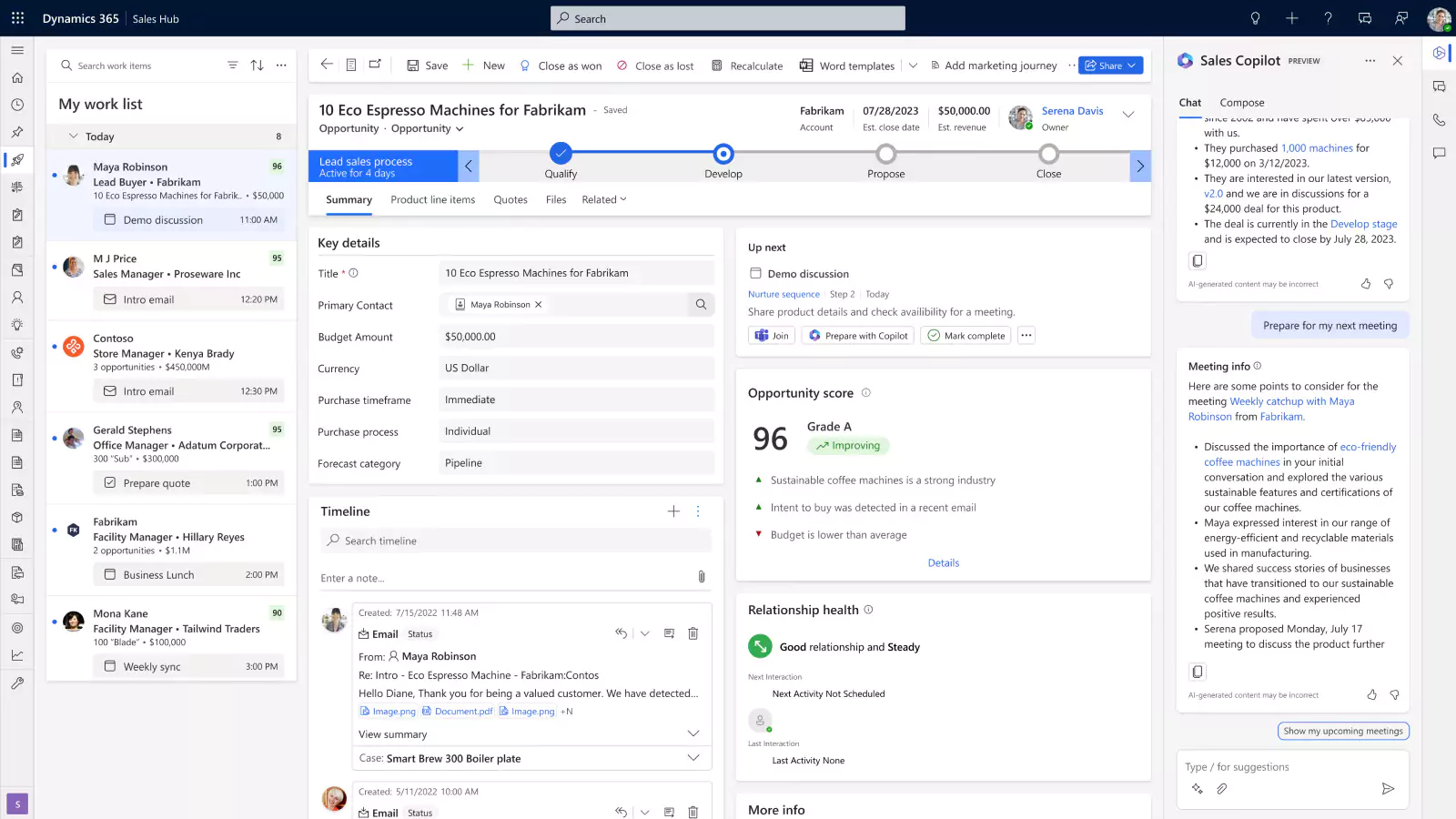
Dynamics 365 CRM and Business Central integration
One of the most common Microsoft Dynamics 365 CRM integration scenarios connects Dynamics 365 Customer Engagement applications with Microsoft Dynamics 365 Business Central.
This integration helps bridge the gap between customer-facing teams and financial operations. Without integration, sales, service, and operations teams often work from incomplete information while finance teams manually re-enter customer records, quotes, service details, and order information into the ERP system.
When Dynamics 365 CRM and Business Central are connected, information can move automatically between both platforms. Customer-facing teams gain visibility into operational and financial data directly inside the CRM environment, while finance and operations teams reduce manual processing and duplicate data entry.
Common integration scenarios include:
- customer and contact synchronization
- quote-to-order workflows
- invoice and payment visibility
- inventory availability lookups
- service work order billing
- project and resource management visibility
- sales forecasting tied to financial data
- support case visibility connected to customer financial information
For example, a salesperson working inside Dynamics 365 Sales may be able to view open invoices, customer payment history, inventory availability, or order status information from Business Central without contacting the finance or operations team.
This type of integration helps organizations improve collaboration between departments while creating faster and more accurate customer interactions. Learn more about Business Central integration with D365 Sales, D365 Field Service, and D365 Project Operations.
Dynamics 365 CRM and Finance & Operations integration
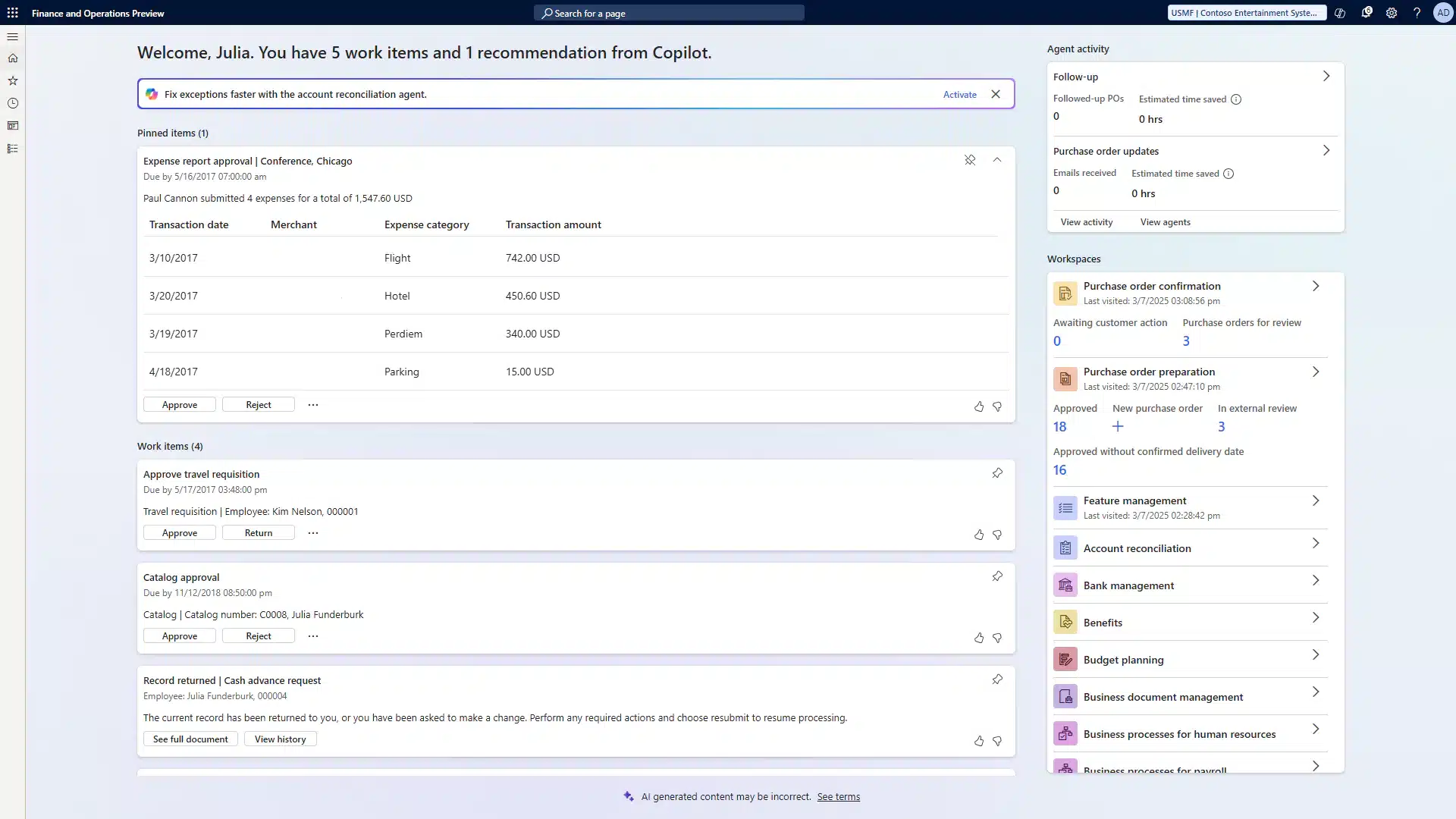
Enterprise organizations often integrate Dynamics 365 CRM with Dynamics 365 Finance & Operations to connect customer engagement processes with large-scale operational and financial management.
Unlike CE applications, Finance & Operations uses a separate ERP architecture and database structure. Integration connects customer-facing workflows with enterprise finance, supply chain, manufacturing, and operational systems.
Microsoft’s Dual-write framework is commonly used to synchronize data between Dynamics 365 Finance & Operations and Customer Engagement applications. Dual-write helps organizations maintain near real-time data consistency across customer, operational, and financial processes. The integration supports all CE applications including Sales, Customer Service, Field Service, and Project Operations.
These integrations are especially important for organizations managing:
- large transaction volumes
- complex supply chains
- enterprise manufacturing operations
- project accounting
- global financial processes
Common integration scenarios include:
- sales order synchronization
- customer account management
- enterprise pricing visibility
- project accounting integration
- field service billing workflows
- operational and financial reporting alignment
For example, when a sales opportunity closes in Dynamics 365 Sales, order and customer information can flow directly into Finance & Operations for fulfillment, procurement, invoicing, and revenue management.
This integration helps enterprise organizations create a more unified operational environment while reducing delays between customer engagement and back-office execution. For organizations looking to go deeper, explore how Finance & Operations integrates with D365 Field Service

Dynamics 365 CRM Integration with Microsoft 365 and Power BI
Dynamics 365 CRM integrates closely with Microsoft business applications including Outlook, Teams, SharePoint, Excel, and Power BI. These integrations help organizations improve collaboration, automate workflows, and create better visibility across customer-facing operations.
Examples include:
- tracking emails and meetings from Outlook
- collaborating on accounts and opportunities inside Teams
- storing customer documents in SharePoint
- editing CRM records in Excel
- building dashboards in Power BI
- automating workflows with Power Automate
These integrations reduce the need for employees to constantly switch between systems throughout the workday while improving access to customer and operational information.
For example, sales representatives can track Outlook emails directly against CRM records, while customer service teams collaborate inside Microsoft Teams during escalated support cases. Organizations using SharePoint integration can centralize contracts, proposals, and service documentation while keeping those files accessible directly inside Dynamics 365 CRM.

Dynamics 365 CRM and third-party systems
Many organizations integrate Dynamics 365 CRM with non-Microsoft platforms including:
- CRM systems
- e-commerce platforms
- warehouse systems
- payroll systems
- custom applications
- industry-specific software
These integrations help organizations eliminate manual data entry, improve visibility, and automate cross-platform workflows.
For example, organizations transitioning from HubSpot to Dynamics 365 may initially synchronize contacts, leads, and marketing activity between platforms before fully consolidating into Dynamics 365 CRM. Learn more about Dynamics 365 and HubSpot integration.

Emerging AI and IoT integration scenarios
Organizations are increasingly extending Dynamics 365 CRM with AI and connected device integrations.
Examples include:
- AI-assisted customer service workflows
- predictive maintenance using IoT sensor data
- automated case routing
- AI-generated call summaries
- intelligent forecasting and recommendations
Microsoft Copilot capabilities are also expanding how organizations interact with Dynamics 365 CRM data across sales, customer service, and operational workflows.
AI is also beginning to accelerate integration development itself. Using Microsoft Copilot and Power Platform tools, organizations can generate portions of Power Automate workflows, simplify mapping configuration, and reduce manual development effort for common integration scenarios.
This helps organizations accelerate integration projects while reducing the amount of repetitive configuration work required during implementation. This area continues to evolve rapidly as organizations explore more advanced AI-native business processes across the Microsoft ecosystem.
Real-world Microsoft Dynamics 365 CRM integration examples
Theory is useful. Seeing integration outcomes in a real business context is more useful.
Sapphire Gas Solutions
Sapphire Gas Solutions is a fast-growing provider of LNG and CNG fuel solutions. Before integration, their CRM was not connected to their back-office systems. Sales, finance, and operations teams worked from disconnected data. Visibility was limited, collaboration was slow, and manual data transfer created frequent errors.
Working with Rand Group, Sapphire implemented D365 Sales and D365 Business Central as a fully integrated platform. Routine processes that previously required spreadsheets and manual data entry now happen automatically inside one connected system. New sales reps onboard faster. Leaders have real-time visibility into sales performance and financial data.
Sales Director Preston McDonald summed up the impact: “Dynamics 365 Sales is a complete game-changer for us. It’s so much easier to use than our previous CRM, and the integration with Business Central means I always have the most up-to-date data, whether it’s pricing or project margins.”
Petroplex Acidizing
Petroplex Acidizing is an oilfield services company that relied on paper-based field processes and a legacy ERP that did not connect to field operations. Work orders, parts usage, and labor costs were entered manually — creating billing delays, reporting gaps, and lost field tickets.
Rand Group migrated Petroplex to Dynamics 365 Business Central and Field Service as an integrated environment. The impact was measurable: field tickets that previously went missing were eliminated entirely, the team saved 32 hours per month on reporting, and administrative time dropped by 4 hours per week. Field activity now flows directly into financial reporting. Operations and finance work from the same data in real time.
Common Microsoft Dynamics 365 CRM integration risks
Integration guides often focus on what is possible. The most helpful ones also tell you what can go wrong. The risks below reflect what our team sees most often when organizations approach integration without a clear plan. They come from real projects — not theory. Understanding them upfront is the difference between an integration that delivers long-term value and one that creates long-term maintenance.
- No defined system of record: Every shared data point needs an owner. Who controls the master customer address — the CRM or the ERP? Who manages credit limits? Without clear rules, both systems try to update the same field and create conflicts. Define system-of-record ownership before development begins, not after the first data conflict appears.
- Scope creep and over-engineering: Integration projects tend to grow. A plan to sync accounts and orders expands to include every entity in the system. The result is a delayed launch, a complex architecture, and a system that is difficult to maintain. Start with the highest-value, lowest-risk data flows. Add complexity after the foundation is stable.
- Inadequate error handling: An integration without retry logic, dead letter queues, and alerting will fail silently. Data stops flowing. No one notices for hours — or days. Build error handling from the start, not as an afterthought. Every integration point should have monitoring that surfaces failures immediately.
- Performance and throttling: Dataverse’s Service Protection limits allow 6,000 API requests per 5-minute window per user. High-volume integrations that do not account for this will hit the ceiling and fail. Design batching strategies and exponential backoff logic into any integration that moves large data volumes.
- Customization fragility: Integrations built on unsupported methods or hardcoded URLs break when Dynamics 365 updates. Build to Microsoft-supported protocols — OData for API access, OAuth 2.0 and Microsoft Entra ID for authentication. This reduces emergency maintenance and protects your investment through future release cycles.
Microsoft Dynamics 365 CRM integration best practices
Over more than 20 years of designing and delivering Dynamics 365 integrations across manufacturing, oil and gas, professional services, distribution, and other industries, our team at Rand Group has identified the practices that consistently separate successful projects from costly ones. These are the principles we apply on every engagement — regardless of the systems involved or the integration pattern chosen.
- Define system-of-record ownership before development starts. Know which system is the source of truth for each data field.
- Match the integration pattern to the workload. Power Automate is ideal for low-volume, simple scenarios. Custom code or Azure middleware is the right call for high-volume or complex requirements.
- Build error handling and monitoring into every integration from day one. Never wait until something breaks to add observability.
- Use role-based access controls for every integration account. Apply the principle of least privilege — integration service accounts should only access what they need.
- Use OAuth 2.0 and Microsoft Entra ID for authentication. Avoid API keys and hardcoded credentials wherever possible.
- Test in a sandbox environment that mirrors production. Validate data flow, error scenarios, and performance before going live.
- Plan for bi-directional synchronization early. Decide upfront which systems can write back — and under what conditions — to avoid circular update loops.
- Maintain a phased integration roadmap. Launch with the highest-value, lowest-risk connections first. Expand from a stable foundation.
- Work with a certified Microsoft specialist for enterprise or multi-system integrations. The complexity increases quickly, and the cost of rework is high.


Ready to connect your systems?
Rand Group designs and implements Dynamics 365 CRM integrations for organizations across manufacturing, distribution, professional services, and more. Our North American team manages the full project — from architecture to go-live.
Why work with Rand Group for Microsoft Dynamics 365 CRM integration
Rand Group helps organizations design and implement Microsoft Dynamics 365 integrations that are scalable, maintainable, and aligned with long-term operational goals. Our team works across the full Microsoft ecosystem, including Dynamics 365, Business Central, Finance & Operations, the Power Platform, Azure integration services, and third-party business systems.
Successful integrations require more than connecting APIs. They require governance, architecture planning, security, monitoring, and lifecycle management to ensure systems remain reliable as business requirements evolve. Rand Group helps organizations build integration environments that support operational efficiency, accurate reporting, and long-term scalability.
From integration strategy and architecture through development, testing, deployment, and support, our team helps clients implement Microsoft-supported integration solutions designed to remain stable through ongoing Microsoft updates and platform changes.
Our 90% client retention rate reflects the way we work. We are not focused on closing a project. We are focused on making sure the integration delivers value over time — and staying engaged to ensure it does. The case studies in this guide reflect real outcomes from real clients. If you want to understand what integration could look like for your organization, we are straightforward to talk to.
Frequently asked questions
What is Dataverse and why does it matter for integration?
Dataverse is the shared cloud database platform that powers all Microsoft Dynamics 365 Customer Engagement applications. Because every CE app stores data in Dataverse, they share the same customer record without needing a custom integration between them. For external systems, Dataverse exposes a REST API, webhooks, and a plug-in architecture that makes integration practical to build and maintain.
Can Dynamics 365 CRM integrate with non-Microsoft systems?
Yes — Microsoft Dynamics 365 CRM integrates with virtually any platform that exposes an API, including other CRM systems, ERP solutions, HR platforms, e-commerce tools, and legacy applications. The right approach depends on the platform, data volume, and how frequently the systems need to exchange information. Learn more about Rand Group’s Dynamics 365 integration services.
How long does a Dynamics 365 CRM integration project take?
A Microsoft Dynamics 365 CRM integration can take anywhere from a few days to several months depending on scope and complexity. A simple two-system connection using Power Automate can go live quickly. A multi-system enterprise integration involving custom API development and rigorous testing typically takes 6 to 16 weeks or more. Key factors include the number of systems, data volume, real-time requirements, and the complexity of field mapping.
What is the difference between native and third-party CRM integrations?
Native integrations use Microsoft-built connectors and shared infrastructure that require little or no custom setup. The Dataverse connection between Sales and Customer Service is a native integration — both apps already share the same data. Third-party integrations connect Dynamics 365 to non-Microsoft systems using APIs, middleware, or pre-built connectors. They require more design work but extend the platform to virtually any system in your technology stack.
Does Dynamics 365 CRM support real-time integrations?
Yes, Dynamics 365 CRM supports real-time integrations through Dataverse webhooks, plug-ins, Azure Service Bus, and event-driven architecture. These tools allow a record change in Dynamics 365 to trigger an action in another system almost immediately, making them useful for time-sensitive workflows such as order confirmations, case escalations, inventory updates, and field service billing.
How much does Dynamics 365 CRM integration cost?
Dynamics 365 CRM integration costs vary depending on the number of systems involved, data complexity, real-time requirements, and the level of customization required. Simple integrations using prebuilt connectors and Power Automate typically require less effort than enterprise integrations involving middleware, custom APIs, or large-scale ERP synchronization. Organizations should evaluate integration costs based on long-term business value, scalability, and ongoing maintenance requirements rather than upfront development effort alone. Speak with a Dynamics 365 integration specialist to get an estimate for your scenario.
Next steps
Microsoft Dynamics 365 CRM integration is how organizations turn a collection of good software into a connected business platform. When your sales, service, field operations, and finance systems share data in real time, the benefits reach every department — faster billing, better forecasts, stronger customer experiences, and fewer hours spent on manual work. The path to integration is well-defined, but the details matter.
Getting the architecture, error handling, and system-of-record decisions right from the start determines whether integration delivers long-term value or creates long-term maintenance. Rand Group has helped organizations across industries design and build Dynamics 365 integrations that hold up — through update cycles, growth, and changing business requirements. Contact us today to start the conversation about what integration can do for your business.