Dynamics 365
 Power Platform
 Dynamics
 Cloud & Productivity
Microsoft Dynamics 365 Field Service for oil and gas

Oil and gas companies depend on field teams to keep equipment running, respond to service needs, complete inspections, manage field tickets, and keep operations moving across remote sites. When scheduling, work orders, maintenance records, inventory, and billing data live in separate systems, teams often rely on manual updates, paper forms, spreadsheets, and delayed communication.
Dynamics 365 Field Service for oil and gas helps connect field operations, dispatch, technicians, equipment data, and back-office systems in one platform. With tools for work order management, technician scheduling, asset tracking, mobile access, inventory visibility, and ERP integration, D365 Field Service helps oil and gas companies improve field execution, reduce manual work, and gain better visibility from the field to the office. This is especially valuable for oilfield services companies that depend on accurate field tickets, mobile crews, equipment readiness, and fast billing cycles.
At a glance
Dynamics 365 Field Service for oil and gas helps oilfield services companies and energy organizations manage work orders, digital field tickets, technicians, assets, maintenance, inventory, scheduling, and service data in one connected system. When integrated with ERP, it can connect completed field work with billing, inventory, job costing, and financial reporting. This helps companies reduce paper processes, speed up invoicing, improve scheduling, strengthen equipment visibility, and gain better field-to-office insight.
Table of contents
- What is Dynamics 365 Field Service?
- Why oil and gas companies need connected field service management
- Dynamics 365 Field Service capabilities for oil and gas operations
- Dynamics 365 Field Service use cases for oil and gas companies
- Benefits of Dynamics 365 Field Service for oil and gas
- How D365 Field Service and ERP integration improve field-to-office visibility
- Partner with Rand Group for Dynamics 365 Field Service in oil and gas
- Key takeaways
- Frequently asked questions
What is Dynamics 365 Field Service?
Dynamics 365 Field Service is Microsoft’s field service management solution for organizations that deliver onsite service. It helps teams manage the full service lifecycle, from the first request to work order creation, scheduling, dispatch, technician execution, and follow-up reporting.
For oil and gas companies, Dynamics 365 Field Service provides a connected way to manage field work across remote sites, customer locations, yards, and facilities. It brings work orders, schedules, technicians, assets, service tasks, inventory, and reporting into one system so field and office teams can work from the same information.
D365 Field Service is often used by organizations that install, inspect, repair, and maintain equipment in the field. These needs are common for oilfield services companies, energy service providers, equipment maintenance teams, and other oil and gas organizations that depend on reliable field execution.
The platform also supports more proactive service models. By connecting asset history, service agreements, technician activity, inventory data, and IoT-enabled equipment insights, oil and gas companies can move beyond reactive service and build more consistent maintenance and response processes.

Why oil and gas companies need connected field service management
Oil and gas field work is complex because teams often manage jobs across remote sites, customer locations, yards, wells, facilities, and job sites. Dispatchers need to assign the right crews quickly, technicians need accurate job and asset details in the field, maintenance teams need equipment history, and finance teams need clean field ticket data for billing. When this information is spread across paper forms, spreadsheets, whiteboards, emails, and disconnected systems, delays and errors become harder to avoid.
Common challenges include:
- Paper field tickets that slow down billing and increase the risk of missing information
- Manual scheduling that makes it harder to respond to urgent work or changing priorities
- Duplicate data entry between field tickets, spreadsheets, billing systems, and ERP
- Scattered maintenance records that make it harder to track asset history and recurring issues
- Limited inventory visibility that can delay jobs when parts, tools, or materials are unavailable
- Delayed field updates that reduce visibility for dispatchers, managers, customers, and finance teams
- Inconsistent processes across crews, locations, service lines, and job types
- Disconnected field and back-office data that makes reporting, invoicing, and decision-making harder

Connect your oil and gas field operations
Disconnected field tickets, schedules, maintenance records, and ERP data can slow down field teams and delay billing. Rand Group helps oil and gas companies use Dynamics 365 Field Service to connect field operations, reduce manual work, and improve visibility.
Dynamics 365 Field Service capabilities for oil and gas operations
Dynamics 365 Field Service includes core capabilities that support oil and gas field operations from the first service request through job completion, review, and billing. These capabilities help teams manage work orders, schedule resources, support technicians, track assets, manage parts, monitor performance, and use AI in practical ways.
Work order management
Work order management is the foundation of Dynamics 365 Field Service. For oil and gas companies, work orders can be used to track repairs, inspections, maintenance tasks, service calls, equipment work, customer requests, and field jobs.
With D365 Field Service, teams can manage:
- Work order type, status, duration, and priority
- Service account and job location details
- Customer assets tied to maintenance, inspection, or repair work
- Service tasks, products, services, and required skills
- Labor, parts, costs, and billable items
- Time and resource preferences
- Work order history for repeat service and asset tracking
Work orders can also be created in several ways, including manually, from a case, from an agreement, from an opportunity, through Power Automate, or through an API. This gives oil and gas companies flexibility to manage one-off service requests, recurring maintenance, and automated workflows.
This helps standardize how field work is completed. A pump inspection, compressor repair, valve replacement, or routine maintenance visit can follow a defined process with the right tasks, parts, skills, and asset details attached.
Work order history also gives managers better visibility. When every job is tracked in one system, teams can review past work, identify recurring issues, and understand the full service history for a customer asset.

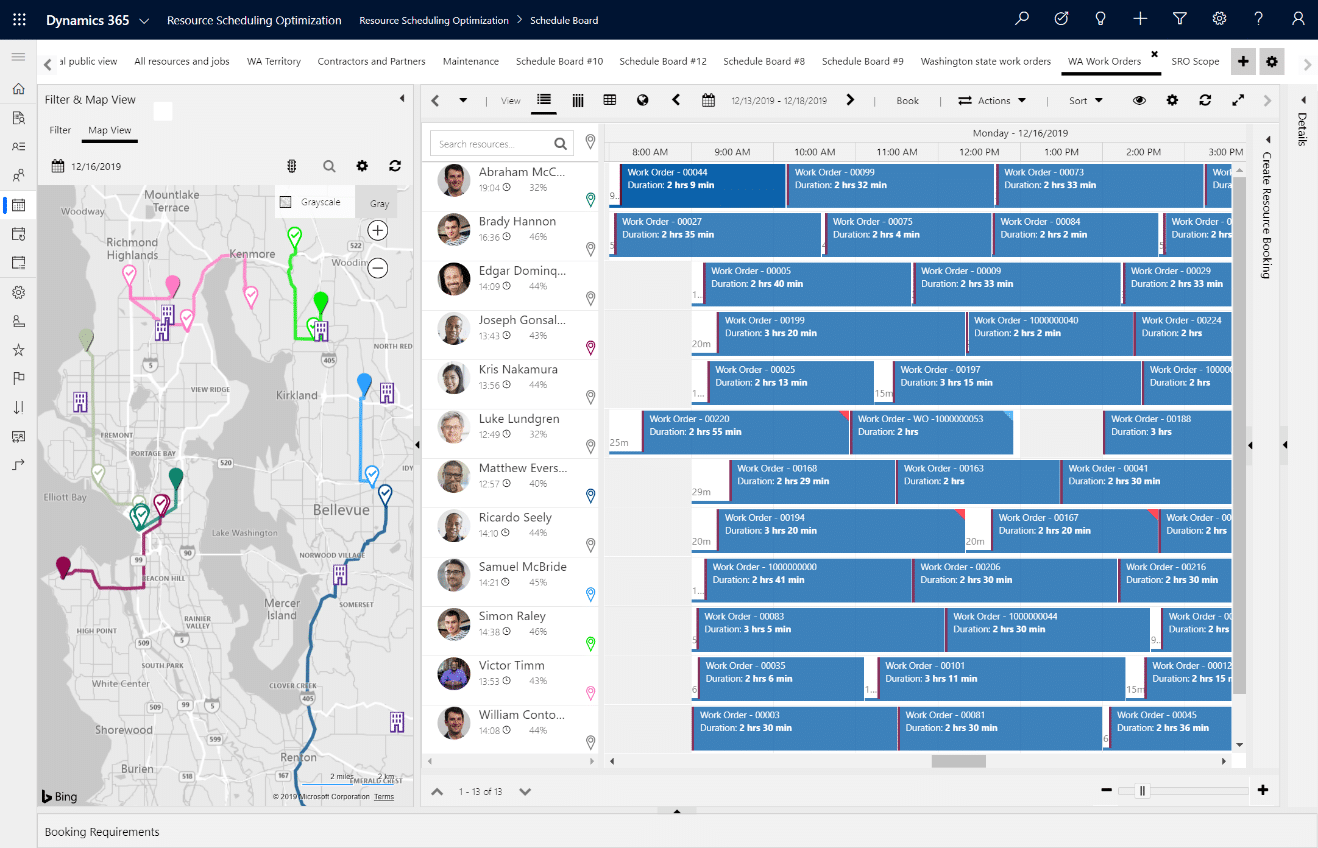
Scheduling and dispatch
Scheduling can be a challenge for oil and gas companies because jobs can change quickly. Urgent service calls, technician availability, job priority, travel time, equipment needs, and required skills all affect the schedule.
D365 Field Service helps dispatchers schedule the right resource for the right job by using:
- Resource requirements
- Bookable resources
- Crews and equipment resources
- The schedule board
- Schedule assistant
- Technician skills and characteristics
- Territories and location data
- Job priority and promised time windows
- Booking records for scheduled work
For oil and gas operations, a resource may be more than one technician. Companies may need to schedule crews, contractors, trucks, equipment, tools, facilities, or other resources needed to complete the job.
Resource Scheduling Optimization is available as a licensed add-in for companies with more complex scheduling needs. It can help schedule multiple jobs at once, match work to the best available resources, maximize resource use, and reduce travel time.
This is useful for oil and gas companies that manage many appointments across large service areas. Better scheduling can help reduce drive time, improve technician utilization, and make it easier to respond to urgent work.
Mobile tools for field technicians
Field technicians need reliable access to work details while they are away from the office. This is especially important in oil and gas, where teams may work across remote sites, customer locations, yards, facilities, and areas with limited connectivity.
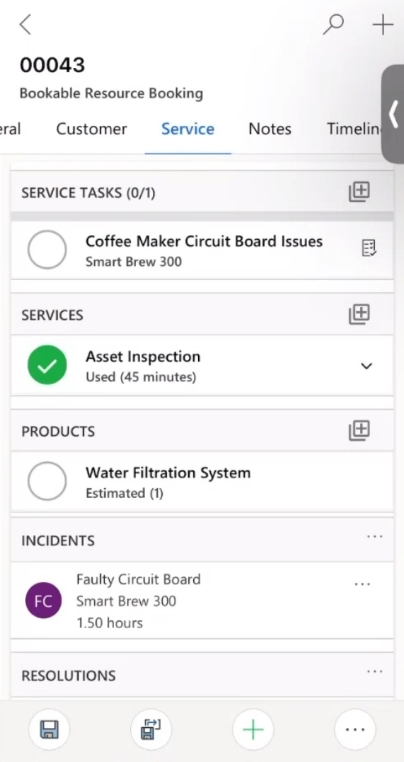
The Dynamics 365 Field Service mobile app helps technicians:
- View work orders and bookings
- Access customer, asset, and job details
- Update booking status
- Capture photos and videos
- Scan barcodes
- Enter time
- Complete service task checklists
- Complete inspections
- View calendar details
- Use driving directions
- Generate customer service reports with signatures
- Work offline when internet access is limited
Oilfield services companies often operate in remote areas where internet access may be limited or inconsistent. With offline capabilities configured in the Dynamics 365 Field Service mobile app, technicians can continue accessing work order details, completing service tasks, capturing notes and photos, recording parts or materials used, and updating job status while they are in the field. Once connectivity is restored, updates can sync back to the system so office teams have more timely and complete field data.
This helps reduce delays caused by paper notes, end-of-day updates, or missing field information. For oil and gas organizations, offline mobile access can improve field-to-office communication while supporting technicians who need to complete work in remote or low-connectivity environments.
Together, mobile and offline capabilities help field teams capture job information closer to the point of service instead of waiting until they return to the office.
Asset and equipment tracking
Oil and gas companies often manage high-value equipment that must be maintained, inspected, repaired, and tracked over time. This can include pumps, compressors, tanks, rigs, trailers, tools, meters, vehicles, customer-owned equipment, and production assets.
D365 Field Service supports customer asset tracking so teams can manage equipment at a service location. Work orders for maintenance, inspection, and repair can be connected to the related asset and service account.
Asset and equipment tracking helps teams manage:
- Asset records
- Equipment location
- Service account relationships
- Work order history by asset
- Maintenance and repair history
- Warranty details
- Notes and documentation
- Related parts and service activity
Asset tracking helps technicians arrive with better context. Instead of relying on paper files or past conversations, they can see prior work, asset history, related service records, and important notes.
Asset records also help managers spot patterns. If the same equipment keeps failing, teams can review work order history and maintenance trends to decide whether to adjust schedules, inspect related assets, change parts, or replace equipment.
Preventative and proactive maintenance
Dynamics 365 Field Service helps oil and gas companies plan, schedule, and manage preventative maintenance before equipment issues disrupt operations. Teams can use the system to create recurring work orders, define maintenance schedules, and track service history against specific assets.
D365 Field Service can support recurring and planned work through:
- Service agreements
- Maintenance schedules
- Recurring work orders
- Inspection schedules
- Predefined work order details
- Asset-based maintenance history
- Service tasks and checklists
- Customer contract requirements
For oil and gas companies, this can support recurring work such as monthly equipment checks, quarterly inspections, planned maintenance visits, safety inspections, and customer service contracts. Usage-based or meter-based maintenance can also be supported with the right configuration or customization.
Connected Field Service can support proactive service when IoT data is available. IoT alerts can help teams identify potential issues, review device data, and create work orders before equipment problems become more costly.
This matters in oil and gas because unplanned downtime can affect crews, customers, production schedules, and revenue. Better maintenance planning gives teams more control over equipment reliability.

Inventory and parts visibility
Field work often depends on having the right parts, tools, and materials available. If a technician reaches a site without the correct part, the job may require a second visit.
Dynamics 365 Field Service includes inventory, purchasing, and returns capabilities for basic field service inventory needs. For more complex inventory, pricing, procurement, or financial requirements, D365 Field Service can integrate with ERP systems.
Inventory and parts visibility can help oil and gas companies track:
- Parts used on work orders
- Products and services tied to field work
- Truck inventory
- Warehouse inventory
- Inventory consumption
- Purchase order activity
- Returned parts
- Materials used for billing or job costing
This helps teams plan work more accurately. Dispatchers and technicians can better understand whether the right parts are available before a job is assigned or completed.
Inventory data also affects billing and job costing. When parts and materials are captured on the work order, finance and operations teams get clearer information about what was used, what should be invoiced, and what needs to be replenished.
Reporting and analytics
Field service reporting helps managers understand what is happening across the field. Without clear reporting, teams may know which jobs are urgent, but they may not see larger trends in technician utilization, asset reliability, customer satisfaction, or service cost.
Dynamics 365 Field Service can help oil and gas companies track KPIs such as:
- Work order volume and open work orders
- Technician utilization and job completion rates
- Travel time and repeat visits
- First-time fix rate and mean time to repair
- Service backlog and service level performance
- Asset maintenance history and recurring equipment issues
- Parts usage, work order costs, and billing readiness
- Customer satisfaction and service quality trends
Dynamics 365 Field Service includes list views and dashboards that help users review operational data, filter records, and monitor key metrics. Dispatchers can track open or overdue work orders, technicians can focus on assigned work, and managers can review performance across teams, assets, and service areas.
Power BI can extend reporting with more advanced dashboards. For oil and gas companies, Power BI can combine field service data with ERP, finance, inventory, and operational data to give leaders a broader view of performance.
Better reporting also supports continuous improvement. If repeat visits increase, managers can review whether the issue is training, scheduling, parts availability, asset condition, or incomplete work order data.

AI and Copilot in D365 Field Service
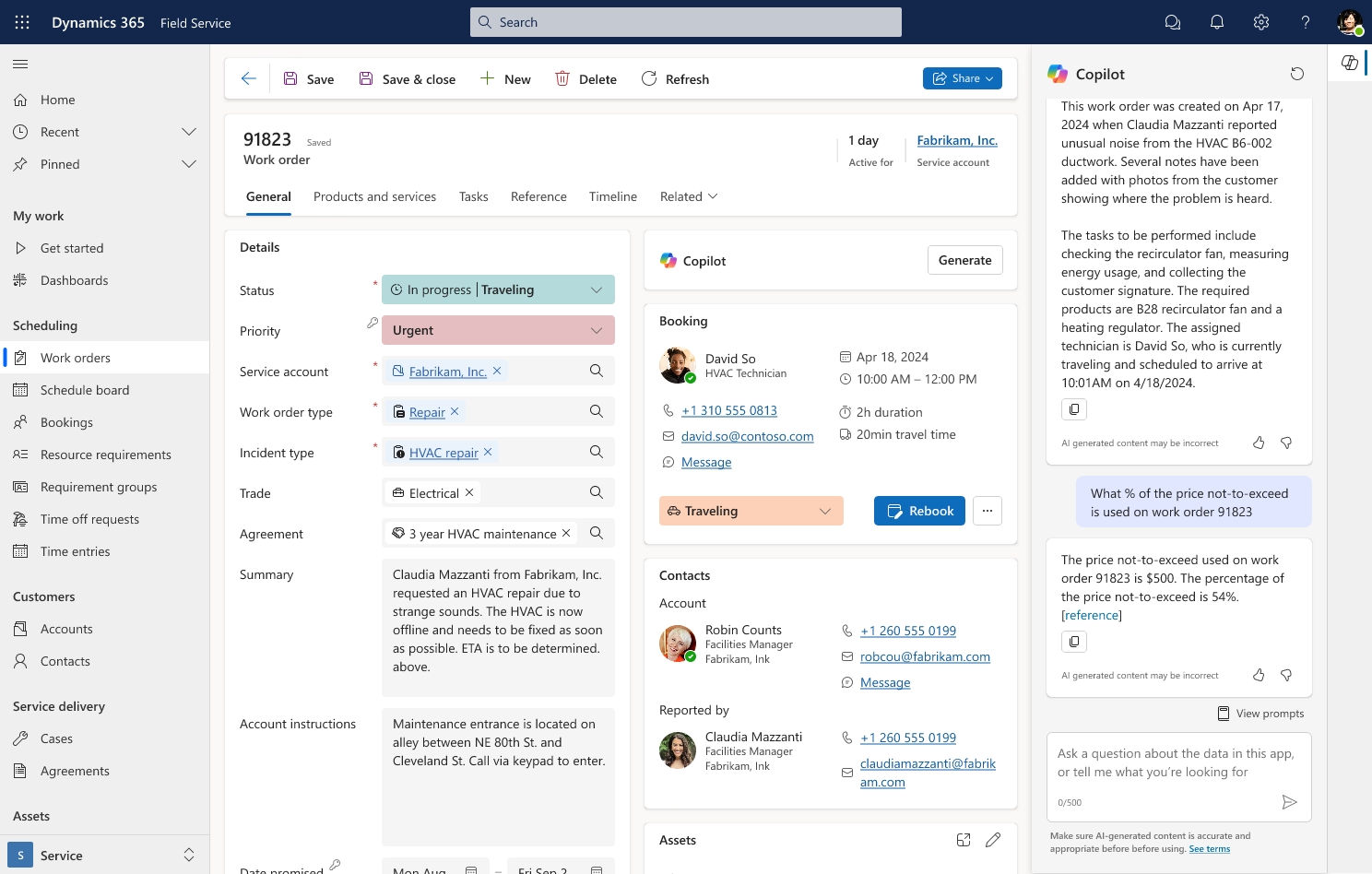
AI and Copilot in Dynamics 365 Field Service help users find information faster, reduce manual work, and support better decisions. For oil and gas companies, this can help dispatchers, technicians, and service managers quickly review work orders, bookings, service history, and job details.
Copilot can support field service teams with:
- Work order summaries
- Booking and work order recaps
- Service account summaries
- Recent record changes
- Onsite visit preparation
- Natural language questions about field service data
- Inspection template creation
- Customer email drafting in supported workflows
Microsoft is also introducing AI agents in D365 Field Service, including a Scheduling Operations Agent focused on dispatch and schedule optimization. This can help dispatchers respond to changing schedules, urgent work orders, technician availability, skills, location, and job priority.
Dynamics 365 Field Service use cases for oil and gas companies
Dynamics 365 Field Service can support several oil and gas field operation scenarios, especially when teams need better control over field tickets, equipment service, technician activity, maintenance work, and field-to-office data flow. Two common use cases are digitizing field tickets and improving asset and equipment maintenance.
How Dynamics 365 Field Service supports digital field tickets
Digital field tickets help oil and gas companies capture job details closer to where the work happens. Instead of relying on paper tickets, manual handoffs, and rekeyed information, teams can use D365 Field Service to collect field data through work orders, mobile forms, inspections, service tasks, notes, photos, parts, labor, and approvals.
For oilfield services companies, Dynamics 365 Field Service can support a connected field ticketing software strategy when configured around mobile data capture, labor, equipment usage, materials, customer approvals, billing workflows, and ERP integration. This allows field ticket information to move from the job site to the back office with fewer manual handoffs.
This use case is important because field tickets often affect invoicing, payroll, job costing, inventory updates, and customer communication. When field ticket data is captured digitally, teams can reduce missing information, shorten review cycles, and improve visibility for dispatchers, managers, and finance teams.
In many oilfield services environments, the paper ticket process depends on getting the right customer or site representative, often called the company man, to review and approve the work before the crew leaves the location. When that approver is unavailable, difficult to locate, or reviewing incomplete paperwork, tickets can be delayed, misplaced, or sent back for clarification. Digital field ticket workflows can help capture the required job details, supporting notes, photos, materials, labor, and approvals while the crew is still onsite.
Digital field ticket workflows can help oil and gas companies manage:
- Labor and crew details: Technicians can record time, work performed, and job status while they are still in the field.
- Equipment and materials used: Teams can capture parts, materials, tools, and equipment tied to the work order.
- Photos, notes, and forms: Field teams can document job conditions, completed work, exceptions, and supporting details.
- Customer approvals: Signatures and service reports can help confirm completed work and support billing.
- Billing readiness: With the right ERP integration, completed work, labor, parts, services, and approvals can move more smoothly into invoicing and financial processes.
For oil and gas companies, this can reduce billing delays and improve data quality because job details are captured at the time and place of service.
Digital field tickets in action: Petroplex customer case study
Petroplex Acidizing partnered with Rand Group to move from paper field tickets, manual tracking, and disconnected workflows to an integrated Dynamics 365 Business Central and D365 Field Service solution. With digital ticketing and mobile field entry, Petroplex achieved a 100% elimination of lost or missing field tickets, reduced invoice cycle times from weeks to hours, improved data accuracy, and saved 4 hours per week in administrative time. Read the full Petroplex case study here.

Digitize field tickets and speed up billing
Paper field tickets, manual approvals, and disconnected billing handoffs can slow down invoicing and create gaps between the field and the office. Rand Group can help you design a digital field ticket workflow in Dynamics 365 Field Service that captures labor, equipment usage, materials, approvals, and billing details closer to the point of service.
How Dynamics 365 Field Service supports asset and equipment maintenance
Oil and gas companies rely on equipment that is expensive, mobile, and often used in demanding conditions. Dynamics 365 Field Service helps teams connect maintenance work to the assets being serviced, giving technicians and managers better visibility into equipment history, service needs, and recurring issues.
A work order can be linked to a specific asset, service account, location, and maintenance activity. This helps teams track repairs, inspections, parts, service notes, and past work in one system instead of relying on disconnected records.
Asset and equipment maintenance workflows can help oil and gas companies manage:
- Asset-based work orders: Teams can connect each service job to the equipment being inspected, repaired, or maintained.
- Service history: Technicians can review prior work, past issues, related service tasks, and asset details before arriving onsite.
- Preventative maintenance: Agreements and recurring work orders can help teams plan scheduled maintenance, inspections, and customer service contract work.
- Usage-based maintenance: Meter-based or condition-based maintenance can be supported when the right data, configuration, or customization is in place.
- Proactive service: Connected Field Service can use IoT alerts to help teams identify potential equipment issues and create work orders before problems become more costly.
- Maintenance reporting: Managers can review repeat failures, downtime patterns, parts usage, and service history to improve maintenance plans over time.
For oil and gas companies, this creates a more structured way to manage equipment reliability. Teams can plan work earlier, reduce manual tracking, and make better maintenance decisions based on asset history and field service data.
Asset maintenance in action: Conquest customer case study
Conquest Completion Services partnered with Rand Group to replace manual maintenance tracking across whiteboards, binders, and spreadsheets with D365 Field Service. The new system supports digital preventative maintenance tracking, custom meter-based maintenance, and automatic notifications, helping Conquest improve equipment visibility, strengthen audit control, and achieve an 80% improvement in efficiency. Read the full Conquest case study here.
Benefits of Dynamics 365 Field Service for oil and gas
Dynamics 365 Field Service helps oil and gas companies improve visibility, reduce manual work, and connect field activity with back-office processes. According to the Forrester Total Economic Impact study, the ROI of Dynamics 365 Field Service is 346% over three years, with a payback period of less than six months.
For oil and gas companies, these benefits often show up in the following areas:
- Faster invoicing: Digital field tickets and ERP integration can help finance teams move from completed work to billing faster. This can reduce delays caused by paper tickets, missing details, and manual re-entry.
- Better scheduling visibility: Dispatchers can see technician availability, skills, job priority, and resource needs in one system. Resource Scheduling Optimization can also help schedule multiple jobs and reduce travel time.
- Reduced manual work: Teams can replace paper forms, spreadsheets, and duplicate data entry with connected workflows. This helps technicians, dispatchers, admins, and managers work from shared information.
- Improved equipment uptime: Asset history, preventive maintenance, agreements, and IoT alerts can help teams identify issues earlier and reduce unplanned downtime.
- Stronger field-to-office communication: Technicians can update work orders from the mobile app, even when offline access is needed. This helps office teams get better information without waiting for paper tickets or end-of-day calls.
- Better inventory control: Parts and materials used in the field can be tracked more accurately. For more complex inventory and pricing needs, D365 Field Service can connect with ERP systems.
- Improved reporting: Managers can monitor work order trends, technician productivity, asset maintenance, backlog, parts usage, and billing readiness. This supports better daily decisions and longer-term planning.
- More consistent service delivery: Standard work order templates, incident types, service tasks, checklists, inspections, and mobile workflows help teams complete work in a more consistent way across crews, service lines, and locations.
How D365 Field Service and ERP integration improve field-to-office visibility
The benefits of Dynamics 365 Field Service become stronger when field service data connects with ERP. Oil and gas field operations do not end when the technician completes the job. Labor, materials, equipment usage, field ticket approvals, service costs, inventory activity, and customer details often need to support billing, purchasing, job costing, and financial reporting.
ERP integration can help oil and gas companies improve:
- Billing speed: Completed work, labor, parts, services, and approvals can move more smoothly from D365 Field Service into billing workflows. This helps reduce delays caused by paper tickets, missing details, and duplicate entry.
- Inventory accuracy: Parts and materials used in the field can be connected to inventory and procurement processes. This helps teams better understand what was used, what needs to be replenished, and what should be billed.
- Job costing: Labor, materials, equipment usage, and service costs can be tied back to the related customer, project, work order, or job. This gives finance and operations teams a clearer view of field service profitability.
- Financial visibility: When field activity connects with ERP, leaders can see how service work affects revenue, cost, inventory, and cash flow. This supports better reporting and faster decisions.
- Data consistency: Integration helps reduce duplicate records and manual updates across systems. Customer, item, service, inventory, and transaction data can stay more aligned between field and back-office teams.
D365 Field Service can be integrated with ERP systems such as Dynamics 365 Business Central and Dynamics 365 Finance & Operations, depending on the organization’s business needs and Microsoft roadmap. To learn more, read our guides on integrating D365 Field Service with Business Central and integrating D365 Field Service with D365 Finance & Operations.

Turn field service data into faster back-office action
When D365 Field Service is connected with ERP, completed work can move more smoothly into billing, inventory, job costing, and financial reporting. Rand Group can help you design an integration strategy that supports both field teams and finance teams.
Partner with Rand Group for Dynamics 365 Field Service in oil and gas
Rand Group helps oil and gas companies implement, integrate, customize, and support Dynamics 365 Field Service. Our team works with clients to digitize field tickets, automate scheduling, connect D365 Field Service with ERP, improve reporting, and support user adoption across field and office teams.
Oil and gas companies often need a partner that understands both field operations and back-office systems. Field service work affects dispatch, technicians, maintenance, inventory, billing, accounting, reporting, and customer communication. A project that only focuses on the mobile app or schedule board may miss the broader process.
For oil and gas companies, D365 Field Service projects often extend beyond mobile work orders and scheduling. Field activity may need to support billing, inventory, job costing, reporting, approvals, and financial processes. Rand Group helps clients look at the full field-to-office workflow so the system supports both field execution and back-office action.
Rand Group brings experience across:
- D365 Field Service implementation: We help companies implement and configure D365 Field Service around real field operations, including work orders, scheduling, mobile access, inspections, service tasks, assets, and reporting.
- ERP integration: We have experience integrating D365 Field Service with ERP systems, including Dynamics 365 Business Central and Dynamics 365 Finance & Operations.
- Customization & development: We customize D365 Field Service when standard functionality needs to support unique scheduling, maintenance, reporting, mobile, or field ticket requirements.
- Oil and gas field workflows: We help digitize field tickets, maintenance tracking, dispatch, equipment usage, approvals, and field-to-office processes.
- D365 Field Service support: We provide ongoing D365 Field Service support to help teams improve adoption, resolve issues, optimize workflows, and adapt the system as business needs change.
Rand Group has more than two decades of business application experience, 3,000+ successful engagements, 1,200+ clients, and a 90% client retention rate. This experience helps oil and gas companies build connected systems that support both field teams and back-office operations.
What our clients say about us
“Rand Group has consistently thought outside of the box in ways I haven’t experienced with other providers. They’ve always offered multiple workable options to address our unique challenges, going beyond what we initially requested.”
– Erin Underwood, VP & CFO, Petroplex Acidizing Inc.
“Implementing Dynamics 365 Field Service with Rand Group was a lifesaving, game-changing event. We have had an 80% gain in efficiency and it’s crazy to think of how we used to do things.”
– Christa Curette, VP of Engineering & Technology, Conquest Completion Services, LLC
Key takeaways
- Dynamics 365 Field Service helps oil and gas companies connect field operations, dispatch, technicians, assets, inventory, and ERP data.
- D365 Field Service supports work order management, scheduling, mobile field work, asset tracking, inventory visibility, reporting, AI, and Copilot.
- Digital field tickets help reduce paper processes, missing information, duplicate entry, and billing delays.
- The Dynamics 365 Field Service mobile app helps technicians capture job details, notes, photos, forms, parts, service tasks, and approvals in the field.
- Asset tracking and preventative maintenance help teams manage equipment history, recurring service, inspections, IoT alerts, and downtime risk.
- ERP integration helps connect field activity with billing, inventory, purchasing, job costing, and financial reporting.
- According to the Forrester Total Economic Impact study, the ROI of Dynamics 365 Field Service is 346% over three years.
- Oil and gas companies can use D365 Field Service to improve invoicing speed, scheduling visibility, field-to-office communication, data quality, and service consistency.
- Rand Group helps oil and gas companies implement, integrate, customize, and support Dynamics 365 Field Service.
Frequently asked questions
What is Dynamics 365 Field Service for oil and gas?
Dynamics 365 Field Service for oil and gas is a field service management solution that helps companies manage work orders, technicians, field tickets, assets, maintenance, inventory, scheduling, reporting, and ERP-connected field operations.
How does Dynamics 365 Field Service help oil and gas companies?
Dynamics 365 Field Service helps oil and gas companies digitize field work, improve scheduling, manage equipment service, track field activity, reduce manual processes, and connect field data with back-office systems.
What is Resource Scheduling Optimization in D365 Field Service?
Resource Scheduling Optimization is a licensed add-in for D365 Field Service that helps schedule multiple jobs, match work to the best available resources, improve utilization, and reduce travel time.
Can Dynamics 365 Field Service integrate with ERP systems?
Yes. D365 Field Service can integrate with ERP systems such as Dynamics 365 Business Central and Dynamics 365 Finance & Operations, depending on the company’s business needs, ERP environment, and Microsoft roadmap.
What are the main benefits of Dynamics 365 Field Service for oil and gas?
The main benefits include faster invoicing, better scheduling visibility, reduced manual work, improved equipment uptime, stronger field-to-office communication, better inventory control, improved reporting, and more consistent service delivery.
Why should oil and gas companies work with Rand Group for D365 Field Service
Oil and gas companies should work with Rand Group because Rand Group helps implement, integrate, customize, and support Dynamics 365 Field Service, including digital field tickets, ERP integration, scheduling, maintenance workflows, reporting, and user adoption.
Can Dynamics 365 Field Service support digital field tickets for oil and gas?
Yes. Dynamics 365 Field Service can support digital field ticket workflows by helping field teams capture labor, equipment usage, materials, notes, photos, forms, service tasks, and customer approvals through work orders and mobile tools. When integrated with ERP, this information can support billing, inventory, job costing, and financial reporting.
Can technicians use Dynamics 365 Field Service offline?
Yes. The Dynamics 365 Field Service mobile app can support offline access when configured correctly. This helps technicians view work order details, complete tasks, capture notes and photos, record parts or materials used, and update job status in remote or low-connectivity areas, then sync updates when connectivity returns.
Transform oil and gas field operations with Dynamics 365 Field Service
Oil and gas companies need more than disconnected tools, paper field tickets, manual scheduling, and delayed reporting. Dynamics 365 Field Service helps connect work orders, technicians, field tickets, assets, maintenance, inventory, reporting, and ERP data so field and office teams can work from the same information.
Rand Group helps oil and gas companies implement, integrate, customize, and support D365 Field Service solutions that fit real field operations. Whether you need to digitize field tickets, improve scheduling, connect D365 Field Service with ERP, or gain better visibility across your field service processes, contact us today to speak with a Dynamics 365 Field Service expert.