Dynamics 365
 Power Platform
 Dynamics
 Cloud & Productivity
AI in action: Transforming Dynamics 365 Field Service with Copilot

Artificial intelligence is rapidly changing how service organizations operate—but its real value lies in how it supports everyday work. In field service, that means helping dispatchers respond faster, enabling technicians to spend more time in the field, and giving teams better visibility into inventory and scheduling.
Dynamics 365 Field Service provides the foundation for managing end-to-end service operations. With Microsoft Copilot embedded into the platform, organizations can move beyond automation to intelligent assistance—using AI to streamline tasks, reduce manual work, and improve service delivery without disrupting existing workflows.
This blog explores how Copilot enhances Dynamics 365 Field Service and provides practical use cases that demonstrate its value across field service operations.
Understanding Dynamics 365 Field Service
Dynamics 365 Field Service is a cloud-based application that supports the end-to-end service lifecycle—from initial request intake through scheduling, execution, and completion. It is designed to help service organizations coordinate people, assets, and inventory in a single, connected system, improving visibility and operational consistency.
Key capabilities include:
- Work order management: Centralizes service requests and work details, providing a structured way to capture customer issues, asset information, required activities, and service expectations. This supports both reactive repair scenarios and planned, preventive maintenance programs.
- Scheduling and dispatch: Enables organizations to assign the right technician to the right job by considering availability, skill sets, location, and existing commitments. This helps reduce travel time, improve first-time fix rates, and balance workloads across field teams.
- Inventory and asset visibility: Connects parts usage and warehouse inventory directly to service activity, giving teams insight into stock levels, consumption patterns, and reorder thresholds. This alignment helps prevent delays caused by missing materials and supports more proactive inventory planning.
- Customer communication: Provides tools to keep customers informed throughout the service process, including appointment confirmations, updates, and completion notifications. Consistent communication improves transparency and contributes to higher customer satisfaction.
As part of Microsoft’s Power Platform, Dynamics 365 Field Service is highly configurable and extensible. Organizations can tailor workflows, data models, and integrations to meet specific operational requirements without relying heavily on custom code. Built on Dataverse and tightly integrated with Microsoft 365 and other Dynamics 365 applications, Field Service fits naturally into broader business processes.
Microsoft’s ongoing investment in AI further enhances the platform’s value. With capabilities like Copilot embedded directly into Field Service workflows, organizations can move beyond basic process automation toward more intelligent, assisted operations—supporting faster decisions, reduced administrative effort, and more effective service delivery.
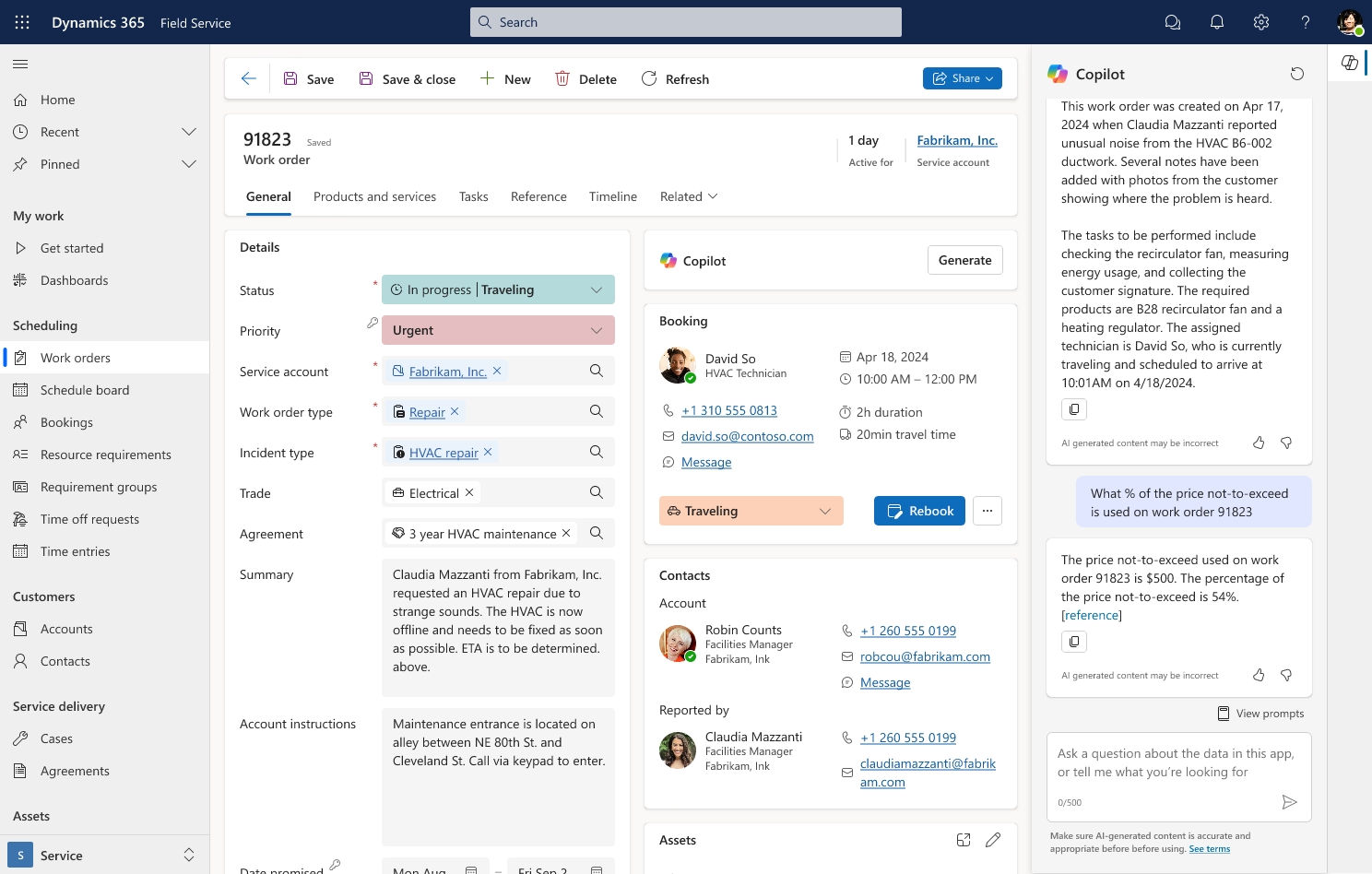
How Copilot in Dynamics 365 Field Service enhances operations
Copilot is Microsoft’s AI-powered assistant designed to support users as they complete their daily work, not replace them. Embedded directly within Dynamics 365 Field Service and Microsoft 365 applications, Copilot brings intelligence into the flow of work—helping dispatchers, technicians, and purchasing teams act more quickly, reduce manual effort, and make better-informed decisions without leaving the systems they already use.
In practice, Copilot works alongside users in both desktop and mobile environments. For example, dispatchers can use the Copilot sidebar in Outlook to draft responses to customer emails or create work orders automatically from the email content. Technicians can summarize work orders on their mobile devices or update records using natural language input. Purchasing teams can quickly check inventory levels or identify items below reorder points without manually navigating tables or reports.
Natural language interface
One of Copilot’s core strengths is its natural language interface. Instead of relying on structured menus or keyword-based searches, users can type or speak plain sentences to ask questions or request actions.
For instance, a dispatcher can ask: “Who is available to handle a work order on Monday?” and receive a list of qualified technicians with their availability. Similarly, a technician can ask Copilot to summarize a work order, review customer contacts, or provide instructions for a task—without scrolling through multiple records or reports. This conversational approach reduces time spent on routine tasks and makes system data far more accessible.
Context-aware intelligence
Copilot retains context within conversations and across organizational data, making its responses more precise and tailored. Follow-up questions do not require repeating information. For example, after reviewing a work order summary, a technician can ask for related asset details or previous service history, and Copilot will automatically provide the relevant information.
Because Copilot is integrated into Microsoft’s ecosystem, it can draw from Dynamics 365 records, Outlook emails, documents, and company templates. Draft emails, work order updates, or statements of work are automatically aligned with the organization’s style, tone, and formatting. This context-awareness ensures that AI outputs are specific to the organization, not generic responses.
Task automation and operational impact
Copilot also automates repetitive or time-consuming tasks, reducing manual effort and human error. Some examples from the transcript include:
- Summarizing work orders: Technicians receive a clear, concise overview of assignments without reading through long timelines or histories.
- Creating work orders from emails: Copilot can extract relevant details such as contact, account, priority, and incident type directly from a customer email.
- Supporting scheduling and routing decisions: Dispatchers can ask Copilot to suggest available technicians and optimal travel routes based on bookings and locations.
- Providing inventory insights: Purchasing teams can check stock levels or identify products below reorder thresholds quickly, without navigating inventory tables.
By automating these tasks, field service teams can focus more on problem-solving, service quality, and customer engagement. This not only improves individual productivity but also strengthens operational consistency across dispatch, field execution, and back-office functions.


Transform your field service operations
Discover how Microsoft Dynamics 365 Field Service, enhanced with Copilot AI, can streamline your operations, reduce administrative tasks, and improve customer satisfaction. Take the next step toward smarter, faster, and more efficient service delivery
Practical use cases of Copilot in Dynamics 365 Field Service
To illustrate how Copilot enhances field service operations, consider three common scenarios that reflect everyday workflows for dispatchers, technicians, and inventory teams.
Dispatcher efficiency
Dispatchers are often the first point of contact for customers reporting issues, and timely response is critical. For example, a dispatcher might receive an urgent email from a customer reporting a malfunctioning HVAC system. Using the Copilot add-in for Outlook:
- The dispatcher can draft a professional, customer-facing response in seconds, maintaining consistent tone and accuracy.
- Copilot automatically maps email content to a new work order, populating key fields such as customer, priority, and issue type.
- The dispatcher confirms the schedule and assigns a technician—all without leaving Outlook.
This workflow significantly reduces manual data entry, accelerates response time, and ensures accurate recordkeeping. By handling routine administrative work, Copilot allows dispatchers to manage more work orders efficiently, respond faster to urgent issues, and maintain a high level of customer satisfaction.
Technician productivity
Field technicians often spend a significant portion of their day on administrative tasks rather than servicing equipment. Copilot streamlines their workflow by:
- Summarizing work orders on mobile devices, providing a concise overview of tasks, asset details, and expected outcomes.
- Updating work orders using natural language input—typed or voice-to-text—so that completed work, labor hours, and material usage are accurately recorded without extra steps.
- Surfacing relevant account or asset information in context, helping technicians troubleshoot or complete tasks more effectively.
With Copilot handling administrative tasks, technicians can spend more time on-site resolving issues. This not only improves productivity but also ensures service records remain complete, accurate, and consistent—supporting better reporting, compliance, and customer follow-up.
Inventory and procurement insights
Managing inventory across multiple warehouses can be complex and time-consuming. For purchasing and inventory teams, Copilot simplifies tracking and planning by:
- Answering questions like, “How much coolant do we have in stock?” or “Which products are below the reorder point?”
- Returning current inventory levels and highlighting items that require replenishment.
- Providing proactive recommendations for procurement, helping prevent stockouts and ensuring critical parts are available when technicians need them.
By eliminating the need to manually navigate complex menus or aggregate data, Copilot reduces errors and speeds decision-making. Inventory and purchasing teams can act faster, maintain optimal stock levels, and support uninterrupted field operations.

AI in action: Transforming Dynamics 365 Field Service operations
See how Microsoft Dynamics 365 Field Service, enhanced with Copilot, helps teams respond faster, optimize scheduling, and manage inventory—all while delivering top-notch customer service.
Benefits of integrating Copilot with Dynamics 365 Field Service
Organizations adopting Copilot in Dynamics 365 Field Service can realize several tangible benefits that improve efficiency, accuracy, and customer satisfaction.
- Faster response times: Automating work order creation from customer emails and quickly drafting professional responses reduces delays in communication. Dispatchers can respond promptly to urgent issues, helping improve customer satisfaction and strengthen trust.
- Improved resource allocation: AI-assisted scheduling and route suggestions allow dispatchers to assign the right technician based on availability, skill set, and location. This optimizes field operations, minimizes travel time, and ensures technicians are utilized effectively.
- Enhanced accuracy: Copilot’s context-aware intelligence ensures that information across emails, work orders, and internal templates remains consistent. Work order details, communications, and documentation reflect the organization’s standards, reducing errors and maintaining data integrity.
- Reduced administrative burden: Repetitive tasks such as summarizing work orders, updating records, or generating routine emails can be automated. This frees staff to focus on higher-value, customer-facing activities, increasing productivity and improving job satisfaction.
- Better inventory management: Copilot provides real-time insights into stock levels, identifies products below reorder points, and supports timely procurement decisions. Purchasing and inventory teams can prevent stockouts, reduce downtime, and ensure technicians have the parts they need to complete jobs efficiently.
By combining Dynamics 365 Field Service’s robust operational capabilities with Copilot’s AI-driven assistance, organizations can operate more efficiently, reduce manual effort, and deliver superior, consistent service experiences to customers.
Frequently asked questions
What is Microsoft Dynamics 365 Field Service and what does it do?
Microsoft Dynamics 365 Field Service is a cloud-based solution designed to manage all aspects of field service operations. It helps organizations handle work orders, scheduling, inventory, and customer communication in a single system.
How does Microsoft Dynamics 365 Field Service help field technicians work more efficiently?
The platform provides mobile access to work orders, customer information, and asset details, allowing technicians to update records, log labor, and track parts usage while on site, reducing administrative tasks and increasing time spent on service delivery.
What scheduling and dispatch capabilities are available in Microsoft Dynamics 365 Field Service?
Field Service automatically assigns the right technician to each job based on availability, skills, location, and workload. This ensures faster response times, balanced team workloads, and higher first-time fix rates.
How does Microsoft Dynamics 365 Field Service handle inventory management for parts and materials?
Field Service integrates inventory tracking into daily workflows, providing real-time visibility into stock levels, usage patterns, and reorder needs. This helps prevent stockouts and ensures technicians have the materials needed to complete jobs efficiently.
Why should my organization choose Microsoft Dynamics 365 Field Service for managing field operations?
Because it centralizes work orders, scheduling, inventory, and customer communication, helping teams operate more efficiently and deliver better service.
Next steps
Dynamics 365 Field Service, powered by Microsoft Copilot, combines automation, intelligence, and flexibility to transform field service operations. By embedding AI directly into workflows, organizations can reduce manual effort, improve response times, and deliver more consistent, high-quality customer experiences.
Rand Group helps organizations implement and optimize Dynamics 365 solutions to maximize the value of these AI-driven capabilities. Our team can assess current workflows, identify opportunities for Copilot integration, and implement tools that automate routine tasks while improving operational efficiency.
We also provide ongoing guidance to ensure adoption and long-term success. To explore how your organization can leverage AI in Dynamics 365 Field Service, schedule a consultation with Rand Group and take the first step toward streamlining operations, enhancing customer satisfaction, and staying ahead in the evolving field service landscape.