Dynamics 365
 Power Platform
 Dynamics
 Cloud & Productivity
Mobile Dynamics 365 Field Service: Empowering technicians on the go

Organizations that rely on field service teams face a common challenge: how to equip technicians with the tools and information they need to work efficiently, deliver accurate service, and maintain clear communication with customers—all while operating outside the office. Field service work is dynamic, with technicians moving between locations, handling different types of equipment, and responding to unexpected issues in real time. Without a centralized system, these complexities can lead to delays, miscommunication, or incomplete documentation.
The Dynamics 365 Field Service mobile app addresses these challenges by bringing the full power of field service management to a mobile device. Technicians can access work orders, customer and asset information, service instructions, and history from anywhere, update progress, log labor and parts, capture photos or signatures, and complete structured inspections. Real-time updates ensure that dispatchers, managers, and customers always have the latest information, while offline functionality allows work to continue even without a network connection. By consolidating critical tools and data in one mobile platform, the app enables field teams to work smarter, increase first-time fix rates, and enhance the overall customer experience.
Why mobile field service matters
Field service operations often involve dynamic schedules, complex assets, and customer expectations for timely service. Traditional methods of managing work orders—paper forms, phone calls, or desktop-only applications—can slow response times, create errors, and limit visibility into the status of work in the field. A modern mobile field service app changes that dynamic.
With Dynamics 365 Field Service mobile, technicians receive real-time updates on work orders, asset information, and scheduling changes. Dispatchers can assign or reschedule work, and technicians instantly see the updates, reducing miscommunication and enabling teams to respond more quickly to customer needs. This constant connectivity not only improves productivity but also allows technicians to perform work more accurately on the first visit, reducing repeat trips and improving customer satisfaction.
Key capabilities of the Dynamics 365 field service mobile app
The Dynamics 365 Field Service mobile app is designed to put everything a technician needs into one intuitive interface. By consolidating scheduling, asset information, work order details, and communication tools, the app helps technicians stay organized, reduce errors, and respond quickly to customer needs. These features work together to support efficient, accurate, and connected field service operations.
- Real-time synchronization: Technicians receive instant updates on new bookings, work order changes, or asset details directly on their mobile device. Updates made in the field automatically sync back to the system, keeping dispatchers and other team members informed.
- Asset visibility and history: Access to customer asset records, service history, and related sub-assets ensures technicians have the context needed to complete work correctly on the first visit.
- Offline functionality: Technicians can work in areas without internet connectivity, updating work order details, capturing photos, and recording parts and labor. Once a connection is restored, all data automatically syncs with the central system.
- Work order management: Technicians can view detailed work order information, including tasks, required parts, labor, and service steps, enabling them to execute jobs efficiently.
- Customer communication: Technicians can provide accurate ETAs and proof of service, improving transparency and strengthening customer trust.
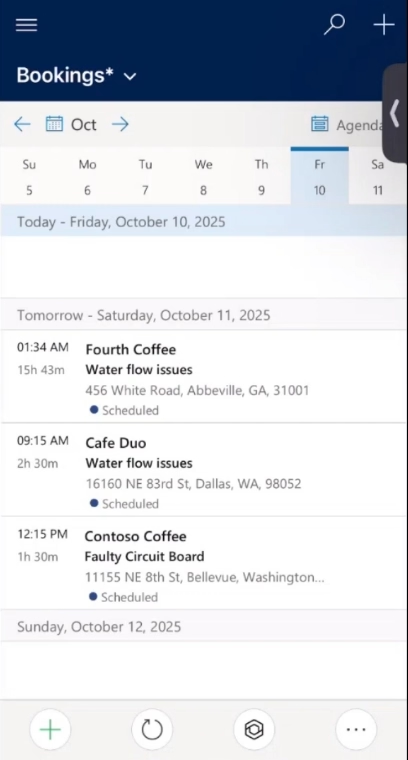
Managing bookings and schedules in Dynamics 365 Field Service
Bookings, or scheduled work orders, are the backbone of effective field service operations. The Dynamics 365 Field Service mobile app gives technicians an organized, centralized view of their assignments for the day, upcoming days, or even weeks into the future. For each booking, the app provides all necessary details: customer information, job location, required parts, labor allocation, and step-by-step task instructions. This ensures that technicians arrive on-site fully prepared and can prioritize work efficiently.
Real-time updates and notifications further enhance scheduling management. If a work order is rescheduled or an urgent request comes in, technicians see the changes instantly on their mobile device. This reduces the need for back-and-forth calls with dispatchers, eliminates confusion, and helps maintain service-level agreements (SLAs). The app also integrates navigation tools, allowing technicians to quickly reach job sites while avoiding delays caused by traffic or unfamiliar locations. By centralizing booking and scheduling information, organizations can improve technician productivity, reduce downtime, and increase overall operational efficiency.
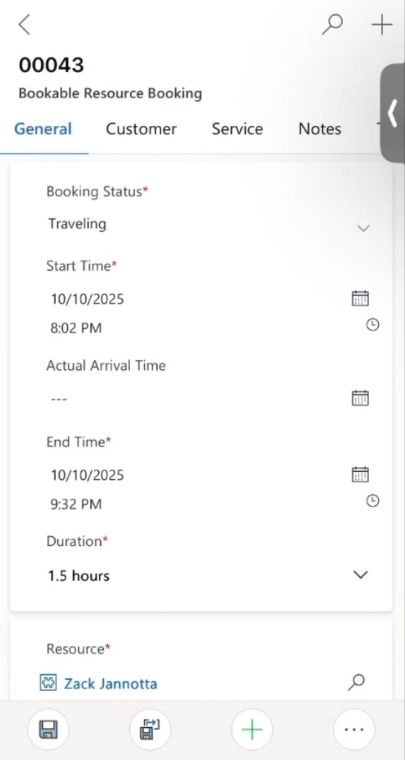
Accessing customer assets and service history in Dynamics 365 Field Service
Technicians often work on complex assets with multiple components or related sub-assets, each with its own maintenance history and service requirements. The Dynamics 365 Field Service mobile app provides a detailed view of these assets, including service history, warranties, and past repairs. This comprehensive context enables technicians to understand prior work, anticipate potential issues, and make more informed decisions on the first visit.
For example, a technician servicing an industrial water pump can immediately review when seals were last replaced, whether certain components have recurring faults, and if any sub-assets need simultaneous maintenance. Access to this information reduces repeat trips, improves first-time fix rates, and strengthens customer trust by demonstrating that technicians are fully prepared and knowledgeable about the customer’s equipment. With asset history readily available in the field, teams can work faster, reduce errors, and maintain a higher standard of service quality.
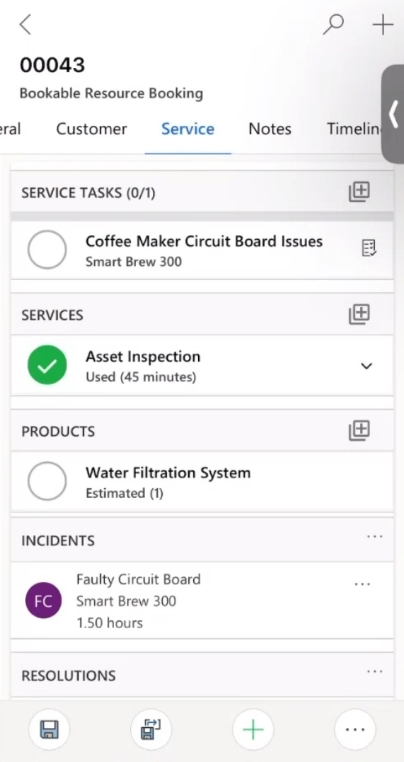
Streamlining inspections and data capture in Dynamics 365 Field Service
Field service work often involves inspections, data recording, and documentation that can be time-consuming if managed manually. The Dynamics 365 Field Service mobile app streamlines this process by providing customizable inspection templates and structured checklists. Technicians can easily capture every required detail while performing work, ensuring consistency across all service visits.
- Completing structured inspection checklists directly in the app to ensure all required steps are followed
- Uploading photos, videos, or notes to document work performed and provide visual evidence of service quality
- Capturing key metrics, such as temperature, runtime, or cycle time, for detailed reporting and future analysis
- Logging labor and parts used for each work order to maintain accurate cost and inventory records
- Collecting digital customer signatures for proof of service and verification of completed work
- Storing all data centrally in Dynamics 365 to enable reporting, trend analysis, and operational insights
By simplifying inspections and automating data capture, the mobile app reduces administrative burden, ensures accurate recordkeeping, and provides managers with actionable insights. Technicians can focus on delivering quality service, while organizations gain a complete, real-time view of field operations and asset performance.

Empower your field service teams with Dynamics 365
Transform how your technicians work on the go with Dynamics 365 Field Service. From real-time scheduling and asset tracking to inspections and proof-of-service, your team can complete jobs faster, improve first-time fix rates, and enhance customer satisfaction.
Enhancing productivity and first-time fix rates in Dynamics 365 Field Service
One of the most significant benefits of the Dynamics 365 Field Service mobile app is its ability to consolidate all relevant work order information, asset data, inspection results, and parts tracking into a single, accessible interface. By providing technicians with everything they need at their fingertips, the app reduces time spent searching for information, minimizes errors, and allows field teams to focus on completing work efficiently. This streamlined access to data directly impacts key performance outcomes across the organization.
Technicians no longer need to call back to the office for missing asset details or part specifications. They can immediately review asset history, reference past work orders, and follow detailed instructions to complete the job correctly on the first visit. This increases first-time fix rates, enhances overall productivity, and accelerates invoice generation. Clear visibility into job status and progress also improves communication with customers, enabling accurate ETAs, timely updates, and a more transparent service experience.
- Improved productivity: Technicians have all work order details, asset information, and required resources in one place, reducing downtime and increasing the number of service calls completed per day.
- Higher first-time fix rates: Immediate access to asset history, previous repairs, and structured work instructions allows technicians to complete tasks accurately on the first visit.
- Reduced invoice cycle time: Real-time logging of parts, labor, and services streamlines invoicing and ensures accurate billing.
- Better customer communication: Live status updates, proof of service, and clear ETAs keep customers informed and build trust.
Utilizing additional mobile features
Beyond core scheduling, asset tracking, and work order management, the Dynamics 365 Field Service mobile app includes additional features that further empower field technicians and support operational efficiency. These tools enhance on-the-job problem solving, collaboration, and data accuracy, helping organizations maximize the value of their field service teams.
- Barcode scanning: Technicians can quickly identify serialized or barcoded assets and parts, reducing errors and saving time when recording used components.
- Push notifications: Real-time alerts notify technicians of new assignments, changes to work orders, or urgent service requests, ensuring they remain up to date without constant manual checking.
- Remote assist: Less experienced technicians can collaborate with senior experts via live video, annotations, and Teams integration, allowing complex issues to be resolved without delay.
Mobile Dynamics 365 Field Service: Empowering technicians on the go
Explore how the Dynamics 365 Field Service mobile app equips technicians with everything they need to stay productive, connected, and effective while on the go.

Real-world workflow of a field service technician
Imagine a technician starting their day with a full schedule of service calls across multiple customer sites. Using the Dynamics 365 Field Service mobile app, the technician navigates the day efficiently, handling each task with clarity and real-time insight:
- The technician receives a notification that a new work order has been assigned.
- They review work order details, including customer information, asset location, and required tasks.
- Using the app, they execute the assigned service tasks, complete inspections, and capture photos or measurements as needed.
- Status updates are applied in real time, so dispatchers and customers know exactly where the technician is and when the work will be completed.
- Parts and labor used are logged, and any additional items required can be added directly in the app.
- Upon completion, the technician captures a customer signature and closes the work order, automatically syncing all data to Dynamics 365 Field Service.
By consolidating scheduling, asset data, inspections, and documentation into one mobile platform, technicians spend more time completing work and less time managing administrative tasks. This workflow increases first-time fix rates, boosts productivity, and enhances the overall customer experience, while giving managers a complete view of field operations.
Measurable outcomes for field service organizations
Organizations using the Dynamics 365 Field Service mobile app see clear improvements across key operational and customer-facing metrics. By giving technicians real-time access to work orders, asset data, inspections, and communication tools, the app streamlines workflows and enhances service quality.
- Increased productivity: Centralized access to customer details, asset history, and work order instructions reduces time spent searching for information, allowing technicians to complete more service calls per day.
- Higher first-time fix rates: Visibility into prior repairs, asset sub-components, and structured instructions helps technicians resolve issues on the first visit, minimizing repeat trips.
- Improved SLA performance: Real-time scheduling updates keep technicians and dispatchers aligned, helping ensure service commitments are met.
- Shorter invoice cycles: Logging parts, labor, and services directly in the app accelerates invoicing and reduces administrative errors.
- Enhanced customer communication: Live status updates, ETAs, and proof-of-service documentation improve transparency and build customer trust.
Frequently asked questions
What is the Dynamics 365 Field Service mobile app?
The Dynamics 365 Field Service mobile app is a tool that enables field technicians to manage work orders, access customer and asset information, perform inspections, and log parts and labor directly from a mobile device. It keeps field teams connected and productive, even while offline.
How does the mobile app improve first-time fix rates?
The app provides technicians with detailed asset histories, previous work orders, and step-by-step instructions. By having all relevant information at their fingertips, technicians can resolve issues correctly on the first visit, reducing repeat trips and increasing customer satisfaction.
Can technicians use the app without internet access?
Yes. The app supports offline functionality, allowing technicians to update work orders, capture photos, record parts and labor, and complete inspections without a network connection. Once reconnected, all data automatically syncs with the central Dynamics 365 system.
How does the mobile app help with customer communication?
Technicians can provide real-time updates on work order status, estimated arrival times, and proof of service. Customers receive timely notifications, while dispatchers and managers have live visibility into field operations, improving transparency and trust.
What additional features does the mobile app offer for field teams?
The app includes barcode scanning for assets and parts, push notifications for work order changes, remote assist for live collaboration with senior technicians, and knowledge base access for on-the-job guidance. These features enhance productivity, accuracy, and problem-solving in the field.
Next steps
Dynamics 365 Field Service mobile app equips field service teams with the tools and insights they need to deliver faster, more accurate, and more transparent service. By enabling technicians to access work orders, customer assets, inspections, parts, and labor directly from their mobile device, organizations can increase first-time fix rates, improve productivity, and strengthen customer relationships.
Rand Group works with organizations to implement Dynamics 365 Field Service in a way that aligns with operational processes, optimizes mobile workflows, and ensures successful adoption. Our team can help assess your current field service operations, design a mobile-first strategy, and guide you through deployment and training.
To learn how your organization can empower field technicians and drive measurable service outcomes, schedule a consultation with Rand Group today.