CRM user adoption strategies: How to increase CRM usage and long-term value

A CRM system can only create value when people use it consistently. Many organizations invest in CRM software to improve sales visibility, customer service, reporting, marketing, and account management. However, they often struggle to get users to enter data, follow workflows, and trust the system.
Strong CRM user adoption strategies help employees understand why the CRM matters, how it supports their daily work, and what processes they are expected to follow. This guide explains how to improve CRM adoption before, during, and after implementation so your organization can improve data quality, increase user engagement, and get more value from your CRM investment.
At a glance
CRM user adoption strategies are the steps organizations take to help employees use a CRM system consistently and correctly. The most effective strategies include role-based training, leadership support, CRM champions, clear usage standards, user-friendly workflows, business outcome alignment, adoption tracking, and ongoing optimization.
Table of contents
- What is CRM?
- What is CRM user adoption?
- Why is CRM user adoption important?
- What causes low CRM user adoption?
- CRM adoption strategies
- How to build a CRM adoption strategy
- How to measure CRM user adoption
- Common CRM adoption mistakes to avoid
- Partner with Rand Group to improve CRM adoption
- Key takeaways
- Frequently asked questions
What is CRM?
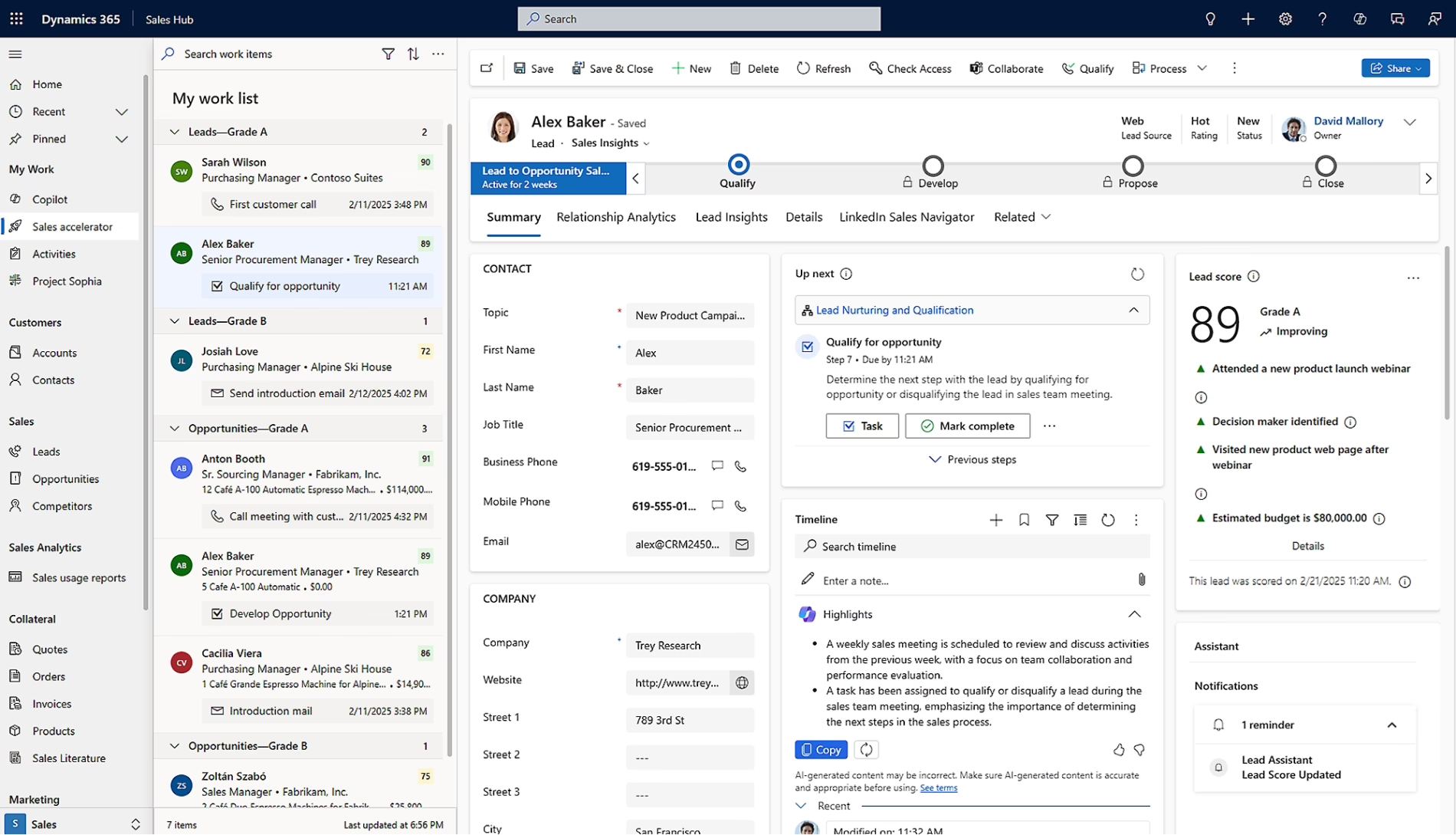
CRM stands for customer relationship management. A CRM is software that helps businesses manage customer relationships, sales activity, service interactions, marketing engagement, and account data in one central system.
Businesses use CRM to improve how teams track leads, manage opportunities, serve customers, follow up on tasks, and report on customer activity. Instead of storing important details in spreadsheets, inboxes, or disconnected tools, a CRM gives employees a shared view of customers and prospects.
CRM systems are used across sales, service, marketing, finance, and leadership teams. Sales teams use CRM to manage leads, opportunities, accounts, activities, and forecasts. Service teams use CRM to manage cases, queues, customer issues, and service levels. Marketing teams use CRM data to segment audiences, support campaigns, and track engagement.
The business value of CRM depends on how well users adopt it. When employees enter accurate data and follow standard processes, leaders can view pipeline health, customer trends, service performance, team activity, and revenue opportunities from one source of truth. When users do not use the system consistently, CRM reports become less reliable and the business loses visibility.
What is CRM user adoption?
CRM user adoption is the extent to which employees use a CRM system consistently as part of their daily work. Strong adoption means users enter accurate data, follow standard workflows, update records on time, use dashboards, and rely on the CRM to manage customer activity.
CRM adoption is not the same as having access to the system. A user may have a CRM license but still keep key information in spreadsheets, emails, or personal notes. True adoption happens when the CRM becomes the standard place where sales, service, marketing, and leadership teams manage customer information and make decisions.
CRM adoption depends on more than training. It also requires clear processes, clean data, leadership support, useful reporting, and workflows that match how users work. A strong CRM adoption strategy helps employees understand what to do, why it matters, and how CRM usage supports better business outcomes.
Why is CRM user adoption important?
CRM user adoption is important because CRM software, implementation, integrations, training, and change management all require a major investment of time and budget. To realize the ROI from that investment, users must enter accurate data, follow standard workflows, and use the system as the source of truth for customer activity. Without consistent adoption, the CRM cannot provide reliable reports, accurate forecasts, or a complete view of customers.
Strong CRM user adoption helps businesses:
- Improve data quality: Users enter complete, accurate, and current customer information in one system instead of spreading it across spreadsheets, inboxes, and personal notes.
- Increase sales visibility: Leaders can review pipeline health, opportunity stages, sales activity, and forecast data without chasing manual updates from each team.
- Support better customer service: Service teams can see customer history, open cases, prior interactions, and next steps, which helps them respond with more context and less delay.
- Reduce duplicate work: Teams spend less time updating offline trackers, building manual reports, or searching for information across disconnected tools.
- Strengthen reporting and decision-making: Managers can use CRM dashboards and reports to understand customer trends, team activity, service performance, and revenue opportunities.
- Improve accountability: Clear CRM usage standards make it easier to track ownership, follow-up, case progress, and opportunity movement.
- Increase return on investment: The business gets more value from its CRM when users apply the system to real work, trust the data, and use it to support daily decisions.

What causes low CRM user adoption?
Low CRM user adoption usually happens when users do not see value in the system or do not understand how it supports their work. If employees believe the CRM only helps management track activity, they may see it as extra work instead of a tool that helps them serve customers, close deals, improve follow-up, or make better decisions.
Common causes of low CRM user adoption include:
- Unclear value: Users may not understand how the CRM helps them work faster, manage customers, close deals, or resolve issues. When the value is unclear, the system can feel like extra administrative work.
- Unclear processes: Users may not know when to create a lead, how to update an opportunity, who owns an account, or what fields must be completed. When expectations are unclear, each person uses the CRM differently.
- Poor data quality: Duplicate accounts, outdated contacts, missing information, and inaccurate records can make users lose trust in the CRM. Once users stop trusting the data, they often create workarounds.
- Overly complex workflows: Too many required fields, unnecessary steps, confusing forms, or long approval paths can make the CRM feel slow and frustrating.
- Generic training: Users need to learn how the CRM supports their specific role. A sales manager, service agent, marketing user, and executive each need different training because they use the system in different ways.
- Low leadership support: If managers do not use CRM data in meetings, forecasts, or performance reviews, users may assume CRM usage is optional.
- Continued reliance on offline tools: CRM adoption can fail when teams are allowed to keep using disconnected spreadsheets, personal task lists, or inboxes as the main source of truth. When offline tools remain the preferred option, the CRM becomes incomplete and less useful.

Struggling to get users to adopt your CRM?
Low CRM adoption can lead to poor data quality, unreliable reporting, missed follow-ups, and reduced return on investment. Rand Group helps organizations identify adoption barriers, improve CRM workflows, and build a practical plan to increase user engagement.
CRM adoption strategies
The best CRM adoption strategies focus on people, process, data, and accountability. Adoption improves when users understand the value of the system, receive role-based training, follow clear standards, and see how CRM supports better business outcomes.
The following strategies are crafted from Rand Group’s decades of experience implementing business software and supporting user adoption. A strong CRM adoption plan should not rely on one launch meeting or one training session. It should include clear communication, practical system design, ongoing support, and regular adoption measurement.

Provide role-based CRM training
Role-based CRM training teaches users how to complete the tasks they perform every day. This is more effective than broad feature training because it connects the system to real work.
Each group needs training that reflects its role. Sales users may need to learn how to manage leads, opportunities, activities, quotes, and pipeline updates. Service users may need to learn how to manage cases, queues, knowledge articles, escalations, and service-level agreements. Managers may need to learn how to use dashboards, forecasts, approvals, and activity tracking.
Training should also continue after go-live. New users need onboarding, existing users need refresher training, and teams may need added guidance when workflows, dashboards, integrations, or CRM features change.
To support role-based CRM training:
- Build training paths by role, department, and process
- Use real examples that match each user’s daily tasks
- Train users on workflows, not just system features
- Include hands-on practice with common CRM scenarios
- Create quick reference guides for repeat tasks
- Offer refresher training after go-live
- Add CRM training to new hire onboarding
Get leadership involved early
Leadership support is one of the most important CRM user adoption strategies. Users are more likely to adopt the system when leaders explain why it matters and use the CRM themselves.
Executive sponsors should connect CRM adoption to business goals. These goals may include better forecasting, faster response times, improved account management, cleaner reporting, stronger customer retention, or less reliance on spreadsheets.
Managers also play a direct role in adoption. They can reinforce CRM usage by reviewing dashboards in team meetings, using CRM data for pipeline reviews, and asking users to update records before forecast discussions.
To get leadership involved:
- Assign an executive sponsor before implementation begins
- Communicate why CRM adoption matters to the business
- Connect CRM use to goals such as sales visibility, service quality, and reporting accuracy
- Use CRM data in meetings, reviews, and planning sessions
- Reinforce CRM as the source of truth
- Encourage managers to model the behavior they expect from users
- Address adoption barriers raised by employees
Identify CRM champions and early adopters
CRM champions are users who help support adoption across the organization. They understand the system, answer peer questions, test workflows, and help reinforce standard processes.
Champions are useful because employees often trust peers who understand their role. A sales representative may be more willing to ask another sales user for help than submit a formal support request.
Early adopters can also provide feedback before the full rollout. They can test forms, dashboards, data fields, and workflows with real business scenarios. This helps the project team find issues before they affect all users.
To build a CRM champion network:
- Select champions from each major user group
- Include sales, service, marketing, operations, and leadership where relevant
- Involve champions during design and testing
- Ask early adopters to test real business scenarios
- Give champions extra training before go-live
- Create a clear process for champions to collect and share feedback
- Recognize champions for helping support adoption
Define clear CRM usage standards
CRM usage standards explain how users should enter, update, and manage information in the system. Without standards, users may follow different habits, which creates inconsistent data and unreliable reporting.
Usage standards should define required fields, naming rules, ownership rules, update timing, opportunity stages, activity tracking, case status updates, and account management expectations. Users should know what must be entered, when it must be updated, and who owns each part of the process.
Clear standards improve reporting because teams follow the same rules. When CRM data is consistent, dashboards become more reliable, forecasts become more accurate, and leaders can compare activity across teams.
To define CRM usage standards:
- Document required fields for key records
- Define when leads, opportunities, cases, and accounts must be updated
- Set rules for account ownership and record ownership
- Standardize opportunity stages, case statuses, and activity tracking
- Create naming rules for accounts, contacts, campaigns, and records
- Explain who owns data cleanup and data quality
- Review standards regularly as processes change
Tie CRM use to business outcomes
CRM adoption improves when users understand how the system supports real business outcomes. Users need to see that CRM tasks are not just administrative work.
For sales teams, CRM usage can support better follow-up, stronger pipeline management, and more accurate forecasting. For service teams, CRM usage can support faster case resolution, better customer history, and clearer escalation paths.
For marketing teams, CRM usage can improve audience segmentation, campaign tracking, and lead handoff. For leadership teams, CRM data can improve visibility into customer trends, revenue risk, and team performance.
To connect CRM use to business outcomes:
- Explain how CRM supports each team’s goals
- Show sales users how CRM helps manage deals and follow-ups
- Show service users how CRM improves case history and response time
- Show marketing users how CRM improves segmentation and lead tracking
- Show leaders how CRM improves forecasting and visibility
- Build dashboards around outcomes users care about
- Share examples of how better CRM data improves decisions
Design around user workflows
A CRM should support how users work. If the system creates too many extra steps, users may avoid it or create workarounds.
Good CRM design starts with understanding user roles. Each role should have forms, views, dashboards, and workflows that match the work they need to complete. Required fields should be limited to information that is truly needed for process, reporting, or compliance.
Workflow design should also consider where users work. Sales representatives, field teams, and service staff may need mobile access. If the CRM is difficult to use outside the office, adoption may suffer.
To design CRM around user workflows:
- Map current workflows before designing the system
- Build role-based forms, views, dashboards, and reports
- Remove fields and steps that do not support a clear business purpose
- Limit required fields to data that is truly needed
- Use automation to reduce duplicate entry and manual follow-up
- Test workflows with real users before go-live
- Review mobile usability for users who work outside the office
Measure adoption and outcomes
CRM adoption should be measured over time. Without measurement, it is hard to know whether users are following processes, entering quality data, or getting value from the system.
Adoption metrics should include both usage and quality. Login activity can show whether users access the system, but it does not prove that data is complete or workflows are being followed.
Outcome metrics are also important. The goal is not just more CRM activity. The goal is better customer visibility, cleaner reporting, faster response, stronger pipeline management, and better business decisions.
To measure CRM adoption and outcomes:
- Track active users by role
- Monitor record creation and record updates
- Review required field completion
- Track opportunity updates, case updates, and activity completion
- Measure dashboard and report usage
- Monitor duplicate records and missing data
- Review support tickets and user feedback
- Compare CRM usage to business outcomes such as forecast accuracy, response time, and pipeline visibility
- Review adoption metrics on a regular schedule after go-live
How to build a CRM adoption strategy
A CRM adoption strategy should begin before implementation and continue after go-live. Each phase should include clear goals, user communication, training, testing, feedback, and measurement.
The best adoption strategies treat CRM adoption as an ongoing business process. Go-live is an important milestone, but it is not the end of adoption work.

Before implementation
Before implementation, focus on planning, alignment, and readiness. This phase should define what successful adoption looks like, who will use the CRM, how processes should work, and what data needs to be prepared before launch.
- Define CRM adoption goals: Decide what successful CRM adoption means for your organization. Goals may include higher data completeness, better forecast accuracy, fewer spreadsheets, faster case resolution, or more consistent follow-up.
- Align goals with system design: Clear adoption goals should guide how the CRM is configured. If the goal is better sales forecasting, the project team should define required opportunity fields, pipeline stages, forecast categories, and manager review processes.
- Identify user groups and role-specific needs: Different teams will use the CRM in different ways. Sales, customer service, marketing, account management, and leadership each need different views, workflows, reports, and training.
- Map current and future workflows: Document how work happens today and how it should happen in the CRM. This helps prevent the project team from copying broken processes into a new system.
- Involve users early: End users should be part of discovery and design. They can explain where current processes slow them down, what data they need, and where automation may help.
- Prepare CRM data before migration: Data cleanup should start before implementation. Duplicate records, outdated contacts, incomplete accounts, and inconsistent naming can weaken user trust from day one.
- Assign sponsors and champions: Identify executive sponsors and CRM champions before launch. These users help communicate the value of the system, support adoption, and reinforce expectations.
During implementation
During implementation, focus on building a CRM that is practical, clear, and aligned with daily work. Users are more likely to adopt the system when forms, workflows, dashboards, and automations support what they need to do.
- Keep the CRM simple: Every required field, approval step, workflow, or customization should have a clear purpose. If a field is not used for process, reporting, or compliance, it may not need to be required.
- Build role-based dashboards and views: Users should see information that helps them act. A sales user may need open opportunities, next steps, and overdue activities, while a service manager may need open cases, aging issues, escalations, and team workload.
- Test with real business scenarios: Testing should include real users and common tasks. Users should test actions such as creating a lead, converting an opportunity, updating an account, managing a case, or reviewing a dashboard.
- Collect feedback before go-live: User feedback should be reviewed before the system is launched to the full business. If users find a process confusing during testing, the project team should adjust it before go-live when possible.
- Train users on tasks and processes: CRM training should show users how to complete their work in the system. Training should focus on workflows, responsibilities, and real scenarios, not just where buttons are located.
- Communicate what is changing: Users need to understand what is changing, when it is changing, and how they will be supported. Clear communication reduces confusion and helps employees prepare for the new way of working.
After go-live
After go-live, focus on support, measurement, and continuous improvement. Even well-trained users may have questions once they begin using the CRM with real customers, real data, and real deadlines.
- Provide accessible post-go-live support: Users should know where to ask questions, report issues, and request help. Support may come from internal champions, administrators, a help desk, or an external CRM partner.
- Plan refresher training: Many users absorb more training once they have worked in the system for several weeks. Refresher sessions can address common questions, reinforce standards, and improve confidence.
- Review adoption metrics early: Adoption metrics should be reviewed soon after go-live. Early reporting can show whether users are logging in, completing required fields, updating records, and following workflows.
- Fix friction points quickly: If users report that a form is too long, a report is unclear, or a workflow creates duplicate work, the issue should be reviewed. Quick improvements help prevent users from building workarounds.
- Improve dashboards and workflows over time: Once users begin working in the CRM, the organization can refine reports, simplify steps, and add automation where it creates value. CRM adoption improves when the system continues to reflect how the business works.
- Make CRM part of standard operations: CRM usage should become part of daily processes, meetings, reporting, and performance reviews. When CRM processes are built into normal work, adoption becomes less dependent on reminders.
How to measure CRM user adoption
CRM user adoption can be measured by tracking whether users access the system, enter complete data, follow standard workflows, and rely on CRM reports for decisions. A strong measurement plan should look beyond login activity and include usage, data quality, process, outcome, and feedback metrics.
Common CRM user adoption metrics include:
- Active users by role: Shows whether the right users are working in the CRM across sales, service, marketing, account management, and leadership.
- Login frequency: Measures how often users access the system, but should be reviewed with other metrics because logging in does not always mean users are following processes.
- Records created and updated: Shows whether users are adding new leads, contacts, accounts, opportunities, cases, activities, or other required records.
- Required field completion: Measures whether users are entering the data needed for reporting, forecasting, customer service, and process management.
- Opportunity updates: Tracks whether sales teams are keeping opportunity stages, close dates, next steps, and forecast details current.
- Case workflow usage: Shows whether service teams are managing cases through the correct statuses, queues, escalations, and resolution steps.
- Dashboard and report usage: Measures whether users and leaders are using CRM data to review performance, manage work, and make decisions.
- Duplicate record rate: Helps identify whether users are creating duplicate accounts, contacts, leads, or opportunities that reduce data trust.
- Training completion: Shows whether users have completed required CRM training, onboarding, or refresher sessions.
- Support tickets by category: Helps identify where users are struggling, such as navigation, reporting, workflows, integrations, or data entry.
- User satisfaction feedback: Provides insight into whether the CRM is easy to use, useful, and aligned with how teams work.
- Business outcome metrics: Measures whether CRM adoption is improving results such as forecast accuracy, pipeline visibility, response time, case resolution time, lead conversion, or customer follow-up.
CRM adoption metrics should be reviewed regularly after go-live. Early reviews can show whether users are logging in, completing required fields, updating records, and following workflows. Ongoing reviews can help leaders identify training gaps, data issues, process confusion, and system friction before they reduce trust in the CRM.
Measurement should not be used only to police users. Adoption data should help the organization improve training, simplify workflows, clean data, strengthen reporting, and increase the value of the CRM over time. The best metrics depend on how your business uses the system, so a sales-focused CRM may need more pipeline and forecasting metrics, while a service-focused CRM may need more case, queue, and resolution metrics.

Turn CRM adoption data into action
CRM adoption metrics can show where users are struggling, but the next step is knowing how to fix the issue. Rand Group helps businesses review CRM usage, improve training, simplify workflows, and optimize the system after go-live.
Common CRM adoption mistakes to avoid
CRM adoption improves when organizations treat the CRM as a living business platform, not a one-time software launch. Training is important, but long-term adoption also depends on clear ownership, clean data, practical workflows, leadership support, regular measurement, and ongoing improvements after go-live.
Common CRM adoption mistakes to avoid include:
- Treating adoption as only a training issue: Training matters, but it cannot fix poor system design, unclear processes, bad data, or weak leadership support. Adoption requires a full strategy that supports people, process, data, and accountability.
- Waiting too long to involve users: If users are not included until go-live, the CRM may not reflect how they work. This can lead to resistance, missed requirements, and late-stage design changes.
- Migrating poor-quality data: Duplicate accounts, outdated contacts, incomplete records, and inconsistent naming can weaken trust in the system. Users are less likely to adopt a CRM when they do not trust the data.
- Making the CRM too complex: Too many fields, forms, workflows, and approval steps can make the system feel slow and frustrating. CRM design should support daily work, not add unnecessary steps.
- Failing to define ownership: Users need to know who owns accounts, leads, opportunities, cases, reports, data cleanup, and process updates. Without ownership, CRM usage becomes inconsistent.
- Allowing offline tools to remain the source of truth: If teams can choose between CRM and spreadsheets, many will keep using the tool that feels familiar. This makes CRM data incomplete and weakens reporting.
- Ignoring adoption data and user feedback: Without regular measurement, leaders may not see adoption gaps until reporting becomes unreliable. User feedback, support tickets, and adoption metrics should guide training, workflow improvements, and data cleanup.
Partner with Rand Group to improve CRM adoption
Rand Group helps organizations plan, implement, optimize, and support CRM systems that align with how their teams work. With more than two decades of experience, 3,000+ successful engagements, 1,200+ clients, and a 90% client retention rate, our team brings deep business, technical, and industry knowledge to CRM projects.
A successful CRM project is not only about software configuration. It is about building a system users can trust, understand, and apply to real work. Rand Group supports user adoption by helping organizations define clear processes, train users by role, improve data quality, align CRM with business outcomes, and continue optimizing the system after go-live.
Rand Group CRM user adoption services include:
- User adoption strategy creation: We help define adoption goals, user groups, success metrics, communication plans, and post-go-live support needs.
- Targeted CRM training: We provide role-based, new user, new implementation, module-specific, feature-specific, technical, admin, end user, super user, and power user training.
- CRM process alignment: We help align CRM workflows with how your sales, service, marketing, and leadership teams actually work.
- Change management support: We help teams communicate change, reduce resistance, reinforce standards, and connect CRM usage to business goals.
- Data quality and reporting support: We help improve CRM data structure, clean up data issues, and build reports that users and leaders can trust.
- Post-go-live support and optimization: We provide ongoing support to answer questions, resolve issues, improve workflows, and help users continue adopting the system.
Case study highlight: Sapphire Gas Solutions
Sapphire Gas Solutions faced adoption and training challenges with its previous CRM setup. The system was complex, difficult to train new users on, and not aligned with Sapphire’s project-driven sales process. Rand Group helped Sapphire replace its old CRM with Microsoft Dynamics 365 Sales, configured the system to fit how the team actually works, and provided targeted training and support to improve user adoption. As a result, Sapphire achieved 40% faster sales rep onboarding and a 50% reduction in manual data entry. To learn more, read the full Sapphire Gas Solutions case study.
What our clients say about us
Rand Group didn’t just implement a system—they helped us rethink our business processes. The team went beyond a ‘canned solution’ and worked closely with us to develop practical, customized solutions.
– Jeff Nelson, Director, Sapphire Gas Solutions
“Would I recommend Rand Group? Absolutely, without a doubt. You don’t just do it for us. You explain things, give us the tools to understand the system, and help us become self-sufficient. It has been a great partnership.”
– Taylor Peak, Accounting Manager, PMC
Key takeaways
- CRM user adoption means employees use the CRM consistently as part of their daily work, not just that they have system access.
- Strong CRM adoption is required to realize ROI from CRM software, implementation, integrations, training, and change management.
- Low CRM adoption often leads to poor data quality, unreliable reports, inaccurate forecasts, duplicate work, and reduced customer visibility.
- Effective CRM adoption strategies include role-based training, leadership support, CRM champions, clear usage standards, workflow alignment, and ongoing measurement.
- CRM adoption planning should begin before implementation with clear goals, user involvement, process mapping, data cleanup, and executive sponsorship.
- CRM adoption should continue after go-live through support, refresher training, adoption tracking, workflow improvements, and ongoing optimization.
- Rand Group helps organizations improve CRM adoption through strategy creation, targeted training, process alignment, change management, data quality, reporting, support, and optimization.
Frequently asked questions
What are CRM user adoption strategies?
CRM user adoption strategies are the steps a business takes to help employees use a CRM system consistently and correctly. Common strategies include role-based training, leadership support, CRM champions, clear usage standards, workflow alignment, adoption tracking, and ongoing support.
Why is CRM user adoption important?
CRM user adoption is important because a CRM only creates value when employees use it. Strong adoption improves data quality, customer visibility, sales forecasting, service performance, reporting, accountability, and return on investment.
How do you increase CRM user adoption?
You can increase CRM user adoption by involving users early, designing workflows around how teams work, cleaning data before launch, providing role-based training, setting clear usage standards, and measuring adoption after go-live.
What causes low CRM user adoption?
Low CRM user adoption is often caused by unclear value, poor training, complex workflows, bad data, weak leadership support, and continued reliance on spreadsheets or offline tools. Users may also resist CRM when they see it as extra administrative work instead of a tool that helps them do their jobs.
What is the best CRM adoption strategy?
The best CRM adoption strategy is to align the CRM with user workflows and business outcomes. Users are more likely to adopt the system when it supports daily tasks, reduces manual work, improves visibility, and helps the business make better decisions.
When should CRM adoption planning begin?
CRM adoption planning should begin before implementation. Teams should define adoption goals, involve users in design, map workflows, prepare data, assign champions, and plan training before the CRM goes live.
How do you measure CRM user adoption?
CRM user adoption can be measured with active users by role, login frequency, record updates, required field completion, opportunity updates, case workflow usage, dashboard usage, training completion, support tickets, user feedback, and business outcome metrics.
What CRM adoption metrics should businesses track?
Businesses should track CRM usage, data quality, process compliance, user feedback, and business outcomes. Common CRM adoption metrics include active users, record updates, duplicate records, dashboard usage, opportunity updates, case resolution activity, training completion, and reduction in offline spreadsheets.
How does CRM training improve user adoption?
CRM training improves user adoption by teaching employees how to complete their daily work in the system. Role-based CRM training is most effective because it focuses on the workflows, dashboards, reports, and tasks each user group needs.
How can leadership support CRM user adoption?
Leadership can support CRM user adoption by explaining why the system matters, using CRM data in meetings, reinforcing usage standards, and holding teams accountable for data quality. Adoption is stronger when leaders treat the CRM as the source of truth.
How can a CRM partner help with user adoption?
A CRM partner can help improve user adoption by creating an adoption strategy, aligning CRM workflows with business processes, migrating clean data, training users, building useful reports, supporting change management, and providing post-go-live optimization.
Turn CRM adoption into long-term business value
A CRM system should make customer data easier to manage, not harder to use. With the right CRM adoption strategy, your team can move away from disconnected spreadsheets, inconsistent processes, incomplete records, and unreliable reporting toward a system that supports daily work and better decisions.
Rand Group helps organizations improve CRM adoption through strategy creation, targeted training, process alignment, change management, data quality, reporting, support, and ongoing optimization. Contact us today to build a CRM adoption strategy that helps your users trust the system, follow the right processes, and get more value from your CRM investment.