Dynamics 365
 Power Platform
 Dynamics
 Cloud & Productivity
What is Resource Scheduling Optimization in Dynamics 365 Field Service?

In field service operations, scheduling is rarely as simple as assigning the closest technician to the next available job. Dispatchers must balance technician certifications, territory coverage, service-level agreements, customer expectations, emergency requests, and travel time — often while adjusting schedules throughout the day.
Many field service organizations initially rely heavily on dispatcher knowledge and manual scheduling processes. While experienced dispatchers can keep operations running effectively, scheduling becomes increasingly difficult as service teams grow, appointment volumes increase, and customer expectations tighten.
This is where Resource Scheduling Optimization (RSO) for Dynamics 365 Field Service can provide significant operational value.
RSO is an add-on for Dynamics 365 Field Service that automatically optimizes and schedules work orders based on configurable business rules, operational priorities, and scheduling objectives. Rather than requiring dispatchers to manually evaluate every technician, territory, certification, and route, RSO continuously analyzes scheduling data to generate more efficient assignments and improve overall service delivery.
What is Resource Scheduling Optimization?
Resource Scheduling Optimization (RSO) is an add-on for Dynamics 365 Field Service that automatically assigns work orders to the most appropriate technicians based on configurable business rules, operational priorities, and scheduling objectives.
Rather than relying entirely on manual scheduling, RSO continuously evaluates scheduling data to help organizations improve efficiency, reduce travel time, and better align resources with customer and operational requirements.
The solution evaluates factors such as:
- Technician skills and certifications
- Resource availability
- Scheduling windows
- Territory alignment
- Job priority
- Travel time
- Existing appointments and route efficiency
- Required roles and service capabilities
Organizations can configure RSO around operational goals such as improving technician utilization, prioritizing emergency service requests, reducing travel costs, or assigning specialized technicians to complex work orders.
One of the biggest advantages of RSO is its flexibility. Some organizations prioritize faster response times and SLA performance, while others focus more heavily on reducing windshield time, balancing workloads, or improving scheduling consistency across regions. The most effective optimization strategies are typically aligned with the organization’s actual service delivery goals rather than applying the same scheduling logic across every scenario.
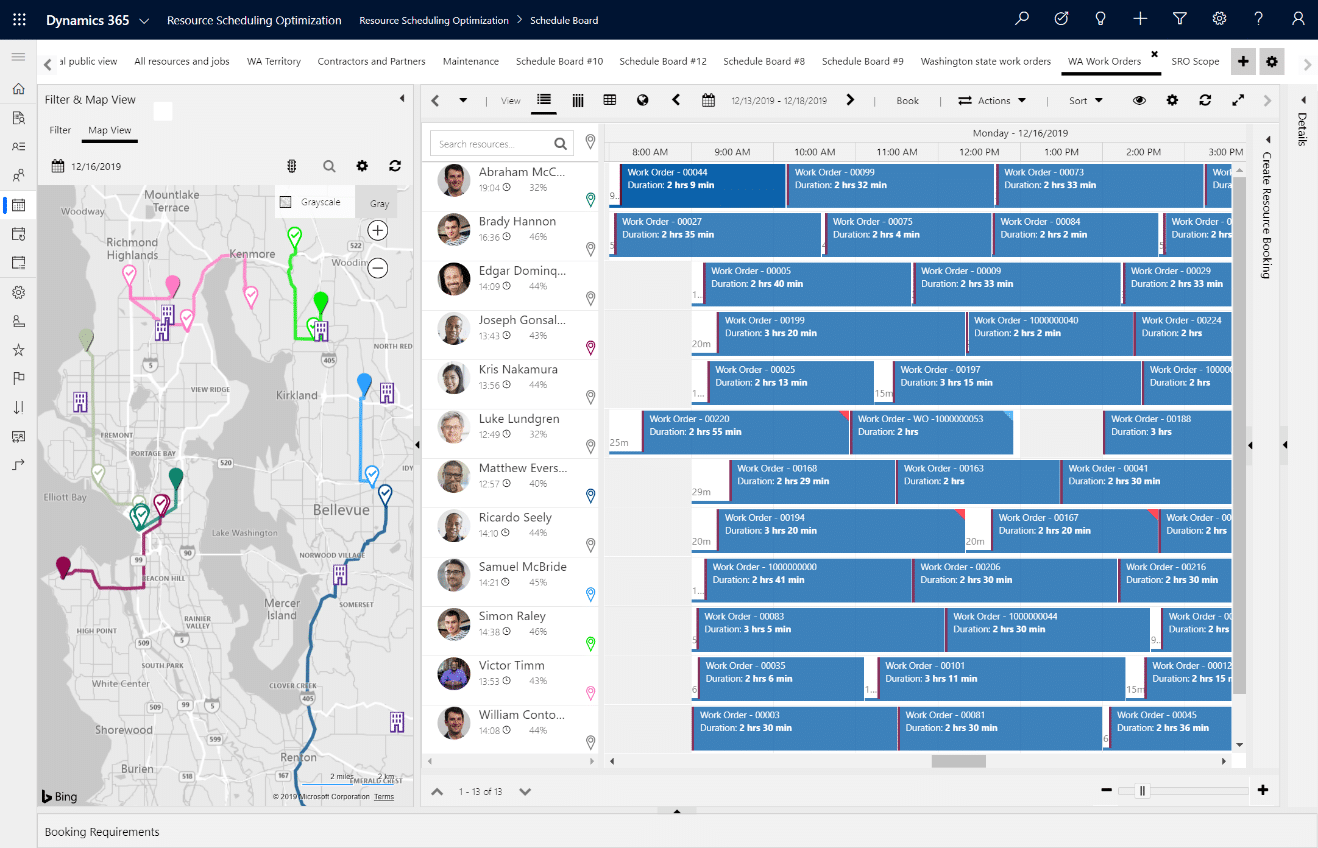
How Resource Scheduling Optimization works in practice
In day-to-day operations, Resource Scheduling Optimization helps dispatch teams manage changing schedules, shifting priorities, and real-time service demands more efficiently.
Organizations can configure optimization runs around operational factors such as territories, business units, appointment types, shift structures, resource pools, or emergency service scenarios. Many companies schedule overnight optimization runs to prepare technician schedules for the next business day while also running additional optimization cycles throughout the day to accommodate delays, cancellations, or newly created work orders.
One feature many dispatch teams find particularly valuable is single-resource optimization. This allows dispatchers to re-optimize an individual technician’s route and schedule without disrupting the broader service schedule. This becomes especially useful when handling emergency service calls, last-minute scheduling changes, dynamic routing adjustments, or high appointment volumes.
Once optimized schedules are generated, dispatchers can review assignments directly within the Dynamics 365 schedule board alongside route maps and travel details. While RSO automates much of the scheduling process, most organizations still rely on dispatcher oversight to manage customer escalations, technician preferences, operational exceptions, and special service requests that may require additional business context beyond scheduling data alone.
What are the benefits of using Resource Scheduling Optimization?
Dynamics 365 Field Service offers three primary ways to schedule resources: manual scheduling, the Scheduling Assistant, and Resource Scheduling Optimization (RSO). While manual scheduling and the Scheduling Assistant can work well for smaller service teams, organizations with growing field operations often run into efficiency and scalability challenges as appointment volumes increase and scheduling becomes more complex.
- Reduced manual scheduling effort: One of the biggest operational benefits of RSO is reducing dispatcher workload. Without automation, dispatchers often spend hours reviewing technician availability, certifications, territories, and travel routes while constantly adjusting schedules throughout the day. RSO helps automate these decisions by evaluating multiple scheduling factors simultaneously and generating optimized assignments automatically. In our experience, this becomes especially valuable for organizations managing large technician teams, multiple service regions, high work order volumes, or strict service-level agreements.
- Improved scheduling accuracy: Manual scheduling processes can create avoidable errors, particularly in fast-moving service environments. Common issues include assigning technicians without the required certifications, overbooking resources, creating inefficient travel routes, or overlooking high-priority work orders. By consistently applying predefined business rules and optimization criteria, RSO helps reduce scheduling mistakes and improve operational consistency across the organization.
- Increased technician utilization: A common challenge we see across field service organizations is low technician utilization caused by excessive travel time, scheduling gaps, or uneven workload distribution. RSO helps improve productive working hours by reducing unnecessary travel, consolidating appointments geographically, balancing workloads more effectively, and filling schedule gaps throughout the day. Over time, this can help organizations improve service capacity without immediately increasing headcount.
- Better customer service outcomes: More efficient scheduling often leads to better customer experiences. Organizations commonly see improvements in on-time arrival rates, response times, SLA compliance, first-time fix rates, and overall appointment consistency after implementing scheduling optimization. In our experience, customers may never know an optimization engine is being used behind the scenes, but they do notice when technicians arrive on time, are properly prepared, and resolve issues efficiently.
- Scalability without expanding dispatch teams: As field service operations grow, manually managing schedules becomes increasingly difficult and time-consuming. One of the long-term advantages of RSO is that it allows organizations to scale scheduling operations without proportionally increasing dispatcher staffing. This becomes especially important for companies experiencing rapid growth, geographic expansion, seasonal service fluctuations, or increasing appointment complexity. Successful organizations often view RSO as part of a broader operational scalability strategy rather than simply a scheduling automation tool.
For organizations evaluating whether the platform is the right fit, a Dynamics 365 Field Service demo for service organizations can help illustrate how scheduling optimization, dispatching, mobile capabilities, and work order management function together in day-to-day operations.
Real-world example: transforming Field Service operations with Dynamics 365
Organizations often see the greatest value from scheduling optimization and field service automation when it is part of a broader operational transformation initiative.
One example is Conquest Completion Services, LLC, an oilfield services company operating one of the largest fleets of coiled tubing units in the continental United States. Prior to implementing Dynamics 365 Field Service, Conquest relied heavily on paper processes, Excel spreadsheets, whiteboards, and manual scheduling workflows to manage field operations.
These manual processes created significant operational inefficiencies. Invoicing could take weeks due to paper-based field ticket approvals, preventative maintenance tracking was spread across multiple disconnected systems, and scheduling resources consumed several hours per day. The organization also struggled with limited operational visibility and reporting capabilities.
Rand Group implemented Dynamics 365 Field Service with integration to Dynamics 365 Finance & Operations to help digitize scheduling, field ticketing, preventative maintenance, and dispatch processes. The project also included customizations for meter-based maintenance tracking and load-out scheduling requirements unique to Conquest’s operations.
The results were substantial. Conquest reported an 80% improvement in efficiency, a seven-times faster invoicing process, and approximately 1,300 hours saved annually through scheduling and load-out process improvements. The organization also gained improved audit visibility, better operational reporting, and more consistent maintenance management across the business.
Common challenges organizations should prepare for
While Resource Scheduling Optimization can deliver major operational improvements, implementation success depends heavily on the quality of the underlying field service processes and data.
Many organizations underestimate the preparation required before optimization can consistently produce reliable scheduling results. In most cases, the biggest challenges are not caused by the software itself, but by inconsistent operational processes, incomplete scheduling data, or unclear business rules.
- Data quality issues: RSO depends heavily on accurate operational data. If technician skills, territories, availability, appointment durations, or work order requirements are incomplete or outdated, optimization results may not align with business expectations. Successful organizations typically establish stronger governance around resource management, work order categorization, and scheduling standards before expanding automation.
- Over-customization early in the project: Another common mistake is trying to build overly complex optimization logic during the initial rollout. Many organizations achieve better long-term results by starting with simpler optimization goals — such as reducing travel time or improving technician utilization — before layering in more advanced business rules and automation scenarios.
- Change management and dispatcher adoption: RSO changes how dispatchers interact with scheduling workflows. Organizations that position the solution as a replacement for dispatchers often encounter resistance and lower adoption rates. The most successful implementations involve dispatchers early in the design process and position optimization as a decision-support tool rather than a fully hands-off automation system.
- Process standardization challenges: Scheduling automation is most effective when service processes are already reasonably standardized. Organizations with inconsistent scheduling practices, unclear ownership, or highly reactive workflows may need to improve operational consistency before optimization can deliver reliable results at scale.
- Ongoing optimization and maintenance: RSO is not a “set it and forget it” solution. As service operations evolve, organizations often need to refine optimization settings, scheduling priorities, territories, and resource rules over time to maintain performance and adapt to changing business requirements.
What successful organizations do differently
Organizations that see the strongest long-term results from Resource Scheduling Optimization typically approach it as part of a broader operational improvement strategy rather than simply a scheduling automation tool.
The most successful implementations usually begin with clearly defined operational goals, standardized service workflows, and realistic expectations around optimization. Rather than attempting to automate every scheduling scenario immediately, many organizations start with core priorities and refine optimization strategies over time as operational maturity improves.
Successful organizations typically:
- Standardize field service processes before automation: Optimization performs best when scheduling workflows, appointment types, territories, and dispatch processes are reasonably consistent across the organization.
- Define clear operational KPIs: Organizations that establish measurable goals — such as reducing travel time, improving technician utilization, increasing first-time fix rates, or improving SLA compliance — are typically better positioned to evaluate optimization performance and long-term ROI.
- Maintain accurate scheduling and resource data: Reliable technician skills, availability, appointment durations, and work order classifications are critical for producing consistent optimization results.
- Start with realistic optimization objectives: Many organizations achieve better adoption by focusing on a smaller set of operational goals first before expanding into more advanced scheduling logic and automation scenarios.
- Continuously refine optimization settings: Scheduling optimization is rarely static. As service operations evolve, organizations often adjust territories, resource pools, scheduling priorities, and business rules to improve performance over time.
- Involve dispatchers and field teams early: Including dispatchers, technicians, and operations leaders during planning and rollout phases often leads to smoother adoption and better operational alignment after go-live.
Organizations that take this phased, operationally focused approach often achieve stronger adoption, more efficient scheduling operations, and greater long-term value from Dynamics 365 Field Service optimization initiatives.
Other ways to use Resource Scheduling Optimization
While RSO is most commonly associated with Dynamics 365 Field Service, organizations can also use optimization capabilities across other Dynamics 365 Customer Experience applications. RSO allows the Dynamics 365 platform to automatically assign these records.
For example, businesses may use optimization logic to assign:
- Leads to sales representatives
- Opportunities to specialized account teams
- Cases to customer service agents
- Service requests to facilities or internal resources
In our experience, organizations often discover additional workflow automation opportunities after seeing how optimization improves scheduling operations.
Resource Scheduling Optimization frequently asked questions
What is Resource Scheduling Optimization in Dynamics 365 Field Service?
Resource Scheduling Optimization (RSO) is an add-on for Dynamics 365 Field Service that automatically assigns and optimizes work orders based on technician availability, skills, territories, travel time, scheduling windows, and business priorities. Instead of relying entirely on manual scheduling, RSO continuously evaluates operational data to create optimized schedules that improve technician utilization, reduce travel time, and support service-level agreements.
How does Resource Scheduling Optimization improve field service operations?
RSO improves field service operations by automating scheduling decisions that would otherwise require significant dispatcher effort. In our experience, organizations commonly use RSO to reduce travel time, improve technician utilization, increase on-time arrival rates, handle emergency scheduling more effectively, and scale operations without proportionally increasing dispatcher staffing.
What types of companies benefit most from Resource Scheduling Optimization?
RSO is typically most beneficial for organizations managing multiple technicians, large service territories, high appointment volumes, specialized certifications, or complex scheduling requirements. Companies experiencing growth often see the greatest value because manual scheduling becomes increasingly difficult to manage efficiently at scale.
Can Resource Scheduling Optimization reduce technician travel time?
Yes. One of the primary goals many organizations configure within RSO is minimizing technician travel time between appointments. By evaluating routes, territories, appointment windows, and technician locations, RSO helps create more efficient schedules that can reduce fuel costs, improve productivity, and support more reliable customer arrival times.
Does Resource Scheduling Optimization replace dispatchers?
No. In practice, organizations achieve the best results when dispatchers use RSO as a scheduling support tool rather than a full replacement for operational oversight. Dispatchers still play an important role in handling customer escalations, special requests, schedule exceptions, and day-to-day operational adjustments.
Next steps
Resource Scheduling Optimization can help field service organizations improve scheduling efficiency, reduce travel time, increase technician utilization, and create more scalable service operations.
However, technology alone is rarely enough to solve scheduling challenges.
In our experience, the greatest long-term value comes from aligning optimization with operational processes, business goals, dispatcher workflows, and organizational change management.
Rand Group helps organizations evaluate, implement, and optimize Dynamics 365 Field Service solutions based on real operational requirements — not just software features.
Our team brings practical experience across field service strategy, scheduling optimization, implementation planning, integration, and long-term Field Service support.
If you are evaluating Resource Scheduling Optimization or looking to improve your current field service scheduling processes, contact Rand Group to speak with one of our Dynamics 365 Field Service specialists.