Dynamics 365
 Power Platform
 Dynamics
 Cloud & Productivity
How Dynamics 365 Customer Service helps teams close cases faster

Organizations today handle more service requests, across more channels, with higher expectations than ever before. Customers want clear answers, visibility into what’s happening with their case, and confidence that the person helping them understands their history and situation. For many service teams, the challenge isn’t effort, it’s fragmented systems, duplicated work, and limited insight into what’s really happening across cases.
Dynamics 365 Customer Service brings those moving parts together. The platform connects customer records, case activity, knowledge content, scheduling, and AI-driven guidance into a single workspace, giving agents the context they need to work efficiently and make better decisions. Instead of chasing information across tools, teams can focus on resolving issues and improving outcomes.
This blog looks at how the platform supports that shift, helping organizations reduce resolution time, improve consistency, and create service operations that scale without sacrificing quality.
What is Dynamics 365 Customer Service?
Dynamics 365 Customer Service is a comprehensive customer support platform that helps organizations manage cases, centralize customer information, automate workflows, and deliver consistent service across every channel. It brings together case management, knowledge articles, communication history, scheduling tools, and AI-driven insights into one unified workspace.
With everything connected, agents can quickly understand a customer’s history, track progress from first contact through resolution, and collaborate with other teams when needed. For leaders, the platform provides reporting, dashboards, and performance metrics that support smarter decision-making and continuous improvement.
How Dynamics 365 Customer Service centralizes customer data
One of the most valuable capabilities of this platform is its ability to centralize customer data in a single, accessible platform. Agents no longer need to search across multiple systems or spreadsheets to gather the information they need — everything from contact details to historical interactions is available in one unified workspace.
With complete contact and account records, agents can view previous cases, communication history, product ownership, and service entitlements instantly. This holistic perspective gives support teams the context required to make informed decisions quickly and reduces the risk of errors or duplicated effort.
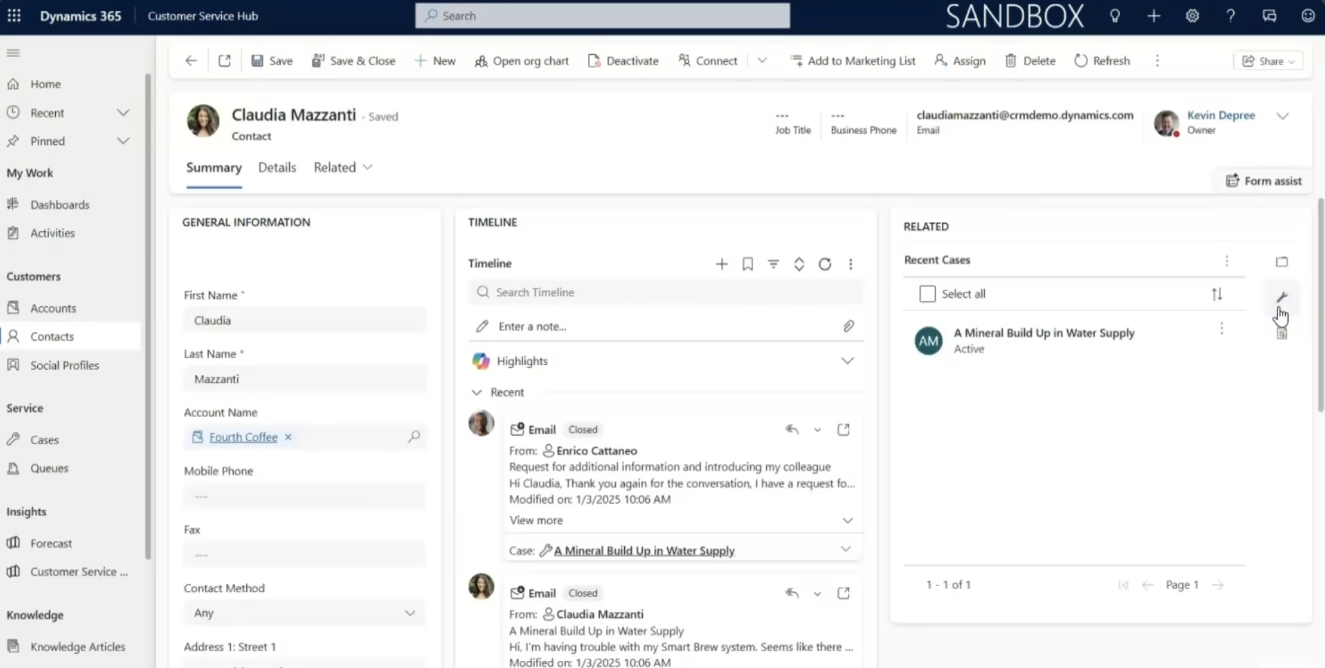
Use entitlements to prioritize and plan support effectively in Dynamics 365 Customer Service
When an agent opens a case, they can immediately see whether a customer has remaining service entitlements, such as allotted hours, case limits, or warranty coverage. This insight allows the agent to prioritize requests appropriately and provide guidance that aligns with both customer expectations and organizational policies.
Entitlements also improve resource planning and efficiency. By automatically tracking usage, the system ensures that support resources are allocated fairly and predictably, avoiding over-commitment and enabling managers to forecast capacity accurately. Teams can also see patterns in case volume or recurring issues, which helps identify opportunities for proactive support and service improvements.
Ultimately, by centralizing customer data and using entitlements intelligently, Dynamics 365 Customer Service enables agents to deliver personalized, informed, and efficient support — while organizations gain visibility, control, and the ability to scale operations effectively.
Streamline case management across teams with Dynamics 365 Customer Service
At the core of Dynamics 365 Customer Service is case management. The platform supports the entire lifecycle of a case, from initial intake to final resolution. Cases can be automatically routed based on predefined rules, ensuring they reach the most appropriate agent or team. Alternatively, organizations can use queues to allow agents to select cases based on availability or expertise.
A robust timeline feature tracks every interaction—emails, phone calls, appointments, and notes—so agents always have a clear view of case history. This eliminates the need for manual follow-ups or fragmented communication. Additionally, AI-powered Copilot automatically updates case summaries as interactions occur, so anyone picking up the case can continue seamlessly without losing context.
This structured approach ensures that no case is overlooked, reduces resolution time, and minimizes the frustration for both agents and customers.

Leverage knowledge articles for faster problem solving
Knowledge management is another critical component of effective customer service. Dynamics 365 Customer Service enables agents to access both internal and external knowledge articles. Internal articles allow technical support teams to share best practices, schematics, and troubleshooting steps without exposing sensitive information to customers. External articles, on the other hand, can be shared directly with customers to guide them through common issues.
Agents can link knowledge articles directly to cases, or even embed them into email responses, saving time and ensuring consistent, accurate communication. Articles can include text, images, and diagrams, and go through structured review and approval workflows to maintain quality and compliance.
By integrating knowledge into the case workflow, organizations reduce time spent searching for solutions, improve first-contact resolution rates, and ensure that support interactions remain efficient and consistent.
How Dynamics 365 Customer Service improves scheduling and resource use
Many cases require scheduled support, whether it’s a field technician visit or a virtual troubleshooting session. Dynamics 365 Customer Service offers a flexible scheduling system that allows agents to book service activities based on resource availability, expertise, and working hours.
The schedule board provides a visual, drag-and-drop interface, making it easy to reschedule appointments or reassign cases to different agents. This feature also allows managers to track resource utilization and ensure that workloads are balanced across the team. Color-coded indicators make it simple to see which agents are under- or over-utilized, helping organizations make data-driven staffing decisions.
Additionally, the platform can sync scheduled activities with agents’ Outlook calendars, providing a seamless workflow that reduces missed appointments and ensures accountability.
Case closed: Fast, personalized service with Dynamics 365 Customer Service
In this video, see how Dynamics 365 Customer Service helps teams deliver faster, personalized, and consistent support. Explore how customer data, case management, knowledge articles, scheduling, and AI insights come together in a unified workspace.

Tracking performance and time with Dynamics 365 Customer Service
Accurate time tracking is essential for understanding how efficiently support teams are working and how resources are being allocated. Dynamics 365 Customer Service automatically captures handling time for each case, so agents don’t have to manually log their work. Agents can pause and resume timers as needed, ensuring that the system only records active case work, which keeps metrics accurate without disrupting daily workflows.
Beyond simple time tracking, the platform provides a suite of built-in performance metrics that give managers and team leads actionable insights. These metrics help identify bottlenecks, optimize processes, and improve service quality. Key metrics include:
- Time to resolution: Tracks the total time taken to resolve each case, highlighting areas where processes can be streamlined.
- Stage duration: Measures how long cases spend in each stage of the business process flow, helping managers pinpoint delays and inefficiencies.
- First-contact resolution: Monitors the percentage of cases resolved on the first interaction, a key indicator of agent effectiveness and customer satisfaction.
- Agent utilization: Shows how much time each agent spends actively working on cases versus available time, supporting resource planning and workload balancing.
- Team-level insights: Aggregates individual metrics to provide a broader view of team performance, revealing trends, peaks, and potential areas for training or process improvement.
By providing real-time visibility into both individual and team performance, Dynamics 365 Customer Service allows organizations to make informed decisions, allocate resources more effectively, and continuously improve support operations.

Guide teams with business process flows
Dynamics 365 Customer Service uses business process flows to standardize how support cases are handled, ensuring every agent follows a consistent, structured approach. These flows guide agents through each stage of a case from initial identification and categorization to research, resolution, and closure so that no steps are missed, and every interaction meets organizational standards.
By using business process flows, organizations can:
- Ensure consistency: Every agent follows the same sequence of steps, reducing variability in service delivery and minimizing errors.
- Improve efficiency: Structured workflows eliminate guesswork, helping agents focus on solving the customer’s problem rather than figuring out what to do next.
- Enhance accountability: Each stage is tracked, so managers can see where a case is in the workflow and who is responsible for each step.
- Prevent delays: Threshold alerts can notify agents or supervisors if a case has been in a stage longer than expected, helping to avoid missed deadlines and maintain high service standards.
- Enable continuous improvement: With real-time visibility into case progress and stage duration metrics, organizations can identify bottlenecks, optimize processes, and refine workflows over time.
By combining structured guidance with real-time insights, business process flows in Dynamics 365 Customer Service not only streamline individual cases but also enhance overall operational performance. They help teams work smarter, resolve cases faster, and maintain a consistently high level of service for every customer.
Manage entitlements and resolve cases intelligently
Entitlement management allows organizations to handle special situations effectively. For example, if a case involves a product defect under warranty, it can be resolved without deducting from the customer’s entitlement allowance. This ensures that service commitments remain accurate while maintaining customer satisfaction.
When cases are resolved, all related metrics—including time spent, resolution type, and stage performance—are updated automatically. This not only streamlines reporting but also provides insights that can inform future process improvements.

Transform your support operations
Implementing Dynamics 365 Customer Service with Rand Group ensures your organization fully leverages its capabilities. From centralized customer data and streamlined case management to AI-driven insights and knowledge management, our team configures the platform to match your workflows and goals—helping your support teams resolve cases faster and deliver exceptional customer experiences.
Deliver a superior customer experience with Dynamics 365 Customer Service
By integrating customer data, case management, knowledge articles, scheduling, and AI-powered insights, Dynamics 365 Customer Service provides a complete solution for delivering fast, personalized support. Teams can resolve cases more efficiently, improve first-contact resolution rates, and optimize resources, all while maintaining a consistent and professional customer experience.
For organizations looking to modernize their support operations, Dynamics 365 Customer Service offers a platform that combines speed, intelligence, and structure—helping teams close cases faster and delight customers every step of the way.
Next steps
Rand Group specializes in implementing Dynamics 365 Customer Service. Our team combines deep technical expertise with practical experience to help support teams work more efficiently, resolve cases faster, and deliver a better customer experience.
If you’re considering a rollout or upgrade, explore our Dynamics 365 Customer Service implementation services to see how we design, configure, and deploy solutions aligned to your business goals. Are you already live and looking for ongoing help? Our Dynamics 365 Customer Service support services provide guidance, troubleshooting, optimization, and continuous improvement.
We collaborate closely with your teams to understand your workflows, optimize case management, and ensure Dynamics 365 Customer Service is configured to meet your specific needs. With Rand Group, organizations don’t just adopt technology — they transform how their support teams operate, gaining visibility, control, and the ability to scale service operations effectively.
Contact Rand Group today to see how we can help your team close cases faster, improve efficiency, and elevate the customer experience using Dynamics 365 Customer Service.