Dynamics 365
 Power Platform
 Dynamics
 Cloud & Productivity
Dynamics 365 Customer Service implementation checklist: A readiness guide for support teams

A successful Microsoft Dynamics 365 Customer Service implementation starts well before the kickoff meeting. When service goals, process owners, case data, and integration needs stay unclear, teams often spend early project time resolving questions that preparation could have answered.
You do not need to design every workflow, routing rule, or SLA before engaging a partner. A knowledgeable partner should help you shape those decisions. Still, entering the project with aligned stakeholders and a clear view of your support operations helps the team design a better solution and reduces avoidable rework. This Dynamics 365 Customer Service implementation checklist blog explains what service, IT, and operations leaders should review before kickoff.
Quick answer: What should a Dynamics 365 Customer Service implementation checklist include?
A Dynamics 365 Customer Service implementation checklist covers the decisions a support team makes before configuration begins. It spans service goals, case types and channels, routing, SLAs and escalation, knowledge management, data migration, integrations, security, reporting, and user adoption. Treat it as a readiness guide, not a list that must be fully finished before your project starts.
Table of contents
- Why preparation matters before a Customer Service implementation
- What to prepare before contacting a Customer Service partner
- Dynamics 365 Customer Service implementation checklist
- Your D365 Customer Service implementation checklist
- Dynamics 365 Customer Service readiness summary
- How to test Dynamics 365 Customer Service before launch
- Common mistakes this checklist can prevent
- Why work with Rand Group on your Customer Service implementation
- Key takeaways
- Frequently asked questions
Why preparation matters before a Customer Service implementation
Your implementation partner delivers the most value when consultants can focus on designing your service processes, not learning how your support team already works.
Preparation helps your organization:
- Run more productive discovery workshops
- Make design decisions faster
- Reduce scope changes and rework
- Improve the quality of migrated case and knowledge data
- Identify integrations earlier
- Build reports and dashboards that support real decisions
- Prepare agents for new ways of working
Many service project delays begin before configuration. Teams often use different definitions for a case, an escalation, a resolution, or a met SLA. The implementation team must resolve those differences before it can build consistent routing, automation, and reporting.
A Customer Service implementation is also not an IT-only project. The platform shapes how agents log cases, move work between tiers, and measure service performance. Service leaders and front-line agents should take part alongside IT.
For a broader view of costs, timelines, and delivery options, read our Dynamics 365 Customer Service implementation guide.

What to prepare before contacting a Customer Service partner
Preparation does not mean designing your future service system alone. Most organizations benefit from involving a partner before they finalize processes, routing rules, or integrations.
Before that conversation, try to identify:
- Why your current support process or tools need to change
- Which teams and channels the platform must support
- Which service leaders and process owners should take part
- Where agents rely on spreadsheets, inboxes, or manual work
- Which existing systems hold customer and case information
- What measurable service results the project should improve
- Which customer or agent problems need attention first
- Compile current internal and external (e.g. customers) reporting, KPIs and other metrics
- List of agents and their relevant skills, certifications, etc.
An experienced partner should validate these requirements, challenge outdated processes, and recommend the right mix of capabilities. The partner can also explain what native features handle and what may need configuration, Power Platform, integration, or custom development.
Dynamics 365 Customer Service implementation checklist
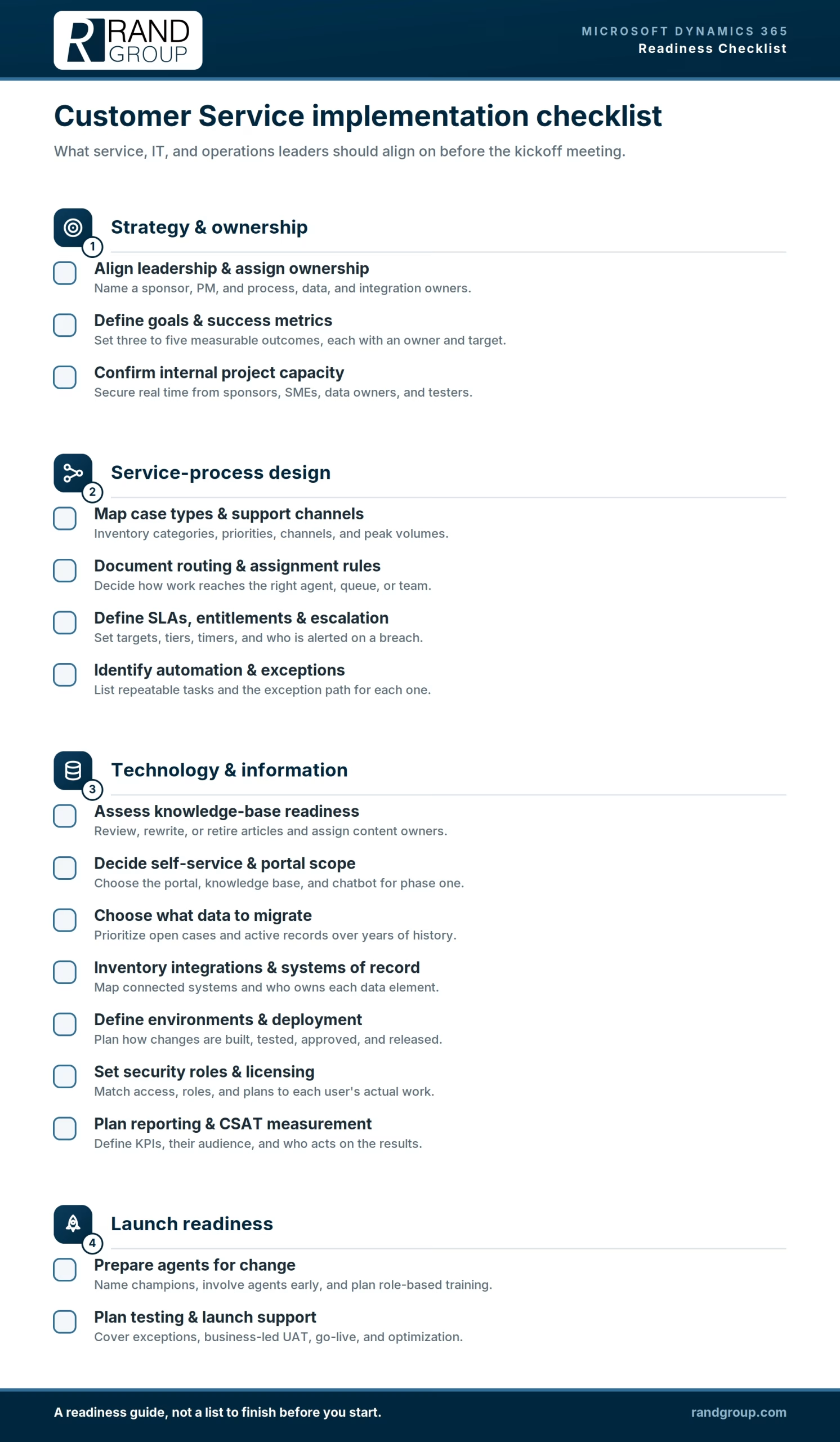
The checklist below groups the decisions your organization should review before kickoff. It is organized around four areas: strategy and ownership, service-process design, technology and information, and launch readiness.
Use it as a readiness guide rather than a requirement to finalize every decision independently. Your organization should enter the project with a clear understanding of its current operations, goals, and constraints, while your implementation partner helps validate requirements and design the future solution.
Strategy and ownership
A successful implementation begins with clear and measurable business goals, accountable decision-makers, and enough internal capacity to participate throughout the project.
Align leadership and assign service ownership
Every successful Customer Service implementation needs executive support and clear accountability. Before kickoff, identify:
- An executive sponsor who can remove roadblocks
- An internal project manager
- A service process owner
- An IT lead
- A data owner
- An integration owner
- A training or change lead
- Subject matter experts from affected teams
Depending on the size and structure of your organization, one person may take responsibility for more than one of these roles. The priority is to ensure that each area has a clearly identified owner and that decision-making responsibilities are understood.
Service leaders, not IT alone, should own the process decisions that shape daily support work. IT plays an important role in security, integrations, environments, and governance, but service leaders and front-line agents understand how cases are received, assigned, escalated, and resolved.
Define your service goals and success metrics
Begin with measurable outcomes, not screens and fields. Define three to five goals that will guide project scope and solution design.
Common service goals include:
- Faster first-response and resolution times
- Higher customer satisfaction scores
- More cases resolved through self-service
- Lower case backlog and reopened-case rates
- Better visibility into agent workload and SLA performance
For each goal, document the owner, current performance, target outcome, and measurement method. Clear goals help the implementation team prioritize requirements and prevent the project from becoming a collection of disconnected features.
Confirm internal project capacity
Your implementation partner cannot replace internal ownership. Agents and leaders must attend workshops, review proposed designs, validate data, test realistic scenarios, and approve key decisions.
Before kickoff, confirm how much time your sponsor, project manager, process owners, subject matter experts, data owners, and testers can commit. Limited internal availability can delay a project even when the technical work remains on schedule.
Service-process design
This group defines how cases enter the organization, reach the right team, progress through service tiers, and are resolved.
Map your case types and support channels
Inventory the types of cases your team handles and how customers contact you today. Your channel requirements affect process design, routing, integrations, licensing, and the scope of the implementation.
Document:
- Your main case categories and priorities
- Current channels such as email, phone, chat, portal, SMS, and social messaging
- Typical and peak case volume by channel
- Which channels are in scope for the first phase
- Whether conversations need to move between self-service and live agents
- Any telephony, messaging, or third-party platforms that must be connected
Some voice, chat, digital messaging, and social-channel scenarios may require Dynamics 365 Contact Center, Customer Service Premium, Copilot Studio, communications services, or additional licensing. Review these requirements with your implementation partner before finalizing the project scope.
Document routing and assignment rules
Decide how work should reach the appropriate agent or team. Clearly defined assignment rules provide the foundation for queues and unified routing.
Capture:
- How cases are assigned today, such as by team, skill, priority, customer tier, language, product, or region
- Which queues you need and who owns each one
- How agent capacity, skills, and availability should affect assignment
- How overflow and after-hours cases should be handled
- What should happen when no appropriate agent is available
- Which cases require manual review or reassignment
For a closer look at queues, workstreams, classification, and assignment methods, read our guide to setting up omnichannel routing in Dynamics 365 Customer Service.
Define SLAs, entitlements, and escalation tiers
Service commitments are one of the areas where a Customer Service implementation differs most from a general CRM rollout. Define them early so they can guide case handling, automation, and reporting.
Clarify:
- Response and resolution targets by customer tier, priority, or contract
- Entitlements that determine the support each customer receives
- Escalation tiers and the conditions that move a case between them
- Business hours, holidays, and pause conditions for SLA timers
- Who receives notifications when an SLA is approaching or has been breached
- Which exceptions require a manager’s decision
Service teams should also agree on shared definitions for terms such as first response, resolution, escalation, reopened case, and breached SLA. Inconsistent definitions can produce unreliable automation and reporting.
Identify automation and exception handling
List the repeatable tasks that automation could support, including case creation, classification, routing, escalation alerts, acknowledgements, and follow-up reminders.
For each opportunity, define:
- The event that triggers the automation
- The action the system should complete
- The person or team responsible for the outcome
- The conditions that should stop or bypass the automation
- The exception path when information is missing or the situation falls outside the rule
Automation should support a clearly understood process. Automating a broken process only produces faster errors.
Technology and information
This group addresses the information, connected systems, environments, security, licensing, and reporting required to operate the solution.
Assess your knowledge-base readiness
A strong knowledge base can help agents resolve cases faster and give customers more self-service options. Review the content you have today and determine what should be improved before migration.
Determine:
- Where knowledge articles currently reside
- Which articles remain accurate and useful
- Which articles should be migrated, rewritten, combined, or retired
- How articles will be categorized and made searchable
- Whether each article should be available to customers or restricted to internal use
- Who will write, review, approve, and update content
- How agents will report outdated or missing information
Do not treat knowledge migration as a simple file-transfer exercise. Outdated, duplicated, or poorly organized articles can make it harder for agents and customers to find reliable answers.
Decide your self-service and portal scope
Self-service can help customers find answers, submit requests, and track cases without contacting an agent, but it introduces additional design and governance decisions. Determine what belongs in the first phase and what can be introduced later.
Consider whether you need:
- A customer portal for submitting and tracking cases
- A searchable customer-facing knowledge base
- An AI agent or chatbot for routine questions and guided self-service
- A process for transferring customers from self-service to a live agent
- Authentication for customers accessing cases or account information
- An owner responsible for monitoring and improving self-service content
AI-agent and chatbot scenarios may use Microsoft Copilot Studio and consume separate Copilot capacity or credits. Confirm the required products, licensing, security, and consumption model as part of implementation planning.
Review your service data and choose what to migrate
Poor data weakens trust in a new system from the first day. Identify each source of service information and assign someone to validate its quality.
Common sources include existing ticketing applications, shared inboxes, CRM records, spreadsheets, portal records, and telephony logs.
Most teams prioritize:
- Open cases
- Active entitlements
- Customer and contact records
- Current knowledge articles
- Information required for active service contracts or reporting
Historical closed cases can add migration cost and clutter without improving daily operations. Some records can remain in a searchable archive rather than being moved into the production environment.
Before migration, define how duplicate records, incomplete fields, inconsistent categories, inactive customers, and outdated knowledge content will be handled. Data owners should also approve reconciliation rules so the project team can verify that the correct information moved successfully.
Inventory integrations and define systems of record
List every system that may exchange information with Dynamics 365 Customer Service. Common examples include telephony platforms, ERP applications, Microsoft Teams, email, identity systems, portals, ecommerce platforms, data warehouses, and reporting tools.
For each integration, document:
- Its business purpose
- The information exchanged
- The direction and required frequency of data movement
- The system that owns each record or data element
- Whether the connection is native, API-based, Power Platform-based, middleware-supported, or provided through a third-party connector
- The owner responsible for testing and supporting it
Defining the system of record helps prevent conflicting versions of customer, case, contract, and operational information. Rand Group’s integration services can help organizations plan and develop connections between Dynamics 365 Customer Service and their other business systems.
Define your environment and deployment approach
Dynamics 365 Customer Service configuration should not move directly from design into production. Establish how your team and implementation partner will build, test, approve, and deploy changes throughout the implementation and after go-live.
Determine:
- Which development, testing, user acceptance testing, training, and production environments you need
- Who is authorized to configure, approve, and deploy changes
- How configurations, Power Platform components, integrations, and custom development will move between environments
- How changes will be documented and connected to approved requirements
- Whether source control and automated deployment pipelines are needed
- How environment copies, test data, and production data will be protected
- How Microsoft release-wave updates will be reviewed and tested
- Who will own release management and solution maintenance after go-live
Also define when configuration is sufficient and when custom development is justified. An application lifecycle management approach helps prevent untested changes, inconsistent environments, and production issues as the solution evolves.
Define agent security roles and licensing
Match each user’s access and licensing to the work they need to perform. Avoid assigning licenses based only on job titles because agents, supervisors, administrators, occasional users, and service leaders may require different capabilities.
Identify:
- Named users and the teams they belong to
- The tasks each user or role must complete
- Required access to cases, queues, knowledge, dashboards, and customer records
- Security roles, record ownership, business-unit access, and field-level restrictions
- The appropriate Customer Service plan for each user
- Any related licensing or capacity required for voice, digital messaging, contact-center functionality, Copilot Studio, or AI agents
Licensing requirements depend on the selected channels, AI features, service complexity, and user responsibilities. Validate the licensing design before purchasing subscriptions or finalizing the solution architecture. For a detailed comparison of plans, capabilities, and licensing considerations, read our Microsoft Dynamics 365 Customer Service pricing and licensing guide.
Plan reporting and CSAT measurement
Do not leave reporting until the end of the implementation. Identify what service leaders, supervisors, and agents need to understand and what decisions each report should support.
For each report or dashboard, define:
- Its audience
- The question it should answer
- The data required
- The reporting frequency
- The person responsible for acting on the results
Common measures include case volume and backlog, first-response and resolution times, SLA performance, reopened cases, agent workload, escalation rates, self-service use, and customer satisfaction.
A useful dashboard guides action rather than merely displaying data. For example, a backlog report should help a manager decide where to reassign resources, while an SLA report should show which case types, queues, or customers are experiencing recurring delays.
Launch readiness
This group ensures that the system works under realistic conditions and that agents are prepared to use it successfully.
Prepare agents for change
Plan user adoption before the system is built. Identify team champions, involve agents in design reviews, communicate how their work will change, and develop training for each role.
Your adoption plan should address:
- How agents will participate in design and testing
- Which training each role requires
- How training materials will be maintained
- Where users can ask questions after launch
- How supervisors will reinforce the new processes
- How adoption and proficiency will be measured
- How agents can submit feedback, report friction points, and suggest improvements after launch
- How feedback will be reviewed, prioritized, and incorporated into future enhancements
Agents are more likely to adopt the platform when it helps them resolve cases, find answers, and serve customers more effectively. Adoption stalls when the system appears to exist only for management reporting.
A structured user adoption strategy can help your organization prepare users, build proficiency, and sustain adoption beyond go-live. The solution should continue to evolve as agents use it, customer needs change, and new improvement opportunities emerge. Establishing a clear feedback process helps ensure the platform does not become a static set of features defined only at launch.
Technology training explains how to use Dynamics 365 Customer Service, but it does not address every organizational or behavioral change created by the implementation. A formal change management strategy can help leaders communicate the reasons for the project, manage resistance, prepare affected teams, and reinforce new service processes after launch.
Plan testing and launch support
Testing should reflect how the service organization actually works, including exceptions and peak periods—not only ideal scenarios.
Plan for:
- End-to-end process testing
- Integration and migration validation
- Security-role testing
- User acceptance testing led by service representatives
- Performance or load testing where appropriate
- Deployment testing between environments
- Training validation
- Go-live support and issue escalation
- Post-launch monitoring and optimization
Confirm that configurations, solutions, integrations, and Power Platform components can move successfully between environments without overwriting required settings or data.
Business users should lead user acceptance testing because agents, supervisors, and service leaders are best positioned to determine whether the platform supports real service work. Testing should follow cases from intake through routing, SLA tracking, escalation, resolution, and follow-up, including unusual and incomplete scenarios.
Your D365 Customer Service implementation checklist

Choose the right Dynamics 365 Customer Service deployment
The right licensing and deployment approach depends on your users, service channels, required capabilities, and long-term plans. Download Rand Group’s guide to compare Customer Service options, understand key licensing considerations, and prepare for a more informed implementation.
Dynamics 365 Customer Service readiness summary
Use this table to confirm your team is ready. Each area lists a key question and a suggested owner.
How to test Dynamics 365 Customer Service before launch
Testing confirms the system works the way your team does. Plan it before build begins, not after.
A strong testing approach covers:
- End-to-end scenarios: Follow a case from intake through routing, SLA, resolution, and follow-up.
- Exceptions: Test missing data, reopened cases, breached SLAs, and unusual escalations.
- Integrations: Confirm data moves correctly between the platform, telephony, and your ERP system.
- Security: Verify each role can see and do only what it should.
- Migration reconciliation: Check that migrated cases, contacts, and articles match the source.
- Load testing where appropriate: For high-volume teams, confirm performance at peak.
- Business-led user acceptance testing (UAT): Have agents and leaders sign off, not just IT.
- Deployment: Confirm that configurations, solutions, integrations, and Power Platform components can move successfully between environments without overwriting required settings or data.
Common mistakes this checklist can prevent
Over many Dynamics 365 Customer Service projects, we have noticed that the hardest problems rarely start with the technology. They start with a few decisions made, or skipped, before configuration begins. The good news is that each one is avoidable, and the checklist above is designed to help you catch them early.
Here are the patterns we see most often, and what they tend to look like in practice:
- Starting configuration before the future service process is agreed. When the team builds first and aligns later, early work often has to be redone. A short conversation about how cases should flow saves weeks.
- Treating the project as an IT-only effort. IT can stand up the platform, but service leaders and agents understand the day-to-day work. When they help shape it, adoption comes far more easily.
- Migrating historical data that no longer earns its place. Years of closed cases can add cost and clutter without helping a single agent. Moving what the team actually uses keeps the new system clean and trusted.
- Leaving reporting until the end. Reports designed as an afterthought rarely answer the questions leaders care about. Naming those questions early shapes a system that measures what matters.
- Testing only the ideal path. Real support work is full of exceptions, so testing only clean scenarios hides the gaps. Trying the messy cases before launch prevents surprises after it.
- Automating without an exception path. Automation speeds up a good process and accelerates a broken one just as fast. Planning what happens when something falls outside the rule keeps agents in control.
- Training once and moving on. A single session at go-live fades quickly. Ongoing support and refreshers help agents build real confidence.
- Treating go-live as the finish line. The first weeks reveal what to refine. Teams that plan for optimization keep improving long after launch.
None of these require perfection before kickoff. They simply reward a little preparation, and a partner who has seen how these projects unfold can help you spot them before they cost time.


Ready to plan your Dynamics 365 Customer Service implementation?
Every support organization has different processes, service commitments, channels, and integration requirements. Rand Group can assess your readiness, identify potential gaps, and develop a Dynamics 365 Customer Service implementation plan aligned with your operational needs and go-live goals.
Why work with Rand Group on your Customer Service implementation
Rand Group approaches Customer Service implementation as a business improvement effort, not simply a software rollout. Our consultants work across Dynamics 365, Microsoft 365, Power Platform, and connected business systems, so your service data connects to the rest of your operations.
Organizations work with Rand Group to:
- Plan and implement Dynamics 365 Customer Service around measurable service goals
- Design case, routing, SLA, and knowledge processes
- Prepare and migrate service and customer data
- Connect the platform with telephony, ERP, and reporting tools
- Support testing, training, deployment, and adoption
- Provide ongoing Customer Service support after go-live
Rand Group maintains a 90% client retention rate, which reflects a long-term approach to implementation, optimization, and support. That broader experience helps clients connect service processes with finance, operations, and reporting rather than treating support as an isolated system.
Much of that retention comes down to how we handle the day-to-day work, from configuration questions to ongoing support requests:
“Rand Group has been top-notch—professional, responsive, and very proactive. You can tell their internal processes are really sound, especially in how they manage and follow up on support requests. We come up with ideas, and they help us figure out what will actually work in the system, whether it’s configuration, reporting, or technical support.”— Derek Atwood, Subs for Pools
Key takeaways
- Define measurable service goals before discussing configuration.
- Document case types, channels, routing, and SLAs early.
- Decide what data to migrate based on business value, not habit.
- Plan testing, training, and adoption from the start.
- Choose a partner that supports you well beyond go-live.
Frequently asked questions
What should be included in a Dynamics 365 Customer Service implementation checklist?
A Dynamics 365 Customer Service implementation checklist should cover goals, case types, channels, routing, SLAs, knowledge, data, integrations, security, reporting, testing, and adoption. Each area should also have a named owner and a decision that must be validated before configuration or go-live.
What data should be migrated to Dynamics 365 Customer Service?
Migrate the operational data your team needs for daily work, such as open cases, active entitlements, customer and contact records, and current knowledge articles. Historical information like long-closed cases often adds cost and complexity without improving service. That data can stay in an accessible archive instead of moving into production.
How should Dynamics 365 Customer Service be tested before launch?
Test end-to-end case scenarios, exceptions, and every integration, then confirm security roles and reconcile migrated data against the source. High-volume teams should also run load testing at peak. Most important, business users should lead user acceptance testing so agents and leaders confirm the system fits real service work.
What are the biggest risks in a Dynamics 365 Customer Service implementation?
The biggest risks are unclear ownership, weak process design, and poor data quality. Projects also struggle with uncontrolled customization, insufficient testing, and low user adoption. Preparing goals, processes, data, and adoption plans before kickoff reduces each of these risks.
What should happen after Dynamics 365 Customer Service goes live?
Plan for support in the first weeks to resolve defects quickly. Monitor KPIs, track adoption, and keep knowledge articles current as agents learn what customers ask. A 30-, 60-, and 90-day optimization plan helps you refine routing, automation, and reporting once real usage data arrives.
Prepare for a smoother Dynamics 365 Customer Service implementation
You do not need every routing rule, SLA, or report finalized before you engage a partner. What matters most is aligning leadership, involving the right service owners, defining clear goals, and understanding your current data and systems.
Taking these steps before kickoff helps your team move efficiently through discovery, design, testing, and adoption, which reduces delays and improves long-term results. If you are ready to begin, contact Rand Group to speak with a consultant.