Dynamics 365
 Power Platform
 Dynamics
 Cloud & Productivity
Microsoft Dynamics 365 CRM implementation checklist: What to prepare before kickoff

A successful Microsoft Dynamics 365 CRM implementation starts before the kickoff meeting. When business goals, process owners, data requirements, and integration needs remain unclear, teams can lose valuable project time resolving questions that should have been identified earlier.
You do not need to design every form, workflow, dashboard, or integration before engaging an implementation partner. A knowledgeable partner should help you make those decisions. However, entering the project with aligned stakeholders and a clear view of your business problems allows the implementation team to make better design decisions and reduce avoidable rework.
This Microsoft Dynamics 365 CRM implementation checklist explains what sales, service, marketing, operations, and IT leaders should review before kickoff.
At a glance
Before a Microsoft Dynamics 365 CRM implementation, define your business goals, assign project owners, document customer-facing processes, assess your data, identify integrations, outline reporting requirements, and prepare users for change. These steps create a strong starting point while leaving detailed solution design, configuration, and technical decisions to the implementation process.
Table of contents
- Why preparation matters before a Dynamics 365 CRM implementation
- What should you prepare before contacting a Dynamics 365 partner?
- Microsoft Dynamics 365 CRM implementation checklist
- Your Dynamics 365 CRM implementation readiness checklist
- What happens after the Dynamics 365 CRM kickoff?
- Common Dynamics 365 CRM implementation mistakes to avoid
- How TCC Multi-Family Interiors recovered from a failed implementation
- Why work with Rand Group on your Dynamics 365 CRM implementation?
- Key takeaways
- Frequently asked questions about Dynamics 365 CRM implementation
Why preparation matters before a Dynamics 365 CRM implementation
Your implementation partner’s time delivers the most value when consultants can focus on designing better processes and configuring Dynamics 365 CRM, not discovering basic information about how your organization operates.
Preparation can help your organization:
- Conduct more productive discovery workshops
- Make project decisions faster
- Reduce scope changes and unexpected work
- Improve data migration quality
- Identify integrations earlier
- Create more useful reports and dashboards
- Prepare users for new processes
Many CRM project delays begin before configuration. Sales, marketing, service, and operations teams may use different definitions for a qualified lead, active customer, sales opportunity, service case, or completed activity. The implementation team must resolve those differences before it can build consistent workflows and reporting.
CRM implementation is also not an IT-only project. Dynamics 365 affects how employees collect customer information, complete daily tasks, transfer work between departments, and measure performance. Business leaders and front-line users must participate in the project alongside IT.
For a broader explanation of the implementation process, costs, timelines, and delivery options, read our Microsoft Dynamics 365 CRM implementation guide.
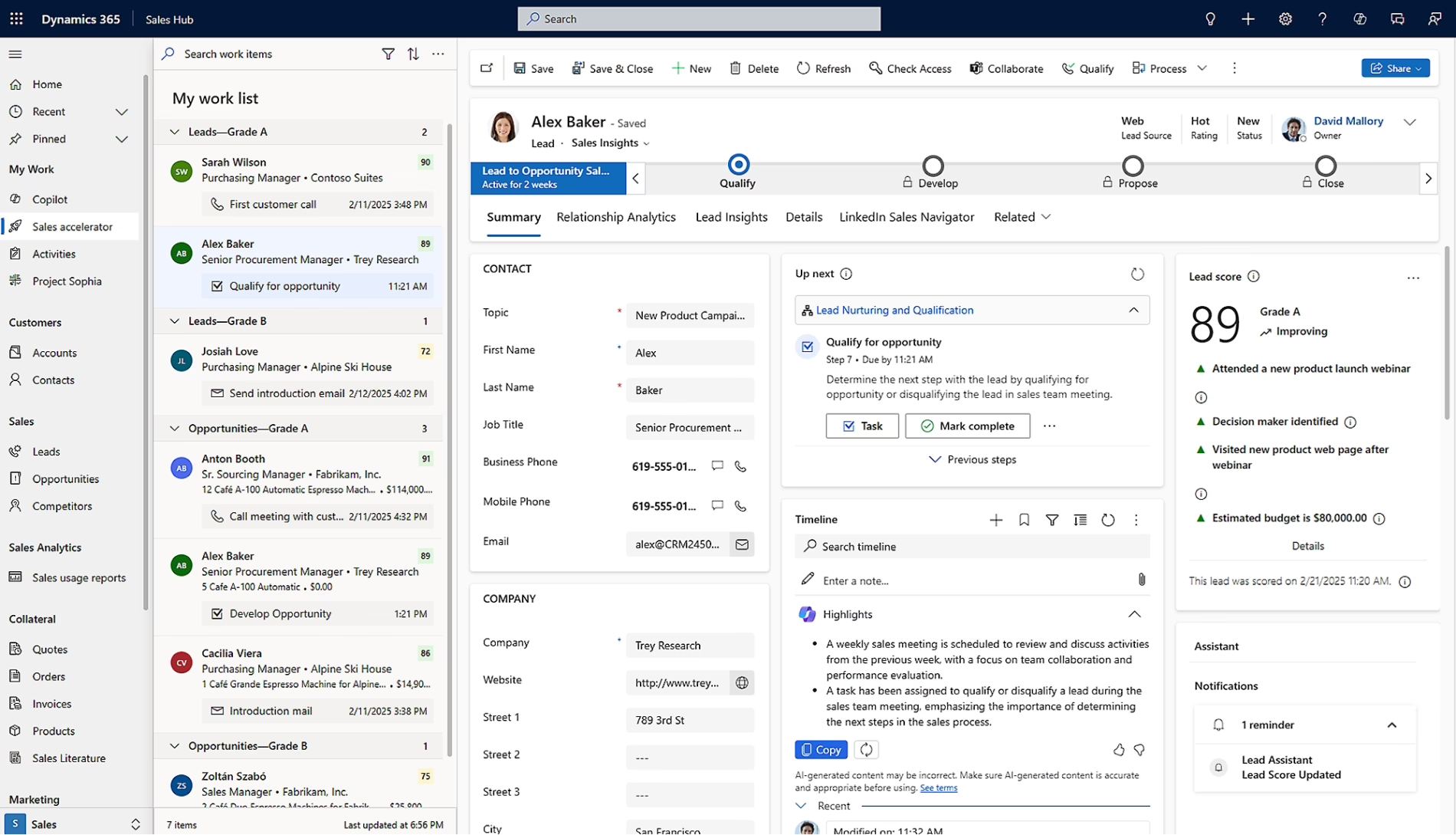
What should you prepare before contacting a Dynamics 365 CRM partner?
Preparation does not mean independently designing your future CRM system. Most organizations benefit from involving an implementation partner before they finalize processes, applications, data migration rules, or integrations.
Before that conversation, try to identify:
- Why the current process or system needs to change
- Which departments will use Dynamics 365
- Which leaders and process owners must participate
- Where users rely on spreadsheets or manual work
- Which existing systems contain customer information
- How much data needs to move into the new system
- How each source can export its data
- What measurable results the project should support
- Which customer or employee problems need attention first
An experienced implementation partner should help validate these requirements, challenge outdated processes, identify gaps, and recommend the right combination of Dynamics 365 applications. The partner should also explain which requirements can be met through native functionality and which may require configuration, Microsoft Power Platform, integration, custom development, or another supporting technology.

Start planning your Dynamics 365 CRM implementation
Rand Group can help your organization assess its processes, identify readiness gaps, and create a practical Dynamics 365 CRM implementation plan.
Microsoft Dynamics 365 CRM implementation checklist
Use the following checklist as a readiness guide, not a requirement that every decision be completed before kickoff. Some questions should be answered internally, while others are best refined with your implementation partner.
Align leadership and assign project ownership
Every successful CRM implementation needs executive support and clear accountability. The strongest CRM projects are led by business process owners, not IT. Dynamics 365 is technology, but you use it to enforce how your teams work every day. The people who own those processes are best positioned to lead the effort, with IT as an essential partner for data, security, and integration.
Before kickoff, identify:
- An executive sponsor who can remove roadblocks
- An internal project manager
- Business process owners
- An IT lead
- A data owner
- An integration owner
- A training or change management lead
- Subject matter experts from affected departments
- A steering committee or escalation group
Depending on the project, stakeholders may come from sales, marketing, customer service, field service, project delivery, finance, operations, and IT.
Leadership should also define three to five measurable goals. Examples include improving lead response time, increasing pipeline visibility, reducing manual sales administration, shortening case resolution times, improving scheduling, or reducing duplicate customer records. These goals should guide scope and design decisions throughout the project.
Determine which Dynamics 365 CRM applications are in scope
“Dynamics 365 CRM” is commonly used to describe Microsoft’s connected customer engagement applications rather than one stand-alone product. Your organization may need one application or a combination of several.
Do not assume that every application belongs in the first phase. Select applications based on the processes being improved, the users involved, and the results the organization needs.
Define the business outcomes CRM must support
Begin with business questions, not screens and fields. Your leadership team may need to understand:
- Which opportunities are most likely to close?
- Why are leads failing to convert?
- Where do customer requests become delayed?
- Which service cases require attention?
- Which technicians or project resources are available?
- Which customer interactions require follow-up?
- Where do handoffs between departments fail?
- Which activities contribute to revenue or customer retention?
For each objective, identify the business owner, current challenge, desired result, and how success will be measured. This prevents the implementation from becoming a list of disconnected feature requests.
Document your current processes
Document the workflows that the new Dynamics 365 environment may support.
For sales, this may include lead qualification, opportunity stages, activities, quoting, approvals, forecasting, and the handoff after a deal closes.
For customer service, review case intake, routing, escalation, service-level commitments, knowledge management, resolution, and follow-up.
Field service teams should document work-order creation, scheduling, dispatch, parts coordination, mobile work, customer sign-off, and billing handoffs.
Organizations implementing Customer Insights should review audience segmentation, consent, journeys, campaign processes, lead scoring, and the marketing-to-sales handoff.
Project-based organizations may also need to document project qualification, quoting, resource planning, delivery, time and expense entry, and project reporting.
For each workflow, identify:
- What starts the process
- Who owns each step
- What information is required
- Which approvals are needed
- Where delays or exceptions occur
- Which systems are involved
- How success is measured
The goal is not to copy every legacy process into Dynamics 365 CRM. Separate required controls from workarounds created by limitations in the current system.
Prioritize future-state improvements
Once the current processes are documented, identify what needs to change. Look for:
- Duplicate data entry
- Spreadsheet-dependent work
- Missed follow-ups
- Inconsistent sales stages
- Unassigned leads or cases
- Manual routing and approvals
- Scheduling conflicts
- Repeated customer questions
- Poor visibility between departments
- Incomplete handoffs
- Unclear accountability
For example, discount approvals may run through email or manual sign-off today. Dynamics 365 can move them into a defined approval workflow. Opportunities that fall past due may go unnoticed until someone reviews the pipeline. The system can send automatic notifications when a deal stalls or a follow-up is missed.
Classify requirements as required for go-live, important after go-live, a future enhancement, or requiring more discovery. This discipline helps prevent over-customization and protects the first phase from lower-priority requests.
Map customer and operational handoffs
Dynamics CRM processes rarely stop within one department. Map how information moves from marketing to sales, sales to operations, customer service to field service, project delivery to finance, and CRM to ERP.
For each handoff, document:
Trigger: What event starts the handoff?
Information: Which data must transfer?
Ownership: Who becomes responsible?
System of record: Which application owns the record?
Notification: How is the next team notified?
Exceptions: What happens when information is incomplete?
A closed sales opportunity, for example, may need to create an order or project in an ERP system. A completed field service work order may need to trigger billing. These connections should be discussed before configuration begins.
Our Microsoft Dynamics 365 CRM integration guide explains common integration methods, risks, and architecture considerations.
Assess customer data and assign ownership
Poor data can weaken trust in a new CRM from the first day.
Identify every source of customer and operational data, including:
- Existing CRM applications
- ERP or accounting systems
- Outlook contacts
- Marketing platforms
- Customer service tools
- Field service systems
- Project management applications
- Spreadsheets
- Department databases
- Customer portals
- Other business applications
Review the data for duplicate records, incomplete information, outdated contacts, inconsistent naming, missing ownership, unused fields, conflicting customer identifiers, inaccurate opportunity stages, and missing communication preferences.
Assign a business owner to validate each major data category. IT can help extract and transform data, but business users must confirm whether it is accurate and useful.
Decide which historical data should move
Migrating all historical CRM data may add cost and complexity without improving daily work.
Determine whether the new system needs:
- Active accounts and contacts
- Open leads and opportunities
- Open cases and work orders
- Active projects
- Recent closed opportunities
- Historical service cases
- Activities, emails, notes, and attachments
- Products and price lists
- Customer assets
- Marketing preferences
- Custom records
Some older information can remain in an accessible archive rather than moving into the production CRM. The right decision depends on operational value, reporting needs, compliance requirements, data quality, and migration effort.
Inventory integrations and define systems of record
Create a list of every application that may exchange data with Dynamics 365 CRM.
Common examples include:
- Dynamics 365 Business Central
- Dynamics 365 Finance and Dynamics 365 Supply Chain Management
- Outlook and Exchange
- Microsoft Teams
- Power BI
- Power Apps
- Power Automate
- Ecommerce systems
- Customer portals
- Telephony platforms
- Document management systems
- Payment systems
- Industry-specific applications
For each integration, document its purpose, data exchanged, direction, frequency, business owner, technical owner, and system of record. Defining the system of record prevents departments from maintaining conflicting versions of the same information. Dynamics 365 Sales may own leads and opportunities, while the ERP owns invoices, payments, and inventory.
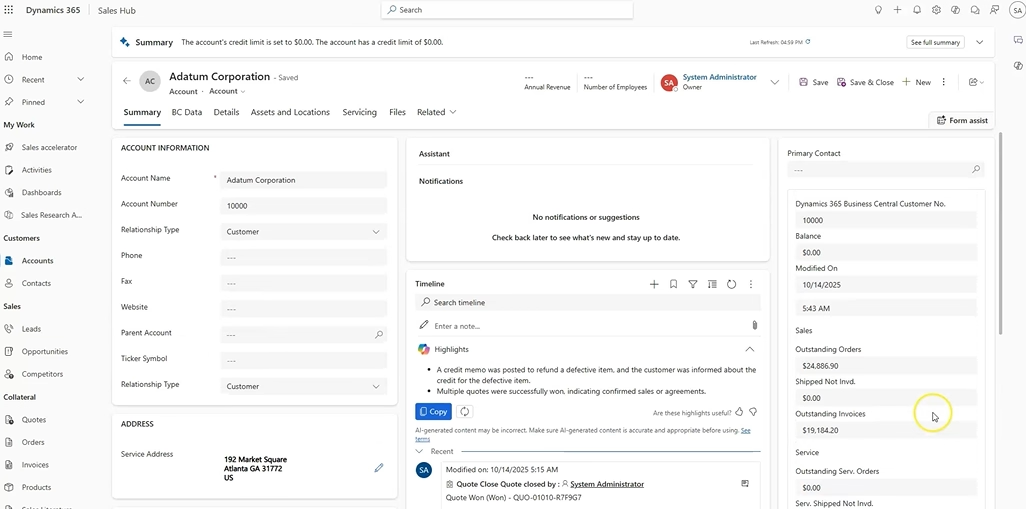
Define reports and success measures
Do not leave reporting until the end of the implementation.
Ask leaders what decisions they expect the new system to support. Requirements may include: pipeline by stage, forecast versus actual sales, lead conversion, win rate, sales cycle length, case volume and backlog, response and resolution times, service-level performance, technician utilization, work-order completion, project progress, resource utilization, and customer engagement.
For each report, define:
- The intended audience
- The business question it should answer
- The required data
- The reporting frequency
- The action users should take
A useful dashboard should guide a decision or action, not simply display more information.
Review security and access requirements
Identify who should view, create, update, approve, or delete different records.
Initial requirements may include:
- Business units and teams
- User roles
- Record ownership
- Management hierarchy
- Field-level security
- Sensitive customer information
- Consent and privacy requirements
- Audit needs
- Data retention
- External access
- Segregation of duties
Licensing and access decisions should follow the application scope and the work each user needs to perform.
Identify automation and approval needs
List the manual tasks that may benefit from automation, such as:
- Lead assignment
- Follow-up reminders
- Quote approvals
- Case routing
- Escalation notifications
- Work-order creation
- Renewal reminders
- Project approvals
- Customer onboarding
- Closed-won handoffs
- ERP record creation
For each proposed automation, define the trigger, action, owner, approval authority, notifications, and exception process. Automation should support a clear process. Automating an inconsistent process usually creates faster inconsistency.
Prepare users for change
User adoption should be planned before the system is built. Identify department champions, involve front-line employees in design reviews, develop role-based training, and explain why processes are changing.
Common sources of resistance include:
- Concern about added data entry
- Preference for spreadsheets
- Unclear personal benefits
- Increased visibility into activities
- Poor experiences with the previous CRM
- Different practices across teams
Users are more likely to adopt Dynamics CRM when it helps them complete work, find information, and manage follow-up. Adoption remains difficult when the system is designed only for management reporting.
Confirm internal project capacity
Your implementation partner cannot replace internal business ownership. Subject matter experts must attend workshops, review configuration, validate data, test realistic scenarios, and make timely decisions.
Before kickoff, confirm how much time the executive sponsor, project manager, process owners, IT staff, data owners, testers, trainers, and end users can dedicate to the project. Limited internal availability can delay an implementation even when the technical work is progressing as planned.
Your Dynamics 365 CRM implementation readiness checklist
Use this checklist to confirm your organization is prepared for a successful Dynamics 365 CRM implementation. Each area highlights key questions and ownership responsibilities to help guide your planning before kickoff.
What happens after the Dynamics 365 CRM kickoff?
Once kickoff begins, most implementations move through discovery, design, configuration, testing, training, and deployment.

Phase 1: Discovery and solution design
The implementation team validates business goals, reviews current processes, confirms the application scope, assesses data and integrations, and designs future-state workflows. Primary outcome: An agreed solution blueprint and implementation plan.

Phase 2: Configuration, development, and integration
The team configures Dynamics 365, creates forms and dashboards, builds workflows, prepares data migration, and connects approved systems. Primary outcome: A configured solution aligned with approved business requirements.

Phase 3: Testing, training, and go-live
Business users complete end-to-end testing, validate migrated data, confirm security, attend role-based training, and prepare for deployment. Primary outcome: A validated system and users who are prepared to work in it.
Common Dynamics 365 CRM implementation mistakes to avoid
Based on Rand Group’s experience helping organizations plan, recover, and improve Microsoft Dynamics 365 CRM implementations, many project challenges can be traced to decisions made before configuration begins. The technology is rarely the only source of difficulty. Problems are more likely to arise when organizations lack clear goals, business ownership, reliable data, realistic testing, or an implementation partner that understands their processes.
Common mistakes include:
- Treating CRM as an IT-only project without clear business ownership
- Beginning without measurable goals or defined success criteria
- Recreating inefficient legacy processes and over-customizing the first phase
- Underestimating data cleanup or migrating unnecessary historical data
- Failing to define integrations, systems of record, and reporting requirements early
- Excluding front-line users or underestimating training and testing
A Dynamics 365 CRM partner also needs to understand how the technology supports your industry, customer journey, and operating model. That combination of functional, technical, and business process knowledge helps the project team identify risks earlier, challenge inefficient requirements, and design a solution that users can adopt and the organization can continue improving after go-live.

How TCC Multi-Family Interiors recovered from a failed implementation
TCC Multi-Family Interiors initially experienced an unsuccessful Microsoft Dynamics 365 implementation that left employees unable to use the system effectively.
Rand Group stepped in to re-implement Dynamics 365 Business Central, configure business processes, migrate data, and train users on best practices. TCC later expanded its Microsoft environment with Dynamics 365 Sales and an automated Power Apps workflow that improved communication about new sales opportunities.
The experience shows why partner knowledge, user training, connected systems, and long-term support should be considered before kickoff.
“Rand Group’s knowledge base is expansive. Whenever we come up with an idea to be explored, they always have someone on staff that has relevant experience. Anytime we have an issue pop up, Rand Group is always available, dependable, and helpful.” – Travis Hardwick, President and CEO, TCC Multi-Family Interiors

Choose the right partner for your Dynamics 365 CRM implementation
The right partner can help you implement, support, and improve Dynamics 365 CRM as your business needs change. Download our white paper to explore seven criteria for choosing a support partner, plus practical questions to use when evaluating potential CRM partners.
Why work with Rand Group on your Dynamics 365 CRM implementation?
Rand Group approaches CRM implementation as a business improvement initiative, not simply a software deployment. Our consultants work across Dynamics 365, Microsoft 365, Power Platform, Microsoft ERP applications, analytics, and connected business processes.
Organizations can work with Rand Group to:
- Plan and implement Dynamics 365 CRM applications around measurable business goals
- Design sales, service, field service, marketing, and project processes
- Prepare and migrate customer and operational data
- Connect CRM with ERP, Microsoft 365, reporting tools, and other applications
- Support testing, training, deployment, and user adoption
- Continue improving the environment after go-live
Rand Group maintains a 90% client retention rate and has been recognized as one of the best Microsoft Dynamics 365 CRM partners for 2026. These credentials reflect our long-term approach to implementation, optimization, and support. Our broader experience with Microsoft business applications also helps clients connect customer engagement processes with finance, operations, project delivery, and reporting rather than treating CRM as an isolated system.
Key takeaways
- Define measurable business goals before discussing detailed CRM configuration.
- Select Dynamics 365 applications based on the processes and users involved.
- Document workflows, data sources, integrations, and departmental handoffs.
- Make user training, testing, and change management part of the initial plan.
- Choose a partner that understands your business and can provide support after go-live.
Frequently asked questions about Dynamics 365 CRM implementation
What should you prepare before a Dynamics 365 CRM implementation?
Define your business goals, assign project owners, document current processes, identify data sources, inventory integrations, outline reporting needs, and plan for training. Detailed technical design can then be completed with the implementation partner.
Which applications are included in Dynamics 365 CRM?
The Dynamics 365 customer engagement suite includes Dynamics 365 Sales, Customer Service, Field Service, Customer Insights, Project Operations, and Contact Center. An organization can implement one application or combine several based on its needs.
Who should participate in a Dynamics 365 CRM implementation?
The project should include an executive sponsor, internal project manager, IT representatives, data and integration owners, and subject matter experts from every affected department.
What data should be migrated into Dynamics 365 CRM?
Most organizations migrate active accounts, contacts, open opportunities, cases, work orders, and other records required for daily work. Historical data should be evaluated based on its business value, quality, compliance requirements, and migration effort.
Can Dynamics 365 CRM integrate with an ERP system?
Yes. Dynamics 365 CRM applications can connect with ERP systems such as Business Central and Dynamics 365 Finance & Supply Chain Management to support processes such as customer synchronization, quote-to-order, project handoffs, billing, and financial visibility.
How do you prevent a Dynamics 365 implementation from failing?
Set measurable goals, involve business users, clean data, define integrations, control customization, complete realistic testing, provide role-based training, and establish clear project governance.
Prepare for a more effective Dynamics 365 CRM implementation
You do not need every field, workflow, report, or integration finalized before engaging a partner. What matters most is aligning leadership, involving the right process owners, defining clear business goals, and understanding your current data and systems.
Taking these steps before kickoff helps your implementation team move more efficiently through discovery, design, testing, training, and adoption—reducing delays and improving long-term results. If you are ready to begin planning your Dynamics 365 CRM implementation, contact Rand Group to speak with a consultant.