 Dynamics 365
 Power Platform
 Dynamics
 Cloud & Productivity

Case Intake Agent
Turn customer requests into organized support cases with AI
The Case Intake Agent is a custom AI agent designed to help customer service teams capture, classify, and route incoming support requests. It uses AI to understand customer issues, create cases in Dynamics 365 Customer Service, and direct requests to the appropriate team, reducing manual data entry and helping customers get support faster.
Business challenge
Manual case intake slows down customer support
Customer service teams receive requests through email, chat, phone calls, and other channels, but turning those interactions into organized support cases takes time. Employees must review each request, identify the issue, enter details, and determine who should handle it. When request volumes increase, delays and inconsistent case information can affect response times and service quality.

Time-consuming case creation
Manually reviewing customer messages, entering case details, and linking customer records takes time away from resolving support issues.

Incomplete or inconsistent information
Missing details, incorrect categories, and inconsistent case descriptions make it harder for service teams to understand and resolve customer issues.

Delayed case assignment
When incoming requests require manual review and sorting, cases can sit in queues or reach the wrong team before receiving attention.
Features
Streamline customer service case intake with AI
The Case Intake Agent helps customer service teams turn incoming requests into structured support cases with less manual effort. By analyzing customer messages and applying your organization’s case management rules, it supports more consistent case creation, accurate classification, and faster assignment.
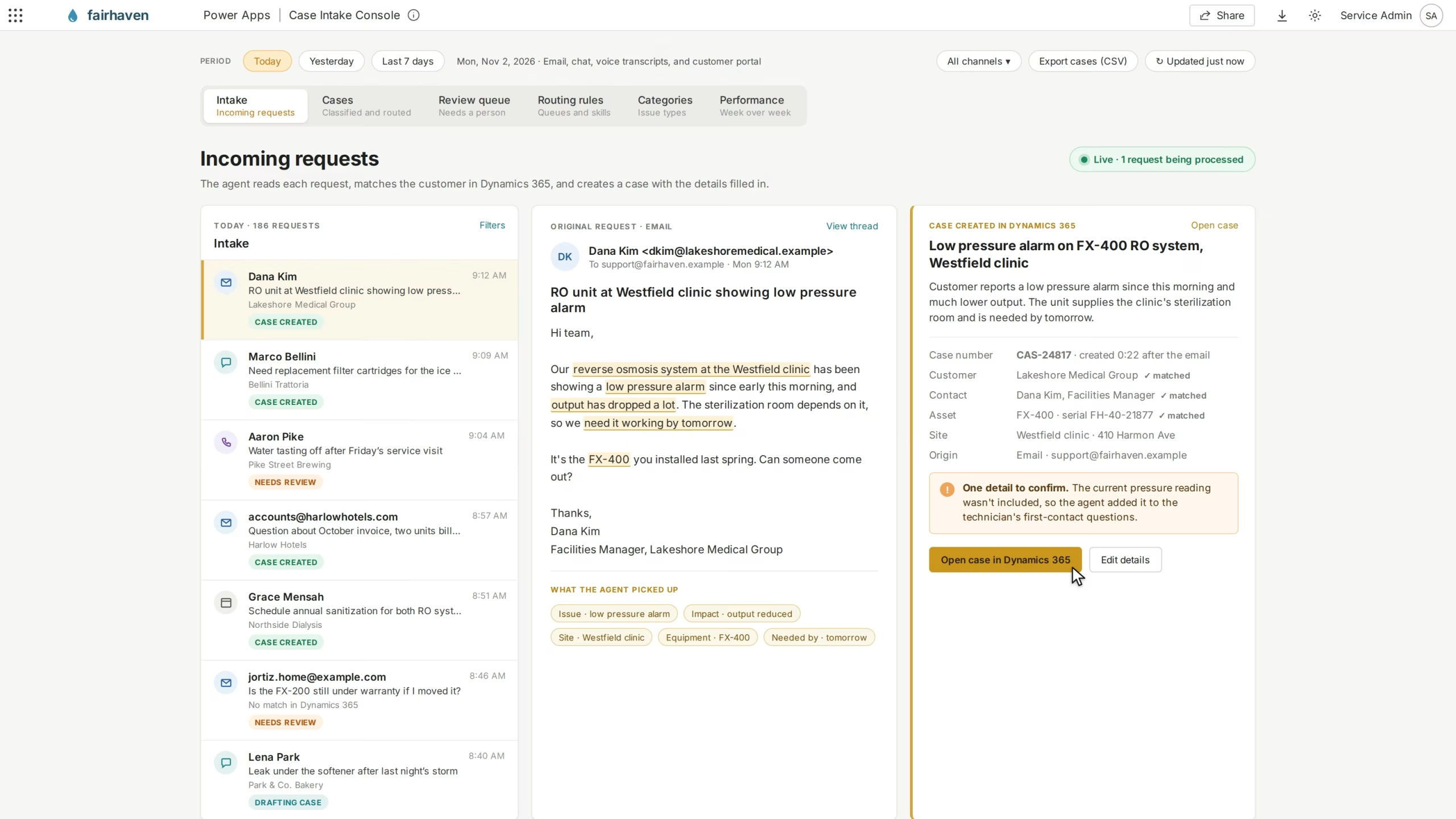
Capture customer requests and create cases automatically
The agent analyzes incoming customer requests to identify the issue, extract relevant details, and prepare case records in Dynamics 365 Customer Service. It uses connected customer information to organize case details and reduce the amount of data employees must enter manually.
The agent can:
- Process incoming requests from connected email and supported service channels
- Identify the customer’s issue using AI-powered language analysis
- Extract relevant information, such as customer details and issue descriptions
- Match incoming requests with existing customer and contact records
- Generate case titles and summaries based on the customer’s request
- Create structured support cases with relevant information already populated
- Flag missing or unclear details that require employee review
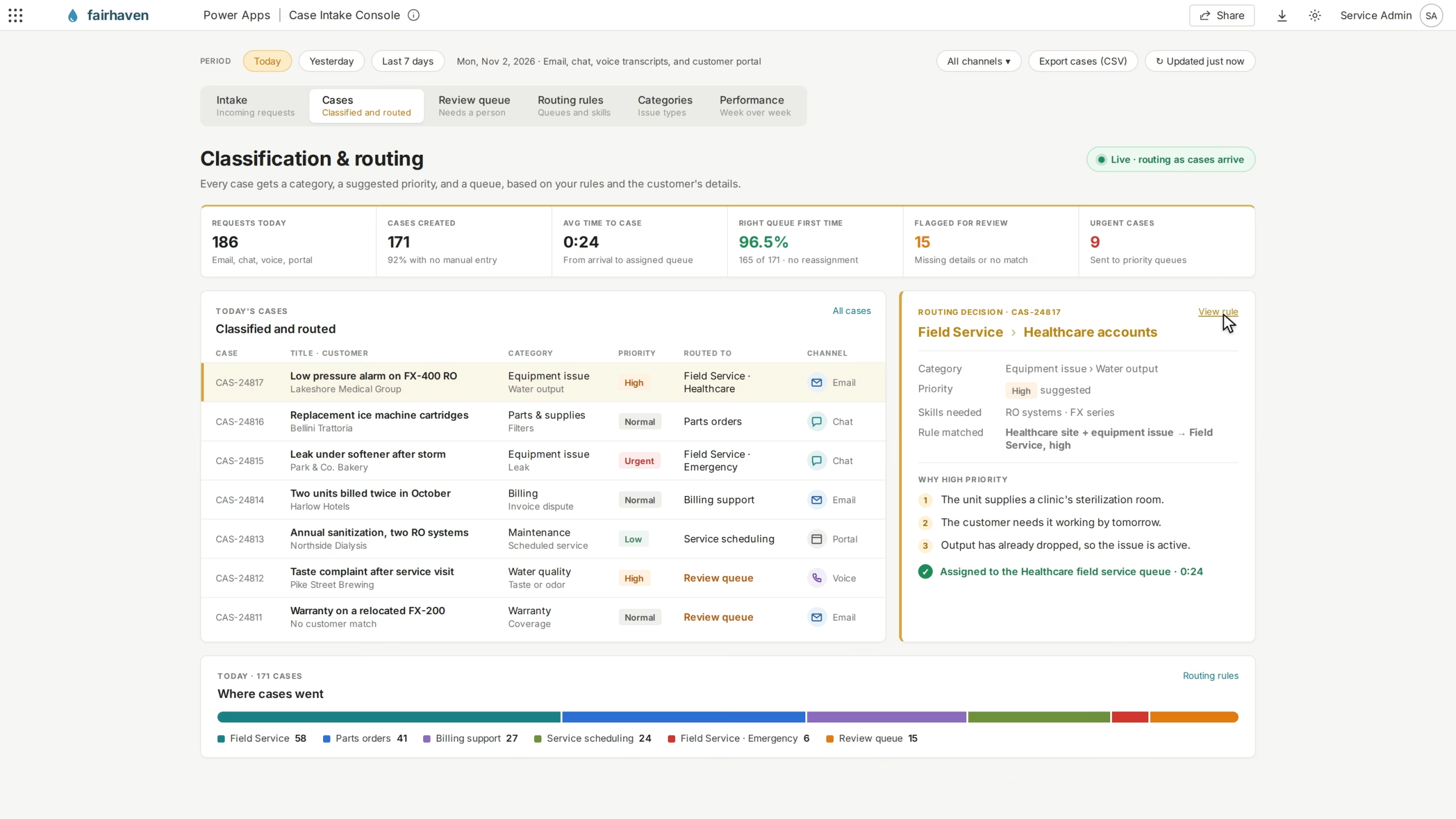
Classify and route cases to the right team
The agent evaluates incoming requests to determine the type of issue, its priority, and the appropriate team to handle it. By connecting AI-generated case information with configured routing rules, it helps organizations reduce manual sorting and direct cases to the right support resources.
The agent can:
- Categorize support requests based on issue type and business rules
- Identify requests that may require urgent attention
- Suggest case priority based on the customer’s issue and available information
- Assign cases to appropriate queues or support teams
- Support routing based on issue category, customer type, or required skills
- Flag requests that need additional review before assignment
- Help maintain consistent case classification across support channels

Spend less time creating cases and more time resolving them
Simplify how your customer service team handles incoming support requests with Rand Group's Case Intake Agent. Our team can help you connect service channels, configure AI-powered case creation, and build intelligent routing workflows that fit your Dynamics 365 Customer Service environment.
How it works
From customer request to assigned support case in five steps
The Case Intake Agent uses AI and connected customer information to capture incoming requests, organize case details, and route work to the appropriate support team.
Receive the customer request
The agent receives an incoming service request through a connected channel, such as email, chat, or another supported customer service interaction.
Understand the issue
Using AI, the agent analyzes the customer’s message to identify the main issue, extract relevant details, and determine what information is needed.
Match customer information
The agent checks connected Dynamics 365 customer and contact records to associate the request with the appropriate customer.
Create and classify the case
The agent creates a case with a title, description, and relevant details, then applies configured categories and priority recommendations.
Route for resolution
Using the case information and defined routing rules, the agent directs the request to the appropriate queue or team for review and resolution.
Compatibility & requirements
Getting started with the Case Intake Agent
The Case Intake Agent is designed to work with Dynamics 365 Customer Service and connected Dynamics 365 Contact Center channels. Rand Group can help configure the agent around your organization’s case management processes, connect incoming service channels, establish case classification rules, and define workflows for reviewing and assigning support requests.
Setup typically includes:
- A compatible Dynamics 365 Customer Service environment
- Dynamics 365 Contact Center with configured channels, if using voice or digital conversations
- Connected customer service mailboxes or supported communication channels
- Access to customer accounts, contacts, and case records
- Defined case categories, priorities, and assignment rules
- Configured queues and routing workflows
- Appropriate user permissions and security controls for accessing customer information
- Applicable Dynamics 365, Power Platform, and AI service licenses based on the deployment

Why partner with Rand Group?
AI case intake tailored to your business
Rand Group builds custom AI agents around your customer service processes and existing technology. We help define case categories, intake rules, customer data connections, and routing workflows so the Case Intake Agent captures the right information and directs requests according to your organization’s support requirements.
Long-term support beyond implementation
With a 90% client retention rate, Rand Group focuses on helping customers improve their technology over time. After launch, we can refine case classification rules, adjust routing workflows, improve AI prompts, and expand the agent as your service processes evolve, keeping intake efficient and consistent.
Proven experience across 3,000+ engagements
With more than 3,000 successful engagements, Rand Group brings experience across CRM, system integration, and business process improvement. We apply that knowledge to help you connect service channels, streamline case management, and make AI-powered intake a practical part of your customer service operations.
Award-winning Microsoft technology expertise
Rand Group is a Microsoft Solutions Partner and the Microsoft Americas Channel Emerging Partner of the Year. We’ve also been named to Accounting Today’s VAR 100 and ERP Global Insights’ Top 100 VARs. Our expertise across Dynamics 365, Power Platform, and Microsoft technologies supports connected, custom AI solutions.
Frequently asked questions (FAQs)
What is the Case Intake Agent?
The Case Intake Agent is an AI-powered solution designed to automate the initial steps of customer service case management. It analyzes incoming requests, extracts relevant information, creates support cases, and helps route them to the appropriate team. This reduces manual case creation and helps customer service representatives focus on resolving issues.
How does the Case Intake Agent create support cases?
The agent analyzes incoming customer messages to identify the issue and extract important information. It uses this information to populate case fields in Dynamics 365 Customer Service, including the title, description, customer, and relevant classifications. Case creation can follow configured business rules and review requirements.
What types of customer requests can the Case Intake Agent process?
The agent can be configured to process requests from connected customer service channels, including email and supported digital conversations. Voice interactions may also be supported when appropriate call data or transcripts are available. The channels supported depend on your organization’s Dynamics 365 environment and integrations.
Can the Case Intake Agent identify existing customers?
Yes. The agent can use connected Dynamics 365 customer and contact records to associate incoming requests with the appropriate customer. This helps service representatives access relevant information without manually searching for and linking customer records.
How does the Case Intake Agent prioritize support requests?
The agent analyzes the customer’s issue and applies configured business rules to suggest an appropriate priority. Organizations can define criteria based on factors such as issue type, urgency, and customer classification. These priorities can then support case assignment and routing.
Can the Case Intake Agent automatically route cases to the right team?
Yes. The agent can work with configured Dynamics 365 routing rules to direct cases to appropriate queues or support teams. Routing can consider factors such as issue category, customer type, required skills, and business priorities, depending on your organization’s setup.
Can customer service representatives review cases created by the agent?
Yes. The Case Intake Agent can be configured to support employee review of AI-generated case information. Service representatives can verify details, correct classifications, and address missing information before taking further action. Review requirements can be tailored to your organization’s service processes.
Can the Case Intake Agent be customized for our organization?
Yes. Rand Group can tailor the agent’s AI prompts, case fields, classification rules, routing workflows, and connected data sources to your customer service processes. This allows organizations to define how support requests are captured, categorized, and assigned based on their business needs.