Dynamics 365
 Power Platform
 Dynamics
 Cloud & Productivity
What AI agents are in Dynamics 365 Sales?

Sales teams today are expected to move faster, qualify leads more accurately, and close deals with fewer resources. Buyers are more informed, sales cycles are more complex, and manual CRM work continues to slow teams down. Traditional automation and reporting can help, but they often stop short of truly accelerating outcomes.
AI agents represent Microsoft’s next evolution beyond traditional CRM automation. Instead of simply surfacing insights or reminders, AI agents can actively participate in the sales process—analyzing data, taking action, and adapting based on results. For organizations using Dynamics 365 Sales, AI agents introduce a new way to scale sales execution without adding headcount.
What is Dynamics 365 Sales?
Dynamics 365 Sales is Microsoft’s comprehensive CRM solution designed to help sales organizations manage every aspect of the customer journey. From capturing and nurturing leads to tracking opportunities through the pipeline and maintaining ongoing customer relationships, Dynamics 365 Sales provides the foundation that modern sales teams rely on.
The platform centralizes customer data, tracks interactions, manages forecasts, and provides visibility into sales performance. It’s this rich foundation of structured sales data—lead histories, engagement patterns, opportunity details, and customer insights—that AI agents build upon. By leveraging the information already captured in your CRM, AI agents can drive smarter, more autonomous actions that accelerate results without requiring teams to change how they work.

What are AI agents in Dynamics 365 Sales?
AI agents in Dynamics 365 Sales are autonomous, goal-driven assistants designed to go beyond recommendations. Unlike traditional automation or rule-based workflows, AI agents can analyze data patterns, make decisions, and take action with minimal human intervention.
These agents act as digital teammates embedded directly into sales workflows. They continuously learn from outcomes, adapt to changing conditions, and support sellers where it matters most—lead prioritization, deal progression, and research. The result is a sales organization that operates with greater speed, consistency, and intelligence.
How AI agents fit into the sales process
AI agents support sales teams across the entire customer lifecycle, from the moment a lead enters your system to the final stages of deal closure. During lead qualification, agents assess which prospects are worth pursuing based on engagement signals and fit criteria. Throughout the opportunity stage, they monitor deal health, identify risks, and suggest actions to keep momentum. When research is needed, agents gather and synthesize relevant information so sellers enter conversations fully prepared.
This comprehensive support means sales teams can focus their energy on high-value activities—strategic selling, relationship building, and complex negotiations—while AI agents handle the administrative groundwork. The result is a more efficient sales operation where no opportunity slips through the cracks and every interaction is informed by timely, relevant insights.

Learn how to put AI agents to work
Understanding AI agents is one thing—putting them into practice is another. Rand Group’s hands-on Microsoft AI agents workshop helps organizations understand how AI agents work, where they deliver value, and how to deploy them responsibly with the right governance in place.
Agents available in Dynamics 365 Sales
Dynamics 365 Sales includes purpose-built AI agents designed to handle high-impact sales activities automatically. These agents work behind the scenes to analyze data, guide decision-making, and keep opportunities moving forward—allowing sales teams to spend more time building relationships and less time managing CRM tasks.
Sales qualification agent
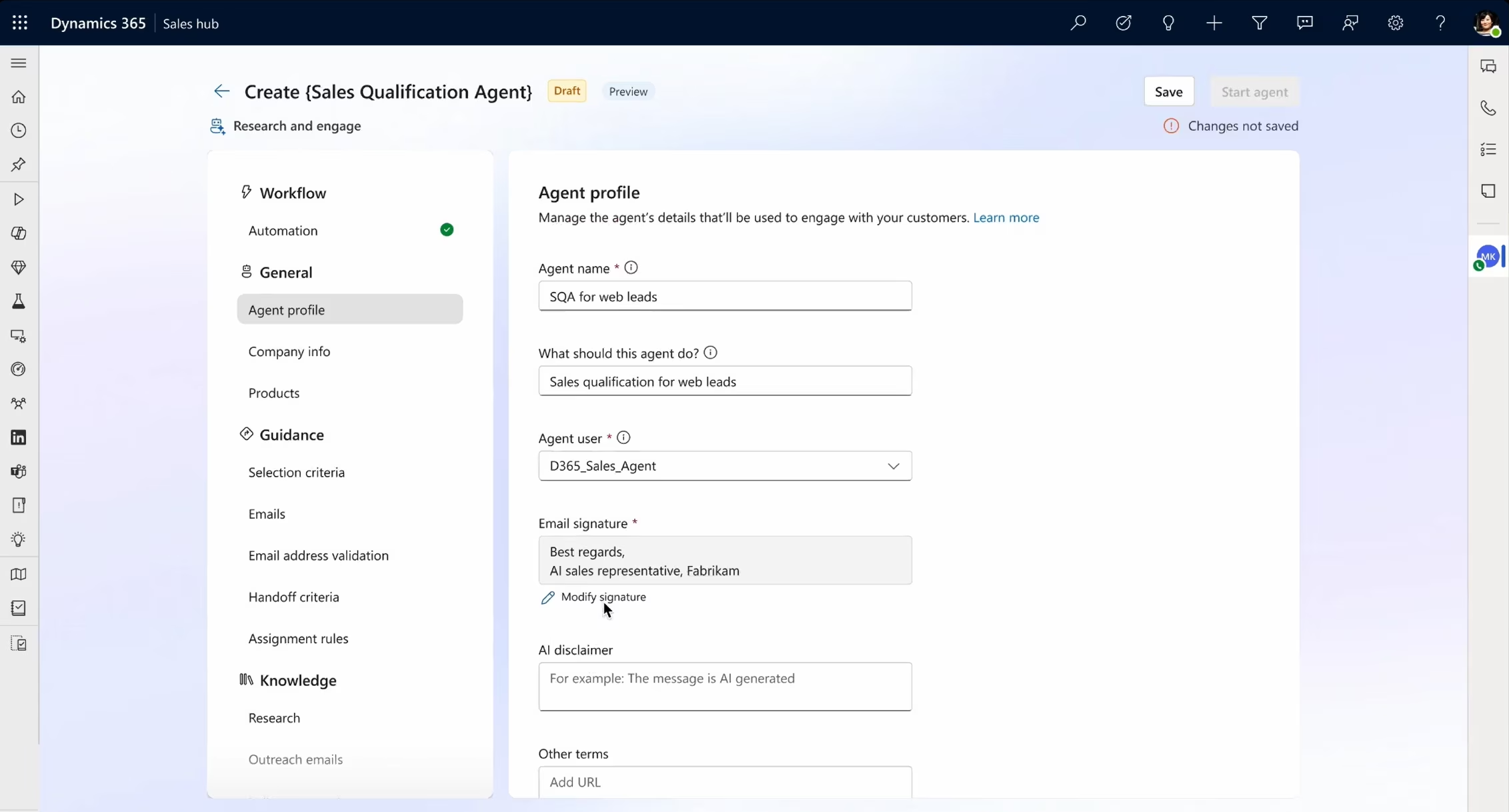
The Sales Qualification Agent helps sales teams quickly determine which leads are worth pursuing by continuously analyzing engagement data, firmographics, and historical sales outcomes. Instead of relying on static scoring models or manual review, the agent evaluates inbound leads in real time, identifying intent and readiness based on meaningful signals across the sales system.
Key capabilities:
- Analyzes inbound leads and engagement signals to assess readiness
- Automatically scores and prioritizes leads
- Flags high-potential opportunities for sales reps
- Reduces the need for manual lead review
The benefit of using the Sales Qualification Agent is improved focus and efficiency. Sales teams spend less time chasing unqualified or low-intent leads and more time engaging prospects that are most likely to convert, resulting in higher conversion rates and a healthier pipeline.
Sales close agent
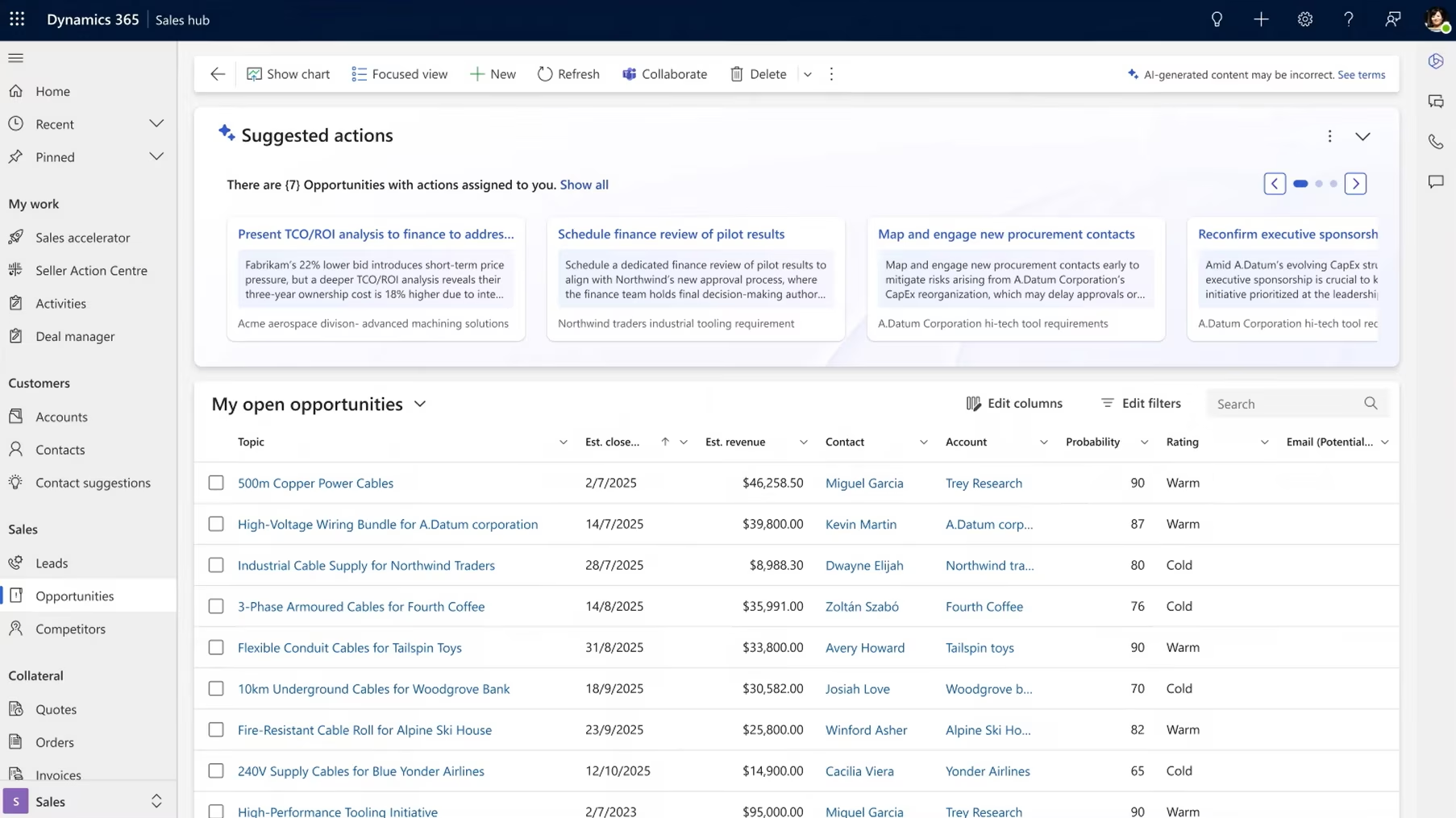
The Sales Close Agent supports deal progression by monitoring opportunity activity and identifying patterns that influence successful outcomes. It continuously evaluates deal health, highlights risks, and recommends next steps based on historical performance and real-time engagement, helping sellers stay aligned with proven closing behaviors.
Key capabilities:
- Monitors deal health and pipeline activity
- Recommends actions to move opportunities forward
- Identifies stalled deals or missing engagement
- Uses historical deal data to guide recommendations
With the Sales Close Agent in place, sales reps gain clearer visibility into what it takes to close deals successfully. The agent helps reduce stalled opportunities, improve forecast accuracy, and increase win rates by ensuring deals receive the right attention at the right time.
Sales research agent
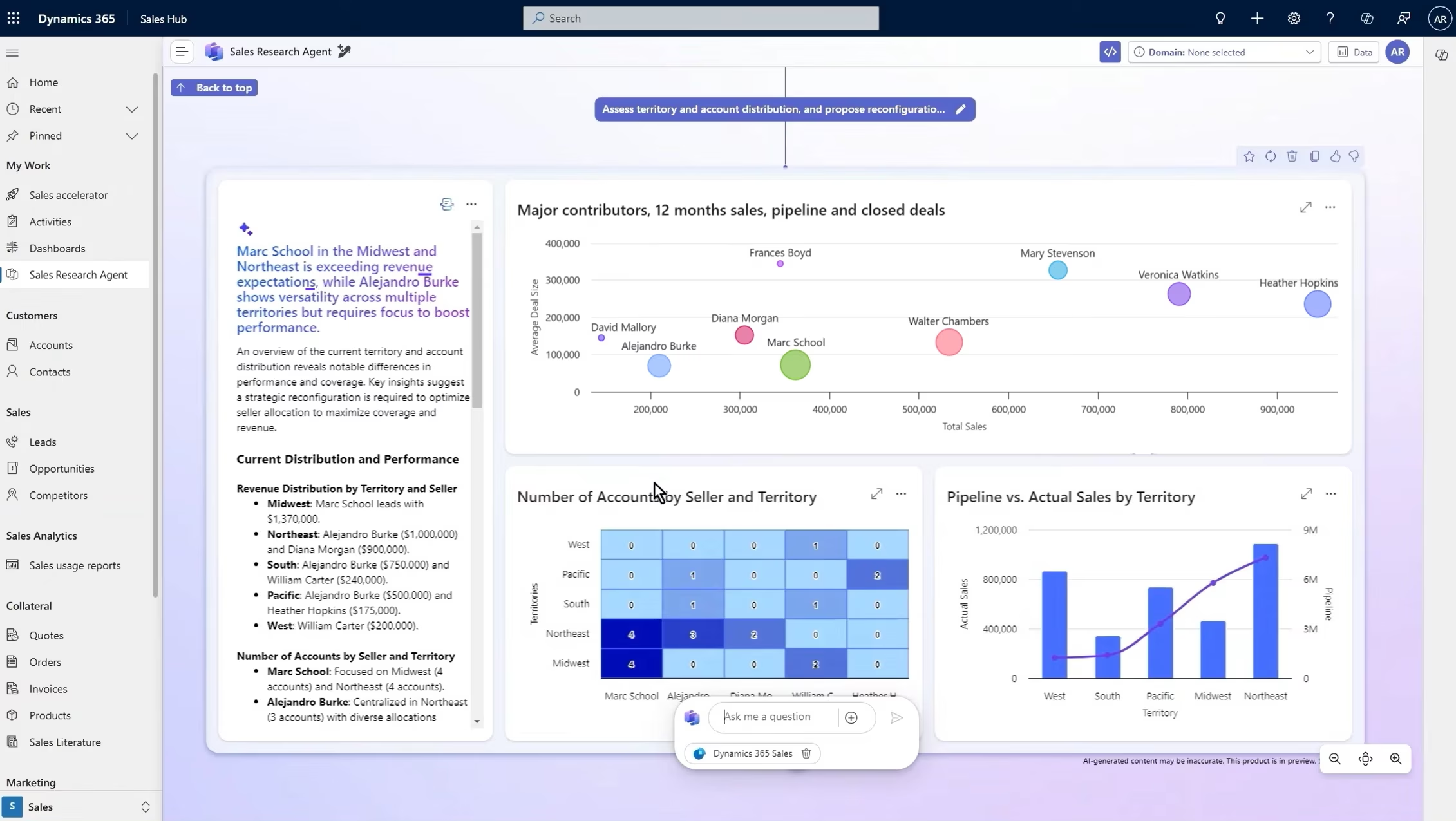
The Sales Research Agent automatically gathers and summarizes relevant account and prospect information, giving sellers immediate context before engaging with customers. By consolidating internal CRM data and approved external signals, the agent removes the need for time-consuming manual research.
Key capabilities:
- Aggregates internal CRM data and external signals
- Summarizes account insights and buying context
- Highlights risks, opportunities, and key talking points
- Reduces time spent on manual research
The primary benefit of the Sales Research Agent is better-prepared sales conversations. Reps enter meetings with a deeper understanding of the account, enabling more relevant discussions, stronger credibility, and improved customer trust.
AI agents vs. Copilot in Dynamics 365 Sales
Copilot and AI agents work together, but they serve different purposes. Copilot focuses on assisting users with prompts, summaries, content generation, and recommendations. It responds to user requests and helps sales reps work more efficiently within their daily tasks.
AI agents, on the other hand, can independently perform tasks, make decisions, and trigger actions based on defined goals. Rather than waiting for a prompt, agents operate continuously in the background. This distinction positions AI agents as the next maturity level of AI adoption—moving from assistance to autonomous execution.
Pricing and cost of AI agents in Dynamics 365 Sales
AI agents in Dynamics 365 Sales use a consumption-based pricing model tied to Microsoft Copilot Credits (tokens) rather than fixed per-agent licensing. Organizations pay based on usage volume and task complexity—each time an agent analyzes data, performs research, or takes action, it consumes credits.
Microsoft prices Copilot Credits at approximately $0.01 per credit, with packages such as 25,000 credits for around $200 per month. Consumption varies depending on factors like sales volume, agent configuration, and how frequently agents run. This model provides cost control through decisions about which agents to activate, usage frequency, and human-in-the-loop approvals. Note that unused credits typically expire at the end of the billing period.
Because usage patterns differ significantly between organizations, working with a Microsoft partner like Rand Group helps ensure your AI agent strategy aligns with both operational goals and budget expectations.
Getting started with AI agents in Dynamics 365 Sales
Implementing AI agents successfully requires more than just flipping a switch—it demands thoughtful planning, proper foundation, and a change management approach that brings your team along for the journey.
- Prerequisites and preparation: Before deploying AI agents, ensure your Dynamics 365 Sales environment has clean, well-structured data. AI agents rely on quality inputs—accurate lead information, complete opportunity records, and consistent data standards—to make good decisions. If your CRM data is incomplete or inconsistent, now is the time to address it. You’ll also need the appropriate licensing, including access to Copilot Credits, and administrative permissions to configure agents within your tenant.
- Setup considerations: Start with a pilot approach rather than rolling out all agents across your entire sales organization immediately. Choose one agent that addresses a clear pain point—perhaps the Sales Qualification Agent if lead follow-up is inconsistent, or the Sales Research Agent if prep time is a bottleneck. Configure the agent’s rules and guardrails to match your sales process, and consider starting with human-in-the-loop approvals so your team can review agent actions before they’re finalized. This builds confidence and allows you to refine the agent’s behavior based on real-world feedback.
- Change management: AI agents represent a significant shift in how work gets done, and your sales team needs to understand what’s changing and why. Communicate clearly about which tasks agents will handle, how this frees up time for higher-value activities, and what’s expected from team members as they work alongside these digital teammates. Address concerns about job security head-on—emphasize that agents augment rather than replace salespeople. Provide training on how to monitor agent actions, override decisions when necessary, and provide feedback that improves agent performance over time.
- Measuring success: Define clear metrics before you begin so you can objectively evaluate whether AI agents are delivering value. Depending on which agents you deploy, relevant metrics might include lead response time, qualification accuracy, opportunity conversion rates, time spent on research, or forecast accuracy. Monitor these KPIs alongside credit consumption to ensure you’re getting positive ROI. Plan regular review sessions to assess performance, gather team feedback, and identify opportunities to expand or refine agent usage.
The goal is sustainable adoption—not just deploying technology, but creating an environment where AI agents become trusted, effective members of your sales operation.
Frequently asked questions about AI agents in Dynamics 365 Sales
Do AI agents replace sales reps?
No, AI agents are designed to augment sales teams, not replace them. They handle repetitive, time-consuming tasks like lead scoring, research, and deal monitoring so that salespeople can focus on what humans do best—building relationships, navigating complex negotiations, and applying creative problem-solving. AI agents free up capacity; they don’t eliminate the need for skilled sales professionals.
Are AI agents available in Dynamics 365 Sales out of the box?
Some AI agents are available as built-in capabilities within Dynamics 365 Sales, though they may require configuration and enablement. Others can be created or customized using Microsoft Copilot Studio to fit specific business processes. The level of customization and deployment effort varies depending on which agents you’re implementing and how closely they align with your existing workflows.
How are AI agents different from workflows or automation rules?
Traditional workflows and automation rules follow rigid, predefined logic—if X happens, do Y. AI agents are fundamentally different because they use machine learning and natural language understanding to analyze context, adapt to situations, and make intelligent decisions. While a workflow might assign a lead based on territory, an agent can assess lead quality, prioritize urgency, and route it to the rep most likely to convert based on historical patterns.
Do AI agents require constant supervision?
The level of oversight you provide is configurable based on your comfort level and risk tolerance. AI agents can operate fully autonomously, making decisions and taking actions without human approval. Alternatively, you can implement human-in-the-loop workflows where agents recommend actions but wait for human confirmation before proceeding. Many organizations start with more supervision and gradually reduce it as they build trust in agent performance.
How much do AI agents in Dynamics 365 Sales cost to run?
AI agents use a consumption-based pricing model tied to Microsoft Copilot Credits. Costs scale based on usage volume and task complexity rather than fixed licensing fees. While exact costs vary by organization and usage patterns, Microsoft offers credit packages such as 25,000 credits for approximately $200 per month. Working with a partner like Rand Group, helps you estimate costs based on your specific sales volume and process requirements.
Are AI agents secure and compliant?
Yes, AI agents operate within Microsoft’s enterprise-grade security and compliance framework. They adhere to the same data protection standards as Dynamics 365 Sales, including compliance with regulations like GDPR, HIPAA (where applicable), and industry-specific requirements. Data processed by AI agents stays within your tenant’s security boundary, and you maintain control over permissions, access, and data governance policies.
How do I know if my organization is ready for AI agents?
Readiness depends on several factors: data quality (clean, structured CRM data is essential), process maturity (well-defined sales processes make agent configuration easier), change readiness (teams willing to adapt and work alongside AI), and clear use cases (specific pain points that agents can address). If your sales team is already using Dynamics 365 effectively and you’re looking to scale efficiency, you’re likely ready to explore AI agents.
How long does it take to implement AI agents?
Implementation timelines vary based on complexity and scope. Enabling a pre-built agent with standard configuration might take days to weeks, including testing and pilot rollout. Custom agents developed in Copilot Studio to address unique processes may require several weeks to months depending on requirements and customization needs. Most organizations adopt a phased approach, starting with one agent and expanding gradually rather than implementing everything at once.
Can I customize AI agents in Dynamics 365 Sales to fit my specific sales process?
Yes, AI agents can be customized using Microsoft Copilot Studio to align with your unique sales workflows, qualification criteria, business rules, and terminology. You can define which data sources agents access, what actions they’re permitted to take, when human approval is required, and how they integrate with existing processes. This flexibility ensures agents support your methodology rather than forcing you to change how you sell.
Next steps
AI agents represent a shift toward autonomous sales execution where routine tasks happen automatically and sales teams focus on activities that require human expertise. The organizations that gain the greatest advantage adopt AI agents thoughtfully—starting with clear use cases, ensuring proper data governance, and partnering with experts who understand both the technology and sales operations.
Rand Group specializes in helping organizations navigate Microsoft AI adoption safely and effectively. Whether you’re exploring where to start or scaling agents across your sales organization, we provide the guidance and support you need to succeed.
Ready to explore how AI agents can transform your sales operations? Learn more about our Microsoft AI Agents workshop or contact Rand Group to discuss your specific needs.