Dynamics 365
 Power Platform
 Dynamics
 Cloud & Productivity
AI-powered selling with Copilot in Dynamics 365 Sales

Sales teams are under constant pressure to respond faster, stay informed, and maintain momentum across increasingly complex buying cycles. Leads arrive from multiple channels, stakeholders change frequently, and critical context is often buried across emails, notes, and CRM records. While most organizations have invested in CRM systems to manage this complexity, many sellers still struggle with fragmented information and time-consuming administrative work in Dynamics 365 Sales and with Copilot.
Microsoft is addressing these challenges directly with Copilot capabilities in Dynamics 365 Sales and Microsoft Outlook. Rather than replacing sellers, Copilot is designed to reduce friction—helping sales professionals quickly understand where an account stands, identify risks and opportunities, and communicate more effectively with prospects. This post explores how AI-powered Copilot features support real-world selling scenarios, where they deliver the most value today, and what organizations should consider as they adopt them.
Why speed and context matter in Dynamics 365 Sales
One of the most consistent findings in sales research is the importance of rapid response. Organizations that engage leads quickly are far more likely to convert interest into meaningful conversations. Yet speed alone is not enough. Sellers also need context—what has already happened, who has been involved, and what the next best action should be.
Dynamics 365 Sales addresses this challenge by combining CRM data, activity history, and AI-driven summaries into a single, accessible experience. Copilot plays a central role by surfacing insights that would otherwise require manual review across multiple records and systems. The result is not just faster outreach, but more informed and relevant engagement.
Copilot summaries in Dynamics 365 Sales
Copilot summaries are one of the most immediately valuable AI features in Dynamics 365 Sales. They provide a concise, structured overview of a lead, opportunity, or other sales record, allowing sellers to quickly orient themselves before reaching out to a prospect or joining a call.
These summaries evolve as a deal progresses. Early in the lifecycle, they may focus on company background, lead source, and basic qualification details. As opportunities mature, the summaries incorporate activity history, stakeholder engagement, and recent changes—giving sellers a clear picture of where things stand.
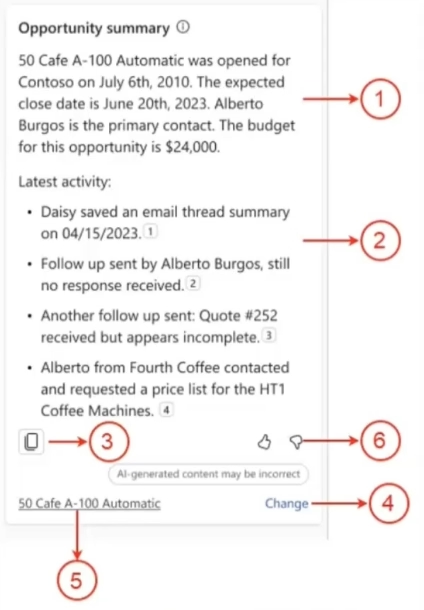
Copilot summaries are organized into multiple sections that make them easy to scan and act on:
- Opportunity or lead overview: High-level information about the record, including key details and current status.
- Recent activity summaries: Emails, meetings, notes, tasks, and other activities are summarized, with references that allow users to drill into the original records when more detail is needed.
- Quick sharing options: Summaries can be copied and shared with managers or teammates, supporting pipeline reviews, forecasting discussions, and internal alignment.
- AI association feedback: When Copilot associates activities with a record, users can correct those associations if needed. This feedback helps improve future accuracy.
- Topic and relevance indicators: Copilot highlights the topic it believes the activity relates to, helping users validate context.
- User feedback controls: Thumbs-up and thumbs-down feedback allows sellers to indicate whether summaries are accurate and helpful, reinforcing a learning loop that improves results over time.
Together, these elements help sellers spend less time searching for information and more time engaging with prospects.
Understanding what has changed in Dynamics 365 Sales—and why it matters
Sales pipelines are dynamic, and changes occur constantly: stakeholders disengage, budgets shift, timelines move, and deal sizes fluctuate. Staying on top of these changes is critical for sellers and managers to act decisively and maintain momentum. Copilot in Dynamics 365 Sales helps by summarizing updates and answering focused questions such as, “What has changed since I last viewed this opportunity?”
To use this capability effectively, auditing must be configured within Dynamics 365. When auditing is enabled, Copilot can track field-level changes and generate concise summaries of meaningful updates, allowing sellers to quickly understand what has changed and why it matters.
This capability is particularly valuable in several scenarios:
- Sales managers overseeing multiple deals: Quickly identify shifts in engagement, timelines, or deal size across a portfolio without manually reviewing every record.
- Account owners returning to opportunities after time away: Understand recent activity and changes without relying on memory or combing through historical notes.
- Teams coordinating handoffs: Ensure continuity when opportunities move between sellers, regions, or teams, reducing miscommunication and preventing gaps in follow-up.
When configured properly, this feature reduces surprises, supports proactive deal management, and improves visibility across the pipeline. By providing timely, actionable insights, it helps both sellers and managers focus on the opportunities that require immediate attention, ultimately enhancing pipeline predictability and revenue outcomes.
Mobile access for field-based sellers with Dynamics 365 Sales and Copilot
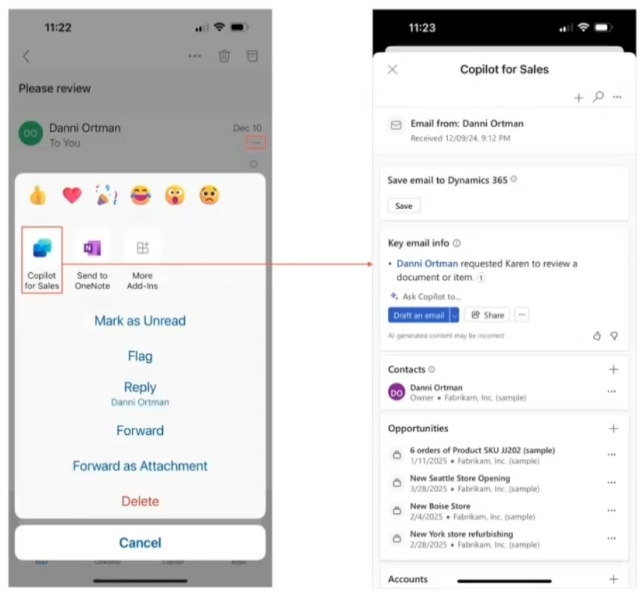
Sales work rarely happens exclusively at a desk, and timely access to insights is critical for field-based sellers. Dynamics 365 Sales, combined with Copilot capabilities, is fully accessible through mobile applications on both iOS and Android, giving sellers the tools they need wherever they are.
Key benefits include:
- Real-time access to insights and summaries: Sellers can review lead or opportunity summaries before meetings, ensuring they are fully prepared and able to engage in meaningful, informed conversations. Copilot-generated summaries provide a quick snapshot of prior activity, key stakeholders, and potential next steps.
- Immediate activity capture: After a call or meeting, sellers can update notes, log follow-up tasks, or record outcomes directly from their mobile device. This reduces reliance on memory and ensures that information is captured accurately and promptly, minimizing gaps in the CRM.
- Seamless workflow between appointments: Mobile access allows sellers to enter data between meetings or while traveling, maintaining continuity in their workflow. Timely updates enhance visibility for sales managers, improve pipeline accuracy, and support better decision-making across the organization.
- Improved CRM data quality: By capturing activities and insights in real time, mobile users contribute to more complete and accurate CRM records. This not only supports individual performance but also strengthens reporting, forecasting, and analytics for the entire sales organization.
For field-based sellers, mobile access transforms Dynamics 365 Sales from a static system into a dynamic, actionable tool. Combined with Copilot’s AI-driven insights, it ensures sellers remain informed, efficient, and responsive, no matter where their day takes them.
Relationship insights and warm introductions in Dynamics 365 Sales
Not every Copilot capability is branded explicitly as AI, but many still deliver intelligent insights. Relationship insights in Dynamics 365 Sales help sellers understand existing connections between people in their organization and external contacts.
By analyzing communication patterns—without reading message content—Dynamics 365 can indicate whether colleagues have an established relationship with a prospect. These insights are based on interaction volume rather than message details, addressing common concerns about privacy and data security.
For sellers, this enables:
- Identifying potential warm introductions
- Leveraging internal relationships to build credibility
- Avoiding redundant or conflicting outreach
These features require administrative configuration and coordination with Microsoft 365 and Exchange settings, but they can significantly improve early-stage engagement when enabled.

Boost sales performance with Copilot in Dynamics 365 Sales
Unlock smarter selling with Copilot in Dynamics 365 Sales, streamlining your workflow and providing AI-driven insights. See how it can help your team close deals faster and work more efficiently.
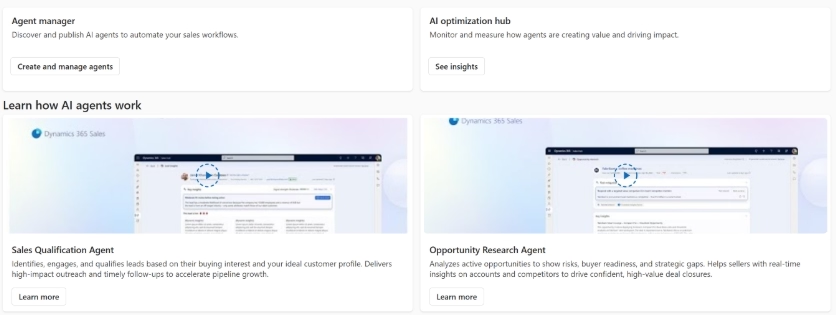
AI agents in Dynamics 365 Sales: sales qualification and opportunity research
Microsoft is introducing AI agents within Dynamics 365 Sales that extend Copilot beyond on-demand prompts and summaries. These agents analyze data continuously and can take action based on defined rules, offering a view of how AI may become more operational within the sales process.
Sales qualification agent
The sales qualification agent is designed to improve early-stage lead handling by reducing the time sellers spend researching and initiating contact. It evaluates leads based on configurable criteria—such as source, geography, or industry—and surfaces relevant insights to support faster, more informed engagement.
In a research-only configuration, the agent gathers company background, prior interactions in Dynamics 365, and publicly available information, presenting it in a concise summary. This allows sellers to quickly assess fit and context while retaining full control over outreach.
For organizations ready to introduce more automation, the agent can also operate in an engage mode. In this mode, it uses its research to draft and send initial outreach emails automatically. Engagement continues until predefined conditions are met—such as a response, an activity threshold, or a time limit—at which point the lead is handed off to a seller for direct follow-up.
When used deliberately, the sales qualification agent helps teams scale early engagement without overwhelming sellers, while maintaining consistency and human oversight.
Opportunity research agent
The opportunity research agent focuses on active deals and pipeline health. It analyzes opportunity data, activity history, and engagement patterns to surface signals that may indicate risk or changing deal dynamics.
These insights can include disengaged stakeholders, slowing momentum compared to historical patterns, or opportunities that may require intervention. The agent can also help prioritize deals based on factors such as size, timing, and likelihood to close, helping sellers and managers focus attention where it is most needed.
Rather than replacing judgment or pipeline reviews, the opportunity research agent functions as an early signal. It brings potential issues to the surface sooner, enabling proactive follow-up and more focused coaching conversations—particularly during high-impact periods such as quarter-end.
Because this agent is currently in preview, organizations should ensure its use aligns with data quality, governance, and change management practices before a broader rollout.
Copilot-driven activities inside Dynamics 365 Sales
Copilot is embedded directly into common sales activities, starting with email composition inside Dynamics 365 Sales. Sellers can prompt Copilot to draft emails based on context, such as an opportunity record or recent interactions.
Once generated, emails can be adjusted for length and tone, whether short, medium, or long, and professional, friendly, or more conversational.
While Copilot can save time, it is not a replacement for judgment. Sellers should always review and refine drafts to ensure the message aligns with their intent and brand voice. Overly formal or excessively courteous language may need adjustment, depending on the audience and relationship.
Emails sent from Dynamics 365 are tracked automatically in both Outlook and the Dynamics timeline, ensuring consistent visibility without extra steps.
Copilot for Sales in Microsoft Outlook
Copilot for Sales extends Dynamics 365 capabilities directly into Outlook, allowing sellers to manage emails and appointments without switching applications:
- Drafting and coaching emails: Sellers can ask Copilot to draft messages or use the coaching feature, which analyzes tone, clarity, and sentiment and provides actionable suggestions. For example, a frustrated follow-up can be reframed into a professional, respectful email that maintains urgency. Over time, this guidance helps sellers improve communication skills independently.
- Automatic email tracking: All emails sent through Outlook with Copilot for Sales are automatically recorded in Dynamics 365 Sales. This eliminates the need to manually save or associate messages with records, reducing administrative overhead and ensuring a complete activity history.
- Appointment tracking: Unlike emails, appointments must be linked to the appropriate record and confirmed as saved before sending to appear in Dynamics 365 timelines. If this step is missed, the appointment will not be tracked, which can affect Copilot summaries and reporting. This distinction is a key focus during user training and adoption planning.
AI powered selling: Copilot for Dynamics 365 Sales in action
See how AI-powered Copilot capabilities help sellers quickly understand leads and opportunities, respond faster to prospects, and stay grounded in the full sales context without digging through records or emails. The focus is on practical features that help teams connect sooner and sell smarter in real-world scenarios.

Known limitations and practical considerations for Dynamics 365 Sales and Copilot
While Copilot for Sales delivers significant value today, successful adoption depends on understanding a few practical implementation considerations that help ensure smooth workflows and reliable outcomes. Key areas to plan for include:
- Administrative setup and system coordination: Certain features, such as activity tracking, relationship insights, or AI agents, require configuration by system or Exchange administrators. Ensuring these prerequisites are in place supports accurate data capture and consistent experiences. Coordination between IT and sales teams helps maximize feature effectiveness and avoid incomplete records.
- Preview features and ongoing evolution: Some Copilot capabilities, including AI agents and engagement workflows, are currently in preview. As Microsoft refines these features, functionality or behaviors may evolve before general availability. Organizations can benefit from introducing preview capabilities through targeted pilots, gathering user feedback, and adjusting processes as enhancements are released.
Accounting for these considerations reinforces the value of thoughtful implementation, structured user training, and continuous optimization. With the right planning, organizations can fully leverage Copilot in Dynamics 365 Sales while maintaining confidence in data quality and day-to-day sales operations.
Frequently asked questions
What is Copilot in Dynamics 365 Sales and how does it help sales teams?
Copilot in Dynamics 365 Sales is an AI-powered assistant that helps sales professionals work more efficiently by summarizing key information, surfacing insights, and suggesting next steps. It reduces manual research and administrative tasks, allowing sellers to focus on engaging with prospects and managing opportunities effectively.
Can sellers access Dynamics 365 Sales and Copilot on mobile devices?
Yes. Dynamics 365 Sales and Copilot are fully accessible on iOS and Android mobile devices. Field-based sellers can review summaries, update notes, log activities, and access real-time insights wherever they are, improving CRM data quality and supporting informed decision-making on the go.
How does Copilot summarize activity and changes in my sales pipeline?
Copilot tracks activity history, emails, meetings, notes, and updates to provide concise summaries of leads and opportunities. When auditing is enabled, it can highlight field-level changes, allowing sellers and managers to quickly understand what has changed, who is engaged, and which actions require attention.
How does Copilot help improve email communication in Dynamics 365 Sales?
Copilot can draft emails based on the context of opportunities, recent interactions, or previous activities. Sellers can adjust tone, length, and style, while emails are automatically tracked in Dynamics 365 and Outlook. This saves time, ensures consistent messaging, and keeps CRM records accurate without extra administrative work.
What should organizations do to successfully adopt Copilot in Dynamics 365 Sales?
Organizations should plan for proper configuration, user training, and governance when adopting Copilot. This includes enabling auditing, coordinating with IT and Microsoft 365 admins, and introducing AI features in stages. Thoughtful planning ensures accurate CRM data, smooth workflows, and maximum value from Copilot’s AI-powered insights.
Next steps
Copilot in Dynamics 365 Sales represents a practical application of AI that supports real selling activities—summarizing information, improving communication, and helping teams focus on the right opportunities at the right time. When implemented thoughtfully, these capabilities can reduce administrative effort and improve consistency across the sales process.
Rand Group helps organizations evaluate, configure, and adopt Microsoft Dynamics 365 Sales and Copilot capabilities in alignment with their sales strategy, governance requirements, and user readiness. Whether you are exploring Copilot for the first time or looking to optimize existing functionality, a structured assessment and rollout plan can make the difference between experimentation and measurable impact.
If you would like to discuss how Copilot can support your sales teams, or need guidance on configuration, training, or change management, contact Rand Group for a conversation about your Dynamics 365 Sales roadmap.