 NetSuite
NetSuite Exception Management
Find financial issues faster and resolve them sooner
Spend less time searching for errors and more time addressing them. NetSuite Exception Management uses AI to flag unusual financial activity and provide context for investigation, helping accounting teams focus their reviews and address potential issues throughout the accounting period.
Business challenge
Growing transaction volumes make financial issues harder to find
As financial activity increases, reviewing transactions one by one takes more time. Unusual amounts, unexpected account assignments, and missing entries can be difficult to spot among routine activity, leaving accountants with more to investigate as the close approaches.

Time spent searching for errors
Manual reviews can require checking large volumes of routine transactions before finding the items that need attention.

Issues carried into month-end
Potential errors and omissions left unresolved during the period can add follow-up work and delay the financial close.

Limited context for investigation
An unusual transaction is only the starting point. Accountants still need to understand why it stands out and compare it with relevant historical activity.
Features
Spot unusual activity before it slows down the close
Bring AI-powered detection and transaction context together inside NetSuite. Exception Management highlights activity that differs from learned patterns, helping accountants focus their attention on potential issues throughout the period.
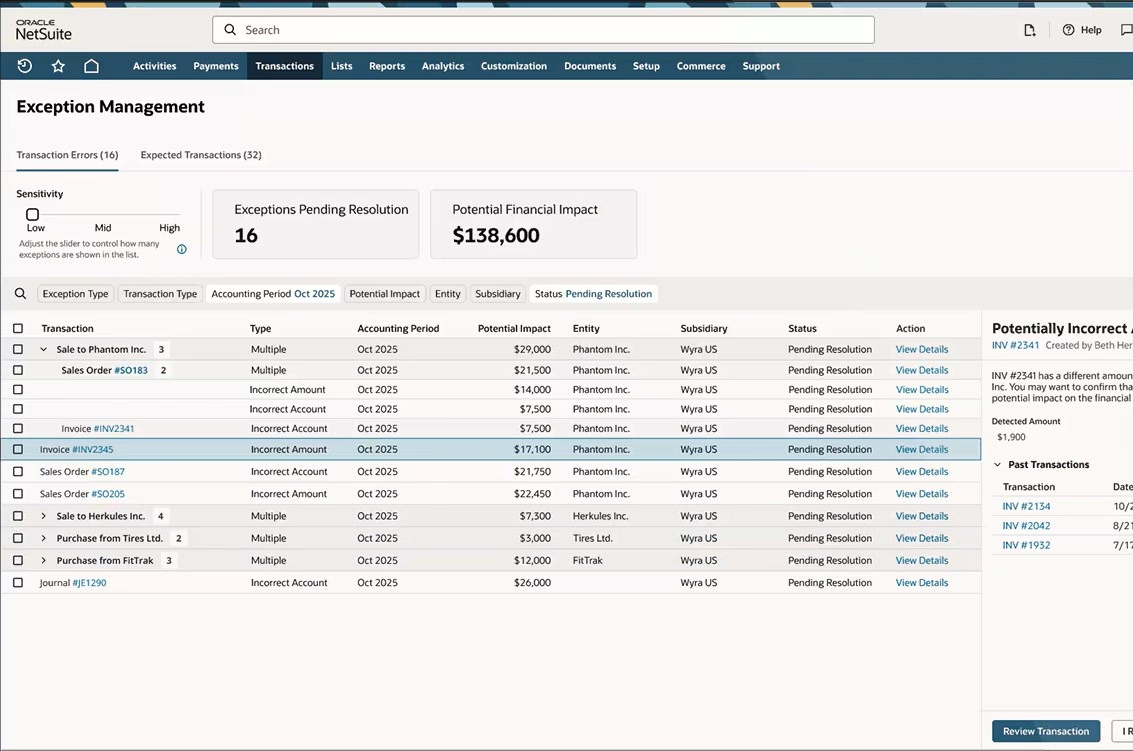
Find unusual amounts and accounts alongside missing activity
Exception Management learns from historical transactions to identify patterns and surface activity that warrants closer review. Once enabled and trained, it evaluates newly created or edited transactions every hour.
The feature can:
- Flag transaction amounts that differ from patterns in similar activity.
- Identify account assignments that appear inconsistent with prior posting behavior.
- Highlight recurring transactions expected in the next few days of the current period and flag missing activity after its expected date.
- Surface suspicious changes to vendor legal or payee names associated with recent payments and vendor bills.
Understand why an item was flagged and decide what comes next
Move from a potential issue to an informed decision with explanations, historical comparisons, and links to underlying records. Review tools help accountants investigate flagged activity and record the outcome.
Users can:
- Review detected and expected values alongside similar historical transactions.
- Use filters to focus on relevant exceptions and mark favorites for follow-up.
- Open transaction records and supporting documentation to investigate and correct confirmed errors.
- Close corrected items as resolved, mark valid activity as No Action Needed, or reopen exceptions for further review.
Recording these outcomes provides feedback that helps the models refine future suggestions.

Uncover financial issues today for a smoother close tomorrow
Make exception review a regular part of the accounting process. Rand Group can assess NetSuite readiness, help confirm eligibility, and establish a focused approach to investigating and resolving flagged activity.
How it works
Spot, investigate, and resolve financial issues in five steps
Follow a practical path from flagged activity to a recorded decision. Exception Management provides the context and review tools; accountants determine whether a correction is needed.
Review flagged activity
Open the Exception Management page to explore potential transaction errors and expected or missing activity. Use filters to focus the review.
Understand the exception
Open the details to see why an item was flagged and review the available detected and expected values.
Compare supporting records
Examine similar historical transactions, open the underlying record, and review supporting documentation to understand the difference.
Take the appropriate action
Correct confirmed errors or investigate missing activity. For supported missing transaction types, use Create Transaction; other types link to the relevant process page.
Record the outcome
Mark corrected issues as resolved or select No Action Needed for valid activity. These decisions help refine future suggestions.
Compatibility & requirements
What is needed to use Exception Management
Exception Management is a native NetSuite feature with availability and access requirements. Rand Group can help assess readiness and coordinate with the NetSuite Account Manager to confirm the appropriate next steps.
Before getting started, review:
- Eligibility and model readiness: Availability depends on sufficient transaction volume and readiness for model training.
- Historical data: Models learn from up to 18 months of transaction history. Consistent records that reflect normal operations provide a stronger basis for useful suggestions.
- Feature setup: Accounting Periods must be enabled. In production, Exception Management Models must be enabled before the Exception Management interface.
- Permissions: An administrator enables the feature. Users need Exception Management access, with Full permission to resolve items and appropriate access to the relevant subsidiaries and transaction types.
- Review preferences: Configure included exception categories, transaction exclusions, and minimum amount thresholds to align the review with business needs.

Why partner with Rand Group?
Accounting processes come first
We review recurring issues and investigation workflows to identify where exception detection can make a practical difference. The focus stays on improving financial review and follow-up.
NetSuite expertise you can trust
Connect available AI capabilities with the configuration and permissions that support accounting work. Rand Group can help assess readiness and confirm feature access with NetSuite.
Local teams across North America
Our consultants work from offices across the United States and Canada, providing support in your time zone from people who understand your accounting processes. Whether NetSuite Exception Management needs a configuration update or your team has questions about flagged activity, you can reach someone who already knows your NetSuite environment.
Guidance that evolves with the business
Keep the review process aligned with changing transaction patterns and business priorities. Rand Group can help refine preferences and assess new NetSuite capabilities as they become available.
Frequently Asked Questions (FAQs)
What is NetSuite Exception Management?
NetSuite Exception Management is a native AI-powered feature that identifies financial activity outside an organization’s learned transaction patterns. It provides explanations and comparisons to help accounting teams investigate potential issues and fix them promptly.
What types of issues can it identify?
It flags unusual amounts, unexpected account assignments, suspicious vendor information changes, and missing transactions. It also highlights recurring activity predicted in the next few days of the current accounting period.
Does Exception Management correct errors automatically?
Accountants decide what action to take. They review flagged activity, correct confirmed errors in the underlying records, and mark the exception as resolved. Valid transactions can be closed with No Action Needed.
How does it learn transaction patterns?
It uses up to 18 months of an organization’s transaction history to train dedicated models. Consistent records and feedback from resolved or dismissed exceptions help refine future suggestions.
Is Exception Management available in every NetSuite account?
No. Availability depends on sufficient transaction volume and model training readiness. Rand Group can assess the environment and coordinate with the NetSuite Account Manager to confirm eligibility and access.
Can the exception review be tailored to business needs?
Yes. Administrators can configure exception categories, exclude selected transaction types, and set minimum amount thresholds. Users can also filter review lists and mark favorites for follow-up.