 NetSuite
Intelligent Close Manager
Keep your financial close moving with AI-powered insights
Give your accounting team a clearer view of what’s complete, what’s outstanding, and where to focus next. NetSuite Intelligent Close Manager brings close tasks, financial metrics, and AI-generated insights into your dashboard, helping your team prioritize work and address pending activities throughout the accounting period.
Business challenge
Limited visibility can slow financial close
Keeping the close on track takes more than checking off tasks. Your team needs to know which activities are unfinished, how they affect the numbers, and who should act next. Without that visibility, follow-up can consume time that should go toward completing and reviewing the close.

Time lost tracking progress
Chasing updates across spreadsheets, emails, and task lists makes it harder to see what is complete and what still needs attention.

Unclear priorities
A long list of open activities does not always show which work matters most. Your team needs financial context to decide where to focus.

Issues left until month-end
Pending approvals, unbilled orders, and unresolved exceptions can build up during the period, leaving more work to investigate as deadlines approach.
Features
Keep your team on track with clear priorities
Bring close progress, outstanding activities, and financial context together inside NetSuite. Intelligent Close Manager helps your accounting team understand the work ahead and move directly to the tasks that need attention.
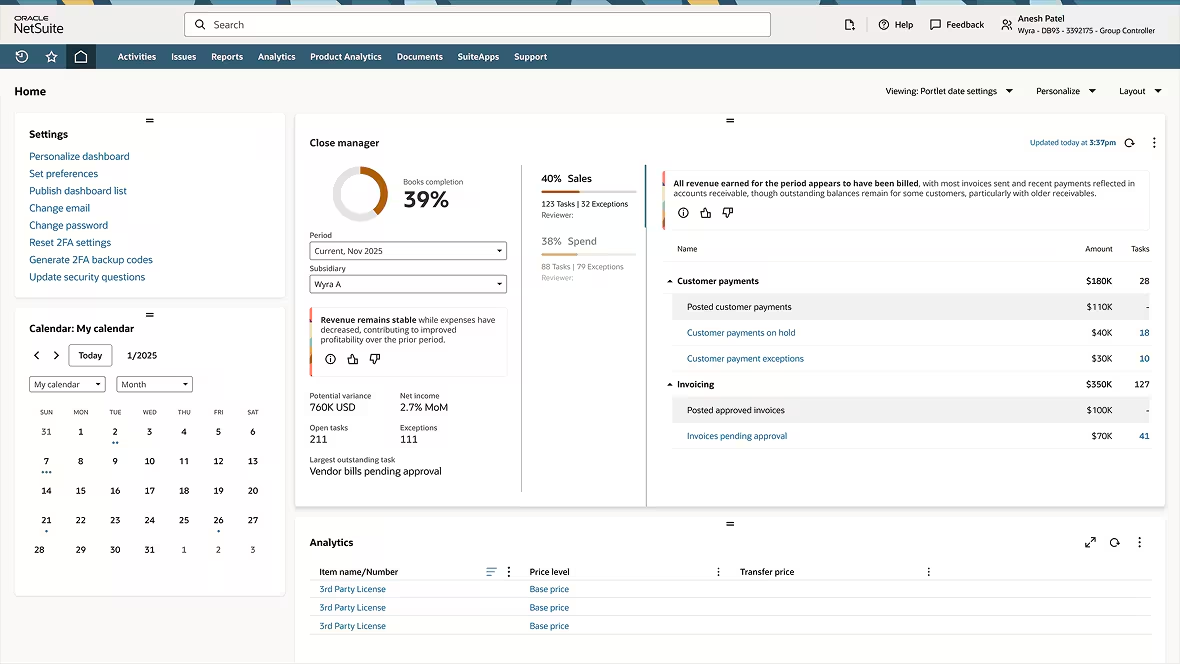
See what is outstanding and why it matters
Review close activity for a selected accounting period and subsidiary. Use completion metrics and task amounts to understand progress and the financial significance of unfinished work.
Your team can:
- Monitor completion and open activities across accounts receivable, accounts payable, accounting, and custom tasks.
- Review net income change, the largest outstanding task, and potential variance; the total value of tasks still requiring completion.
- Identify outstanding work, including unbilled sales orders and vendor bills or journal entries that need approval.
- Follow task links to the relevant transaction lists and workflow pages.
Turn close insights into action
Use AI-generated summaries to understand close progress, open activities, and potential gaps in task coverage. Combine those insights with records and supporting transactions to give your team a practical next step.
Your team can:
- Generate summaries of overall close progress and accounts receivable and accounts payable activity.
- Use AI prioritization to organize work by factors such as transaction amount, business impact, and due date.
- Assign task records, set due dates, and update status for the first open accounting period, with custom tasks for company-specific activities.
- Investigate relevant exceptions surfaced through NetSuite Exception Management when that feature is available and enabled.
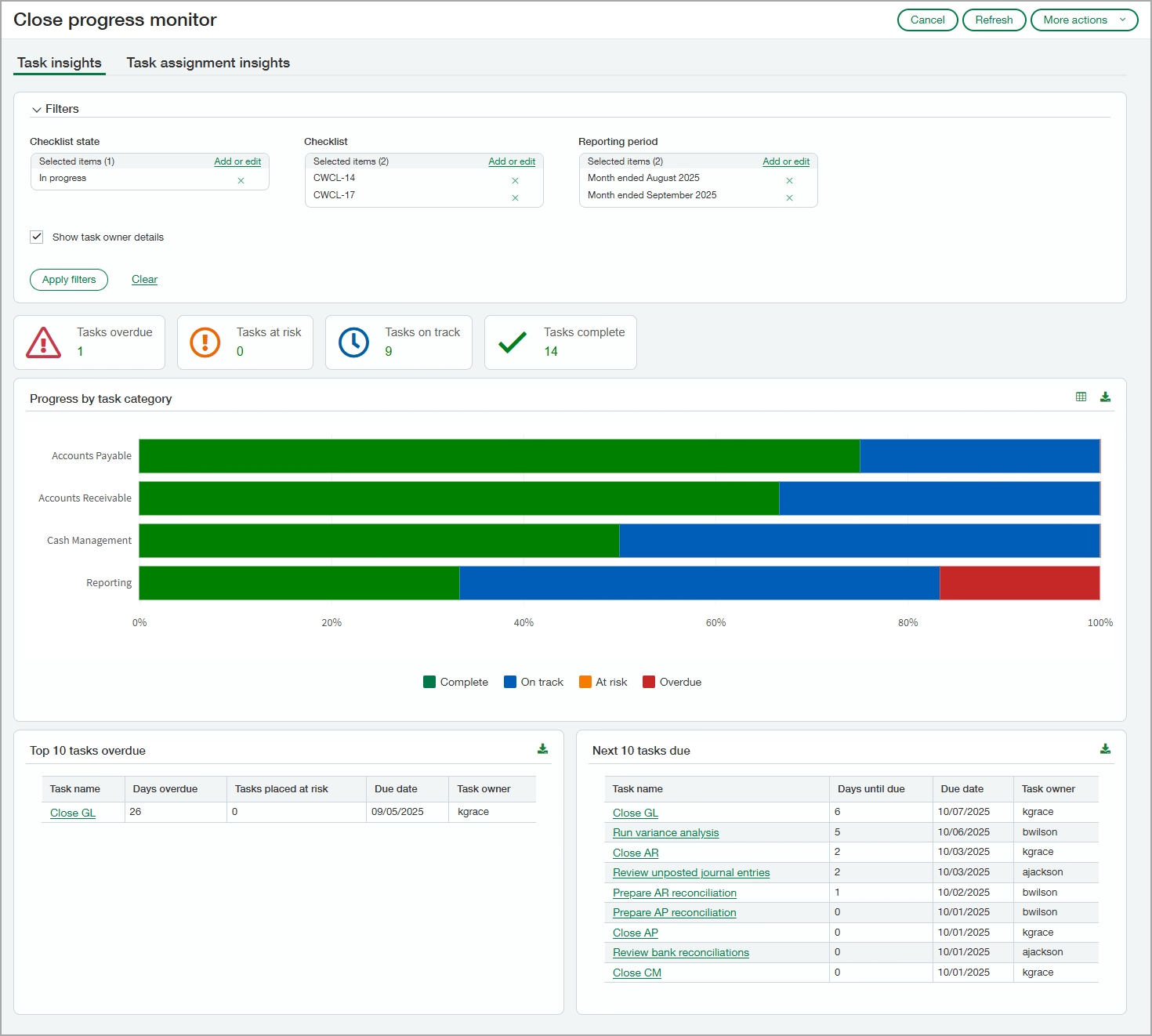

Make the next financial close smoother, smarter, and more efficient
Every accounting team manages the close a little differently. Rand Group can review your process, assess your NetSuite configuration, and help you build Intelligent Close Manager into the way your team tracks and completes work.
How it works
Five steps to tracking and managing the financial close
Build a regular review of outstanding work into your accounting routine. Intelligent Close Manager brings together the information and task links your team needs to keep activities moving throughout the period.
Select your period and subsidiary
Open Intelligent Close Manager on your NetSuite Home dashboard. Choose the accounting period and subsidiary you want to review.
Review progress and financial context
Check completion metrics, open tasks, and estimated impact to understand what remains outstanding.
Explore insights and priorities
Generate a close summary and review suggested priorities to help decide where your team should focus next.
Investigate and complete the work
Follow task links to supporting pages, review the underlying records, and complete the relevant approvals, billing, or other close activities.
Track completion and manage period locks
Update task records as work progresses. Authorized users can also access controls to lock transaction types and accounting periods.
Compatibility & requirements
What you need to use Intelligent Close Manager
Intelligent Close Manager is a native NetSuite feature. The tasks, metrics, and AI capabilities you see depend on your account settings and user access. Rand Group can help you review the setup before your team begins using it.
To get started, you will need:
- Enabled features: Accounting Periods and Intelligent Close Manager enabled in your NetSuite account.
- Appropriate permissions: Manage Accounting Periods at View level or higher to use the feature, with additional permissions for custom tasks and underlying actions.
- AI preferences: Enable Narrative Insights turned on to generate close summaries and use AI prioritization.
- Accounting-book alignment: A process that accounts for the dashboard displaying data for the primary accounting book only.
- Exception Management eligibility: To include related exception capabilities, sufficient transaction data and model readiness, along with the feature being available and enabled.
System-generated tasks and KPIs refresh hourly. Custom tasks appear immediately after creation.

Why partner with Rand Group?
A process that fits your team
We review your close activities and recurring challenges to identify where Intelligent Close Manager can make your work easier. The setup starts with how your accounting team operates.
NetSuite expertise
Get guidance on the features, preferences, and permissions that support your financial workflows. We help you understand what is available in your environment and how to configure it.
Local teams across North America
Our consultants work from offices across the United States and Canada, providing support in your time zone from people who understand your close process. Whether Intelligent Close Manager needs a configuration update or your accounting team has questions, you can reach someone who already knows your NetSuite environment.
Ongoing improvement
Keep your close process aligned with your business as it evolves. Rand Group can help you review your configuration and assess new NetSuite capabilities as they become available.
Frequently Asked Questions (FAQs)
What is NetSuite Intelligent Close Manager?
NetSuite Intelligent Close Manager is a native dashboard feature for monitoring and managing financial close work. It brings together tasks, financial metrics, transaction amounts, relevant exceptions, and AI-generated insights to help accounting teams understand outstanding activities and take action.
Does Intelligent Close Manager automate the entire financial close?
It supports close monitoring, task management, and prioritization. Your accounting team remains responsible for reviewing records, resolving issues, and completing required activities.
What does potential variance mean?
Potential variance is the total value of tasks that still require completion. It gives your team context about unfinished work; it is not a confirmed accounting error or a final adjustment to your financial results.
Can we assign tasks and track due dates?
Yes. Close Manager task records support assignments, due dates, and status updates. NetSuite creates system task records for the first open accounting period. Your team can also create custom tasks for company-specific activities, subject to the relevant permissions.
Does it include Exception Management?
Intelligent Close Manager can bring relevant exceptions into the close view when NetSuite Exception Management is available and enabled. Exception Management availability depends on sufficient transaction volume and model readiness.
What do we need to use the AI insights?
The Enable Narrative Insights preference must be enabled to generate close summaries and use AI prioritization. Build confidence in AI-generated summaries by reviewing the supporting reports and records.
How can Rand Group help us get started?
Rand Group can review your close process, confirm feature availability, and configure relevant capabilities. We can also align tasks with responsibilities and train your team to review insights and complete outstanding work.