Sage 100 reviews: Ratings, pros and cons, and what real users say

When business leaders begin researching ERP software, reviews are often one of the first places they turn. Product specifications can tell you what a system is designed to do, but Sage 100 reviews can provide insight into what it is like to use the software day to day.
Sage 100 is a well-established ERP and accounting solution for small and midsize businesses, particularly organizations with complex financial, inventory, distribution, and manufacturing requirements. Its depth and flexibility have helped make it a long-standing option for businesses that need more functionality than entry-level accounting software can provide.
If you are researching Sage 100, you may be wondering whether the platform is the right fit for your business. In this article, we examine Sage 100 ratings, analyst perspectives, customer reviews, common pros and cons, and feedback from real users. We’ll also share insights from Rand Group’s experience helping businesses implement, customize, upgrade, and support Sage 100.
Sage 100 reviews at a glance
- Ratings: 4.1/5 on Capterra and Software Advice; 3.7/5 on G2.
- Top strengths: Financial management, inventory, manufacturing, customization, and reporting.
- Best fit: Growing manufacturers, distributors, and inventory-intensive SMBs.
- Considerations: Not cloud-native, traditional UI, less AI-forward than modern SaaS ERPs, and greater upgrade and administration requirements.
- Bottom line: Sage 100 remains a strong fit for established SMBs that prioritize accounting and operational depth, but cloud-first organizations should carefully compare it with modern SaaS ERP alternatives.
Ratings and review counts were checked in August 2026 and may change as new reviews are submitted.
- What is Sage 100?
- What software experts say about Sage 100
- Sage 100 ratings on review platforms
- G2 reviews
- Capterra reviews
- Software Advice reviews
- Sage 100 pros and cons
- What users like about Sage 100
- What some Sage 100 reviewers say could be improved
- Understanding total cost of ownership
- What Rand Group customers say about Sage 100
- Is Sage 100 right for your business?
- Maximize your Sage 100 ROI with Rand Group
- FAQs
What is Sage 100?
Sage 100 is an enterprise resource planning (ERP) and business management solution designed primarily for small and midsize organizations. It brings financial management together with operational capabilities such as inventory, distribution, purchasing, sales order processing, and manufacturing.
The platform is particularly well suited for businesses that have outgrown basic accounting software and need greater control over transactions, inventory, reporting, and business processes.
Sage 100 includes capabilities for:
- General ledger, Accounts Payable, and Accounts Receivable
- Inventory management
- Sales and purchase order management
- Manufacturing and production management
- Bill of Materials (BOM)
- Business intelligence and reporting
- Customer relationship management
- Payroll and human resources
- Integrations and third-party applications
One of Sage 100’s defining characteristics is its modular flexibility. Organizations can configure the platform around their processes and extend it through integrations, third-party applications, and custom development.
That flexibility can be especially valuable for distributors and manufacturers with requirements that are difficult to accommodate with less sophisticated accounting platforms.
Sage 100 is a mature ERP platform rather than a cloud-native SaaS ERP. Its established architecture provides considerable flexibility and supports a large ecosystem of customizations and third-party solutions, but it also means the user experience, deployment model, upgrades, and pace of innovation differ from newer cloud ERP platforms. Businesses prioritizing browser-based access, automatic SaaS updates, embedded AI, or a modern cloud-first architecture should weigh those requirements carefully when evaluating Sage 100.


See Sage 100 in action
Discover how Sage 100 can help connect your financial, inventory, distribution, and manufacturing processes. Schedule a personalized demo with Rand Group’s Sage experts to explore the features that matter most to your business.
What software experts say about Sage 100
Industry evaluations position Sage 100 as a mature, highly configurable ERP solution for small and midsize businesses with complex financial and operational requirements. Its depth across accounting, inventory, distribution, and manufacturing makes it particularly relevant for organizations that have outgrown entry-level accounting systems.
Software Advice recognizes Sage 100 as a frontrunner and identifies it as the easiest-to-use solution in its guide to material requirements planning (MRP) software, based on its analysis of reviews within the category.
These findings highlight several of Sage 100’s core strengths: financial depth, strong manufacturing and inventory capabilities, and operational flexibility. Organizations can also extend the platform through integrations, third-party applications, and customizations to accommodate specialized requirements as their operations evolve.
Sage continues to invest in the platform, with recent releases introducing enhancements across usability, automation, inventory traceability, security, and workflow productivity.
Overall, Software Advice’s findings reinforce why Sage 100 remains a strong ERP option for growing manufacturers, distributors, and other inventory-intensive businesses.
0
out of 5 for Bills of Material
0
out of 5 for financial management
0
out of 5 for Accounts Receivable
Next, we’ll look at Sage 100 reviews and ratings across leading software review platforms to see what users say about the system day to day.
Sage 100 ratings on review platforms
Expert perspectives can help businesses understand Sage 100’s capabilities. Sage 100 reviews from real users provide another important perspective: how well does the software perform in day-to-day operations?
Across major software review platforms, Sage 100 earns solid overall ratings:
- G2: 3.7 out of 5 stars
- Capterra: 4.1 out of 5 stars
- Software Advice: 4.1 out of 5 stars
While individual experiences vary, reviewers frequently praise Sage 100 for its accounting capabilities, inventory management, customization, and reporting flexibility.
Sage 100 G2 reviews
On G2, Sage 100 has an average rating of approximately 3.7 out of 5 stars based on more than 200 reviews.
Positive G2 reviews frequently highlight:
- Strong accounting and financial management
- Detailed inventory capabilities
- Customization options
- Flexible reporting
- Ability to support established business processes
Accounting is one of the clearest strengths. Sage 100 provides functionality for general ledger, accounts payable, accounts receivable, bank reconciliation, and other core financial processes, giving finance teams detailed transaction records and controls.
Inventory is another recurring theme. Businesses can manage inventory across multiple locations while supporting purchasing, sales orders, and lot and serial number tracking.
Reviewers also value Sage 100’s flexibility. Organizations can customize fields, workflows, reports, and integrations and extend the platform through a broad ecosystem of third-party solutions.
0
out of 5 stars overall
0
out of 5 stars for ease of use
0
out of 5 stars for inventory management
Sage 100 Capterra reviews
On Capterra, Sage 100 earns an average rating of approximately 4.1 out of 5 stars.
Capterra reviewers highlight many of the same strengths found on G2, including:
- Comprehensive accounting functionality
- Inventory and order management
- Flexible reporting
- Customization
- Ability to support complex business processes
The reviews reinforce where Sage 100 can be particularly valuable: businesses that need more operational depth than basic accounting software provides.
For distributors, manufacturers, wholesalers, and other inventory-intensive organizations, the ability to connect financial transactions with inventory and operational processes can provide greater control and visibility across the business.
0
out of 5 stars overall
0
out of 5 stars for ease of use
Sage 100 Software Advice reviews
On Software Advice, Sage 100 earns an average rating of approximately 4.1 out of 5 stars based on more than 400 verified reviews.
Beyond the individual capabilities highlighted earlier, the overall rating provides a broader indication of customer satisfaction across organizations using Sage 100 in real-world environments.
Software Advice reviewers represent businesses across a range of industries and company sizes, with the majority coming from small and midsize organizations. This makes the feedback particularly relevant for businesses evaluating Sage 100 as their operations become more complex.
Taken together with ratings from G2 and Capterra, Software Advice’s reviews add to a substantial body of user feedback that prospective buyers can consider when evaluating Sage 100.
0
out of 5 stars overall
0 +
verified reviews
Sage 100 pros and cons
Like any ERP solution, Sage 100 comes with advantages and considerations that depend on your organization’s needs, resources, and complexity. Here’s a quick comparison of the Sage 100 pros and cons highlighted throughout user reviews.
These tradeoffs make fit especially important. Sage 100 can deliver substantial value when its financial, inventory, distribution, and manufacturing depth aligns with a company’s requirements. Organizations prioritizing a modern SaaS architecture, rapid cloud innovation, embedded AI, or minimal IT administration may be better served by evaluating cloud-native ERP alternatives.
What users like about Sage 100
Looking across Sage 100 reviews, several advantages appear repeatedly. Users often point to the platform’s financial management, inventory capabilities, manufacturing functionality, customization, and reporting flexibility as reasons Sage 100 continues to support their businesses as operational requirements become more complex.
These strengths reflect a common theme in user feedback: Sage 100 provides the depth and flexibility to manage core financial processes while supporting the operational needs of growing businesses.
Strong accounting and financial controls
Sage 100 provides a comprehensive financial foundation, including:
- General Ledger
- Accounts Payable
- Accounts Receivable
- Bank reconciliation
Businesses can maintain detailed transaction histories, establish financial controls, and manage higher transaction volumes as they grow.
Advanced inventory and distribution
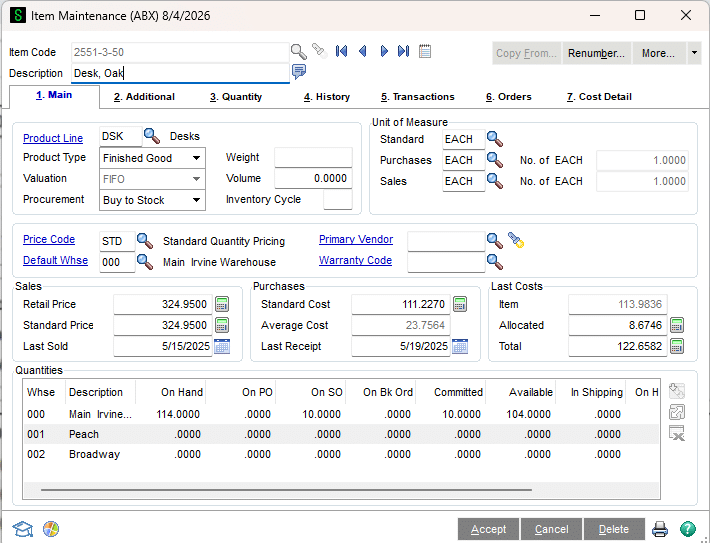
Inventory management is one of Sage 100’s strongest capabilities.
Organizations can manage inventory across locations and warehouses while supporting purchasing, sales orders, lot and serial tracking, and other distribution requirements.
For businesses where inventory is central to operations, this depth can be a significant advantage over simpler accounting platforms.
Manufacturing capabilities
Sage 100 can also connect manufacturing processes with financial and inventory data.
Depending on the modules and configuration selected, businesses can manage:
- Bill of Materials
- Production processes
- Inventory requirements and related manufacturing activities
This makes the platform particularly relevant for light-to-mid manufacturers that want to connect accounting, inventory, distribution, and production.

Extensive customization
Another frequently cited advantage is flexibility.
Businesses can tailor Sage 100 with:
- Custom fields and workflows
- Specialized reports
- Third-party applications
- System integrations
- Custom development
This flexibility can be especially valuable for established organizations with processes that cannot easily be accommodated by a one-size-fits-all ERP system.
Flexible reporting and data access
Sage 100 also provides several ways to access and analyze business information.
Tools such as Microsoft Excel, Sage Intelligence, and Crystal Reports can help finance and operations teams build reports around their specific requirements.
For organizations that already rely heavily on Excel for financial analysis, this flexibility can make it easier to work with ERP data using familiar tools.
What some Sage 100 reviewers say could be improved
No ERP system is the right fit for every organization. Sage 100 reviews also identify several areas businesses should consider during an ERP evaluation.
Not a cloud-native SaaS platform
One of the most important distinctions for buyers in 2026 is that Sage 100 is not a cloud-native SaaS ERP. Although Sage 100 can be hosted in the cloud and accessed remotely, its underlying architecture differs from ERP platforms designed from the ground up as multi-tenant SaaS applications.
That distinction affects more than deployment. Cloud-native ERP platforms typically provide browser-first experiences, vendor-managed updates, more frequent innovation cycles, and increasingly embedded AI capabilities. Organizations making cloud architecture and AI-enabled workflows central to their long-term technology strategy should include those differences in their ERP evaluation.
What to consider: If cloud-native architecture, automatic updates, embedded AI, and minimal infrastructure management are strategic priorities, compare Sage 100 directly with modern cloud ERP alternatives before deciding.
User interface
Sage 100 has a more traditional desktop-oriented user experience than modern browser-first ERP platforms. For long-time users, that familiarity can be an advantage, but organizations accustomed to contemporary SaaS applications may find the interface and navigation dated.
Sage continues to improve usability, search, automation, and workflows, but incremental enhancements do not change the fundamental architectural difference between Sage 100 and a cloud-native ERP.
What to consider: User experience should be evaluated with the employees who will use Sage 100 every day, particularly if your workforce expects browser-based or mobile-first applications.
Learning curve
Sage 100’s depth can also create a learning curve for new users.
Employees may need time and training to become familiar with:
- Menus and navigation
- Transaction processes
- Posting procedures
- Reporting
- Company-specific workflows and customizations
This is an area where implementation quality matters. Proper configuration, role-based training, and documented processes can make it significantly easier for employees to work effectively in the system.
What to consider: The same depth that requires additional training can provide greater control once users understand the system.
Upgrades and maintenance
Sage 100 upgrades can require additional planning, especially in environments with extensive customizations, integrations, or third-party applications.
Businesses may need to:
- Review application compatibility
- Test integrations
- Validate customizations
- Prepare infrastructure
- Test critical workflows before going live
What to consider: An experienced Sage partner can help create an upgrade strategy, test the environment, and reduce disruption.

Choose the right partner for your Sage 100 investment
The right partner can help you optimize Sage 100, navigate upgrades, and get more value from your technology investment. Download our How to Choose the Right Support Partner white paper for the 7 criteria to consider and key questions to ask when evaluating potential partners.
Understanding total cost of ownership
Cost is another consideration raised in some Sage 100 reviews.
The total investment includes more than software licensing:
- Implementation
- Additional modules
- Integrations
- Customizations
- Hosting or infrastructure
- Training
- Support
- Future upgrades
For that reason, businesses should evaluate total cost of ownership alongside potential business value.
An organization that uses Sage 100 to improve inventory control, strengthen financial processes, connect departments, and replace disconnected applications may realize value that cannot be measured by license cost alone.
Ultimately, many of the considerations raised in Sage 100 reviews reflect the tradeoff that comes with a mature and highly configurable ERP system. Sage 100 provides considerable depth and flexibility, but organizations need the right implementation, training, and support strategy to take full advantage of it.
What Rand Group customers say about Sage 100
Software reviews provide valuable insight, but some of the most meaningful Sage 100 reviews come from organizations that have relied on the platform to run and grow their businesses. Rand Group’s Sage experts have helped manufacturers, distributors, and other organizations optimize Sage 100 to improve inventory management, connect operations, strengthen reporting, and support long-term growth.
Here are two examples of what Rand Group customers say about their experience with Sage 100.
0 +
Years of growth supported
0 %
Less time spent on locating inventory
0 %
Less time spent on financial reports
Stucchi USA: Supporting 20+ years of growth with Sage 100
For Stucchi USA, Sage 100 has evolved alongside the business for more than two decades. With Rand Group’s ongoing support, Sage 100 now serves as the operational hub for inventory, warehouse management, pricing, production, and reporting.
The result is a scalable ERP environment that has supported 20+ years of growth and helped Stucchi USA reduce time spent locating inventory by 50%.
“Sage goes beyond an ERP system for us. It is the epicenter for our workflows, and every time we find an inefficiency, the question becomes how we can digitize it and move closer to best practice.” Scott Rolston, President, Stucchi USA
Trim-Tex: Supporting 5x growth with connected operations
After more than 25 years with Sage 100, Trim-Tex Drywall Solutions partnered with MicroAccounting (now Rand Group) to better connect its departments, reporting, inventory, and production processes.
By expanding its Sage environment, Trim-Tex reduced man-hours, saved hundreds of thousands in accounting fees, optimized inventory, and supported 5x company growth.
“The business was growing to the point where we really needed a comprehensive accounting system where all the different modules would talk to each other. Sage today is an integral part of our business.” Martha Kinzel, Controller, Trim-Tex Drywall Solutions
Together, these customer experiences demonstrate an important advantage of Sage 100: the platform can continue evolving as a business grows. With the right configuration, integrations, and ongoing optimization, organizations can extend their Sage 100 investment to address new requirements rather than treating ERP as a one-time technology project.
Is Sage 100 right for your business?
Sage 100 is best suited to a specific type of organization. Its mature functionality and extensive customization can be valuable for businesses with complex operational requirements, but organizations prioritizing a modern cloud-first technology strategy may find other ERP platforms better aligned with their goals.
Sage 100 may be a strong fit if you:
- Are a small or midsize manufacturer, distributor, wholesaler, or inventory-intensive business
- Prefer an on-premises or privately hosted ERP environment over a cloud-native SaaS model
- Need robust accounting, inventory, distribution, or production functionality
- Have specialized workflows that benefit from extensive customization
- Rely on established third-party integrations or Sage 100 expertise
- Already use Sage 100 and can continue gaining value by optimizing your existing investment
- Prioritize functional depth and operational control over having the newest ERP architecture
You may want to consider a cloud ERP instead if you:
- Want a cloud-native SaaS platform with vendor-managed infrastructure and updates
- Prioritize a modern, browser-first user experience
- Want rapid access to emerging AI and automation capabilities
- Prefer standardized processes over extensive ERP customization
- Want to reduce the internal effort associated with upgrades and system administration
- Are developing a broader cloud-first application and data strategy
For many established Sage 100 customers, replacing a system that already supports complex business processes may not deliver enough value to justify the disruption. For a company selecting a new ERP, however, architecture, AI strategy, user experience, and long-term product direction deserve just as much consideration as today’s feature requirements.
The right question is therefore not simply whether Sage 100 is a good ERP. It is whether Sage 100 is the right ERP for your requirements and technology strategy.
Maximize your Sage 100 ROI with Rand Group
Choosing the right ERP is only part of the equation. An experienced implementation and support partner can help you configure Sage 100 around your business requirements and continue getting value from the platform as those requirements evolve.
As a Sage Diamond Tier Partner, Rand Group combines Sage 100 expertise with accounting, technology, and industry knowledge. Our Sage consultants work with small and midsize businesses across the ERP lifecycle, including:
- ERP evaluation and selection
- Sage 100 implementation and configuration
- Upgrades and migrations
- Integrations and custom development
- Reporting and business intelligence
- User training and optimization
- Ongoing Sage 100 support
Whether you’re evaluating Sage 100, looking to improve an existing environment, or planning your next upgrade, Rand Group can help you develop a Sage 100 strategy aligned with your business goals and long-term growth.
Sage 100 reviews FAQs
Is Sage 100 a good ERP system?
Yes, Sage 100 can be a strong ERP system for small and midsize businesses that need robust accounting, inventory, distribution, or manufacturing capabilities. It is particularly well suited for organizations that value customization and need more operational depth than basic accounting software provides. The right fit depends on your business requirements, deployment strategy, budget, and desired user experience.
What are the main advantages of Sage 100?
The main advantages of Sage 100 are strong financial management, advanced inventory and distribution capabilities, manufacturing functionality, customization, and flexible reporting. Its mature ecosystem of third-party applications and integrations also allows businesses to extend the platform around specialized requirements.
What are the disadvantages of Sage 100?
Common Sage 100 criticisms include its traditional user interface, learning curve, upgrade requirements, and the potential cost of maintaining a customized ERP environment. Some organizations may also want more modern native dashboards or a completely cloud-native user experience. Whether these issues are significant depends on how the business intends to use and deploy the software.
Is Sage 100 good for manufacturing?
Yes. Sage 100 can be a good fit for small and midsize manufacturers that need to connect accounting, inventory, purchasing, and production processes. Manufacturing capabilities can include Bill of Materials and production management, making the platform particularly relevant for light-to-mid manufacturing environments.
Is Sage 100 good for inventory management?
Yes. Inventory management is one of Sage 100’s notable strengths. The platform supports inventory-intensive businesses with capabilities for managing items across locations, purchasing and sales transactions, and detailed inventory tracking. Additional functionality and integrations can extend these capabilities for more specialized distribution requirements.
Is Sage 100 cloud-based?
Sage 100 is not a cloud-native ERP in the same sense as browser-first SaaS platforms, but organizations can deploy and access Sage 100 through different hosting and infrastructure approaches. Businesses evaluating deployment options should discuss their security, accessibility, infrastructure, integration, and IT management requirements with an experienced Sage partner.
How much does Sage 100 cost?
Sage 100 pricing depends on your organization’s users, modules, deployment requirements, integrations, implementation scope, and support needs. Businesses should evaluate total cost of ownership rather than software licensing alone. Implementation, customization, training, infrastructure, third-party applications, support, and future upgrades may all contribute to the overall investment.
Is Sage 100 easy to use?
Sage 100 can be straightforward for trained users, but its depth means new employees may experience a learning curve. Reviews indicate that users appreciate the system’s functionality and customization while some find its navigation less intuitive than newer cloud-native ERP applications. Proper configuration and role-based training can help improve adoption.
What types of companies use Sage 100?
Sage 100 is primarily designed for small and midsize organizations with more complex accounting and operational requirements. It is especially relevant for distributors, manufacturers, wholesalers, and inventory-intensive businesses that need financial management integrated with purchasing, sales, inventory, and operational processes.
What Sage 100 reviews tell us
Sage 100 reviews highlight a mature ERP with strong financial, inventory, manufacturing, and customization capabilities, alongside clear tradeoffs in architecture, user experience, administration, and AI innovation. For established SMBs with complex operational requirements, those strengths can still make Sage 100 an excellent fit. Organizations prioritizing a cloud-native architecture, modern browser experience, and rapidly evolving AI capabilities should also evaluate modern SaaS ERP alternatives.
The right expertise can help you get more from your investment. Connect with Rand Group’s Sage experts to evaluate Sage 100, optimize your existing system, or plan the next step in your ERP strategy.