NetSuite
Oracle NetSuite integration guide: Tools, architecture, and best practices

Oracle NetSuite integration is a critical part of building a connected, scalable business environment. While NetSuite serves as a powerful system of record, most organizations rely on multiple applications across ecommerce, CRM, finance, logistics, and HR. Without integration, these systems operate in silos, leading to manual processes, data inconsistencies, and limited visibility across the business.
This Oracle NetSuite integration guide explains how to connect your systems effectively. It covers core integration tools, architecture patterns, common use cases, and best practices to help you design a reliable and scalable integration strategy.
- What is Oracle NetSuite?
- What does integration mean in Oracle NetSuite?
- Benefits of integrating Oracle NetSuite
- What can Oracle NetSuite integrate with?
- Core Oracle NetSuite integration capabilities
- Advanced Oracle NetSuite integration approaches
- Oracle NetSuite integration architecture patterns
- Common Oracle NetSuite integration scenarios
- Integration costs and timelines
- Integration challenges and risks
- Choosing the right Oracle NetSuite integration partner
- Frequently asked questions
What is Oracle NetSuite?
Oracle NetSuite is a comprehensive business platform that helps organizations manage core operations in one connected system. It combines enterprise resource planning (ERP), customer relationship management (CRM), financials, inventory, and more into a single cloud-based solution. Because NetSuite is built in the cloud, teams can access real-time data from anywhere while benefiting from automatic updates, strong security, and a scalable foundation that grows with the business. Oracle NetSuite reviews often praise its ability to centralize data and provide real-time visibility across departments, helping organizations improve decision-making and efficiency.
As an all-in-one platform, Oracle NetSuite simplifies how companies run finance, sales, procurement, and operations. It brings data and processes together so teams can work more efficiently and make better decisions based on accurate information. However, most organizations still rely on other systems across their technology stack. This is where NetSuite integration becomes critical, allowing businesses to connect Oracle NetSuite with other applications to create a unified, end-to-end view of operations.

What does integration mean in Oracle NetSuite?
NetSuite integration is the process of connecting Oracle NetSuite with other business systems so data can flow automatically between them. This includes linking NetSuite to tools like ecommerce platforms, CRM systems, payroll software, and logistics applications. Instead of manually entering data in multiple systems, integration ensures information is shared in real time or on a scheduled basis.
In the context of ERP, integration means creating a connected environment where Oracle NetSuite acts as a central system of record. For example, when a sales order is created in an ecommerce platform, that data can automatically sync to NetSuite for fulfillment, invoicing, and reporting. This reduces errors, eliminates duplicate data entry, and keeps all systems aligned.
Integrating Oracle NetSuite is important because most organizations rely on multiple applications to run their business. Without integration, these systems operate in silos, making it harder to maintain accurate data and efficient processes. NetSuite integration helps unify your technology stack, giving teams better visibility and control across the entire business.
Benefits of integrating Oracle NetSuite
Integrating Oracle NetSuite helps organizations connect their systems, streamline operations, and improve data accuracy across the business. Instead of relying on manual processes and disconnected tools, NetSuite integration enables real-time data flow between systems like ecommerce, CRM, and finance. This creates a more efficient, scalable environment where teams can work from the same data and make faster, more informed decisions.
- Single system of record: Keep Oracle NetSuite as the central source of truth across all connected systems
- Faster time to value: Use prebuilt integrations and tools to accelerate deployment
- Automated workflows: Reduce manual data entry with automated, bidirectional data flows
- Reduced costs: Lower operational and IT costs by eliminating manual processes and redundant systems
- Improved visibility: Gain real-time insights with dashboards, monitoring, and reporting across systems
- Eliminate data silos: Connect disconnected applications across departments and functions
- Improve data accuracy and consistency: Ensure data is synced and standardized across systems
- Enable real-time reporting: Access up-to-date data for faster, more accurate decision-making
- Scale operations: Support growth across multiple entities, locations, and business units

Ready to integrate your systems with NetSuite?
Identify where your systems are disconnected and how to fix them. A NetSuite integration assessment helps you reduce manual work, improve data accuracy, and create a seamless flow of information across your technology stack.
What can Oracle NetSuite integrate with?
Oracle NetSuite can integrate with a wide range of business systems to create a connected and efficient technology ecosystem. While NetSuite is a comprehensive platform that includes capabilities for ERP, CRM, ecommerce, and more, most organizations still use additional tools to support specific processes. NetSuite integration allows you to connect these systems so data flows seamlessly across your business, whether you are using NetSuite modules or third-party and custom solutions.
Core Oracle NetSuite integration capabilities
Oracle NetSuite provides a range of built-in tools to support integration across your technology stack. These capabilities enable businesses to connect systems, automate workflows, and manage data efficiently. Together, they form the foundation for a flexible and scalable NetSuite integration strategy.
NetSuite SuiteCloud platform integration
The NetSuite SuiteCloud platform is the foundation for Oracle NetSuite integration. It provides the core tools and standards needed to connect NetSuite with other systems, whether they are cloud applications, on-premise software, or custom solutions. By using industry-standard APIs, data formats, and secure authentication methods, SuiteCloud allows organizations to integrate Oracle NetSuite into virtually any business process while maintaining data accuracy and system performance.
SuiteCloud is designed to be flexible and scalable, so it works with your existing technology stack instead of forcing you to redesign it. Whether you need real-time API-based integrations, scheduled data transfers, or high-volume data pipelines, SuiteCloud supports multiple integration methods. This flexibility makes NetSuite integration easier to implement and more adaptable as your business grows and your systems evolve.
- SuiteTalk REST web services: SuiteTalk provides a modern REST-based API for interacting with NetSuite using JSON. It supports CRUD operations, custom records, and advanced queries like SuiteQL, making it the preferred method for new NetSuite integrations. This approach simplifies development and enables real-time data exchange across systems.
- SuiteTalk SOAP web services: Offers a SOAP-based integration method using XML and supports a wide range of business objects and operations. It has historically been used for enterprise integrations but is being phased out in favor of REST-based services. To learn more, read our blog on NetSuite SOAP endpoint changes.
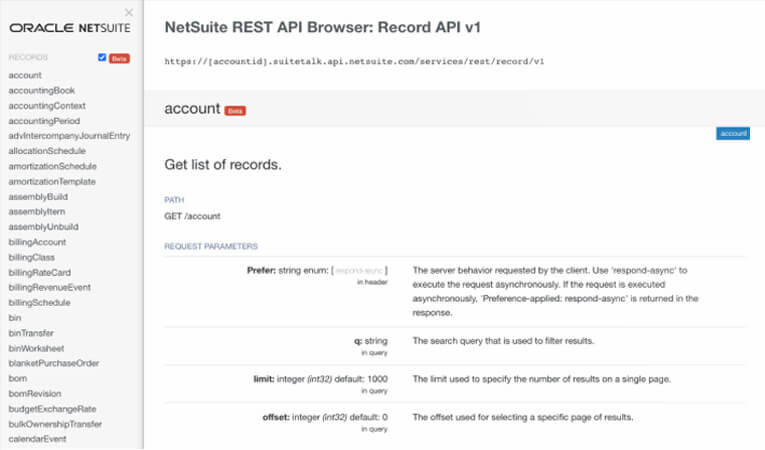
- REST API browser: Allows developers to explore available REST APIs, including record types, fields, and request/response structures. It provides visibility into how NetSuite data is structured, which helps speed up development and troubleshooting. This tool is useful for understanding how to design and test integrations.
- Custom REST endpoints (RESTlets): Enables developers to create custom API endpoints using SuiteScript for specific business logic. RESTlets support secure, stateless communication over HTTP and can handle complex workflows that standard APIs cannot. This makes them ideal for tailored NetSuite integration scenarios.
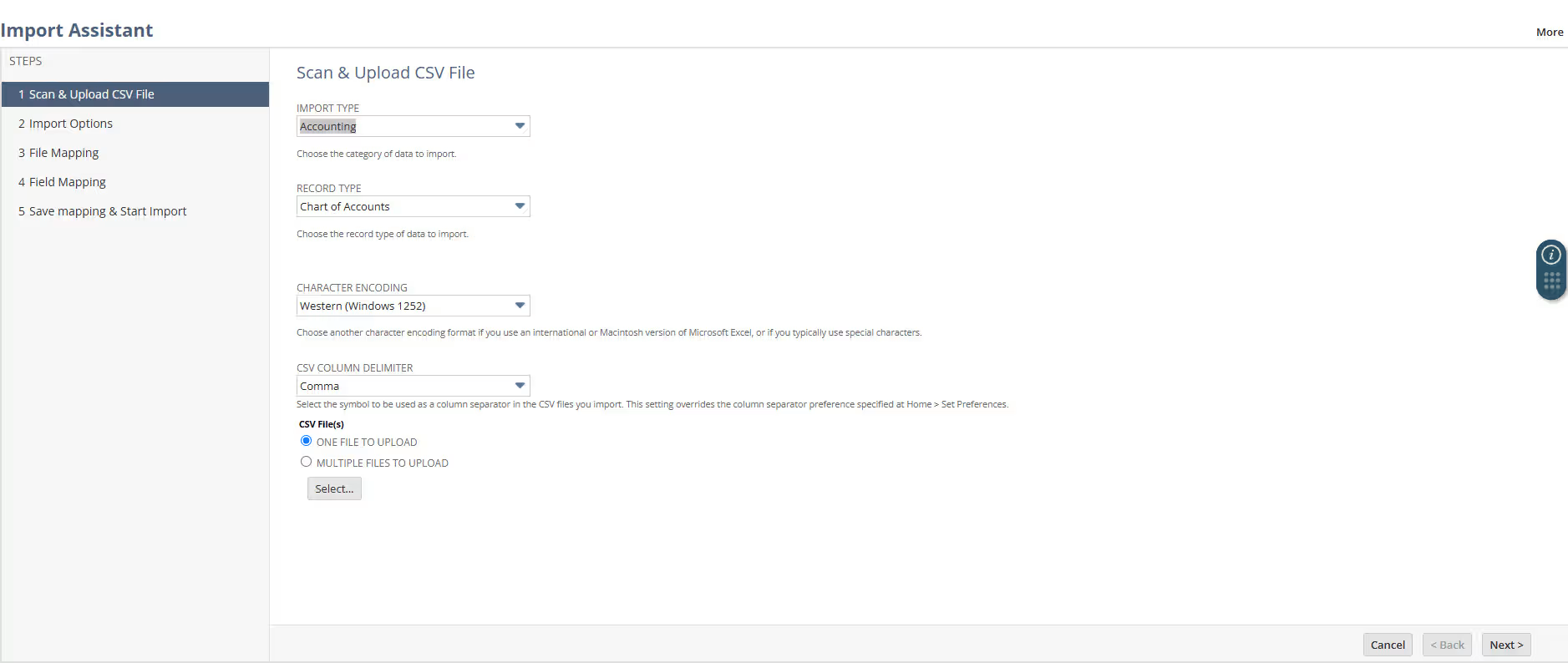
- CSV file import: Provides a simple way to import and update data in bulk using CSV files. It includes tools like the Import Assistant for mapping fields, scheduling jobs, and reducing manual data entry errors. This method is commonly used for batch integrations and data migration.
- High-volume data pipeline (SuiteAnalytics Connect): Enables large-scale data extraction from NetSuite into external systems like data warehouses and BI tools. It uses standard ODBC, JDBC, and .NET interfaces to support high-volume, programmatic data transfers. This is essential for reporting, analytics, and enterprise data integration.
NetSuite integration platform
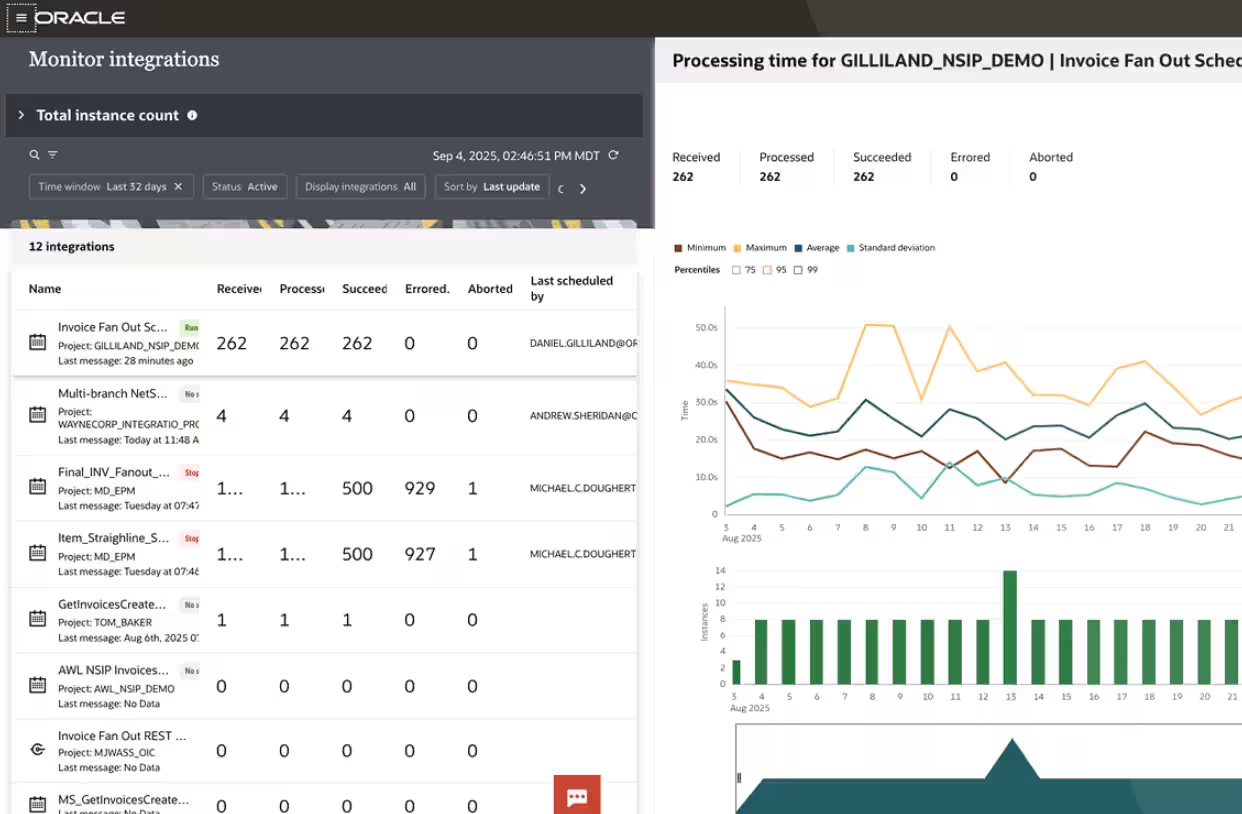
While the SuiteCloud platform provides the technical foundation for building integrations, the NetSuite integration platform focuses on managing and scaling those integrations across your business. It acts as a centralized layer that connects applications, automates workflows, and monitors data movement in real time. This makes Oracle NetSuite integration more accessible, especially for organizations that want to reduce complexity and speed up deployment.
The NetSuite integration platform is designed to simplify how businesses integrate NetSuite with other systems. With prebuilt connectors, AI-assisted configuration, and centralized monitoring, teams can quickly connect ecommerce, CRM, HR, and other applications. This approach helps organizations integrate Oracle NetSuite more efficiently while maintaining visibility, control, and data accuracy across their entire technology stack.
- Applications and data integrations: Connect cloud and on-premises systems using prebuilt adapters and templates. These integrations reduce development time and allow businesses to quickly link NetSuite with other critical applications. This helps ensure consistent data flow across systems without heavy customization.
- Process automation: Automate repetitive tasks and workflows across systems using configurable logic and AI-assisted mapping. This reduces manual effort and improves data consistency across integrations. Automated workflows also help speed up business processes and reduce errors.
- Intelligent document processing: Convert unstructured documents like invoices and purchase orders into automated workflows. AI-powered recognition extracts data and feeds it into integrated systems for processing. This improves efficiency and reduces manual data entry for document-heavy processes.
- API management: Manage the full lifecycle of APIs, including development, testing, deployment, and monitoring. Centralized governance ensures integrations are secure and consistent across the organization. This helps teams maintain control over complex Oracle NetSuite integration environments.
- Development tools: Provide a low-code and developer-friendly environment for building integrations. Users can design integrations with drag-and-drop tools or extend functionality with scripting. AI assistance helps simplify configuration and reduce technical barriers.
- Monitoring and alerts: Track integration performance in real time with dashboards and analytics. Identify issues, bottlenecks, and errors quickly with automated alerts and insights. This improves reliability and helps teams resolve problems faster.
- Security and compliance: Ensure integrations meet enterprise security and compliance requirements. Built-in controls, audit trails, and monitoring protect data and maintain integrity across systems. This is critical for organizations managing sensitive financial and operational data.
NetSuite connectors (prebuilt integrations)
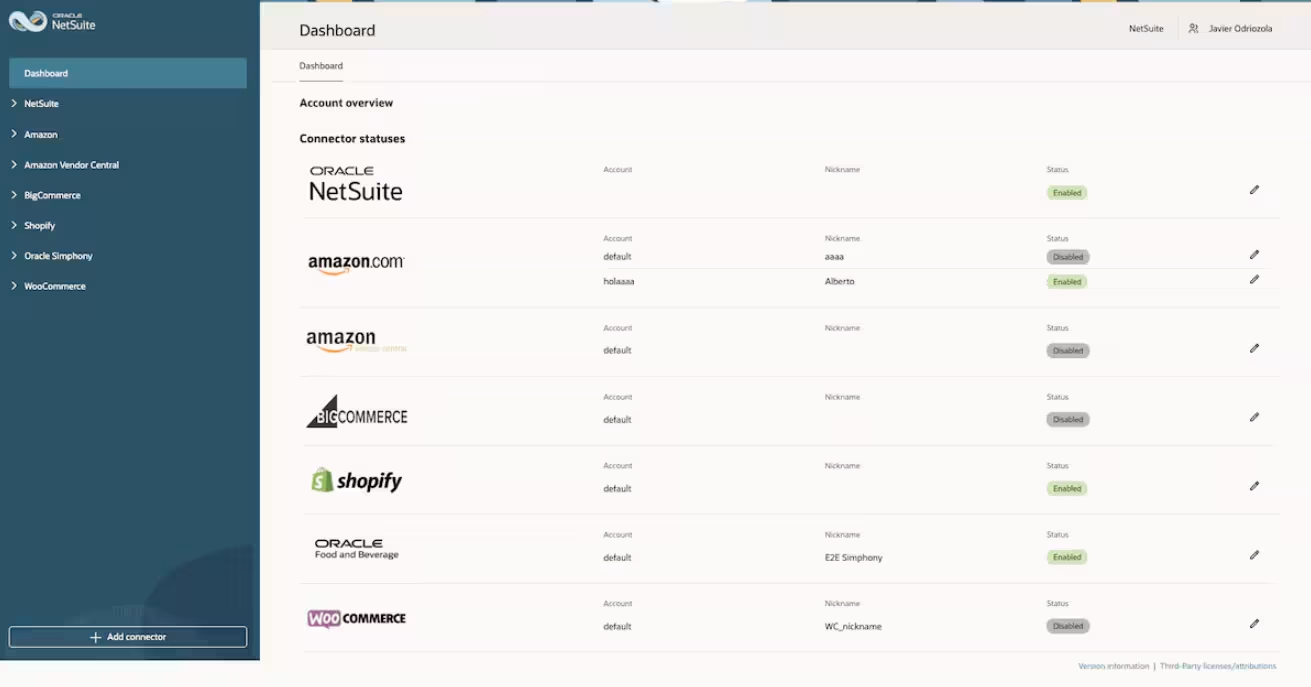
After establishing the foundation with SuiteCloud and managing integrations through the NetSuite integration platform, many organizations look for faster and simpler ways to connect their systems. This is where NetSuite connectors come in. These prebuilt integrations are designed to quickly link Oracle NetSuite with common business applications, reducing the need for custom development and accelerating time to value.
NetSuite connectors automate the flow of data between systems like ecommerce platforms, marketplaces, CRM tools, and logistics providers. By using preconfigured mappings and workflows, businesses can eliminate manual data entry, reduce errors, and keep information synchronized across systems. This makes integrating Oracle NetSuite easier for standard use cases while still supporting scalability as the business grows.
- Ecommerce: Connect NetSuite with ecommerce platforms to sync products, pricing, inventory, and orders. As orders are processed and fulfilled in NetSuite, updates are automatically reflected in the ecommerce system. This ensures accurate inventory levels and a seamless order-to-cash process.
- Marketplace: Integrate with marketplaces like Amazon, eBay, and Walmart to manage listings, orders, and financial data. NetSuite receives order and customer information while sending fulfillment updates back to the marketplace. This helps centralize marketplace operations and improve visibility across sales channels.
- CRM: Connect NetSuite with CRM systems to align customer, sales, and financial data. This integration improves visibility into the full customer lifecycle, from lead to payment. It also helps reduce data silos and supports faster order processing and revenue recognition.
- Logistics: Integrate with shipping and fulfillment providers to automate order routing and tracking. Orders can be sent directly from NetSuite to 3PL providers or warehouses, with status updates flowing back into the system. This improves fulfillment speed and accuracy.
- Point of sale: Sync in-store sales and payment data with NetSuite in real time or in batches. This allows businesses to consolidate sales data across locations and channels. It also supports accurate financial reporting and inventory management as the business scales.
Advanced Oracle NetSuite integration approaches
Advanced Oracle NetSuite integration approaches are used when standard tools and connectors are not enough to support complex systems, high data volumes, or unique business requirements. These methods provide greater flexibility and control, allowing organizations to design integrations that align closely with their processes and technology stack.
API-based integrations
For organizations with more complex requirements, API-based integrations provide a flexible way to extend NetSuite beyond standard connectors and built-in tools. These integrations are typically used when businesses need real-time data exchange, custom workflows, or deeper control over how systems interact. When integrating Oracle NetSuite at this level, developers often use SuiteCloud tools like SuiteTalk APIs and RESTlets to build tailored connections between NetSuite and other applications.
- Real-time data exchange: APIs allow systems to send and receive data instantly, ensuring information stays up to date across platforms. This is critical for processes like order management, inventory updates, and financial transactions.
- Custom business logic: API-based integrations can be designed to support specific workflows that standard connectors cannot handle. This allows organizations to tailor NetSuite integration to their exact operational needs.
- SuiteTalk APIs: NetSuite’s REST and SOAP APIs provide structured access to business objects and data. These APIs are commonly used to build secure, scalable integrations between NetSuite and external systems.
- RESTlets (custom endpoints): RESTlets enable developers to create custom API endpoints using SuiteScript. This allows for more advanced and flexible integration scenarios when standard APIs are not enough.
Custom scripting
Custom scripting is another advanced approach to NetSuite integration that allows organizations to build highly tailored integrations and automations. When standard APIs or connectors are not enough, developers can use tools like SuiteScript to create custom logic inside NetSuite. This approach is commonly used when integrating Oracle NetSuite with systems that require unique workflows, data transformations, or event-driven processes.
- SuiteScript for custom integrations: SuiteScript is NetSuite’s JavaScript-based scripting framework used to build custom integrations and automation. It allows developers to control how data is processed, transformed, and exchanged between systems.
- Event-driven automation: Scripts can trigger actions based on events such as record creation, updates, or approvals. This enables real-time NetSuite integration workflows without manual intervention.
- Custom data transformations: Custom scripting allows businesses to map and transform data between systems based on specific requirements. This is useful when integrating Oracle NetSuite with systems that have different data structures.
- Extended functionality: SuiteScript can extend NetSuite beyond standard capabilities by adding custom processes and integrations. This ensures the system can adapt to complex and evolving business needs.
Third-party integration tools (middleware)
For organizations that need flexibility without heavy custom development, third-party integration tools—often called middleware—provide a practical approach to NetSuite integration. These platforms act as a bridge between Oracle NetSuite and other systems, allowing data to be transformed, routed, and synchronized across applications. This makes it easier to integrate Oracle NetSuite with multiple systems while maintaining consistency and control.
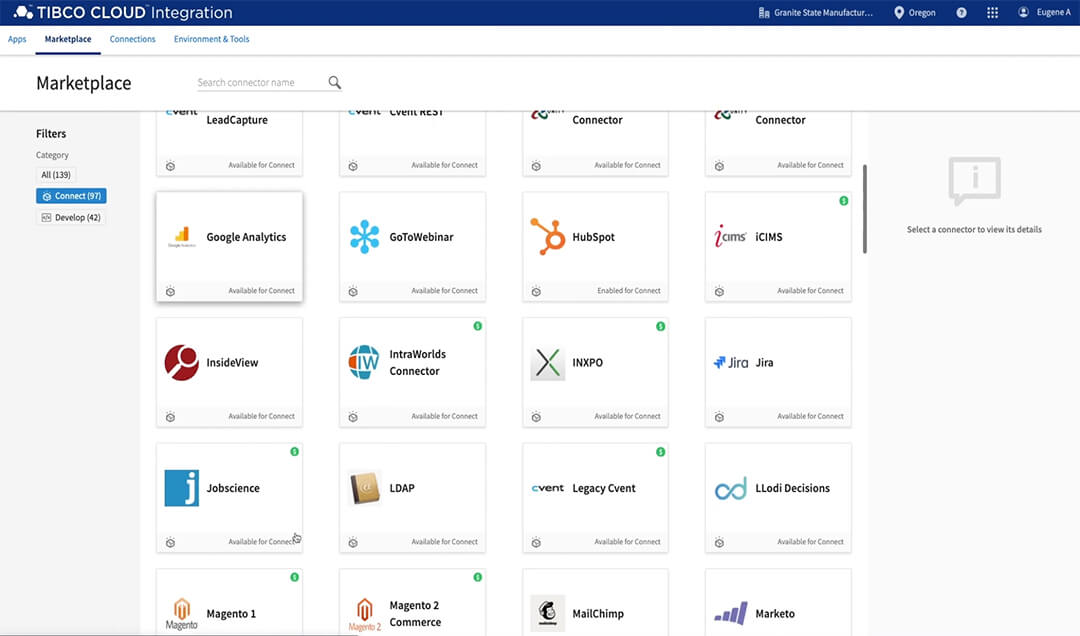
Middleware platforms are commonly used when businesses need to connect several applications or support more complex integration scenarios. Many of these tools offer low-code or no-code interfaces, prebuilt connectors, and support for APIs, databases, and cloud services. This reduces the need for custom coding while still enabling scalable and reliable NetSuite integration across the organization.
Examples of middleware and integration platforms include solutions like TIBCO Cloud Integration, Boomi, and MuleSoft. These tools are especially valuable when integrating Oracle NetSuite in environments with high data volume, multiple systems, or limited internal development resources. By centralizing integration logic and monitoring, middleware helps ensure integrations remain stable, manageable, and easier to maintain over time.
File-based and batch integrations
File-based and batch integrations are a simple and cost-effective approach to NetSuite integration, especially for organizations that do not require real-time data exchange. These integrations typically use files, such as CSVs, to move data between systems on a scheduled basis. This method is commonly used when integrating Oracle NetSuite with legacy systems, external partners, or processes that can operate with periodic updates instead of instant synchronization.
Batch integrations are often easier to implement and maintain compared to API-based integrations, making them a good option for straightforward use cases like data imports, exports, and migrations. However, they do not provide real-time visibility, which can limit responsiveness for time-sensitive processes. Despite this, file-based NetSuite integration remains a reliable solution for many businesses, particularly when simplicity, cost, and stability are priorities.
Workflow automation
Workflow automation is another important part of a NetSuite integration strategy, even though it is not a direct integration method. Instead of connecting systems, tools like SuiteFlow help automate the processes that run between integrations. This ensures that data moving through your NetSuite integration flows is validated, routed, and processed correctly without manual intervention.
- SuiteFlow for process automation: SuiteFlow provides a visual, no-code interface to design and manage workflows inside NetSuite. It allows business users and developers to automate tasks without writing complex code.
- Event-driven workflows: Workflows can be triggered by user actions, system events, or scheduled processes. This helps ensure data is processed at the right time within your NetSuite integration flows.
- Approval and routing logic: SuiteFlow supports multi-step approvals and process routing for transactions like orders, invoices, and onboarding. This ensures that data flowing through integrations follows the correct business rules.
- Data validation and quality control: Workflows can enforce rules and validations before data is saved or transferred. This improves accuracy and prevents bad data from moving across integrated systems.

Choosing the right NetSuite integration approach
Choosing the right NetSuite integration approach depends on your system complexity, data requirements, and need for real-time visibility. Some methods are best for quick, standard integrations, while others provide more flexibility for custom workflows and large-scale environments.
Oracle NetSuite integration architecture patterns
Oracle NetSuite integration architecture patterns define how systems connect, communicate, and exchange data across your technology stack. Choosing the right approach is important because it impacts scalability, performance, and long-term maintenance when designing an Oracle NetSuite integration.
Different integration patterns support different business needs. Some are simple and quick to implement, while others are designed for complex, enterprise-level environments. Understanding these patterns helps organizations build a strategy that is reliable, scalable, and aligned with their operational goals.
- Point-to-point integration: Connects two systems directly without an intermediary. This approach is simple and fast to implement, making it suitable for small environments with limited integrations. However, it becomes difficult to manage and scale as the number of integrations increases.
- Hub and spoke architecture: Uses a central hub to connect multiple systems instead of direct connections between each system. This reduces complexity by standardizing how data flows across integrations. It is easier to scale than point-to-point but still requires careful management of the central hub.
- Enterprise service bus (ESB): A more advanced version of hub-and-spoke that handles routing, transformation, and orchestration of data. It is designed for complex, enterprise-level environments with many systems. ESBs provide flexibility and control but require more setup and governance.
- Event-driven architecture: Triggers integrations based on events such as order creation or status updates. This enables real-time data processing and improves responsiveness across systems. It is ideal for time-sensitive scenarios but can be more complex to design.
- Batch processing architecture: Transfers data in scheduled intervals rather than in real time. This approach reduces system load and is easier to implement for non-critical processes. However, it limits real-time visibility and responsiveness.
- API-led architecture: Organizes integrations into layers such as system APIs, process APIs, and experience APIs. This structure improves reusability and scalability across multiple integrations. It is well-suited for organizations building long-term integration strategies.
- Data synchronization vs orchestration: Data synchronization focuses on keeping data consistent across systems, while orchestration manages multi-step business processes across systems. Both are important depending on whether the goal is data accuracy or process automation.
Common Oracle NetSuite integration scenarios
Oracle NetSuite integration delivers the most value when it supports real business processes across departments. Instead of treating integration as a technical task, organizations see better results when systems are connected around daily workflows like sales, fulfillment, finance, and HR. The following examples show how common NetSuite integration scenarios improve visibility, reduce manual work, and streamline operations.
NetSuite + ecommerce
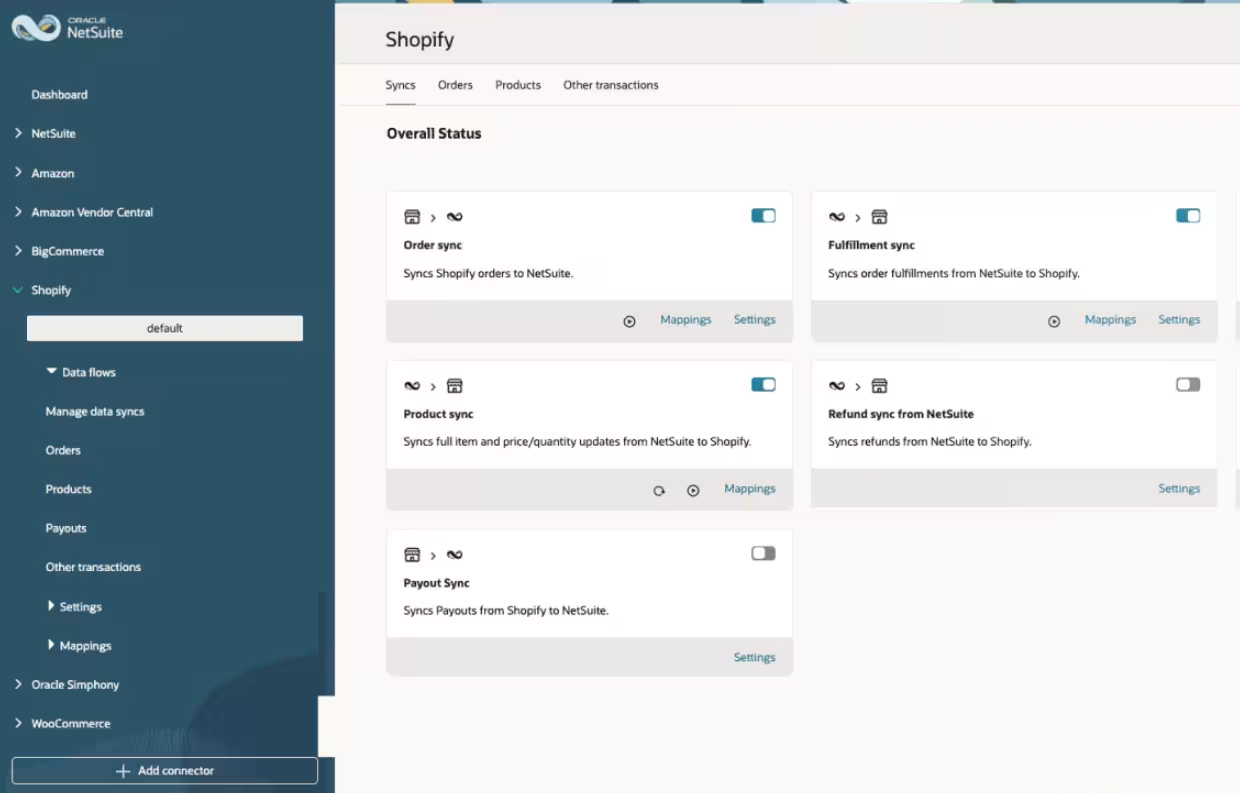
Integrating NetSuite with ecommerce and point of sale systems connects online and in-store sales directly to financial and operational processes. Platforms like Shopify, BigCommerce, Adobe Commerce (Magento), WooCommerce, and Loop Returns are commonly integrated, along with POS systems like Square. This integration ensures that orders, inventory, customers, and payments are synchronized across channels, creating a unified commerce experience.
Benefits of integrating NetSuite with ecommerce and POS systems include:
- Automatic creation of sales orders from online and in-store transactions
- Real-time inventory synchronization across all sales channels
- Centralized product, pricing, and promotion management
- Streamlined returns and refund processing
- Reduced manual reconciliation between sales and accounting
- Improved visibility into total revenue across channels
NetSuite + CRM integration
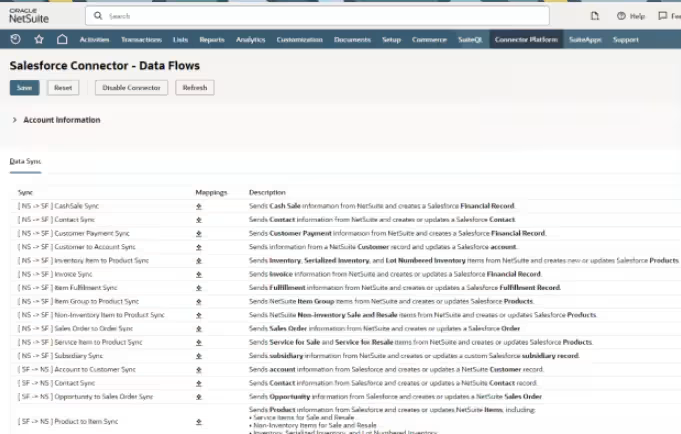
Integrating NetSuite with CRM systems connects sales and financial data to create a seamless lead-to-cash process. Solutions like Salesforce and HubSpot are commonly used to manage customer relationships, pipeline, and marketing activity, while NetSuite handles financials and order processing. This integration ensures both systems share accurate customer, order, and revenue data.
Benefits of integrating NetSuite with CRM systems include:
- Shared customer and account data across sales and finance
- Improved visibility into order status and financial data for sales teams
- Reduced duplicate data entry and manual updates
- Faster quote-to-cash and order processing
- Better alignment between sales performance and financial reporting
- Enhanced customer experience with consistent data
NetSuite + logistics software
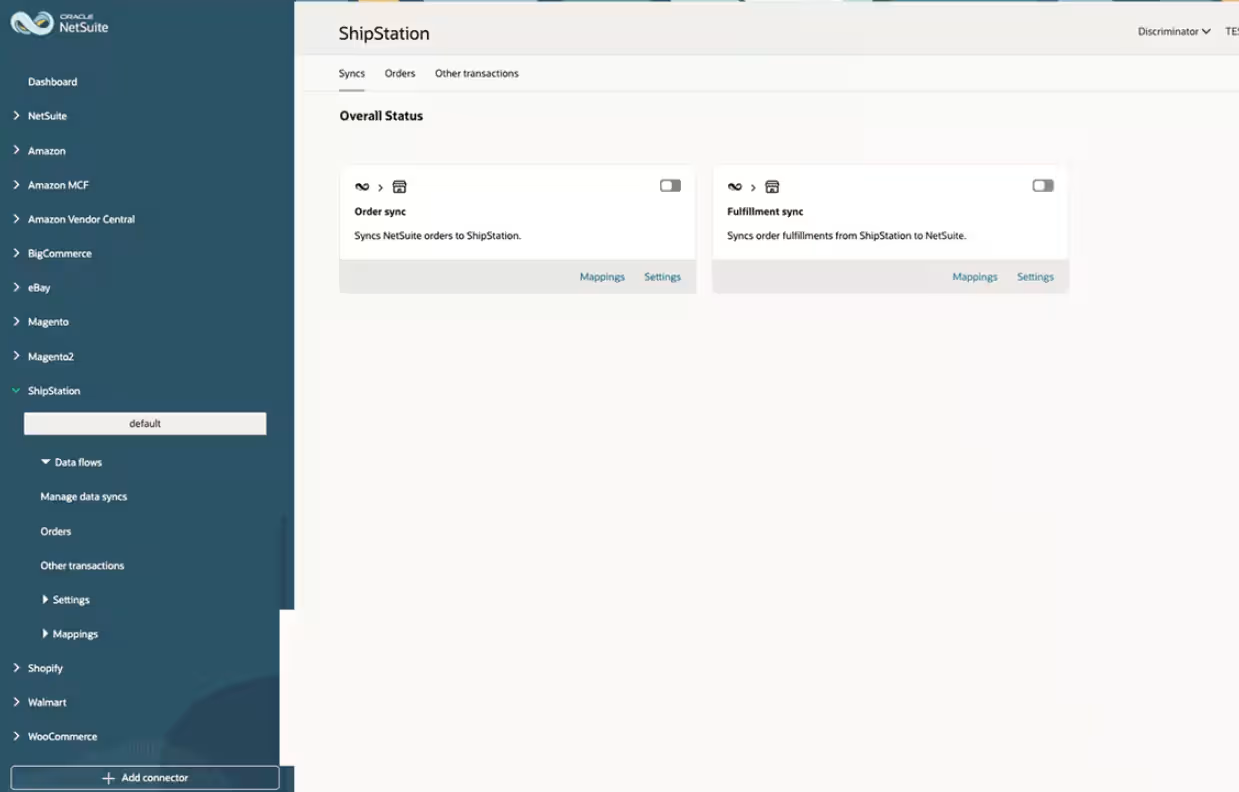
Integrating NetSuite with logistics and 3PL providers connects order fulfillment, shipping, and warehouse operations. Solutions like ShipStation and Amazon Multi-Channel Fulfillment (MCF) are commonly integrated to automate order routing and tracking. This integration ensures accurate and timely fulfillment data across systems.
Benefits of integrating NetSuite with logistics and 3PL systems include:
- Automated transfer of orders to fulfillment and shipping providers
- Real-time shipment tracking and status updates
- Improved accuracy in warehouse and delivery processes
- Reduced manual data entry between systems
- Faster order processing and fulfillment cycles
- Better visibility into shipping performance and costs
NetSuite + EDI integration
Integrating NetSuite with EDI (electronic data interchange) systems enables automated document exchange with trading partners. EDI is commonly used for transactions like purchase orders, invoices, and shipping notices in industries such as retail, manufacturing, and distribution. This integration ensures standardized, error-free communication between systems.
Benefits of integrating NetSuite with EDI systems include:
- Automated exchange of key business documents
- Reduced manual data entry and processing errors
- Faster order processing with trading partners
- Improved compliance with partner requirements
- Increased efficiency in high-volume transaction environments
- Better visibility into order and fulfillment status
NetSuite + HR and payroll integration
Integrating NetSuite with HR and payroll systems connects employee data, payroll processing, and financial reporting. Platforms like Paylocity are commonly used to manage payroll and HR functions, while NetSuite manages financials. This integration ensures accurate and consistent employee and payroll data across systems.
Benefits of integrating NetSuite with HR and payroll systems include:
- Automated synchronization of employee and payroll data
- Improved accuracy in financial reporting and payroll accounting
- Reduced manual data entry between HR and finance systems
- Streamlined payroll processing and reconciliation
- Better visibility into labor costs and workforce data
- Enhanced compliance with payroll and reporting requirements
Integration costs and timelines
The cost and timeline of NetSuite integration depend on the complexity of the systems involved, how data is exchanged, and the level of customization required. Some integrations can be implemented quickly using prebuilt connectors or standard APIs, while others require custom development, middleware, and detailed architecture planning. Real-time integrations typically require more effort than batch integrations because they must support validation, error handling, and system performance.
As integrations become more complex, additional time is needed for testing, governance, and long-term support planning. Even when using native NetSuite tools like SuiteCloud or connectors, organizations must account for data mapping, validation, and user acceptance testing. More advanced integrations involving multiple systems or high data volumes require structured development, performance tuning, and ongoing monitoring to ensure reliability.
Key factors that affect NetSuite integration cost and timeline include:
- Number of systems involved
- Real-time versus scheduled data movement
- Data volume and transaction frequency
- Level of custom business logic required
- Data mapping and transformation complexity
- Security, authentication, and compliance requirements
- Testing and validation cycles
- Ongoing monitoring and support expectations
Low complexity
Low complexity integrations typically rely on prebuilt connectors or standard APIs with minimal customization. These scenarios focus on configuration, mapping, and testing rather than custom development, making them faster and more cost-effective to implement.
Common characteristics include:
- Use of NetSuite connectors or standard API integrations
- Limited data entities with clear system ownership
- Low to moderate transaction volumes
- Minimal data transformation requirements
- Limited custom business logic
While simpler, these integrations still require proper testing, validation, and monitoring to ensure accuracy and stability.
Moderate complexity
Moderate complexity integrations involve multiple systems or more advanced data handling requirements. These projects require stronger planning, structured development, and coordination across teams to ensure data flows correctly between systems.
Common characteristics include:
- API-based integrations with custom data mapping
- Real-time or near real-time synchronization
- Moderate to high transaction volumes
- Cross-system data ownership and dependencies
- Defined error handling and monitoring processes
These integrations typically require design, development, testing, and user validation phases to ensure performance and reliability.
High complexity
High complexity integrations are typically part of broader ERP or digital transformation initiatives. These scenarios involve multiple systems, large data volumes, and advanced business logic, requiring a more structured and scalable approach.
Common characteristics include:
- Multiple interconnected enterprise systems
- Combination of real-time and batch integrations
- High transaction volumes or global operations
- Complex data transformations and validation rules
- Custom APIs, services, or middleware platforms
- Security and compliance requirements
- Formal architecture governance and documentation
These integrations require detailed planning, extensive testing, and ongoing monitoring to maintain performance and stability over time.
Integration challenges and risks
Even with strong native capabilities, NetSuite integration introduces risk if it is not designed and managed carefully. Poor integration design can lead to data inconsistencies, performance issues, and reporting errors that impact financial accuracy and operational visibility. Because Oracle NetSuite often serves as the system of record, integration failures can directly affect processes like order management, inventory tracking, and financial reporting.
Common NetSuite integration challenges include:
- Data mapping errors between systems
- Inconsistent master data definitions across platforms
- Performance issues during high-volume data processing
- Real-time integrations that strain system resources
- Security and authentication misconfigurations
- Inadequate error handling and monitoring
- Over-customization that complicates future updates
- System changes or updates that disrupt integrations
This is why choosing the right NetSuite integration approach and partner is important. A well-designed integration strategy focuses on stability, scalability, and long-term maintainability. With the right architecture and governance in place, organizations can reduce risk and ensure their integrations support business growth.
Choosing the right Oracle NetSuite integration partner
Your integration partner directly impacts long-term system stability and performance. NetSuite integration is not just about connecting applications. It determines how accurate your data remains, how well systems scale, and how reliably processes run across departments. Poor integration design leads to broken data flows, reporting inconsistencies, and ongoing manual fixes, while a strong integration strategy builds control, governance, and flexibility into daily operations.
Rand Group brings deep experience delivering Oracle NetSuite integration across ERP, CRM, ecommerce, logistics, HR, and industry-specific systems. We design integration strategies that align with real business workflows, not just technical requirements. Our team works across NetSuite, third-party platforms, and middleware solutions to create secure, scalable connections that support operational efficiency and long-term growth.
- Multi-platform expertise: We integrate Oracle NetSuite with ecommerce, CRM, logistics, HR, and other third-party systems
- Integration architecture design: We define system ownership, data flows, and scalable integration patterns before development begins
- Custom API and development capabilities: We build tailored integrations using SuiteCloud, APIs, and scripting for complex workflows
- Data-first strategy: We establish data mapping, validation rules, and monitoring frameworks to maintain accuracy
- Full lifecycle delivery: We manage design, development, testing, deployment, and post-go-live support
- Long-term optimization: We monitor performance and continuously refine integrations as business needs evolve
A strong NetSuite integration partner ensures your systems remain connected, reliable, and aligned with your business as it grows.

Get an Oracle NetSuite integration assessment
Every organization has unique integration requirements. Rand Group evaluates your existing systems and designs a tailored plan for integrating Oracle NetSuite with the rest of your technology stack. Our specialists identify risks, reduce inefficiencies, and build a NetSuite integration strategy that aligns with your financial and operational goals.
Frequently asked questions
What is NetSuite integration?
NetSuite integration is the process of connecting Oracle NetSuite with other systems so data flows automatically between them. This can include ecommerce, CRM, HR, logistics, and financial systems. The goal is to eliminate manual data entry and create a single source of truth.
How does Oracle NetSuite integrate with other systems?
Oracle NetSuite integrates with other systems using APIs, prebuilt connectors, middleware platforms, and file-based methods. Tools like SuiteTalk APIs, RESTlets, and third-party integration platforms enable real-time or scheduled data exchange. The approach depends on system complexity and business requirements.
What is the best way to integrate with NetSuite?
The best NetSuite integration approach depends on your needs. Prebuilt connectors work well for standard use cases, while APIs and middleware are better for custom or complex integrations. Most organizations use a combination of methods.
Is Oracle NetSuite integration real time?
NetSuite integration can be real time or batch-based. Real-time integrations use APIs to sync data instantly, while batch integrations use scheduled file transfers like CSV imports. The right option depends on how quickly data needs to be updated.
Does NetSuite have APIs?
Yes, Oracle NetSuite provides APIs through SuiteTalk REST and SOAP web services. These APIs allow developers to access and update data, automate processes, and build custom integrations. REST APIs are the preferred method for modern integrations.
How long does NetSuite integration take?
NetSuite integration timelines vary based on complexity. Simple integrations using connectors can take a few weeks, while more complex, custom integrations can take several months. Factors include the number of systems, data volume, and level of customization.
What systems can Oracle NetSuite integrate with?
Oracle NetSuite can integrate with ecommerce platforms, CRM systems, logistics and 3PL providers, HR and payroll systems, payment gateways, and data tools. Common examples include Shopify, Salesforce, HubSpot, ShipStation, Paylocity, and Stripe. It can also integrate with custom and industry-specific applications.
Do I need an integration partner for Oracle NetSuite?
Most organizations benefit from working with a NetSuite integration partner. A partner helps design the right architecture, manage complexity, and ensure long-term stability. This reduces risk and improves the success of your integration strategy.
Next steps
Oracle NetSuite integration is not just about connecting systems. It is about creating a reliable flow of data that supports your daily operations, reporting, and long-term growth. The right integration strategy improves accuracy, reduces manual work, and ensures your systems scale as your business evolves.
If you are evaluating how to integrate Oracle NetSuite or improve your existing integrations, a structured approach is key. Contact us today to assess your current systems, identify gaps, and design a NetSuite integration strategy that aligns with your business goals.