Tip of the Month
NetSuite Tip of the Month: Speed up sales order entry with favorite customers and items
Entering sales orders in NetSuite often involves selecting the same customers, products, or services repeatedly. For users who process a high volume of sales orders, scrolling through dropdown lists or searching for frequently used items can add unnecessary steps to everyday data entry.
NetSuite’s Allow Favorites in Dropdowns preference provides a simple way to streamline this process. By marking commonly selected items as favorites, users can access them more quickly when creating sales orders. In this month’s tip, we’ll show you how to enable favorites and use them to make sales order entry more efficient.
Tip summary: Quickly access frequently used items on sales orders
NetSuite allows users to designate up to five favorites in supported sales order dropdown fields. Once favorites are selected, users can more easily locate frequently used options without scrolling through lengthy lists.
This feature is especially useful for sales teams and order entry personnel who regularly process orders containing the same products or services. Favorites are saved as individual user preferences, allowing users to personalize sales order entry based on their workflows.
Tip steps: How to enable Favorite Items in NetSuite
Before you can mark items as favorites, you must enable the preference in your NetSuite user settings.
- Navigate to Home > Set Preferences.
- On the General subtab, locate Allow Favorites in Dropdowns.
- Select the checkbox to enable the preference.
- Select Save.
Once enabled, you can begin marking frequently used options as favorites when entering sales orders.
Mark a customer or item as a favorite
After enabling the preference, follow these steps to select your favorites:
- Open a sales order in NetSuite.
- Navigate to a supported dropdown field, such as Customer or Items.
- Locate an item or option you frequently select.
- Select the star icon next to its name in the dropdown list to mark it as a favorite.
- Repeat for other frequently used options, up to five favorites per supported field.
Your selected favorites will be available for quicker access when working with sales orders.
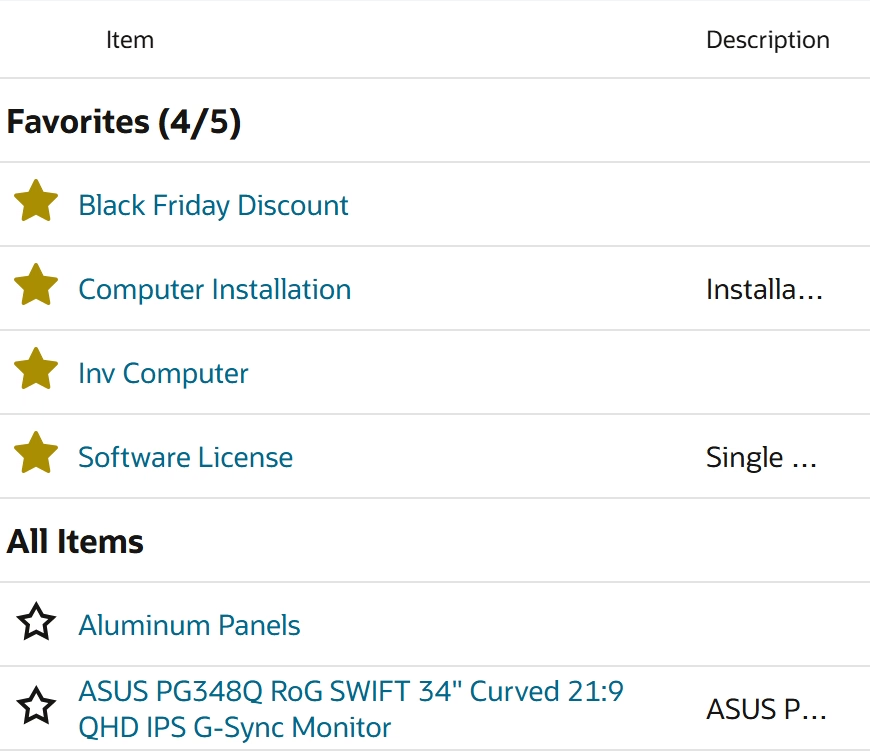
Filter favorite items using Add Multiple Items
For users who regularly add several items to a sales order, NetSuite also provides an option to filter the item list to show favorites.
- Open a sales order and access the Add Multiple Items window.
- Select Show Favorites Only.
- Review the filtered list of your favorite items.
- Select the items you want to add to the sales order.
On the Items subtab, click Add Multiple to select several items for the same sales order in one window. To see just the items you’ve starred, check Show favorites only. Select your items, enter quantities, and click Done to add them to the order.
This option can be particularly helpful when entering recurring orders that contain many of the same products or services.
Tip insights: What to know about NetSuite favorites
There are a few important considerations when using Favorite Items in NetSuite:
- Favorites are user-specific. Your favorites are personal to you and specific to the NetSuite account and role you’re using.
- Favorites are intended for sales orders. Oracle documents this functionality for sales orders. Availability on invoices, purchase orders, or other transaction types should not be assumed without confirming the behavior in your NetSuite environment.
- Favorite Items and Shortcuts are different features. The star icon used to mark favorite items is separate from the Shortcuts star in the NetSuite navigation bar. Favorite Items help streamline sales order entry, while NetSuite Shortcuts provide quick access to frequently visited pages.
Understanding these distinctions can help users take advantage of the feature while keeping their NetSuite workflows organized.
Why this tip matters
Small improvements to repetitive tasks can make a meaningful difference for teams processing sales orders throughout the day. By keeping frequently used items and customers easier to access, NetSuite favorites can reduce unnecessary searching, simplify order entry, and help users work more efficiently.
If you’d like help personalizing NetSuite or identifying other opportunities to streamline your sales order processes, Rand Group’s NetSuite experts are here to help. Contact our team to learn how we can help optimize your NetSuite environment and be sure to return next month for another NetSuite Tip of the Month.