Tip of the Month
Dynamics 365 CE Tip of the Month: Drive smarter sales engagement with Sequences
Sales teams juggle a constant stream of calls, emails, meetings, and follow-ups. Even when organizations define a clear sales process, execution can quickly become inconsistent. Some leads receive multiple touches while others fall through the cracks, and opportunities stall simply because no one followed up at the right time.
When sales outreach lives in spreadsheets, sticky notes, or individual habits, performance becomes unpredictable. Managers lack visibility into engagement quality, and sellers spend too much time deciding what to do next instead of focusing on selling.
Fortunately, Dynamics 365 Sales includes a feature designed to solve this challenge. Sequences help sales teams structure and automate outreach activities, guiding sellers through a consistent engagement plan directly within your Dynamics 365 CE system.
Tip summary: Use Sequences to guide sales outreach
Sequences in Dynamics 365 Sales Enterprise allow organizations to define a step-by-step engagement plan for leads or opportunities. Once a record is enrolled in a sequence, Dynamics automatically guides the seller through a predefined cadence of outreach activities.
These activities may include phone calls, follow-up tasks, automated emails, and wait periods between interactions. Sellers can then work directly from the Sales Accelerator work list, which prioritizes their next best action.
By embedding engagement plans directly in the CRM, sequences help create a more consistent, structured, and efficient sales process.
Steps: How to set up and use Sequences in Dynamics 365 Sales
Requirements – Sequences are available with Dynamics 365 Sales Enterprise and Sales Premium licensing. Sales Accelerator must be enabled in your environment. Email functionality requires proper mailbox configuration and templates.
1. Navigate to Sequences
Within Sales Hub, go to the Sales Insights Settings area and select Sequences.
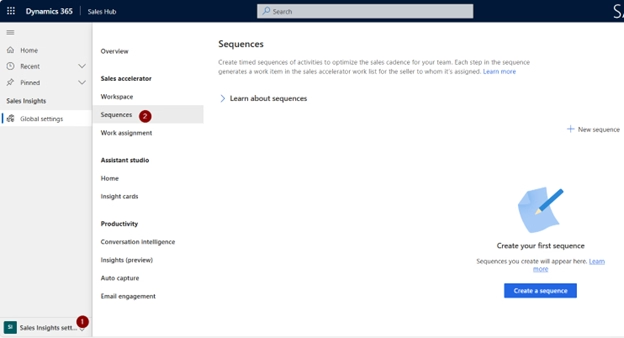
2. Create a new Sequence
Create a sequence and specify whether it will apply to Leads or Opportunities.

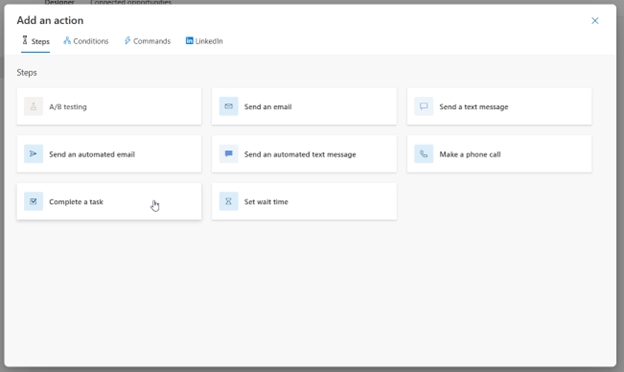
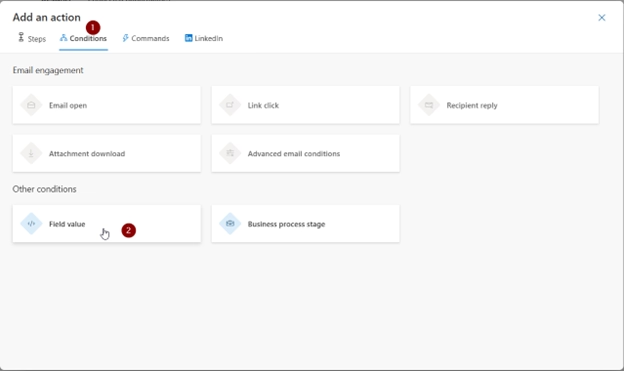
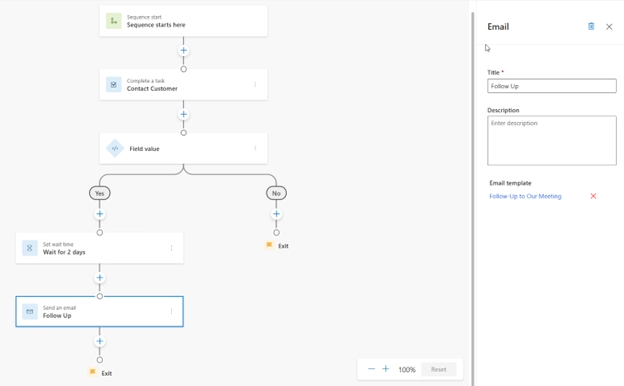
3. Define the engagement cadence
Add steps that represent your desired outreach strategy. Common sequence steps include:
- Phone call tasks
- Automated emails using templates
- Wait periods between outreach attempts
- Conditional branching based on responses or field updates
This allows your organization to define a repeatable engagement strategy for every seller.


4. Activate the Sequence
Once your steps are defined, activate the Sequence so it becomes available for use.

5. Enroll Records
Records can be enrolled in sequences either:
- Automatically using rules, or
- Manually by sales users
6. Work from the Sales Accelerator
Sellers complete their outreach directly from the Sales Accelerator work list, which prioritizes tasks and displays the next recommended action.
The result is a built-in engagement engine that aligns Dynamics 365 with your defined sales process.
Key benefits
- Consistent outreach – Every prospect receives the same high quality engagement plan, reducing gaps and missed opportunities.
- Increased productivity – Sellers spend less time planning their day and more time executing. The system surfaces the next action automatically.
- Improved visibility – Managers gain insight into which activities are being completed and where opportunities may be stalling.
- Scalable process – As your team grows, your engagement strategy remains structured and repeatable rather than dependent on individual habits.
Why this tip matters
Sequences turn Dynamics 365 into a proactive sales engagement platform by guiding sellers through a structured outreach cadence and surfacing the next best action. This helps ensure consistent follow-ups, improves productivity, and gives managers better visibility into sales activity.
As teams grow, sequences make sales processes easier to scale by embedding best practices directly into the system. If you’d like help implementing sequences or optimizing your Dynamics 365 Customer Engagement environment, contact our D365 experts today, and check back next month for another CE Tip of the Month.