NetSuite
NetSuite Quality Management: How to improve inspections and quality control

Quality issues can disrupt production, increase costs, and affect customer satisfaction. When inspection records and quality processes are disconnected from ERP data, identifying and resolving those issues can become even more difficult.
NetSuite Quality Management brings quality control into the same environment as purchasing, inventory, manufacturing, and fulfillment. Organizations can manage inspections, sampling, quality results, nonconformance, and corrective actions within NetSuite.
Effective quality management, however, requires thoughtful process design. This guide explores how NetSuite Quality Management works and how organizations can use its capabilities to build more consistent, connected quality control processes.
At a glance: NetSuite Quality Management
NetSuite Quality Management provides tools for incorporating inspections and quality control into broader ERP processes. Organizations can use it to:
- Define reusable qualitative and quantitative inspections
- Group inspections into specifications for different quality scenarios
- Trigger inspections during receiving, manufacturing, fulfillment, and other processes
- Establish simple or statistical sampling requirements
- Apply consistent pass/fail and conformance criteria
- Track failed inspections through nonconformance, root cause analysis, and corrective actions
- Analyze quality results to identify recurring issues and opportunities for improvement
What is NetSuite Quality Management?
NetSuite Quality Management is a SuiteApp that helps organizations establish, execute, and monitor quality processes within NetSuite. It provides a framework for defining what needs to be inspected, establishing acceptable results, collecting inspection data, and determining what happens when quality requirements are not met.
Because these processes operate within NetSuite, quality information can remain connected to the items, suppliers, transactions, inventory, lots, serial numbers, and manufacturing activity it affects. Instead of maintaining inspection results in spreadsheets, paper records, or a separate system, organizations can incorporate quality checks into their broader operational workflows.
Core capabilities include:
- Quality inspections
- Quality specifications
- Inspection queues
- Sampling
- Quality data collection
- Conformance rules
- Nonconformance management
- Corrective and Preventive Action (CAPA)
- Quality reporting and Saved Searches

Qualitative and quantitative inspections
NetSuite supports different types of inspections depending on what an organization needs to evaluate.
Qualitative inspections evaluate characteristics that do not necessarily require a numerical measurement. Examples might include verifying the condition of an incoming item, confirming that required documentation is present, or determining whether packaging meets established standards.
Quantitative inspections capture measurable results against defined requirements or tolerances. These inspections might evaluate dimensions, weight, temperature, chemical composition, or another measurable characteristic.
The appropriate inspection type depends on the product, process, risk, and quality requirements involved.
More inspection points do not automatically create better quality control. Organizations should focus on inspections that address meaningful quality risks while keeping the process practical for the employees responsible for performing them.

Build stronger quality processes in NetSuite
Quality management is most effective when it works with your broader inventory, manufacturing, purchasing, and fulfillment processes. Rand Group’s NetSuite consultants can help you evaluate how NetSuite Quality Management fits into your operational environment and identify opportunities to improve existing quality workflows.
How does the NetSuite quality management process work?
NetSuite Quality Management connects inspections, specifications, sampling, and quality results into a structured process. While workflows vary by organization, a typical process follows these steps:
- Define inspections: Determine which characteristics, measurements, or conditions need to be evaluated.
- Create specifications: Group related inspections and establish quality requirements for a particular item or process.
- Establish triggers: Determine when inspections should occur, such as during receiving, production, or fulfillment.
- Select samples: Define how much of the received or produced quantity needs to be inspected.
- Collect results: Employees complete required inspections and record quality data in NetSuite.
- Evaluate conformance: Compare results against established criteria to determine whether the inspection passes or fails.
- Manage failures: Follow defined disposition procedures and, when necessary, initiate nonconformance management.
- Correct and prevent recurring issues: Use root cause analysis and corrective and preventive action (CAPA) to address underlying quality problems.
This creates a connected quality workflow from the initial inspection through resolution:
Define inspections → Create specifications → Trigger inspections → Sample → Collect results → Pass/fail → Manage nonconformance → RCA and CAPA
By defining these steps within NetSuite, organizations can create a more consistent process for evaluating quality and responding when requirements are not met.
Creating quality inspections and specifications in NetSuite
Inspections and specifications provide the foundation for NetSuite Quality Management, but they serve different purposes.
Quality inspections
A quality inspection defines the individual characteristics or requirements that need to be evaluated.
Depending on the process, an inspection could ask an employee to:
- Measure a component against an acceptable tolerance
- Verify that an item is undamaged
- Confirm required documentation is present
- Record a temperature or weight
- Check packaging or labeling
- Determine whether a finished product meets defined standards
Organizations can create reusable inspections so employees follow consistent criteria when evaluating quality.

Quality specifications
Quality specifications group individual inspections into a defined quality scenario. They establish which inspections apply and how quality data should be collected and evaluated.
For example:
- Incoming materials: Inspect physical condition, dimensions, labeling, and required supplier documentation.
- Finished products: Evaluate characteristics required for final quality approval.
- Production processes: Apply inspections at defined points to verify that products continue to meet established requirements.
The key distinction is:
- Quality inspection: Defines what is being checked or measured.
- Quality specification: Organizes which inspections and requirements apply to a particular item or quality scenario.
Together, inspections and specifications provide a repeatable framework for applying quality standards across relevant NetSuite processes.
Triggering inspections at the right point
Quality checks are most useful when they occur at the point where an organization can identify and respond to a problem.
Depending on the organization’s NetSuite environment and configuration, quality inspections can be associated with activities such as:
- Item receiving
- Assembly and work order builds
- Work order completions
- Production
- Item fulfillment
- Other operational processes
- On-demand inspections
Automating these triggers can help make quality control part of the operational workflow instead of relying entirely on employees to remember when a separate inspection is required.
Inspection triggers should reflect where quality risk actually occurs. An organization experiencing recurring supplier issues may prioritize receiving inspections, while a manufacturer experiencing production variability may need stronger in-process quality controls. Adding inspections everywhere can create unnecessary work without addressing the underlying risk.
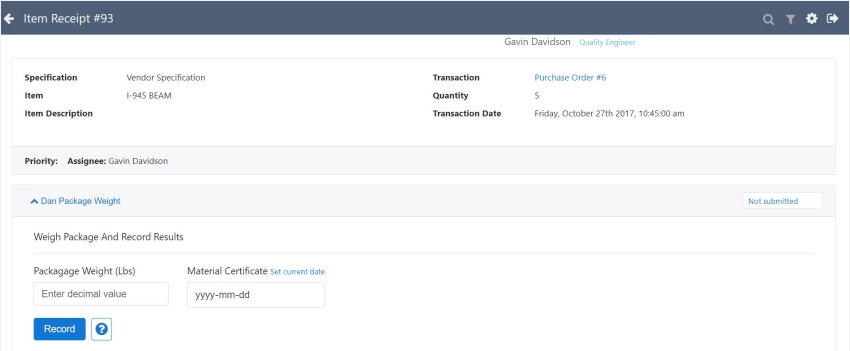
How sampling works in NetSuite Quality Management
Inspecting every individual unit may be necessary for some products or processes, but it can be impractical for high-volume operations. Sampling allows organizations to evaluate a portion of a lot or transaction and use those results to determine whether the broader group meets established quality requirements.
NetSuite Quality Management supports approaches including simple and statistical sampling.
Simple sampling
Simple sampling allows organizations to establish a defined sample size and determine how many failures can occur before an inspection is considered unsuccessful.
Depending on the process, an organization could establish a sample using:
- Fixed quantity
- Percentage of the overall quantity
For example, a receiving process might require inspection of three units from an incoming shipment or 10% of the received quantity. The organization can also establish the allowable number of failures for the sample.
This creates a repeatable process rather than allowing individual employees to decide how many items to inspect each time.
Statistical sampling
Organizations with more advanced sampling requirements can use statistical sampling. NetSuite supports statistical sampling plans that use factors such as item, transaction, and volume criteria, along with Acceptable Quality Limit (AQL) and applicable ISO-based standards.
Quality failures can also be classified according to severity, such as Critical, Major, or Minor, allowing sampling requirements to account for the significance of different defects.
Statistical sampling can be particularly useful when organizations need a more structured methodology for determining sample sizes and acceptable defect levels across larger quantities.
Choosing the right sampling approach
The fact that NetSuite can support a sampling method does not necessarily mean that method is appropriate for every product or process.
Organizations should consider factors such as:
- Product and customer risk
- Supplier performance
- Historical defect rates
- Lot or transaction size
- Regulatory or contractual requirements
- Cost and time required for testing
- Severity of potential defects
- Consequences of allowing a defect to pass undetected
Higher-risk items may require more stringent inspection requirements, while organizations may be able to adjust their approach for consistently reliable suppliers or lower-risk materials.
Sampling requirements should come from the organization’s quality standards and risk profile, not simply from the options available in NetSuite. ERP configuration should enforce an established quality policy rather than become the quality policy itself.
Managing inspection results and quality control
Once an inspection is triggered, the next challenge is making sure it gets completed and that the results lead to the appropriate action.
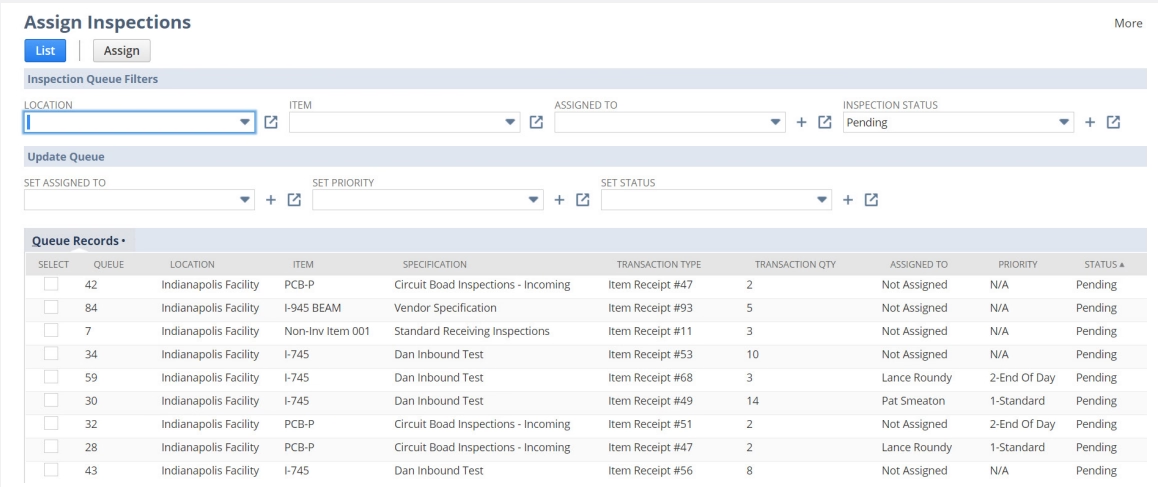
NetSuite’s inspection queues provide a centralized way to manage inspections awaiting completion. Employees can enter the required inspection data, and the results can be evaluated according to established conformance rules.
Depending on the inspection, this might mean determining whether:
- A measurement falls within an acceptable range
- A required condition is present
- Documentation has been provided
- A sample contains too many failed units
- The overall inspection meets the organization’s pass/fail requirements
This structure helps standardize how quality is evaluated instead of relying on informal decisions or quality records maintained outside the ERP.
What happens when an inspection fails?
Recording a failed inspection is only the beginning of the quality process. Organizations also need to determine what happens to the affected material and how the underlying problem will be addressed.
Depending on the organization’s quality procedures, potential actions could include:
- Placing inventory on hold or in quarantine
- Reinspection
- Rework
- Returning material to the vendor
- Scrapping affected inventory
- Accepting material under an approved deviation
- Initiating further investigation
The appropriate response should be determined by the organization’s quality policies and the nature of the failure.
For significant or recurring problems, the process may need to progress beyond immediate disposition into formal nonconformance management.
Managing nonconformance in NetSuite
A quality management process should do more than identify that something failed. Organizations also need a structured way to document the issue, determine why it happened, assign responsibility, and prevent the same problem from occurring again.
NetSuite’s Non-Conformance Register (NCR) supports this process.
Non-Conformance Register
NCR records provide a central location for documenting and tracking quality problems. Depending on the configured criteria, NetSuite can automatically create a nonconformance record from a failed quality inspection. Users can also initiate eligible nonconformance requests manually.
The record can connect the issue with relevant information such as:
- Item
- Inspection
- Transaction
- Lot or serial number
- Quantity affected
- Failure details
- Responsible owner
- Disposition and resolution information
This creates continuity between the original failed inspection and the work required to resolve the issue.
Root cause analysis
Finding a defect and finding the cause of a defect are different activities.
Root cause analysis helps an organization move beyond the immediate symptom and investigate why the failure occurred. Depending on the issue, the cause could relate to a supplier, material, equipment, process, employee procedure, design, or another factor.
A structured nonconformance process can document the initial findings, evaluate the impact of the problem, assign responsibility for investigation, and capture the determined root cause.
That information becomes particularly valuable when similar defects begin appearing across different lots, suppliers, locations, or production runs.
Corrective and preventive action
Once an organization understands the problem, Corrective and Preventive Action (CAPA) provides a framework for addressing it.
Corrective actions focus on resolving the cause of an identified problem.
Preventive actions focus on reducing the likelihood of a similar issue occurring in the future.
Within the nonconformance process, organizations can establish information such as:
- Action owners
- Priorities
- Due dates
- Required activities
- Status
- Verification
The process can then progress from the initial quality failure through investigation, root cause analysis, corrective action, verification, and closure.
A digital NCR process provides limited value if quality issues consistently stall after they are recorded. Organizations should establish clear ownership, escalation procedures, due dates, and closure requirements so nonconformance management drives action instead of simply creating additional records.
Using NetSuite quality data for continuous improvement
Individual inspection results help organizations determine whether a particular item or lot meets requirements. Accumulated quality data can provide something broader: visibility into patterns.
NetSuite quality information can be analyzed through reporting, Saved Searches, quality results, inspection queues, vendor scorecards, production specification scorecards, and other reporting tools.
Rather than simply tracking the number of inspections completed, organizations can use this information to investigate questions such as:
- Which items fail inspections most frequently?
- Which suppliers generate recurring quality problems?
- Are certain defects becoming more common?
- Do failures occur more frequently at a particular location or production stage?
- Which lots or serial numbers are associated with an issue?
- How long does it take to resolve nonconformances?
- Are particular root causes appearing repeatedly?
- Are corrective actions reducing future occurrences?
These insights can support supplier conversations, purchasing decisions, manufacturing improvements, process changes, and future quality-control strategies.
Collecting more quality data should not be the end goal. Before building reports and dashboards, determine which quality trends should lead to a decision or action. That helps keep reporting focused on information employees and managers can actually use to improve operations.
Benefits of managing quality control within NetSuite
Bringing quality processes into the ERP environment can help organizations connect quality decisions with the operational activities they affect.
Key benefits can include:
- Connect quality and operational data: Keep inspections tied to relevant items, suppliers, transactions, inventory, lots, serial numbers, and production activity.
- Standardize quality processes: Apply defined inspections, specifications, sampling requirements, and conformance rules more consistently.
- Catch problems earlier: Introduce quality checks at meaningful points in receiving, production, or fulfillment.
- Improve traceability: Maintain connections between quality results, affected inventory, and nonconformance records.
- Strengthen accountability: Assign ownership for inspections, investigations, NCRs, and corrective actions.
- Identify recurring problems: Analyze quality information for patterns involving products, suppliers, defects, and processes.
- Support audit readiness: Maintain structured records of inspections, failures, investigations, and corrective actions.
The value is not simply digitizing an inspection form. The larger opportunity is connecting quality control with the business processes and data that surround it.
Best practices for optimizing NetSuite Quality Management
NetSuite Quality Management is most effective when its configuration reflects the organization’s actual quality processes. Consider these best practices:
- Map quality processes first: Document inspections, responsibilities, decisions, and exception handling before configuring NetSuite.
- Prioritize risk-based inspection points: Focus quality controls where defects are most likely or could have the greatest impact.
- Standardize inspections and specifications: Use consistent naming, criteria, measurements, and structures to simplify administration and reporting.
- Define sampling requirements intentionally: Choose full inspection, simple sampling, or statistical sampling based on quality standards and risk.
- Establish clear pass/fail and disposition rules: Define acceptable results and what should happen when an inspection fails.
- Build accountability into NCR and CAPA: Assign owners, deadlines, escalation procedures, and closure requirements to keep issues moving toward resolution.
- Design reporting around action: Track quality KPIs that support decisions, such as supplier defects, recurring failures, open NCRs, and CAPA completion.
- Optimize continuously: Revisit quality processes as products, suppliers, facilities, risks, and operational requirements change.

Optimize your NetSuite quality management processes
Whether you are implementing Quality Management for the first time or improving an existing NetSuite environment, Rand Group’s NetSuite consultants can help align inspections, sampling, nonconformance, reporting, and quality workflows with your operational requirements.
Partnering with Rand Group for NetSuite Quality Management support
Implementing quality management requires both the right NetSuite configuration and an understanding of how quality processes fit into broader operations.
Rand Group’s NetSuite consultants can help organizations:
- Assess and improve quality processes, including manual or disconnected workflows
- Configure inspections, specifications, sampling, and conformance requirements
- Optimize inspection, nonconformance, and CAPA workflows
- Develop quality reporting and Saved Searches
- Integrate Quality Management with purchasing, inventory, manufacturing, and fulfillment
- Provide ongoing NetSuite optimization and module support
The goal is to configure NetSuite Quality Management around how your organization evaluates risk, manages exceptions, assigns responsibility, and uses quality data to improve operations.
Frequently asked questions about NetSuite Quality Management
What is NetSuite Quality Management?
NetSuite Quality Management is a SuiteApp that helps organizations manage quality-control processes within NetSuite. It supports capabilities such as inspections, quality specifications, sampling, inspection queues, conformance evaluation, nonconformance management, CAPA, and quality reporting while connecting quality information with broader ERP data and processes.
Does NetSuite have quality management functionality?
Yes. NetSuite offers the Quality Management SuiteApp for establishing and managing quality processes. Organizations can define inspections and specifications, collect quality data, establish sampling and conformance requirements, manage inspection results, track nonconformances, and analyze quality information within the NetSuite environment.
How do quality inspections work in NetSuite?
Organizations define inspections that identify what should be checked or measured and use specifications to organize inspections for specific quality scenarios. Inspections can be triggered by applicable operational activity, placed into an inspection queue, completed by users, and evaluated against established conformance requirements.
Can NetSuite automatically trigger quality inspections?
Yes. NetSuite Quality Management can initiate inspections based on configured operational activities, including receiving, manufacturing, production, and fulfillment scenarios. Organizations can also perform on-demand inspections. The appropriate triggers depend on where the organization needs quality controls within its processes.
Does NetSuite Quality Management support sampling?
Yes. NetSuite Quality Management supports simple and statistical sampling approaches. Organizations can establish fixed or percentage-based samples and acceptable failure thresholds. Statistical sampling can provide a more structured approach using criteria such as AQL and ISO-based sampling standards.
What happens when a quality inspection fails in NetSuite?
The response depends on the organization’s configured quality process. Failed inspections may lead to actions such as holding or quarantining inventory, reinspection, rework, return to vendor, scrap, or further investigation. Qualifying failures can also progress into formal nonconformance management.
What is the NetSuite Non-Conformance Register?
The NetSuite Non-Conformance Register provides a structured way to document, investigate, track, and resolve quality failures. NCR records can connect a nonconformance with information such as the affected item, transaction, inspection, lot or serial number, quantity, findings, disposition, root cause, and corrective actions.
Does NetSuite support corrective and preventive action (CAPA)?
Yes. NetSuite Quality Management supports corrective and preventive action as part of its nonconformance management capabilities. Organizations can document actions, assign owners, establish priorities and due dates, track progress, verify results, and move quality issues toward closure.
Can NetSuite track quality issues by lot or serial number?
Yes. Quality and nonconformance information can be associated with lot- and serial-controlled inventory, helping organizations trace a quality issue to affected inventory and supporting investigation and resolution processes.
How can organizations improve quality control with NetSuite?
Organizations can improve quality control by establishing risk-based inspection points, standardizing inspections and specifications, selecting appropriate sampling methods, defining clear conformance and disposition rules, creating accountable NCR and CAPA processes, and using quality reporting to identify recurring problems. NetSuite configuration should reflect the organization’s established quality requirements and operational processes.
Build a more connected quality management process
NetSuite Quality Management can help organizations bring inspections, sampling, quality results, nonconformance, and corrective actions into the broader ERP environment. Connecting these activities with purchasing, inventory, manufacturing, suppliers, and fulfillment can provide a more consistent way to identify quality problems and manage them through resolution.
Technology alone, however, does not create an effective quality program. Organizations need inspection, sampling, escalation, and corrective-action processes that reflect their products, risks, employees, and operating requirements. Rand Group’s NetSuite consultants can help you evaluate those requirements and configure or optimize NetSuite Quality Management to support a more connected approach to quality control. Contact us today to start a project.