Microsoft 365 Copilot for small businesses: Top features and real scenarios

AI is no longer just a buzzword—it’s a real productivity booster for businesses of all sizes. For small businesses, where resources are often stretched and every minute counts, Microsoft Copilot can be a game-changer. This powerful AI assistant integrates seamlessly with Microsoft 365 apps like Teams, Outlook, Word, and SharePoint to automate tasks and streamline workflows.
If you’ve ever wished for an assistant who could take meeting notes, draft emails, or find files in seconds, Copilot is that assistant. In this blog, we’ll explore five practical ways small businesses can use Microsoft Copilot daily, along with real-life scenarios you can relate to.
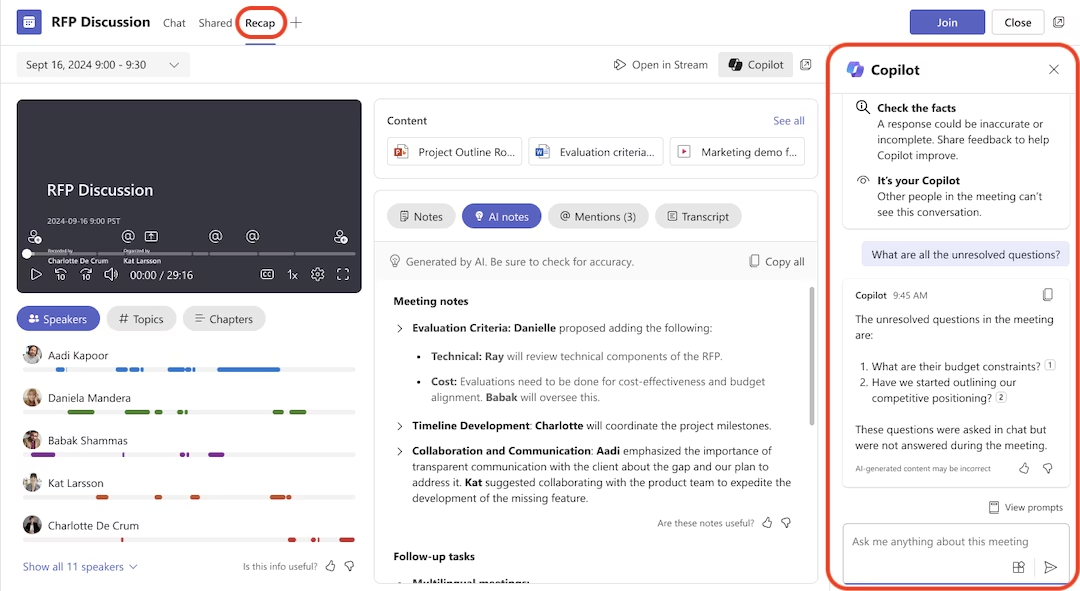
1. Meeting recaps: Never miss a detail again
The challenge: After a client meeting full of action items, someone scrambles to jot down notes and email them afterward—but what if something is missed?
How Copilot helps: Copilot automatically generates a meeting recap that includes key discussion points, decisions made, and action items assigned to specific people. If you record and transcribe the meeting in Teams, Copilot compiles everything into a concise, easy-to-read summary.
Real-life scenario: Imagine you’re a marketing agency meeting with a client about a new campaign. Instead of dividing attention between note-taking and listening, your team focuses on the conversation. Afterward, Copilot delivers an accurate recap and to-do list, so everyone knows their responsibilities without lifting a pen.
2. Onsite meetings: Capture everything on the go
The challenge: You’re at a client’s office for a critical discussion. There’s no laptop—just your phone, and you need to capture everything said.
How Copilot helps: Start a Teams meeting on your phone, hit record and transcribe, and place it on the table. After the meeting, Copilot processes the transcript and gives you a full summary with action items, so you never have to worry about forgetting key details.
Real-life scenario: A construction company owner visits a job site to review project changes with a contractor. Instead of scribbling notes, they start a quick Teams call on their phone. Later, Copilot provides a clean recap and follow-up list to share with the team, making communication simple and stress-free.
3. Outlook integration: Smarter email management
The challenge: Your inbox is overflowing, and you can’t keep up with every email chain or figure out how to respond professionally to a client’s lengthy message.
How Copilot helps: In Outlook, Copilot can summarize email threads, suggest replies, and even rewrite your drafts to make them clearer, more professional, or more concise. You can also ask it to expand ideas or make the tone friendlier.
Real-life scenario: A boutique consulting firm’s owner returns from vacation to dozens of unread emails. Instead of sifting through every thread, they ask Copilot to “summarize the emails I need to follow up on.” Within seconds, Copilot provides a prioritized list with context, saving hours of work and helping them respond faster.

4. Web research: Get answers without leaving your workspace
The challenge: You’re preparing for a client meeting and need quick insights about their business, but time is short.
How Copilot helps: Using Copilot in Windows, you can switch to the web mode and ask questions like, “Tell me about [Company Name].” Copilot scours the web for relevant details—such as company background, services, or testimonials—so you show up informed and prepared.
Real-life scenario: A small IT services company is about to pitch a proposal. Ten minutes before the meeting, the owner asks Copilot, “What does ABC Manufacturing specialize in?” Copilot instantly pulls information from the web, giving the owner confidence and a strong talking point for the call.

5. SharePoint integration: Find files in seconds
The challenge: Your business stores hundreds of documents in SharePoint. When you need the latest client contract or employee handbook, finding it feels like a scavenger hunt.
How Copilot helps: Switch Copilot to work mode and simply type: “Find the latest employee handbook” or “Show me the signed contract for XYZ client.” Copilot retrieves the file instantly—based on your security permissions—saving you time and frustration.
Real-life scenario: A small HR consultancy is preparing for an employee onboarding session and needs the handbook fast. Instead of searching through multiple folders, they ask Copilot to locate it. In seconds, the file is ready, and the onboarding runs smoothly.

Why this matters for small businesses
Small businesses often operate with lean teams, tight budgets, and limited bandwidth—meaning every hour saved has a direct impact on profitability. Microsoft Copilot helps level the playing field by giving smaller organizations access to enterprise-grade productivity tools without requiring IT-heavy setup or additional headcount.
By automating administrative tasks, improving communication, and reducing the time spent searching for information, small businesses can reallocate their resources toward strategic priorities such as revenue generation, customer engagement, innovation, or entering new markets. In short, Copilot doesn’t just save time—it creates capacity for growth.
Getting started with AI in your business
While Microsoft Copilot offers tremendous potential, it’s important to understand how to implement AI effectively in your business operations. The key is knowing where AI delivers real value and where human oversight remains essential.
Rand Group offers comprehensive AI workshops designed specifically for businesses ready to harness these powerful tools. Our “Cut Through the Hype: What Microsoft 365 Copilot Actually Delivers in Your Business” workshop takes a no-nonsense look at how Microsoft Copilot enhances productivity in Microsoft 365. You’ll discover where AI delivers value today, where human oversight is still essential, and how to integrate it into your daily operations.
Learn more about our AI workshops here and discover how to implement these tools effectively in your business.
Want to see these features in action? Watch our comprehensive video walkthrough: Microsoft 365 Copilot in action: Practical tips and tricks, where we demonstrate each of these use cases with real examples and practical advice you can implement immediately.
The future of small business productivity is here, and it’s more accessible than ever. Start exploring what Microsoft Copilot can do for your business today.
Next steps
As a certified Microsoft partner, Rand Group can help you evaluate, implement, and optimize the right Microsoft Copilot solution for your business. Our team of experts provides hands-on guidance, from solution selection to implementation, integration, and user training. Contact us today to discuss your goals and discover how Microsoft Copilot can elevate your business.



Subscribe to our Insights