NetSuite
Oracle NetSuite 2026.2 release: NetSuite Next, AI, finance, and operational enhancements

The Oracle NetSuite 2026.2 release marks the beginning of the NetSuite Next rollout, bringing embedded AI and a redesigned user experience into everyday ERP workflows. Ask Oracle, AI Canvas, and the Redwood experience give users new ways to find information, analyze business data, and complete tasks within NetSuite.
The release also introduces practical improvements across banking, accounts payable, pricing, workforce management, financial close, inventory planning, analytics, and tax. These enhancements can help organizations reduce manual work, improve visibility, strengthen controls, and make more informed decisions across finance and operations. In this blog, we review the key Oracle NetSuite 2026.2 features and the business benefits they can provide.
At a glance
Oracle NetSuite 2026.2 begins the rollout of NetSuite Next and expands AI, automation, reporting, and operational capabilities across the platform. Key updates include NetSuite Next, Ask Oracle, AI-assisted close management, improved bank reconciliation, payment runs, advanced pricing tools, tax-inclusive pricing, inventory optimization, SuitePeople labor insights, and expanded reporting capabilities.
Top NetSuite 2026.2 updates by business function
NetSuite 2026.2 introduces updates across the platform, finance, operations, workforce management, and reporting. Use this summary to identify the enhancements most relevant to your teams and business priorities.
NetSuite Next begins rolling out with NetSuite 2026.2
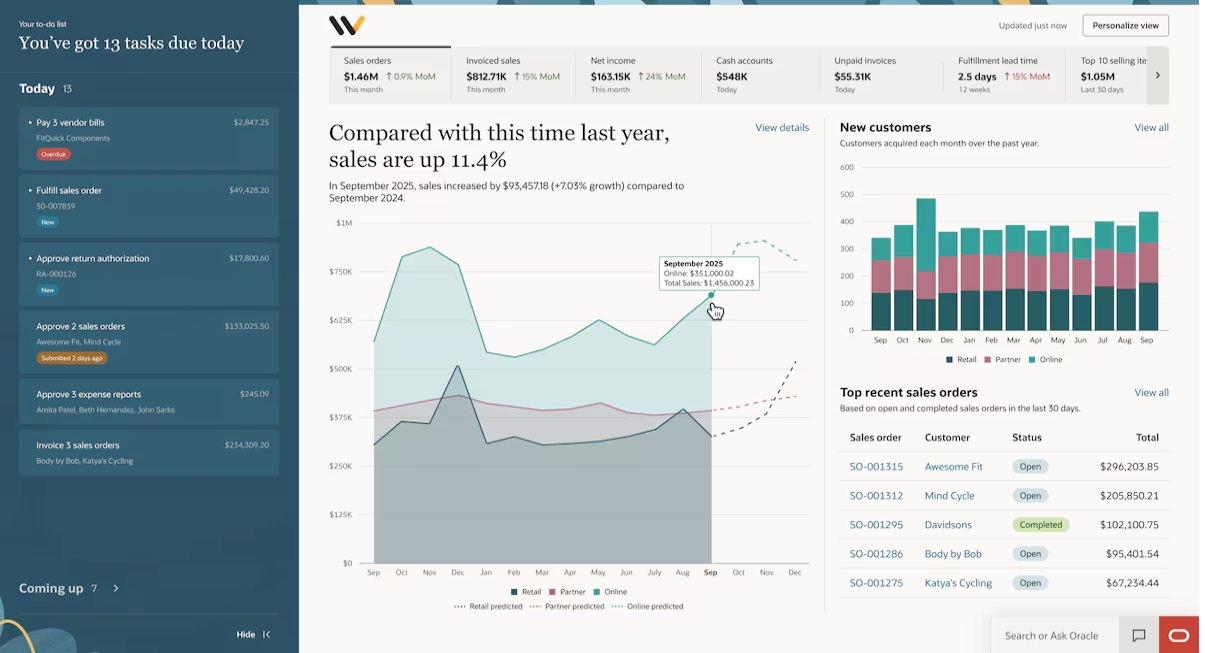
NetSuite 2026.2 begins the rollout of NetSuite Next, a redesigned experience that embeds AI more deeply across records, reports, analytics, and daily workflows. Existing data, permissions, workflows, and customizations remain in place, so businesses can adopt the new experience without a data migration or reimplementation.
The release also brings Ask Oracle into the current NetSuite experience, allowing users to begin working with conversational AI before moving to NetSuite Next. Together, Ask Oracle, AI Canvas, and the Redwood-based interface create a more intuitive way to find information, analyze performance, and complete tasks.
- NetSuite Next: NetSuite Next combines embedded AI with a redesigned user experience across records, reports, analytics, and workflows. It builds on the existing NetSuite environment, so data, roles, permissions, customizations, and workflows remain in place.
- Ask Oracle: Ask questions about NetSuite data, generate reports, find records, surface insights, and complete supported tasks using natural language. The assistant provides answers and visualizations within the user’s existing workflow.
- AI Canvas: Combine summaries, charts, KPIs, tables, and written analysis in one workspace. Users can explore a question in more detail and organize the results into a structured business analysis.
- Redwood experience: Navigate a more modern and consistent interface across records, lists, reports, dashboards, and workflows. The redesigned experience is intended to make information easier to find and everyday tasks simpler to complete.
Administrators can request a preview account that copies the organization’s current NetSuite environment, including its data, roles, workflows, and customizations. Organizations can also activate NetSuite Next directly in their production environment when they are ready.
To learn more, read our blog on the NetSuite Next preview.
Improve financial close management with AI and task tracking
Building on the Intelligent Close Manager introduced in NetSuite 2026.1, the latest release gives finance teams stronger tools for assigning work, tracking progress, and prioritizing close activities. Accounting leaders can manage more of the close process inside NetSuite instead of relying on spreadsheets, email, and separate task-management tools.
NetSuite 2026.2 also adds AI-assisted analysis that helps teams investigate financial changes and focus on the work most likely to delay the close. These improvements support clearer accountability, faster exception review, and more consistent explanations of financial results.
- Close Manager Task records: Eligible close activities automatically generate task records for the first open accounting period. Managers can assign an owner, set dates, add instructions, and track each task from not started through completion.
- Clear task ownership: Each task links directly to the related NetSuite activity, helping employees move from assignment to action faster. Email notifications and progress statuses also reduce manual follow-up.
- AI-prioritized task view: The Priority Queue can rank work based on transaction value, business impact, due dates, and task dependencies. This helps teams address urgent or high-impact activities before they become close bottlenecks.
- Intelligent Flux Analysis: AI-generated explanations help accountants understand why account balances changed between reporting periods. This reduces time spent comparing reports, identifying drivers, and drafting variance commentary.
- Expanded close activities: A new Calculate Consolidated Exchange Rate task brings another important close step into Intelligent Close Manager. Finance teams can monitor more of the close process from one centralized workspace.
The AI-prioritized view and Intelligent Flux Analysis require Narrative Insights. Organizations should also confirm task ownership, permissions, notification settings, and close procedures before enabling the new capabilities.

Improve fixed asset data integrity and processing reliability
NetSuite 2026.2 adds new Fixed Assets Management diagnostics that help administrators identify depreciation records that are duplicated or no longer match the current asset data. Finding these issues earlier can improve depreciation accuracy and prevent invalid records from affecting future forecasts or asset processing.
The release also improves the Asset Reset process for organizations with large fixed asset histories. Cleanup activities are processed in smaller batches, which can improve reliability and reduce the risk of incomplete forecast removal.
- Duplicate depreciation history checks: FAM Diagnostics can identify forecast depreciation records that were created more than once. This helps reduce unnecessary record volume and reporting inconsistencies.
- Stale depreciation history checks: The system can flag forecast records that no longer align with the asset’s current value, forecast date, or depreciation status.
- Guided review and cleanup: Users can download a CSV of the affected records before approving deletion. The Review Assistant then guides them through the cleanup process.
- Scheduled diagnostic scans: Administrators can run duplicate and stale record checks daily, weekly, or monthly. Both new diagnostics use a weekly schedule by default.
- Optimized Asset Reset processing: NetSuite processes large cleanup operations in smaller batches. This improves scalability and supports more reliable depreciation forecasting.

Banking and reconciliation become faster and easier to audit
NetSuite 2026.2 introduces several banking enhancements that simplify transaction matching, payment application, and account reconciliation. Finance teams gain clearer suggestions, fewer manual steps, and more information for reviewing activity before completing a reconciliation.
The release also strengthens the audit trail around banking activity. Users can see who matched, submitted, cleared, reconciled, or excluded a transaction, making it easier to investigate changes and support internal or external audits.
- System notes for reconciliation activity: NetSuite now records when transactions are cleared, submitted, matched, reconciled, or unreconciled. Finance teams and auditors can use this history to trace changes and identify who performed each action.
- Match and submission details: Reconciliation pages now show whether a match or submission was completed by a user or the system. Teams can review ownership, timestamps, and excluded transactions more easily.
- Suggested transaction matches: A new Match Suggestions tab displays likely matches and recommends the next action. Users can accept a match, review options, apply a payment, or create a transaction.
- Payment suggestions for invoices and payables: NetSuite can suggest creating and applying payments for open customer invoices and vendor payables. This brings accounts receivable and accounts payable matching into one workflow.
- Automatic submission of matches: Manual matches and cleared transactions are now submitted for reconciliation in the same action. This removes an extra step and helps shorten the reconciliation process.
- Improved banking pages: Updated filters, labels, search fields, and button placement make banking pages easier to navigate. Users can also compare bank and general ledger details more efficiently.
- Sensitive information notices: New warnings alert users that imported bank memo fields may contain account numbers, credit card details, addresses, or other sensitive information. These notices support more careful handling of imported banking data.


Unlock the value of NetSuite 2026.2
Ready to take advantage of NetSuite 2026.2, including NetSuite Next, Ask Oracle, banking improvements, and expanded analytics capabilities? Rand Group can help you evaluate, enable, and optimize the new features that best support your finance, operations, and reporting goals.
Streamline accounts payable with payment runs
Payment Runs give accounts payable teams one workflow for preparing, reviewing, approving, and processing multiple payables. Users can save a group of eligible transactions, review the full payment batch, and submit it when ready instead of managing each payment separately.
The selected payment account determines the subsidiary and currency for the run. Once submitted, NetSuite 2026.2 uses bulk processing to create the related vendor payments and connect payment activity back to the original transactions.
- Process multiple payable types: Add eligible vendor bills, vendor credits, journal entries, expense reports, and bill payments to one payment run.
- Improve payment control: Review and approve the full batch before processing payments. This reduces the risk of selecting the same payable more than once.
- Increase traceability: Related payment activity appears on the source transactions. Finance teams can follow each payable from selection through payment more easily.
- Support existing NetSuite processes: Payment Runs work with standard permissions, approvals, custom fields, custom segments, searches, REST, SuiteScript, and CSV capabilities where applicable.

Automate payment adjustments for fees and underpayments
Accounts receivable teams can now record bank fees, convenience fees, and customer underpayments directly from customer payment or deposit transactions. NetSuite automatically posts the related adjustment, removing the need to create a separate journal entry when the payment amount does not match the invoice.
This update reduces manual work and makes payment processing easier to reconcile. Finance teams can clear common payment differences faster, create fewer adjusting entries, and maintain a cleaner record of how each payment was applied.

Manage advanced pricing with greater control and visibility
Advanced Pricing enhancements in NetSuite 2026.2 make it easier to maintain complex pricing across products, customers, price levels, and rules. Pricing teams can apply changes at scale, reduce manual setup, and better understand how prices are configured before they affect transactions.
The release also gives sales and finance teams clearer pricing context during order entry and stronger analytics for evaluating results. This helps organizations explain pricing decisions, identify which rules drive revenue, and adjust pricing strategies using current NetSuite data.
- Item collections and bulk updates: Apply price rules to reusable groups of products instead of updating items one at a time. Teams can also add multiple items and customers or import pricing records through CSV to reduce manual maintenance.
- Price level visibility: A dedicated Price Level view shows how price levels connect to customers, items, and price rules. Pricing managers can review configurations and validate where specific pricing applies from one place.
- Pricing context on sales orders: Sales order lines now show whether a price comes from base pricing, a price rule, or customer-specific pricing. Sales teams can answer pricing questions and review exceptions without leaving the transaction.
- Pricing performance analytics: The Sales Pricing Overview Workbook includes a Sales by Price Rule pivot table. Teams can compare invoiced sales by active price rule and identify which pricing strategies are producing the most revenue.
- Expanded AI pricing narratives: AI-generated pricing insights now support more sellable item types. These summaries help users understand pricing changes and recommendations without manually tracing the underlying data.

Support tax-inclusive pricing with SuiteTax
SuiteTax now allows organizations to maintain prices that include tax alongside prices where tax is added separately. This NetSuite 2026.2 enhancement helps businesses present prices the way each market, customer, or transaction expects while NetSuite calculates the net amount, tax, and gross total.
The update is especially useful for global organizations that operate across B2B and B2C markets. Finance teams can reduce manual tax calculations, maintain cleaner customer-facing prices, and support different VAT or GST requirements within one pricing structure.
- Tax-inclusive and tax-exclusive pricing: Maintain both pricing methods at the same time and select the appropriate option for each taxable transaction.
- Automatic tax calculations: NetSuite calculates the tax portion and net amount from a tax-inclusive price or adds tax to a tax-exclusive price.
- Flexible price configuration: Set prices by item, currency, price level, quantity, customer, or vendor to support different markets and relationships.
- Bulk price maintenance: Use price levels, mass updates, and quantity pricing schedules to manage larger item catalogs with less manual work.
- Missing-price controls: NetSuite alerts users when the required tax-inclusive or tax-exclusive price is unavailable, helping prevent incomplete transactions.
Tax-Inclusive Pricing requires SuiteTax and the SuiteTax Engine. It is not currently compatible with Advanced Pricing, and organizations should confirm tax-engine and country support before enabling the feature.

Improve inventory planning and identify imbalances earlier
New inventory planning capabilities help supply chain teams set more consistent replenishment targets and identify projected inventory risks before they disrupt operations. Inventory Optimization applies structured segmentation and service-level targets, while Inventory Imbalance Management brings shortages, stockouts, and excess inventory into one review queue.
These NetSuite 2026.2 enhancements are especially useful for manufacturers, distributors, and other inventory-intensive organizations managing many items or locations. Planners gain a more proactive way to balance inventory availability, working capital, and service levels without removing the need for human review.
- Automated inventory segmentation: NetSuite groups eligible items by business value and demand variability. Teams can apply different planning policies across the inventory portfolio.
- Optimized replenishment targets: The system calculates safety stock, reorder points, preferred stock levels, and lead times using demand, service levels, and planning data.
- Location-specific planning: Organizations can optimize inventory by item or item location. This supports different targets across warehouses with distinct demand patterns.
- Centralized imbalance queue: A new Inventory Imbalance tab highlights projected stockouts, shortages, and overstock. Planners can compare expected inventory with current thresholds.
- Track exception resolution: Users can resolve, dismiss, or reopen exceptions. NetSuite records who updated each exception and when.
Inventory Optimization applies to eligible items using the Reorder Point replenishment method and requires the appropriate inventory features and configuration. Organizations should validate demand, lead-time, service-level, and item-location data before applying optimized targets broadly.

Strengthen manufacturing execution and quality management
Manufacturing Mobile enhancements in NetSuite 2026.2 give production teams more flexibility while strengthening operational controls. Manufacturers can expand work order access across locations within a subsidiary and choose how transaction dates are assigned for assembly builds, work order completions, and work order issues.
Quality Management enhancements add structured tools for capturing, investigating, correcting, and preventing quality problems. These capabilities can help manufacturers improve accountability, reduce manual follow-up, identify recurring defects, and maintain stronger records for audits and compliance.
- Multi-location work order access: Organizations can allow operators to view work orders across all locations within their assigned subsidiary. This supports employees who work across multiple plants or production sites.
- Transaction date controls: Administrators can allow manual dates for backdated activity or require the current system date. This gives manufacturers more control over posting consistency and financial accuracy.
- Non-Conformance Register: Quality teams can track failed inspections, affected items, lots, serial numbers, ownership, status, and aging in one centralized record.
- Automatic quality issue creation: Failed inspections can automatically create a Non-Conformance Register record, assign an owner, and send an email notification. This reduces delays between identifying and investigating a quality failure.
- Corrective and preventive actions: Teams can document root causes, assign corrective and preventive actions, set priorities and due dates, and verify that each action was completed.
- Expanded tablet access: Custom roles can access Quality Management tablet capabilities through configurable permissions. Organizations can extend shop floor access while maintaining control over quality records.

Improve workforce visibility with SuitePeople enhancements
New SuitePeople capabilities make it easier to track employee time and analyze workforce costs inside NetSuite. The NetSuite 2026.2 release expands native time-entry fields and introduces labor cost reporting designed for finance leaders.
These updates can reduce reliance on custom fields, manual reports, and spreadsheet-based payroll analysis. They also give payroll, finance, and management teams a clearer view of time-entry changes, labor spending, and the relationship between workforce costs and revenue.
- Native start and end time fields: Start Time and End Time can now appear on supported time-entry forms and be included in saved searches, CSV exports, and SuiteScript. Organizations that use custom time fields may be able to simplify forms and reduce ongoing customization.
- Stronger time-entry audit trails: Changes to Start Time, End Time, and Duration are recorded in System Notes. Managers, payroll teams, and auditors can see who changed a value and when the change occurred.
- Labor Costs Report: Finance leaders can analyze labor spending by period, subsidiary, department, location, and other business segments. This helps teams identify where workforce costs are concentrated and how those costs change over time.
- Labor Costs and Revenue Report: Organizations can compare labor costs with revenue using metrics such as revenue per paid employee and labor cost as a percentage of revenue. These insights help leaders evaluate whether workforce spending is scaling with business performance.
- AI-assisted insights and dashboards: Finance teams can generate AI-supported summaries and display labor cost metrics in CFO dashboard portlets. This brings workforce analysis closer to the financial reporting and planning process.

Transfer Saved Searches to NetSuite Analytics Warehouse
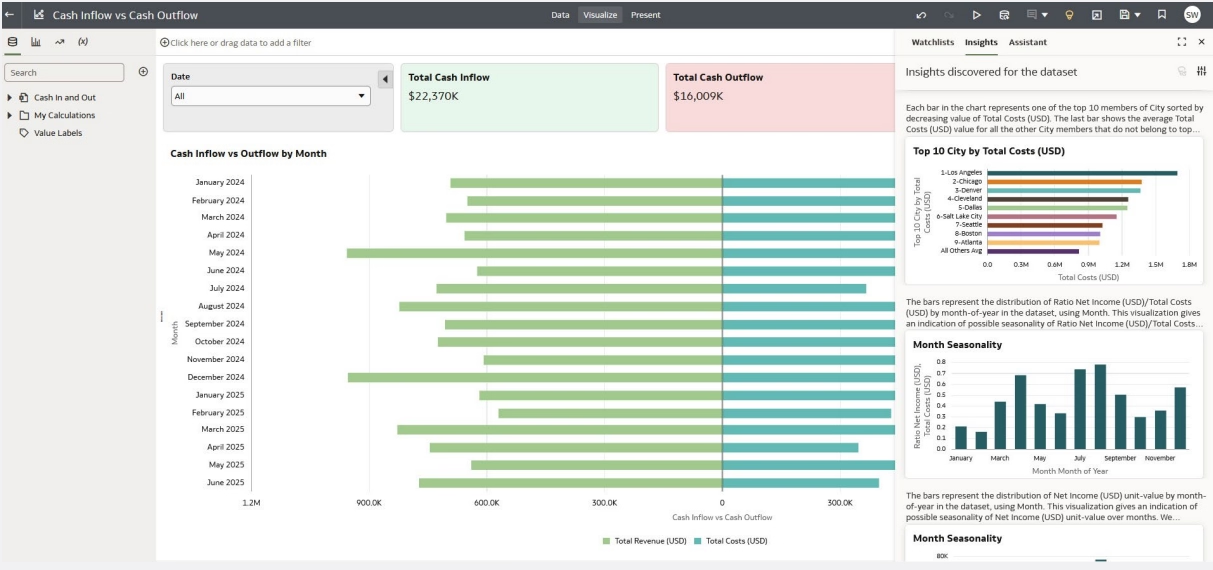
A new data transfer option lets organizations send Saved Searches directly to NetSuite Analytics Warehouse from the Data Transfer Setup page. Teams can analyze business-specific search data alongside standard warehouse data without rebuilding the same logic in another reporting tool.
This update helps preserve existing filters, definitions, and reporting rules while expanding analysis in NetSuite Analytics Warehouse. Administrators must first complete a one-time Oracle NetSuite Analytics connector setup in Oracle Analytics Cloud.
Export NetSuite data in the modern Excel format
Lists, saved searches, and reports now export to Microsoft Excel in the .xlsx format by default. This NetSuite 2026.2 enhancement replaces the older .xls format and makes exported data easier to open, share, and analyze in current versions of Excel.
The change also removes the extra step of converting or resaving files before using them in reporting workflows. Finance and operations teams can move NetSuite data into Excel with less friction and a more consistent file format.
Next steps
Oracle NetSuite 2026.2 delivers updates that can improve how teams analyze data, manage financial processes, maintain pricing, plan inventory, and complete daily work. The introduction of NetSuite Next also represents a broader change in how users interact with NetSuite through embedded AI and a redesigned experience.
Not every enhancement will apply to every NetSuite environment. Some features require additional modules, configuration, permissions, connector setup, or compatibility reviews. Organizations should evaluate the release against their current processes, customizations, integrations, and business priorities before enabling new capabilities.
Rand Group can help your organization review the Oracle NetSuite 2026.2 release, identify the features that provide the most value, and prepare your environment for adoption. Our NetSuite consultants can support release planning, testing, configuration, training, and ongoing optimization. To discuss your NetSuite 2026.2 plans with our team, contact us.