NetSuite
NetSuite 2026.1 release: AI-driven finance, operations, and automation enhancements

The NetSuite 2026.1 release delivers new AI-powered capabilities, expanded financial automation, and operational improvements across the platform. This update focuses on embedded AI in finance, enhanced pricing and cash management tools, stronger warehouse and manufacturing controls, and deeper subscription and project visibility. In this blog, we break down the key updates and enhancements you can expect in NetSuite 2026.1.
AI agents boost reconciliation and planning processes
The NetSuite 2026.1 release introduces AI agents across NetSuite EPM to reduce manual effort and improve confidence in financial workflows. These enhancements bring automation and transparency to reconciliation, forecasting, and cost allocation. Instead of relying solely on static rules and manual review, finance teams can now leverage AI assistants that learn from prior cycles and continuously improve accuracy. The result is faster execution, clearer explanations, and stronger trust in financial outcomes.
These AI capabilities are embedded directly within account reconciliation, planning and budgeting, and profitability and cost management. They are designed to support accountants, analysts, and finance leaders with actionable insights and guided automation, rather than replacing existing controls. This makes it easier to scale financial processes without increasing complexity or headcount.
- NetSuite Account Reconciliation: NetSuite Account Reconciliation now includes an AI assistant that automates the setup of new reconciliation assignments. It identifies newly created accounts, assigns preparers, applies appropriate formats, and adjusts risk attributes based on prior cycles. A new AI-powered transaction matching assistant enhances traditional rule-based matching by using machine learning to uncover hidden relationships and suggest matches with predictive confidence scoring. In addition, generative AI flux analysis detects material balance fluctuations and produces draft, plain-language explanations, reducing the time spent investigating and documenting account variances.
- NetSuite Planning and Budgeting: NetSuite Planning and Budgeting has enhanced multivariate AI forecasting improves both accuracy and transparency in financial planning. The system analyzes multiple business drivers simultaneously and provides interpretable insights into how each driver influences the forecast. This helps finance teams validate assumptions and better understand the reasoning behind AI-generated projections. By combining predictive power with clear explanations, organizations can make more informed planning decisions with greater confidence.
- NetSuite Profitability and Cost Management: New AI-driven assistants simplify the creation and analysis of cost allocation models. The Model Build Assistant interprets user inputs and automatically generates allocation models and rules, reducing the need for deep technical expertise. The Allocation Trace Assistant delivers natural-language explanations of allocation flows, helping users understand how costs move across the organization. Together, these capabilities make complex profitability analysis more accessible and easier to manage.
AI-powered close management with NetSuite Intelligent Close Manager
NetSuite Intelligent Close Manager is introduced in this release to help finance teams manage the period close with greater visibility and control. As transaction volumes grow and close processes become more complex, teams need more than static checklists. Intelligent Close Manager uses AI-driven monitoring and exception detection to provide a centralized view of tasks, KPIs, and potential risks. This allows accounting teams to identify bottlenecks early and stay on track for a timely close.
The new Close Manager dashboard portlet consolidates outstanding tasks, transaction amounts, and projected activity into a single view. Tasks are automatically created based on transaction activity and enabled features, requiring no manual setup. Built-in AI insights highlight trends, exceptions, and missing transactions so teams can prioritize actions throughout the period, not just at month-end. Combined with enhancements to reconciliations, eliminations, and approvals, these updates help organizations accelerate close cycles without sacrificing accuracy or oversight.
- Close Manager dashboard portlet: The Close Manager portlet provides a centralized view of close tasks, transaction amounts, and KPIs such as Exceptions and Net Income. Users can filter by period and subsidiary to focus on specific entities and quickly identify potential bottlenecks.
- AI-driven monitoring and exception detection: Intelligent Close Manager analyzes recorded and expected transaction activity to surface anomalies and missing transactions. Hyperlinked tasks guide users directly to the required actions, reducing manual follow-up and task switching.
- Payment risk detection in Exception Management: The system flags changes to critical vendor data fields that occur near payment events, helping teams detect potential fraud earlier. This strengthens internal controls and reduces financial risk during close.
- Improved eliminations and reconciliation automation: Users can drill down into source transactions for balance sheet elimination entries to improve intercompany transparency. The enhanced Run Reconciliation Rules feature helps clear unmatched transactions more efficiently.
- Enhanced Suite Approvals for journal entries: Suite Approvals now displays the next approver and transaction aging directly in reminder portlets. Configurable lock and edit controls improve governance and reduce manual resubmission during approval workflows.


Unlock the power of NetSuite 2026.1
Ready to take advantage of the latest NetSuite 2026.1 features and AI-driven enhancements? Connect with Rand Group for expert guidance on enabling, optimizing, and maximizing these updates to improve visibility, automation, and performance across your business.
Standardized integration with LLMs: NetSuite AI Connector Service for Analytics Warehouse
Standardized integration with large language models (LLMs) through Model Context Protocol (MCP) are introduced in NetSuite 2026.1. MCP provides a secure framework for connecting external AI systems with internal business data, allowing organizations to generate contextual insights while maintaining strong governance controls. This approach enables AI-driven analytics and automation without compromising data security or system integrity.
The new NetSuite AI Connector Service for NetSuite Analytics Warehouse authenticates and securely connects external LLM platforms such as Claude, Cline AI, and GitHub Copilot to NetSuite data. Users can prompt these models in natural language to analyze internal ERP data and combine it with relevant external information for deeper insights. Unlike embedded assistants limited to a single environment, this service allows organizations to choose where their LLM operates while still leveraging trusted NetSuite data. This creates new opportunities to generate richer financial narratives, compare performance against market signals, and enhance decision-making with broader context.

AI-powered pricing optimization with NetSuite Advanced Pricing
This release enhances pricing management with AI-driven insights and stronger process controls in NetSuite Advanced Pricing. The new rules-based pricing engine gives organizations more structure and flexibility in how prices are defined and enforced. By combining cost data, inventory levels, and sales history with automated logic, businesses can protect margins while maintaining consistency across customers and channels. These updates help pricing teams move from reactive adjustments to more strategic, data-informed decisions.
- Rules-based pricing engine: NetSuite Advanced Pricing now includes a structured, rules-based engine to standardize pricing logic. This reduces manual overrides and ensures consistent pricing across transactions.
- Cost-plus pricing support: Organizations can define pricing models based on cost-plus calculations to better protect margins. This helps ensure that pricing reflects current costs and desired profitability targets.
- Targeted pricing by date, item, and customer: Users can set specific pricing rules based on defined date ranges, individual items, or customer segments. This allows for controlled promotions, contract pricing, and customer-specific strategies.
- AI-generated narrative pricing summaries: AI-generated summaries consolidate inventory data, costs, and historical sales trends into clear insights. Managers can quickly review pricing performance and make adjustments with greater confidence.
AI narrative insights embedded across operations
NetSuite 2026.1 expands generative AI beyond finance and analytics by embedding narrative insights directly into operational workflows. Instead of reviewing multiple reports and dashboards, users now receive concise, contextual summaries based on the page they are viewing. These AI-generated narratives interpret data, highlight risks, and suggest next steps in plain language. This helps teams respond faster, reduce manual analysis, and make more informed decisions across inventory, customer service, and payroll processes.
- Inventory management: AI-generated inventory narratives summarize key insights directly within reports and operational screens such as Location, Item Details, and dashboards. The system highlights anomalies like low or excess stock, back-order risks, valuation changes, and high-impact inventory movements. It can also suggest actions, such as adjusting safety stock levels or reviewing specific items, helping supply chain teams respond proactively and control carrying costs. Organizations looking to further automate inventory-related workflows should also explore the new NetSuite AI Item Creation Assistant, which uses generative AI to extract product information from supplier catalogs and create inventory item records directly within NetSuite.
- Case resolution and customer management: NetSuite CRM now includes AI-powered summaries that provide instant visibility into customer cases, including sentiment, communication history, and escalation details. Customer 360 also delivers a unified narrative overview of transactions, activities, and support interactions with a single click. This allows sales and service teams to prepare more quickly, personalize engagement, and resolve cases with greater consistency.
- Payroll management: NetSuite SuitePeople Payroll introduces AI-generated summaries for payroll expenses and unpaid payroll liabilities. These narratives provide a clear view of total payroll costs for a given period and highlight outstanding liabilities that require attention. By simplifying complex payroll data into actionable insights, organizations can improve reconciliation, compliance, and financial oversight.

Enhanced cash management and AI-driven bank matching
The latest release of NetSuite strengthens cash management by improving visibility, forecasting accuracy, and bank reconciliation efficiency. Finance teams can now access more precise cash projections and better control how bank data flows into the system. With AI-enhanced transaction matching and flexible bank integrations, organizations can reduce manual reconciliation effort while increasing confidence in their cash position. These updates help treasury and accounting teams make faster, more informed decisions.
- More accurate forecasting with Cash 360: NetSuite Cash 360 now supports sales orders with billing schedules, allowing forecasts to reflect billing dates and payment terms more accurately. This provides finance teams with clearer short-term and long-term cash visibility.
- Flexible and on-demand bank feed integration: Users can configure scheduled bank imports to align with their workflows and refresh transactions on demand. This ensures up-to-date bank data is available when needed without relying on rigid import schedules.
- AI-powered bank transaction matching: Generative AI enhances the transaction matching engine by extracting richer and more structured bank data. This increases auto-match rates and reduces the time spent manually reconciling transactions.
- Improved notification management: Users now have greater control over email alerts triggered by bank statement imports. This helps reduce unnecessary notifications and keeps teams focused on high-priority reconciliation tasks.
Vendor consignment inventory management
NetSuite 2026.1 introduces Consigned Inventory Management to help organizations track and manage vendor-owned inventory stored in their facilities. This feature allows businesses to separate consigned and non-consigned inventory by location, ensuring accurate visibility into quantities and values. Because ownership transfers only when items are sold or consumed, companies can reduce financial exposure and improve cash flow. The result is tighter inventory control with less risk tied to unsold or obsolete stock.
- Track consigned inventory separately: Consigned items are managed using distinct inventory statuses and tracked separately from owned inventory at each location. This ensures clear visibility into quantities, valuation, and financial impact.
- Support for full inventory lifecycle: The feature supports purchasing, receiving, fulfillment, transfers, returns, counts, and adjustments for regular, lot, and serialized items. Organizations can manage consigned inventory without disrupting existing procurement and warehouse workflows.
- Pay only for consumed or sold items: Vendor bills automatically include only consumed quantities, with ownership transferring at the time of sale. This defers payment until revenue is generated, helping improve working capital and cash flow.
- Integrated financial and reporting controls: Users can assign vendor consigned asset and COGS accounts and monitor activity through tools such as the Consignment Purchases workbook. This provides stronger financial tracking and clearer insight into consignment performance.

Warehouse, shipping, and fulfillment automation improvements
Enhancements introduced in this release improve operational efficiency and accuracy across Warehouse Management and Ship Central. These updates reduce manual intervention, strengthen process controls, and provide better visibility into receiving, picking, packing, and shipping activities. By automating key warehouse and last-mile workflows, organizations can optimize labor productivity, minimize errors, and protect margins throughout the fulfillment process.
- Warehouse management enhancements: Warehouse Management now supports searching kit and non-inventory items, improving inventory visibility and tracking accuracy. Automated landed cost validations and rule-based processing strengthen compliance during purchase order receipt. Reversal support for inbound shipments adds flexibility, while real-time back-order alerts during picking help teams address fulfillment issues proactively.
- Advanced barcode scanning and packing automation: Ship Central introduces enhanced GS1 and HIBC barcode scanning to improve item identification, lot tracking, and rate calculations. Automated barcode scanning and real-time updates reduce manual packing errors and speed up shipping workflows.
- Flexible shipping options and margin protection: Pick up, drop off (PUDO) delivery options allow merchants to offer more customer-friendly fulfillment choices. For UPS and USPS shipments, the system compares retail and negotiated rates to help preserve margins and ensure consistent pricing logic.
- Improved bulk processing and billing control: Bulk shipment processing now supports larger batches, increasing scalability and efficiency. Third-party billing can be configured directly within the Sales Order, reducing manual data entry and preventing billing discrepancies across related shipments.
What’s new in NetSuite: Latest innovations you need to know
Ready to see what’s new in Oracle NetSuite 2026.1? Watch the video to explore the latest AI-powered innovations, automation features, analytics enhancements, and operational improvements that can help your business work smarter and scale faster.

Manufacturing transparency and improved usability
In the 2026.1 release, NetSuite enhances manufacturing and supply chain workflows with a focus on clarity, accuracy, and mobile usability. These updates improve how information is captured, displayed, and analyzed across shop floor and planning processes. By refining mobile functionality and expanding planning visibility, NetSuite helps operators, planners, and managers make faster decisions with greater confidence. The result is improved production tracking, stronger data integrity, and better coordination across locations.
- Improved mobile image capture and workflow controls: The new “Do Not Compress” option in SCM Mobile preserves image quality for inspections, serial labels, and damage documentation. Configurable cross-icon events allow administrators to define actions when closing pop-ups, aligning mobile workflows with operational logic.
- Expanded mobile access and operation tracking: SCM Mobile now supports iOS devices through Safari and Chrome, enabling full browser-based access on iPhones and iPads. In Manufacturing Mobile, Flexible Operation Exit Handling allows operators to pause or exit tasks without disrupting accurate time tracking.
- Enhanced component visibility during production: Component Item Description Display shows detailed item descriptions during material consumption, reducing selection errors. Quick navigation improvements help operators move efficiently between tasks and maintain production flow.
- Improved kit availability and planning insights: The Manufacturing Scheduler SuiteApp now provides net kit availability across locations based on component supply and existing allocations. New Supply Chain Planning Results in SuiteAnalytics Workbook deliver a complete supply-demand view for purchasing, production, and sales, supporting more informed planning decisions.
Enhanced subscription management
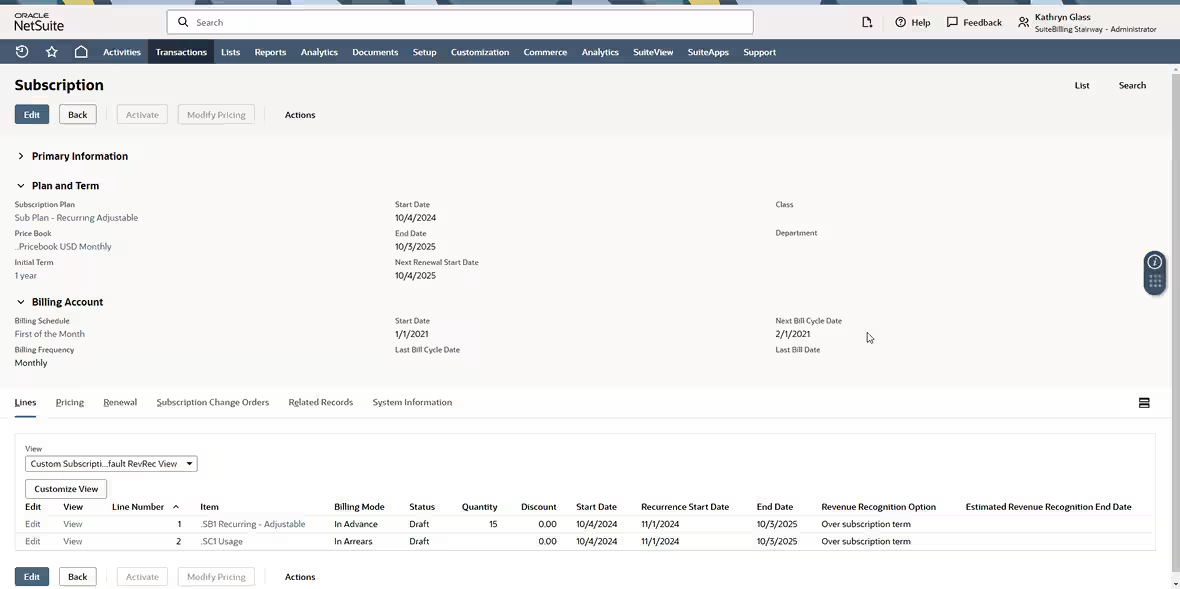
NetSuite 2026.1 strengthens SuiteBilling and subscription analytics to help SaaS and subscription-based businesses better manage commitments, usage, and revenue performance. These updates improve how organizations allocate credits, manage overages, and monitor recurring revenue trends. With clearer visibility into subscription health and more flexible billing controls, finance and operations teams can make more informed growth decisions.
- Flexible commitment and overage management: SuiteBilling now supports flexible commitment allocation across multiple usage-based services, allowing credits to be shared seamlessly. Overage rates can be defined at the service line level, providing greater pricing control and simplifying billing structures.
- Cross-subscription prepaid balances: Prepaid balances can be centrally managed and automatically applied across multiple subscriptions for a single customer. This streamlines reconciliation, simplifies customer administration, and improves visibility into usage and payments.
- Enhanced subscription metrics and cohort analysis: The Subscription Metrics dashboard now organizes KPIs across revenue, unit economics, and subscriber retention. New visualizations such as recurring revenue bridge charts and cohort heat maps help identify trends, growth drivers, and retention patterns.
- Customizable performance views: Users can toggle between fiscal year, trailing twelve months, or year-to-date periods and view metrics based on ARR or MRR. These flexible display options support more meaningful performance comparisons and data-driven decision-making.
Project profitability and reporting updates
The 2026.1 release of NetSuite introduces enhancements that improve revenue visibility and task management for project-based organizations. These updates simplify revenue recognition processes and provide faster insight into project financial performance. By reducing manual steps and improving workflow efficiency, teams can focus more on execution and less on administrative overhead.
- Direct revenue plan recalculation within projects: Users can now recalculate revenue arrangements and plans directly from the project record. Immediate notifications following revenue-generating actions make troubleshooting and ongoing revenue management more efficient.
- Improved project task management: Teams can quickly add multiple tasks during project creation and edit existing tasks using an intuitive pop-up interface. With support for core fields and customization, project setup is faster and easier to manage.
- Greater oversight and flexibility: These enhancements provide clearer financial tracking and more responsive project oversight. Organizations gain better control over both new and ongoing projects with less manual intervention.

Increased payment flexibility and Intelligent Payment Automation
The NetSuite 2026.1 release expands payment automation capabilities to support stronger internal controls and multi-entity operations. Intelligent Payment Automation, powered by BILL, enables centralized vendor payments directly within NetSuite, improving efficiency and visibility. These updates help organizations streamline approvals, reduce fraud risk, and manage payments across subsidiaries with greater confidence.
- Multi-subsidiary vendor payments: Organizations can process payments across subsidiaries using a single vendor record, simplifying vendor management. Role-based initiation and approval workflows strengthen governance and improve compliance.
- Centralized tracking and reporting: Payments can be segmented by department, class, or location for improved reporting. Users can also view and download cleared check images directly within NetSuite for better audit support.
- Expanded NetSuite Pay capabilities: Canadian organizations can now process credit card payments in Canadian dollars through NetSuite Pay, benefiting from prenegotiated rates and automated reconciliation. Companies headquartered outside the U.S. can also enable Intelligent Payment Automation for their U.S. subsidiaries, extending payment automation across global operations.

Next steps
NetSuite 2026.1 introduces meaningful updates across AI, finance, operations, subscription management, and payments. These enhancements help you improve visibility, reduce manual effort, and make more informed decisions across your organization.
If you would like help evaluating which features apply to your business or enabling these updates in your environment, contact Rand Group to learn how we can help you get the most out of NetSuite 2026.1.