NetSuite
Is NetSuite good for small businesses?

Is NetSuite good for SMBs? The short answer is yes. For growing small and midsize businesses, the limitations of basic accounting tools and disconnected systems quickly become apparent. Manual processes slow growth, data lives in silos, and scaling operations become increasingly complex. Enterprise Resource Planning (ERP) software emerges as the solution. Oracle NetSuite provides a unified, cloud-based ERP platform that gives SMBs the agility, functionality, and scalability they need to compete with larger organizations. In this blog, we’ll dive deeper into why NetSuite is such a strong choice for SMBs, exploring its key features, the benefits that deliver value to SMBs, pricing considerations, and how Rand Group can help your business begin its digital transformation with NetSuite.
- Why small businesses should consider implementing ERP
- What is NetSuite?
- Why NetSuite is a strong choice for small businesses
- NetSuite features small businesses find most valuable
- Breaking down NetSuite editions for small businesses
- NetSuite Rapid Activation implementation
- NetSuite pricing
- Why partner with Rand Group for your NetSuite adoption
- FAQs
Why small businesses should consider implementing ERP
ERP systems deliver transformative benefits for small businesses by consolidating critical processes into a single, unified platform. By streamlining workflows, ERPs eliminate redundancies and manual tasks, saving time and reducing errors. Real-time visibility and transparency into operations provide leaders with accurate, holistic views of financials, inventory, and customer interactions, empowering more strategic and data-driven decision making. Most modern ERPs also enhance data security with built-in controls and compliance features, ensuring sensitive business information is protected. Just as importantly, ERPs foster improved collaboration by breaking down departmental silos, enabling finance, sales, operations, and leadership to work seamlessly from the same source of truth. Together, these benefits allow small businesses to operate more efficiently, scale confidently, and stay ahead of the competition.
What is NetSuite?
NetSuite is a cloud-based ERP solution that integrates core business functions into one unified system. Unlike traditional software that requires on-premises servers and complex upgrades, NetSuite operates entirely in the cloud, ensuring accessibility from anywhere and simplifying updates. Its cloud architecture means businesses do not need to worry about hardware maintenance or disruptive version upgrades, NetSuite handles updates seamlessly in the background. This ensures users always have access to the latest features and security protections.
NetSuite brings together financial management, customer relationship management (CRM), inventory, supply chain, and eCommerce capabilities, providing small businesses with real-time insights and a scalable platform designed to grow alongside them. Beyond core functions, the system supports advanced reporting, compliance management, and customizable dashboards that allow leaders to monitor performance at a glance. This unification not only improves efficiency but also eliminates the need for multiple disconnected systems. NetSuite empowers small businesses to operate with the sophistication of much larger enterprises, positioning them for long-term growth and competitiveness.


Want to see NetSuite ERP in action?
Schedule a custom demo with our NetSuite experts today. They can run you through a live dashboard and answer your questions.
Why NetSuite is a strong choice for small businesses
NetSuite is designed with small business growth in mind, offering a wide range of features that address the challenges of scaling, efficiency, and visibility.
Key advantages include:
- Scalability – NetSuite allows SMBs to start with essential financial management and then add modules such as CRM, eCommerce, or advanced inventory as needs evolve. This flexibility ensures businesses can scale seamlessly without facing the disruption and cost of migrating to an entirely new system.
- All-in-One Solution – Instead of relying on multiple disconnected tools, NetSuite brings financials, CRM, inventory, eCommerce, and HR together into a single platform. This integration reduces errors, improves collaboration across departments, and streamlines workflows from end to end.
- Cloud-Based Accessibility – As a cloud-native solution, NetSuite can be accessed securely from any device with an internet connection, empowering remote and hybrid teams. SMBs benefit from reduced IT overhead since there’s no need to manage on-premise servers, updates, or patches.
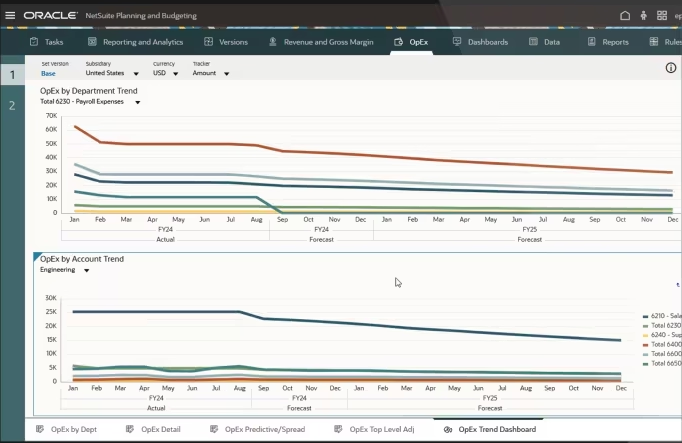
- Real-Time Visibility – NetSuite’s dashboards and analytics provide small business owners with immediate access to financial and operational data. Having this visibility supports better decision-making, improved cash flow management, and the agility to respond quickly to market changes.
- Automation of Manual Work – By automating time-consuming processes like reconciliations, invoice matching, and data entry, NetSuite reduces administrative burdens. Employees can redirect their time to value-added activities such as strategy, customer engagement, and growth initiatives.
NetSuite features small businesses find most valuable
NetSuite ERP delivers a powerful set of capabilities that small businesses value most, enabling them to operate efficiently, reduce complexity, and scale as they grow.
- Financial management – NetSuite streamlines core accounting by automating processes like invoicing, accounts payable/receivable, and reconciliations. It also delivers accurate financial reporting and budgeting tools, ensuring small businesses have clear visibility into profitability and cash flow.
- Customer Relationship Management (CRM) – The CRM module provides a complete view of customer interactions across sales, service, and support channels. With improved lead tracking and sales forecasting, SMBs can strengthen customer relationships and close deals more effectively.
- Inventory management – Real-time visibility into inventory ensures stock levels are always accurate, helping avoid shortages or excess holding costs. Automated purchasing and replenishment workflows keep operations efficient while reducing costly errors.
- Order management – From quote to cash, NetSuite streamlines the entire order lifecycle by integrating sales, inventory, and fulfillment. This results in faster, more accurate deliveries and an improved customer experience.
- eCommerce integration – NetSuite connects online storefronts directly to financials, inventory, and fulfillment, creating a seamless omnichannel experience. This eliminates manual re-entry of data and allows businesses to scale digital sales without added complexity.
- Human Capital Management (HCM) – Small businesses can manage payroll, employee records, and HR workflows in one system, reducing the need for multiple point solutions. This empowers lean HR teams to handle compliance and employee engagement efficiently.
- Artificial Intelligence (AI) – NetSuite leverages AI to automate repetitive tasks such as transaction categorization or forecast updates. SMBs also benefit from predictive insights that support smarter financial planning, sales strategies, and operational efficiency.
Breaking down NetSuite editions for small businesses
NetSuite provides editions with the functionality that most SMBs need with restrictions on the number of users and transactions to keep the price point affordable for small businesses.
The most popular editions for small businesses are NetSuite QuickStart Edition and NetSuite SuiteSuccess Standard Editions, which we will explore in more detail below.
NetSuite QuickStart Edition (formerly called NetSuite Starter Edition)
NetSuite QuickStart Edition is designed specifically for small and midsize businesses that are ready to move beyond basic accounting software but don’t yet need the full enterprise-level capabilities of larger NetSuite editions. It provides a streamlined, cost-effective entry point into the NetSuite ecosystem, giving SMBs access to the functionality they need.
Functionality
- General Ledger (GL) accounting
- Cash management
- Automatic Exchange Rate updates
- Order to cash
- Customer Relationship Management (CRM)
- Procure to pay
- Inventory management
- HR employee record/profile
- Standard operational reports
Limitations
- Maximum of 25 users
- Maximum of 10 GB file cabinet storage
- Maximum of 20,000 monthly transaction lines
NetSuite SuiteSuccess Standard Editions
Each SuiteSuccess package comes in either Standard or Premium. Standard editions are often the best fit for small businesses.
What is SuiteSuccess and how can small businesses benefit from it?
SuiteSuccess is a package of industry-specific functionality, reports, and dashboards designed to accelerate deployment and provide immediate value. Popular SuiteSuccess editions include Financials First, Manufacturing, Wholesale Distribution, Software, Retail, Food & Beverage, Nonprofit, and Services. These editions are pre-configured with features tailored to industry requirements, helping small businesses get up and running faster.
Functionality
Includes all of the features in the QuickStart Edition, plus industry-specific capabilities.
For example:
- SuiteSuccess Manufacturing: Adds Work Orders and Assemblies, Demand Planning, and advanced production management to the core features.
- SuiteSuccess Wholesale Distribution: Includes advanced inventory and supply chain features for businesses managing multi-location distribution.
Limitations
- Maximum of 30 users
- Maximum of 100 GB file storage
- Maximum of 200,000 monthly transaction lines
If SMBs grow beyond these limits, depending on which edition they choose, they can either purchase additional capacity or upgrade to a Premium Edition.
Comparing NetSuite editions for small businesses
NetSuite Rapid Activation implementation
At Rand Group, we understand that small businesses need to see value from their ERP investment quickly. That’s why we offer a Rapid Activation implementation approach, designed to deliver core NetSuite functionality in a matter of weeks. Unlike traditional implementations that can drag on and overcomplicate the process, Rapid Activation provides a clear, phased methodology that gets small businesses live with NetSuite quickly while laying a strong foundation for growth.
Key aspects of Rapid Activation include:
- Pre-configured best practices: We leverage NetSuite’s industry-specific capabilities and pre-built configurations so small businesses can hit the ground running with proven workflows.
- Accelerated timeline: Businesses can start realizing value immediately by focusing on the highest-impact areas first like finance, reporting, and critical operational processes.
- Reduced risk: A structured, step-by-step methodology reduces complexity and ensures projects stay on track, on budget, and aligned with business goals.
- Scalable foundation: Once live, clients can expand their solution with additional NetSuite modules, such as CRM, inventory, or eCommerce.
- Hands-on training and support: Rand Group provides knowledge transfer and user adoption support so your team is confident from day one.
For small businesses, this means faster ROI, minimized disruption, and the flexibility to grow with NetSuite at their own pace. Rapid Activation isn’t a “light” version of NetSuite, it’s a focused implementation strategy that prioritizes speed and success while maintaining a clear path to scalability.
NetSuite pricing
NetSuite’s pricing model is modular and designed to grow with your business. It’s built around four key components that allow you to invest wisely, scaling as you expand:
- Base Package (Suite)
Most small businesses start with either the QuickStart Edition or an industry-specific SuiteSuccess Standard Edition. These tailored packages deliver essential functionality, such as financial management, CRM, inventory, and operations, through pre-configured setups, helping businesses launch quickly and affordably. - User Licenses
NetSuite offers two license types: Full User Licenses, for team members who interact extensively with the system. And Self-Service Licenses, designed for limited access tasks like expense entry or time tracking. SMBs often begin with the included user licenses and can add more as needed up to 25 users for QuickStart and 30 users for SuiteSuccess Standard. - Add-on Modules
While many small businesses find that the base edition already includes most of the features they need, additional functionality, such as advanced financials, manufacturing, or advanced supply chain, can be added as needed. Some SuiteSuccess editions already bundle relevant modules, reducing the need for extras. - Service Tier
Every subscription includes the Standard Service Tier, which supports up to 100 fully licensed users, 100 GB of file storage, and 200,000 monthly transaction lines, typically sufficient for SMBs. Other tiers are available for larger, more complex deployments. - Implementation Fees
In addition to the subscription, small businesses should budget for implementation, typically 1 to 2 times the annual subscription cost. Rand Group’s Rapid Activation starts at $25,000 making implementation faster and more affordable.

NetSuite pricing guide
NetSuite uses a modular subscription model, allowing you to tailor the platform to your business by choosing only the features you need. But what does “modular pricing” really mean in practice? Which add-on modules are available, how much do they cost, and how do you determine the right service tier for your organization? This guide breaks down NetSuite’s pricing structure with real-world examples so you can better understand the licensing model and make informed decisions.
Why partner with Rand Group for your NetSuite adoption
Implementing NetSuite is more than just a technology project, it’s business transformation. Our NetSuite experts bring deep expertise in finance, operations, and industry best practices to every engagement.
As a trusted NetSuite partner, we provide:
- Experienced consultants with a proven track record of successful ERP implementations.
- Industry knowledge to tailor NetSuite to your sector’s specific needs.
- Comprehensive services including strategy, training, support, and system optimization.
- Commitment to partnership with long-term support to help you adapt as your business grows.
Working with our team means choosing a partner that is invested in your success from implementation through ongoing growth.
Frequently asked questions
Is NetSuite too complex for small businesses?
No. NetSuite’s Starter Edition and SuiteSuccess program make it accessible, with best practices baked in for quick adoption.
Can I buy a QuickStart or Standard edition and then upgrade later?
Yes. Many small businesses start with QuickStart or SuiteSuccess Standard editions because they provide the functionality most SMBs need at an affordable price point. As your business grows, you can upgrade to a Premium or Enterprise edition, ensuring NetSuite scales with you without requiring a new ERP implementation.
What happens if I exceed the number of users in the QuickStart or Standard edition?
Each edition has a user limit, 25 for QuickStart and 30 for SuiteSuccess Standard. If your team grows beyond these limits, you can upgrade to the next edition tier. This flexibility ensures your business is never held back by system constraints.
How long does it take to implement NetSuite?
Implementation durations vary depending on business size, complexity, and customization scope. Rapid activation implementations for NetSuite can typically be completed in 6 to 12 weeks. A traditional implementation typically takes 3-9 months.
Can NetSuite handle international operations?
Yes. NetSuite supports multi-currency, multi-language, and multi-subsidiary management, making it future-ready for global expansion.
How does NetSuite integrate with other tools?
NetSuite offers APIs, pre-built connectors, and SuiteApps, ensuring smooth integration with popular third-party tools.
Why implement NetSuite with an Alliance Partner like Rand Group?
Partnering with Rand Group, a NetSuite Alliance Partner, gives you the benefits of direct NetSuite licensing plus a trusted advisor focused on your business. Rand Group brings deep platform expertise, industry knowledge, and a proven methodology to accelerate implementation, reduce risk, and avoid generic setups. We are your partner for the long-term, we provide ongoing guidance, training, integrations, and optimization, helping you unlock the full value of your NetSuite investment.
Transform your small business with NetSuite
For small businesses ready to graduate from spreadsheets and basic accounting tools, NetSuite offers a powerful yet accessible ERP platform. Its scalability, unified features, industry-specific customizations, and AI capabilities make it a future-proof investment. Compared to competitors, NetSuite’s breadth and cloud-native design position it as an ideal ERP solution for growing small businesses. By starting with financials and expanding as needed, small businesses can confidently lay the foundation for sustainable growth with NetSuite.
If you are ready to transform your processes and set your small business on a path for growth contact our NetSuite experts today to learn more about what your business stands to gain with NetSuite ERP.