Tip of the Month
Dynamics GP Tip of the Month: Understanding the Dynamics GP Reconcile to GL routine
Microsoft Dynamics GP offers a suite of tools and functionalities designed to streamline business processes. One of the features within Dynamics GP is the Reconcile to General Ledger (GL) routine. This blog aims to provide an in-depth understanding of the Reconcile to GL routine, its importance, and how it enhances financial accuracy within an organization.
What is the Reconcile to GL routine?
The Reconcile to GL routine in Dynamics GP is a valuable tool that helps users identify discrepancies between subsidiary modules and the General Ledger. This routine compares transaction details recorded in sub-ledger accounts, such as Accounts Receivable, Accounts Payable, Inventory, and others, to those in the General Ledger, ensuring consistency and accuracy in financial reporting.
Key Features:
- Module Integration: The routine supports multiple modules, including Accounts Receivable, Accounts Payable, Inventory, Bank Reconciliation, and Fixed Assets.
- Detailed Reporting: It generates detailed reports that highlight variances, enabling users to pinpoint and address discrepancies.
- Transaction Matching: The routine matches transactions in the sub-ledgers with those in the General Ledger, ensuring that all entries are accounted for.
Importance of the Reconcile to GL routine
The Reconcile to GL routine is essential for maintaining the integrity of financial data. Here are some key reasons why it is important:
Ensures Data Accuracy
By regularly running the Reconcile to GL routine, organizations can ensure that their financial data is accurate and up-to-date. This prevents errors that could lead to financial misstatements and ensures that all transactions are recorded correctly.
Improves Financial Reporting
Accurate financial data is the backbone of reliable financial reporting. The Reconcile to GL routine helps organizations produce accurate financial statements, which are crucial for decision-making, compliance, and stakeholder confidence.
Facilitates Audit Processes
During audits, having accurate and reconciled financial data can significantly streamline the audit process. Auditors can quickly verify the integrity of financial records, reducing the time and effort required for audits.
How to perform the Reconcile to GL routine
Performing the Reconcile to GL routine in Dynamics GP is a straightforward process.
Here is a step-by-step guide:
- Navigate to the Reconcile to GL Window
In Dynamics GP, go to the Financial module and select the Reconcile to GL option from the Routines menu.

2. Choose the subsidiary module you wish to reconcile, such as Accounts Receivable, Accounts Payable, or Inventory and select the General ledger account to reconcile to.

- Specify the date range for the reconciliation. This range should cover the period you want to reconcile. Browse to the file path location for the reconcile excel file.
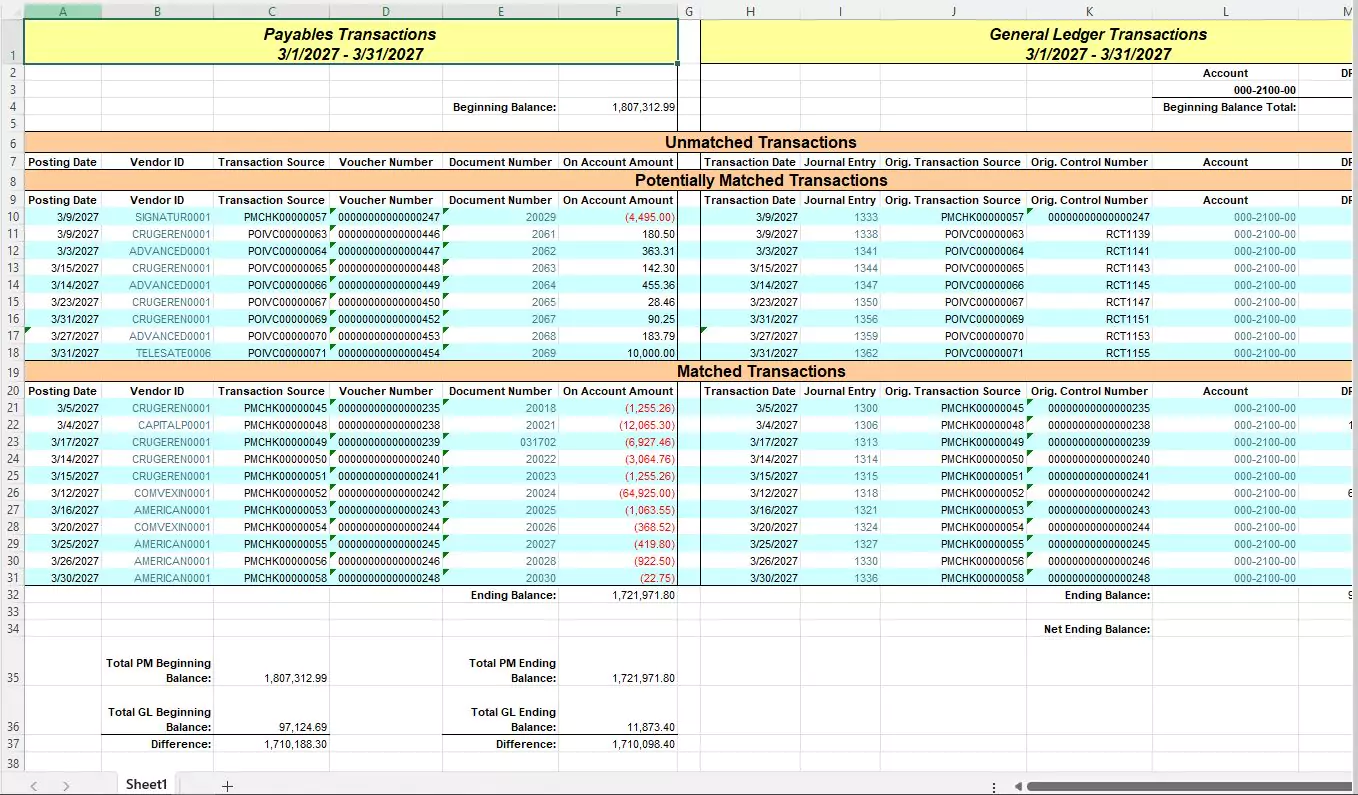
- Run the routine. Click the Process button to start processing the routine. Dynamics GP will generate a report/excel file that highlights any discrepancies between the selected module and the General Ledger.
- Carefully review the reconciliation report to identify and address any variances. Make the necessary adjustments in the sub-ledger or General Ledger to correct discrepancies.
Best practices for using the Reconcile to GL routine
To get the most out of the Reconcile to GL routine, consider the following best practices:
Run the Routine Regularly
Implement a regular schedule for running the Reconcile to GL routine. Most clients run this routine monthly, but the exact frequency depends on the volume of transactions and the complexity of your financial operations.
Investigate Discrepancies Promptly
When discrepancies are identified, investigate and resolve them promptly. Delaying the resolution of variances can lead to larger issues down the line.
Keep Detailed Records
Maintain detailed records of all reconciliations, including reports and any adjustments made. This documentation can be invaluable during audits and for future reference.
Why this tip matters
The Dynamics GP Reconcile to GL routine is a powerful tool for ensuring financial accuracy and integrity. By regularly performing this routine, organizations can maintain accurate financial records, improve reporting, and facilitate audits. Understanding how to effectively use the Reconcile to GL routine and adopting best practices can significantly enhance your financial management processes.
Incorporate the Reconcile to GL routine into your regular financial management activities to ensure that your financial data remains accurate, reliable, and ready for any scrutiny. With Dynamics GP, you can achieve greater control and confidence in your financial operations.
For more help optimizing your Dynamics GP application, contact our team today. And stay tuned for next month’s tip for ways you can unlock even more potential in Dynamic GP.