NetSuite
NetSuite production scheduling: How to plan capacity and manage work centers

Manufacturers need to know when work should begin, which resources are required, and whether available capacity can support production demands. As operations become more complex, managing these variables through spreadsheets and disconnected systems can make effective scheduling difficult.
NetSuite production scheduling connects work orders, BOMs, routings, work centers, and resource availability to help manufacturers plan capacity and coordinate production from planning through shop floor execution.
At a glance: NetSuite production scheduling
NetSuite production scheduling helps manufacturers coordinate work orders, routings, work centers, resource availability, and production requirements within the ERP. Depending on the NetSuite manufacturing features, modules, and add-ons in use, organizations can plan production around work center calendars, calculate operation start and completion dates, evaluate labor and machine capacity, identify potential constraints, and manage increasingly sophisticated manufacturing processes from planning through execution.
What is NetSuite production scheduling?
NetSuite production scheduling is the process of arranging and managing manufacturing workloads over a defined period based on production requirements and available resources. It helps determine when manufacturing operations should occur and which resources are needed to complete them.
Oracle describes production scheduling as a way to arrange, control, and optimize manufacturing workloads over a fixed period. Depending on the manufacturing functionality in use, NetSuite can allocate machine resources, sequence production, and support both infinite and finite capacity scheduling.
Production scheduling connects several pieces of manufacturing data, including:
- Work orders: Define the assemblies and quantities that need to be produced.
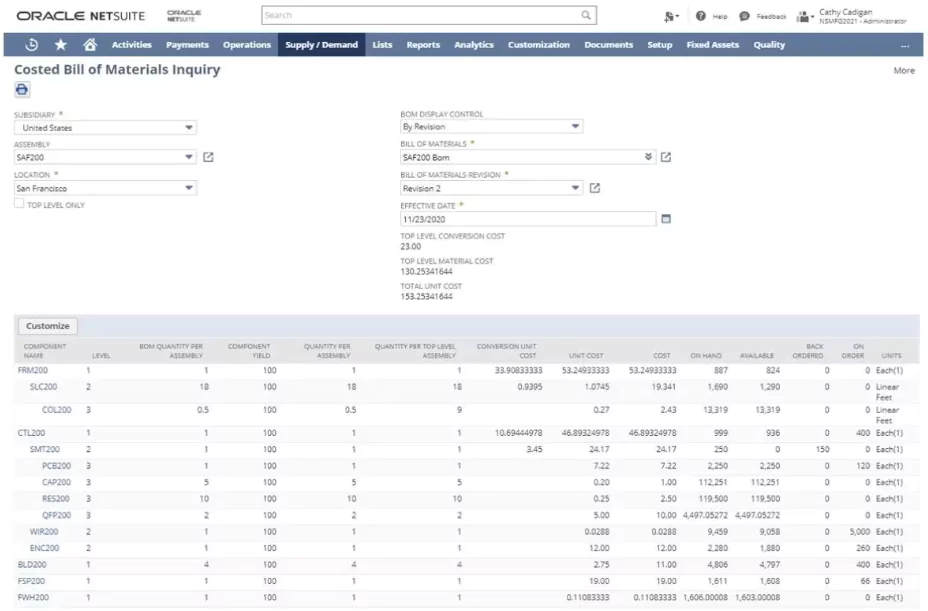
- Bills of materials: Identify the components and quantities required to manufacture an assembly.
- Manufacturing routings: Define the operations and sequence required to complete production.
- Work centers: Represent the labor and machine resources responsible for completing manufacturing operations.
- Work center calendars: Establish when those resources are available.
- Capacity: Determines how much work labor and equipment can perform within a given period.
Together, these elements help translate production demand into a schedule that can be executed on the shop floor.
Production planning and production scheduling are closely related, but they answer different questions. Production planning determines what and how much needs to be produced, while production scheduling determines when the work should happen and which resources will perform it.


Find the right NetSuite manufacturing solution
NetSuite offers manufacturing capabilities for organizations with a wide range of production requirements. Rand Group’s NetSuite experts can help you evaluate your processes, determine which features, modules, and add-ons fit your needs, and build a NetSuite solution around your manufacturing operations.
How does NetSuite production scheduling work?
An effective production schedule starts long before a job reaches the shop floor. NetSuite uses information from work orders, routings, work centers, calendars, and other manufacturing records to establish the steps and time required to complete production.
Start with work orders and production demand
Work orders provide the foundation for manufacturing execution by identifying the assembly that needs to be produced and the quantity required.
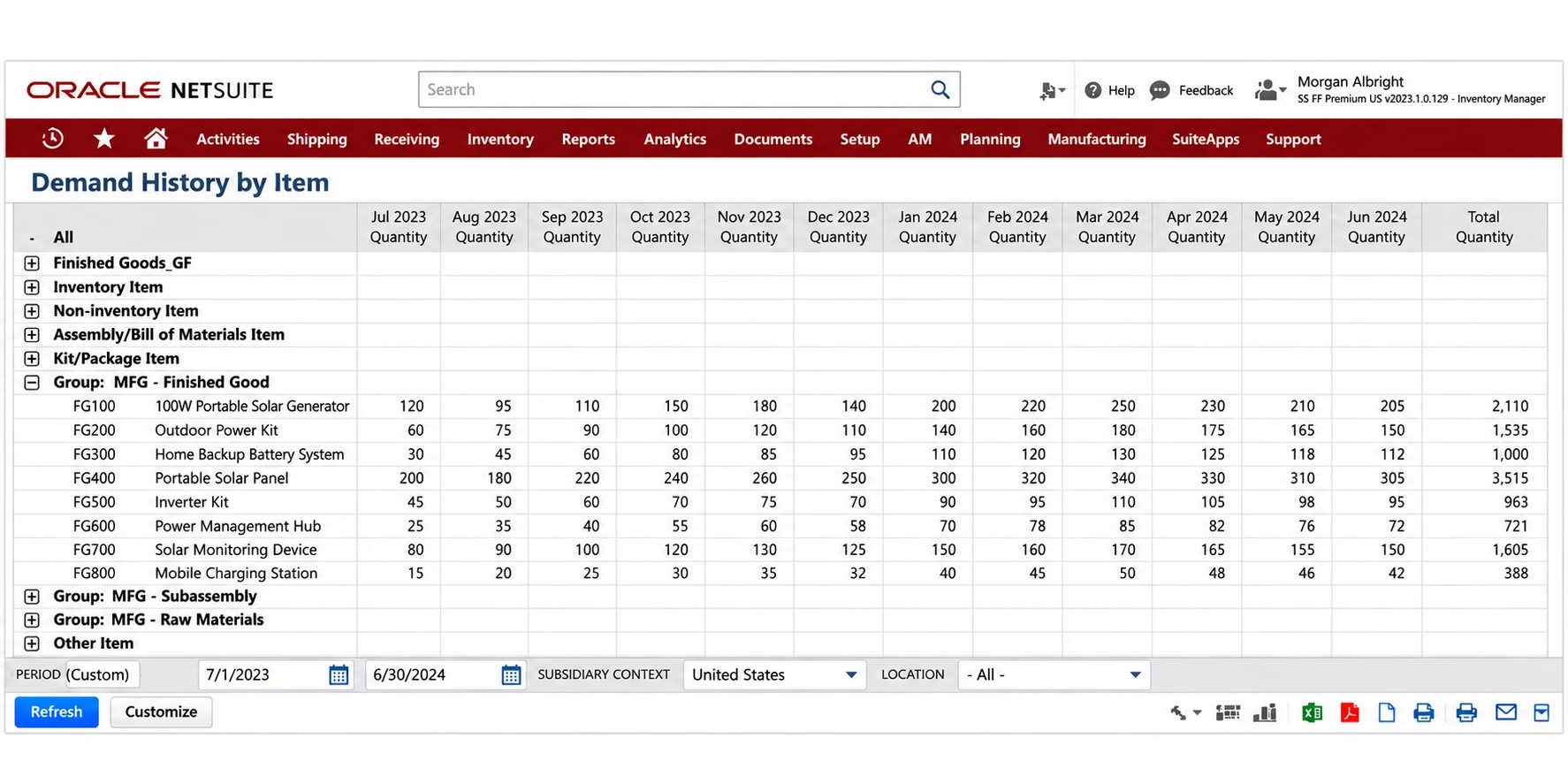
Demand may originate from customer requirements, inventory replenishment needs, or broader supply planning processes. NetSuite supply planning can use demand, inventory, BOM, and other supply information to recommend the orders needed to satisfy requirements.
Once production requirements are established, scheduling determines how that work fits into available manufacturing time and resources.
Define the production process with manufacturing routings
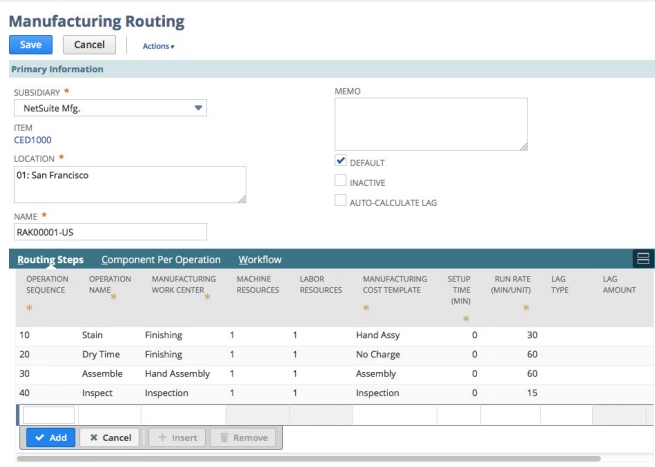
A manufacturing routing establishes the sequence of operations required to manufacture an assembly. Instead of treating production as a single step, routings allow manufacturers to model how work actually moves through the shop floor.
Routing operations can account for information such as:
- Operation sequences
- Assigned work centers
- Setup time
- Run time
- Labor requirements
- Machine requirements
This information helps NetSuite determine how long production operations should take and when they should occur.
Accurate routing data is particularly important for scheduling. If an operation is expected to take two hours in NetSuite but routinely requires four hours on the shop floor, the resulting schedule may appear achievable in the system while creating delays in practice.
Assign operations to work centers
Routing operations can be assigned to manufacturing work centers representing the resources responsible for completing the work.
For example, a manufacturer may route an assembly through cutting, machining, welding, painting, and final assembly. Each operation requires different equipment, employees, and production time. Modeling those resources through work centers provides the foundation for understanding when and where production capacity is available.
What is a NetSuite work center?
A NetSuite work center represents the manufacturing resources used to perform specific production operations. Work centers can account for labor and machine resources and help determine the capacity, time, and cost associated with an operation.
Work centers are different from NetSuite locations or warehouses. A location identifies where inventory or business activity resides, while a work center represents the resources used to perform production activities.
For example, a manufacturer might create work centers for cutting, CNC machining, welding, assembly, painting, or packaging, with an assembly moving through several work centers during production.
To support accurate production scheduling, manufacturers can configure work centers and associated routings around several factors:
- Labor requirements: Employees or labor resources needed to complete an operation.
- Machine requirements: Equipment required for production.
- Setup time: Time needed to prepare for an operation.
- Run time: Time required to complete an operation or produce a specified quantity.
- Work center calendars: The days, hours, shifts, and other periods when resources are available.
For example, one work center might operate eight hours a day, five days a week, while another operates four ten-hour shifts. NetSuite uses assigned work center calendars when determining when manufacturing operations can be scheduled.
Accurately configuring resources, production times, and availability helps NetSuite better reflect actual shop floor capacity and create more realistic production schedules.

Capacity planning in NetSuite
Scheduling determines when manufacturing work should occur, but manufacturers also need to know whether they have enough resources to execute that schedule.
Manufacturing capacity planning compares the amount of production work required with the labor, equipment, and time available to perform it. Oracle defines manufacturing capacity as the maximum amount of work that work centers and equipment can complete during a given period.
Capacity planning can help manufacturers determine:
- Whether machine and labor capacity can support upcoming demand
- Which work centers are overloaded or underutilized
- Whether additional labor, overtime, or equipment may be needed
- Where capacity constraints could affect production commitments
Track planned work center capacity
NetSuite can also generate planned time associated with manufacturing operations. Planned capacity information helps production teams understand how upcoming work is expected to consume available manufacturing time.
Comparing planned requirements with available capacity can help planners identify potential resource shortages before they become larger production issues.
Use Rough-Cut Capacity Planning to identify constraints
NetSuite 2026.2 introduced a new Rough-Cut Capacity Planning (RCCP) capability that gives manufacturing planners a mid- to long-term view of critical labor and machine resources before detailed scheduling occurs.
RCCP compares available work center capacity with the capacity required by work orders and planned work orders. It uses planned time to identify potential overloads and underloads. Manufacturers can evaluate results in daily, weekly, or monthly time buckets and review machine capacity, labor capacity, required capacity, and utilization by work center.
This provides planners with an earlier view into questions such as:
- Which work centers are approaching or exceeding available capacity?
- Where is labor utilization particularly high?
- Are machine resources available to support planned production?
- Which work centers have unused capacity?
- Will the current production plan require additional resources?
For manufacturers using Supply Planning, planned work orders can also be incorporated into RCCP when the applicable supply plan is configured for the feature.
For manufacturers with more advanced production requirements, NetSuite Advanced Manufacturing also provides capacity planning capabilities for evaluating production demand and resource availability over a planning horizon.
Finite vs. infinite capacity scheduling
NetSuite production scheduling can use infinite or finite capacity scheduling, depending on the manufacturing functionality in use:
- Infinite capacity scheduling: Schedules operations based on required timing without limiting the schedule to available resource capacity. Planners may need to identify and resolve conflicts when multiple jobs require the same resources.
- Finite capacity scheduling: Considers available labor and machine capacity when scheduling production, helping prevent resources from being scheduled beyond their limits.
NetSuite supports these approaches at different levels:
- WIP & Routings: Supports work centers, manufacturing routings, labor costing, infinite capacity scheduling, and Gantt-based scheduling.
- Advanced Manufacturing: Adds finite capacity scheduling and more advanced manufacturing planning and execution capabilities.
The right approach depends on the complexity of your production environment and how closely schedules need to account for real-world resource constraints.
Forward vs. backward production scheduling in NetSuite
NetSuite can schedule manufacturing operations forward or backward, depending on whether planners are working from a known start date or required completion date.
Forward scheduling
Starts with the production start date and schedules each operation forward to calculate when production can be completed.
- Starts with: When production can begin
- Determines: Expected completion date
- Best suited for: Understanding when an order can realistically be completed
For example, if production begins Monday, NetSuite can use the routing and work center calendars to schedule machining, finishing, and packaging in sequence and determine the expected completion date.
Backward scheduling
Starts with the required completion date and works backward through production operations to determine when manufacturing needs to begin.
- Starts with: Required completion or due date
- Determines: Required production start date
- Best suited for: Planning production around customer commitments and delivery requirements
NetSuite uses routing information and work center calendars to calculate when each operation needs to occur to meet the targeted completion date.
Backward scheduling does not, by itself, mean that resource capacity is automatically reallocated to eliminate conflicts. Oracle notes that planners may still need to assess resource assignments after work orders are created.
That distinction is important when configuring a manufacturing environment. Calculating when work should occur and confirming that sufficient capacity exists are related but separate planning considerations.
Manage production sequences and changing schedules
Manufacturing rarely runs exactly according to the original plan. Machines go down, materials arrive late, employees are unavailable, customer priorities change, and production operations sometimes take longer than expected.
A connected production scheduling process gives planners better information for responding to those changes.
Sequence manufacturing operations
Manufacturing routings establish the order in which production operations occur and the work centers responsible for them.
For example:
Cutting → Machining → Assembly → Inspection → Packaging
Sequencing helps ensure downstream operations are scheduled in relation to the production steps that must occur first.
Visualize upcoming production
Visual production management can make complex schedules easier to understand.
NetSuite WIP & Routings includes Gantt scheduling capabilities that allow planners to view and adjust production schedules. For manufacturers with more sophisticated scheduling requirements, Advanced Manufacturing adds deeper production planning, finite scheduling, and execution capabilities.
Visual scheduling can help planners identify:
- Competing work orders
- Resource conflicts
- Production gaps
- Upcoming workloads
- Changes in priorities
- Potential late orders
Respond to changes on the shop floor
When manufacturing information is maintained across spreadsheets and disconnected systems, a change to one part of the schedule can require several manual updates.
Keeping work orders, routings, work centers, inventory, and production information within NetSuite gives planners a more connected view of the factors affecting the schedule.
That visibility becomes particularly valuable when teams need to respond to equipment downtime, labor constraints, material shortages, rush orders, or changes in customer demand.
NetSuite manufacturing scheduling capabilities by operational complexity
NetSuite offers different levels of manufacturing functionality based on the complexity of your production environment:
- Work Orders & Assemblies: Supports basic work orders and assembly processes for manufacturers that do not need detailed WIP, routing, or labor tracking.
- WIP & Routings: Adds work centers, manufacturing routings, labor costing, WIP tracking, infinite capacity scheduling, and Gantt scheduling for more detailed production control.
- Advanced Manufacturing: Extends these capabilities with finite capacity scheduling and more advanced manufacturing planning and shop floor execution.
The right configuration depends on your production steps, resource constraints, scheduling requirements, costing needs, and shop floor processes. More functionality is not always better; the goal is to match NetSuite’s capabilities to the complexity of your manufacturing operation.
Learn more about how NetSuite supports manufacturers across financial management, inventory, supply chain, and production in our comprehensive guide to NetSuite for manufacturing.
What makes a NetSuite production schedule accurate?
NetSuite production scheduling is only as reliable as the operational data behind it. Manufacturers should pay particular attention to:
- Routings and operation sequences: Ensure routings reflect how work actually moves through the shop floor.
- Setup and run times: Use realistic production times to improve completion dates and capacity calculations.
- Work center capacity: Account for operating hours, shifts, staffing, and machine availability.
- BOM and inventory data: Maintain accurate material requirements, inventory balances, and lead times so schedules account for material availability.
- Ongoing maintenance: Regularly review routings, calendars, production times, and capacity as processes and resources change.
Accurate configuration helps keep NetSuite schedules aligned with actual shop floor conditions.

Optimize your NetSuite production schedule
Accurate production scheduling depends on configuring routings, work centers, capacity, calendars, and production data around your real-world operations. Rand Group’s NetSuite manufacturing experts can help you evaluate and optimize your configuration to improve scheduling accuracy and production visibility.
Benefits of connected production scheduling in NetSuite
Bringing production scheduling into the same ERP environment as inventory, purchasing, orders, and financial information can provide several operational advantages.
- Improve production visibility: Give planners greater insight into upcoming manufacturing requirements and resource demand.
- Identify capacity constraints earlier: Recognize overloaded work centers before they create larger production disruptions.
- Support more achievable production dates: Incorporate operation timing and resource availability into scheduling decisions.
- Reduce spreadsheet-based scheduling: Keep more production information connected to the underlying manufacturing transactions.
- Coordinate planning and execution: Connect demand, materials, work orders, routings, capacity, and shop floor activity.
- Improve resource utilization: Identify where labor and machine resources are constrained or underutilized.
The value of these capabilities depends heavily on configuration and data quality. A sophisticated scheduling engine working from inaccurate production assumptions will still produce an unreliable schedule.
Signs your manufacturing scheduling process may need improvement
It may be time to reevaluate your production scheduling processes if:
- Production schedules rely heavily on spreadsheets.
- Capacity conflicts are identified too late.
- Planners lack visibility into work center utilization.
- Shop floor changes require extensive manual rescheduling.
- Production schedules are disconnected from inventory, purchasing, and other ERP data.
These challenges can indicate that existing processes lack the visibility and coordination needed to support growing production requirements.
Partner with Rand Group for NetSuite manufacturing
Effective NetSuite production scheduling depends on configuring BOMs, routings, work centers, capacity, and workflows around how production actually operates.
Rand Group’s NetSuite consultants can help manufacturers:
- Evaluate production and scheduling requirements.
- Select the right NetSuite manufacturing capabilities.
- Configure BOMs, routings, work centers, calendars, and workflows.
- Integrate manufacturing with inventory, purchasing, order management, and financials.
- Migrate data and train users.
- Optimize NetSuite as manufacturing requirements evolve.
With the right configuration, manufacturers can build a NetSuite environment that supports more efficient day-to-day production and long-term growth.
Key takeaways
- NetSuite production scheduling connects work orders, routings, work centers, and resource capacity to help manufacturers coordinate production.
- Work centers and calendars establish when manufacturing resources are available and provide important inputs for scheduling.
- Forward and backward scheduling answer different planning questions, helping manufacturers schedule from either a known start date or required completion date.
- Capacity planning can identify resource constraints before they disrupt production, including potential machine and labor overloads.
- Rough-Cut Capacity Planning provides visibility into required and available capacity across work centers before detailed scheduling.
- NetSuite manufacturing functionality can scale with production complexity, from basic work orders and assemblies to routing, WIP, finite capacity scheduling, and advanced manufacturing execution.
- Accurate production schedules depend on accurate manufacturing data, including routings, setup and run times, calendars, resource capacity, BOMs, and inventory information.
Frequently asked questions about NetSuite production scheduling
What is NetSuite production scheduling?
NetSuite production scheduling helps manufacturers determine when production activities should occur and which resources are required to complete them. It connects work orders, manufacturing routings, work centers, calendars, and other production information to coordinate manufacturing workloads over a defined period.
How does production scheduling work in NetSuite?
NetSuite uses manufacturing information such as work orders, routings, operation times, work centers, and work center calendars to calculate when production operations should occur. Depending on the manufacturing functionality in use, manufacturers can use forward or backward scheduling and infinite or finite capacity scheduling.
What is a work center in NetSuite?
A work center represents the labor and machine resources responsible for performing manufacturing operations. Work centers can be assigned to routing operations and associated with calendars that establish when those resources are available for production.
How does NetSuite calculate work center capacity?
NetSuite can use work center calendars and configured labor and machine resources to determine available manufacturing capacity. The newer Rough-Cut Capacity Planning functionality compares available capacity with capacity required by work orders and planned work orders to calculate machine and labor utilization.
What is Rough-Cut Capacity Planning in NetSuite?
Rough-Cut Capacity Planning is a NetSuite manufacturing capability that compares available work center capacity with the capacity required by work orders and planned work orders. It helps planners identify potential labor and machine overloads or underloads before detailed production scheduling.
What is the difference between forward and backward scheduling in NetSuite?
Forward scheduling begins with a production start date and calculates when manufacturing should be completed. Backward scheduling begins with a required completion date and calculates when production needs to start based on routing requirements and work center calendars.
Does NetSuite support finite capacity scheduling?
Yes. NetSuite Advanced Manufacturing supports finite capacity scheduling for organizations that need production schedules to account for resource limitations. WIP & Routings supports infinite capacity scheduling along with work centers, manufacturing routings, and Gantt scheduling.
What is the difference between production planning and production scheduling?
Production planning determines what products need to be manufactured, in what quantities, and what resources will be required. Production scheduling determines when specific manufacturing activities should occur and how production work should be sequenced across available resources.
Which NetSuite manufacturing capabilities do I need for production scheduling?
The answer depends on manufacturing complexity. Organizations with basic assembly requirements may be able to use Work Orders & Assemblies. Manufacturers that need work centers, routings, WIP tracking, and more detailed scheduling can use WIP & Routings. More complex environments requiring finite capacity scheduling and advanced shop floor execution may benefit from Advanced Manufacturing.
Build a more connected manufacturing operation with NetSuite
Effective production scheduling requires manufacturers to connect demand with the materials, people, machines, and time needed to meet it. NetSuite provides manufacturing capabilities that can bring those processes together and give production teams greater visibility into upcoming work and resource requirements.
The right configuration depends on how your organization actually manufactures. Contact Rand Group to discuss your production requirements and learn how NetSuite manufacturing can support more connected planning, scheduling, and execution.