10 signs it’s time to replace your ERP system

Your enterprise resource planning (ERP) system plays a critical role in connecting business processes, managing data, and supporting daily operations. However, as your business grows and requirements evolve, the system that once met your needs may begin creating challenges. Manual workarounds, reporting limitations, and rising maintenance costs can reduce efficiency, limit visibility, and make it harder to support growth.
While these challenges may indicate it’s time to replace your ERP system, a complete replacement isn’t always necessary. Some issues can be resolved through upgrades, integrations, or process improvements. Understanding the warning signs can help you determine whether your current ERP continues to meet your business needs or whether it’s time to explore other solutions.
At a glance: When is it time to replace your ERP system?
It may be time to replace your ERP system when its limitations consistently interfere with business operations, increase costs, or prevent your organization from meeting its goals. Common warning signs include excessive manual work, unreliable reporting, disconnected applications, difficulty scaling, and rising maintenance expenses.
Before committing to ERP replacement, organizations should evaluate whether their challenges can be resolved through optimization, upgrades, or additional functionality. When the existing platform can no longer reasonably support critical business requirements or future growth, replacing it may provide greater long-term value.
Why businesses outgrow their ERP systems
ERP systems support an organization’s core financial and operational processes, but business requirements evolve. As companies expand, introduce new products, acquire businesses, or adopt new technologies, their ERP needs become more complex. A system that once supported basic accounting and operations may be holding your business back as it struggles to manage multiple entities, advanced inventory requirements, or more sophisticated reporting.
Organizations commonly outgrow their ERP systems because of:
- Business expansion: New locations, acquisitions, and international operations increase financial and operational complexity.
- Changing business processes: New products, services, and operating models require additional ERP capabilities.
- Increasing reporting requirements: Leadership needs more timely, accurate, and detailed information to make decisions.
- Technology limitations: Aging infrastructure, difficult integrations, and limited automation restrict efficiency.
- Evolving security and compliance needs: Changing regulations and internal controls may exceed existing system capabilities.
Outgrowing an ERP doesn’t mean the original software selection was wrong. It may simply mean your business has evolved beyond what the system was designed to support.

Has your business outgrown its ERP system?
Not sure if your current ERP can keep up with your evolving business needs? Rand Group’s ERP experts can assess your existing system, identify limitations and opportunities for improvement, and help determine whether optimization, an upgrade, or replacement is the right next step.
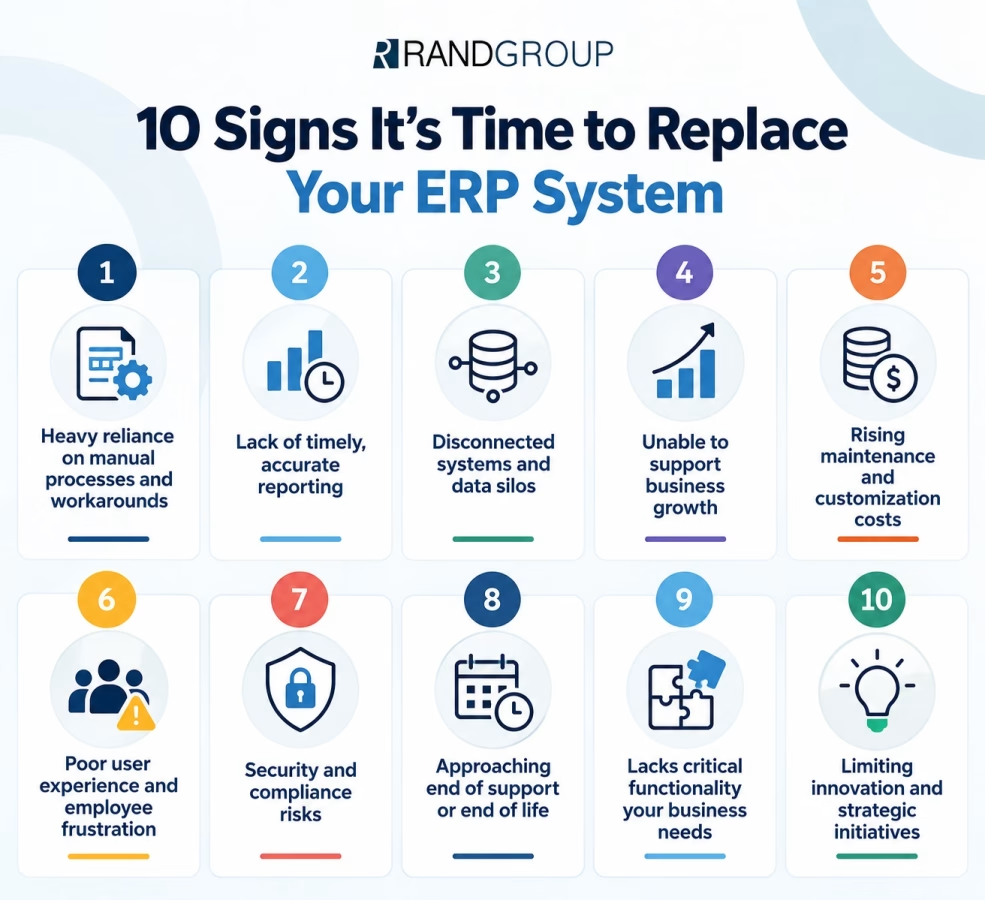
10 signs it’s time to replace your ERP system
Recognizing the warning signs of an outdated or inadequate ERP system can help your organization address challenges before they become more costly or disruptive. While no single issue automatically requires replacement, persistent problems across multiple business functions may indicate that your current platform is no longer the right fit.
1. Your business relies heavily on manual processes and workarounds
One of the clearest signs that your ERP is no longer meeting business requirements is an increasing reliance on manual processes to complete routine tasks.
Employees may regularly export information into spreadsheets, re-enter data between applications, or manually reconcile transactions because the ERP cannot support the necessary workflows.
Common examples include:
- Finance teams manually consolidating financial information across entities or departments.
- Employees entering the same customer, order, or inventory information into multiple systems.
- Accounting teams relying on spreadsheets for reconciliations, reporting, or approval tracking.
- Staff developing workarounds to complete processes that the ERP cannot adequately support.
While spreadsheets and manual processes have their place, excessive reliance on them can increase the risk of errors, create inconsistent data, and consume valuable employee time.
When to consider replacement: If critical business processes consistently require workarounds that cannot be eliminated through configuration, automation, or integrations, your ERP may lack the functionality your organization needs.
2. Your ERP cannot provide timely, accurate reporting
Reliable financial and operational reporting is essential for understanding business performance and making informed decisions. If generating reports requires extensive manual effort, your ERP may be limiting visibility into your operations.
Organizations with inadequate reporting capabilities often struggle to obtain a complete picture of financial performance, inventory levels, profitability, and other critical business metrics.
Warning signs include:
- Financial reports take days to compile because information must be gathered from multiple sources.
- Different departments produce conflicting reports or use inconsistent data.
- Finance teams spend more time preparing and reconciling reports than analyzing results.
- Leadership lacks timely visibility into financial and operational performance.
- Budgeting, forecasting, and variance analysis depend heavily on external spreadsheets.
These challenges can delay decisions and make it difficult to identify emerging risks or opportunities.
When to consider replacement: If your ERP cannot provide the reporting and data accessibility your organization requires, even with improved reporting tools or integrations, it may be time to evaluate a more capable solution.
3. Disconnected systems are creating data silos
An ERP should serve as a central component of your business technology environment, connecting critical financial and operational processes. However, as organizations adopt additional applications, maintaining those connections can become increasingly difficult.
Sales, finance, manufacturing, inventory, and customer service teams may rely on separate systems that don’t communicate effectively with the ERP.
This can result in:
- Duplicate or inconsistent information across departments.
- Manual transfers of data between applications.
- Delays in updating financial, inventory, or customer records.
- Limited visibility into processes that span multiple business functions.
- Expensive or difficult-to-maintain custom integrations.
For example, a distributor whose ecommerce platform doesn’t integrate effectively with its ERP may need to manually transfer orders, update inventory records, and reconcile sales information.
When to consider replacement: If your ERP cannot reliably integrate with the applications essential to your operations, and maintaining those connections requires excessive cost or effort, a more flexible platform may be necessary.
4. Your ERP can no longer support business growth
Growth often introduces operational complexity that an existing ERP wasn’t originally designed to manage.
Expanding into new markets, opening additional locations, acquiring businesses, or introducing new product lines can create requirements that exceed the capabilities of your current system.
Common scalability challenges include:
- Difficulty managing multiple companies, locations, or legal entities.
- Limited support for multi-currency transactions or international operations.
- Performance issues as transaction volumes and data requirements increase.
- Inability to support more sophisticated manufacturing, distribution, or inventory processes.
- Complicated financial consolidation and intercompany accounting.
These limitations can force organizations to adopt disconnected applications or develop increasingly complex workarounds.
When to consider replacement: If supporting growth requires extensive customization, additional systems, or fundamental changes to existing processes, your ERP may no longer provide the scalability your business needs.
5. ERP maintenance and customization costs continue to rise
The cost of maintaining an ERP extends beyond software licensing and support fees. Organizations must also consider infrastructure, customizations, integrations, technical resources, and the employee time required to keep the system operating effectively.
As ERP environments age or become more heavily customized, maintenance can become increasingly expensive and complicated.
Signs of rising ERP ownership costs include:
- Frequent spending on custom development or recurring system fixes.
- Increasing reliance on specialized consultants to maintain existing functionality.
- Expensive infrastructure maintenance or replacement requirements.
- Difficulty applying software updates because of extensive customizations.
- Significant IT resources dedicated to maintaining the system rather than improving it.
These expenses can accumulate gradually, making it difficult to recognize the full cost of maintaining the existing environment.
When to consider replacement: If the cost of maintaining and upgrading your ERP outweighs the potential long-term benefits of moving to a more suitable platform, replacement deserves serious consideration.
However, moving to a cloud ERP doesn’t automatically reduce costs. Licensing, implementation, integrations, and ongoing support must also be included in the comparison.
6. Employees struggle to use the system effectively
An ERP system should help employees complete their work efficiently. When the software is difficult to navigate, requires excessive manual entry, or makes routine processes unnecessarily complicated, productivity and adoption can suffer.
Employees may avoid the ERP whenever possible, maintain separate records, or develop their own processes to compensate for usability challenges.
Common indicators include:
- Employees require extensive training to complete routine tasks.
- Everyday workflows involve unnecessary steps or complicated navigation.
- Users regularly turn to spreadsheets or external applications instead of the ERP.
- New employees struggle to learn the system.
- User frustration contributes to inconsistent processes and data quality problems.
Poor usability can also make it harder to standardize processes across departments and locations.
When to consider replacement: If configuration changes, process improvements, and additional training cannot resolve persistent usability problems, your organization may benefit from evaluating a system better aligned with how employees work.
7. Your ERP presents growing security or compliance risks
ERP systems manage sensitive financial, operational, employee, and customer information. As security threats and regulatory requirements evolve, organizations must ensure their business systems continue to provide appropriate protection and controls.
Older or inadequately maintained ERP environments may lack capabilities needed to support current security practices, internal controls, or compliance obligations.
Potential warning signs include:
- Limited role-based access controls or segregation of duties.
- Inadequate audit trails for sensitive transactions or system changes.
- Difficulty applying necessary security updates.
- Reliance on outdated operating systems or unsupported infrastructure.
- Inability to accommodate evolving regulatory or industry-specific requirements.
These limitations can increase operational risk and complicate audits or compliance efforts.
When to consider replacement: If your ERP cannot meet essential security, auditability, or compliance requirements through supported updates, configuration, or additional controls, replacement may be necessary.
8. Your ERP is approaching end-of-support or end-of-life
ERP vendors periodically retire software versions, change support policies, or discontinue products. When this happens, organizations may face increasing challenges maintaining their systems and planning for future technology requirements.
It’s important to distinguish between a specific software version reaching end of support and an entire ERP product being discontinued. An upgrade may be sufficient when the vendor continues to develop and support the platform.
Potential concerns include:
- The vendor has announced an end-of-support or end-of-life date.
- Security patches, bug fixes, or compatibility updates will no longer be available.
- New operating systems or business applications are no longer supported.
- Technical expertise and third-party integrations are becoming harder to obtain.
- The product roadmap no longer supports the organization’s long-term needs.
Continuing to operate an unsupported ERP can introduce growing maintenance, security, and business continuity risks.
When to consider replacement: If there is no viable supported upgrade path, or the available upgrade options cannot meet your business requirements, it may be time to evaluate alternative ERP platforms.
9. Your ERP lacks critical functionality your business needs
Even a well-maintained ERP can become inadequate when business requirements evolve beyond its capabilities.
Organizations may discover that their software cannot support increasingly sophisticated financial, operational, or industry-specific processes without extensive customization.
Examples include:
- A manufacturer requiring advanced production planning, shop floor management, or quality control capabilities.
- A multi-entity organization needing automated consolidations, intercompany accounting, and more detailed financial reporting.
- A distributor requiring sophisticated warehouse management, inventory tracking, or demand planning.
- A professional services business needing integrated project accounting, resource management, and profitability reporting.
- A growing company requiring more advanced billing, revenue recognition, or financial automation.
In some cases, additional modules or integrations can address these requirements. In others, the limitations reflect a fundamental mismatch between the ERP and the organization’s needs.
When to consider replacement: If essential functionality cannot be added or supported without excessive customization, complexity, or cost, evaluating a different ERP may be the better long-term approach.
10. Your ERP is limiting innovation and strategic initiatives
Perhaps the most significant warning sign is when your ERP begins influencing what your organization can accomplish rather than supporting its business objectives.
A system may continue handling routine transactions while limiting your ability to pursue new opportunities, adopt new technologies, or improve operations.
Examples include:
- Delaying acquisitions or expansion because the ERP cannot support additional entities or locations.
- Struggling to automate processes because data is difficult to access or integrate.
- Being unable to introduce new business models without extensive system changes.
- Facing limitations when adopting advanced analytics or AI-enabled capabilities.
- Spending technology budgets maintaining existing functionality rather than supporting new initiatives.
These challenges can create opportunity costs that are more difficult to quantify than direct maintenance expenses but may have a significant long-term impact.
When to consider replacement: If your ERP consistently prevents your organization from executing important strategic initiatives, it may be time to evaluate technology that better supports your future direction.
Should you upgrade, optimize, or replace your ERP system?
Recognizing ERP warning signs doesn’t always mean you need a new system. Depending on your challenges, optimizing or upgrading your existing ERP may provide the improvements you need with less cost and disruption.
Consider three approaches:
For example, reporting challenges may be resolved through better configuration or integrations, while an older on-premises ERP may benefit from an upgrade or hosting. However, if your system fundamentally lacks the capabilities your business needs, continued investment in workarounds may offer diminishing returns.
The right approach depends on your business requirements, existing system capabilities, and the long-term costs and benefits of each option.
One important part of an ERP assessment is distinguishing between limitations of the software itself and challenges caused by configuration, integrations, or business processes. A system may still meet an organization’s core requirements even when certain workflows have become inefficient. Identifying the underlying causes can help businesses avoid unnecessary replacement costs while recognizing when a new platform would deliver greater long-term value.
What should you consider before replacing your ERP?
ERP replacement affects employees, processes, and technology across your organization. Before selecting new software, it’s important to understand your current challenges and identify the capabilities your business needs moving forward.
Key considerations include:
- Evaluate your current ERP challenges: Document the issues affecting daily operations and determine whether they stem from software limitations, configuration, integrations, or inefficient processes.
- Define your future business requirements: Consider your organization’s goals over the next three to five years and identify the financial, operational, reporting, and industry-specific capabilities needed to support growth.
- Compare the total cost of ownership: Evaluate the costs of maintaining your current ERP versus implementing a replacement, including licensing, infrastructure, customizations, support, migration, training, and employee productivity.
- Assess implementation and migration requirements: Plan for data migration, integrations, process changes, testing, and employee training to establish realistic budgets and timelines while minimizing disruption.
- Work with an experienced ERP advisor: An experienced partner can assess your current environment, identify improvement opportunities, and help determine whether optimization, upgrading, or replacement best supports your business objectives.
What should you look for in a replacement ERP system?
If your evaluation indicates that replacement is the best path forward, the next step is identifying a system that addresses your current challenges while supporting future business requirements.
Important capabilities to consider include:
- Scalability: Can the system support additional users, entities, locations, transactions, and operational complexity as your business grows?
- Integration capabilities: Can it connect with the CRM, ecommerce, payroll, manufacturing, and other applications your organization relies on?
- Reporting and analytics: Does it provide reliable access to financial and operational information for decision-making?
- Process automation: Can it reduce repetitive tasks, streamline approvals, and improve consistency across workflows?
- Security and financial controls: Does it support appropriate user permissions, audit trails, and compliance requirements?
- Industry-specific functionality: Can it accommodate the unique processes and requirements of your industry?
- Long-term flexibility: Does the vendor’s product roadmap, deployment approach, and support ecosystem align with your business strategy?
Modern ERP solutions such as Microsoft Dynamics 365 Business Central, Dynamics 365 Finance & Operations, Oracle NetSuite, and Sage Intacct offer different capabilities for organizations with varying financial and operational requirements.
However, the best ERP isn’t necessarily the platform with the most features. It’s the one that aligns with your business processes, provides the capabilities you need, and offers a sustainable foundation for future growth.

Find the right ERP solution for your business
Not sure whether to upgrade your current ERP or invest in a new system? Rand Group’s ERP software selection experts can help you evaluate your business requirements, compare solutions, and identify the right technology to support your operations and long-term goals.
ERP replacement in action: How Club Greenwood modernized its financial operations
As its financial management requirements evolved, Club Greenwood, a Colorado-based health and fitness organization, faced increasing manual processes and reporting inefficiencies with its existing Sage 100 system.
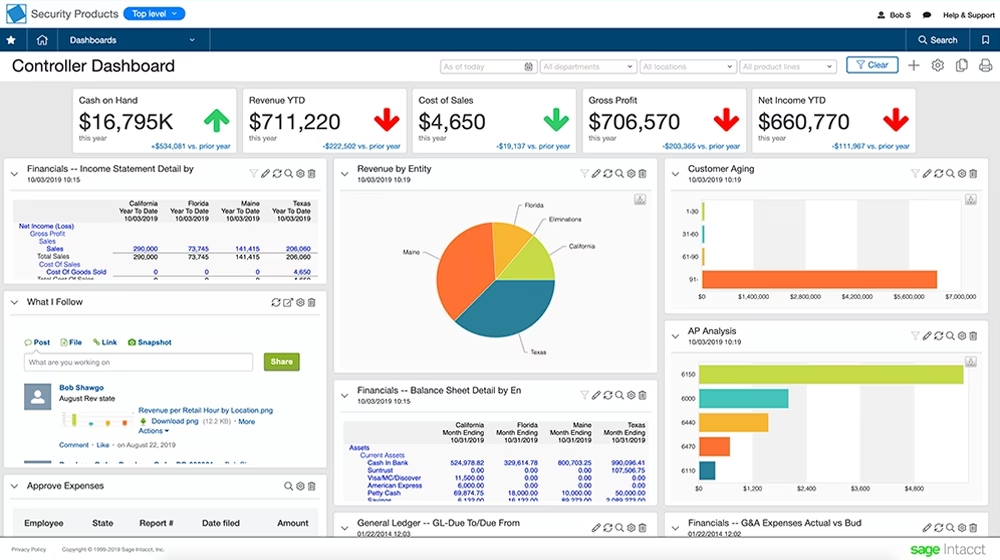
Working with Rand Group, Club Greenwood migrated to Sage Intacct to modernize its financial operations, streamline processes, and improve reporting.
The organization achieved measurable results, including:
30 %
faster month-end close
30 %
reduction in accounts payable processing time
50 %
reduction in bank reconciliation time
Club Greenwood’s experience demonstrates how replacing an ERP system can improve efficiency and better support evolving business requirements.
Key takeaways: Is it time to replace your ERP?
ERP replacement is a significant investment, but continuing to operate a system that no longer meets business requirements can also carry substantial costs and risks.
Here are the most important considerations:
- Persistent inefficiencies are a warning sign. Excessive manual work, disconnected applications, and reporting delays may indicate that your ERP is no longer adequately supporting daily operations.
- Business growth can expose ERP limitations. Expanding operations, increasing transaction volumes, and more complex financial requirements can push existing systems beyond their capabilities.
- Maintenance costs should be evaluated alongside business value. Rising support expenses, customizations, and employee workarounds can make an existing ERP more expensive than it initially appears.
- Not every ERP challenge requires replacement. Upgrades, integrations, optimization, and process improvements may resolve issues without the disruption of a full migration.
- ERP replacement should support long-term goals. Evaluate potential solutions based on your current requirements, future growth plans, and total cost of ownership.
- A structured assessment is the best starting point. Understanding your existing challenges and business requirements can help determine whether to improve your current ERP or begin evaluating alternatives.
Why partner with Rand Group for ERP replacement?
Rand Group combines ERP consulting, implementation, and support expertise to help organizations evaluate their existing systems and determine the best path forward.
- Multi-platform ERP expertise: As a Microsoft, Oracle NetSuite, and Sage partner, Rand Group helps organizations evaluate solutions based on their unique business requirements.
- Business and technology expertise: Our consultants combine technical knowledge with experience in finance, manufacturing, distribution, and other business functions to align ERP technology with operational needs.
- Solutions built around your business: From ERP optimization and upgrades to full replacements, we develop solutions tailored to your processes, requirements, and long-term goals.
- A partner for the long term: Rand Group provides ongoing ERP support, optimization, and advisory services to help your technology evolve alongside your business.
Frequently asked questions about ERP replacement
How do you know when it's time to replace your ERP system?
It may be time to replace your ERP system when persistent limitations affect productivity, reporting, integration, security, or business growth. Common warning signs include excessive manual work, disconnected applications, rising maintenance costs, and difficulty supporting new business requirements. Before replacing your ERP, evaluate whether upgrades, integrations, or optimization can adequately resolve these challenges.
How often should a business replace its ERP system?
There is no universal timeline for replacing an ERP system. Some platforms can serve organizations for many years through regular updates, upgrades, and improvements. The decision should depend on whether the ERP continues to meet business requirements, receives appropriate vendor support, and provides sufficient value relative to its maintenance and operating costs.
Is it better to upgrade or replace an ERP system?
Upgrading is often the better option when your existing ERP continues to meet core business requirements and a newer version can resolve current limitations. Replacement may be more appropriate when the platform lacks essential functionality, cannot support growth, or requires excessive customization and maintenance. A structured ERP assessment can help determine which approach provides greater long-term value.
What are the risks of continuing to use an outdated ERP system?
An outdated ERP can create operational inefficiencies, increase maintenance expenses, limit reporting capabilities, and introduce security or compliance risks. Organizations may also struggle to integrate newer applications or support business growth. The severity of these risks depends on the system’s support status, technical condition, and ability to meet current business requirements.
How much does it cost to replace an ERP system?
ERP replacement costs vary depending on organizational size, software requirements, implementation complexity, data migration, integrations, customization, and training. Organizations should evaluate the total cost of ownership rather than software licensing alone. Comparing replacement costs against the ongoing expenses and limitations of the existing system can help determine the potential business value.
How long does it take to replace an ERP system?
ERP replacement timelines vary based on the organization’s size, operational complexity, data quality, integration requirements, and implementation approach. A relatively straightforward implementation may take a few months, while complex, multi-entity or enterprise-wide projects can take considerably longer. Thorough planning, realistic requirements, and effective change management can help reduce delays and implementation risks.
What is the first step in replacing an ERP system?
The first step is assessing your current ERP environment and documenting the business challenges that need to be addressed. Involve key stakeholders from finance, operations, IT, and other departments to identify requirements and improvement opportunities. This assessment provides the foundation for determining whether ERP replacement is necessary and evaluating potential software solutions.
Is your current ERP still the right fit for your business?
Reporting challenges, rising maintenance costs, and limitations supporting growth may indicate that your ERP is no longer meeting your business needs. However, replacing your system isn’t always the best solution.
Whether you’re considering an upgrade, optimization, or complete replacement, Rand Group’s ERP experts can help you evaluate your options and identify the right path forward.Connect with an ERP expert to discuss your current challenges and explore solutions that support your long-term goals.