Manufacturing accounting software: Best QuickBook alternatives for growing manufacturers

Many manufacturers start with QuickBooks because it is familiar, affordable, and useful for basic accounting. It can help manage invoices, expenses, payments, bills, and financial reports without adding unnecessary complexity.
As the business grows, accounting becomes more connected to production. Finance teams need clearer visibility into inventory, purchasing, job costs, work-in-progress, production schedules, and product margins. When those details live in spreadsheets, disconnected apps, or manual workarounds, it becomes harder to trust the numbers.
At a glance:
Manufacturing accounting software helps manufacturers connect financial management with inventory, production, purchasing, costing, work-in-progress, and reporting. QuickBooks can be a good starting point for small manufacturers with basic accounting and simple inventory needs. However, growing manufacturers often need more advanced capabilities such as bills of materials, routings, MRP, job costing, warehouse management, approval workflows, and real-time margin reporting.
This guide explains when QuickBooks may still be enough, when it may be time to evaluate a manufacturing ERP system, and how common alternatives such as NetSuite, Dynamics 365, Sage 100, and Sage Intacct compare.
- What is manufacturing accounting software?
- Signs your manufacturing business has outgrown QuickBooks
- What growing manufacturers need in accounting software
- Should manufacturers replace QuickBooks or add manufacturing software?
- Best manufacturing accounting software alternatives to QuickBooks
- How to choose the best manufacturing accounting software
- QuickBooks migration considerations for manufacturers
- How Rand Group helps manufacturers move beyond QuickBooks
- Key takeaways
- Frequently asked questions
What is manufacturing accounting software?
Manufacturing accounting software is a system that connects financial data with the operational data that drives manufacturing costs. It goes beyond basic bookkeeping by helping manufacturers track income, expenses, invoices, and payments alongside inventory, labor, overhead, work-in-progress, production costs, purchasing, and fulfillment. This gives finance and operations teams a clearer view of how products are made, what they cost, and how those costs affect profitability.
Unlike general accounting software, manufacturing accounting software is built around the way manufacturers operate. It can track raw materials, finished goods, machine time, labor hours, production orders, job costs, and product margins at each stage of production. Many systems also support inventory valuation, variance analysis, and reporting by job, item, product line, location, or customer.
From Rand Group’s experience working with manufacturers, basic accounting capabilities are rarely enough once production and inventory become more complex. Manufacturers need a system that connects accounting with production, inventory, supply chain, warehouse, and reporting data.
What does manufacturing accounting software do?
Manufacturing accounting software helps manufacturers connect financial activity to the work happening across production, inventory, purchasing, and fulfillment. Instead of waiting for manual updates from separate spreadsheets or systems, teams can track costs and operational activity in a more connected way.
Common functions include:
- Tracking raw materials, work-in-progress, and finished goods
- Managing production costs, labor, overhead, and machine time
- Supporting job costing, standard costing, actual costing, and variance analysis
- Connecting purchasing, inventory, production, and financial reporting
- Managing bills of materials, routings, production orders, and MRP
- Reporting on margins by job, item, product line, customer, or location
- Automating repetitive finance tasks such as invoice processing, payment reconciliation, and data entry
Key benefits of manufacturing accounting software
The main benefit of manufacturing accounting software is better visibility into cost, inventory, and profitability. When accounting and operations are connected, manufacturers can make decisions using current data instead of delayed reports or spreadsheet estimates.
Key benefits include:
- More accurate product costing and margin visibility
- Better inventory control across raw materials, WIP, and finished goods
- Faster month-end close and financial reporting
- Fewer manual spreadsheets and duplicate data entry
- Improved production planning and purchasing decisions
- Stronger controls, approvals, and audit trails
- Better visibility across finance, production, purchasing, warehouse, and leadership teams
Who uses manufacturing accounting software?
Manufacturing accounting software is used by manufacturers that need more than basic bookkeeping to manage growth. It is especially useful when production, inventory, costing, and reporting become too complex to manage in QuickBooks, spreadsheets, or disconnected systems.
Common users include:
- Small and midsized manufacturers outgrowing QuickBooks
- Make-to-stock, make-to-order, and assemble-to-order manufacturers
- Discrete, process, batch, and mixed-mode manufacturers
- Finance teams that need accurate cost and margin reporting
- Production teams that need visibility into materials, capacity, and WIP
- Purchasing teams that need better demand and supplier planning
- Leadership teams that need real-time insight into performance, cash flow, and profitability
Signs your manufacturing business has outgrown QuickBooks
QuickBooks can be a good fit for smaller manufacturers that need basic bookkeeping, invoicing, expense tracking, financial reports, and simple inventory management. For early-stage manufacturers, it may be enough to manage daily accounting without adding a more complex system.
As a manufacturer grows, the business often needs more connected capabilities across accounting, inventory, production, costing, purchasing, and reporting. At Rand Group, we often work with manufacturers that have relied on QuickBooks for years but reach a point where spreadsheets, manual processes, and disconnected systems make it harder to manage growth with confidence.
This matters as manufacturers face more supply chain complexity, cost pressure, workforce challenges, and demand for better data. Deloitte’s 2026 manufacturing outlook notes that manufacturers are investing in smart manufacturing, supply chain tools, and advanced technologies to improve agility, resilience, and decision-making. For growing manufacturers, basic accounting software may no longer provide enough visibility to manage production, inventory, and cost control effectively.
Based on the manufacturing clients we support at Rand Group, these are common signs we see when a business has outgrown QuickBooks:
- You rely on spreadsheets to manage production: If teams use spreadsheets to track work orders, production schedules, bills of materials, shop floor activity, or costing, your accounting system is no longer the full system of record.
- You cannot see true product costs fast enough: If material, labor, overhead, scrap, rework, freight, or work-in-progress costs are updated late, leaders may price products or review margins using incomplete data.
- Inventory data does not match reality: Stockouts, overstock, inaccurate reorder points, missing inventory adjustments, and poor warehouse visibility are signs that inventory has become too complex for basic tracking.
- Production and finance work in different systems: When production data lives outside accounting, teams must re-enter information, reconcile numbers by hand, and wait longer for accurate reports.
- Month-end reporting takes too long: If finance exports data, checks spreadsheets, and waits on production updates before closing the books, the process is too manual.
- Margins are hard to trust: Leaders need to see profit by item, job, customer, location, or product line. If that data takes days to build, decisions slow down.
- Purchasing is reactive: If buyers order materials based on manual checks, outdated reports, or urgent production requests, it becomes harder to control shortages, lead times, and excess inventory.
- Controls are limited: As manufacturers grow, they need stronger approvals, role-based security, audit trails, and segregation of duties around purchasing, payments, inventory adjustments, and financial posting.

Not sure whether QuickBooks is still enough?
Rand Group can help assess your accounting, inventory, production, costing, and reporting processes to determine whether QuickBooks, an add-on, or a full manufacturing ERP is the right next step.
What growing manufacturers need in accounting software
Growing manufacturers need accounting software that supports how products are made, stocked, sold, shipped, and reported on. Instead of only recording financial activity after it happens, the right system should connect accounting with inventory, production, purchasing, warehouse, and reporting data so teams can manage costs, plan work, and make decisions from the same source of truth.
Key capabilities to evaluate include:
- Accounting connected to operations: Financial management should connect to purchasing, inventory, production, sales, fulfillment, month-end close, and reporting.
- Accurate inventory visibility: Teams need to track raw materials, work-in-progress, finished goods, stock movement, reorder points, warehouses, lots, serial numbers, and inventory value.
- Bills of materials and routings: The system should define the materials, components, labor, machines, and steps required to make each product.
- Production orders and WIP tracking: Teams need to know what is being made, where each order stands, and what costs have been added before goods are finished.
- Job costing and production costing: Manufacturers need to track material, labor, overhead, standard cost, actual cost, scrap, rework, and variance by job, item, customer, or product line.
- Material planning and purchasing: The system should help teams plan what to buy, when to buy it, and how much is needed based on demand, lead times, inventory, and production plans.
- Reporting, analytics, and controls: Leaders need real-time reporting, approval workflows, audit trails, role-based security, and segregation of duties as the business grows.
Manufacturing accounting software helps solve many of the problems that appear when QuickBooks, spreadsheets, and disconnected systems can no longer keep up. By connecting financial and operational data, manufacturers can improve inventory accuracy, product costing, production planning, month-end close, purchasing decisions, and visibility across departments.
Should manufacturers replace QuickBooks or add manufacturing software?
Some manufacturers can continue using QuickBooks and add manufacturing, inventory, or production software around it. This approach may work when accounting needs are still simple and the main challenge is tracking production activity, inventory movement, or shop floor data more effectively.
However, add-on tools can also create new challenges if financial, inventory, production, purchasing, and reporting data remain disconnected. As the business grows, teams may still need to reconcile data between systems, manually update reports, or rely on spreadsheets to understand product costs and margins.
Manufacturers should consider replacing QuickBooks with a connected manufacturing ERP system when:
- Finance, inventory, purchasing, and production teams need to work from the same data
- Product costing, WIP, or margin reporting is difficult to trust
- Inventory is managed across multiple warehouses, bins, lots, or serial numbers
- Month-end close depends on manual production or inventory updates
- Purchasing decisions are based on outdated reports or spreadsheet forecasts
- Leadership needs real-time visibility into production, cash flow, inventory value, and profitability
- The company needs stronger workflows, approvals, audit trails, and role-based security
For manufacturers with basic needs, QuickBooks plus an add-on may be enough for a period of time. For manufacturers with more complex operations, replacing QuickBooks with a connected ERP platform can reduce manual work, improve reporting accuracy, and give teams better visibility across the full business.
Best manufacturing accounting software alternatives to QuickBooks
Once QuickBooks can no longer support growing manufacturing needs, the next step is usually a manufacturing ERP or a more advanced manufacturing accounting platform. The right choice depends on company size, manufacturing model, reporting needs, budget, integrations, deployment preferences, and how much operational complexity the business needs to manage.
There is no single best manufacturing accounting software for every company. A small manufacturer that needs better inventory and production control may need a different system than a multi-entity manufacturer with advanced warehouse, supply chain, and global reporting requirements.
Why work with a multi-platform partner?
Many software providers only compare their own solution against QuickBooks. Rand Group works across Microsoft, Oracle NetSuite, and Sage products which allows our team to evaluate manufacturing accounting software based on business fit instead of a single publisher’s product. This helps manufacturers compare functionality, cost, scalability, implementation requirements, integrations, and long-term support needs before choosing a platform.
We created the table below to help you compare top manufacturing accounting software options beyond QuickBooks.

Need help choosing the right manufacturing accounting software?
Choosing the right manufacturing accounting software starts with a clear view of your requirements, risks, and long-term goals. Rand Group’s software selection engagement helps you compare options, evaluate fit, and build a practical ERP roadmap before you commit to a platform.
NetSuite manufacturing ERP
NetSuite manufacturing ERP is a cloud-based business management suite that connects manufacturing accounting, inventory, production, procurement, order management, supply chain, and reporting in one platform. For manufacturers outgrowing QuickBooks, NetSuite can provide a more complete system for managing the full manufacturing process, from demand planning and purchasing to production, fulfillment, and financial reporting.
NetSuite is designed for growing manufacturers that need real-time visibility across operations. Instead of managing finance, inventory, production, and customer orders in separate tools, teams can work from shared data and use built-in dashboards to monitor performance, control costs, and respond faster to changes in demand.
Key NetSuite manufacturing capabilities include:
- Inventory management: Track stock levels, item locations, reorder points, inventory transfers, item costing, and demand patterns across locations.
- Planning and scheduling: Align production plans with forecasts, inventory availability, capacity, and customer demand.
- Shop floor control: Monitor work orders, production activity, machine performance, and schedule changes with real-time visibility.
- Material requirements planning: Use demand, inventory, lead times, and bill of materials data to plan replenishment and reduce material shortages.
- Supply chain management: Manage procurement, suppliers, demand planning, logistics, and inventory movement from one system.
- Quality and compliance management: Support quality checks, traceability, audit readiness, and documentation requirements.
- Cost and financial control: Track production costs, costed bills of materials, carrying costs, margins, and financial performance in real time.
- Reporting and analytics: Use role-based dashboards, KPIs, and SuiteAnalytics to monitor inventory, orders, production, and financial results.
As an Oracle NetSuite Alliance Partner, Rand Group helps manufacturers evaluate, implement, customize, and support NetSuite based on their production model, reporting needs, integrations, and growth plans. Our team works with manufacturers to connect finance and operations, improve data visibility, and configure NetSuite around real business processes instead of forcing teams into disconnected workarounds.
To explore NetSuite’s manufacturing capabilities in more detail, read our Guide on NetSuite for modern manufacturing. To learn why manufacturers choose NetSuite as they grow, read Why manufacturing companies choose NetSuite.
Best fit: NetSuite is a strong fit for growing manufacturers that want a cloud ERP suite to manage manufacturing accounting, inventory, production, supply chain, order management, CRM, and reporting in one connected platform.


White Paper
Why manufacturers are switching from QuickBooks to NetSuite
Manufacturers that need a platform that connects finance and operations are moving from QuickBooks to NetSuite. Download our white paper to learn why growing manufacturers are choosing NetSuite’s all-in-one solution for manufacturing operations.
Dynamics 365 Finance & Operations
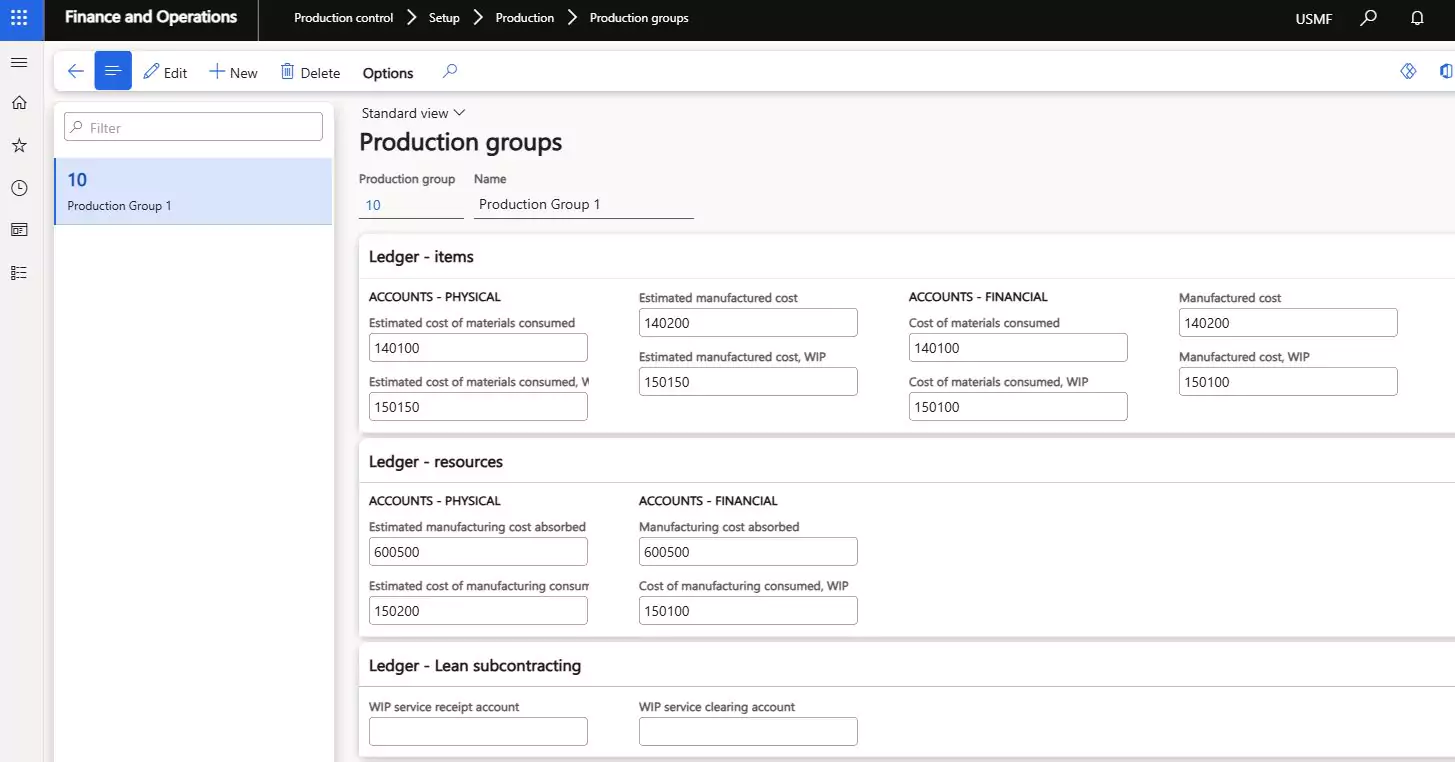
Dynamics 365 Finance & Operations is a cloud ERP solution for larger midsize and enterprise manufacturers with complex financial, supply chain, and production needs. It is commonly used to describe two connected Microsoft applications: Dynamics 365 Finance and Dynamics 365 Supply Chain Management. Together, these applications help manufacturers connect manufacturing accounting, financial management, procurement, inventory, production, warehousing, and reporting in one system.
For manufacturers outgrowing QuickBooks, Dynamics 365 Finance & Operations can support more advanced control across finance and operations. It is built for manufacturers that need multi-entity reporting, real-time cost tracking, production planning, warehouse management, compliance support, and deep integration with Microsoft tools such as Power BI, Power Automate, Microsoft Teams, and Copilot.
Key Dynamics 365 Finance & Operations manufacturing capabilities include:
- Advanced financial management: Manage general ledger, budgeting, forecasting, accounts payable, accounts receivable, fixed assets, compliance, multi-currency, and multi-entity financial operations.
- Supply chain management: Connect procurement, inventory, production, logistics, warehouse management, and fulfillment to improve visibility across the full supply chain.
- Production control: Manage production orders, shop floor activity, material consumption, work-in-progress, scrap, quality tracking, and cost accounting integration.
- Bills of materials and routings: Support multi-level BOMs, phantom BOMs, product variants, component substitutions, operation routings, resource groups, and cost roll-ups.
- Material planning and forecasting: Use master planning, demand forecasting, planning optimization, traceability, and multi-site planning to balance supply, demand, and inventory.
- Discrete, lean, and process manufacturing: Support different manufacturing models, including assembly, Kanban, formula and recipe management, batch balancing, co-products, by-products, and traceability.
- Warehouse and inventory management: Track inventory across locations, improve replenishment, support warehouse workloads, and connect inventory activity to financial reporting.
- AI, automation, and analytics: Use Copilot, AI-driven insights, Power BI, predictive planning, workflow automation, and demand planning tools to reduce manual work and support faster decisions.
To learn more, read our blog Dynamics 365 for manufacturing.
Best fit: Dynamics 365 Finance & Operations is a strong fit for larger midsize and enterprise manufacturers that need advanced manufacturing accounting, multi-entity financial management, supply chain control, production planning, warehouse management, and scalable reporting.
QuickBooks migration proof point: Rand Group worked with Conquest Completion Services after the company outgrew QuickBooks, Excel, and paper-based processes for managing financial and operational data. QuickBooks was used for financial data, while inventory, purchasing, and production details were tracked outside the system, which made it difficult to manage costs in real time. Before the migration, Conquest did not have reliable inventory tracking and needed up to two months to calculate true manufacturing costs. We helped Conquest move to Dynamics 365 Finance & Operations, giving the company a connected system for financials, inventory, purchasing, and manufacturing processes, including raw material usage tracking and real-time cost visibility. To learn more, read the full case study.
Dynamics 365 Business Central
Dynamics 365 Business Central is a flexible ERP solution for small and midsized manufacturers that need more than QuickBooks but may not need the complexity of a larger enterprise ERP. It connects manufacturing accounting, financial management, inventory, purchasing, production, sales, warehouse activity, and reporting in one centralized system.
For manufacturers already using Microsoft tools, Dynamics 365 Business Central can be a practical next step because it integrates with familiar applications like Excel, Outlook, Teams, Power BI, and Power Platform. This helps teams improve visibility, reduce manual work, and manage production and financial data from a shared source of truth.
Key Dynamics 365 Business Central manufacturing capabilities include:
- Financial management: Manage general ledger, accounts payable, accounts receivable, cash flow, budgeting, fixed assets, financial reporting, and month-end close.
- Inventory and warehouse management: Track inventory by item, location, bin, lot, or serial number while improving receiving, picking, cycle counting, and replenishment.
- Bills of materials: Define the components and subassemblies required to make finished goods and support more accurate costing and planning.
- Routings and work centers: Map production steps, work centers, machine centers, setup times, run times, and capacity needs.
- Production orders: Create, plan, release, and track production orders while managing material consumption, output posting, WIP, scrap, and rework.
- Material planning: Use demand forecasts, planning worksheets, MRP, and MPS to plan materials, production, and replenishment more effectively.
- Reporting and analytics: Use dashboards, Power BI, Excel, and role-based reporting to monitor inventory, production, costs, margins, and financial performance.
- AI and automation: Use Copilot, workflows, and Power Platform tools to reduce repetitive work, improve reporting, and support faster decision-making.
To learn more, read our blogs on Dynamics 365 Business Central manufacturing.
Best fit: Dynamics 365 Business Central is a strong fit for small and midsized manufacturers that want a Microsoft-based ERP to manage manufacturing accounting, inventory, production, purchasing, warehouse activity, reporting, and financial operations in one scalable system.
QuickBooks migration proof point: Rand Group worked with A-Z Process Solutions after the company outgrew QuickBooks, spreadsheets, and disconnected systems across its growing business. QuickBooks was used alongside Excel, Teams documents, personal drives, and separate operational tools, which created gaps in financial visibility, inventory tracking, project profitability, and material consumption. We helped A-Z Process Solutions move to Dynamics 365 Business Central, giving the company a connected manufacturing accounting solution for financials, inventory, project management, and operational reporting. After the migration, A-Z reduced cycle count time by 90%, achieved $15,000 in monthly inventory savings, and eliminated manual project spreadsheets. To learn more, read the full case study here.

Sage 100
Sage 100 is an ERP and business management system for small and midsized manufacturers that need stronger control over manufacturing accounting, inventory, production, purchasing, and reporting. It is often a good fit for companies that have outgrown spreadsheets or entry-level accounting tools but do not need the scale or complexity of a larger enterprise ERP.
Sage 100 manufacturing brings financials, inventory, distribution, and production processes into one integrated system. With manufacturing modules such as Production Management, Bill of Materials, Material Requirements Planning, and Job Costing, teams can improve visibility into work-in-progress, production costs, material usage, scheduling, and inventory performance.
Key Sage 100 manufacturing capabilities include:
- Production management: Create and manage work tickets, track labor and materials, define routing steps, and monitor production status.
- Bill of materials: Manage multi-level BOMs, components, subassemblies, revision history, and engineering changes to support more accurate production.
- Inventory management: Track inventory levels, lot and serial numbers, costing methods, multiple locations, transfers, and replenishment needs.
- Material requirements planning: Forecast material needs, generate purchasing recommendations, reduce shortages, and avoid excess inventory.
- Job costing and scheduling: Track labor, materials, overhead, estimates, budgets, and production timelines to improve margin visibility.
- Barcode and shop floor automation: Capture production, labor, and inventory data from the shop floor to reduce manual entry and improve accuracy.
- Financial management: Connect production activity with accounting, reporting, compliance, bank feeds, reconciliations, and cost tracking.
- Customization and scalability: Configure Sage 100 around specific manufacturing workflows, reporting needs, and operational processes.
To learn more, read our blog on Sage 100 manufacturing features and use cases.
Best fit: Sage 100 is a strong fit for small and midsized manufacturers that need practical manufacturing accounting, inventory management, BOMs, MRP, job costing, production management, and reporting without moving to a more complex enterprise ERP.
Sage 100 manufacturing proof point: Rand Group worked with Trim-Tex Drywall Solutions, an Illinois-based manufacturer of drywall products and accessories, after the company expanded into a 220,000-square-foot facility and needed its systems to keep pace with growth. Trim-Tex was already using Sage 100 but had siloed processes across production, maintenance, the front office, and reporting. We helped Trim-Tex expand its use of Sage 100, Sage Production Management, Sage Intelligence, and Sage CRM to improve production visibility, track costs, optimize inventory reporting, and align business processes across departments. The project helped Trim-Tex reduce man-hours, save hundreds of thousands on accounting fees, optimize inventory, and support 5x company growth. To learn more, read the full case study.

Sage Intacct
Sage Intacct is a cloud financial management platform that helps organizations improve accounting, reporting, approvals, automation, and dimensional visibility. For manufacturers, Sage Intacct is often best suited as the financial management foundation rather than a standalone manufacturing ERP system.
Manufacturers that need inventory, production, purchasing, warehouse, order management, work order, and MRP capabilities should evaluate Sage Intacct together with Sage Distribution and Manufacturing Operations. This combined solution can help connect financial and operational data while giving manufacturers stronger reporting, controls, and visibility than QuickBooks typically provides.
Key Sage Intacct and Sage Distribution and Manufacturing Operations capabilities include:
Key Sage Intacct and Sage Distribution and Manufacturing Operations capabilities include:
- Cloud financial management: Manage accounts payable, accounts receivable, cash management, budgeting, reporting, and financial controls in a cloud-based system.
- Dimensional reporting: Analyze performance by entity, location, department, product line, customer, project, or other business dimensions without relying on complex spreadsheets.
- Inventory management: Track inventory activity, stock levels, item movement, and warehouse processes with greater visibility across operations.
- Production and work order management: Manage work orders, routings, labor, machine resources, material usage, and production activity.
- Material requirements planning: Use a single MRP run to analyze BOM levels and recommend purchasing or production actions.
- Order and fulfillment visibility: Manage the order lifecycle from item setup and pricing through shipments, invoices, and fulfillment status.
- Procurement automation: Streamline purchasing, supplier returns, internal requisitions, and approval workflows.
- Financial and operational insights: Use dashboards, reporting, and analytics to connect production and inventory performance back to financial outcomes.
Best fit: Sage Intacct is a strong fit for small and midsized manufacturers that prioritize cloud financial management, dimensional reporting, approvals, automation, and multi-entity visibility. Manufacturers that need deeper production, inventory, warehouse, and MRP functionality should evaluate Sage Intacct with Sage Distribution and Manufacturing Operations or consider another manufacturing ERP solution depending on operational complexity.


White paper
Explore Sage Distribution and Manufacturing Operations
Sage Distribution and Manufacturing Operations helps manufacturers improve efficiency across work orders, change control, inventory, and production workflows. Download our white paper to learn how these capabilities help teams access and apply operational insights to improve performance.
How to choose the best manufacturing accounting software
The best manufacturing accounting software depends on how your business operates today and how you need it to grow. Before comparing platforms, we recommend defining your manufacturing processes, reporting needs, inventory complexity, integrations, and long-term goals so you can evaluate each system based on fit rather than features alone.
- Start with your manufacturing model: Consider whether you are make-to-stock, make-to-order, engineer-to-order, assemble-to-order, batch, process, or mixed-mode.
- Define your costing needs: Identify whether you need standard costing, actual costing, job costing, WIP, variance reporting, scrap, rework, or landed cost tracking.
- Map inventory complexity: Review warehouses, bins, lots, serial numbers, raw materials, finished goods, units of measure, substitutions, and reorder rules.
- Identify reporting gaps: List the reports that are difficult to produce today, such as product margin, WIP, production variance, inventory valuation, backlog, and cash flow.
- Review integrations: Identify required connections to CRM, ecommerce, EDI, MES, WMS, payroll, shipping, banking, field service, and reporting tools.
- Consider scalability: Make sure the system can support more users, transactions, entities, locations, SKUs, product lines, and compliance requirements.
- Evaluate AI and future-readiness: Look for embedded AI, automation, analytics, and connected data capabilities that can reduce manual work, improve forecasting, and support faster decision-making as the business grows.
- Compare total cost: Include licenses, implementation, data migration, integrations, training, customizations, reporting, support, and process change.
- Evaluate the partner: Choose a partner with manufacturing, accounting, inventory, reporting, integration, training, and change management experience.
QuickBooks migration considerations for manufacturers
Moving from QuickBooks to manufacturing accounting software is not only a data migration. It is also a chance to clean up processes, improve reporting, and prepare your team for a more connected system.
- Clean up your chart of accounts, departments, dimensions, locations, and reporting structures before migration.
- Review item records, units of measure, costing methods, inventory balances, vendors, and inactive items.
- Validate bills of materials and routings so inaccurate production data does not carry into the new system.
- Decide whether to migrate open transactions, summary history, detailed transaction history, or a mix of each.
- Plan training for finance, production, purchasing, warehouse, and leadership teams before go-live.
- Define key financial, inventory, production, and margin reports early so teams can trust the system after launch.
How Rand Group helps manufacturers move beyond QuickBooks
Rand Group helps manufacturers move beyond QuickBooks, spreadsheets, disconnected apps, and legacy systems with a consultative approach to software evaluation and implementation. With over two decades of experience and a 90% client retention rate, our team brings deep expertise across manufacturing, distribution, finance, supply chain, reporting, integrations, and business process improvement.
As a multi-platform partner, Rand Group works across Microsoft Dynamics 365, NetSuite, and Sage. This allows us to help manufacturers compare options based on business fit, not a single software publisher. We help clients evaluate current processes, identify system gaps, select the right manufacturing accounting software, and build a practical roadmap for implementation, adoption, and long-term support.
Rand Group helps manufacturers:
- Assess current accounting, inventory, production, purchasing, and reporting processes.
- Identify gaps caused by QuickBooks, spreadsheets, disconnected applications, or legacy ERP systems.
- Compare manufacturing accounting software options across Microsoft Dynamics 365, NetSuite, and Sage.
- Implement, configure, and customize ERP and accounting systems around real business processes.
- Connect manufacturing accounting software with CRM, ecommerce, EDI, WMS, MES, payroll, reporting, and other business systems.
- Build dashboards, reports, workflows, and automations that improve visibility and reduce manual work.
- Train users across finance, production, purchasing, warehouse, leadership, and operations teams.
- Provide ongoing support, optimization, system enhancements, and long-term technology guidance.
What our clients say about us
“Working with Rand Group has been a game-changer for us. We felt fully supported the entire way, and whenever issues came up, the team was right there problem-solving with us.”
– Danielle Johnson, Director of Data Systems, A-Z Process Solutions
“We have always felt like a top priority when working with Rand Group’s team and have the utmost confidence in their industry and technical knowledge.”
– Christa Curette, VP of Engineering & Technology, Conquest Completion Services, LLC
Key takeaways
- QuickBooks can be a good starting point for manufacturers with basic accounting and simple inventory needs.
- Growing manufacturers often need stronger tools for BOMs, routings, MRP, WIP, job costing, purchasing, warehouse management, and reporting.
- Some manufacturers can extend QuickBooks with add-ons, while others need to replace it with a connected ERP system.
- NetSuite, Dynamics 365 Finance & Operations, Dynamics 365 Business Central, Sage 100, and Sage Intacct can each be a strong fit depending on company size, complexity, budget, and platform preference.
- Rand Group helps manufacturers evaluate software options, migrate from QuickBooks, configure ERP systems, train users, and support long-term optimization.
Frequently asked questions
What is manufacturing accounting software?
Manufacturing accounting software connects accounting with inventory, production, purchasing, costing, and reporting. It helps manufacturers track costs from raw materials through finished goods so they can better understand product margins and profitability.
Is QuickBooks good for manufacturing?
QuickBooks can work for small manufacturers with basic accounting, invoicing, expense tracking, and simple inventory needs. As manufacturers grow, they often need deeper tools for production planning, WIP, MRP, routings, job costing, warehouse management, and real-time reporting.
Can manufacturers keep QuickBooks and add manufacturing software?
Yes, some manufacturers keep QuickBooks and connect it with manufacturing, inventory, or production software. This can work when accounting needs are simple and the main gap is operational tracking. However, manufacturers with more complex costing, WIP, inventory, purchasing, reporting, or multi-entity needs may benefit from replacing QuickBooks with a connected manufacturing ERP system.
When should a manufacturer move beyond QuickBooks?
A manufacturer should consider moving beyond QuickBooks when teams rely on spreadsheets for production, cannot trust inventory numbers, struggle to calculate true product costs, or spend too much time on manual reporting.
What is the best QuickBooks alternative for manufacturers?
The best QuickBooks alternative for manufacturers depends on company size, production complexity, budget, reporting needs, and growth plans. Common options include NetSuite, Dynamics 365 Finance & Operations, Dynamics 365 Business Central, Sage 100, and Sage Intacct.
What features should manufacturing accounting software include?
Manufacturing accounting software should include financial management, inventory tracking, bills of materials, routings, production orders, WIP tracking, MRP, job costing, warehouse management, reporting, and approval workflows.
What is the difference between manufacturing accounting software and ERP?
Manufacturing accounting software focuses on financial and production cost tracking. Manufacturing ERP connects accounting with broader business processes, including inventory, purchasing, sales, warehouse, production, supply chain, and reporting.
Is NetSuite better than QuickBooks for manufacturers?
NetSuite is often a better fit for manufacturers that need a scalable cloud ERP with stronger inventory, production, supply chain, reporting, and control capabilities. QuickBooks may still be a fit for smaller manufacturers with simpler accounting and inventory needs.
Is Dynamics 365 Business Central good for manufacturing?
Yes, Dynamics 365 Business Central can be a strong fit for many small and midsized manufacturers. It supports financial management, inventory, purchasing, warehouse management, production, reporting, and Microsoft integrations, with full manufacturing capabilities available in Business Central Premium.
Is Sage 100 good for manufacturing?
Yes, Sage 100 can be a strong fit for small and midsized manufacturers that need integrated financials, inventory, BOMs, MRP, production management, job costing, and reporting. It is often a practical step up from QuickBooks for manufacturers that need more operational control.
Is Sage Intacct good for manufacturers?
Sage Intacct can be a strong option for manufacturers that need cloud financial management, multi-entity reporting, dashboards, approvals, and accounting automation. Manufacturers with more complex production or shop floor needs should evaluate Sage Distribution and Manufacturing Operations or another ERP solution.
Can Rand Group help migrate manufacturers from QuickBooks?
Yes. Rand Group helps manufacturers evaluate QuickBooks alternatives, select the right manufacturing accounting or ERP software, migrate data, configure processes, train users, build reports, integrate systems, and support the system after go-live.
Move beyond QuickBooks with the right manufacturing accounting software
QuickBooks is often a good starting point for manufacturers. It can support basic accounting and simple inventory needs, but growth often brings more complex requirements across production, costing, purchasing, reporting, and inventory control.
As those needs expand, manufacturers need software that connects financial data with the way products are made, stocked, sold, and delivered. The right manufacturing accounting software helps improve cost visibility, inventory accuracy, production planning, reporting, and operational control.
Rand Group can help you compare manufacturing accounting software options based on your production model, accounting requirements, inventory complexity, reporting needs, integrations, budget, and growth goals. Our team works across Microsoft Dynamics 365, NetSuite, Sage 100, and Sage Intacct to help manufacturers select, implement, and optimize the right system for their business.
Schedule a manufacturing software selection consultation to determine the right path beyond QuickBooks.