NetSuite development services: When to configure vs customize NetSuite

Whether you are implementing NetSuite for the first time or improving an existing environment, new business requirements often raise the same question: Can NetSuite support this with native tools, or do we need custom development? A department may want to automate a manual process. Finance may need a specialized report. Operations may need a workflow that reflects how the business actually runs.
Many organizations assume every new requirement calls for custom code. In reality, NetSuite is designed to be configured extensively before customization becomes necessary. In our experience, organizations often achieve their goals using NetSuite’s native tools, reducing implementation costs, simplifying future upgrades, and avoiding unnecessary technical debt.
This guide explains what NetSuite development services include, the difference between configuration and customization, when each approach makes sense, and how an experienced Oracle NetSuite partner can help you make the right decision during implementation, optimization, and long-term system improvement.
At a glance
NetSuite development services include both configuration and customization. Configuration uses NetSuite’s native tools, such as SuiteBuilder, SuiteFlow, SuiteAnalytics, and role-based settings, to tailor the system without custom code. Customization uses SuiteScript, SuiteTalk, SuiteCloud tools, integrations, or custom applications to extend NetSuite when native functionality cannot fully support the requirement. In most cases, organizations should configure first and customize only when there is a clear business need.
What are NetSuite development services?
Many users associate NetSuite development services exclusively with custom programming, but the term covers a much broader range of capabilities. Development services include both no-code configuration and custom software development designed to optimize how NetSuite supports your business.
Depending on your requirements, NetSuite development services may include:
- Configuring native NetSuite functionality
- Building custom forms and records with SuiteBuilder
- Automating business processes using SuiteFlow
- Creating dashboards, KPIs, and Saved Searches with SuiteAnalytics
- Developing custom functionality with SuiteScript
- Building integrations through SuiteTalk APIs
- Creating workflow automation
- Connecting external applications
- Optimizing performance as functional requirements evolve
The key distinction is that many enhancements can be accomplished without writing custom code. NetSuite’s native tools often satisfy business needs while reducing implementation costs and simplifying future upgrades.
Key takeaway: NetSuite development services encompass both no-code configuration and custom programming. The best solution depends on your business objectives, not simply the technical capabilities available.

Need help extending NetSuite?
Not every business requirement calls for custom code. Our NetSuite experts help organizations evaluate requirements, leverage native functionality, and develop custom solutions only when they deliver measurable value. Connect with one of our NetSuite experts to learn more about our development services.
Configuration vs. customization: What’s the difference?
Before deciding whether you need a NetSuite developer, it’s important to understand the difference between configuration and customization.
NetSuite configuration
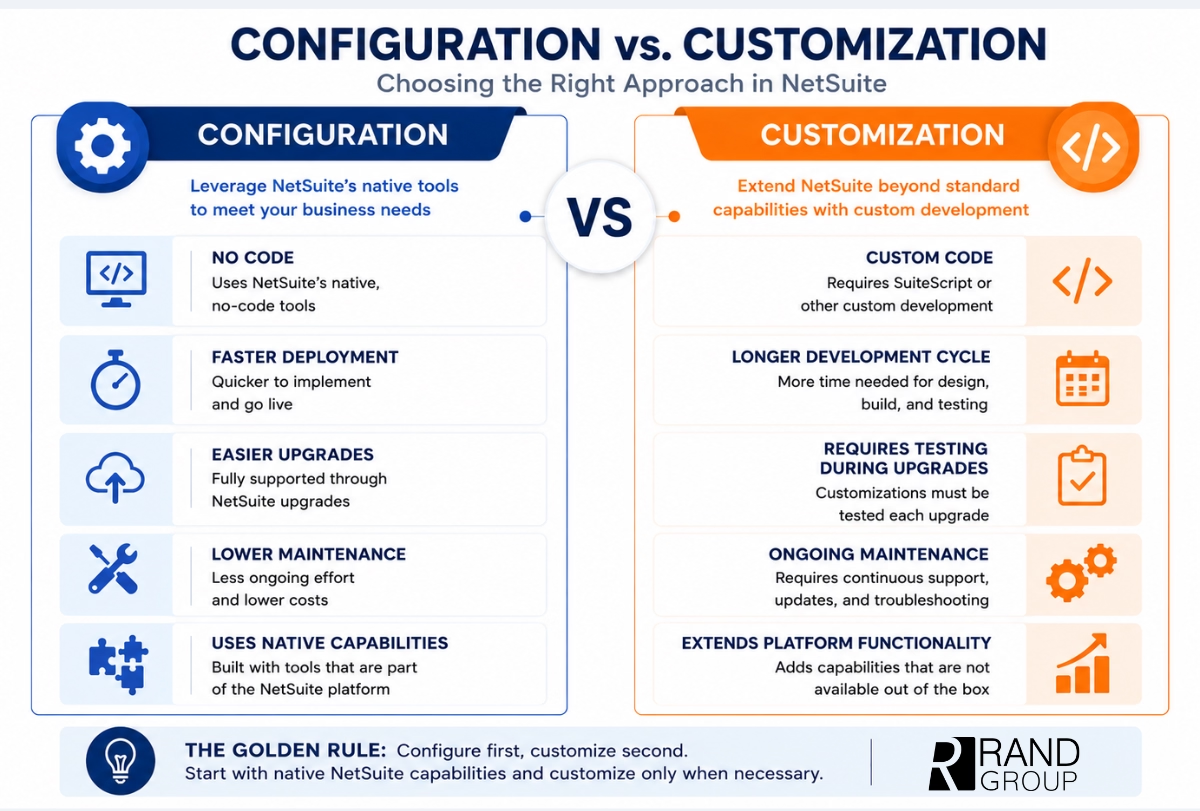
Configuration uses NetSuite’s built-in capabilities to tailor the system without modifying the underlying application. Because these tools are part of the standard platform, they remain supported through future NetSuite releases and generally require less ongoing maintenance.
Common configuration activities include:
- Creating custom forms
- Personalizing dashboards
- Building Saved Searches and KPIs
- Creating approval workflows
- Managing user roles and permissions
- Adding custom fields and record types
Configuration is typically faster to implement, less expensive to maintain, and easier to support through future NetSuite upgrades.
NetSuite customization
Customization extends NetSuite beyond its native functionality through custom development, most commonly using SuiteScript and related SuiteCloud technologies.
Customization becomes appropriate when organizations have business requirements that cannot reasonably be achieved through standard configuration.
Examples include:
- Custom business applications
- Industry-specific calculations
- Advanced pricing engines
- Complex workflow logic
- Third-party software integrations
- Client-side scripting
- Specialized document generation
The goal should never be to avoid customization entirely. Rather, it should be reserved for situations where it delivers measurable business value.
When should you configure NetSuite?
Whenever possible, start with configuration. NetSuite’s native capabilities are remarkably flexible and often satisfy operational goals without introducing additional complexity.
Modify the user experience
Configuration makes it easy to tailor NetSuite to different departments and user roles.
Examples include:
- Personalized dashboards
- Custom form layouts
- Additional tabs
- Portlets displaying role-specific information
These improvements help users work more efficiently without requiring development.
Capture business-specific information
Most organizations need to track information unique to their operations.
SuiteBuilder allows administrators to create:
- Custom fields
- Custom lists
- Custom record types
- Additional classifications
These enhancements allow organizations to capture business-specific data while remaining fully supported within the NetSuite platform.
Automate everyday business processes
Many routine workflows can be automated without custom code.
Examples include:
- Approval routing
- Email notifications
- Task assignments
- Record validation
- Status changes
SuiteFlow enables organizations to automate these business processes through a visual interface rather than custom programming.

Improve reporting and analytics
Finance and executive teams frequently need reporting beyond standard financial statements.
Native NetSuite tools support:
- Saved Searches
- KPI scorecards
- Financial dashboards
- Operational reporting
- Executive analytics
These capabilities often eliminate the need for custom reporting solutions.
Manage security and permissions
Configuration also provides extensive security controls, including:
- User roles
- Department restrictions
- Record permissions
- Segregation of duties
- Form-level access
We’ve found that many organizations underestimate how much can be accomplished through NetSuite’s native configuration tools. Leveraging these capabilities first often produces a simpler solution while reducing long-term maintenance requirements.
When does NetSuite custom development make sense?
While configuration should always be considered first, some business requirements legitimately require custom development.
Complex business logic
Organizations with highly specialized operations sometimes require calculations or workflows beyond SuiteFlow’s capabilities.
Examples include:
- Industry-specific allocation rules
- Complex pricing engines
- Subscription calculations
- Multi-condition commission calculations
- Specialized revenue logic
These scenarios often justify SuiteScript development.
Third-party integrations
Many businesses rely on software beyond NetSuite.
Tailored development may be needed to connect:
- Ecommerce platforms
- Legacy ERP systems
- Warehouse management systems
- Shipping applications
- Proprietary business software
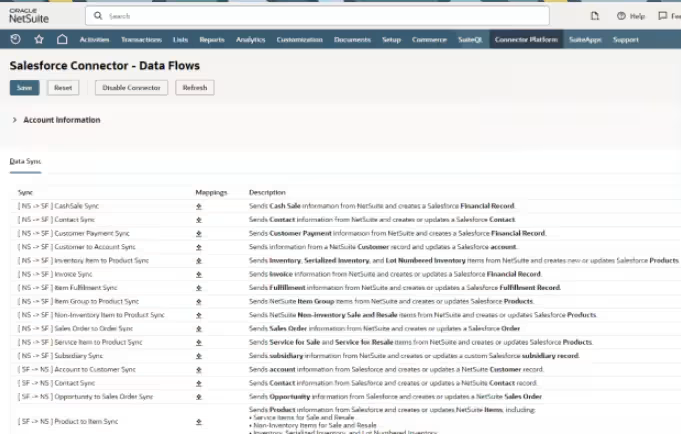
SuiteTalk APIs provide the foundation for securely exchanging information between NetSuite and external systems.
Advanced user experiences
Some organizations need dynamic functionality directly within NetSuite forms.
Examples include:
- Real-time calculations
- Dynamic field validation
- Pop-up alerts
- Conditional field behavior
- Client-side automation
These enhancements improve the user experience while supporting specialized operational requirements.
High-volume automation
Organizations processing large transaction volumes often benefit from automated background processing.
Examples include:
- Overnight invoice generation
- Scheduled scripts
- Map/Reduce processing
- Large-scale imports
- Batch processing
Automating these activities improves performance while reducing manual effort.
Advanced document generation
Many organizations require documents that extend beyond standard NetSuite templates.
Custom development can support:
- Highly branded invoices
- Complex packing slips
- Purchase order formatting
- Advanced FreeMarker templates
- Industry-specific documentation
These customizations help organizations maintain compliance while improving customer-facing communications.
The golden rule: Configure first, customize second
The most successful NetSuite environments share one common characteristic: they follow a disciplined governance strategy.
Rather than immediately writing custom code, experienced NetSuite consultants first determine whether the requirement can be achieved through configuration, existing functionality, or a modest business process improvement.
This “configure first, customize second” philosophy delivers several long-term advantages:
- Easier NetSuite upgrades
- Lower ongoing support costs
- Faster implementations
- Better scalability
- Reduced technical debt
- Improved long-term maintainability
Before investing in custom functionality, ask these questions:
- Can SuiteFlow automate this process?
- Can SuiteBuilder accomplish the objective?
- Is there already a native NetSuite feature?
- Could a small business process change eliminate the need?
- Does a SuiteApp already solve this problem?
We’ve found that organizations with strong governance around customization requests tend to realize lower support costs and smoother NetSuite upgrades over time because unnecessary custom code never enters the environment.
Common mistakes organizations make when customizing NetSuite
Custom development can extend NetSuite’s capabilities, but a strategic approach helps maximize long-term value. Avoid these common mistakes when evaluating customization.
- Customizing before exploring native functionality: Evaluate SuiteBuilder, SuiteFlow, SuiteAnalytics, and other built-in tools before writing custom code.
- Recreating legacy ERP processes: Use your implementation as an opportunity to improve workflows rather than replicate outdated processes.
- Ignoring available SuiteApps: A certified SuiteApp may already provide the functionality you need, reducing development time and ongoing maintenance.
- Failing to document customizations: Keep scripts, workflows, and integrations well documented to simplify troubleshooting, upgrades, and future enhancements.
- Building custom reports before evaluating SuiteAnalytics: Native dashboards, Saved Searches, KPI scorecards, and SuiteAnalytics Workbooks often deliver the reporting organizations need without custom development.
Real-world example: Supporting Henry Resources’ unique business requirements
Every organization has unique operational requirements, and sometimes custom development provides the greatest long-term value.
Henry Resources, an oil and gas organization, needed more than a standard ERP implementation. Working closely with their team, our NetSuite experts helped consolidate multiple disconnected solutions into a unified NetSuite environment while carefully balancing configuration and custom development.
Rather than customizing every process, the project focused development efforts where they delivered measurable business value. This included configuring NetSuite Bill Capture, creating a custom Joint Interest Billing (JIB) solution, building specialized JIB and revenue check import processes, and implementing custom business segments for industry-specific reporting.
The result was improved operational visibility, streamlined financial processes, stronger reporting capabilities, and a scalable ERP platform that supports the organization’s ongoing growth. It’s a strong example of using customization strategically rather than by default.
0
hours saved per month
0
chart of accounts unified into one
0
legacy systems consolidated into one ERP

Ready to tailor NetSuite to your business?
Like Henry Resources, your organization may benefit from a combination of native NetSuite functionality and strategic custom development. Our experienced consultants and developers help you build solutions that support your industry, streamline operations, and scale as your business grows.
NetSuite development services backed by technical expertise
Choosing when to configure versus customize requires more than technical knowledge. It requires understanding your business processes, growth plans, reporting requirements, and long-term ERP strategy.
As an Oracle NetSuite Alliance Partner, Rand Group helps organizations maximize the value of their NetSuite investment through practical, business-first consulting.
Our NetSuite development services include:
- NetSuite consulting: Evaluate business processes, define requirements, and develop an ERP strategy aligned with your long-term goals.
- Configuration services: Optimize workflows, dashboards, reporting, and security using NetSuite’s native capabilities.
- Custom development: Extend NetSuite with SuiteScript, SuiteTalk integrations, custom records, and tailored business logic when native functionality isn’t enough.
- ERP optimization: Improve system performance, reduce technical debt, and prepare your environment for future upgrades and growth.
- Ongoing support: Provide enhancements, managed application services, troubleshooting, and user support to maximize the value of your NetSuite investment.
Our certified NetSuite consultants and developers have extensive experience extending NetSuite where it creates measurable business value. Projects like Henry Resources’ demonstrate our ability to balance native functionality with thoughtful customization that supports long-term business growth.
NetSuite development services FAQs
What are NetSuite development services?
NetSuite development services include both configuring native NetSuite functionality and building custom solutions. Services may include workflow automation, SuiteScript development, SuiteBuilder configuration, SuiteTalk integrations, reporting enhancements, dashboards, and ongoing ERP optimization.
What is the difference between NetSuite configuration and customization?
Configuration uses NetSuite’s built-in, no-code tools to tailor the system, while customization involves writing custom code to create functionality beyond NetSuite’s standard capabilities. Configuration is generally easier to maintain, while customization provides greater flexibility for unique business requirements.
When should I customize NetSuite instead of configuring it?
Customization is appropriate when native NetSuite features cannot support your business processes. Examples include complex calculations, industry-specific workflows, advanced integrations, custom applications, or specialized user experiences that cannot be achieved through SuiteBuilder or SuiteFlow.
Does custom NetSuite development affect future upgrades?
Yes. Customizations should be reviewed and tested during NetSuite upgrades to ensure compatibility. Following a “configure first, customize second” strategy helps minimize upgrade effort and long-term maintenance.
Can NetSuite integrate with third-party software?
Yes. NetSuite integrates with many external applications through SuiteTalk APIs, web services, middleware platforms, and custom integrations. Common integrations include ecommerce platforms, CRM systems, warehouse management software, shipping solutions, and proprietary business applications.
What programming language does NetSuite use?
NetSuite customization primarily uses SuiteScript, Oracle NetSuite’s JavaScript-based development framework within the SuiteCloud Platform.
Can an existing NetSuite implementation be optimized without custom development?
Absolutely. Many organizations improve reporting, automate workflows, strengthen security, and streamline operations using native NetSuite configuration tools without writing custom code.
Does Rand Group provide both NetSuite consulting and custom development?
Yes. Rand Group provides NetSuite consulting, implementation, configuration, custom development, integrations, optimization services, and ongoing support to help organizations maximize the value of their NetSuite investment.
Need help deciding whether to configure or customize NetSuite?
Every NetSuite environment evolves as your business grows, but not every new requirement calls for custom development.
Our NetSuite consultants help organizations evaluate business processes, identify opportunities to leverage native functionality, and recommend custom development only when it delivers measurable business value. Whether you’re planning a new implementation or optimizing an existing environment, we’ll help you build a scalable solution that supports long-term growth. Contact our team today to start a project.