Dynamics 365
 Power Platform
 Dynamics
 Cloud & Productivity
Dynamics 365 Finance & Operations customization and development guide

Microsoft Dynamics 365 Finance & Operations supports complex financial, supply chain, manufacturing, warehouse, and operational processes out of the box. Yet every organization has unique workflows, approval paths, reporting needs, and integration requirements that may not fit a standard ERP setup. Dynamics 365 Finance & Operations customization helps teams adapt the system to their business without forcing major process compromises.
Rand Group helps organizations plan and build practical Dynamics 365 Finance & Operations customization and development strategies that fit their processes, users, and long-term goals. In this guide, we’ll explain what can be customized in D365 F&O, how customization differs from configuration and development, which tools are commonly used, and how to approach ERP customization in a scalable way.
Table of contents
- What is Dynamics 365 Finance & Operations customization and development?
- Why Dynamics 365 Finance & Operations customization matters
- What can be customized in Dynamics 365 Finance & Operations?
- Tools used for Dynamics 365 Finance & Operations customization and development
- When should you configure, customize, or build custom development in D365 F&O?
- Common Dynamics 365 Finance & Operations customization mistakes
- Best practices for Dynamics 365 Finance & Operations customization
- How Rand Group helps organizations customize Dynamics 365 Finance & Operations
- Case study: Customizing Dynamics 365 Finance & Operations for operational efficiency
- Dynamics 365 Finance & Operations customization FAQs
What is Dynamics 365 Finance & Operations customization and development?
Dynamics 365 Finance & Operations customization and development is the process of tailoring D365 F&O to fit specific business processes, data requirements, workflows, reporting needs, and integrations. Dynamics 365 Finance & Operations development goes deeper by using developer tools, X++ code, extensions, APIs, and Azure services to build new functionality or connect the system with other applications.
D365 F&O is built to support complex enterprise operations across finance, supply chain, manufacturing, procurement, inventory, warehouse management, and global business structures. Customization and development help organizations get more value from that foundation by adapting the system to the way teams actually work. This can improve process efficiency, reduce manual work, support better reporting, and connect ERP data with the other systems used across the business. At Rand Group, we have decades of experience helping organizations implement and customize Microsoft ERP solutions across a variety of industries, including manufacturing, distribution, energy, and professional services.
Modern Dynamics 365 Finance & Operations customization is supported by Microsoft’s broader cloud ecosystem, including Power Platform, Microsoft Dataverse, Azure services, reporting tools, and integration frameworks. This gives organizations multiple ways to extend the platform, from low-code automation and dashboards to advanced ERP development and enterprise integrations. In practice, successful D365 F&O customization strategies focus on solving the right business problems without creating unnecessary long-term complexity. The goal is not to customize everything, but to choose the right approach for each business need.
Why Dynamics 365 Finance & Operations customization matters
Dynamics 365 Finance & Operations customization and development matters because enterprise ERP systems must support real business operations, not just standard software processes. The right customization and development strategy helps teams improve efficiency, reduce manual work, strengthen reporting, and support growth without creating unnecessary system complexity.
Many organizations use customization when standard D365 F&O functionality covers most of the need, but not the full process. We often see this with clients that have industry-specific workflows, complex approval paths, multi-entity structures, or reporting needs that require more than standard setup. In those cases, the goal is to close the gap in a practical way while keeping the system scalable, usable, and easier to maintain.
- Align ERP with real business operations: We often see clients customize D365 F&O when standard workflows do not fully reflect how their teams operate. This is common in organizations with complex manufacturing, finance, supply chain, project, service, or multi-entity requirements.
- Improve efficiency and reduce manual work: Many organizations use Dynamics 365 Finance & Operations customization to automate repetitive tasks, reduce duplicate data entry, and improve consistency across departments. Common examples include approval workflows, data validation, process automation, and cleaner handoffs between teams.
- Support reporting and visibility: Custom reporting helps teams access the data they need without relying on manual exports or disconnected spreadsheets. D365 F&O reporting customization can support Power BI dashboards, operational insights, centralized financial data, and automated reports.
- Enable scalability and growth: As companies grow, ERP requirements often change. Dynamics 365 Finance & Operations customization can support acquisitions, new entities, global operations, new business models, and evolving compliance requirements.
- Improve user adoption: Users are more likely to adopt ERP when the system supports their daily work. Personalization, role-based workspaces, simplified workflows, and relevant dashboards can reduce friction and help teams work more confidently.

Ready to customize Dynamics 365 Finance & Operations?
A clear customization strategy helps you extend D365 F&O without creating long-term maintenance issues. Rand Group can help you evaluate requirements, prioritize changes, and build an upgrade-safe path forward.
What can be customized in Dynamics 365 Finance & Operations?
Dynamics 365 Finance & Operations can be customized across the user experience, workflows, approvals, security, financial dimensions, reporting, integrations, business logic, forms, tables, and role-based workspaces. These changes can range from simple no-code personalization to advanced custom development using extensions, APIs, and Azure services.
The best approach depends on the business need, the level of complexity, and the long-term maintenance impact. With decades of ERP implementation and customization experience, we help organizations identify which requirements should be handled through personalization, configuration, low-code tools, integrations, or custom development.
In many cases, we recommend starting with personalization and configuration before moving into deeper customization or development. This helps teams solve the requirement in the simplest way possible while keeping the system easier to manage, test, and update over time.
Personalization
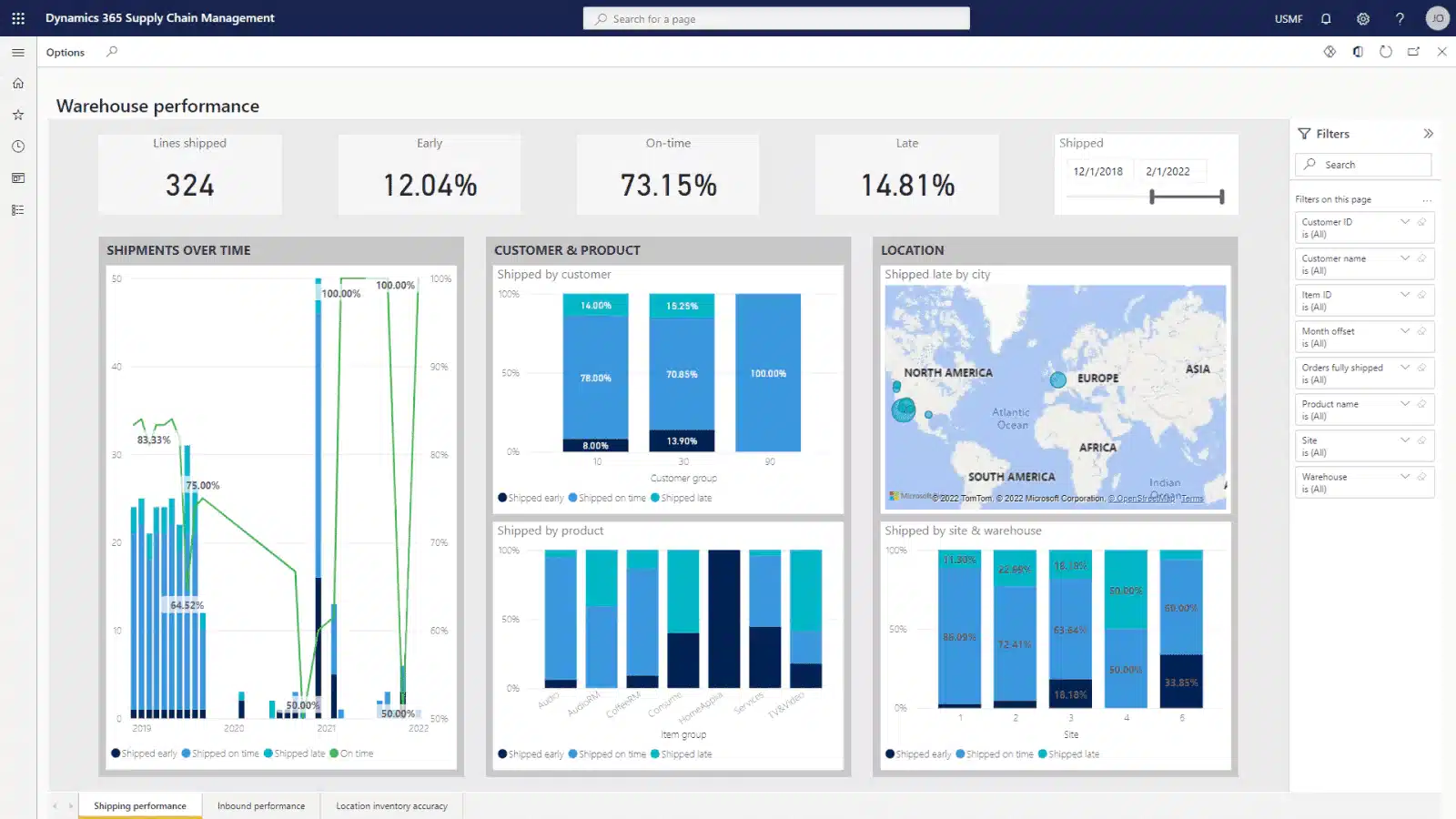
Personalization in D365 F&O is a no-code way to adjust the user experience. It helps users work faster without changing the system’s core functionality. Personalization is often useful when users need cleaner views, faster navigation, or role-specific workspaces that match their daily tasks.
Common personalization options include:
- Dashboards: Dashboards can be adjusted so users see the metrics, tasks, and links that matter most to their role. This helps users focus on priority work without searching through unrelated information.
- Saved views: Saved views let users keep filtered or organized page layouts for repeated tasks. This can speed up daily work for teams that review the same data, such as open invoices, purchase orders, or inventory transactions.
- Workspace customization: Workspaces can be personalized to show the tiles, lists, and actions a user needs most often. This helps teams manage role-specific work from one place and reduces extra clicks.
- Field layouts: Field layouts can be adjusted so users see the most important fields first. This can improve data entry speed, reduce confusion, and support cleaner records.
- Role-based experiences: Role-based experiences help users work from pages and dashboards designed around their responsibilities. This can improve adoption because users only see the information and actions that are relevant to their job.
Configuration
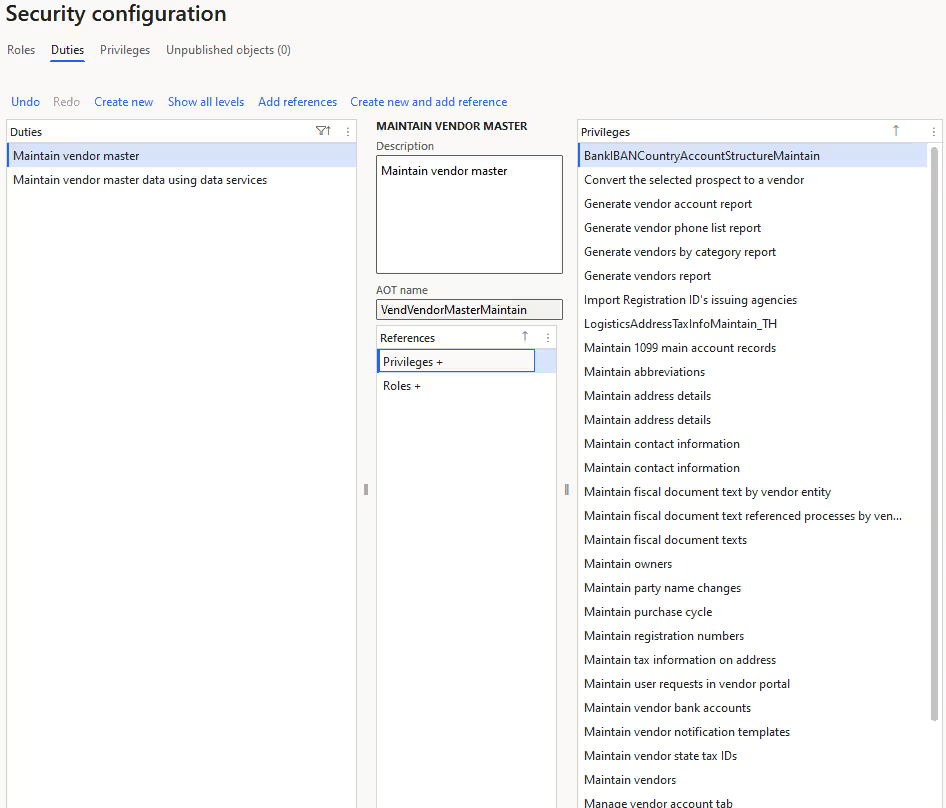
Configuration uses native D365 F&O functionality to align the system with business rules. This should usually be the first step before custom development because it keeps the solution simpler and easier to maintain. Configuration is often the right approach when the requirement can be handled with standard settings, workflows, controls, or setup options.
Common configuration options include:
- Workflows: Workflows define how records, tasks, and transactions move through the business. They help standardize processes and reduce manual follow-up.
- Approvals: Approval configuration controls who must review and approve certain actions before they move forward. This supports stronger controls for purchases, expenses, journals, and other key business processes.
- Financial dimensions: Financial dimensions help organizations track financial data by department, location, project, product line, or other reporting needs. This improves financial visibility without requiring separate charts of accounts for every reporting scenario.
- Security setup: Security configuration controls what users can see and do in the system. This helps protect sensitive data, support segregation of duties, and reduce operational risk.
- Business rules: Business rules define how the system should handle certain processes, validations, or required fields. This helps improve consistency and reduces errors during daily work.
Customization and development
Customization and development are used when standard functionality and configuration do not meet the requirements. This may involve extending business logic, creating new forms, adding integrations, or building custom reporting solutions. Development is best used for requirements that create clear business value and cannot be solved through simpler options.
Common customization and development examples include:
- Custom business logic: Custom business logic changes how the system processes specific scenarios. This is useful when a company has unique pricing, costing, validation, or operational rules that standard functionality cannot fully support.
- New workflows: New workflows can be developed when standard approval or routing options do not match the business process. This helps organizations automate more complex handoffs while maintaining control and visibility.
- Custom modules: Custom modules add new functional areas or process flows inside D365 F&O. This can support industry-specific requirements or unique operational models that are not covered by standard modules.
- API development: API development connects D365 F&O with other systems, applications, or external platforms. This helps reduce duplicate data entry and keeps information consistent across the business.
- Reporting solutions: Custom reporting solutions help teams access the exact data, layout, or analysis they need. This can support financial reviews, operational decision-making, compliance, and executive reporting.
- ERP integrations: ERP integrations connect D365 F&O with systems such as CRM, warehouse management, eCommerce, payroll, banking, or third-party logistics platforms. This helps create a more connected technology stack and reduces data silos.
- Custom forms and tables: Custom forms and tables capture data that does not fit standard structures. This can help teams manage specialized processes while keeping important information inside the ERP system.
Tools used for Dynamics 365 Finance & Operations customization and development
Dynamics 365 Finance & Operations development uses a mix of developer tools, no-code tools, low-code tools, integration services, and lifecycle management tools. The right tool depends on whether the change affects the user interface, business logic, reporting, automation, integrations, or deployment process.
Some tools are best for small user-level changes, while others are used for complex ERP development. Choosing the right tool helps organizations solve the business need without adding unnecessary cost, risk, or maintenance. In our experience, organizations often create avoidable complexity when custom development is used for requirements that could be handled through configuration, reporting tools, or Power Platform automation. We help clients evaluate the long-term impact of each approach so they can balance flexibility, scalability, governance, and maintainability over time.
Core customization and development tools
Core development tools are used when a requirement needs deeper technical work. These tools are common for building extensions, changing business logic, creating integrations, or supporting more complex ERP requirements that cannot be handled through configuration alone.
Common tools include:
- Visual Studio with D365 F&O development tools: Visual Studio is the main development environment for D365 F&O technical work. Developers use it to build, test, debug, and manage customizations that extend the application.
- Application Explorer: Application Explorer helps developers view and work with application objects such as tables, forms, classes, and data entities. This is useful when teams need to understand existing system structure before building or extending functionality.
- Extension model: The extension model lets developers add or modify functionality without directly changing core Microsoft code. This supports a more maintainable approach and helps reduce issues during updates.
- Data Entities and OData: Data Entities and OData help expose D365 F&O data for reporting, integrations, and external applications. These tools are useful when organizations need consistent data flow between ERP and systems such as CRM, warehouse management, eCommerce, or reporting platforms.
- X++ development: X++ is the programming language used for D365 F&O development. It is used to build custom business logic, validations, workflows, reports, and other ERP-specific functionality.

No-code and low-code customization tools
No-code and low-code tools help reduce the need for custom coding. These tools are useful for user experience changes, document formats, light automation, and reporting. Microsoft states that Electronic Reporting lets teams configure formats for incoming and outgoing electronic documents and manage those formats over time.
Common no-code and low-code tools include:
- Personalization toolbar: The personalization toolbar lets users adjust pages, fields, and workspaces without code. This helps users create a cleaner experience that fits their daily tasks.
- Saved views: Saved views let users keep filtered and organized page layouts for repeated work. This helps teams access commonly used records faster, such as open orders, invoices, journals, or inventory transactions.
- Electronic Reporting: Electronic Reporting helps teams configure document formats for regulatory, banking, tax, and business communication needs. This is useful when organizations need structured outputs without building a custom report from scratch.
- Business Document Management: Business Document Management helps users modify business documents such as invoices, purchase orders, and statements. This supports branding, compliance, and customer-facing document requirements.
- Power Automate: Power Automate helps organizations create automated workflows across D365 F&O and other Microsoft or third-party systems. This can reduce manual follow-up, trigger approvals, send alerts, and connect routine tasks across applications.
- Power Apps: Power Apps can be used to build low-code apps that extend ERP processes or capture data outside the standard D365 F&O interface. This is useful for mobile scenarios, simplified data entry, or department-specific workflows.
- Power BI: Power BI helps teams build dashboards and analytics using D365 F&O data. This supports better visibility into finance, operations, inventory, sales, procurement, and executive performance metrics.

DevOps and lifecycle management tools
DevOps and lifecycle management tools help teams control deployments, testing, release management, and governance. These tools are important because customization does not end after development; it must be tested, deployed, monitored, and maintained over time.
Common lifecycle tools include:
- Lifecycle Services: Lifecycle Services, also called LCS, supports project management, environment management, deployment, monitoring, and issue tracking for D365 F&O. It helps teams manage the ERP lifecycle from implementation through ongoing support.
- Azure DevOps: Azure DevOps helps teams manage work items, source control, builds, testing, and release pipelines. This supports a more structured development process and improves visibility across technical work.
- Build and release pipelines: Build and release pipelines automate how code is compiled, packaged, tested, and deployed. This reduces manual deployment risk and helps teams move changes through environments more consistently.
- Test management: Test management tools help teams document, run, and track tests before changes reach production. This is important for protecting core ERP processes such as posting, approvals, integrations, and reporting.
- Upgrade planning: Upgrade planning helps organizations prepare customizations for Microsoft updates and new releases. This reduces disruption and helps ensure custom functionality continues working as the platform evolves.
- Deployment governance: Deployment governance defines how changes are reviewed, approved, scheduled, and released. This helps prevent rushed updates, supports accountability, and reduces the risk of production issues.
When should you configure, customize, or build custom development in D365 F&O?
You should configure, customize, or build custom development in D365 F&O based on how complex the requirement is and whether standard functionality can meet the need. Not every business requirement needs custom code. In many cases, personalization, configuration, or Power Platform tools can meet the need with less cost and lower maintenance effort.
At Rand Group, we recommend starting with the simplest option that solves the problem. Use personalization for user-specific changes, configuration for standard business rules, low-code tools for light automation, and custom development when the requirement affects deeper ERP logic, integrations, or data structures. This helps reduce risk, simplify testing, and keep the system easier to update over time.
The table below reflects our recommended approach for common D365 F&O customization and development scenarios.
The best approach is usually the least complex option that meets the requirement. In our experience, custom development should be reserved for needs that create clear business value and cannot be solved through standard configuration, reporting tools, or low-code customization.
Common Dynamics 365 Finance & Operations customization mistakes
Customization can create value, but poor planning can increase cost, risk, and long-term system complexity. Many issues happen when organizations recreate legacy ERP processes exactly instead of reviewing whether the process should change. A better approach is to identify the business problem first, then decide whether personalization, configuration, low-code tools, integration, or custom development is the right solution.
Common mistakes we see in D365 F&O customization and development include:
- Recreating legacy ERP processes without review: Many organizations try to rebuild old processes exactly as they existed in a previous system. This can carry forward inefficiencies instead of using D365 F&O to improve the way work gets done.
- Over-customizing standard processes: Custom development should not be the first option for every requirement. Over-customization can increase costs, slow down updates, and make the system harder to support.
- Building disconnected integrations: Integrations that are not planned well can create data silos, duplicate records, and reporting issues. In our experience, integration issues are often caused more by inconsistent data structures and unclear ownership than by the integration technology itself. A strong integration strategy should define data ownership, timing, error handling, and security.
- Skipping documentation: Undocumented customizations are harder to support, test, and improve over time. Clear documentation helps future teams understand what was built, why it was needed, and how it affects the system.
- Using weak governance: Without a clear review and approval process, customization requests can quickly become inconsistent or unnecessary. In our experience, organizations that customize heavily without governance standards often create upgrade and maintenance challenges later. Governance helps prioritize high-value changes and control long-term complexity.
- Ignoring release management: Microsoft updates can affect customizations, integrations, and reports if they are not tested in advance. Release planning helps reduce disruption and keeps critical ERP processes stable.
- Customizing without user adoption planning: A customization may be technically correct but still fail if users do not understand it. Training, communication, and feedback help teams adopt changes and use them correctly.
Best practices for Dynamics 365 Finance & Operations customization
The best Dynamics 365 Finance & Operations customization strategy balances business fit with long-term maintainability. Customization should solve clear problems, support users, and protect the system from unnecessary upgrade risk. Based on our experience supporting D365 F&O clients across a variety of industries, we recommend confirming the business value, reviewing standard options, and understanding how each change will affect reporting, integrations, testing, security, and future Microsoft updates before building anything custom.
Best practices include:
- Prioritize standard functionality first: Start by reviewing what D365 F&O can already do through native functionality, configuration, and Power Platform tools. This helps reduce unnecessary development and keeps the system easier to maintain.
- Avoid over-customization: Customization should be used when it solves a clear business need that standard options cannot support. Too many customizations can increase cost, slow down updates, and make the system harder to support.
- Use an extension-based approach: When development is required, use supported extension methods instead of changing core application logic directly. This helps reduce upgrade risk and keeps custom functionality more stable over time.
- Build scalable integrations: Integrations should be designed for reliable data flow, error handling, security, and future growth. This helps prevent disconnected systems, duplicate data entry, and reporting gaps.
- Establish governance and documentation: Define how customizations are requested, reviewed, approved, tested, and released. Clear documentation also helps support teams understand what was built and why it matters.
- Plan for testing and updates: Every customization should be tested before deployment and reviewed as Microsoft releases updates. This helps protect critical ERP processes such as posting, approvals, reporting, and integrations.
- Include user adoption planning: Customizations only create value when users understand how and why to use them. Training, role-based guidance, and feedback loops help teams adopt the changes with less friction.
How Rand Group helps organizations customize Dynamics 365 Finance & Operations
Rand Group helps organizations design, build, and support Dynamics 365 Finance & Operations customization that aligns with their business goals, users, reporting needs, and long-term ERP strategy. We have more than 20 years of experience implementing, customizing, and developing ERP systems across a variety of industries, and we were named the 2025 Microsoft Americas Channel Emerging Partner of the Year.
Our team combines ERP consulting, software engineering, reporting, integrations, Power Platform, and support services. We work with your stakeholders to understand how your business operates, then help you decide where to use standard functionality, where to configure the system, and where custom development will create the most value.
Customize Dynamics 365 F&O to match your business
We start by learning how your teams work before recommending any customization. This helps us design a solution that supports daily operations while staying scalable and maintainable.
Our approach focuses on:
- Business alignment: We connect customization decisions to your actual business goals, processes, and pain points. This helps ensure the final solution supports how your teams work instead of adding unnecessary complexity.
- Scalability: We design customizations with growth in mind, including new entities, locations, product lines, users, and reporting needs. This helps your D365 F&O environment adapt as your business changes.
- Maintainability: We focus on practical solutions that can be tested, documented, supported, and improved over time. This helps reduce long-term support issues and makes future changes easier to manage.
- Upgrade readiness: We help clients plan customizations with Microsoft updates and release cycles in mind. This helps reduce disruption and lowers the risk of custom functionality breaking during updates.
Extend core functionality
Some organizations need D365 F&O to support workflows, data structures, or operational logic that goes beyond standard functionality. We build extensions that fit the business need while reducing unnecessary complexity.
Common extension work includes:
- Custom tables and forms: We create tables and forms when your business needs to capture data that does not fit standard D365 F&O structures. This keeps important operational information inside the ERP instead of in spreadsheets or disconnected systems.
- Business logic: We develop business logic for unique pricing, costing, validation, approval, or operational requirements. This helps the system support your rules more consistently.
- Workflows: We customize or build workflows to support more complex routing, approvals, and process controls. This helps reduce manual follow-up and keeps work moving through the right steps.
- Modules: We can extend or build module functionality for specialized business processes. This is useful when your organization has industry-specific needs that are not fully covered by standard functionality.
- Role-based experiences: We help tailor experiences around the users who rely on D365 F&O every day. This can improve adoption by giving users clearer access to the tasks, data, and actions they need.
Unlock advanced reporting and analytics
Reporting is often one of the most important areas for customization. We help teams build reporting solutions that support daily operations, financial review, compliance, and executive decision-making.
Common reporting services include:
- Power BI dashboards: We build dashboards that turn ERP data into clear, visual insights. This helps leaders and managers track performance without relying on manual exports.
- SSRS reports: We create structured reports for operational, financial, and transactional needs. This is useful when teams need precise layouts, repeatable outputs, or detailed ERP data.
- Financial Reporter: We help configure financial reporting structures that support statements, budget comparisons, and management reporting. This gives finance teams better visibility into performance across entities, dimensions, and departments.
- Operational dashboards: We design dashboards for areas such as procurement, inventory, production, warehouse operations, and order management. This helps teams monitor issues and act faster.
- Automated reporting: We help automate recurring reports so teams spend less time preparing data and more time using it. This improves consistency and reduces reporting delays.

Extend Dynamics 365 F&O with the Power Platform
The Power Platform can help teams automate work and build connected experiences around D365 F&O. We help organizations use Power Automate, Power Apps, Power BI, Teams, and Outlook in ways that support real business processes. We commonly see organizations adopt Power Platform quickly, but without clear ownership and lifecycle governance, low-code environments can become difficult to manage over time.
Common Power Platform extensions include:
- Power Automate workflows: We use Power Automate to connect tasks, approvals, alerts, and notifications across systems. This helps reduce manual work and improves process consistency.
- Power Apps: We build low-code apps for simplified data entry, mobile workflows, and department-specific processes. This can help users complete tasks without navigating the full ERP interface.
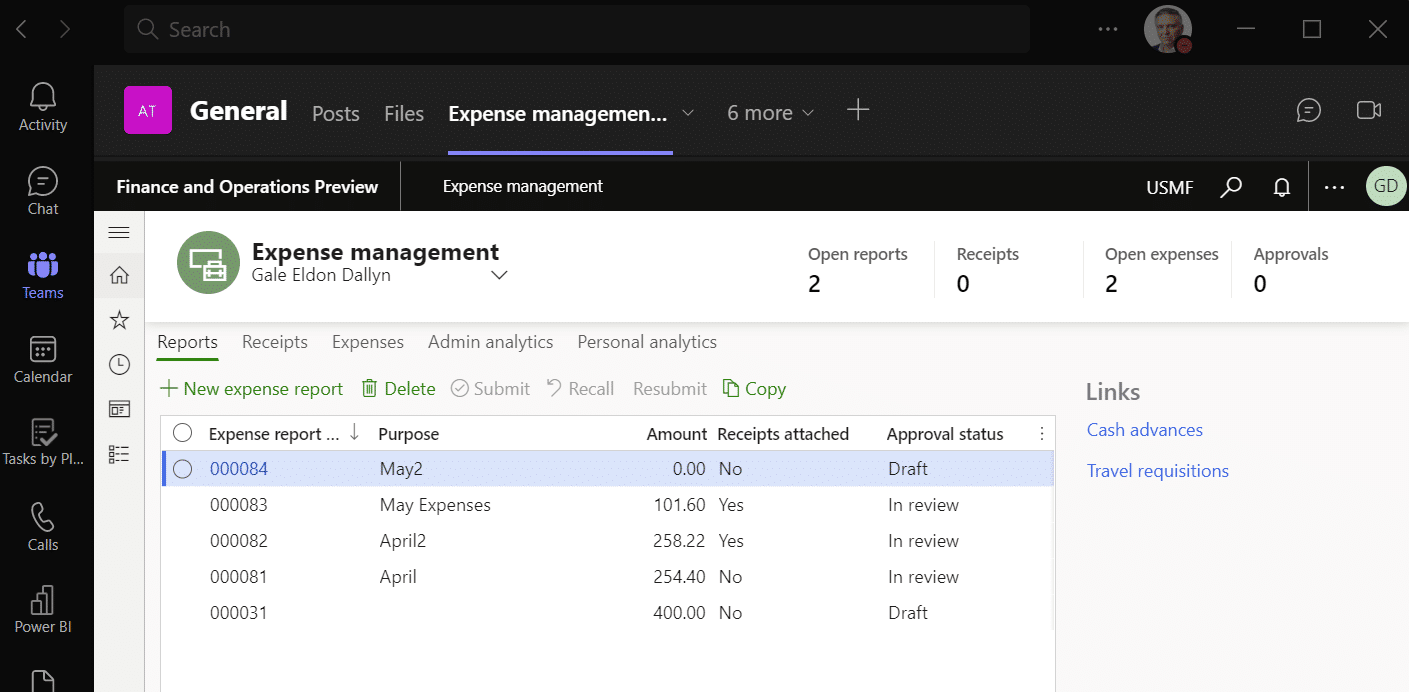
- Teams integrations: We connect D365 F&O processes with Microsoft Teams where collaboration happens. This helps users review, discuss, and act on ERP information faster.
- Outlook integrations: We help bring ERP-related actions and information into Outlook where it supports the process. This can improve communication around approvals, customer updates, vendor activity, and follow-up tasks.
- Approvals: We design approval processes that fit your roles, controls, and business rules. This helps strengthen governance while reducing approval delays.
- Alerts: We create alerts that notify users when key events or exceptions occur. This helps teams respond faster to issues such as overdue approvals, inventory concerns, or process delays.

Dynamics 365 Finance & Operations integrations
Dynamics 365 Finance & Operations integrations connect ERP data with the other systems that run your business. We help clients design reliable integrations that reduce duplicate data entry, improve visibility, and keep business-critical systems aligned. In our experience, integration issues are often caused more by inconsistent data structures and unclear ownership than by the integration technology itself.
Common D365 F&O integrations include:
- Warehouse management systems: Connect warehouse activity with D365 F&O to support inventory accuracy, fulfillment, and operational visibility.
- 3PL systems: Share shipping, receiving, and inventory updates with third-party logistics providers to improve outsourced logistics control.
- eCommerce platforms: Sync orders, inventory, customers, payments, and fulfillment data between online sales channels and ERP.
- Microsoft Dataverse: Support connected data across Dynamics 365 apps and Power Platform solutions.
- CRM integrations: Connect sales, customer, finance, and operations data to reduce silos between front-office and back-office teams.
- Dual-write: Enable near real-time synchronization between D365 F&O and Dataverse-based applications.
- Reporting databases: Support advanced analytics and large-scale reporting without slowing daily ERP transactions.
- Microsoft 365 tools: Connect D365 F&O with Excel, Outlook, Teams, and SharePoint so users can work with ERP data in familiar tools.

Need a D365 F&O customization assessment?
A customization assessment helps identify which requirements should be configured, automated, integrated, or developed. Rand Group can review your current processes, discuss your customization strategy, and define a practical roadmap.
Case study: Customizing Dynamics 365 Finance & Operations for operational efficiency
Conquest Completion Services was using QuickBooks, Excel, and paper documents to manage financial and operational processes. Rand Group helped Conquest select and implement Dynamics 365 Finance & Operations and Dynamics 365 Field Service, tailoring the system to support field service, inventory, manufacturing, reporting, and financial management needs. By integrating these systems and aligning the ERP with how Conquest worked, the company gained real-time visibility, reduced manual work, and improved decision-making. To learn more, read the full case study.
0 %
reduction to days sales outstanding
0
reduction in A/R and A/P staff
0 x
faster purchase order approval
Dynamics 365 Finance & Operations customization FAQs
Can Dynamics 365 Finance & Operations be customized?
Yes. Dynamics 365 Finance & Operations can be customized through personalization, configuration, extensions, custom development, Power Platform, reporting tools, and integrations.
What tools are used for D365 F&O development?
D365 F&O development commonly uses Visual Studio, X++, Application Explorer, extensions, Data Entities, OData, Azure DevOps, and Lifecycle Services. Power Platform tools can also extend the system for automation, reporting, and apps.
Does customization affect Microsoft updates?
Customization can affect updates if it is poorly designed or not tested. Extension-based development helps reduce update risk because it avoids direct changes to baseline model elements.
What is the difference between configuration and customization?
Configuration uses standard D365 F&O settings and features to meet a requirement. Customization changes or extends how the system works when standard functionality does not meet the business need.
Can D365 F&O integrate with third-party systems?
Yes. D365 F&O can integrate with third-party systems using Data Entities, OData, APIs, dual-write, business events, Azure services, and integration tools. OData V4 can expose updatable views for integration scenarios.
What programming language does D365 F&O use?
Dynamics 365 Finance & Operations uses X++ for ERP development. Microsoft describes X++ as an object-oriented, application-aware, and data-aware programming language used in ERP programming and database applications.
Can Power Platform extend Dynamics 365 Finance & Operations?
Yes. Power Platform can extend D365 F&O through Power Automate, Power Apps, Power BI, Dataverse, virtual entities, business events, and dual-write. These tools can support automation, dashboards, apps, and cross-system processes.
How long does ERP customization take?
ERP customization timelines vary based on complexity. A small workflow or report change may take days or weeks, while complex custom modules or enterprise integrations may take months.
What are common ERP integration challenges?
Common ERP integration challenges include data quality issues, unclear ownership, mismatched field structures, poor error handling, performance limits, security requirements, and weak testing.
Build a scalable and connected ERP platform with Dynamics 365 Finance & Operations
Dynamics 365 Finance & Operations customization can help your organization align ERP with real business processes, automate manual work, improve reporting, and connect critical systems. The key is to use the right approach for each requirement and avoid custom development when configuration or low-code tools can solve the issue.
Rand Group helps organizations plan, build, integrate, and support Dynamics 365 Finance & Operations environments that are scalable and maintainable. Contact us today to evaluate your current ERP environment, define a customization strategy, and build a scalable Dynamics 365 Finance & Operations platform that fits your business.