Dynamics 365
 Power Platform
 Dynamics
 Cloud & Productivity
Dynamics 365 Finance and Operations integration guide

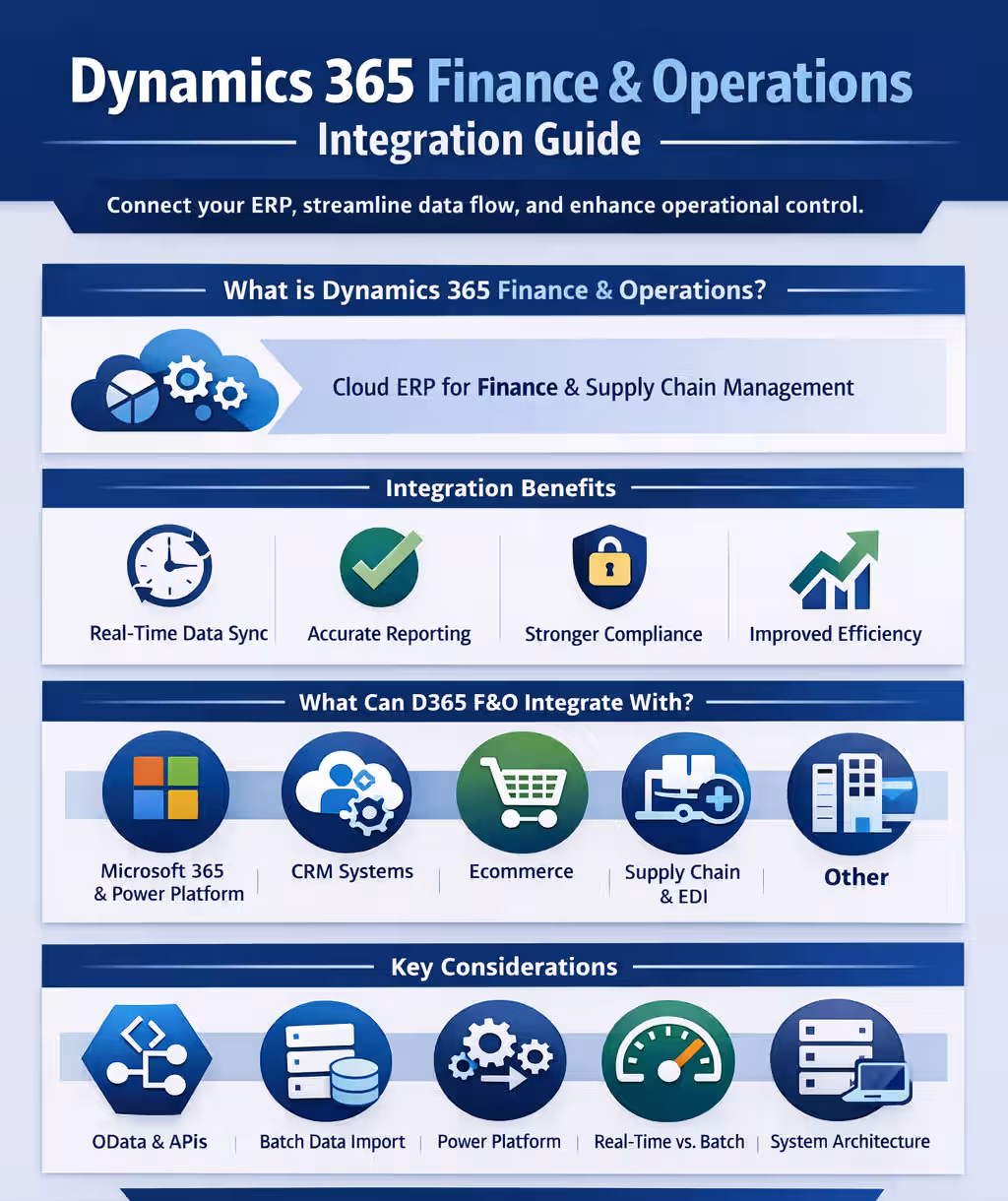
Modern enterprises depend on multiple systems to manage finance, supply chain, operations, and reporting. When these systems are not connected, data becomes siloed and visibility suffers. Dynamics 365 Finance and Operations integration connects your ERP to the rest of your technology stack, enabling real-time data flow, improved accuracy, and stronger operational control.
In this guide, we explain what integration means in an ERP environment, how Dynamics 365 Finance and Operations (also known as Dynamics 365 Finance and Supply Chain Management) connects with other systems, available integration methods, common scenarios, cost considerations, risks, and how to choose the right integration partner.
- What is Dynamics 365 Finance & Operations?
- What does integration mean in ERP?
- Benefits of Dynamics 365 Finance & Operations integration
- What can Dynamics 365 Finance & Operations integrate with?
- Native integration across the Microsoft ecosystem
- Types of Dynamics 365 Finance & Operations integration approaches
- Dynamics 365 Finance & Operations integration architecture patterns
- Common Dynamics 365 Finance & Operations integration scenarios
- Integration costs and timelines
- Integration challenges and risks
- Choosing the right Dynamics 365 Finance & Operations integration partner
- Frequently asked questions (FAQs)
What is Dynamics 365 Finance & Operations?
Dynamics 365 Finance & Operations is a cloud-based enterprise resource planning (ERP) solution built for mid-sized and large organizations with complex financial and operational needs. It consists of two core applications: Dynamics 365 Finance and Dynamics 365 Supply Chain Management. Together, these applications manage general ledger, budgeting, cash flow, global financial reporting, inventory, manufacturing, procurement, warehousing, and logistics. Instead of relying on disconnected systems, organizations run both financial and supply chain processes from one unified platform. This centralized foundation is critical for effective Dynamics 365 Finance and Operations integration.
Dynamics 365 Finance & Operations acts as the system of record for enterprise finance and operations. It stores transactional data, controls financial postings, tracks inventory movement, and manages operational workflows. Because core processes run through one platform, reporting is more accurate and compliance controls are stronger. Integration decisions must protect the integrity of this system of record while enabling secure data exchange with other systems.
Dynamics 365 Finance & Operations is part of the broader Microsoft Dynamics 365 ecosystem. It integrates natively with Dynamics 365 applications, Microsoft 365, Power Platform, and Azure services. Users can analyze financial data in Power BI, automate approvals with Power Automate, and connect operational data across applications through shared services and APIs. This built-in connectivity makes Dynamics 365 Finance and Operations integration more structured and scalable than traditional ERP environments.
To learn more, read our detailed guide on what is Dynamics 365 F&O.

What does integration mean in ERP?
Integration in an ERP environment means connecting business systems so they share data automatically and operate as one coordinated ecosystem. With Dynamics 365 Finance and Operations integration, information moves between finance, supply chain, CRM, banking platforms, and other applications without manual intervention. This eliminates duplicate entry, reduces reconciliation work, and ensures teams are working from consistent data.
ERP integration also connects business events, not just data fields. When a transaction happens in one system, related actions can occur automatically in Dynamics 365 Finance and Operations. For example, a shipment confirmation can trigger inventory updates, cost recognition, and financial postings inside the ERP. Integration can run in real time for immediate visibility or on a scheduled basis for high-volume or batch processing. The right approach depends on operational requirements and system architecture.
A critical part of integration design is defining the system of record. In most enterprise environments, Dynamics 365 Finance and Operations serves as the authoritative source for financial and operational data. Other systems may contribute information, but Finance and Operations maintains control over transactional accuracy and reporting. When ownership rules are clearly defined, integration becomes more reliable, compliance is stronger, and enterprise data remains trustworthy.
Benefits of integrating Dynamics 365 Finance & Operations
Integrating Dynamics 365 Finance and Operations connects your ERP to the rest of your enterprise systems, creating a unified flow of financial and operational data. When systems exchange information automatically, teams spend less time reconciling spreadsheets and more time analyzing results. Dynamics 365 Finance and Operations integration improves data accuracy, strengthens internal controls, and provides real-time visibility across finance and supply chain operations.
A well-designed integration strategy also reduces operational risk. When transactions update consistently across connected platforms, reporting becomes more reliable and compliance processes are easier to manage. Integration supports faster decision-making because leaders can trust that financial, inventory, and operational data reflect current activity across the organization.
Key benefits of Dynamics 365 Finance and Operations integration include:
- Real-time visibility into financial and operational performance
- Reduced manual data entry and fewer reconciliation errors
- Faster month-end close and improved reporting accuracy
- Better coordination between finance and supply chain teams
- Stronger audit controls and data governance
- Scalable architecture that supports growth and expansion
- Improved automation across enterprise workflows

Ready to connect your systems?
Find out where your systems are disconnected and how to fix them. A D365 F&O focused integration assessment helps you identify risks, eliminate manual work, and design a cleaner data flow across your technology stack.
What can Dynamics 365 Finance & Operations integrate with?
Dynamics 365 Finance and Operations integration supports connections across Microsoft applications, third-party platforms, industry systems, and legacy software. Because it serves as the financial and operational system of record, it often connects to CRM platforms, banking systems, warehouse tools, analytics solutions, and external applications that support daily operations. These integrations ensure financial data, inventory updates, customer information, and operational transactions remain synchronized across the enterprise.
Native integration across the Microsoft ecosystem
Dynamics 365 Finance and Operations integrates natively with the broader Microsoft cloud platform. As part of the Dynamics 365 suite, it shares identity, security, and data services with Microsoft 365, Azure, and Power Platform. This shared foundation simplifies Dynamics 365 Finance and Operations integration because user access, authentication, and compliance controls are already aligned within Microsoft’s cloud infrastructure.
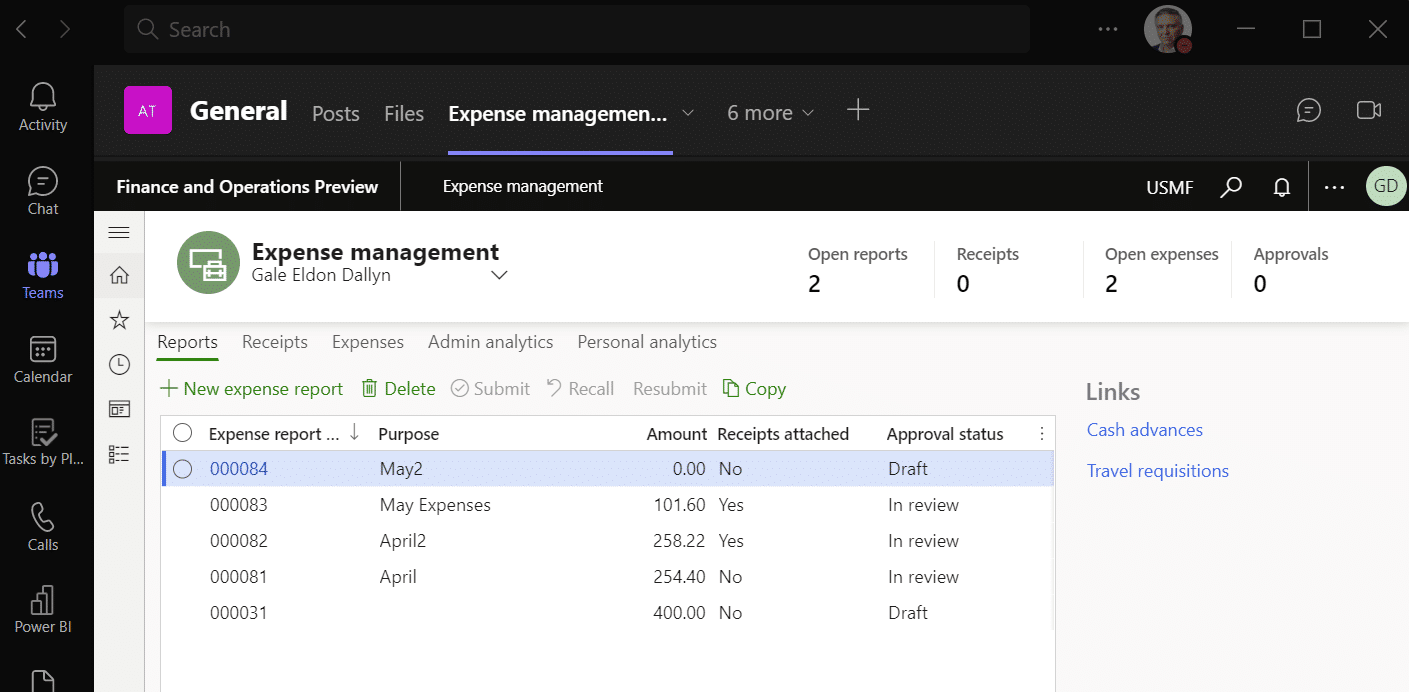
Out of the box, Dynamics 365 Finance and Operations connects with tools such as Excel, Outlook, Teams, Power BI, Power Automate, and other Dynamics 365 applications including Dynamics 365 Sales and Dynamics 365 Field Service. These native connections support real-time reporting, automated workflows, and cross-application data visibility without extensive custom development. For organizations already using Microsoft technologies, this ecosystem alignment reduces integration complexity and accelerates deployment timelines.
Native integration provides a strong starting point, but it does not eliminate the need for architecture planning. Many enterprises still require API-based integrations, data transformations, or middleware to connect third-party platforms, industry systems, or legacy applications. Microsoft-native interoperability creates a stable integration framework, while broader integration strategy ensures complete end-to-end connectivity across the enterprise.
Types of Dynamics 365 Finance & Operations integration approaches
Dynamics 365 Finance and Operations integration can be delivered in several ways depending on business requirements, data volume, timing expectations, and system architecture. Some integrations require real-time processing and ERP validation, while others prioritize performance and large data throughput. Choosing the correct integration method ensures system stability, accurate data exchange, and long-term scalability across the enterprise.
OData (Data entities)
OData integration in Dynamics 365 Finance and Operations uses REST-based web services to perform create, read, update, and delete (CRUD) operations in real time. It is a synchronous integration method, meaning requests are processed immediately and do not run in batch mode. OData is best suited for scenarios where business logic inside Dynamics 365 Finance and Operations must execute during data import or update. Because it relies on standard technologies such as HTTP and JSON, it provides a consistent and discoverable way for external systems to exchange data while ensuring ERP validation and posting rules are applied before transactions are committed.
OData in Dynamics 365 Finance and Operations is best suited for:
- Real-time data synchronization
- Executing ERP business logic during data updates
- Moderate transaction volumes with immediate response requirements
- Customer portals or external systems that require live status queries
- Integration scenarios where validation and approval workflows must run inside the ERP
Custom Service
Custom services in Dynamics 365 Finance and Operations integration are used when external systems need to retrieve or process data in real time and standard data entities are not sufficient. Developers can build custom services within Finance and Operations and expose them through SOAP or JSON (REST) endpoints. This method is commonly used for real-time lookups, such as checking on-hand inventory, validating transactions, or returning calculated data. Because the logic runs inside the ERP, responses reflect current data, validation rules, and business controls before information is returned to the calling system.
Custom service integration in Dynamics 365 Finance and Operations is best suited for:
- Real-time data lookups from external applications
- Inventory availability or calculated balance checks
- Scenarios requiring custom business logic execution
- SOAP or REST-based integrations
- Controlled ERP validation before returning results
Batch data API
Batch data API integration in Dynamics 365 Finance and Operations is designed for large-volume data imports and exports that do not require real-time processing. This approach is asynchronous, meaning requests schedule background batch jobs that process data later rather than immediately. Batch data APIs are commonly used when transaction volumes exceed hundreds of thousands of records or when integrations run on a scheduled basis. Because processing occurs in the background, this method reduces performance impact on the live system while handling high data throughput efficiently.
Batch data API integration in Dynamics 365 Finance and Operations is best suited for:
- Large-volume sales order or purchase order imports
- Scheduled data synchronization between enterprise systems
- Periodic data exports to warehouse or inventory systems
- High transaction volumes exceeding several hundred thousand records
- Scenarios where real-time response is not required
- Incremental or change-tracked data transfers across systems
This method is often the preferred choice for enterprise-scale integrations where stability, throughput, and performance control are more important than immediate response time.
External web service
External web service integration in Dynamics 365 Finance and Operations is used when the ERP needs to call data from another application. In this model, Dynamics 365 Finance and Operations acts as the integration client and sends requests to an external system hosted on-premises or by a SaaS provider. This approach is commonly used when business processes require external validation, calculations, or reference data. Proper authentication, security, and error handling are essential to ensure stable and secure communication between systems.
External web service integration in Dynamics 365 Finance and Operations is best suited for:
- Calling third-party tax or payment services
- Retrieving data from industry-specific platforms
- Validating transactions against external systems
- Real-time data requests initiated by the ERP
- Scenarios where Finance and Operations must consume external services
Power Platform
Power Platform integration in Dynamics 365 Finance and Operations connects the ERP to Power Automate, Power Apps, Power BI, and Microsoft Dataverse to enable low-code automation, shared data, and advanced analytics. This integration unlocks capabilities such as dual-write for near-real-time data synchronization, virtual entities for direct access to D365 Finance and Operations data without copying it, business events and data events for event-driven automation, and AI features powered by Copilot Studio and AI Builder. Power Platform integration is commonly used when organizations need workflow automation, cross-application data sharing, customer and sales synchronization, or embedded analytics without extensive custom development.
Power Platform integration in Dynamics 365 Finance and Operations is best suited for:
- Automating workflows using Power Automate
- Building custom apps with Power Apps that extend ERP data
- Enabling real-time data synchronization with dual-write
- Responding to ERP events through business or data events
- Accessing D365 Finance and Operations data through virtual entities
- Embedding analytics and dashboards with Power BI
- Enabling AI-driven capabilities and Copilot features
- Archiving data to Dataverse for long-term retention
Excel integration
Excel integration in Dynamics 365 Finance and Operations allows users to work with ERP data directly inside Microsoft Excel. Instead of exporting static spreadsheets, users can open live data in Excel, make controlled changes, and publish updates back to the system. This approach combines the flexibility of Excel with the governance of the ERP, making it easier for finance and operations teams to manage data in a familiar interface while maintaining system controls.
Excel integration in Dynamics 365 Finance and Operations is best suited for:
- Controlled data imports and exports using standardized templates
- Bulk updates to customers, vendors, products, or transactional data
- Financial analysis and ad hoc reporting in Excel
- Business users who require secure ERP data access in a familiar interface
- Scenarios where ERP validation must occur before publishing changes
- Structured workbook design using the Excel workbook designer
Choosing the right approach
Choosing the right Dynamics 365 Finance and Operations integration approach depends on data volume, timing requirements, business logic complexity, and system architecture. Real-time lookups require a different method than high-volume scheduled transfers. Some scenarios require ERP validation to run before data is committed, while others prioritize performance and throughput. A well-designed integration strategy evaluates how often data moves, how critical timing is, and which system owns the data before selecting the appropriate method.
Dynamics 365 Finance & Operations integration architecture patterns
Selecting the right integration method is only part of a successful Dynamics 365 Finance and Operations integration strategy. Long-term stability, scalability, and performance depend on how integrations are architected across the enterprise. A well-designed architecture defines system ownership, data flow direction, transformation rules, monitoring standards, and error handling processes before development begins.
Point-to-point integration
Point-to-point integration connects Dynamics 365 Finance and Operations directly to another system using APIs or services. While this approach can work for simple or isolated integrations, it becomes increasingly complex as more systems are added.
Best suited for:
- Limited integrations between two systems
- Low-complexity environments
- Clearly defined data ownership
- Short-term or isolated integration needs
Risks to consider:
- Increased maintenance as connections multiply
- Limited scalability
- Difficult troubleshooting across multiple direct connections
- Higher long-term technical debt
Hub-and-spoke (middleware or integration platform)
A hub-and-spoke architecture introduces a centralized integration layer, often built on Azure Integration Services or enterprise iPaaS platforms. Instead of connecting directly to Dynamics 365 Finance and Operations, external systems communicate through a managed integration hub that handles routing, transformation, logging, and monitoring.
Best suited for:
- Enterprises integrating multiple systems
- Complex data transformation requirements
- Scalable and governed environments
- Organizations requiring centralized monitoring and retry logic
Common technologies in this architecture often include Azure Logic Apps, Azure Service Bus, Azure API Management, and enterprise integration platforms (iPaaS). By centralizing integration management through these tools, organizations improve scalability, simplify troubleshooting, and establish a consistent framework for supporting future integrations.
Event-driven integration
Event-driven architecture uses business events or data events in Dynamics 365 Finance and Operations to trigger actions across connected systems. Instead of polling for changes, external systems respond automatically when predefined events occur, such as order confirmation, shipment posting, or invoice generation.
Best suited for:
- Near real-time process coordination
- Workflow automation
- Scenarios requiring immediate cross-system updates
- Reducing unnecessary system polling
Event-driven integration improves responsiveness while minimizing system load and preserving ERP validation controls.
Data synchronization and system-of-record design
One of the most critical architectural decisions in Dynamics 365 Finance and Operations integration is defining the system of record for each data domain. In most enterprises, D365 Finance and Operations owns financial and operational transactions, while CRM or other platforms may own customer interactions or marketing data.
A clearly defined system-of-record model prevents circular updates, duplicate records, and reconciliation issues. Without governance, bidirectional integrations can create data conflicts that undermine reporting accuracy.
Best practices include:
- Assigning authoritative ownership for master data domains
- Preventing uncontrolled bidirectional updates
- Defining conflict resolution rules
- Documenting data flow direction and transformation logic
Monitoring and error handling design
Integration architecture must include centralized logging, alerting, and exception handling. Without structured monitoring, integration failures may go undetected, leading to data inconsistencies and operational disruption.
Strong integration monitoring includes:
- Centralized logging across systems
- Automated alerts for failures or performance degradation
- Defined retry and exception-handling logic
- Clear ownership for issue resolution
Monitoring should be considered a foundational component of Dynamics 365 Finance and Operations integration architecture, not an afterthought added after go-live.
Common Dynamics 365 Finance & Operations integration scenarios
Dynamics 365 Finance and Operations integration delivers the most value when it supports daily operational workflows. Rather than treating integration as a technical exercise, organizations see stronger results when financial and operational systems are aligned around real business processes. The following examples show how common integrations connect departments, improve visibility, and reduce manual effort across the enterprise.
Dynamics 365 F&O + Power BI
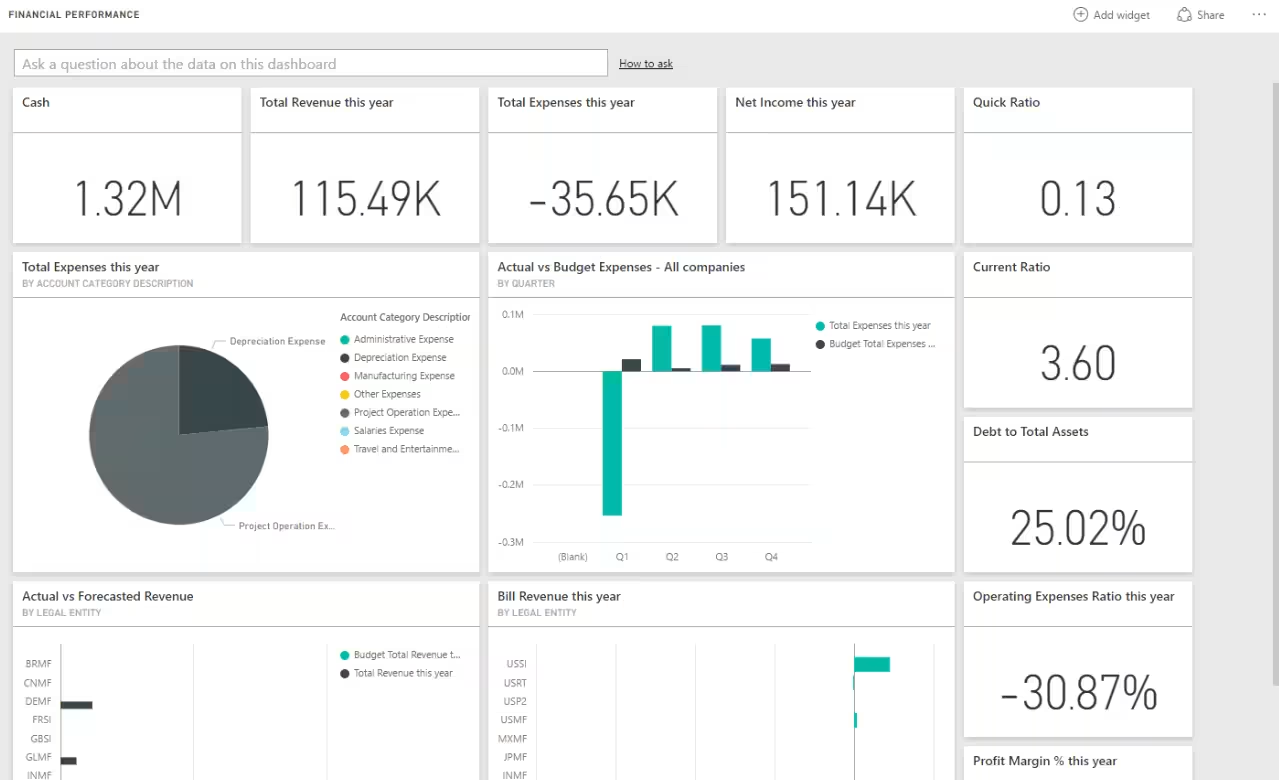
Dynamics 365 Finance & Operations and Power BI integration enables advanced ERP analytics and real-time performance reporting. While Finance and Operations includes built-in reporting tools, Power BI enhances visibility by delivering interactive dashboards, cross-company analysis, and deeper data modeling. This integration allows finance and operations leaders to move beyond static reports and analyze trends, KPIs, and operational performance across the enterprise.
Benefits of integrating Dynamics 365 Finance & Operations with Power BI include:
- Real-time dashboards for financial and operational metrics
- Cross-entity and cross-company performance visibility
- Drill-down reporting from summary KPIs to transaction-level detail
- Improved forecasting and trend analysis
- Centralized executive reporting across departments
- Secure, role-based access to analytics
- Enhanced decision-making with visual data insights
Dynamics 365 Finance & Operations + Dynamics 365 Field Service
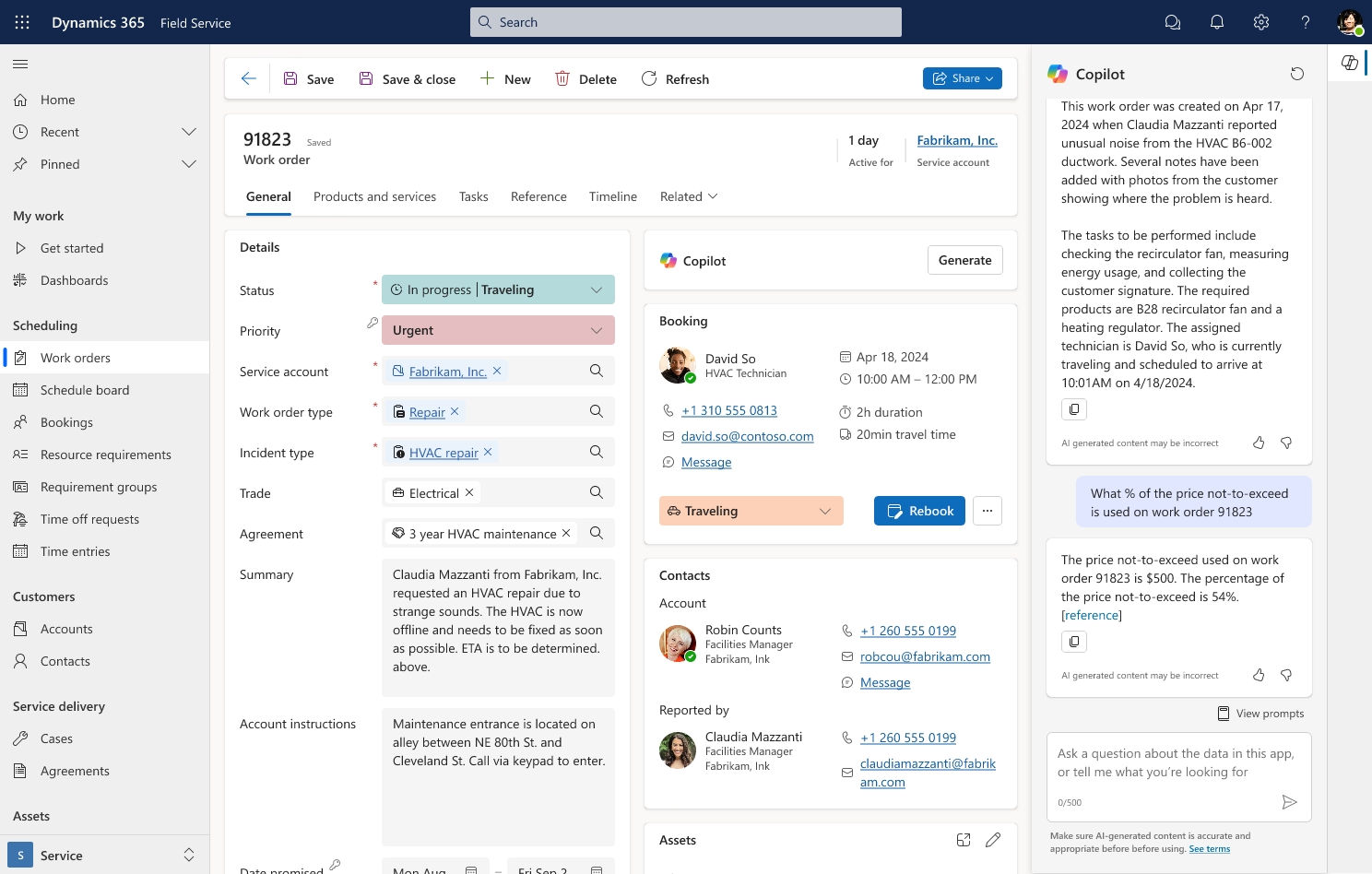
Integrating Dynamics 365 Finance and Operations with Dynamics 365 Field Service connects field operations directly to financial and supply chain data. This integration ensures that work orders, inventory usage, customer records, and billing information remain synchronized across both systems. With near real-time data sharing through tools such as dual-write, organizations gain a unified view of service activity and financial impact without manual reconciliation.
Benefits of integrating Dynamics 365 Finance & Operations with Dynamics 365 Field Service include:
- Automatic synchronization of customers, products, and pricing
- Real-time inventory visibility for field technicians
- Seamless work order to invoice processing
- Accurate revenue recognition tied to service activity
- Reduced manual data entry between service and finance teams
- Improved asset and contract management
- Stronger financial reporting tied to field operations
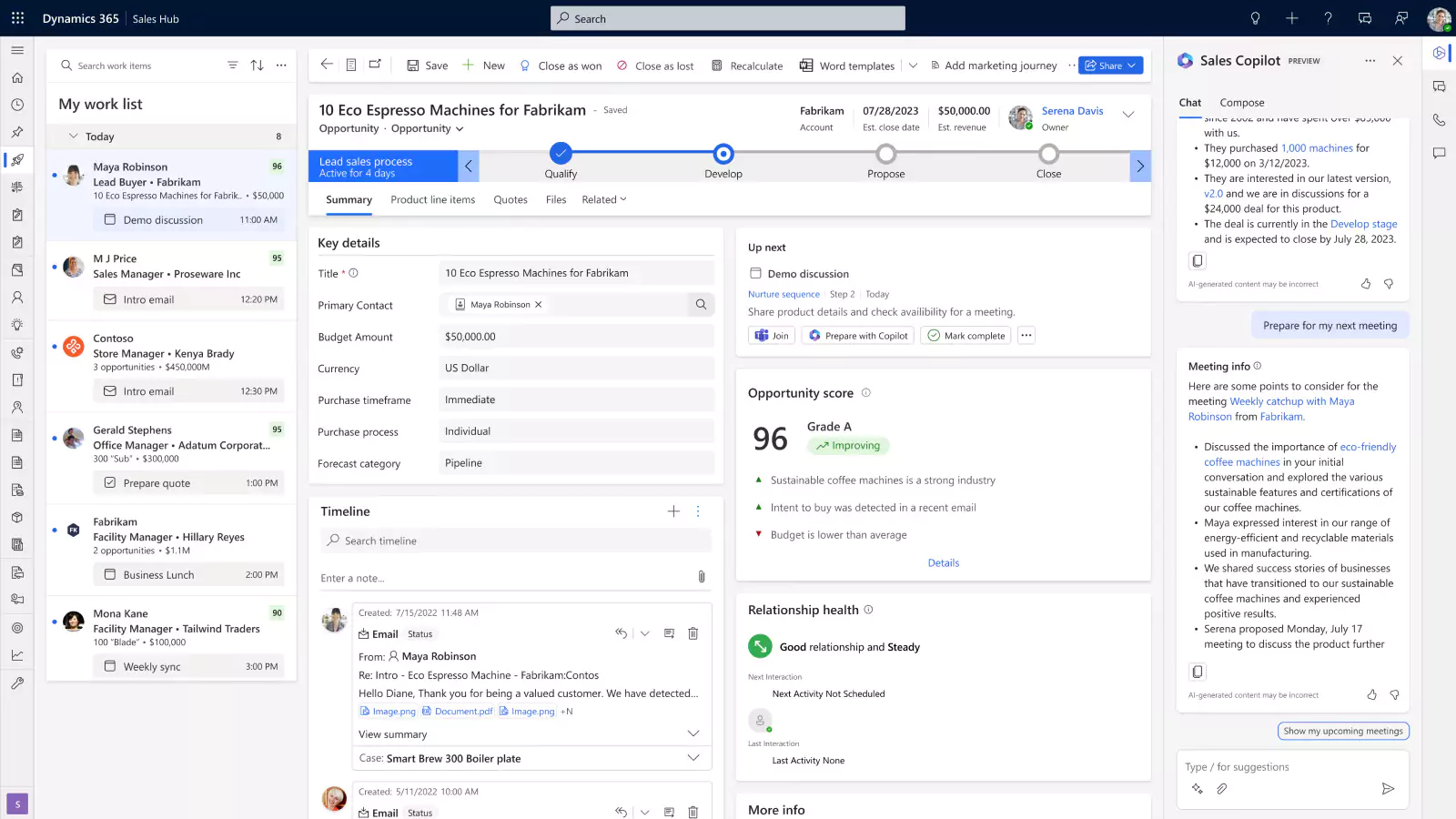
Dynamics 365 Finance & Operations + Dynamics 365 Sales (CRM integration)
Dynamics 365 Finance & Operations and Dynamics 365 Sales integration aligns sales, finance, and operations from lead to invoice. Customer accounts, product catalogs, pricing, and inventory data remain synchronized between systems, ensuring sales teams work with accurate information while finance maintains control over order processing and revenue tracking. This integration reduces manual handoffs and creates a seamless quote-to-cash process across the organization.
Benefits of integrating Dynamics 365 Finance & Operations with Dynamics 365 Sales include:
- Near real-time visibility into inventory and pricing for sales teams
- Automatic synchronization of customers, products, quotes, and sales orders
- Reduced errors from duplicate data entry
- Faster order processing and invoice generation
- Improved revenue recognition and financial forecasting
- Better customer experience through accurate order tracking
- Stronger alignment between sales performance and financial reporting
Dynamics 365 Finance & Operations + Ecommerce integration
Integrating Dynamics 365 Finance and Operations with ecommerce platforms connects online storefront activity directly to financial and operational processes. Ecommerce systems such as Magento (Adobe Commerce), Shopify, and BigCommerce are commonly integrated with Finance and Operations to synchronize orders, customers, pricing, inventory, and fulfillment status. This integration ensures that digital commerce transactions flow into the ERP system of record without manual re-entry or reconciliation.
Benefits of integrating Dynamics 365 Finance & Operations with ecommerce platforms include:
- Automatic creation of sales orders from online transactions
- Real-time inventory synchronization across ecommerce and ERP
- Centralized product, pricing, and promotion management
- Support for complex B2B pricing and contract structures
- Streamlined fulfillment and shipment tracking
- Improved financial visibility into ecommerce revenue
- Reduced manual reconciliation between online sales and accounting
- Scalable support for high-volume ecommerce operations

Dynamics 365 Finance & Operations + EDI integration
Dynamics 365 Finance and Operations EDI integration connects the ERP to trading partners, suppliers, logistics providers, and large retailers through standardized electronic document exchange. Common EDI transactions include purchase orders, invoices, advance ship notices (ASNs), and shipment confirmations. This integration is especially common in manufacturing, distribution, and retail environments where high transaction volume and compliance requirements demand automation.
Benefits of integrating Dynamics 365 Finance & Operations with EDI include:
- Automated purchase order and invoice processing
- Reduced manual data entry and keying errors
- Faster order-to-cash and procure-to-pay cycles
- Improved compliance with retailer and supplier requirements
- Greater visibility into shipment and fulfillment status
- Lower operational costs through document automation
- Scalable support for high transaction volumes
Integration costs and timelines
The cost and timeline of Dynamics 365 Finance and Operations integration depend on the complexity of the connection, how frequently data moves, and how much customization is required. Some integrations rely on configuration and standard services, while others require custom development, architecture design, and performance testing. Real-time integrations typically require more planning than scheduled batch transfers because they must support validation logic, error handling, and system responsiveness.
Enterprise integrations also require careful testing and governance. Even when native Microsoft capabilities such as dual-write or standard APIs are used, configuration, validation, and user acceptance testing are still necessary. Large-volume integrations using batch data APIs require performance tuning and monitoring. Custom services or API-based integrations require additional documentation, security review, and long-term maintenance planning.
Key factors that affect Dynamics 365 Finance and Operations integration cost and timeline include:
- Number of systems involved
- Real-time versus scheduled data movement
- Data volume and transaction frequency
- Level of custom business logic required
- Data mapping and transformation complexity
- Security, authentication, and compliance requirements
- Testing and validation cycles
- Ongoing monitoring and support expectations
Low complexity integrations
Low complexity integrations typically rely on standard connectors or well-defined APIs with limited data transformation requirements. These scenarios focus primarily on configuration, mapping, and structured testing rather than heavy custom development.
Common characteristics include:
- Native integrations such as dual-write between Dynamics 365 applications
- Power Platform-based workflow automation
- Limited data entities with clearly defined system ownership
- Low to moderate transaction volumes
- Minimal custom business logic
While considered lower complexity, these integrations still require validation, governance planning, and coordinated testing to ensure long-term stability.
Moderate complexity integrations
Moderate complexity integrations involve multiple systems, more advanced transformation logic, or tighter real-time coordination. These projects require stronger architectural planning and more structured development practices.
Common characteristics include:
- API-based integrations requiring custom data mapping
- Real-time synchronization with ERP validation rules
- Moderate to high transaction volumes
- Cross-system data ownership considerations
- Structured error handling and monitoring frameworks
These integrations typically require formal architecture design, development cycles, performance validation, and coordinated user acceptance testing across business teams.
High complexity integrations
High complexity integrations are often part of broader ERP transformation initiatives and enterprise modernization programs. They require disciplined architecture design and long-term operational governance.
Common characteristics include:
- Multiple interconnected enterprise systems
- A mix of real-time and batch processing
- Large transaction volumes or global operations
- Advanced data transformation and validation logic
- Custom services or specialized APIs
- Security and compliance review requirements
- Formal enterprise architecture governance
These integrations demand scalable architecture, structured documentation, comprehensive testing, and continuous monitoring to ensure performance and reliability across the enterprise.
Integration challenges and risks
Even with strong native capabilities, Dynamics 365 Finance and Operations integration introduces risk if it is not designed carefully. Poor integration architecture can lead to data inconsistencies, performance issues, and reporting errors that affect financial accuracy and operational control. Because Dynamics 365 Finance and Operations often serves as the system of record, integration failures can directly impact compliance, revenue recognition, inventory accuracy, and executive reporting.
Common Dynamics 365 Finance and Operations integration challenges include:
- Data mapping errors between source and target systems
- Inconsistent master data definitions across platforms
- Performance bottlenecks during high-volume processing
- Real-time integrations that strain system resources
- Security and authentication misconfigurations
- Inadequate error handling and monitoring
- Over-customization that complicates future upgrades
- Version changes or updates that disrupt integrations
This is why your Dynamics 365 Finance and Operations integration partner matters. The right partner designs integrations for stability, scalability, and long-term maintainability. Experience in architecture, governance, and enterprise integration ensures that systems remain secure, performant, and aligned with business growth.
Choosing the right Dynamics 365 Finance & Operations integration partner
Your integration partner directly impacts long-term system stability and performance. Dynamics 365 Finance and Operations integration is not just about connecting applications. It determines how accurate your financial data remains, how well systems scale, and how reliably processes run across departments. Poor integration design leads to broken data flows, reporting inconsistencies, and recurring manual fixes. Strong integration architecture builds control, governance, and flexibility into daily operations.
Rand Group brings enterprise integration experience across ERP, CRM, field service, analytics, project management, and industry-specific systems. We design D365 F&O integration strategies that align with real business workflows, not just technical requirements. Our team works across Microsoft technologies and third-party platforms to create secure, scalable connections that support financial integrity and operational efficiency.
- Multi-platform expertise: We integrate Dynamics 365 Finance and Operations with Microsoft applications, third-party systems, and proprietary platforms.
- Enterprise architecture design: We define system ownership, data governance, and integration patterns before development begins.
- Custom API and service development: We build scalable integrations for complex or specialized workflows.
- Data-first strategy: We establish transformation rules, validation controls, and monitoring frameworks to maintain accuracy.
- Full lifecycle delivery: We manage design, development, testing, deployment, and post-go-live support.
- Long-term optimization: We monitor performance and refine integrations as business requirements evolve.

Get a D365 F&O integration assessment
Every organization has unique integration requirements. Rand Group evaluates your existing systems and designs a tailored plan for connecting Dynamics 365 Finance and Operations to the rest of your technology environment. Our specialists identify risks, reduce inefficiencies, and build an integration strategy that aligns with your financial and operational goals.
Frequently asked questions
What is Dynamics 365 Finance and Operations integration?
Dynamics 365 Finance and Operations integration is the process of connecting the ERP to other business systems so data flows automatically between platforms. It allows financial, supply chain, and operational data to stay synchronized across applications. Proper integration improves accuracy, reduces manual work, and supports real-time visibility across the enterprise.
How does Dynamics 365 Finance and Operations integrate with other systems?
Dynamics 365 Finance and Operations integrates using APIs, OData services, batch data APIs, custom services, and Microsoft Power Platform tools. The method depends on whether the integration requires real-time processing, large data transfers, or custom business logic. Choosing the correct approach ensures performance, security, and long-term stability.
Is Dynamics 365 Finance and Operations integration real time?
Dynamics 365 Finance and Operations integration can be real time or scheduled. Real-time integrations use services such as OData or dual-write to process transactions immediately. High-volume integrations typically use batch data APIs to move data asynchronously in the background.
What is the best integration method for Dynamics 365 Finance and Operations?
The best integration method depends on data volume, timing requirements, and business logic. Real-time needs often use OData or custom services, while high-volume transfers use batch data APIs. The right choice balances performance, validation, and scalability.
What is dual-write in D365 F&O integration?
Dual-write is a Microsoft capability that synchronizes data between Dynamics 365 Finance and Operations and Dataverse in near real time. It keeps shared records such as customers and products aligned across Dynamics 365 applications. This reduces duplicate data entry and improves cross-system consistency.
What systems can D365 Finance and Operations integrate with?
Dynamics 365 Finance and Operations can integrate with CRM systems, banking platforms, warehouse management systems, e-commerce tools, HR software, analytics platforms, and industry-specific applications. It also connects natively with Microsoft 365, Power BI, Power Automate, and other Dynamics 365 applications. Most modern systems that support APIs or web services can be integrated.
What are common risks in D365 F&O integration?
Common risks include data mapping errors, inconsistent master data, performance bottlenecks, and security misconfigurations. Poorly designed integrations can impact financial accuracy and reporting reliability. Proper architecture, testing, and monitoring reduce these risks significantly.
Do I need an integration partner for Dynamics 365 Finance and Operations?
Most enterprises benefit from an experienced integration partner because Dynamics 365 Finance and Operations often serves as the system of record. Integration requires architecture planning, security controls, and governance to protect financial integrity. A qualified partner ensures integrations are scalable, compliant, and aligned with long-term business goals.
Next steps
A successful Dynamics 365 Finance and Operations integration strategy starts with clarity. You need to define which systems should connect, how data should move, and which platform owns financial and operational records. When these decisions are made early, integrations remain stable, reporting stays accurate, and your ERP continues to scale with the business.
If you are ready to improve data visibility and reduce manual processes, begin with a structured integration review. Rand Group can assess your current architecture, identify risks, and design a practical integration roadmap aligned to your operational goals. Contact us today to discuss your Dynamics 365 Finance and Operations integration strategy.