Dynamics 365
 Power Platform
 Dynamics
 Cloud & Productivity
Financial management in Microsoft Dynamics 365 Finance & Operations

Financial management is at the core of every successful organization. Yet many finance teams still rely on disconnected systems, spreadsheets, and manual processes to manage reporting, cash flow, and compliance. This slows down decision-making and increases the risk of errors.
Microsoft Dynamics 365 Finance & Operations changes that. It brings your financial operations into one unified, intelligent platform. It replaces manual, fragmented processes with automation, real-time visibility, and built-in controls. This blog covers everything you need to know about financial management in Dynamics 365 Finance & Operations. It explains what it includes, what it can do, and how it helps your organization work smarter.
What is financial management in Dynamics 365 Finance & Operations?
D365 Finance & Operations is Microsoft’s ERP platform designed for mid-market and enterprise organizations. It consists of two powerful applications: Dynamics 365 Finance and Dynamics 365 Supply Chain Management. Each application can be used on its own or together as a complete ERP system.
Dynamics 365 Finance is the application dedicated to financial management. It is the core of what most finance teams interact with day to day. It centralizes financial data from across your organization. It automates time-consuming tasks. And it supports global operations across multiple countries, currencies, and legal entities — all from one platform.
The financial management modules in Dynamics 365 Finance also connect directly to the broader Dynamics 365 Finance & Operations ecosystem. This includes supply chain management, procurement, and project operations. When a purchase order is received, the financial entry posts to the general ledger automatically. When a project incurs costs, those transactions flow into project accounting in real time. That level of integration turns financial management from a back-office function into a true strategic advantage.
Benefits of financial management in Dynamics 365 Finance & Operations
Consolidating your financial operations onto Dynamics 365 Finance & Operations delivers measurable business outcomes. Here are the key benefits:
- Faster financial close: Automated close workflows, intercompany eliminations, and journal automation reduce the time spent on month-end significantly. Your team closes the books faster — with fewer errors and less manual effort.
- Improved accuracy: Three-way invoice matching, automated bank reconciliation, and full audit trails cut data entry errors. Your financial records stay clean, reliable, and audit-ready at all times.
- Better cash flow visibility: Real-time cash positioning, AI-driven forecasts, and payment predictions give your treasury team a clear picture of liquidity. You can anticipate shortfalls and plan ahead — not react after the fact.
- Reduced manual processes: Invoice capture, payment proposals, bank reconciliation, and collections outreach all run with minimal manual effort. Your finance team spends less time on repetitive tasks and more time on work that drives value.
- Scalable global operations: Multi-entity, multi-currency, and multi-country support grows with your business. As you expand into new markets or add legal entities, Dynamics 365 Finance & Operations scales without adding operational complexity.

Everything you need to know about Dynamics 365 Finance & Operations pricing
Pricing and licensing for Dynamics 365 Finance & Operations can be complex. Our free guide breaks it all down — license types, base and attach options, user roles, implementation costs, and total cost of ownership. Use it to build a realistic budget and choose the right plan for your organization.
Capabilities of financial management in Dynamics 365 Finance & Operations
Here is a closer look at each module within the Dynamics 365 Finance & Operations capabilities suite. Each module is designed to address a specific area of financial management — and together they form a complete, connected system. Whether you use a handful of modules or the full suite, every capability is built on the same platform and shares the same data. That means no duplicate entries, no reconciling between systems, and no gaps in your financial picture.
General ledger
The general ledger is the backbone of your financial framework. It centralizes every financial transaction across your organization. Debits, credits, and journal entries all live in one place. This gives you one authoritative source of truth for your books.
The chart of accounts is fully configurable. You can design account segments to match your business structure. You can also share account structures across multiple legal entities. Financial dimensions let you tag every transaction by department, cost center, region, or project. This makes reporting more granular and more useful for decision-making.
Intercompany transactions post automatically between legal entities. Automated settlements and eliminations are included. Foreign currency balances revalue automatically as exchange rates change. This keeps your financials accurate in a multi-currency environment. The year-end close process runs in a structured, automated workflow. Closing entries, retained earnings transfers, and opening balances are handled by the system — not manually. The result is a single, accurate, and auditable record of your financial activity. Finance teams spend less time reconciling discrepancies and more time analyzing results. Leadership gets the reliable financial data they need to make confident decisions.

Accounts payable
Accounts payable automation in Dynamics 365 Finance & Operations gives your team full control over vendor invoices and outgoing payments. It automates the steps that slow AP teams down. These include invoice capture, matching, approvals, and payment runs.
Vendor invoices can be imported electronically and matched automatically against purchase orders and receipts. The system supports two-way and three-way invoice matching. Three-way matching compares the invoice against both the purchase order and the confirmed receipt. This prevents overpayment and enforces procurement governance. Invoices then route through configurable approval workflows based on amount thresholds, vendor type, or cost center. Once approved, payment proposals automate payment runs. They factor in due dates, early payment discounts, and available cash. Vendor aging reports give you a real-time view of outstanding payable balances.
The benefit is significant. AP teams shift away from manual data entry and chasing approvals. Instead, they focus on exception handling and vendor relationship management. Organizations reduce processing costs, avoid late payment penalties, and gain tighter control over outgoing cash.

Accounts receivable
Accounts receivable helps your team manage customer invoicing, collections, and cash application. It keeps cash flowing in and reduces days sales outstanding.
Customer invoices generate directly from sales orders or are created manually. Multiple formats and electronic delivery options are supported. The collections workspace centralizes all overdue accounts in one view. It includes collection letters, activity tracking, credit limit management, and account notes. Your collections team can work efficiently without jumping between screens.
Customer aging analysis shows what customers owe and how long each balance has been outstanding. This helps your team prioritize who to contact first. Incoming payments apply to open invoices automatically through settlement rules. Interest charges also calculate and post automatically on overdue balances.
The impact is clear. Organizations using Dynamics 365 Finance & Operations AR capabilities collect faster and reduce the manual effort behind every payment. Finance teams have a complete, real-time picture of what is owed — and the tools to act on it quickly.

Cash and bank management
Cash and bank management gives your treasury team real-time visibility into your cash position. It also gives them the tools to manage cash proactively — not reactively.
Multiple bank accounts, bank groups, and payment formats are managed in one place. Bank statements import electronically. The system then uses automated matching rules for bank reconciliation. This significantly cuts the time your team spends reconciling manually. Cash flow forecasting pulls data from accounts payable, accounts receivable, and payment terms. It projects your short- and long-term liquidity positions dynamically. Electronic payment formats — including ACH and SEPA — are built in and configurable per bank account.
The benefit for treasury teams is meaningful. Rather than piecing together cash positions from multiple sources, everything is visible in one place. Teams can anticipate shortfalls, plan funding needs, and make smarter decisions about when and how to deploy cash.

Fixed assets
Fixed assets in Dynamics 365 Finance & Operations cover the complete lifecycle of your capital assets. This goes from acquisition through depreciation to disposal.
Asset purchases and constructions are recorded and automatically linked to asset books. Depreciation methods include straight-line, reducing balance, and sum-of-years’ digits. Each method is configured per asset book. This allows you to maintain separate rules for tax and financial reporting purposes. When assets are retired or sold, disposal transactions post automatically. Gain or loss calculations flow directly to the general ledger. The asset leasing module manages operating and finance leases. It supports compliance with both ASC 842 and IFRS 16 standards.
For organizations managing large asset portfolios, this reduces a significant amount of manual tracking. It ensures depreciation runs accurately and on schedule. It also keeps your asset records audit-ready at all times.

Budgeting and budget control
Budgeting and budget control in Dynamics 365 Finance & Operations moves budget planning out of spreadsheets. It brings budgeting into a structured, controlled environment. Spend limits enforce against actual transactions in real time.
Budget plans are built collaboratively across departments. Teams use Excel-integrated worksheets to enter and refine their budgets. Workflow-driven approvals route submissions through the right reviewers before budgets are finalized. Once approved, budgets post as budget register entries. This creates the baseline for control and reporting. Budget control rules check available budget automatically before any transaction posts. This stops overspending before it happens — not after the fact. Encumbrance accounting reserves budget when a purchase order is raised. It does not wait for the invoice to arrive. Budget vs. actuals reporting runs in real time across financial dimensions.
The benefit is stronger financial discipline across the organization. Budget owners stay accountable. Finance teams get early warning of potential overruns. And leadership has a real-time view of how spending tracks against plan — without waiting for the month-end report.

Financial reporting and analytics
Reporting is where all your financial data comes together and becomes actionable. Financial reporting in Dynamics 365 Finance & Operations gives finance teams the tools to produce regulatory statements and executive-level analytics. No spreadsheet exports or IT requests are needed.
The built-in Financial Reporter — previously known as Management Reporter — lets finance users build income statements, balance sheets, and cash flow statements. A dedicated report designer is included. No developer is required. Reports support multiple columns, comparison periods, and organizational hierarchies. Producing entity-level and consolidated financial statements is straightforward.
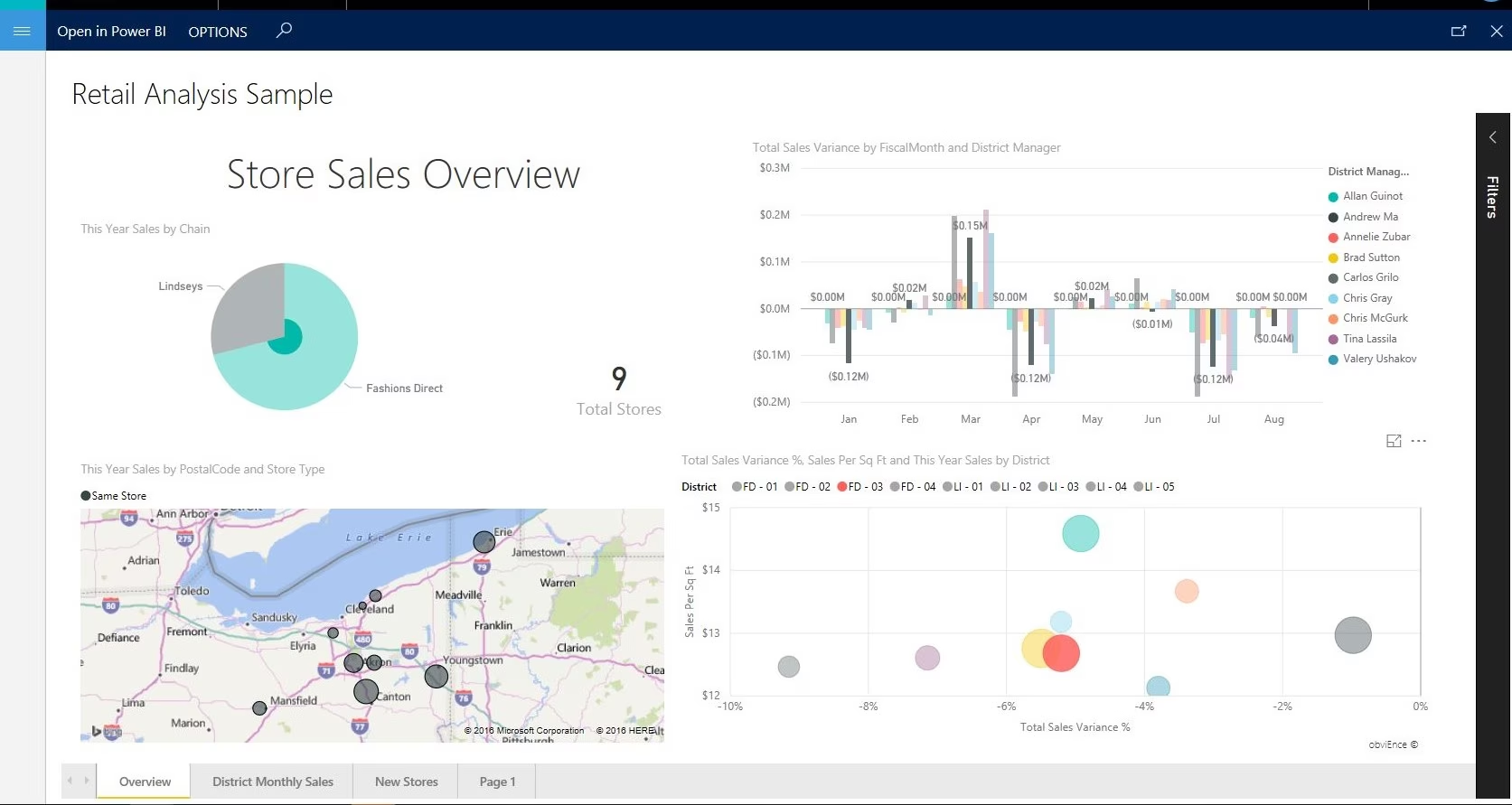
Connecting Power BI to Dynamics 365 Finance & Operations enables interactive dashboards that update in real time. Users can drill from high-level KPIs down to individual transaction detail in a few clicks. Role-based workspaces surface the right analytics for each user. This applies whether they work in AP, AR, treasury, or the executive team.
The outcome is faster, more confident decision-making. Finance leaders no longer wait for reports to be compiled manually. The data they need is already there — accurate, up to date, and presented in the format that is most useful to them.
Tax management
Tax management in Dynamics 365 Finance & Operations automates tax calculation and compliance reporting across jurisdictions. It reduces compliance risk as your business grows or expands into new markets.
Sales tax rules determine which taxes apply to each transaction. They are configured using sales tax groups and item tax groups. Tax codes define the rates, calculation methods, and ledger posting rules for each tax type. Withholding tax calculates and reports automatically on applicable vendor payments. VAT returns and compliance reports generate automatically for countries that require them. For complex, multi-jurisdiction scenarios, the tax calculation service integrates with third-party engines such as Avalara. This handles advanced tax determination logic without custom development.
The benefit is confidence at every transaction. Tax calculates correctly at the point of entry. Compliance reports generate automatically. And your team spends less time manually reviewing tax entries or correcting filing errors.
Global financial management and compliance
Organizations that expand across borders face much greater financial complexity. Dynamics 365 Finance & Operations is purpose-built for exactly this challenge.
The platform supports multiple legal entities. Each entity can have its own chart of accounts, fiscal calendar, and reporting currency. At the same time, group-level consolidations roll up results from all entities automatically. Currency revaluation and consolidation tools handle foreign exchange adjustments automatically. Your consolidated reports reflect accurate, current values at all times.
Dynamics 365 Finance & Operations includes built-in localization support for over 40 countries. This covers country-specific tax rules, statutory reporting requirements, and standard payment formats. The electronic reporting framework generates regulatory filings in country-specific formats. This includes VAT returns and statutory financial statements.
This makes Dynamics 365 Finance especially well-suited for mid-market and enterprise organizations. It fits companies managing complex intercompany structures, multiple regional subsidiaries, or international expansion.
Automation and AI in financial management
AI and automation are deeply woven into everyday financial workflows in Dynamics 365 Finance & Operations. They are not optional add-ons. They are built directly into the platform. This means your finance team benefits from intelligent assistance from day one — without waiting for a separate implementation or integration. As your organization grows, these capabilities scale with you — handling greater transaction volumes and complexity without adding headcount.
Microsoft Copilot in Dynamics 365 Finance & Operations
Microsoft Copilot in Dynamics 365 Finance & Operations gives finance teams an AI assistant that works right inside the ERP system. It allows users to interact with financial data using natural language for specific tasks, helping them surface insights faster and reduce manual effort.
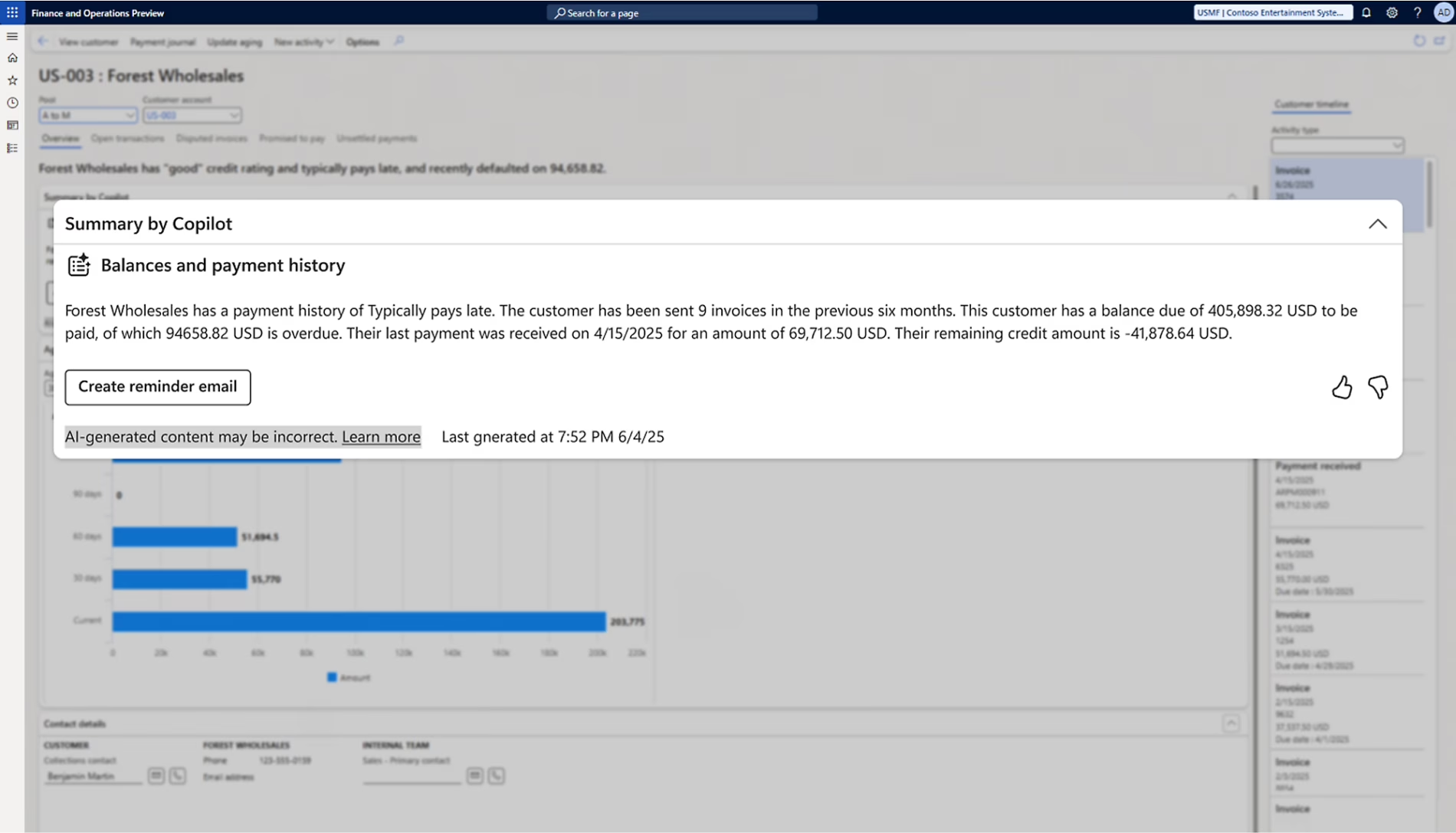
Copilot enhances the collections workspace with AI-generated account summaries, including outstanding balances, payment history, and risk indicators. It can also assist in drafting collection reminder emails, helping teams communicate more efficiently. During the financial close process, Copilot highlights anomalies, explains variances, and flags transactions that may require review. This supports faster and more informed decision-making during period-end activities.
While Copilot continues to expand across the platform, it is designed to assist—not replace—financial processes. Finance teams still maintain control over reviews, approvals, and final decisions.
Finance Insights and AI-driven forecasting
Finance Insights applies machine learning to financial data to support more accurate forecasting and prioritization. It analyzes historical patterns and transaction data to provide practical, data-driven recommendations.
AI-based payment predictions help teams identify which customers are likely to pay late, allowing collections efforts to be prioritized more effectively. Cash flow forecasting uses real transaction behavior and trends to generate dynamic projections, giving finance teams better visibility into future liquidity. Vendor invoice automation helps capture, classify, and route invoices with reduced manual input, improving efficiency while maintaining oversight.

AI agents
AI agents in Dynamics 365 Finance & Operations go further than Copilot. They run in the background and automate high-volume, repetitive finance tasks. The account reconciliation agent is a good example. It analyzes transactions, identifies matching entries, and flags discrepancies automatically. This helps finance teams close periods faster while maintaining strong controls. These agents operate within your defined security roles and business rules. Automation happens in a governed, auditable way.


Ready to modernize your financial operations?
Discover how Dynamics 365 Finance & Operations can replace your manual processes with automation, real-time visibility, and intelligent controls. Our team will walk you through a personalized demo tailored to your business — no pressure, no generic slides.
Transform your financial management journey with Rand Group
At Rand Group, we help mid-market and enterprise organizations get the most out of Dynamics 365 Finance & Operations. Whether you are implementing for the first time or optimizing an existing deployment, our team is ready to help. We also support organizations migrating from legacy systems like Dynamics AX. Our team brings deep expertise across every module of Dynamics 365 Finance & Operations.
We work with organizations across manufacturing, oil and gas, professional services, construction, and other regulated industries. These are environments where financial complexity is high. The cost of errors is real. Our consultants understand both the technology and the business processes that sit behind it. That combination is what drives successful outcomes.
Our services cover the full lifecycle of your D365 Finance & Operations investment. We deliver structured Dynamics 365 Finance & Operations implementations with clear milestones and minimal disruption. We provide tailored Dynamics 365 Finance & Operations training programs that get your team working confidently from day one. We also offer ongoing Dynamics 365 Finance & Operations support to keep your system optimized as your business evolves.
Frequently asked questions
What is financial management in Microsoft Dynamics 365 Finance & Operations?
Financial management in Dynamics 365 Finance & Operations is a set of integrated modules that manage an organization’s financial data, transactions, and reporting in one system. It includes general ledger, accounts payable, accounts receivable, cash and bank management, fixed assets, budgeting, reporting, and tax management. These capabilities help organizations automate processes, maintain compliance, and gain real-time financial visibility.
What financial management features are included in D365 Finance & Operations?
Dynamics 365 Finance & Operations includes core financial capabilities such as general ledger, accounts payable, accounts receivable, cash flow forecasting, fixed asset management, budgeting, and financial reporting. It also supports financial dimensions, multi-entity consolidation, Power BI analytics, and built-in tax management. These features work together to provide accurate reporting and better financial control.
Can Dynamics 365 Finance & Operations automate accounts payable and accounts receivable processes?
Yes, Dynamics 365 Finance & Operations automates both accounts payable and accounts receivable processes. On the accounts payable side, it supports invoice capture, two-way and three-way matching, approval workflows, and automated payment runs. On the accounts receivable side, it automates invoicing, payment application, collections tracking, and interest calculations. AI-driven tools can also predict payment behavior and prioritize collections.
Is D365 Finance & Operations suitable for multi-entity and global financial management?
Yes, Dynamics 365 Finance & Operations is designed for multi-entity and global financial management. It supports multiple legal entities, currencies, and fiscal calendars within a single system. Intercompany transactions, consolidations, and eliminations are automated. The platform also includes localization for over 40 countries to support regional tax and compliance requirements.
What AI or Copilot financial features are available in D365 Finance & Operations?
Dynamics 365 Finance & Operations includes built-in AI capabilities such as Microsoft Copilot and Finance Insights. Copilot allows users to interact with financial data using natural language, generate summaries, and automate tasks like collections communication. Finance Insights provides payment predictions, cash flow forecasting, and invoice automation. AI agents can also handle tasks like account reconciliation in the background. For more on this topic, read our blog on harnessing the power of AI in Dynamics 365 Finance & Operations.
What size of organization is Dynamics 365 Finance & Operations best suited for?
Dynamics 365 Finance & Operations is best suited for mid-market and enterprise organizations with complex financial requirements. It is ideal for companies managing multiple entities, operating across countries, or working in regulated industries. Smaller organizations with simpler needs may find a better fit with Dynamics 365 Business Central. Read our comparison of Dynamics 365 Finance & Operations vs. Business Central to find out which platform suits your organization.
Next steps
Financial management is no longer just about closing the books on time. It is a strategic function. It drives better decisions, stronger controls, and faster growth. Dynamics 365 Finance & Operations gives you the platform to make that shift. You move from reactive, manual finance to proactive, intelligent financial management.
If you are ready to explore what D365 F&O can do, contact Rand Group for a Dynamics 365 Finance & Operations demo. Our team will assess your current financial processes. We will identify where D365 Finance & Operations adds the most value.