Dynamics 365
 Power Platform
 Dynamics
 Cloud & Productivity
What is Microsoft Dynamics 365 Supply Chain Management? Features, pricing, and benefits

Managing a complex supply chain requires more than tracking inventory. Businesses need to coordinate purchasing, production, warehouses, transportation, suppliers, assets, and customer demand while keeping teams working from reliable data.Microsoft Dynamics 365 Supply Chain Management (D365 SCM) is a cloud-based ERP application that connects these processes. It supports inventory, procurement, manufacturing, warehouse management, supply chain planning, transportation, asset management, product information, and other operational processes. For organizations with complex supply chains, Dynamics 365 Supply Chain Management can provide the visibility and control needed to make informed decisions, improve operational efficiency, and respond to changes in supply and demand.
At a glance
Dynamics 365 Supply Chain Management is Microsoft’s ERP application for managing complex supply chain and operational processes. It connects inventory, procurement, planning, manufacturing, warehousing, transportation, asset management, and product information so organizations can manage more of their supply chain from a connected platform.
What is D365 Supply Chain Management?
Microsoft Dynamics 365 Supply Chain Management is a cloud-based ERP application designed to help organizations manage and connect supply chain operations. It is commonly used by manufacturers, distributors, and other organizations with complex inventory, production, procurement, warehouse, and logistics requirements.
Dynamics 365 Supply Chain Management is one of the core applications that make up Dynamics 365 Finance & Operations. While Dynamics 365 Finance focuses primarily on financial management, Dynamics 365 Supply Chain Management extends the ERP environment into operational areas such as inventory, purchasing, manufacturing, warehousing, planning, and transportation.
Organizations can use Dynamics 365 Supply Chain Management on its own or alongside Dynamics 365 Finance to connect financial and operational processes. It also works within the broader Microsoft ecosystem, including Power BI, Power Apps, Power Automate, and other Dynamics 365 applications.

What does Dynamics 365 Supply Chain Management do?
Dynamics 365 Supply Chain Management helps organizations manage the flow of products, materials, information, and operational processes across the supply chain.
Businesses can use the application to:
- Plan supply and demand based on operational requirements
- Manage purchasing and supplier processes
- Track inventory across sites, warehouses, and locations
- Manage inbound and outbound warehouse operations
- Plan and execute manufacturing
- Maintain product information
- Coordinate transportation and shipments
- Manage equipment and maintenance
- Support quality management and product traceability
Bringing these processes into a connected ERP environment can reduce reliance on disconnected applications, spreadsheets, and manual processes while giving teams greater visibility into operations.
Benefits of Dynamics 365 Supply Chain Management
Dynamics 365 Supply Chain Management connects information across supply chain processes so teams can make decisions based on a more complete view of operations.
Key benefits include:
- Greater operational visibility: Connect inventory, purchasing, production, warehousing, transportation, and fulfillment data to create a clearer view of supply chain activity.
- Better inventory and warehouse control: Improve visibility into product availability while standardizing receiving, put-away, picking, replenishment, packing, counting, and shipping processes.
- More responsive planning: Use supply and demand information to support purchasing, replenishment, production, and capacity decisions.
- Connected manufacturing and traceability: Coordinate materials, production, resources, quality, and costing while tracking inventory through lots, batches, serial numbers, and related processes.
- Greater scalability: Support growing transaction volumes, product catalogs, warehouses, facilities, and operational requirements within a connected ERP platform.
Dynamics 365 Supply Chain Management features and capabilities
Dynamics 365 Supply Chain Management includes functionality across the supply chain. Organizations can configure and use capabilities that align with their operational requirements.
Key capabilities include:
- Inventory management: Manage inbound and outbound inventory, inventory movements, reservations, transfers, counting, costing, and availability across sites and warehouses. Learn more about inventory management with Dynamics 365 Supply Chain Management.
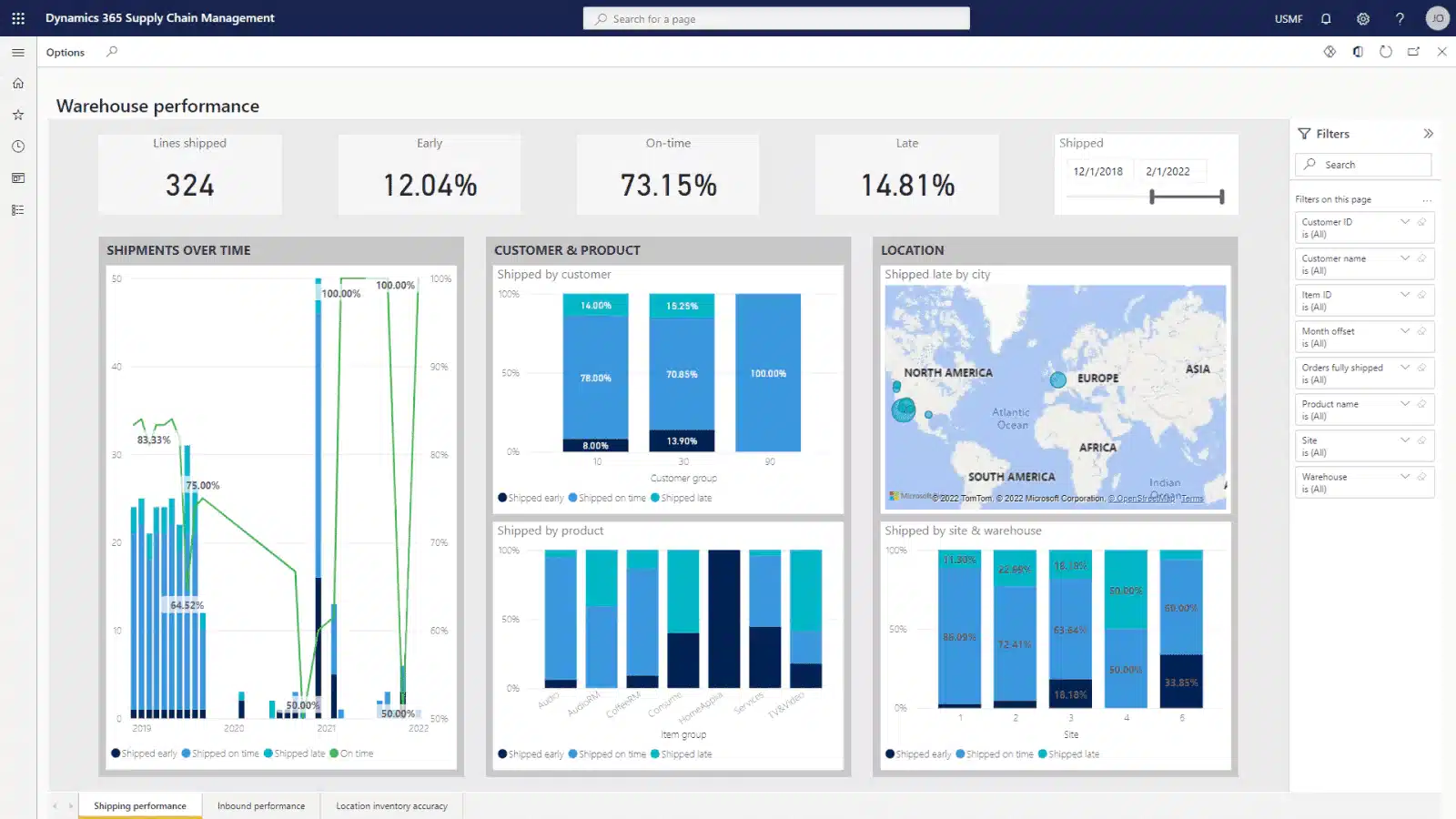
- Warehouse management: Manage receiving, put-away, replenishment, picking, packing, cycle counting, shipping, and other warehouse processes. Advanced warehouse management supports configurable workflows, mobile warehouse processes, wave processing, location directives, and multiple picking strategies. For a deeper look, read our overview of warehouse management in Dynamics 365 Finance & Supply Chain Management.
- Supply chain planning and demand forecasting: Plan materials and capacity based on supply and demand requirements. Planning capabilities help organizations create planned orders, identify requirements, and respond to changing demand.
- Procurement and sourcing: Manage purchasing processes from identifying requirements through purchase orders, receiving, and vendor invoicing. Organizations can configure purchasing policies, workflows, vendors, and sourcing processes around their procurement requirements.
- Manufacturing and production control: Manage production orders, bills of materials, formulas, routes, resources, capacity, scheduling, and shop floor processes. Dynamics 365 Supply Chain Management supports discrete, process, lean, and mixed-mode manufacturing scenarios.
- Product information management: Centralize product information used throughout procurement, inventory, manufacturing, sales, and other operational processes. Businesses can manage released products, product variants, attributes, categories, and other product data.
- Transportation management: Plan inbound and outbound transportation, manage loads and shipments, work with carriers, evaluate routes and rates, and coordinate transportation with warehouse processes.
- Asset management: Manage equipment and other assets throughout their operational lifecycle. Businesses can create assets, schedule maintenance, manage maintenance requests, create work orders, and plan preventive maintenance.
- Quality management and traceability: Establish quality processes throughout inventory and manufacturing operations. Businesses can manage quality orders, testing, nonconformance, and inventory traceability to support product quality and operational control.
Together, these capabilities allow organizations to manage interconnected supply chain processes within the same ERP environment rather than maintaining separate systems for inventory, manufacturing, warehousing, and other operational functions.
How AI, Copilot, and AI agents support Dynamics 365 Supply Chain Management
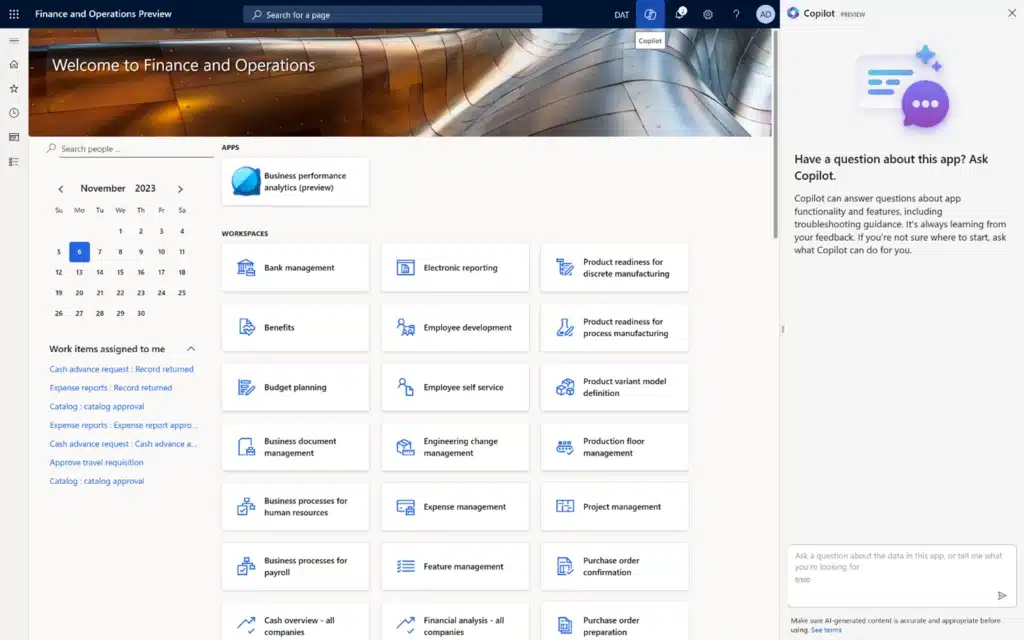
Microsoft continues to add AI, Copilot, and agent capabilities to Dynamics 365 Supply Chain Management. These tools can help users analyze supply chain information, identify issues, reduce repetitive work, and respond to changes.
Examples of AI-assisted capabilities include:
- Demand planning insights: Generative AI can help planners analyze demand plans, identify patterns, and understand information that may affect forecasts.
- Warehouse workload insights: Copilot can provide insights into pending warehouse work, including picking, receiving, and workforce information.
- Purchase order change analysis: AI-assisted functionality can help procurement teams understand purchase order changes and their downstream impact.
- Forecast analysis: AI capabilities can help planners review demand forecasts and forecast accuracy.
- Operational summaries: Copilot can summarize supply chain information so users can review important data faster.
Dynamics 365 Supply Chain Management is also introducing AI agents in Dynamics 365 Finance & Operations that can perform or coordinate specific business tasks.
The Procurement Agent is one example. Its supplier communications capabilities, currently available as a production-ready preview, can help procurement teams follow up with suppliers, interpret supplier responses, identify proposed purchase order changes, and surface information for review. The agent can also analyze how supplier changes may affect inventory availability, production orders, transfer orders, or customer deliveries, giving purchasers more context before they act.
Agent availability, licensing, Copilot Credit consumption, and release status vary by capability. Organizations should confirm current requirements before deployment. For a broader look at these capabilities, read how Copilot works in Dynamics 365 Finance & Operations.
Who should use Dynamics 365 Supply Chain Management?
Dynamics 365 Supply Chain Management is designed for organizations that need greater depth across inventory, procurement, manufacturing, warehousing, planning, transportation, and other operational processes.
It can be a strong fit for organizations that:
- Operate multiple warehouses, plants, or distribution locations
- Manage large or complex inventories
- Have advanced procurement and supplier requirements
- Manufacture products using complex production processes
- Need sophisticated warehouse management
- Require advanced supply and demand planning
- Need product, lot, batch, or serial traceability
- Manage equipment that requires ongoing maintenance
- Operate across multiple entities, locations, or countries
- Need financial and supply chain processes to work within a connected ERP environment
Distributors with complex pricing, inventory, rebate, and multi-warehouse requirements can benefit from the connected capabilities described in our guide to Dynamics 365 Finance & Supply Chain Management for distributors. For manufacturers, the fit becomes especially strong when production involves multiple facilities, detailed production planning, quality control, traceability, advanced warehousing, or other interconnected processes. Learn how Dynamics 365 Finance & Supply Chain Management supports complex manufacturing.
Organizations managing engineered products, project-driven production, or complex bills of materials can also explore D365 Finance & Supply Chain Management for engineer-to-order manufacturing. The right fit depends on operational complexity rather than company size or industry alone. Organizations with relatively straightforward financial, inventory, warehouse, and manufacturing requirements may not need the depth of Dynamics 365 Supply Chain Management. In those cases, Dynamics 365 Business Central may better align with their needs. For a deeper comparison of Microsoft’s ERP options, read Dynamics 365 Finance & Operations vs. Business Central.
Dynamics 365 Supply Chain Management vs. Dynamics 365 Finance
Dynamics 365 Supply Chain Management and Dynamics 365 Finance are two core ERP applications within Dynamics 365 Finance & Supply Chain Management. They can be deployed independently or together, depending on an organization’s requirements. The following table highlights the primary functional areas associated with each application. Some capabilities span financial and operational processes, so the applications are designed to work together rather than operate as completely separate functional systems.
Dynamics 365 Finance focuses primarily on financial management, accounting, budgeting, and project accounting, while Dynamics 365 Supply Chain Management focuses primarily on procurement, inventory, production, warehousing, transportation, asset management, and related operational processes.
When organizations use the applications together, operational activity can flow into financial processes within the same ERP environment. To understand how the applications work together, read what Dynamics 365 Finance & Supply Chain Management is and how its applications work together.
How much does Dynamics 365 Supply Chain Management cost?
Microsoft offers two primary Dynamics 365 Supply Chain Management plans:
A few additional licensing considerations include:
- Premium includes 1,000 Copilot Credits per user/month and is designed for organizations with more advanced planning, analytics, and AI requirements.
- Team Members is not a substitute for a full Supply Chain Management license when users perform broader operational processes.
- Additional Copilot Credits may be required depending on AI agent usage.
- Implementation, migration, integrations, customizations, training, and support are separate from the software subscription.
Organizations that use more than one qualifying Dynamics 365 application may also be able to use Microsoft’s base and attach licensing model. For example, eligible users with Dynamics 365 Supply Chain Management as their base application can license Dynamics 365 Finance as an attach application for $30 per user, per month.
D365 Supply Chain Management licensing and pricing
Pricing and licensing for D365 F&SCM is subscription based per user or device to provide flexibility and scalability for your organization. Download this guide to learn more about pricing, user types, licensing options, and other considerations.
What does a Dynamics 365 Supply Chain Management implementation involve?
A Dynamics 365 Supply Chain Management implementation should begin with the business processes the ERP needs to support rather than with software configuration.
A typical implementation can include:
- Discovery and process assessment: Identify current processes, pain points, requirements, integrations, and business objectives.
- Solution design: Determine how Dynamics 365 Supply Chain Management should support inventory, purchasing, manufacturing, warehousing, planning, and other required processes.
- Configuration and development: Configure the application and determine whether integrations, extensions, or custom development are required.
- Data migration: Prepare, clean, map, and migrate relevant data from legacy systems.
- Testing: Validate business processes, integrations, data, security, and system performance.
- Training and change management: Prepare users for new workflows and responsibilities before deployment.
- Go-live: Move the configured environment and required data into production.
- Post-go-live support: Resolve issues, train users, introduce additional capabilities, and continue optimizing processes.
Implementation scope can vary significantly. A distributor implementing inventory, procurement, and warehouse management has different requirements from a multi-site manufacturer that also needs complex production, planning, quality, transportation, and system integrations.
Working with an experienced Dynamics 365 F&SCM implementation partner can help organizations map these requirements before configuration begins and build an implementation plan around actual business processes.
How does Dynamics 365 Supply Chain Management work with other Microsoft products?
Dynamics 365 Supply Chain Management can work with other Microsoft business applications and productivity tools to extend how organizations use operational data.
Common connections include:
- Dynamics 365 Finance: Connect financial management with procurement, inventory, manufacturing, and other supply chain processes.
- Power BI: Analyze supply chain information through reports and dashboards.
- Power Apps: Build applications that extend or support specific business processes.
- Power Automate: Automate workflows and approvals between applications and business processes.
- Microsoft 365: Support collaboration and productivity alongside ERP processes.
- Microsoft Copilot: Extend AI-assisted experiences across Microsoft applications.
For organizations already invested in Microsoft technology, these connections can help reduce information silos and extend ERP data into reporting, automation, collaboration, and other business workflows.

Build a supply chain ERP strategy around your operations
Dynamics 365 Supply Chain Management can connect inventory, purchasing, manufacturing, warehousing, planning, and transportation within one ERP environment. Rand Group can help determine which capabilities fit your operational requirements.
Why work with Rand Group for Dynamics 365 Supply Chain Management?
Supply chain ERP projects cross multiple departments and business processes. Decisions about inventory can affect purchasing, manufacturing, warehousing, fulfillment, costing, and finance. A successful implementation requires technical ERP expertise and an understanding of how these processes work together.
Rand Group brings over 20 years of experience helping organizations evaluate, implement, support, and improve business technology. Our 90% client retention rate reflects the long-term relationships we build with organizations beyond the initial implementation.
Our Dynamics 365 Finance & Operations team works across financial, supply chain, manufacturing, warehouse, technical, integration, and reporting requirements. This cross-functional experience helps us look beyond individual features and understand how changes in one part of an ERP environment affect other processes.
Rand Group provides Dynamics 365 Finance & Operations consulting services across the ERP lifecycle, including:
- ERP evaluation and selection and planning
- Dynamics 365 data migration
- Microsoft system integrations and Dynamics 365 SCM development
- Microsoft reporting and analytics
- Training and user adoption
- Ongoing support
Our relationship with clients also continues after go-live. As requirements change, we help organizations optimize processes, adopt new functionality, integrate additional systems, and train users.
Real-world results with Dynamics 365 Supply Chain Management
Rand Group has helped organizations use Dynamics 365 Finance & Operations to connect purchasing, inventory, manufacturing, financial, and other operational processes.
Conquest Completion Services improves purchasing and inventory management
Conquest Completion Services’ Dynamics 365 Finance & Operations implementation replaced QuickBooks, Excel spreadsheets, and paper documents used to manage financial and operational processes. The disconnected systems made it difficult to track inventory, understand manufacturing costs, approve purchase orders quickly, and access timely information.
Rand Group helped Conquest select and implement Dynamics 365 Finance & Operations as its ERP platform. The new environment provided tighter inventory management, better visibility into parts and consumable costs, and manufacturing processes that track raw-material usage and provide real-time cost information.
Following the implementation, Conquest achieved:
- 3x faster purchase order approval
- 85% reduction in days sales outstanding
- 4.5 reduction in A/R and A/P staff
Conquest also gained greater access to real-time operational and financial data, helping teams make decisions without waiting for information to move between disconnected systems.
The Museum of Fine Arts, Houston improves purchasing processes
The Museum of Fine Arts, Houston Dynamics 365 case study shows how the organization modernized a financial system it had relied on for more than 20 years. Manual processes affected purchasing, reporting, approvals, and access to financial information.
Rand Group helped MFAH modernize its ERP environment with Dynamics 365 Finance & Operations. The organization standardized procurement and requisition tracking and automated purchase approvals while modernizing its broader financial processes.
Following the implementation, MFAH achieved:
- 50% reduction in monthly close cycle
- Three-day financial close timeline
- 67% faster purchase approval process
The results demonstrate how connecting procurement and financial processes can improve purchasing workflows while giving the organization a more efficient financial foundation.
Key takeaways
- Dynamics 365 Supply Chain Management connects inventory, procurement, manufacturing, warehousing, planning, transportation, asset management, and other operational processes.
- It is designed primarily for organizations with complex supply chain requirements, including advanced manufacturing, multi-site inventory, warehousing, and planning.
- Dynamics 365 Finance can be deployed alongside Supply Chain Management to connect operational and financial processes.
- Standard and Premium licensing differ in minimum license requirements and the depth of planning, analytics, and AI capabilities available.
- Successful implementation depends on aligning the ERP environment with business processes, data, integrations, security, and user requirements.
Frequently asked questions about Dynamics 365 Supply Chain Management
What is Microsoft Dynamics 365 Supply Chain Management?
Microsoft Dynamics 365 Supply Chain Management is a cloud-based ERP application for managing inventory, procurement, planning, manufacturing, warehousing, transportation, product information, asset management, and other supply chain processes.
What is Dynamics 365 Supply Chain Management used for?
Businesses use Dynamics 365 Supply Chain Management to connect and manage processes such as purchasing, inventory, manufacturing, warehouse operations, planning, transportation, and asset maintenance.
Is Dynamics 365 Supply Chain Management an ERP?
Yes. Dynamics 365 Supply Chain Management is an ERP application within Microsoft’s Dynamics 365 portfolio. It focuses primarily on operational and supply chain processes and can work alongside Dynamics 365 Finance to create a broader ERP environment.
What is the difference between Dynamics 365 Finance and Supply Chain Management?
Dynamics 365 Finance focuses primarily on financial management, accounting, budgeting, and project accounting. Dynamics 365 Supply Chain Management focuses primarily on inventory, procurement, planning, manufacturing, warehousing, transportation, asset management, and related operational processes. Some capabilities can span both financial and operational areas.
Does Dynamics 365 Supply Chain Management have AI agents?
Yes. Microsoft is introducing AI agents for Dynamics 365 Supply Chain Management. The Procurement Agent includes supplier communications functionality that can assist with vendor follow-up, interpret supplier responses, identify purchase order changes, and help purchasers evaluate their impact. Availability, release status, licensing, and Copilot Credit requirements vary by agent capability.
Take the next step with Dynamics 365 Supply Chain Management
Choosing the right supply chain ERP requires evaluating operational complexity, licensing, integrations, implementation requirements, and how financial and supply chain processes need to work together. If you are evaluating a new ERP or looking to improve an existing Dynamics 365 environment, contact Rand Group to discuss your Dynamics 365 Supply Chain Management requirements.