Dynamics 365
 Power Platform
 Dynamics
 Cloud & Productivity
What is Dynamics 365 Finance? Features, pricing, AI, and more

Dynamics 365 Finance is a cloud-based enterprise resource planning (ERP) application designed to help organizations manage complex financial operations. It connects accounting, accounts payable and receivable, budgeting, cash management, fixed assets, financial reporting, planning, and other financial processes within the Microsoft ecosystem. As organizations grow, more legal entities, larger transaction volumes, complex reporting requirements, global operations, and disconnected systems can make it harder for finance teams to close the books, understand performance, and maintain financial controls.
For organizations that need more than basic accounting software, Dynamics 365 Finance provides a financial foundation for managing complex and growing operations. This blog explains what Dynamics 365 Finance does, its core capabilities, AI features, benefits, licensing, implementation considerations, and how to determine whether it fits your organization.
At a glance
Dynamics 365 Finance is Microsoft’s enterprise financial management application for organizations with complex accounting, reporting, planning, and operational requirements. It supports core processes such as general ledger, accounts payable and receivable, budgeting, cash management, fixed assets, financial reporting, business performance management, and multi-entity operations. As part of the broader Dynamics 365 Finance & Operations environment, it helps finance teams strengthen controls, improve visibility, and manage financial complexity at scale.
What is Microsoft Dynamics 365 Finance?
Microsoft Dynamics 365 Finance (D365 Finance) is a cloud ERP application focused on financial management. It helps organizations manage financial transactions, accounting, budgeting, cash, assets, reporting, planning, and other finance processes within one connected system.
Dynamics 365 Finance is especially relevant for organizations that have outgrown simpler accounting systems or need to manage financial complexity across multiple departments, business units, legal entities, or countries.
You may also see the term Dynamics 365 Finance & Operations, or D365 F&O. This commonly refers to the combination of two Microsoft ERP applications: Dynamics 365 Finance and Dynamics 365 Supply Chain Management. Organizations can license and use the applications separately or together depending on their financial and operational requirements.
Dynamics 365 Finance primarily addresses the financial side of ERP, while Dynamics 365 Supply Chain Management extends the environment into areas such as procurement, inventory, warehousing, manufacturing, and supply chain planning.
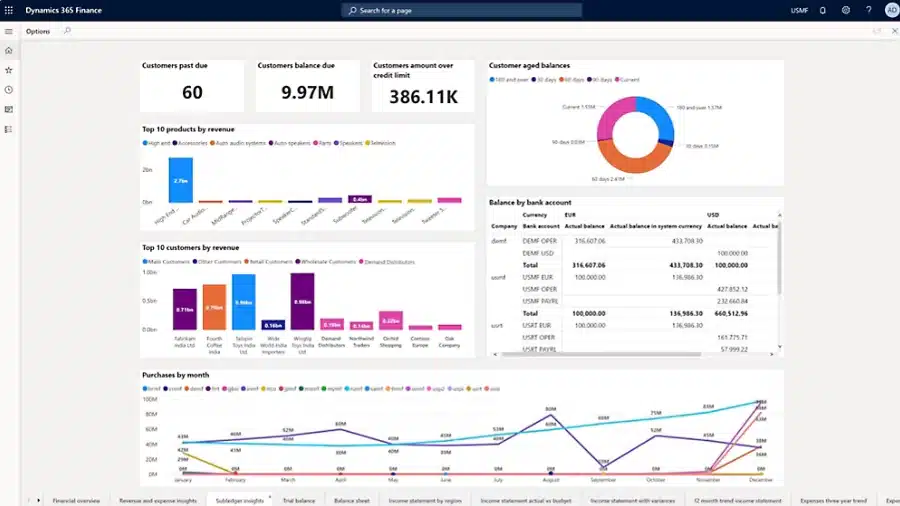
What does Dynamics 365 Finance do?
Dynamics 365 Finance gives finance teams a centralized environment for managing financial activity across an organization. Instead of relying on separate accounting systems, spreadsheets, reporting tools, and manual processes, businesses can manage core financial processes within a connected ERP platform.
Organizations can use Dynamics 365 Finance to manage:
- General ledger and financial transactions
- Accounts payable and vendor payments
- Accounts receivable, collections, and customer payments
- Budgeting and budget controls
- Cash and bank accounts
- Fixed assets
- Asset leasing
- Cost accounting
- Financial reporting
- Financial planning and performance analysis
- Multi-company and multi-entity financial processes
These capabilities give finance teams greater control over financial data while helping organizations standardize processes across departments and legal entities.
What are the core modules and capabilities of Dynamics 365 Finance?
Dynamics 365 Finance includes financial management capabilities that support both day-to-day accounting and broader financial planning. Key capabilities include:
- General ledger: Establish charts of accounts, financial dimensions, fiscal calendars, journals, allocations, and accounting structures. The general ledger provides the foundation for recording and organizing financial activity across the organization.
- Accounts payable: Manage vendor invoices, payments, payment schedules, approvals, and other payables processes. Automation and workflows can help reduce manual work and strengthen control over outgoing payments.
- Accounts receivable: Manage customer invoices, payments, collections, credit processes, and outstanding balances to improve visibility into receivables and cash flow.
- Cash and bank management: Manage bank accounts, payments, deposits, reconciliation, and other cash-related processes while maintaining visibility into an organization’s financial position.
- Budgeting: Create budgets, establish budget controls, manage budget planning processes, and compare financial performance against established budgets.
- Fixed assets: Track assets throughout their lifecycle, including acquisition, depreciation, transfers, adjustments, and disposal.
- Asset leasing: Manage lease information and accounting processes within the ERP environment.
- Cost accounting: Measure, allocate, and analyze costs across the organization to provide deeper insight into where resources are being consumed.
- Financial reporting: Create financial statements and reports using financial data and dimensions to give stakeholders greater visibility into performance.
- Business performance management: Support financial planning, budgeting, forecasting, analytics, and performance management. Advanced business performance management capabilities are included with Dynamics 365 Finance Premium.
- Global financial management: Support organizations operating across multiple companies, currencies, and financial structures while helping finance teams standardize processes across the business.
For a broader look at functionality across the Microsoft enterprise ERP suite, read our guide to Dynamics 365 Finance & Operations modules.
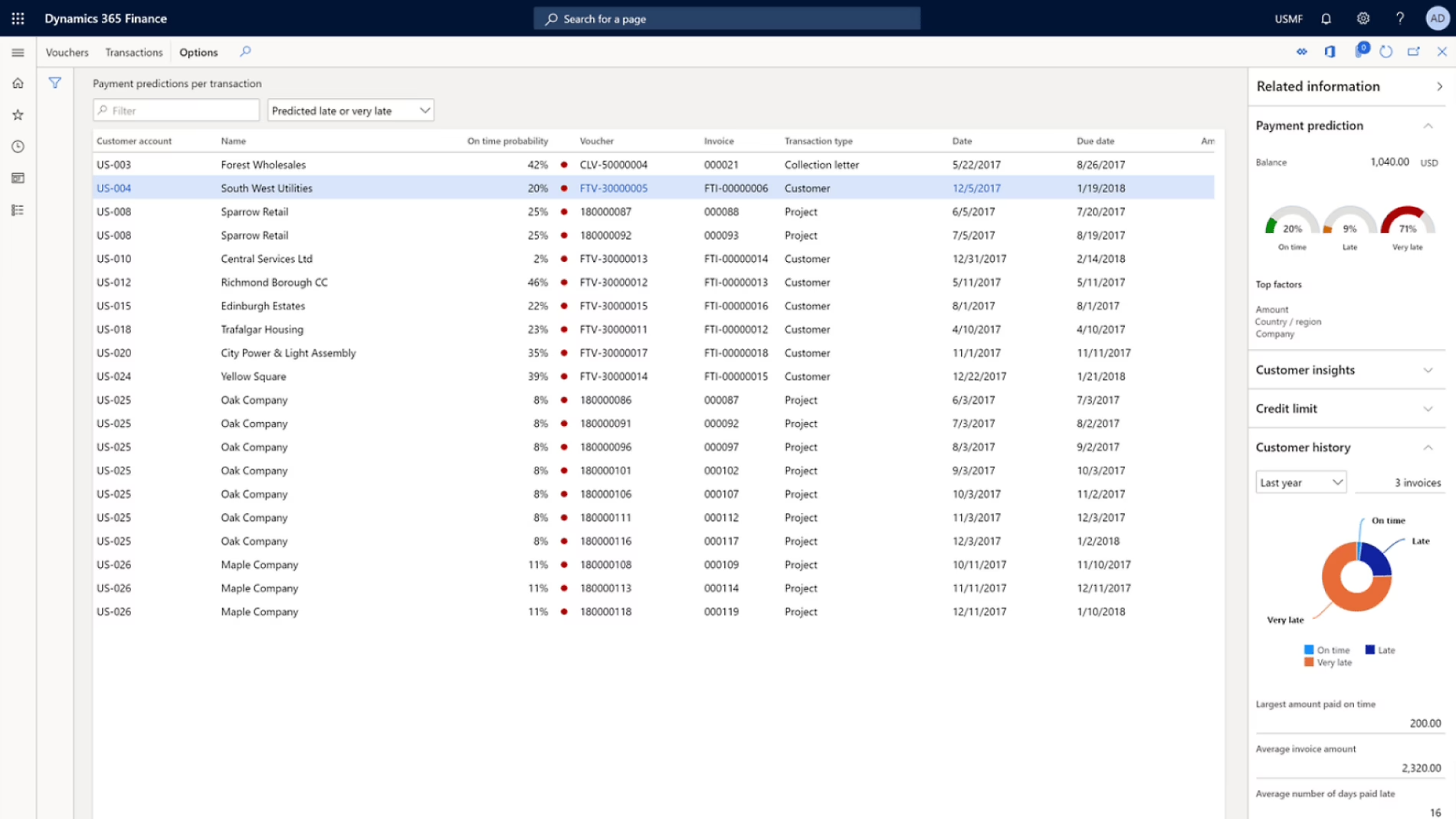
How do AI, Copilot, and AI agents work in Dynamics 365 Finance?
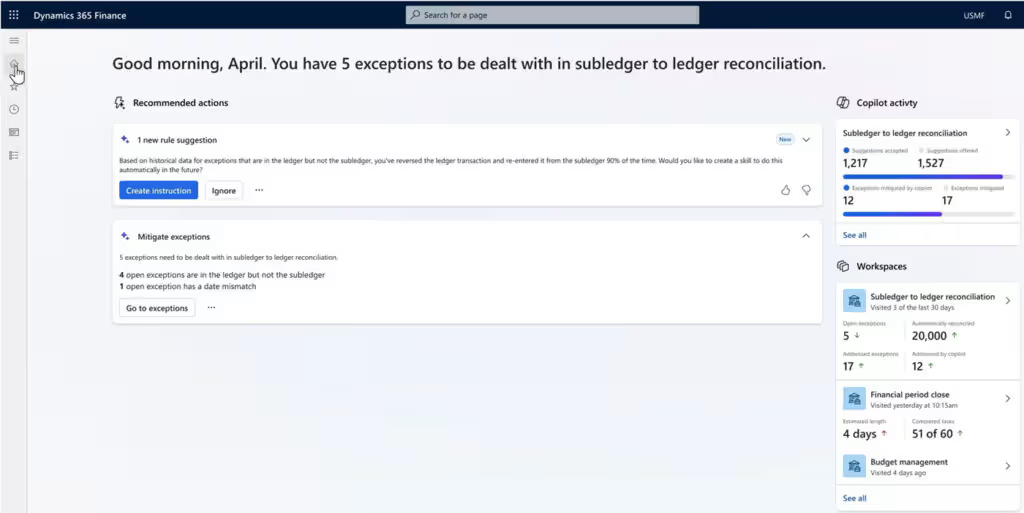
Dynamics 365 Finance uses AI, Copilot, and automation to help finance teams review information faster, reduce repetitive work, and identify exceptions that need attention. Microsoft Copilot typically assists users with information and individual tasks, while AI agents can support more complex, multi-step processes.
Key capabilities include:
- Copilot summaries and insights: AI can summarize information such as workflow history, customer details, aging balances, payment activity, and collections information to help users review records more efficiently.
- AI agents: Microsoft is introducing agents that can monitor financial processes, identify issues, and assist users with defined actions. The Account Reconciliation Agent, currently available as a production-ready preview, can help identify differences between general ledger and subledger data and recommend actions to resolve exceptions.
- Financial automation: Workflows, analytics, reconciliation tools, and other automation capabilities can reduce repetitive tasks while keeping employees involved in approvals, exceptions, and financial decisions.
- Copilot Credits: Some agent scenarios use Copilot Credits, so organizations should consider AI consumption when planning licensing and costs.
AI and agent capabilities continue to evolve, so organizations should confirm availability, prerequisites, licensing, and security requirements before deployment.
What are the benefits of Dynamics 365 Finance?
Dynamics 365 Finance can help organizations improve financial control, visibility, and efficiency while building a more connected foundation for financial management.
Key benefits include:
- Centralize financial management: Bring accounting, transactions, reporting, budgeting, and related financial data into one ERP environment instead of relying on disconnected systems.
- Reduce manual work: Use workflows, automation, and integrated data to reduce repetitive data entry, manual approvals, reconciliation work, and spreadsheet-dependent processes.
- Improve financial visibility and planning: Give finance leaders more timely information for reporting, budgeting, forecasting, performance analysis, and decision-making.
- Strengthen financial controls: Standardize accounting structures, workflows, approvals, and security while supporting more consistent processes across the organization.
- Support complex and growing organizations: Manage multiple legal entities, currencies, business units, and global financial requirements while connecting finance with broader operational processes.
Who is D365 Finance best suited for?
Dynamics 365 Finance is generally suited for organizations that need enterprise-level financial management. Financial and operational complexity is often more important than company size when determining whether the platform is the right fit.
Dynamics 365 Finance may be worth evaluating if your organization needs to:
- Manage multiple legal entities, business units, or currencies
- Standardize financial processes across the organization
- Support advanced reporting, budgeting, and planning
- Strengthen financial controls, approvals, and auditability
- Handle high transaction volumes
- Connect finance with operational systems and data
Dynamics 365 Finance can also support consolidated reporting, intercompany activity, and global financial structures. Learn more about Dynamics 365 Finance & Operations for multi-entity and global organizations.
Organizations with less complex requirements may want to consider Dynamics 365 Business Central, which is designed primarily for small and midsize organizations. Dynamics 365 Finance is generally better suited to businesses that require deeper financial management, greater process complexity, or broader multi-entity and global capabilities. Compare the platforms in our guide to the differences between Dynamics 365 Finance & Operations and Business Central.
Before selecting an ERP, consider your legal entities, integrations, data migration, reporting requirements, and user needs. These factors can help determine the right application, licensing approach, and implementation scope.
Dynamics 365 Finance vs. Dynamics 365 Supply Chain Management
Dynamics 365 Finance and Dynamics 365 Supply Chain Management are separate Microsoft applications that address different parts of enterprise resource planning. They can operate independently, but organizations often use them together when they need an ERP environment that connects financial and operational processes.
The applications include different areas of functionality:
Dynamics 365 Finance focuses primarily on financial management, while Dynamics 365 Supply Chain Management manages many of the processes involved in purchasing, producing, storing, and moving goods.
When an organization uses the applications together, operational transactions can flow into the financial environment, giving finance and operations teams a more connected view of business activity. Learn more about the combined applications on our Dynamics 365 Finance & Operations overview.
How does Dynamics 365 Finance integrate with other Microsoft products?
Dynamics 365 Finance can connect with other Microsoft applications to extend reporting, automation, collaboration, and operational processes.
- D365 Supply Chain Management: Connect accounting and financial management with procurement, inventory, manufacturing, warehousing, transportation, and other supply chain processes.
- Dynamics 365 Project Operations: Extend the environment into project planning, resource management, time and expense, project billing, and other project-based processes.
- Microsoft Power BI: Build dashboards and visual reports that help finance teams analyze financial and operational performance.
- Microsoft Excel: Work with Dynamics 365 Finance data through familiar spreadsheet experiences where Excel is appropriate for analysis and data management.
- Microsoft Power Automate: Automate approvals, notifications, and workflows across Dynamics 365 Finance and connected applications.
- Microsoft Power Apps: Build additional applications and experiences that extend ERP processes without changing the core Dynamics 365 Finance application.
- Microsoft 365: Connect ERP processes with productivity and collaboration applications used across the organization.
Integrations should be planned as part of the broader ERP architecture rather than added after implementation. Our Dynamics 365 Finance & Operations integration guide provides a deeper look at integration methods, use cases, costs, and planning considerations.
How much does Dynamics 365 Finance cost?
Dynamics 365 Finance uses user-based licensing, and the appropriate license depends on the functionality each person needs. The prices below are current U.S. list prices shown as a monthly per-user rate with annual billing.
Microsoft’s current product terms require a minimum purchase of 20 Dynamics 365 Finance base licenses or 10 Dynamics 365 Finance Premium base licenses for those products. Team Members is an additional-user license and does not have a separate product-specific minimum.
The Team Members license should not be treated as a lower-cost substitute for a full Finance license. Microsoft limits Team Members to specific scenarios. For Finance and related operations applications, permitted activities can include recording time or expenses, approving certain transactions, creating requisitions, and working with limited departmental budget and quality-control scenarios.
Organizations that use more than one qualifying Dynamics 365 application may also be able to use Microsoft’s base and attach licensing model. For example, eligible users with Dynamics 365 Finance as their base application can license Dynamics 365 Supply Chain Management as an attach application for $30 per user, per month.
Licensing is only one component of the total investment. Organizations should also plan for implementation, data migration, integrations, customization, training, ongoing support, and applicable AI or agent consumption.

Get a clearer picture of Dynamics 365 Finance pricing
Licensing depends on user roles, applications, implementation requirements, integrations, and ongoing costs. Our pricing guide provides a deeper look at the factors that can affect your Dynamics 365 Finance investment.
What does a Dynamics 365 Finance implementation involve?
A successful Dynamics 365 Finance implementation starts with understanding how the organization operates today and determining how those processes should work in the new ERP environment.
Although every project differs, a typical implementation includes:
- Discovery and requirements: Document financial processes, reporting requirements, integrations, pain points, and business goals.
- Solution design: Define how Dynamics 365 Finance will support processes, data, security, reporting, and integrations.
- Configuration: Configure the ERP around approved business requirements.
- Data migration: Clean, map, validate, and migrate required financial and master data.
- Integration: Connect Finance with other business applications and data sources.
- Reporting: Build and validate the reports finance teams and business leaders need.
- Testing: Validate processes, integrations, data, security, and reporting before deployment.
- Training and change management: Prepare users to work effectively in the new system.
- Go-live: Move the configured solution into production.
- Optimization and support: Address post-launch needs and continue improving the environment as business requirements evolve.
The scope and timeline depend on factors such as the number of legal entities, data quality, integrations, customizations, reporting requirements, and business-process complexity.
Read our Dynamics 365 Finance & Operations implementation guide for a more detailed look at implementation planning, timelines, costs, and deployment considerations.
Build a stronger D365 Finance strategy with Rand Group
ERP implementation requires more than technical configuration. Financial processes, accounting structures, security, integrations, data, reporting, user adoption, and operational requirements all need to work together.
Rand Group has more than 20 years of experience helping organizations evaluate and implement business technology solutions. Our team includes financial, technology, development, data, and industry specialists who work across the ERP lifecycle, from requirements and solution design through data migration, integrations, testing, Dynamics 365 Finance & Operations training, deployment, and ongoing Dynamics 365 Finance & Operations support.
That experience extends beyond implementation. With a 90% client retention rate, Rand Group works with clients over the long term as their systems, processes, and business requirements change. This ongoing perspective helps our consultants design Dynamics 365 environments that address immediate requirements while considering future growth, optimization, integrations, reporting, and new Microsoft capabilities.
Our cross-functional approach is especially important for Dynamics 365 Finance projects. Decisions about charts of accounts, financial dimensions, entities, integrations, security, reporting, and data can affect multiple teams. Bringing finance and technical expertise together helps organizations make those decisions with the full ERP environment in mind.
Dynamics 365 Finance customer highlights
The Museum of Fine Arts, Houston (MFAH) needed to modernize a legacy financial environment built around paper-based processes and static reporting. Rand Group helped MFAH move its financial operations to Microsoft Dynamics 365 Finance & Operations, creating a centralized cloud ERP environment with stronger procurement controls, automated processes, and improved reporting. The organization reduced its monthly financial close cycle by 50%, giving its finance team faster access to financial information. Read the Museum of Fine Arts, Houston Dynamics 365 Finance & Operations case study to learn more.
Conquest Completion Services relied on QuickBooks, Excel, and paper documents to manage financial and operational processes. Rand Group helped the oilfield services company select and implement Dynamics 365 Finance & Operations. After implementation, Conquest reduced its purchase order approval process from 10 days to 3 days, reduced days sales outstanding from 15–20 days to 3 days, and reduced its accounts receivable and accounts payable staffing requirements from seven employees to 2.5. Read the Conquest Completion Services Dynamics 365 Finance & Operations case study for the full story.
Key takeaways
- Dynamics 365 Finance is a cloud ERP application designed to manage complex financial processes, including accounting, payables, receivables, budgeting, cash, assets, reporting, and planning.
- The application is particularly suited to organizations managing complex financial structures, multiple entities, advanced reporting, or global operations.
- Dynamics 365 Finance can work independently or alongside Dynamics 365 Supply Chain Management as part of a broader Finance & Operations ERP environment.
- Microsoft continues to expand AI within Finance through Copilot experiences and AI agents, including the Account Reconciliation Agent.
- Dynamics 365 Finance licensing depends on user requirements, with Finance, Finance Premium, Team Members, and other licensing options supporting different scenarios.
- Successful implementation requires planning around processes, data, integrations, reporting, security, licensing, and user adoption, not just ERP configuration.
Frequently asked questions
What is Microsoft Dynamics 365 Finance?
Microsoft Dynamics 365 Finance is a cloud-based ERP application for financial management. It helps organizations manage accounting, accounts payable and receivable, budgeting, cash, fixed assets, financial reporting, planning, and other complex finance processes.
What is Dynamics 365 Finance used for?
Dynamics 365 Finance is used to manage and automate enterprise financial processes. Organizations can use it for general ledger, payables, receivables, budgeting, cash and bank management, fixed assets, financial reporting, planning, and multi-entity financial management.
Is Dynamics 365 Finance an ERP system?
Yes. Dynamics 365 Finance is an enterprise resource planning application focused on financial management. Organizations can use it independently or combine it with other Dynamics 365 applications to create a broader ERP environment.
What modules are included in Dynamics 365 Finance?
Core Dynamics 365 Finance areas include general ledger, accounts payable, accounts receivable, budgeting, cash and bank management, fixed assets, asset leasing, cost accounting, financial reporting, business performance capabilities, and Finance insights.
What is the difference between Dynamics 365 Finance and Supply Chain Management?
Dynamics 365 Finance focuses on accounting and financial management. Dynamics 365 Supply Chain Management focuses on processes such as procurement, inventory, warehousing, manufacturing, asset management, and supply chain planning. Organizations can use both applications together to connect financial and operational processes.
Does Dynamics 365 Finance include AI and Copilot?
Dynamics 365 Finance includes AI-powered Copilot experiences for scenarios such as customer information, collections, workflow summaries, and other financial processes. Microsoft is also introducing AI agents, including the Account Reconciliation Agent, which is currently available as a production-ready preview. Availability, prerequisites, licensing, and Copilot Credit requirements vary by capability.
Take the next step with Dynamics 365 Finance
Dynamics 365 Finance can provide a connected financial foundation for organizations managing complex accounting, reporting, planning, and operational requirements. The right ERP strategy should account for financial processes, data, integrations, reporting, licensing, security, and how employees will use the system.
Rand Group helps organizations evaluate, implement, optimize, and support Microsoft Dynamics 365 Finance based on their financial and operational requirements. Contact Rand Group to discuss your Dynamics 365 Finance goals and determine the right next steps.