Dynamics 365
 Power Platform
 Dynamics
 Cloud & Productivity
Accounts payable automation in Microsoft Dynamics 365 Finance & Operations

Accounts payable (AP) is one of the most transaction-heavy functions in finance. Vendor invoices arrive from multiple sources, approvals must follow internal controls, and payments must be executed accurately and on time. When these processes rely on manual data entry, email-based approvals, or disconnected systems, finance teams can struggle to maintain efficiency and visibility.
As organizations grow, the volume and complexity of invoices increases. Manual processes make it harder to track liabilities, enforce approval policies, and ensure data accuracy across the ERP. These inefficiencies not only slow operations but can also create compliance risks and payment delays that affect vendor relationships.
Accounts payable automation in Microsoft Dynamics 365 Finance & Operations (Dynamics 365 Finance and Supply Chain Management) helps organizations modernize these workflows. By automating invoice capture, validation, approval routing, and payment processing, finance teams can reduce administrative effort while strengthening financial governance.
This article explores how AP automation works within Dynamics 365 Finance & Operations, the capabilities available in the platform, and how organizations can design a more efficient invoice processing strategy.
At a high level, Dynamics 365 Finance & Operations provides a structured, ERP-native approach to accounts payable automation—combining workflow, validation, and integration capabilities within a single system.
What is accounts payable automation?
Accounts payable automation refers to the use of digital workflows and data capture technologies to streamline the lifecycle of vendor invoices—from receipt through approval and payment. Instead of relying on manual data entry and informal approval methods, automation structures the entire process within the ERP system.
In a modern ERP environment like Dynamics 365 Finance & Operations, AP automation typically includes several interconnected capabilities:
- Invoice capture and data extraction: Invoice information is captured from email attachments, scanned documents, or electronic submissions and converted into structured data.
- Automated validation: Invoice details are checked against purchase orders, vendor records, and receipt data to confirm accuracy.
- Workflow-based approvals: Invoices are routed to appropriate approvers based on predefined rules such as invoice amount, department, or cost center.
- Centralized document management: Supporting documents are stored alongside ERP transactions for auditability and easy retrieval.
- Payment execution and reconciliation: Once invoices pass validation and approval workflows, Dynamics 365 Finance & Operations can move approved invoices into posting and payment processing, ensuring accounting entries, tax calculations, and financial dimensions are applied consistently.
When these capabilities operate within a unified ERP platform, organizations gain stronger visibility into liabilities and better control over vendor payments. Automation ensures that invoice processing follows consistent governance policies while reducing manual administrative effort.
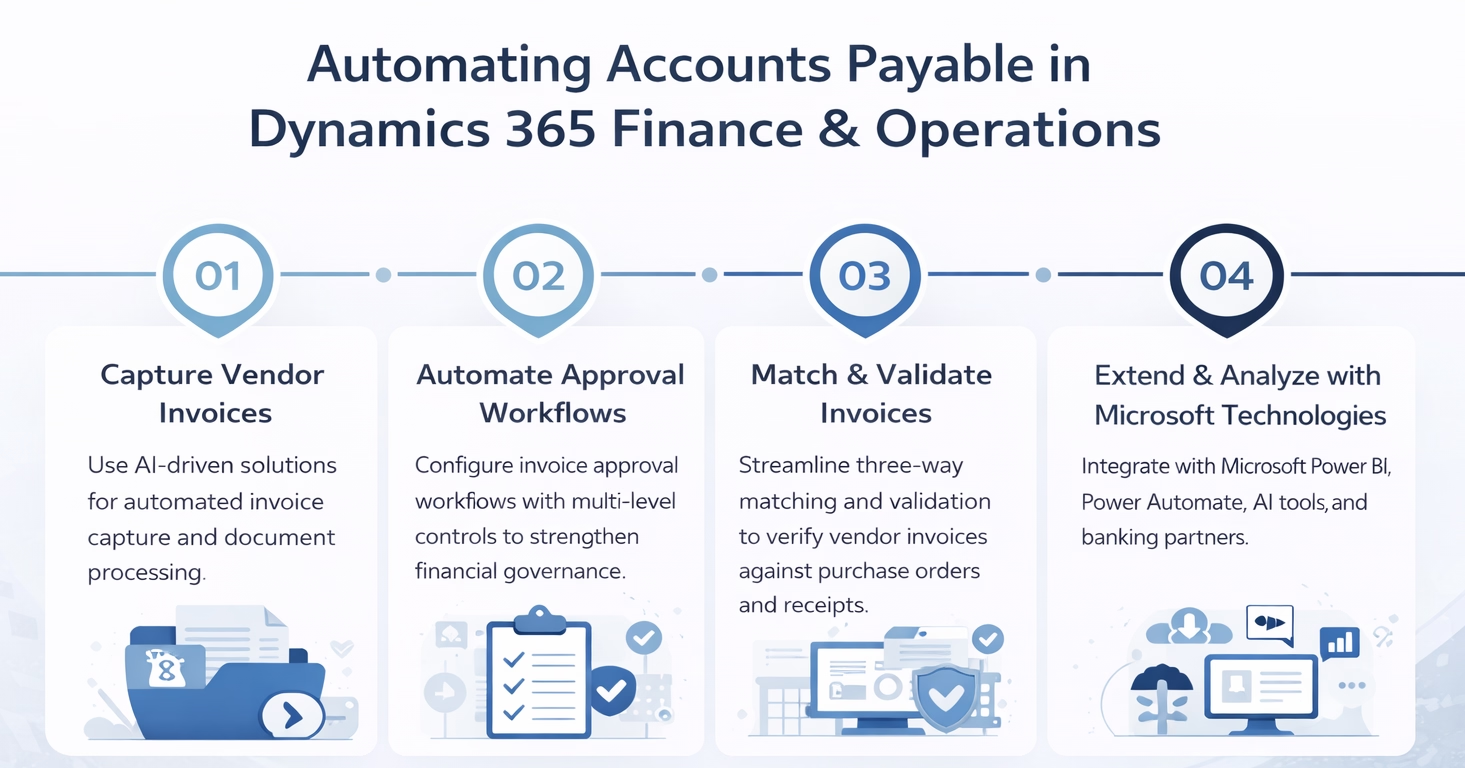
Why organizations automate accounts payable processes
Many finance teams still rely on manual invoice processing steps. Invoices may arrive by email, vendor portals, or paper mail, requiring AP staff to review documents, manually enter data into the ERP, and route approvals through email or spreadsheets.
These workflows can quickly become inefficient as invoice volumes increase. Automation helps finance teams improve operational performance while maintaining stronger financial oversight.
Key benefits of automating accounts payable in Dynamics 365 Finance & Operations include:
- Reduced manual data entry: Automated document capture tools extract invoice details directly from vendor documents, minimizing the need for manual input.
- Faster invoice processing: Automated workflows immediately route invoices to the appropriate approvers, reducing delays caused by email-based approvals.
- Improved data accuracy: Automated validation against purchase orders and vendor records reduces the risk of entry errors.
- Stronger financial controls: Structured approval workflows ensure invoices follow consistent governance policies before payment is released.
- Better visibility into financial liabilities: Finance teams gain real-time insight into outstanding invoices and upcoming payment obligations.
- Scalability for growing organizations: Automation allows AP teams to manage higher invoice volumes without proportionally increasing staff workload.
When implemented effectively, these improvements allow finance teams to focus more on financial oversight and vendor management rather than administrative processing tasks.
Core accounts payable capabilities in Dynamics 365 Finance & Operations
Dynamics 365 Finance & Operations provides several built-in capabilities that support accounts payable automation. These tools allow organizations to design structured invoice workflows directly within the ERP system.
Another important capability is invoice matching, which automates invoice validation within Dynamics 365 Finance & Operations.
The system uses configurable two-way and three-way matching policies to automatically compare invoice data against purchase orders and product receipts. Organizations can define tolerance thresholds for price and quantity variances, allowing acceptable differences to be approved automatically while exceptions are flagged for review.
This shifts invoice processing from manual validation to exception-based handling, where finance teams focus only on discrepancies instead of reviewing every invoice.
Dynamics 365 also provides workflow automation tools that control how invoices move through approval processes. These workflows eliminate manual routing by automatically assigning invoices to the correct approvers based on predefined rules, financial dimensions, and organizational hierarchies.
Invoices are systematically routed, escalated, and tracked within the ERP, ensuring approvals occur without manual coordination while maintaining full audit visibility.
Finally, the platform includes integrated document management and audit capabilities, allowing organizations to maintain a complete record of invoices, approvals, and supporting documents within the ERP environment.
Together, these capabilities provide a structured foundation for modernizing accounts payable operations.
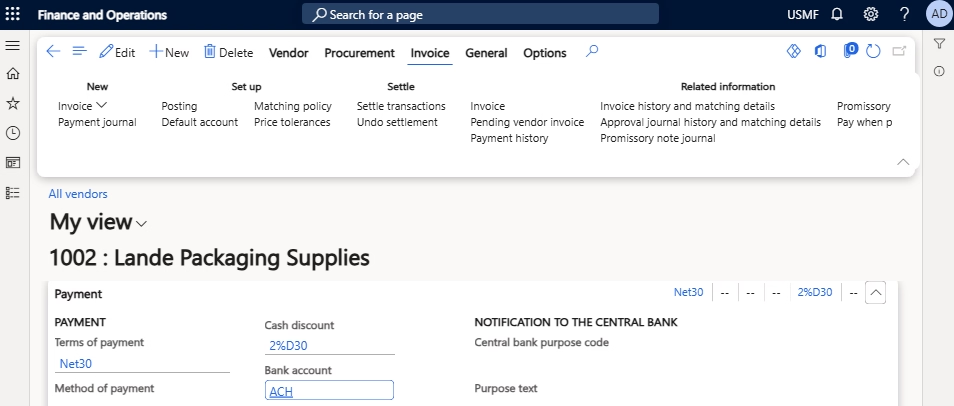
Automating vendor invoice capture and document processing
One of the most time-consuming tasks in accounts payable is manually entering invoice information into the ERP system. Many vendors still send invoices as PDF attachments or scanned documents, requiring AP teams to review and input data line by line.
Document automation technologies significantly improve this process by enabling low-touch and, in some scenarios, near touchless invoice processing.
Using document intelligence solutions integrated with Dynamics 365 Finance & Operations, organizations can extract key invoice fields, create invoice records, and validate data against purchase orders—allowing many invoices to move through the system with minimal manual intervention unless exceptions occur.
A typical automated invoice capture workflow may include the following steps:
- Invoice receipt: Vendor invoices arrive through email, vendor portals, EDI channels, or scanned documents.
- Document storage: The invoice document is stored in a repository such as SharePoint or Azure storage.
- Data extraction: Document intelligence services identify and extract structured data fields such as vendor name, invoice number, totals, and line items.
- Data validation: Extracted data is validated against vendor records and purchase order information.
- ERP transaction creation: The system creates a vendor invoice record in Dynamics 365 Finance & Operations for review and posting.
Finance staff primarily review exceptions identified by the system, resolve discrepancies, and finalize invoice posting, rather than manually entering and validating every invoice.

Purchase order matching and validation
Purchase order matching is a critical control mechanism that Dynamics 365 Finance & Operations uses to automate invoice validation and prevent incorrect payments. It ensures that invoices correspond to goods or services that were properly ordered and received.
Dynamics 365 Finance & Operations supports several matching configurations that automate this validation process.
Organizations can configure:
- Two-way matching: Invoice amounts are compared against the original purchase order.
- Three-way matching: Invoice data is validated against both the purchase order and the product receipt to confirm goods were received.
- Tolerance rules and exception handling: The system can automatically flag discrepancies such as pricing differences or quantity mismatches.
These automated controls help finance teams detect issues early and prevent incorrect payments from being processed.
By enforcing matching policies within the ERP, organizations can maintain stronger procurement governance while reducing the time AP staff spend manually verifying invoices.

Dynamics 365 Finance & Operations pricing and licensing guide
Explore the Dynamics 365 Finance & Operations pricing and licensing guide to understand the flexible subscription options, user types, and cloud benefits of D365 F&O. Learn about regular and premium editions, base and attach pricing models, and more.
Exception-based processing in Dynamics 365 Finance & Operations
A key benefit of accounts payable automation in Dynamics 365 Finance & Operations is the ability to move toward exception-based processing.
Instead of manually reviewing every invoice, the system can automatically validate, route, and prepare invoices for posting when predefined criteria are met—such as successful matching, valid vendor data, and acceptable tolerance thresholds.
Only invoices that fail validation or exceed tolerances are flagged for review. This allows finance teams to focus on resolving issues rather than processing routine transactions, significantly reducing manual workload while improving consistency and control.
Workflow automation for invoice approvals
Approvals are an essential part of financial governance, but manual approval routing can slow down invoice processing. Dynamics 365 Finance & Operations includes configurable workflow tools that allow organizations to define structured approval processes.
Invoice approval workflows can be configured based on factors such as invoice value, department ownership, or vendor classification. These workflows automatically route invoices to the correct stakeholders for review.
For example, an organization might configure approval rules such as:
- Invoices below a defined threshold are automatically approved.
- Department managers approve operational expense invoices.
- Finance leadership reviews invoices above a specified amount.
- Capital expenditures require additional approval from finance or procurement leadership.
These workflows ensure invoices follow consistent approval policies while reducing delays caused by manual routing.
Approvals can occur directly within the ERP interface or through integrated Microsoft tools depending on configuration.
As organizations automate approval workflows, it is important to align them with security and compliance requirements. Our guide on Dynamics 365 Finance and Operations security and segregation of duties explains how to structure these controls effectively.
Extending AP automation with the Microsoft ecosystem
While Dynamics 365 Finance & Operations provides the core ERP capabilities for accounts payable automation, many organizations extend these workflows using additional Microsoft technologies. Many accounts payable automation solutions rely on integrations between Dynamics 365 and other Microsoft technologies. To better understand how these integrations work, read our Dynamics 365 Finance and Operations integration guide.
The broader Microsoft platform allows organizations to create a connected automation architecture across document processing, workflow management, and reporting.
Common extensions include:
- Power Automate: Automates notifications, invoice intake processes, and workflow orchestration across systems.
- Azure AI Document Intelligence: Extracts structured data from invoices and financial documents to accelerate data entry.
- Power BI: Provides reporting and analytics on invoice processing performance, payment cycles, and vendor activity.
- SharePoint and Microsoft 365: Stores invoice documents and supporting files while enabling collaboration across finance teams.
These technologies allow organizations to build a fully integrated accounts payable automation ecosystem around Dynamics 365 Finance & Operations. Unlike standalone AP automation tools, these integrations operate within the broader Microsoft ecosystem, allowing organizations to connect financial processes, data, and reporting without creating disconnected systems.

Take the next step toward accounts payable automation
Accounts payable automation in Dynamics 365 Finance & Operations can help your team reduce manual effort, improve accuracy, and gain better visibility into liabilities and cash flow. Rand Group helps organizations assess current AP processes, identify practical automation opportunities, and implement solutions that align with business and compliance requirements.
Common accounts payable automation scenarios
Organizations implement AP automation in Dynamics 365 Finance & Operations in several operational scenarios.
High-volume invoice environments are a common use case. Manufacturing, distribution, and retail organizations may process thousands of invoices each month. Automated capture and matching significantly reduce the administrative workload associated with these transactions.
Companies operating across multiple legal entities can automate standardized invoice workflows across entities, while still applying entity-specific rules such as tax configurations, currencies, and approval thresholds.
Global organizations may implement AP automation to support vendor operations across different regions and currencies. Automated workflows ensure consistent approval policies across international teams.
Finally, automation plays an important role in audit readiness and compliance. Structured approval records, centralized document storage, and system-generated audit trails make it easier for organizations to meet financial reporting and regulatory requirements.
Designing a successful AP automation strategy
Implementing accounts payable automation is not only a technology initiative, it is also a process transformation effort. Organizations should evaluate their current AP workflows to identify where manual steps can be eliminated, automated, or shifted to exception-based processing.
Several operational factors influence a successful automation strategy.
- Invoice volume and document types: Organizations should evaluate how invoices are received and which formats require automated capture.
- Vendor communication channels: Email, portals, and EDI connections may require different intake workflows.
- Procurement governance and matching policies: Purchase order processes must align with automated invoice validation.
- Approval hierarchies and financial controls: Approval workflows should reflect organizational policies and compliance requirements.
- Integration with banking and financial systems: Payment automation requires secure integration with banking platforms.
- Reporting and financial visibility requirements: Analytics tools should provide insight into invoice processing performance and liabilities.
Careful planning ensures automation supports real operational workflows rather than introducing unnecessary complexity.
Real-world example: Scaling accounts payable with Dynamics 365 Finance & Operations
Organizations that implement accounts payable automation in Dynamics 365 Finance & Operations often see measurable improvements in efficiency, visibility, and financial performance.
For example, Conquest Completion Services, an oilfield services company, replaced legacy systems with Dynamics 365 Finance & Operations to support more scalable financial operations. By automating key financial workflows, the organization significantly improved operational efficiency and cash flow while gaining near real-time access to financial data.
As processes became more automated and structured, Conquest was able to reduce reliance on manual accounting work, streamline approvals, and improve key financial metrics. In fact, the company achieved faster approval cycles and reduced the number of staff required to manage accounts payable and receivable processes.
This type of transformation reflects the broader impact of accounts payable automation—shifting finance teams away from manual processing and toward exception-based oversight and strategic financial management.
0 %
faster purchase order approval
0 %
reduction in days sales outstanding
0 %
reduction in A/R and A/P staff
A practical partner for accounts payable transformation
Successfully automating accounts payable in Dynamics 365 Finance & Operations requires more than enabling system features, it requires aligning technology with real financial processes, controls, and organizational structure. Many organizations struggle not with the tools themselves, but with designing workflows that are both efficient and compliant.
Rand Group brings deep experience in Microsoft Dynamics 365 Finance & Operations and understands how accounts payable processes connect to procurement, cash management, and financial reporting. Our team works closely with finance stakeholders to design automation strategies that reflect how your organization operates, rather than forcing processes into a generic framework.
We support clients across the full lifecycle of AP automation, from process assessment and solution design to implementation and ongoing optimization. This includes configuring invoice workflows, implementing document automation, integrating Microsoft technologies such as Power Automate and Azure AI, and building reporting solutions that provide visibility into AP performance.
By combining ERP expertise with practical process design, Rand Group helps organizations reduce manual effort, improve financial accuracy, and build scalable accounts payable operations within Dynamics 365.
Frequently asked questions about accounts payable automation in Dynamics 365 Finance & Operations
What is accounts payable automation in Dynamics 365 Finance & Operations?
Accounts payable automation in Dynamics 365 Finance & Operations refers to the use of ERP workflows and integrated technologies to streamline vendor invoice processing from receipt through payment. It includes automating invoice data capture, validating invoices against purchase orders and vendor records, routing approvals through structured workflows, and executing payments within the system, helping organizations reduce manual effort, improve accuracy, and gain better visibility into financial liabilities.
How does invoice automation work in Dynamics 365 Finance & Operations?
Invoice automation in Dynamics 365 Finance & Operations works by capturing invoice data from documents such as PDFs or electronic submissions, extracting key fields using tools like Azure AI Document Intelligence or third-party solutions, and creating structured records in the ERP. The system then validates invoice data against purchase orders and vendor information, routes invoices through predefined approval workflows, and posts approved invoices for payment processing, enabling a more efficient and controlled end-to-end workflow.
What are the benefits of automating accounts payable processes?
Automating accounts payable processes in Dynamics 365 Finance & Operations helps organizations reduce manual data entry, accelerate invoice processing cycles, improve data accuracy, and enforce consistent approval controls. It also provides real-time visibility into outstanding invoices and cash flow, allowing finance teams to make more informed decisions while scaling operations without increasing administrative workload.
Can Dynamics 365 Finance & Operations integrate with invoice capture tools?
Dynamics 365 Finance & Operations can integrate with a variety of invoice capture and document automation tools, including Microsoft solutions like Azure AI Document Intelligence and Power Automate, as well as third-party platforms. These integrations enable organizations to automate invoice intake and data extraction while ensuring that all financial transactions are validated, approved, and recorded within the ERP system as the central system of record.
What is purchase order matching in Dynamics 365 accounts payable?
Purchase order matching in Dynamics 365 Finance & Operations is a validation process that compares invoice details with purchase orders and, in some cases, product receipts to ensure accuracy before payment. Organizations can configure two-way or three-way matching rules, and the system automatically flags discrepancies such as pricing or quantity differences, helping prevent overpayments, enforce procurement policies, and maintain accurate financial records.
Next steps
Accounts payable automation in Microsoft Dynamics 365 Finance & Operations helps organizations streamline invoice processing while strengthening financial governance. By automating invoice capture, matching, approvals, and payment processing, finance teams can reduce manual workload and gain clearer visibility into liabilities and cash flow.
For organizations already using Dynamics 365 Finance & Operations, AP automation represents an opportunity to modernize finance operations and improve operational efficiency without replacing core systems.
Rand Group works with organizations to design and implement accounts payable automation strategies within Dynamics 365 environments. Our team helps clients evaluate current AP workflows, configure ERP capabilities, and integrate Microsoft technologies that support end-to-end automation.
If your organization is exploring how to modernize accounts payable processes in Dynamics 365 Finance & Operations, Rand Group can help you assess your current environment and identify practical opportunities for automation. Contact our team to start the conversation.