Dynamics 365
 Power Platform
 Dynamics
 Cloud & Productivity
Dynamics 365 Finance and Operations security and segregation of duties

Dynamics 365 Finance & Operations centralizes finance, supply chain, manufacturing, and procurement operations in one platform. If roles are too broad, a single user can gain end-to-end control over high-risk transactions. A structured approach to security and segregation of duties reduces that risk and strengthens internal controls.
Dynamics 365 Finance & Operations segregation of duties (SoD) helps organizations separate responsibilities so no single user can control an entire transaction from start to finish. When properly configured, it reduces risk, strengthens internal controls, and supports audit readiness.
This guide explains how security works in Dynamics 365 Finance & Operations, how SoD is enforced, and how to identify and resolve conflicts.
What is Microsoft Dynamics 365 Finance & Operations?
Dynamics 365 Finance & Operations (D365 F&O) is Microsoft’s cloud ERP solution designed for medium to large organizations with complex financial and operational requirements. D365 F&O consists of two applications: Dynamics 365 Finance and Dynamics 365 Supply Chain Management. The system brings core processes such as financial management, supply chain, procurement, inventory, and manufacturing into one platform so organizations can standardize controls and scale across entities and locations.
Because it supports high transaction volumes and complex organizational structures, security must be structured and scalable. Users can enter transactions, approve documents, post journals, and access financial data across departments and regions. Without proper controls, that level of access can create serious risk.
Dynamics 365 Finance & Operations uses a layered security architecture built on roles, duties, privileges, and permissions. This structure supports both operational efficiency and strong internal control.

What is segregation of duties in ERP systems?
Segregation of duties (SoD) is a control principle that separates critical tasks among different users. The goal is to prevent errors or fraud by ensuring no single person can initiate, approve, and complete a transaction alone.
In ERP systems, SoD applies across financial and operational processes. For example:
- The person who creates a vendor should not also approve payments
- The user who enters a journal should not be able to post it without review
- The employee who creates a purchase order should not also confirm receipt and approve the invoice
In Dynamics 365 Finance & Operations, SoD is implemented as a security-rule framework that helps you define which duties must not be performed by the same user or role. When SoD rules exist, the platform can detect conflicts in both role design and user role assignments and force an administrator decision and documentation when exceptions are necessary.
Why security and segregation of duties matter in Dynamics 365 Finance & Operations
Security and SoD matter in Dynamics 365 Finance & Operations because the system centralizes financial and operational control in one platform. Without properly designed roles and access controls, a single user could initiate, approve, and post transactions, creating financial, fraud, and compliance risk. Configuring security and SoD in D365 F&O ensures least-privilege access, accountability, protects financial integrity, and supports audit and governance requirements.
- Financial reporting accuracy and internal controls: Separating entry, approval, and posting activities reduces the risk of incorrect or unsupported financial statements.
- Fraud prevention and operational risk management: D365 F&O SoD limits opportunities for unauthorized activity by removing end-to-end control from individual users.
- Audit readiness and governance expectations: Clearly defined roles and permissions make it easier to demonstrate control effectiveness during internal and external audits.
- Alignment with common compliance frameworks: While not enforcing specific regulations, SoD supports widely accepted control principles used across finance and governance models.

Need help with D365 F&O segregation of duties?
Whether you’re configuring roles for the first time or addressing audit findings, Dynamics 365 Finance & Operations segregation of duties can be difficult to design and maintain. Rand Group helps finance and IT teams build practical, scalable security models that strengthen controls without slowing operations.
How Dynamics 365 Finance & Operations handles security and segregation of duties
Dynamics 365 Finance & Operations includes built-in tools to design, detect, and manage SoD conflicts. The system uses role-based security, conflict detection rules, workflow approvals, audit tracking, and Microsoft Entra identity controls to enforce separation of responsibilities. Below are the core tools that support Dynamics 365 Finance & Operations security and SoD.
Microsoft Entra ID integration
Dynamics 365 Finance & Operations uses Microsoft Entra ID (formerly Azure Active Directory) as its primary identity provider. Users must have a valid Entra account in an authorized tenant before they can be provisioned into the system. This means security and access control begin with identity governance, including how users are onboarded, authenticated, and deactivated.
By centralizing identity management in Entra ID, organizations strengthen ERP security before role assignment even begins. Sign-in controls, authentication policies, and identity lifecycle management reduce unauthorized access and support compliance across cloud applications.
Key capabilities include:
- Single sign-on (SSO): Users authenticate once through Entra ID and securely access D365 Finance & Operations. This simplifies access while maintaining centralized control.
- Multi-factor authentication (MFA): Conditional access policies can require MFA for cloud app access. This adds an additional security layer beyond password-based authentication.
- Conditional access policies: “If/then” rules enforce access requirements based on location, device, or risk level. This protects D365 Finance & Operations from unauthorized or high-risk sign-ins.
- Role assignment via security groups: Access to D365 Finance & Operations can be aligned with Entra security groups, improving consistency and governance across systems.
- Identity lifecycle management: Controlled onboarding and offboarding ensure users only have access while employed and in appropriate roles.
- Sign-in monitoring and investigation support: Entra sign-in logs can be combined with D365 Finance & Operations audit logs to support compliance reviews and security investigations.
Role-based security framework
The foundation of Dynamics 365 Finance & Operations segregation of duties is its hierarchical, role-based security model. Access is not granted directly to individual users. Instead, permissions are grouped into structured layers that align with business processes and job functions. A user with no assigned role has no access to the system.
Security is organized across four levels: roles, duties, privileges, and permissions. This layered design allows organizations to separate conflicting responsibilities, restrict posting authority, and control access by legal entity. By building access around business-process segments rather than individual tables or menu items, D365 Finance & Operations supports structured and scalable SoD.
- Permissions: Permissions are the most granular level of security. They control access to securable objects such as tables, fields, forms, and menu items. Permissions define whether a user can read, insert, modify, delete, or execute actions on data. These technical rights form the building blocks of all higher security layers.
- Privileges: Privileges define access to specific system actions, such as running a process, opening a form, or executing a posting routine. Privileges bundle together the permissions required to complete a defined task. They act as the bridge between business-process duties and technical access rights. Carefully assigning privileges prevents unintended access to sensitive transactions.
- Duties: Duties group related privileges into business-process segments, such as vendor maintenance, invoice processing, or journal approval. Duties represent functional chunks of responsibility. In Dynamics 365 Finance & Operations SoD, conflicts are typically defined at the duty level. Separating incompatible duties across roles is the primary enforcement method for SoD.
- Roles: Roles represent job functions and are assigned to users. A role combines duties and privileges into a complete access profile aligned to a position, such as accounts payable clerk or controller. Because roles determine a user’s effective access, SoD is enforced by ensuring conflicting duties are not combined within the same role.
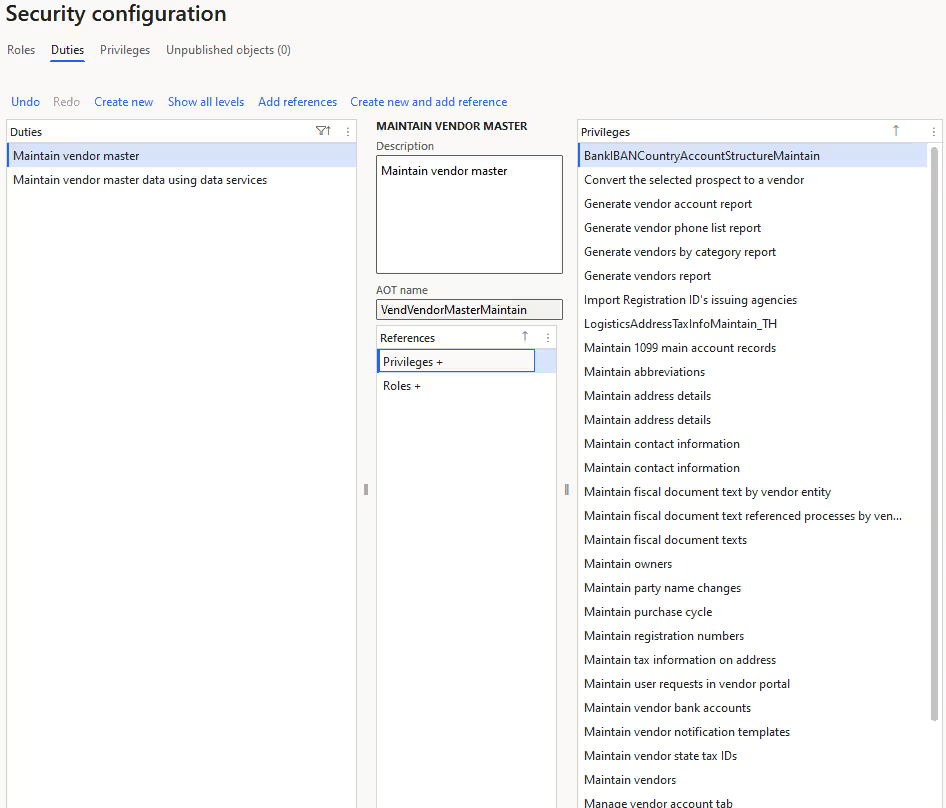
Segregation of duties rules and conflict detection
A core component of Dynamics 365 Finance & Operations is its built-in segregation of duties rule engine. The system allows organizations to formally define incompatible duties and automatically detect when roles or user assignments violate those rules. This makes SoD structured, auditable, and enforceable at the system level.
SoD rules are created by declaring two duties incompatible and documenting the associated security risk, severity, and mitigation plan. Once rules are defined, D365 Finance & Operations validates role design and user assignments against those rules. Conflicts are logged, surfaced, and require administrative resolution, making segregation of duties proactive rather than reactive.
Key capabilities include:
- Configurable SoD rules: Administrators can define incompatible duty pairs, assign risk severity levels, and document security risks and mitigation steps. This ensures the SoD model is aligned to internal control policies and audit requirements.
- Automated role validation: When a new rule is created or updated, the system can validate existing roles to identify conflicting duties. Conflicting duties cannot be combined within a single role, enforcing segregation at the design level.
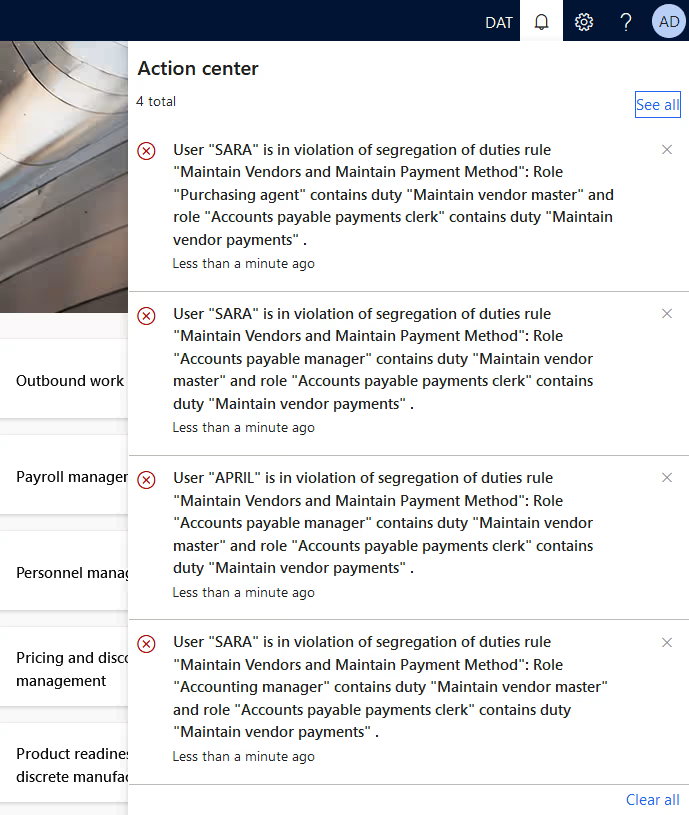
- User-role conflict detection: When assigning roles to users, the system automatically checks for violations. If a user would inherit conflicting duties, the assignment triggers an error and requires an explicit allow or deny decision.
- Conflict logging and tracking: All violations are logged in a dedicated conflicts page. Administrators can review unresolved conflicts, document override reasons, or deny assignments to maintain compliance.
- Mitigation documentation: If a conflict is allowed, the system requires documentation of the reason and compensating controls. This supports governance transparency and audit defensibility.
Together, these tools ensure that Dynamics 365 Finance & Operations SoD is continuously monitored and enforced across both role design and user assignment.
Security configuration workspace
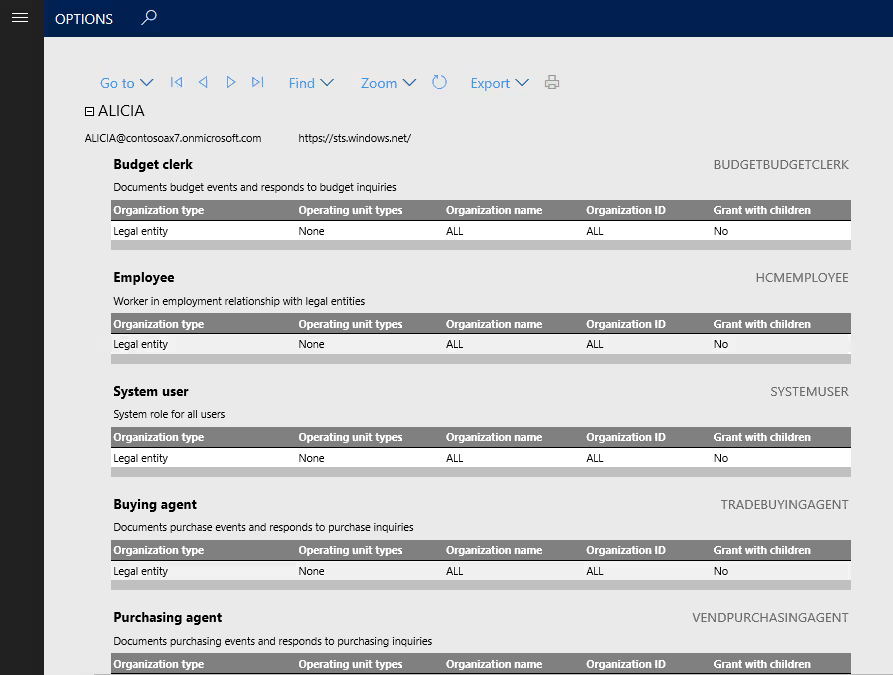
Effective Dynamics 365 Finance & Operations security requires more than rule setup. Organizations must continuously review, analyze, and validate access across roles and users. The Security configuration workspace and related diagnostic tools provide visibility into how security is structured and where risks may exist.
These tools help administrators evaluate effective permissions, detect excessive access, and monitor changes over time. Instead of guessing what access a user truly has, security analysis features provide structured reporting and diagnostics that support governance, audit readiness, and least-privilege role design.
Key capabilities include:
- Security diagnostic for task recordings: Task Recorder can capture real business processes, and Security Diagnostics analyzes the recording to identify required security objects. This allows teams to design least-privilege roles based on actual tasks instead of assigning broad administrative access. It reduces over-permissioning and prevents future security conflicts.
- Effective permission analysis: Administrators can evaluate a specific user’s assigned roles, duties, privileges, and resulting access. Diagnostics flag missing permissions or excessive rights and reference which roles grant them. This makes it easier to refine access without disrupting operations.
- Role and user assignment reporting: Built-in security reports provide visibility into which roles exist and which users are assigned to them. Role assignment analysis helps identify conflicting combinations and supports periodic access reviews required for compliance.
- Role audit trail and change history: Governance-focused reports track role assignment history and changes to roles, duties, and privileges. This creates a clear audit trail for internal control documentation.
- Security analysis entry point views: These views provide a consolidated profile of a user’s accessible entry points and permissions. This is especially useful when reviewing potential SoD violations or investigating control gaps.
Workflow and approval framework
The workflow and approval framework in Finance & Operations acts as a compensating control when full structural separation through roles is not possible. Even with strong Dynamics 365 Finance & Operations segregation of duties, real-world staffing constraints can create gaps. Workflows ensure that key transactions cannot proceed without review and approval, creating an auditable chain of accountability across financial and operational processes.
Key capabilities include:
- Document-based approval enforcement: Workflows require approval before transactions such as purchase orders, vendor invoices, expense reports, general journals, and budgets can be posted. This prevents unauthorized completion of high-impact transactions.
- Conditional routing and approval hierarchies: Approval paths can be configured based on amount, department, legal entity, or other criteria. Multi-level hierarchies ensure appropriate oversight for higher-risk transactions.
- Blocking and status controls: Transactions remain pending until approved, automatically enforcing review before financial impact occurs. Users cannot bypass approval without proper authority.
- Delegation and reassignment controls: Approval responsibilities can be delegated while maintaining documented oversight. This supports business continuity without weakening internal controls.
- Workflow history and audit visibility: Approval status and history are recorded and visible for audit testing and control validation. This provides documented evidence that controls were executed as designed.
Extensible Data Security (XDS)
Extensible Data Security (XDS) enhances security in Dynamics 365 Finance & Operations by adding row-level data restrictions on top of role-based access. While roles and duties define what actions a user can perform, XDS supports least-privilege access by limiting which records users can see or modify. This allows organizations to restrict access to data by legal entity, department, region, customer, or other business criteria without creating entirely separate roles.
XDS uses security policies that apply query-based filters to constrained tables. Only records that meet the defined conditions are accessible. This is especially important in multi-entity or global environments where users share the same job role but should only access a defined slice of operational or financial data.
Key capabilities include:
- Row-level data filtering: XDS applies policy-based filters to tables so users only access records that meet defined criteria. The policy query is enforced across select, update, insert, and delete operations.
- Primary and constrained table relationships: Policies define constrained tables (secured data), a primary table (driving security logic), and a query that filters access. This ensures structured and consistent data restriction.
- Role and application context support: XDS policies can apply based on user roles or application context values. This allows dynamic control of access depending on assignment or runtime conditions.
- Legal entity and organizational separation: XDS supports restricting access by company, department, project, or other business segments. This reduces unnecessary visibility into sensitive transactions or master data.
- Intersection-based enforcement: When multiple policies apply, users only see records that meet all conditions. This strengthens segregation by layering controls.
- Bypass control role: A designated bypass role can override XDS policies when required for administrative or audit purposes. This ensures flexibility while maintaining structured governance.
Audit trail and database logging
Audit tracking is a critical component of security and governance compliance in Dynamics 365 Finance & Operations. Even with well-designed roles, security, and SoD rules, organizations must monitor sensitive changes to ensure accountability. D365 Finance & Operations includes database logging and audit capabilities that track inserts, updates, deletes, and key field modifications, creating a documented trail of system activity. This provides transparency for high-risk master data changes and supports internal control testing and compliance reviews.
Key capabilities include:
- Database logging: Tracks changes to selected tables and fields, recording insert, update, delete, and key modifications in an auditable log.
- Field-level change tracking: Monitors sensitive data such as vendor bank details, credit limits, payment information, and other high-risk master records.
- Electronic signature tracking: Logs transactions that require electronic signatures, strengthening accountability for critical approvals.
- Audit trail reporting: Provides visibility into historical changes for review during audits or investigations.
- Role and security change monitoring: Tracks modifications to roles, duties, and user assignments to detect control drift.
- Log protection controls: Access to audit logs can be restricted to prevent unauthorized viewing or tampering with sensitive logged data.
Common segregation of duties conflicts in Dynamics 365 Finance & Operations
In Dynamics 365 Finance & Operations SoD, conflicts typically occur when one user has access that spans multiple control points within the same process. This often includes a mix of master data maintenance, transaction entry, approval authority, and posting or payment execution. When these responsibilities are combined, independent oversight is removed and financial risk increases.
Vendor master data and payment conflicts
This is the classic SoD breakdown. It occurs when the same user controls vendor setup and vendor payment processing. In Dynamics 365 Finance & Operations, this creates a direct path to redirect funds or pay unauthorized vendors.
How this conflict shows up in Dynamics 365 Finance & Operations
- User can create or modify vendor master records, including bank details
- Same user can enter or approve vendor invoices
- Same user can generate or post vendor payments
How to address it in Dynamics 365 Finance & Operations
- Separate vendor maintenance duties from invoice and payment duties
- Restrict payment posting to a limited treasury or finance role
- Apply SoD rules to block incompatible duties
- Enable database logging for vendor bank and payment detail changes
Procurement and receiving control conflicts
This conflict occurs when one user controls purchasing, receipt confirmation, and invoice approval. In Dynamics 365 Finance & Operations, this weakens three-way match controls and reduces verification between ordering and payment.
How this conflict shows up in Dynamics 365 Finance & Operations
- User can create or approve purchase orders
- Same user can confirm receipt of goods or services
- Same user can approve or finalize vendor invoice processing
How to address it in Dynamics 365 Finance & Operations
- Separate purchasing duties from receiving duties
- Keep invoice approval responsibilities within accounts payable
- Use workflow approvals for purchase orders and invoices
- Review role assignments through security reports and audit trails
General ledger and security administration conflicts
This conflict appears when a user can create and post general ledger journals while also managing security roles or user assignments. Combining financial transaction authority with security configuration reduces accountability and increases control risk.
How this conflict shows up in Dynamics 365 Finance & Operations
- User can create and post general journal entries
- Same user can modify security roles or assign roles to users
- Same user can change privileges or duties within roles
How to address it in Dynamics 365 Finance & Operations
- Separate finance transaction roles from system administration roles
- Limit privileged access using time-bound administrative roles
- Monitor role changes using audit trail and security analysis reports
- Apply SoD rules to prevent conflicting role combinations
Best practices for Dynamics 365 Finance & Operations security & segregation of duties
Effective Dynamics 365 Finance & Operations segregation of duties is not achieved through a single feature. Strong results come from combining structured role design, SoD rule enforcement, workflow approvals, and audit monitoring into a repeatable governance process. Security should be intentional and continuously reviewed, not reactive to audit findings or incidents. Treat SoD and security as an ongoing lifecycle that evolves with your organization.
Best practices include:
- Start with standard roles: Duplicate Microsoft’s out-of-the-box roles as templates and refine them instead of building custom roles from scratch.
- Design for least privilege: Avoid over-permissioning by assigning duties based on actual job responsibilities, not convenience.
- Separate entry and posting authority: Divide transaction creation, approval, and posting responsibilities wherever possible.
- Use SoD rules proactively: Define incompatible duties and validate roles and user assignments after any rule change.
- Leverage workflows as compensating controls: Require approvals for high-risk transactions when full structural separation is not feasible.
- Run conflict and access reviews regularly: Use SoD validation tools, security reports, and audit trails to conduct periodic access reviews.
- Enable targeted auditing: Apply database logging and sign-in monitoring for sensitive data and high-risk areas.
- Align IT and finance governance: Ensure both teams share responsibility for maintaining security and documenting control decisions.
Practical tips for managing security and segregation of duties in Dynamics 365 Finance & Operations
Managing Dynamics 365 Finance & Operations segregation of duties requires continuous oversight. Even well-designed roles can drift over time as users change positions, processes evolve, or temporary access is granted. The following practical steps help maintain least-privilege access and reduce long-term control risk.
Build roles from real process activity, not assumptions
Over-permissioning is one of the most common causes of SoD conflicts. Instead of granting broad access to “make it work,” use task recordings and security diagnostics to identify the exact permissions required for a process. Designing roles around actual system usage reduces unnecessary privileges and prevents conflicts later.
Best practices:
- Record end-to-end business processes before designing or modifying roles
- Use security diagnostics to identify required privileges
- Duplicate and tailor standard roles instead of assigning high-level admin access
- Revalidate access after process changes or system updates
Use time-bound access instead of permanent exception roles
Temporary staffing gaps or special projects often require elevated access. Granting permanent additional roles creates long-term SoD risk. Instead, use temporary or time-bound role assignments so access automatically expires.
Best practices:
- Use temporary role management for short-term coverage needs
- Require documented justification for elevated access
- Review and remove expired exceptions promptly
- Establish a policy that all SoD overrides must expire and be reviewed
Prioritize auditing for high-risk data changes
Even with strong role separation, sensitive master data and financial adjustments should be monitored. Database logging and audit trail reporting provide visibility into who changed what and when. Monitoring high-impact changes strengthens accountability and supports compliance investigations.
Best practices:
- Enable database logging for vendor bank details and payment-critical fields
- Monitor general ledger posting authority and role assignment changes
- Restrict access to audit logs to prevent tampering
- Combine audit logs with SoD conflict reports during reviews
How Rand Group supports Dynamics 365 Finance & Operations security & segregation of duties
Designing effective Dynamics 365 Finance & Operations segregation of duties requires both technical expertise and financial control knowledge. Default roles and automated rule checks are not enough. Organizations need a structured security model that reflects real business processes, control risks, and compliance requirements. Rand Group works with finance and IT leaders to design practical, scalable security frameworks that strengthen internal controls without disrupting operations.
Our approach goes beyond initial configuration. As organizations grow, restructure, or expand globally, SoD must evolve with them. Rand Group supports clients through implementation, optimization, audit preparation, and ongoing governance to ensure security remains aligned with operational needs and regulatory expectations.
- Security design workshops: Facilitate structured sessions to define role strategy, risk areas, and SoD priorities in Dynamics 365 Finance & Operations.
- Role mapping and redesign: Align roles, duties, privileges, and permissions to real job functions while eliminating unnecessary access.
- SoD rule configuration: Define incompatible duties, assign severity levels, and document mitigation strategies within the SoD rule engine.
- Conflict remediation planning: Analyze detected conflicts and design structured resolution plans, including compensating controls when necessary.
- Audit support: Prepare documentation, validate controls, and assist with audit inquiries related to security and SoD.
- Governance framework design: Establish policies for role changes, temporary access, validation cycles, and ongoing compliance monitoring.
- Ongoing security reviews: Conduct periodic access reviews, conflict validation, and security health checks to prevent control drift.
Frequently asked questions
Does Dynamics 365 Finance & Operations include built-in segregation of duties controls?
Yes. Dynamics 365 Finance & Operations includes a built-in segregation of duties (SoD) rule engine that allows administrators to define incompatible duties and automatically detect conflicts. The system validates both role design and user-role assignments against these rules. Conflicts must be resolved or formally documented before access is finalized.
How do you implement segregation of duties in Dynamics 365 Finance & Operations?
Segregation of duties in Dynamics 365 Finance & Operations is implemented by defining incompatible duties, configuring SoD rules between them, and structuring roles around least-privilege access. The system automatically detects conflicts in roles and user assignments and requires resolution or documentation before access is finalized.
How does Dynamics 365 Finance & Operations detect SoD conflicts?
Dynamics 365 Finance & Operations detects SoD conflicts through its rule-based conflict detection engine. When roles are created, modified, or assigned to users, the system automatically checks for violations between incompatible duties. Any detected conflict is logged and requires an administrative allow or deny decision with documentation.
What is the difference between roles, duties, privileges, and permissions in D365 F&O?
Permissions control access to specific system objects such as tables, forms, or actions. Privileges group permissions into executable tasks. Duties group privileges into business-process segments, and roles group duties into job-based access profiles. Segregation of duties rules are typically defined between duties, and roles enforce those separations.
Can segregation of duties be automated in D365 Finance & Operations?
Yes, conflict detection and enforcement are automated once SoD rules are defined. The system automatically prevents conflicting duties from being combined in roles and flags conflicts during user-role assignment. However, organizations must still design rules and review access regularly to maintain effective segregation.
How often should Dynamics 365 Finance & Operations permissions be reviewed?
Permissions should be reviewed at least quarterly and after major role or organizational changes. Regular access reviews help detect over-permissioning, expired exceptions, and new SoD conflicts. Ongoing monitoring prevents control drift and strengthens audit readiness.
Is workflow enough to enforce segregation of duties in D365 F&O?
No. Workflow acts as a compensating control but does not replace structural role separation. Effective Dynamics 365 Finance & Operations segregation of duties combines role-based security, SoD rules, workflow approvals, and audit logging. All layers work together to reduce risk.
Next steps
Strong Dynamics 365 Finance & Operations segregation of duties is achieved by combining job-based role design, SoD rule enforcement, workflow approvals, and ongoing monitoring. When these layers work together, organizations reduce fraud risk, improve financial integrity, and make audits easier by creating clear accountability and documented control evidence.
If you need help designing roles, configuring SoD rules, resolving conflicts, or building a governance process that holds up over time, Rand Group can help. Contact us to talk with a Dynamics 365 Finance & Operations expert and schedule a security and segregation of duties review.