How Microsoft Copilot boosts billable hours for professional services firms

For consulting, legal, IT services, accounting, and other professional services firms, productivity is directly tied to profitability. Every minute spent drafting proposals, recapping meetings, or searching through email threads is time that cannot be billed to clients. Over the course of a week—or a year—the cost of low-value administrative work adds up significantly, impacting utilization rates and revenue.
Microsoft Copilot introduces a new way to work by applying AI to the tools service-based teams already use every day. Rather than switching between applications, manually compiling project details, or drafting documents from scratch, teams can rely on Copilot to automate repetitive tasks, extract insights, and accelerate decision-making. The result is more time dedicated to high-value, billable activities—and less time lost to administrative overhead.
This blog explores what Microsoft Copilot is, how it supports professional services workflows, and real-world examples of the productivity gains teams can expect. It also outlines how Rand Group helps organizations adopt Copilot strategically and securely.
What is Microsoft Copilot?
Microsoft Copilot is an AI-powered assistant integrated directly into the Microsoft 365 and Dynamics 365 applications your team already uses—like Word, Excel, Teams, and Outlook. By combining large language models (LLMs) with your organization’s business data, Copilot streamlines repetitive and administrative tasks, allowing your professionals to focus on high-value work.
With Copilot, professional services teams can:
- Draft client-facing documentation quickly and accurately
- Summarize long email threads or meeting recordings
- Extract insights from spreadsheets, budgets, or project plans
- Generate status reports or action lists
- Automate next steps, follow-up tasks, and reminders
Why Copilot is a game-changer for professional services
Professional services firms depend on knowledge workers—consultants, analysts, project managers, legal advisors—who spend much of their day communicating, documenting, scheduling, and analyzing. According to the 2023 Microsoft Work Trend Index:
- 62% of employees spend too much time searching for information
- 68% struggle to find time for focused work
- Managers estimate nearly two days a week are lost to inefficient processes
Copilot addresses these challenges by automating the administrative layer of professional services work, freeing up your team for higher-value, billable activities and strategic thinking.
How Microsoft Copilot works
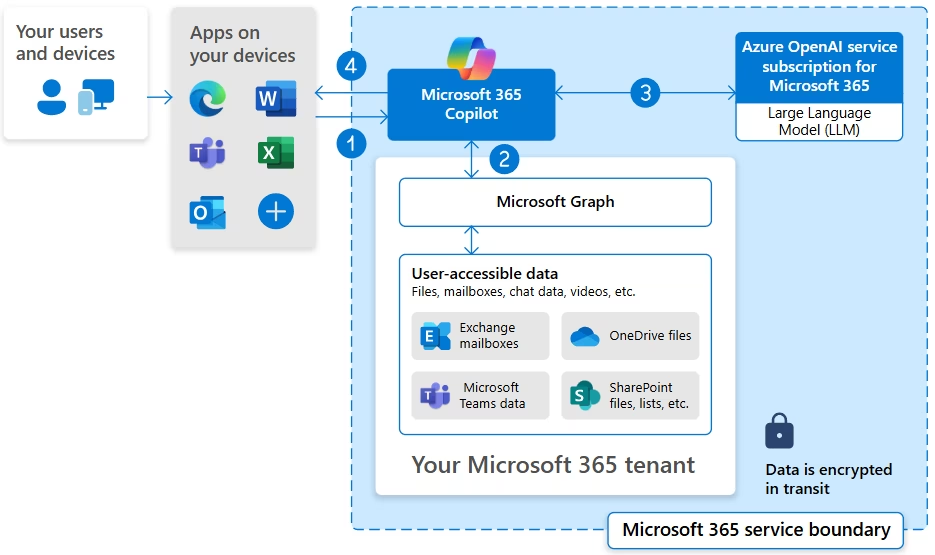
Microsoft Copilot brings together three essential components:
- Large language models (LLMs): These models interpret meaning, understand context, and generate natural language responses.
- Microsoft Graph: This securely connects to your organization’s emails, files, chats, calendars, and SharePoint/OneDrive content. Copilot only draws from the data users already have permission to access.
- Your productivity apps: Word, Excel, Outlook, Teams, PowerPoint, Dynamics 365, and more provide the interface where AI-powered outputs are delivered.
This architecture ensures Copilot leverages your live, secure business context to generate relevant, actionable outputs—never just general “best guesses.”
Real-world use cases for professional services
Here are practical examples of how Microsoft Copilot empowers service-based teams:
Drafting proposals in Word
Scenario: A consultant needs to prepare a project proposal based on previous engagements and the client’s latest requirements.
With Copilot: Type “Draft a proposal for a cybersecurity assessment using last year’s project as a template.” Copilot then:
- Searches your proposal folder for relevant documents
- Reuses applicable content
- Personalizes the draft with client names and timelines from recent emails
- Incorporates recent email correspondence when relevant
Result: An initial draft is ready in minutes, dramatically reducing admin time.
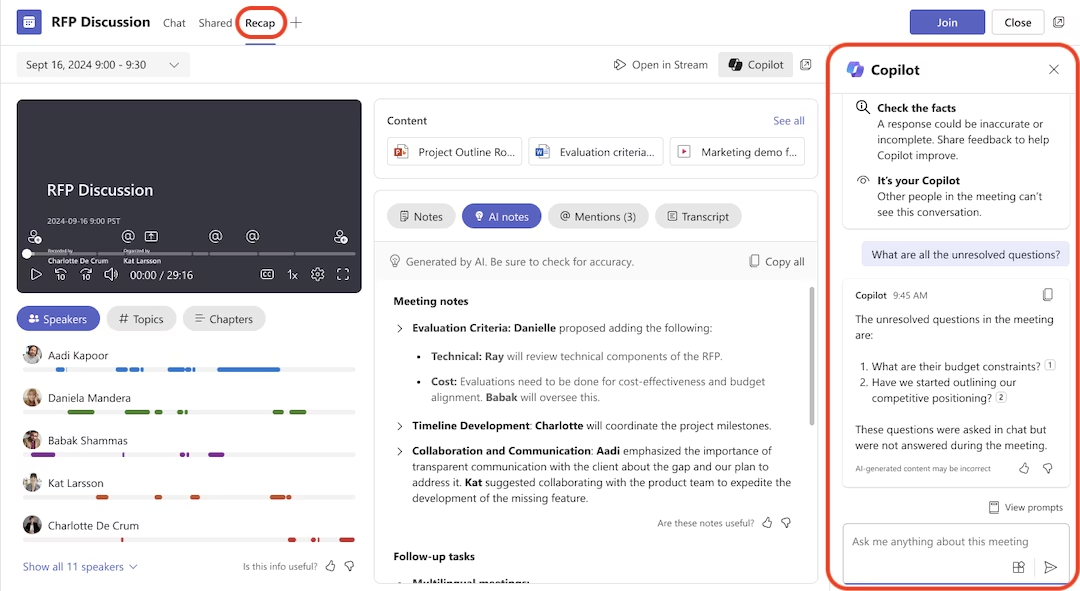
Summarizing client meetings in Teams
Scenario: You missed a client call or need to update another team member.
With Copilot: Ask “What did we agree on in today’s meeting with ABC Corp?” Copilot:
- Summarizes the discussion
- Highlights decisions made
- Lists action items
- Suggests follow-up tasks
Result: No more scrubbing through recordings or deciphering handwritten notes.
Managing email in Outlook
Scenario: Your inbox is overflowing with client conversations.
With Copilot: Ask “Summarize this email chain and draft a response.” Copilot:
- Identifies main topics
- Highlights open questions
- Suggests a concise, professional response
Result: Emails that once took 20 minutes now take 2 minutes.

Project tracking in Excel
Scenario: You need a quick status of all ongoing client projects.
With Copilot: Ask “Which projects are over budget or behind schedule?” Copilot:
- Analyzes project timelines and budgets
- Highlights red flags
- Suggests resource adjustments or next steps
Result: Project health insights become accessible without writing formulas or building dashboards.
Security and privacy: Copilot delivers
Professional services firms handle highly confidential information—legal documents, financial records, client strategies—so data security is non-negotiable. Microsoft Copilot is built with this in mind.
Copilot:
- Honors existing Microsoft 365 user permissions
- Does not train AI models on your data
- Keeps all data within your secure tenant
- Supports compliance frameworks for data residency, audit logging, and access control
As Microsoft states, “Copilot LLMs are not trained on your data, and your data is not stored outside your tenant.” This ensures firms can leverage AI without compromising confidentiality or compliance.
(Microsoft Copilot Privacy Overview)
What you need to get started
To unlock Microsoft Copilot in your organization, you’ll need:
- A Microsoft 365 E3 or E5 license (for Microsoft 365 Copilot)
- Or a Dynamics 365 license (for Copilot in Sales, Service, or Project Operations)
- Proper data governance and access management
- A structured plan for rollout, training, and adoption.
Copilot becomes most effective when teams understand how to use it and when your data is clean, secure, and accessible.
Next steps
Professional services firms looking to adopt Microsoft Copilot benefit most from having a structured plan that aligns technology capabilities with business goals. Rand Group helps firms build this foundation by guiding them through Copilot readiness, data governance, implementation planning, and user education.
Contact Rand Group today to schedule a discovery call and learn how to get started with Microsoft Copilot for your professional services firm.