Best on-premise ERP software for small manufacturers

Small manufacturers need ERP software that connects production, inventory, and financial management to improve efficiency and support growth. From managing bills of materials (BOMs) and production schedules to tracking inventory and manufacturing costs, the right ERP system can help streamline operations and improve visibility.
While cloud ERP adoption continues to grow, on-premises ERP remains a practical option for manufacturers seeking greater infrastructure control, specialized integrations, and deployment flexibility. In this guide, we compare five of the best on-premises ERP systems for small manufacturers, highlighting their capabilities, ideal use cases, and key considerations for selecting the right solution.
At a glance: Best on-premises ERP software for small manufacturers
The best on-premises ERP software for small manufacturers includes Sage 100 for discrete manufacturing and inventory management, Microsoft Dynamics 365 Business Central for manufacturers using Microsoft technology, SAP Business One for integrated financial and production management, Epicor Kinetic for complex manufacturing and production scheduling, and SYSPRO for specialized production and inventory requirements.
Each solution offers different manufacturing capabilities and deployment options. The right choice depends on your production processes, operational complexity, budget, and long-term business goals.
Why small manufacturers still choose on-premises ERP software
On-premises ERP software runs on infrastructure managed by the business, typically within its own facilities or data center, rather than through a vendor-managed cloud service. Although cloud ERP has become increasingly popular, on-premises deployment continues to meet the requirements of manufacturers with specific operational, infrastructure, and technology needs.
There are several reasons small businesses and manufacturers may prefer an on-premises ERP system:
- Greater control over infrastructure and data: On-premises ERP gives manufacturers direct oversight of server configurations, security policies, data storage, and maintenance schedules. This can be valuable for businesses with established IT policies or specialized data governance requirements.
- Support for specialized manufacturing processes: On-premises environments can provide flexibility for maintaining integrations with production equipment, barcode scanners, shop floor applications, and other systems that support established manufacturing workflows.
- Reduced dependence on internet connectivity: Locally hosted ERP systems may allow certain production and inventory operations to continue during external internet outages, depending on the system architecture and local network availability.
- Protection of existing technology investments: Manufacturers can continue leveraging existing infrastructure, software customizations, and integrations while gradually modernizing their technology environment.
- Flexibility in managing system changes: On-premises deployment can give manufacturers greater control over scheduling updates, maintenance, and system enhancements to minimize disruption to production operations.
Despite these advantages, on-premises ERP is not necessarily the best choice for every manufacturer. Hardware expenses, IT maintenance, security responsibilities, and potential limitations in accessing newer AI and automation capabilities should also factor into the decision.

Make a more informed ERP software decision
Choosing the right ERP starts with understanding your business requirements and evaluating your options. Download our Top 10 ERP Software Selection Checklist for a step-by-step guide to comparing solutions and finding the best fit for your manufacturing operations.
Best on-premises ERP software for small manufacturers
The following five ERP systems provide manufacturing capabilities for businesses evaluating on-premises or hybrid deployment. Each offers different strengths depending on manufacturing complexity, operational requirements, and existing technology investments.
The ERP systems reviewed in this list were selected for their manufacturing functionality, relevance to small and midsize manufacturers, and availability of on-premises deployment options. Each offers different strengths depending on production complexity, operational requirements, and existing technology investments.
1. Sage 100
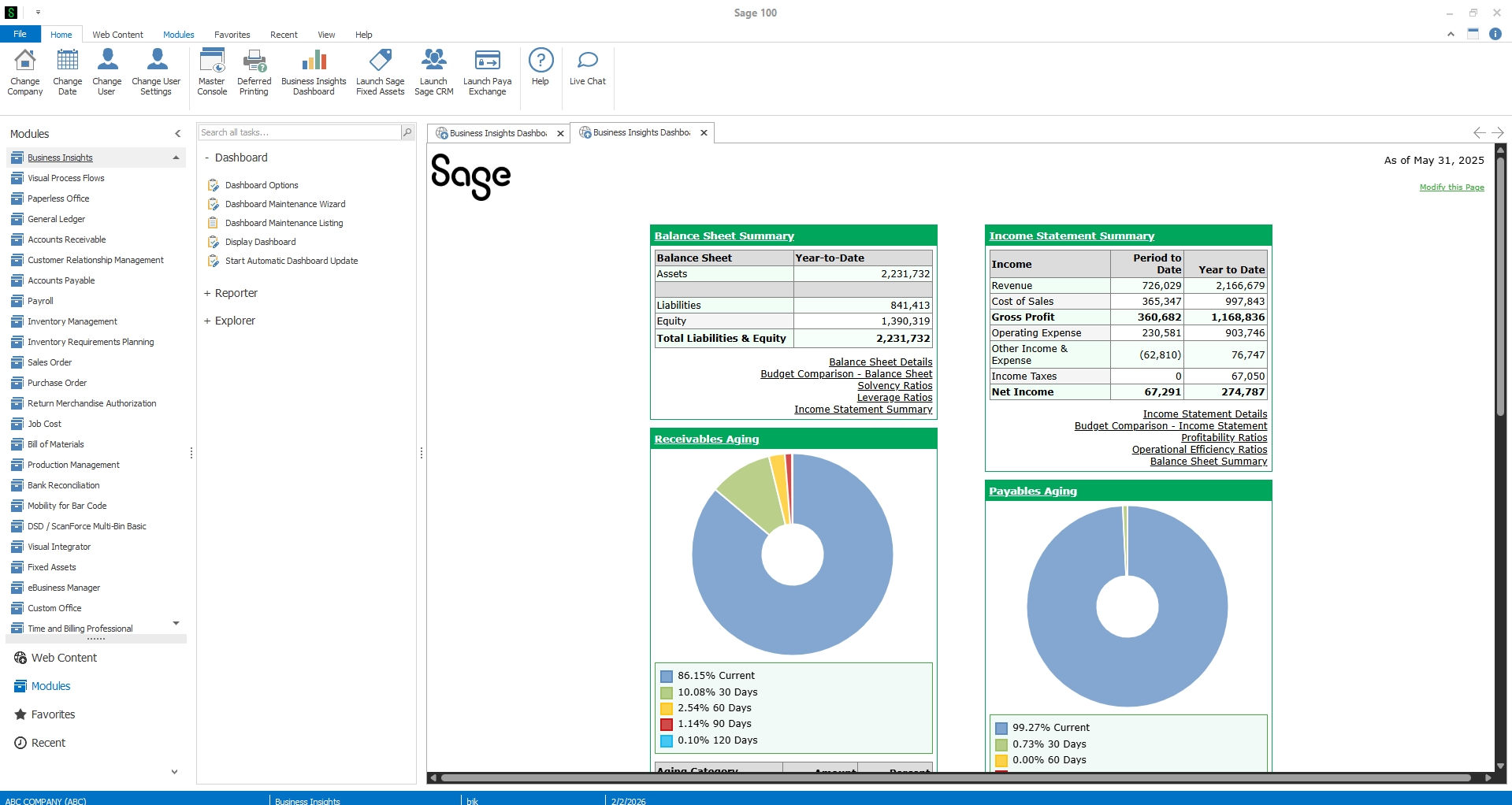
Sage 100 is an established ERP solution designed for small and midsize businesses that need integrated financial management, inventory control, purchasing, and manufacturing capabilities. It is particularly well suited to discrete manufacturers seeking to manage production and inventory processes without the complexity of a large enterprise ERP system.
Sage 100 supports manufacturing operations through modules such as Bill of Materials, Production Management, Inventory Management, and Inventory Requirements Planning. Together, these capabilities help manufacturers coordinate material requirements, manage work tickets, track inventory movements, and monitor production costs.
Key manufacturing capabilities:
- Bill of Materials management for maintaining product structures and component requirements.
- Production Management for work tickets, material usage, and production activity.
- Inventory Management for tracking materials, components, and finished goods.
- Inventory Requirements Planning for evaluating material availability and replenishment needs.
- Integrated financial management and manufacturing costing.
Best for: Small discrete manufacturers that need to connect production, inventory, purchasing, and accounting within one ERP environment.
Deployment considerations: Sage 100 supports on-premises and hosted deployment arrangements, making it an option for manufacturers that want to maintain control over their ERP infrastructure.
For manufacturers with established production workflows, Sage 100 can provide a practical foundation for improving operational efficiency while maintaining familiar business processes.
2. Microsoft Dynamics 365 Business Central
Microsoft Dynamics 365 Business Central is an integrated ERP platform that connects financial management, inventory, purchasing, sales, and manufacturing operations. It is particularly relevant for manufacturers that already use Microsoft business applications and want a connected technology environment.
Business Central Premium includes manufacturing functionality such as production orders, bills of materials, routing, capacity planning, and material requirements planning. These capabilities help manufacturers coordinate production activities while connecting operational data with financial reporting.
Key manufacturing capabilities:
- Production orders and manufacturing BOM management.
- Routing and work center management.
- Material and capacity planning.
- Inventory and warehouse management.
- Integrated purchasing, sales, and financial reporting.
Best for: Small and midsize manufacturers seeking integrated ERP functionality and alignment with Microsoft’s broader technology ecosystem.
Deployment considerations: Business Central is available through both cloud and on-premises deployment models. However, the on-premises version does not offer all the capabilities available in Business Central online.
In particular, Copilot and certain cloud-based AI, automation, and integration capabilities are unavailable or more limited in on-premises environments. Manufacturers prioritizing AI, workflow automation, and access to Microsoft’s latest innovations should carefully evaluate the cloud-based version before selecting an on-premises deployment.
Business Central on-premises remains a viable option for manufacturers seeking integrated production and financial management, but the cloud-based version may provide greater long-term flexibility for organizations pursuing automation and AI initiatives.

3. SAP Business One
SAP Business One is an ERP platform designed for small and midsize businesses that need integrated financial management, purchasing, inventory, sales, and production functionality.
For manufacturers, SAP Business One connects production transactions with financial and inventory data, helping organizations improve visibility into material consumption, purchasing requirements, and manufacturing costs.
Its production functionality supports bills of materials, production orders, and material requirements planning, while its financial capabilities help businesses manage accounting, reporting, and internal controls.
Key manufacturing capabilities:
- Production orders and BOM management.
- Material requirements planning.
- Inventory and purchasing management.
- Production-related cost tracking.
- Integrated financial reporting and audit trails.
Best for: Small and midsize manufacturers that prioritize financial controls, inventory visibility, and integration between accounting and production processes.
Deployment considerations: SAP Business One supports on-premises deployment, with hosted arrangements available through qualifying providers.
Manufacturers with more specialized production requirements may need additional functionality through partner-developed extensions or integrations.
SAP Business One can be a strong option for manufacturers that want to improve financial oversight while managing core production and inventory processes within a single ERP system.

4. Epicor Kinetic
Epicor Kinetic is a manufacturing-focused ERP platform designed to support discrete manufacturing operations, including make-to-order, engineer-to-order, and mixed production environments.
Unlike more general-purpose ERP systems, Epicor Kinetic emphasizes manufacturing processes such as production planning, scheduling, shop floor execution, and quality management.
Its functionality can be particularly valuable for manufacturers managing complex products, variable production schedules, or detailed manufacturing requirements.
Key manufacturing capabilities:
- Advanced production planning and scheduling.
- Manufacturing BOM and routing management.
- Shop floor management and manufacturing execution.
- Quality management and traceability.
- Production costing and operational reporting.
Best for: Small-to-midsize manufacturers with complex discrete manufacturing processes that require advanced production planning and shop floor visibility.
Deployment considerations: Epicor Kinetic supports cloud, on-premises, and hybrid deployments. However, Epicor has announced that version 2028.1 will be the final on-premises release to receive new features, with future innovation focused on Epicor Cloud. Manufacturers seeking a long-term on-premises solution should carefully evaluate Epicor’s product roadmap, support commitments, and future migration requirements.
Although Epicor Kinetic provides extensive manufacturing functionality, its implementation scope and complexity may exceed the requirements of smaller businesses with straightforward production processes. For manufacturers with advanced scheduling, production control, and quality requirements, however, its specialized capabilities may justify the additional investment.

5. SYSPRO
SYSPRO is an ERP solution focused on manufacturing and distribution, with capabilities designed to support production management, inventory control, material planning, and financial operations.
The platform serves manufacturers across industries such as industrial equipment, automotive components, electronics, and other production-intensive sectors.
SYSPRO supports both discrete and process-oriented manufacturing requirements, making it relevant for businesses with specialized production methods or complex inventory management needs.
Key manufacturing capabilities:
- Production planning and scheduling.
- Material requirements planning.
- BOM and manufacturing order management.
- Inventory tracking and product traceability.
- Manufacturing costing and financial management.
Best for: Small-to-midsize manufacturers requiring specialized production management, inventory control, and traceability capabilities.
Deployment considerations: SYSPRO offers deployment flexibility across on-premises and cloud environments, with hybrid arrangements depending on the solution and implementation.
Manufacturers considering SYSPRO should evaluate how its production functionality aligns with their operating model, along with the resources required for implementation, maintenance, and ongoing support.

Essential ERP features small manufacturers should look for
Not every manufacturing ERP system provides the same functionality. Before evaluating vendors, manufacturers should identify which capabilities are most important to their production processes, inventory requirements, and financial operations.
The most important capabilities depend on your manufacturing environment. For example, make-to-order manufacturers may prioritize job costing and production scheduling, while inventory-intensive businesses may focus on material planning and warehouse management.
Manufacturers should also evaluate integration capabilities, usability, reporting, and scalability. Choosing ERP software based on your operational requirements helps avoid unnecessary complexity while supporting long-term growth.
On-premises vs. cloud ERP: Which is better for small manufacturers?
Choosing between on-premises and cloud ERP is an important part of the software selection process. Both deployment models can support manufacturing operations, but they differ in infrastructure requirements, maintenance responsibilities, accessibility, and access to emerging technology.
On-premises ERP may be a good fit for manufacturers that need direct infrastructure control, maintain specialized production integrations, or operate in facilities with connectivity challenges.
Cloud ERP may be better suited to manufacturers seeking reduced infrastructure maintenance, easier remote access, and access to newer automation and AI capabilities.
Manufacturers should also evaluate total cost of ownership, including software licensing, hardware, implementation, integrations, security, upgrades, and ongoing support. A lower initial cost does not necessarily translate into a lower long-term investment.
When cloud ERP may be the better choice
While on-premises ERP remains a practical option, manufacturers seeking greater automation, AI capabilities, and reduced infrastructure maintenance may benefit from cloud-based solutions.
Cloud ERP options for small manufacturers include:
- Microsoft Dynamics 365 Business Central online: Connects financial, inventory, purchasing, and manufacturing operations with access to Microsoft’s cloud-based automation and AI capabilities.
- Oracle NetSuite: Provides integrated financial management, inventory control, supply chain management, and manufacturing capabilities to improve operational visibility.
Comparing on-premises and cloud ERP solutions can help manufacturers identify the deployment model that best supports their operations, technology requirements, and long-term goals.
How to choose the right ERP system for your manufacturing business
Choosing manufacturing ERP software requires more than comparing features and licensing costs. The right solution should support how your business operates today while providing flexibility for changing production requirements.
Start by evaluating your current manufacturing processes, operational challenges, and technology environment.
Important questions to consider include:
- Manufacturing requirements: Does the software support your production model, including make-to-stock, make-to-order, or engineer-to-order operations?
- Inventory and production management: Can it handle your BOMs, material planning, production scheduling, inventory tracking, and costing requirements?
- Existing integrations: Will the ERP connect with your shop floor equipment, warehouse systems, and other business applications?
- Deployment preferences: Do you need on-premises infrastructure control, or would cloud or hybrid deployment better support your operations?
- Total cost of ownership: What are the expected licensing, infrastructure, implementation, maintenance, and support costs?
- Future growth: Can the system accommodate additional products, production capacity, locations, and more complex processes?
Manufacturers should also consider the implementation partner’s experience with similar businesses and production environments.
An ERP system that meets technical requirements but does not align with day-to-day manufacturing workflows can create unnecessary complexity and limit the value of the investment.

Not sure which manufacturing ERP is right for your business?
Choosing between on-premises, cloud, and hybrid ERP solutions can be challenging. Rand Group helps manufacturers evaluate software based on production requirements, inventory processes, financial management needs, and long-term business goals.
How Rand Group helped Stucchi USA improve manufacturing inventory efficiency
Stucchi USA, a manufacturer and distributor of hydraulic quick-connect couplings, partnered with Rand Group to improve inventory management and production processes using Sage 100.
Through multi-bin inventory management, barcode capabilities, and production management enhancements, Stucchi USA improved inventory visibility and operational efficiency.
The result: 50% less time spent locating inventory, along with improved production management and reporting capabilities.
Why partner with Rand Group for manufacturing ERP
Choosing the right manufacturing ERP system is only the beginning. Successful implementation, integration, and ongoing optimization are essential to maximizing its value. Rand Group combines manufacturing industry knowledge with multi-platform ERP expertise to help businesses select, implement, and optimize solutions that support their production processes, inventory requirements, and long-term goals.
- Manufacturing expertise – Our team understands the challenges manufacturers face, from production planning and inventory management to supply chain operations and financial reporting.
- Multi-ERP expertise – As a partner with Microsoft, Oracle NetSuite, and Sage, we help manufacturers evaluate solutions based on their unique requirements rather than a single platform.
- End-to-end ERP services – From software selection and implementation to integrations and ongoing support, Rand Group provides expertise throughout the ERP lifecycle.
- Business-first approach – We align ERP functionality with your manufacturing workflows to improve efficiency, strengthen visibility, and deliver measurable business value.
- Proven implementation methodology – Our structured approach helps manufacturers manage project risks, control timelines, and minimize disruption to operations during ERP implementation.
Key takeaways: Choosing the best on-premises ERP for small manufacturers
- On-premises ERP remains a practical option for small manufacturers that prioritize infrastructure control, specialized integrations, and flexibility in managing their technology environments.
- Sage 100 and Dynamics 365 Business Central provide integrated manufacturing and financial management capabilities, although Business Central's on-premises edition has limitations involving cloud-based AI and automation.
- SAP Business One, Epicor Kinetic, and SYSPRO offer additional options for manufacturers with different financial, production, and inventory management requirements.
- Manufacturing functionality should drive software selection. BOM management, production planning, inventory control, costing, and shop floor visibility are important capabilities to evaluate.
- Cloud ERP deserves consideration. Manufacturers seeking AI, automation, remote accessibility, and reduced infrastructure maintenance may benefit from evaluating cloud-based alternatives.
- An experienced ERP partner can help manufacturers compare solutions, identify operational requirements, and select technology that supports long-term growth.
Frequently asked questions about on-premises manufacturing ERP
What is the best on-premises ERP software for small manufacturers?
Some of the best on-premises ERP options for small manufacturers include Sage 100, Microsoft Dynamics 365 Business Central, SAP Business One, Epicor Kinetic, and SYSPRO. Each supports different manufacturing requirements. The best choice depends on production complexity, inventory needs, deployment preferences, budget, and existing business systems.
Is on-premises ERP still a good choice for small manufacturers?
Yes. On-premises ERP can be a good choice for small manufacturers that want direct control over their infrastructure, maintain specialized production integrations, or have limited internet connectivity. However, businesses must also consider hardware costs, maintenance responsibilities, security, and potential limitations in accessing cloud-based AI and automation features.
Does Microsoft Dynamics 365 Business Central support on-premises deployment?
Yes. Microsoft Dynamics 365 Business Central supports on-premises deployment and provides manufacturing functionality through its Premium experience. However, Business Central on-premises does not include all the AI, Copilot, automation, and cloud integration capabilities available in Business Central online. Manufacturers should compare both deployment models before making a decision.
How much does on-premises manufacturing ERP software cost?
The cost of on-premises manufacturing ERP varies based on the software, number of users, required modules, infrastructure, implementation complexity, and ongoing support. Manufacturers should account for software licensing, server hardware, integrations, data migration, training, security, maintenance, and future upgrades when calculating total cost of ownership.
What ERP features are most important for small manufacturing businesses?
Important manufacturing ERP features include bill of materials management, inventory control, production planning, material requirements planning, manufacturing costing, and shop floor visibility. The most important capabilities depend on the business’s production model, product complexity, inventory requirements, and operational challenges.
Can small manufacturers move from on-premises ERP to cloud ERP later?
Yes. Many manufacturers can transition from on-premises ERP to cloud-based software, although the migration process depends on their current platform, data, customizations, integrations, and business requirements. Some vendors provide supported migration paths, while other transitions require a new ERP implementation. Careful planning helps reduce disruption to manufacturing operations.
What is the difference between manufacturing ERP and accounting software?
Accounting software primarily manages financial transactions, such as general ledger, accounts payable, accounts receivable, and financial reporting. Manufacturing ERP extends these capabilities by connecting accounting with inventory management, production planning, bills of materials, purchasing, manufacturing costing, and other operational processes.
Find the right ERP software for your manufacturing business
The best on-premises ERP software for your manufacturing business depends on your production processes, inventory requirements, and long-term goals. While on-premises systems remain a strong option for many manufacturers, cloud and hybrid solutions may offer additional advantages for businesses seeking greater automation, AI capabilities, and operational flexibility.
Whether you’re replacing an outdated system, optimizing existing processes, or evaluating deployment options, Rand Group can help. Our manufacturing ERP experts provide software selection, implementation, and ongoing support services to help you find a solution that aligns with your business requirements. Contact us to discuss your manufacturing needs and explore the right ERP options for your business.