Is MCP dead? What businesses need to know about AI integrations

Model Context Protocol (MCP) has quickly emerged as an important technology for connecting AI assistants and agents to business applications. With growing adoption across major AI platforms and software vendors, MCP has the potential to make AI integrations more accessible, flexible, and reusable. So why are some technology experts declaring that MCP is dead?
The controversy isn’t really about whether MCP has a future. It’s about whether the industry has been too quick to embrace it as the default approach for connecting AI to external systems. Critics point to unnecessary complexity, performance overhead, and security considerations, particularly when traditional APIs, existing connectors, or other integration methods may accomplish the same objectives more efficiently.
Our perspective? MCP isn’t dead, and it has an important role to play in business AI adoption. But like any emerging technology, its value depends on how and where it’s applied. In this article, we explore the debate, compare MCP with alternative integration approaches, and examine what businesses should consider as they connect AI to their applications and data.
At a glance
MCP is not dead. It is becoming an important standard for connecting AI assistants to business systems, particularly when multiple AI tools need flexible, reusable access to applications and data. However, it isn’t always the best integration method. Direct APIs and existing connectors may be more efficient for predictable workflows, and many businesses will benefit from combining these approaches.
What is MCP, and why did it become popular?
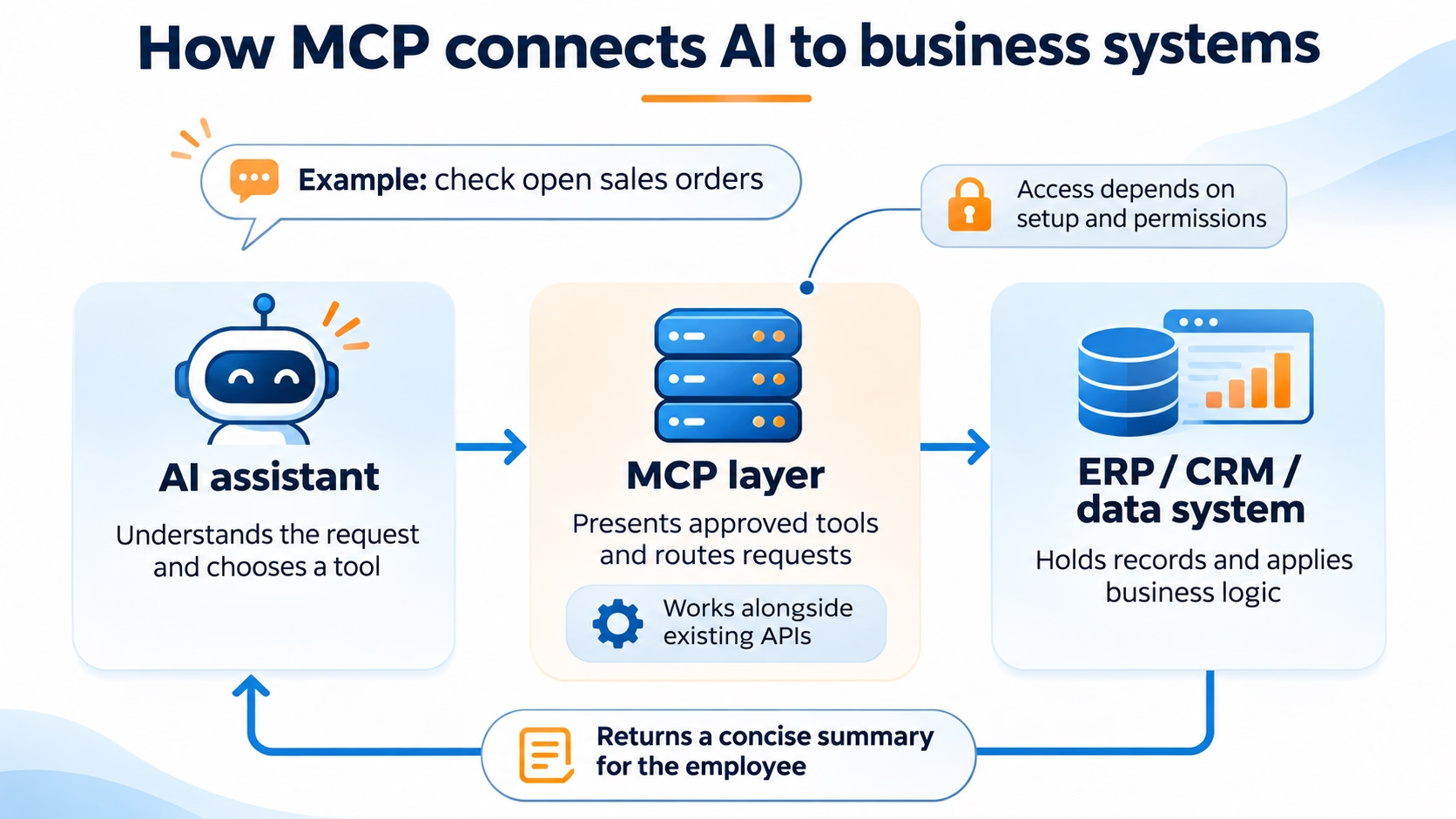
Model Context Protocol, or MCP, is an open standard that defines how AI applications communicate with external tools and data sources. An MCP server exposes selected capabilities from a business application so a compatible AI client can discover and use them.
Imagine two AI assistants that need to search the same knowledge base and look up support tickets. With MCP, both compatible clients can discover the available tools and the inputs each tool expects. The server can reuse the same underlying APIs, and the source systems still apply their access rules. That potential for reuse is what made the standard appealing. Adoption moved quickly once major AI platforms added support, and MCP soon looked like the safe default for any AI integration.
Why are people saying MCP is dead?
Much of the criticism comes from the growing assumption that MCP should be the default way to connect AI applications to external systems. MCP offers meaningful benefits, particularly when AI tools need to discover and interact with capabilities across multiple applications. But those benefits aren’t equally valuable in every situation.
For businesses evaluating AI integrations, the question isn’t whether MCP adds technical complexity, but whether that complexity is justified by what it enables. If an existing connector or API-based integration already supports a business process effectively, adding MCP may offer little additional value. On the other hand, when an application provides an MCP server that allows multiple AI tools to access its capabilities through a standardized interface, MCP can simplify integration and expand what’s possible. Thoughtworks’ April 2026 Technology Radar makes a similar case for evaluating interoperability benefits against the costs of additional abstraction.
Performance is another concern, although its impact depends heavily on implementation. Exposing a large number of tools and passing extensive results to an AI model can increase token consumption, response times, and operating costs. However, these limitations aren’t inherent to every MCP connection. Techniques such as loading tools only when needed and filtering results can reduce overhead, as demonstrated in Anthropic’s research on code execution with MCP.
Security concerns also deserve attention, particularly when AI agents can access sensitive business information or initiate transactions. MCP introduces considerations around authentication, tool permissions, and untrusted content, but many underlying risks, such as excessive access and insufficient approval controls, also exist with other integration methods. Microsoft’s review of MCP security highlights several of these challenges.
These criticisms don’t mean MCP is becoming irrelevant. They reinforce the importance of choosing integration approaches based on business requirements rather than adopting a technology simply because it has become popular.
How does MCP compare with APIs, connectors, and other approaches?
A direct API gives software a defined way to request data or run an operation. An existing connector packages supported actions into a workflow. MCP gives compatible AI clients a shared way to discover and call tools, which may use those same APIs underneath.
For developer-facing tasks, an established command-line interface (CLI) may already offer structured output and predictable errors. In a controlled runtime, code can handle steps such as filtering large results or combining several requests before the model sees the output. Teams can use code with direct integrations or with MCP tools.
When does MCP make sense, and when doesn’t it?
MCP can be valuable when AI assistants need flexible access to information and capabilities across business applications. However, its availability doesn’t automatically make it the best choice. Businesses should consider what the AI needs to accomplish, how predictable the process is, and whether MCP offers meaningful advantages over existing integrations.
When MCP makes sense
MCP is particularly useful when an AI assistant needs to explore information, retrieve data, or interact with different tools based on a user’s request.
For example, an employee might ask an AI assistant why a customer order is delayed. Answering that question could require checking order status, inventory availability, shipping information, and customer communications. An MCP connection can give the assistant a standardized way to discover and use the available tools rather than relying on a separately designed integration for every possible question.
MCP can also provide flexibility when businesses want to use different AI assistants with the same enterprise applications, particularly when software vendors already offer supported MCP servers.
When MCP doesn’t make sense
For predictable, repeatable processes, traditional APIs and automation tools are often more efficient. Importing records, updating transaction statuses, or transferring data between systems typically involves defined inputs, business rules, and expected outputs. These processes don’t necessarily benefit from having an AI model dynamically select tools.
Performance and operating costs also matter. Depending on how an MCP integration is implemented, tool discovery and the information exchanged with an AI model can increase token consumption, processing time, and cost. When a workflow needs to perform a known operation repeatedly, a direct API may provide a more economical and predictable approach.
When to combine AI with traditional integrations
Some of the most valuable business applications combine AI with conventional automation rather than relying on AI for every step.
Consider importing customer or vendor data into an ERP system. AI can help interpret inconsistent source files, standardize descriptions, identify potential duplicates, and suggest how information should be mapped. Once the data has been reviewed and validated, a direct API can load the records into the ERP system using established business rules and error handling.
This approach uses AI where interpretation and judgment add value while keeping structured transactions within a controlled, repeatable process.
The goal isn’t to maximize the use of MCP or AI. It’s to select the right technology for each part of the business process.
Where is MCP headed?
MCP is unlikely to disappear, particularly as major software vendors continue adding support for the protocol. Its growing adoption could make it easier for businesses to connect AI assistants to the applications and data they already use, reducing the need for custom integrations in some scenarios.
However, the next phase of MCP adoption will likely focus less on whether applications support the protocol and more on how effectively those connections work in practice. Businesses will need to evaluate which capabilities are available, how access is controlled, and whether performance and operating costs justify the approach. An MCP connection that works well for occasional data exploration may not be the most efficient option for high-volume or repeatable transactions.
We expect MCP to become one of several established approaches for connecting AI to business systems rather than replacing traditional integrations. AI assistants may use MCP to retrieve information and interact with applications, while direct APIs and conventional automation continue handling structured, predictable processes.
The future of MCP isn’t about replacing APIs or connectors. It’s about making AI integration more accessible while giving businesses flexibility to choose the most effective approach for each use case.
Why does the MCP debate matter for ERP and other business applications?
The choice of AI integration approach becomes more consequential when applications contain financial data, operational records, and business transactions. Asking an AI assistant why an invoice is still open is different from allowing it to modify that invoice or initiate a payment. The first involves retrieving and interpreting information; the second requires appropriate business rules, validation, permissions, and potentially an approval process.
ERP systems also rely on complex relationships between data and business processes. An AI assistant may retrieve information successfully without understanding all the accounting or operational rules that affect how it should be interpreted or used. Organizations need to consider not only what information an AI tool can access, but whether it can produce accurate, reliable results within the context of their business.
This is where the distinction between MCP and traditional integration methods becomes especially important. MCP can provide a flexible way for AI assistants to explore business information and interact with available capabilities. But established APIs and automation tools may be better suited for predictable transactions that require consistent processing, validation, and error handling. In many cases, the most effective solution combines AI with conventional business logic and integrations.
As major ERP vendors introduce MCP capabilities, businesses should look beyond whether their software supports the protocol. The more important questions are which capabilities are available, how they’re secured, and whether MCP is the right approach for the intended business process.
How Microsoft uses MCP with Dynamics 365
Microsoft documents MCP access across Business Central, Finance & Operations, and Dataverse. These services support different applications and tool sets, so organizations should evaluate each separately.
Business Central: Configurable access to ERP data and actions
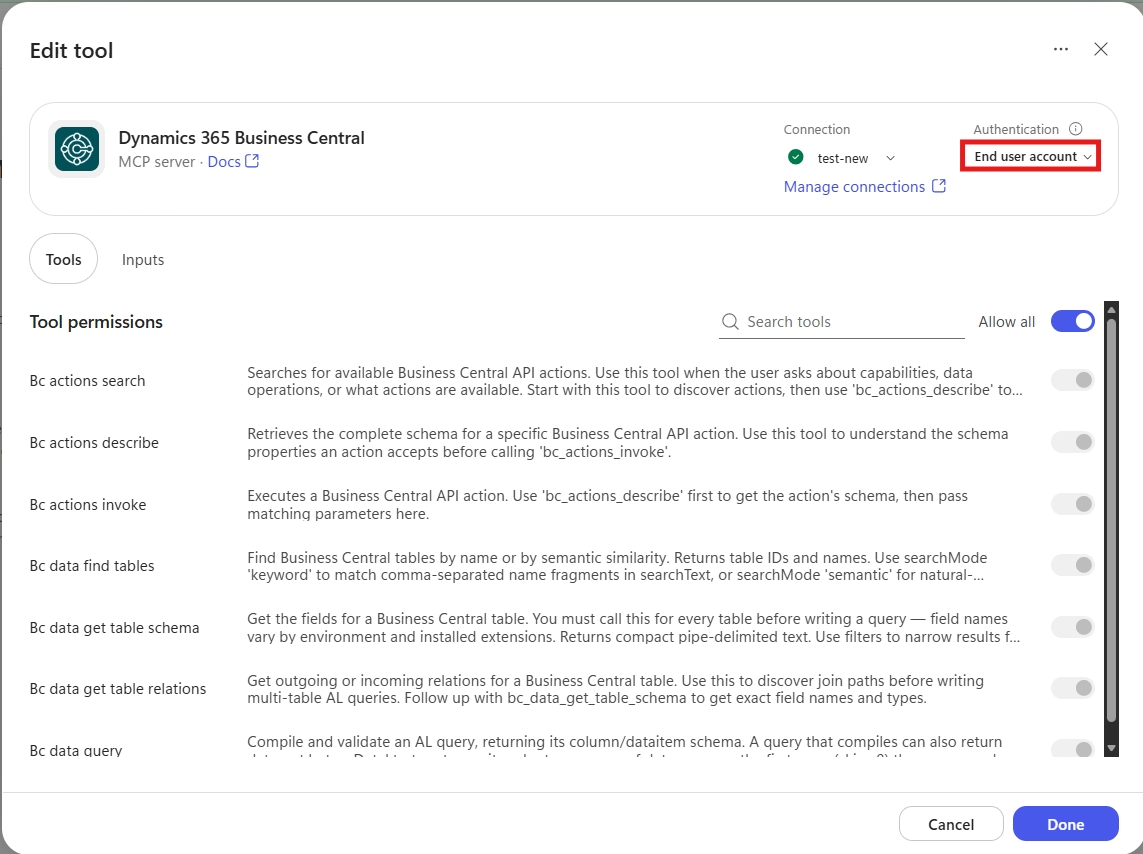
The Business Central online MCP server supports conversational access to business data and logic. Its built-in default configuration provides dynamic discovery for read-only API access. For example, an order inquiry assistant could retrieve open orders and summarize their status for a customer service employee.Administrators can configure additional capabilities, including allowed record changes and actions.
Those capabilities depend on the enabled server features, selected APIs, and user permissions. Microsoft labels Data Query Tools as a preview feature. Explore AI agents in Dynamics 365 Business Central and the practical considerations for connecting Copilot Studio to Business Central with MCP.
Finance & Operations: Tools for data and business processes
The dynamic Dynamics 365 ERP MCP server provides data, form, and action tools. Microsoft documents prerequisites for application versions, supported environments, and allowed clients. Teams must also distinguish this server from the older static implementation.
The business decision is which operations an agent should perform and which need a more controlled workflow. Retrieving records carries a different risk from executing a transaction.

Dataverse: Access to CRM and business application data
Microsoft’s Dataverse MCP documentation lists tools for querying data, creating and updating records, and invoking custom APIs. Check which clients, tools, and permissions are available in your environment.
For CRM projects, confirm that the required tables, operations, and access rules support the intended scenario. A Dataverse connection does not automatically make every Dynamics 365 process available to an agent. These integration options complement the broader Dynamics 365 Copilot and AI capabilities.
How Oracle NetSuite uses MCP
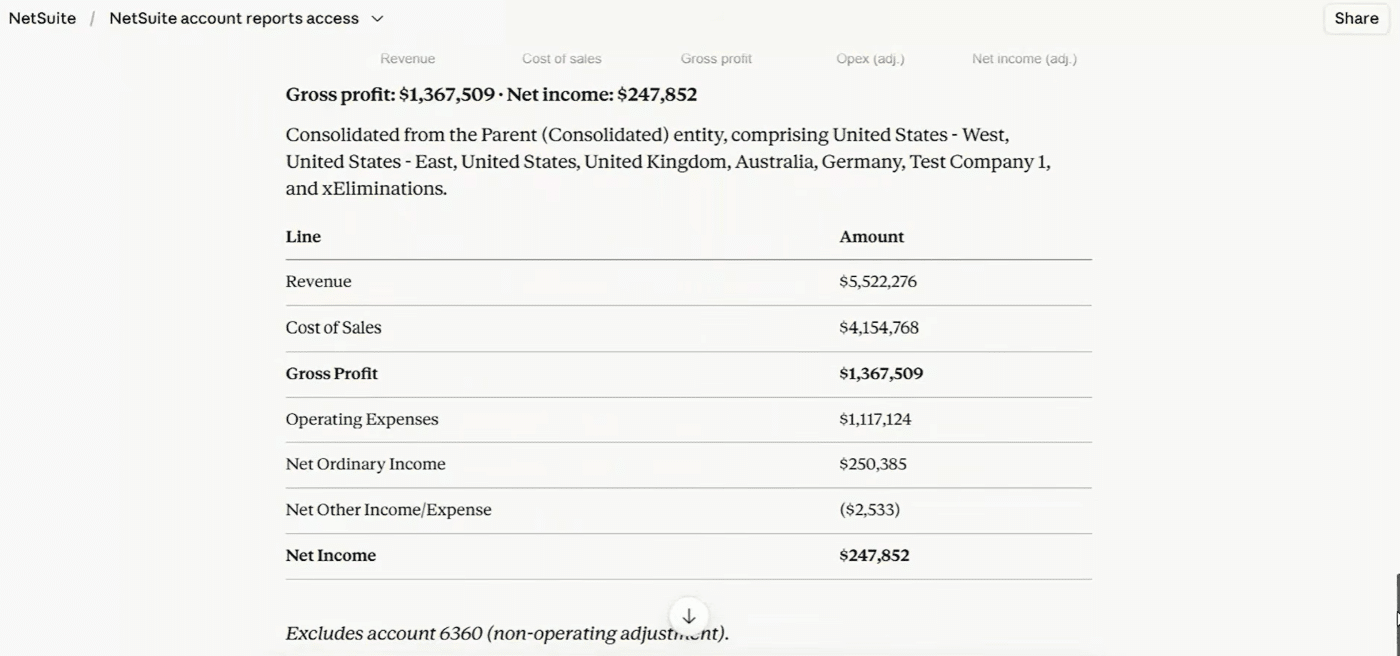
Oracle’s NetSuite AI Connector Service lets supported external AI clients interact with NetSuite through MCP. Its MCP Standard Tools SuiteApp provides capabilities for records, reports, saved searches, and SuiteQL queries.
Oracle also documents tools that create and update records. Those operations follow the assigned NetSuite role and permissions. Organizations should review which roles can connect and what those roles can change before enabling access.
For example, a finance assistant could run an approved saved search and summarize outstanding balances, helping employees investigate exceptions without manually gathering each result. MCP offers one way to extend NetSuite AI and machine learning capabilities. It should fit the organization’s reporting, integration, and access requirements.
How Sage Intacct uses MCP
Sage Intacct AI Gateway supports access through REST APIs and an MCP server. Sage positions the MCP server for AI interactions such as exploring data structures and running read-only queries.
Sage Intacct’s MCP server currently provides read-only access to data and object metadata. Businesses should not assume it can create transactions, approve payments, or update accounting records.
This makes data exploration and analysis practical areas to evaluate. A finance user could ask an assistant to retrieve relevant records and summarize the findings, then review the results against the source data.
Connection requirements also matter. Sage’s setup guide specifies an active Web Services Developer license and an AI Gateway Add-on subscription. Learn more about Sage AI and AI agents in Sage Intacct and how the Sage Intacct AI Gateway supports external AI connections.


Find the right fit for your first AI integration
Bring a specific ERP or CRM workflow to Rand Group. We’ll help you identify what an agent needs to access, what your software already supports, and where MCP could add value.
What should you validate before connecting AI to ERP or CRM?
Some of the most costly mistakes come from moving too fast. Teams treat a vendor’s MCP announcement as proof their use case is ready, add MCP to a fixed workflow a connector already handles, or grant write access before proving read-only value. Another common mistake is putting approval rules inside the AI layer instead of a workflow that will outlast the AI client. Start with a task you can measure. If a finance team spends hours gathering records for a weekly review, test whether limited, read-only access saves time and produces answers the team can verify. Use that evidence to decide where to expand.
- Define the outcome. Choose a specific task and a measurable result, such as less time spent gathering records.
- Confirm supported capabilities. Check the product, environment, required tools, subscriptions, and availability status.
- Limit permissions. Give the agent only the access its task requires.
- Set approval points. Decide which changes require human review before execution.
- Test difficult requests. Include missing information, similar customer names, ambiguous dates, and incomplete records.
- Plan for failures. Check what happens after an interrupted operation or repeated request.
- Review costs. Include model usage, software charges, maintenance, and support.
- Assign ownership. Identify who reviews logs, handles incidents, and retests the integration after updates.
Before giving an agent write access, test ambiguous requests and interrupted transactions. If two customers have similar names, what will the agent do before changing an address? If a request times out, how will the workflow tell whether the previous attempt already succeeded? These are the cases that show whether an integration is ready to operate.
For related design decisions, see our guide to Dynamics 365 integration architecture, costs, and partner selection.

Plan an AI integration your team can support
Rand Group helps you turn a working connection into a reliable business process, from choosing the right tools and access controls to testing real transactions and exceptions.
Put enterprise AI to work with Rand Group
Rand Group has helped organizations implement and support business technology since 2003 and maintains a 90% client retention rate. Our team brings together consultants, accountants, engineers, and industry specialists who understand the financial and operational processes behind ERP and CRM systems.
Our AI agent services for ERP and CRM span Microsoft, Oracle NetSuite, and Sage. We help define the business task, evaluate native capabilities and custom integration needs, configure access, and test how an agent handles real scenarios. That includes deciding when it can retrieve information, when it can change records, and when a person must review its proposed action.
What our clients say about Rand Group
Our clients describe the value of combining software expertise with an understanding of their business. These experiences reflect our ERP implementation and support work across Sage Intacct, NetSuite, Business Central, and Dynamics 365 Finance & Operations.
“Our experience working with Rand Group has always been so positive that I knew they were the right team to guide our move to Sage Intacct. They already understood our company structure, which made the implementation very easy, and they have always been responsive to our needs.” – Lisa Morris, Accounting Director, Spine Team Texas
“The level of care, thoughtfulness, and in-depth knowledge provided by Rand Group exceeded our expectations. We now have a partner who not only understands NetSuite but also comprehends the intricacies of accounting and finance. Rand Group has become an extension of our internal technical team, providing invaluable support as we continue to grow.” – Carolina Pereira, VP of Finance Shared Services, Unified Women’s Healthcare
“Business Central lets us automate workflows, integrate multiple apps, and scale operations quickly, while Rand Group (formerly WebSan) guided us to adapt the platform exactly to our business needs.” – Kenny Jeans, Vice President Corporate Services, AGT Products Inc.
“We have always felt like a top priority when working with Rand Group’s team and have the utmost confidence in their industry and technical knowledge.” – Christa Curette, VP of Engineering & Technology, Conquest Completion Services, LLC
Key takeaways
- MCP earns its place when a shared set of tools can serve multiple AI clients or use cases.
- For fixed workflows, a direct API or existing connector is often easier to operate.
- Code execution can work alongside MCP to reduce how much tool data the model processes.
- MCP capabilities vary by platform. Verify the available actions and permissions before designing around them.
- Test a measurable use case and define approval and recovery steps before enabling consequential actions.
Frequently asked questions
Is MCP dead or becoming obsolete?
MCP remains useful where multiple AI clients need a common way to discover and call tools. Direct APIs and existing connectors often serve fixed workflows with less overhead. The decision comes down to how much value a shared tool interface adds. Explore AI consulting for ERP and CRM platforms for help evaluating the options.
What is the difference between MCP and an API?
An API defines the requests software can make to access data or perform operations in a system. MCP provides a standard way for AI applications to discover available tools, understand their inputs, and request their use. An MCP tool may call an existing API or application logic underneath, so the two approaches can work together.
Does every AI agent need an MCP server?
No. An agent may use an existing connector, direct API calls, or other supported tools. The right choice depends on the application, available capabilities, and operating requirements. Learn more about our AI agent implementation and development services.
Can MCP replace existing ERP and CRM integrations?
An API or connector can keep handling scheduled transfers while MCP gives AI clients access to selected tools. Use MCP where tool discovery or reuse improves a specific workflow.
Can MCP agents change ERP or CRM records?
Yes, when the connected system exposes write operations and the agent has the required permissions. Other implementations provide read-only access. The available actions depend on the server’s tools and the application’s access rules.
How should businesses secure an MCP integration?
Use trusted servers, restrict permissions, review exposed tools, and require approval for sensitive actions. Test how the agent handles untrusted content and unclear requests, and confirm that the available logs support investigation.
Choose AI integrations around your business requirements
Choose AI integrations around your business requirements
MCP isn’t dead, and its growing adoption among software vendors suggests it will remain an important part of the AI integration landscape. But its future isn’t about replacing APIs or traditional automation. It’s about giving businesses another way to make their applications and data accessible to AI.
The organizations that benefit most from AI won’t necessarily be those that adopt MCP most extensively. They’ll be the ones that identify valuable use cases, understand what their existing technology can support, and choose the right combination of AI and traditional automation to deliver reliable, cost-effective results.
Whether you’re exploring AI opportunities, evaluating integration approaches, or looking to turn an initial experiment into a dependable business process, Rand Group can help. Our team combines AI development capabilities with experience in business applications, integrations, and operational processes to design solutions that deliver measurable value. From Microsoft Dynamics 365, NetSuite, and Sage Intacct to other business systems and custom applications, we help organizations put AI to work where it makes the most sense.
Contact Rand Group to discuss your AI initiative.