The best AI tools for getting more out of your ERP

AI for ERP is becoming part of everyday work. According to Stanford’s 2026 AI Index, 58% of employees globally reported using AI at work on a semiregular or regular basis in 2025. For companies that already rely on ERP to manage finance, inventory, purchasing, projects, manufacturing, and other core processes, the next question is how AI can help employees get more from the data and workflows they already have.
Microsoft 365 Copilot, ChatGPT, Claude, Grok, and AI by Zapier approach that opportunity from different angles. Some are better suited to data analysis and research. Others focus on productivity or workflow automation. The right tool depends on the problem you need to solve, the data it needs to access, and how it will fit into your existing processes.
At a glance
The best AI tool for your ERP depends on what you want to improve. Microsoft 365 Copilot fits naturally into Microsoft-focused work environments. ChatGPT and Claude offer flexible ways to analyze data and work with business information. Grok can combine internal analysis with current external research, while AI by Zapier focuses on automating work across applications. These tools do not replace ERP software. They provide additional ways to analyze information, research business questions, automate repetitive work, and make ERP data easier to use.
What does AI for ERP actually mean?
AI for ERP means applying artificial intelligence to the data, workflows, and business processes connected to an ERP system. Your ERP should remain the system of record for core transactions and business information. AI gives employees another way to work with that information.
Depending on the tool and configuration, AI can help employees:
- Ask questions about financial or operational information in natural language
- Analyze ERP exports and identify trends or exceptions
- Summarize reports and supporting documents
- Investigate financial and operational variances
- Automate repetitive handoffs between applications
- Support forecasting, planning, and business analysis
AI can be embedded directly in ERP software or added through an external AI platform. These approaches can also work together. A business might use AI built into its ERP for everyday financial workflows while using another tool for broader analysis, research, or automation. AI is therefore more likely to extend the ERP than replace it. Learn more about whether AI will replace ERP software.
How do the best AI tools for ERP compare?
Each AI platform brings a different strength to ERP-related work. Comparing how they access business information, where they fit best, and their potential limitations can help organizations narrow down which approach aligns with their environment and goals.
The table highlights an important distinction: businesses are not simply comparing language models. They are comparing ecosystems, data access, integrations, automation capabilities, governance, and operating cost.
Why interoperability matters for AI and ERP
The AI model itself is only one part of an ERP AI strategy. Businesses also need to consider how the AI can access approved information, communicate with other systems, and participate in existing workflows. As AI becomes more agentic, interoperability becomes increasingly important.
Microsoft Graph and Work IQ
One of Microsoft 365 Copilot’s primary differentiators is its connection to the Microsoft ecosystem. Microsoft Graph provides APIs for information and services across Microsoft 365, including Outlook, Teams, SharePoint, OneDrive, Excel, Planner, and other Microsoft cloud services.
Microsoft has expanded this approach with Work IQ, its workplace intelligence layer. Work IQ allows Microsoft 365 Copilot and agents to reason across organizational information such as emails, files, meetings, chats, people, calendars, and connected business systems while applying existing permissions and governance controls.
For ERP users, that distinction matters. An ERP process often extends far beyond the transaction stored in the ERP. Supporting information may exist in an Excel workbook, an email conversation, a Teams meeting, a SharePoint document, or another business application. Microsoft 365 Copilot can work across that surrounding organizational context rather than treating each source as an isolated file.
MCP and connected applications
Model Context Protocol, or MCP, provides another approach to interoperability.
MCP is an open standard that gives compatible AI applications a common way to interact with external data sources and tools. Instead of creating a completely different integration for every AI assistant, an organization can expose approved capabilities through an MCP server.
ChatGPT, Claude, Grok, and other AI platforms support MCP-based connections. Microsoft Work IQ also supports MCP alongside other protocols. The connection does not give AI unlimited access. Authentication, permissions, available tools, administrator controls, and system configuration still determine what the AI can access or change.
ChatGPT also supports connected apps that allow users to retrieve information and, where supported, take actions in external services. Availability varies by app, plan, region, workspace, and administrator configuration.
Agents are extending interoperability further
Interoperability is also expanding beyond individual prompts and conversations. OpenAI introduced Dots in September 2026 as persistent agents that can take responsibility for ongoing work, use a cloud computer, and operate across approved connected applications. Dots can continue making progress between conversations while bringing decisions that require human judgment back to the user.
Dots are one example of the broader move toward agents that operate across applications rather than remaining inside a single chat window. For ERP strategy, this means businesses may increasingly evaluate AI based not only on the quality of the underlying model, but also on how well the AI can work across ERP, productivity software, documents, communications, data sources, and other business applications.
AI tools for getting more from your ERP
The following AI tools can complement an ERP in different ways, from analyzing financial and operational data to researching outside factors and automating work between systems. No single tool fits every use case, so the strongest option depends on your existing technology, the information employees need to work with, and the business process you want to improve.
Microsoft 365 Copilot: Work with ERP information across Microsoft 365
Microsoft 365 Copilot is particularly relevant for organizations whose employees already work heavily in Excel, Outlook, Word, Teams, SharePoint, and other Microsoft 365 applications.
Its biggest differentiator is organizational context. Microsoft Graph connects applications with information across Microsoft 365, while Work IQ gives Copilot and agents a permission-aware understanding of work happening across emails, files, chats, meetings, people, and connected business systems.
For ERP teams, this can reduce the gap between the transaction stored in the ERP and the supporting work that happens around it. For example, a finance leader might review ERP data in Excel while also working with supporting documents, management communications, and meeting information within Microsoft 365.
Potential uses include:
- Analyze approved ERP exports in Excel
- Summarize documents, meetings, and communications related to ERP activity
- Prepare reports, presentations, and management commentary
Good fit for: Organizations that already rely heavily on Microsoft 365 and want AI to work within that organizational context.
May not be the best fit when: Most business data, communications, and workflows live outside Microsoft applications and there is limited value in Microsoft 365 grounding.

ChatGPT: Analyze ERP data and investigate business questions
ChatGPT provides a flexible environment for analyzing ERP information and exploring business questions. A business does not need a direct ERP integration to get started. Users can upload an approved CSV or Excel export and ask ChatGPT to compare periods, investigate variances, calculate metrics, identify trends, or create charts.
Users can then continue the analysis conversationally as new questions appear. More advanced environments can connect ChatGPT with approved business applications using apps, plugins, APIs, or MCP-based integrations.
Full MCP support, including modify and write actions, is currently available to ChatGPT Business and Enterprise/Edu environments, subject to workspace configuration, administrator controls, permissions, and the capabilities exposed by the connected application.
OpenAI’s introduction of persistent agents such as Dots also points toward a model where ChatGPT can participate in longer-running workflows across connected applications rather than only responding to individual questions.
Potential uses include:
- Investigate financial and operational variances
- Analyze trends, outliers, and business performance
- Create calculations, summaries, charts, and follow-up analysis
Good fit for: Organizations that want a flexible environment for analysis, research, and increasingly connected or agentic business workflows.
May not be the best fit when: The organization expects the AI to automatically understand internal business context without first uploading information or configuring approved connections.

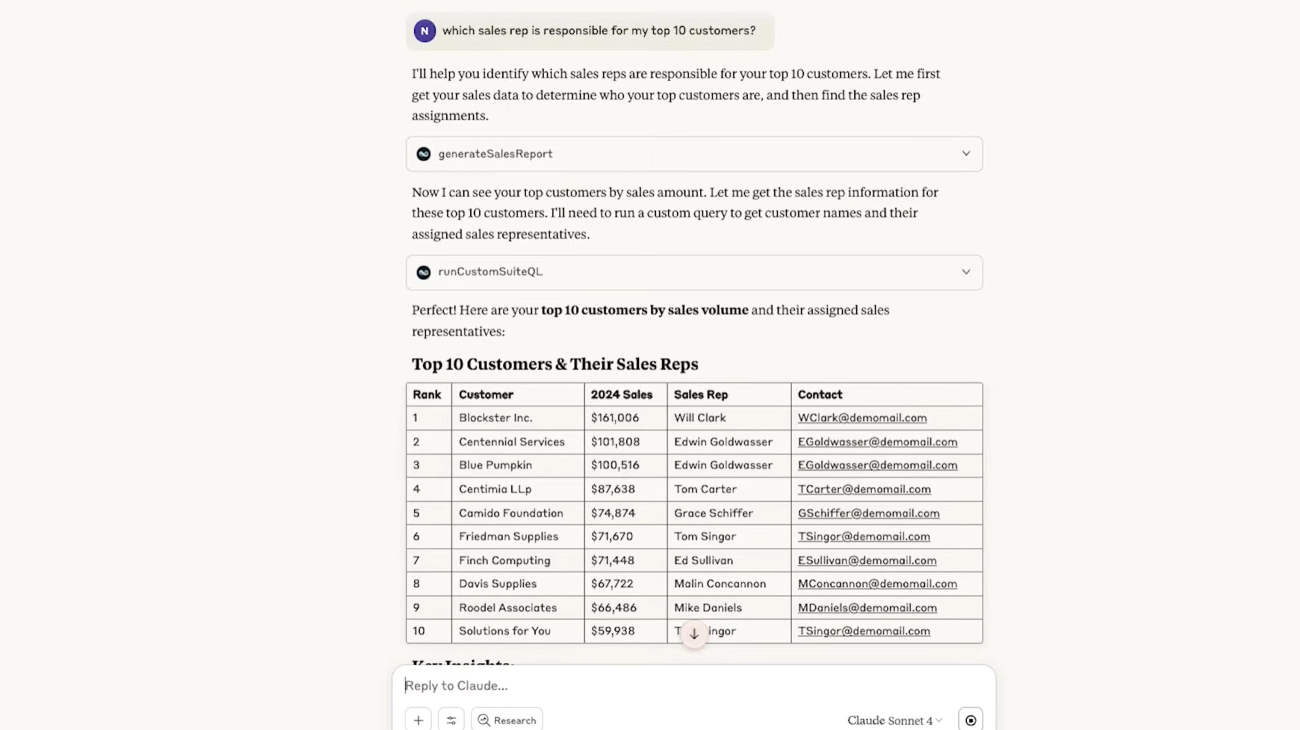
Claude: Work with ERP data, documents, and business context
Claude is another general-purpose AI platform that can work with business data, documents, and connected applications. It can be useful when an ERP process depends on information outside the ERP. A purchasing decision may involve supplier agreements and internal policies. A finance process may rely on supporting documents. An ERP project may include requirements, testing plans, procedures, and configuration documentation. Claude can help users work across those different sources rather than reviewing each one separately.
Potential uses include:
- Analyze documents alongside ERP information
- Compare procedures, contracts, policies, or supporting materials
- Work across approved sources through connectors or MCP
Claude supports connectors that can retrieve information and, where supported, take actions in connected services. Its MCP connector can also connect Claude to remote MCP servers and control which tools are available. For ERP use cases, that creates an option for combining transactional information with the documents and business context surrounding the process.
Good fit for: Organizations with document-heavy workflows or business questions that require context from multiple sources.
May not be the best fit when: Very high-volume workloads make token consumption a primary cost consideration. Claude pricing varies by model and usage, so organizations planning large API workloads should model those costs before selecting an architecture.
Grok: Combine ERP analysis with current external context
Grok, developed by xAI, provides another option for analyzing ERP-related information.
Users can upload spreadsheets, PDFs, and other business files for analysis, extraction, and summarization. Grok also supports web search, which can bring current external information into an analysis when outside factors matter. That makes Grok useful for business questions where ERP data tells only part of the story. For example, an operations team might review changes in purchasing costs and then research supplier developments or market conditions that could help explain the movement. A finance team could investigate an internal variance and review outside information before deciding what requires deeper analysis.
Potential uses include:
- Analyze ERP exports and supporting files
- Compare internal performance with current external developments
- Research suppliers, competitors, markets, or industries
Grok supports custom MCP connectors. Organizations can use those connectors to expose approved internal APIs, databases, or business tools to Grok. The exact integration depends on the MCP server, authentication, permissions, and system architecture.
Good fit for: Organizations that frequently need external context alongside internal business analysis.
May not be the best fit when: The primary requirement is native productivity integration, document-centric workflows, or AI embedded directly into ERP processes.

AI by Zapier: Automate work between ERP and other applications
ERP processes rarely happen entirely inside the ERP. A request may begin through a form. An invoice may arrive by email. A customer may originate in a CRM. Completing one process may need to trigger a notification, update another application, or start the next workflow. AI by Zapier focuses on these cross-application processes. Zapier workflows use triggers and actions to move information between applications. AI steps can then summarize, classify, extract, or interpret information as part of the workflow. Zapier currently supports more than 9,000 applications and can connect AI models and agents with business processes.
Potential uses include:
- Classify and route incoming information
- Trigger workflows between ERP and other applications
- Automate repetitive cross-system handoffs
Zapier also supports MCP, which can give compatible AI clients access to supported actions across connected applications. For ERP products without a ready-made connector, the workflow may require an API, webhook, MCP connection, or custom integration.
Good fit for: Organizations that want AI-assisted automation across multiple applications.
May not be the best fit when: The main requirement is sophisticated financial analysis, document reasoning, or a conversational environment for investigating ERP information.

Don’t overlook the AI already built into your ERP
Before adding another AI platform, review the functionality already available in your ERP. Native AI can have an important advantage because it works within the ERP’s existing workflows, data model, permissions, and business logic. An external tool can still add value when a business needs broader analysis, outside research, cross-system context, or automation beyond the ERP.
Microsoft
Microsoft is embedding Copilot, AI agents, and other AI capabilities throughout its Dynamics 365 ERP applications.
In Dynamics 365 Business Central, Copilot and agents support a growing range of finance, inventory, sales, purchasing, data analysis, document processing, and everyday productivity scenarios. Microsoft is also expanding agent-based functionality that can automate defined business processes while maintaining human oversight.
Dynamics 365 Finance and Dynamics 365 Supply Chain Management, often referred to together as Dynamics 365 Finance and Operations, also include Copilot, agents, and embedded AI capabilities across financial and operational processes.
In Dynamics 365 Finance, for example, the Collections coordinator workspace can use Copilot to summarize customer payment history and overdue balances and help draft reminder emails. Dynamics 365 Supply Chain Management includes AI-assisted capabilities across areas such as demand planning, procurement, and warehouse management. This embedded approach lets employees use AI closer to the ERP data, permissions, workflows, and business logic involved in the process.
For a closer look at these capabilities, explore Copilot in Dynamics 365 Finance and Operations and practical Copilot use cases in Dynamics 365 Business Central.
Oracle NetSuite
NetSuite is expanding AI across the ERP experience. NetSuite 2026.2 marked the start of the rollout of NetSuite Next in the United States and Canada. NetSuite Next builds on the existing NetSuite platform while embedding AI more deeply across business processes, records, and analytics.
The experience is designed to give users more intuitive ways to work with ERP information, uncover insights, and move through everyday business processes. Organizations can evaluate NetSuite Next through their existing NetSuite environment as it becomes available to their account.
For businesses already using NetSuite, this means more AI capabilities may become available directly within the ERP before another external AI platform is introduced. Learn more about NetSuite Next and the future of AI-enabled ERP operations.
Sage Intacct
Sage Intacct is adding AI across core finance processes rather than relying on one standalone AI assistant.
Its AI capabilities include Sage Copilot, specialized finance agents, accounts payable automation, cash intelligence, close automation, data import assistance, and external AI connectivity.
For finance teams, this means some AI use cases may already be available inside the ERP before another platform is introduced. See Sage Copilot and AI capabilities in Sage Intacct.
What should you consider before connecting AI to ERP data?
ERP systems contain sensitive financial and operational information. Connecting an AI tool should begin with a specific use case and controlled access.
Before moving forward, consider:
- Data quality: AI results depend on accurate and consistent ERP data.
- Permissions: Give the AI access only to information required for the use case.
- Read versus write access: Consider starting with analysis and read-only workflows before allowing AI to change ERP records.
- Data handling: Understand how prompts, files, responses, and connected information are processed and protected.
- Human review: Keep people involved in financial reporting, approvals, compliance, and other high-impact decisions.
- Integration requirements: Determine whether the use case requires a file export, API, MCP server, native connector, or custom integration.
The controls should become stronger as AI moves from answering questions to taking actions.
Start with the ERP problem, not the AI tool
It is easy to start with a product name: “We want ChatGPT,” or, “We want an AI agent.”
A stronger approach starts with the process. If finance spends hours investigating monthly variances, begin with financial analysis. If employees struggle to find the information behind a transaction, focus on access to business context. If users repeatedly copy information between ERP, email, CRM, and other applications, workflow automation may offer more value.
This is the same business-first approach organizations should use when evaluating and selecting ERP software. Technology decisions should follow defined business requirements, processes, integrations, and long-term goals.
Apply the same discipline to AI. Define the problem, determine what improvement looks like, confirm that the required data is reliable, and then choose the tool and integration method that fit.

Explore where AI can add value to your ERP
AI creates more value when it solves a defined business problem and works with the systems, data, and controls your organization already has. Rand Group can help you assess your ERP environment, identify where AI could improve analysis, productivity, or automation, and determine whether embedded ERP AI, a general-purpose AI platform, an agent, automation, or a custom solution is the right approach.
Build a practical AI and ERP strategy with Rand Group
An AI project around ERP requires more than choosing a model or activating a feature. AI needs reliable business data, appropriate permissions, secure integrations, clear business rules, and a process employees can use. Rand Group works across Microsoft, Oracle NetSuite, and Sage. This gives our consultants experience with different approaches to ERP, AI, automation, integrations, analytics, and business processes.
Our services include:
- AI workshops and use-case planning
- ERP and AI readiness assessments
- AI agent and custom AI development
- ERP integrations and workflow automation
- Reporting, data, security, and governance planning
- ERP implementation and optimization services
- Ongoing ERP and technology support
Rand Group has completed more than 3,000 engagements for more than 1,200 clients across North America and maintains a 90% client retention rate. That experience helps our consultants understand what happens after an ERP goes live, when processes change, integrations expand, data requirements grow, and organizations need to decide where new technology can deliver practical value.
Hear what our clients say
“The level of care, thoughtfulness, and in-depth knowledge provided by Rand Group exceeded our expectations. We now have a partner who not only understands NetSuite but also comprehends the intricacies of accounting and finance. Rand Group has become an extension of our internal technical team, providing invaluable support as we continue to grow.” – Carolina Pereira, VP of Finance Shared Services, Unified Women’s Healthcare
“Business Central lets us automate workflows, integrate multiple apps, and scale operations quickly, while Rand Group guided us to adapt the platform exactly to our business needs.” -Kenny Jeans, Vice President Corporate Services, AGT Products Inc.
“Sage goes beyond an ERP system for us. It is the epicenter for our workflows, and every time we find an inefficiency, the question becomes how we can digitize it and move closer to best practice.” – Scott Rolston, President, Stucchi USA
Key takeaways
- AI can extend ERP by helping employees analyze information, understand business context, and automate work while the ERP remains the system of record.
- Different tools address different needs: Microsoft 365 Copilot supports productivity around ERP information, ChatGPT and Claude support analysis and business context, Grok adds external research, and AI by Zapier focuses on cross-application automation.
- MCP provides a growing standard for connecting compatible AI applications with approved business data and tools, but permissions, security, and governance remain essential.
- Review the Copilot, agents, and other AI capabilities already available within your ERP before introducing another platform.
- Start with a defined business problem, reliable data, controlled access, and clear measures of success before choosing an AI tool.
Frequently asked questions
What is the best AI tool for ERP?
The best AI tool depends on the problem you want to solve. Microsoft 365 Copilot fits naturally into Microsoft-focused productivity environments. ChatGPT is useful for flexible data analysis. Claude can help with document-heavy and cross-system work. Grok adds current external research to internal analysis. AI by Zapier focuses on workflow automation.
What is MCP in ERP?
Model Context Protocol is an open standard that gives compatible AI applications a common way to connect with external data and tools. In an ERP scenario, an MCP server can make approved data or capabilities available to an AI client. Authentication, user permissions, configuration, and the tools exposed by the server still control what the AI can access or do.
Can ChatGPT analyze ERP data?
Yes. ChatGPT can analyze approved ERP exports such as CSV or Excel files. It can summarize data, identify trends and outliers, perform calculations, and create tables or charts. More advanced environments can also connect ChatGPT with approved business systems through supported apps and MCP integrations.
Can Claude work with ERP data?
Yes. Claude can analyze uploaded business information and connect with external systems through supported connectors and MCP. The exact capabilities depend on the source system, permissions, authentication, and tools made available through the connection.
Can Grok work with ERP data?
Yes, although the method depends on the ERP environment. Users can upload approved ERP exports and spreadsheets to Grok for analysis. Grok also supports custom MCP connectors, which can connect it with external systems that expose compatible MCP services.
Can AI automate ERP processes?
Yes, but the level of automation depends on the ERP, AI platform, integration, permissions, and process. Some AI use cases focus only on analysis. Others can trigger workflows or perform approved actions. Businesses should apply stronger controls when AI can create, modify, approve, or post transactions.
Is it safe to connect AI to ERP data?
AI can be used with ERP information when businesses apply appropriate security and governance. Restrict AI access to the information required for the use case. Understand how each provider handles data. Preserve ERP permissions where possible, and maintain human review for high-impact financial and operational decisions.
Should I use the AI built into my ERP or an external AI tool?
Start by reviewing what your ERP already provides. Native ERP AI may be the simplest option for processes that happen entirely inside the ERP. External tools can add value when you need broader analysis, current research, information from several systems, or automation that extends beyond the ERP. Many organizations may eventually use both.
Get more from your ERP with the right AI strategy
The best AI tool for getting more from your ERP is the one that solves a specific business problem. Microsoft 365 Copilot, ChatGPT, Claude, Grok, and AI by Zapier each address different needs across analysis, research, productivity, and automation.
The technology matters, but so do the ERP data, processes, integrations, permissions, and controls behind it. Rand Group can help you evaluate the AI already available in your ERP, identify where another tool makes sense, and develop a practical AI strategy around your existing environment. To discuss where AI could add value to your ERP strategy, contact Rand Group.