 Dynamics 365
 Power Platform
 Dynamics
 Cloud & Productivity

Project Document Intelligence Agent
Turn project documents into searchable information with AI
The Project Document Intelligence Agent is a custom AI agent built by Rand Group for Dynamics 365 Field Service. It analyzes uploaded project documents, extracts details such as builder names, job-site addresses, and purchase order numbers, and automatically organizes the information in Dynamics 365 and SharePoint.
Business challenge
Manual document processing slows down field service operations
Field service businesses manage large volumes of job-site documents, including floor plans, dimensional plans, and other project files. Employees often need to open each document, identify important details, enter information into CRM, and organize files for future use. This repetitive work takes time and makes it harder to find the right information when needed.

Time-consuming data extraction
Employees spend hours reviewing project documents and manually entering builder names, job-site addresses, purchase order numbers, and other details into business systems.

Disorganized project documents
When files are stored without consistent information, teams struggle to find the right floor plans, project records, and job-site documents.

Disconnected document workflows
Manually updating CRM records and uploading files to SharePoint creates extra work and increases the risk of missing information or misplaced documents.
Features
Turn project documents into organized, searchable information with AI
The Project Document Intelligence Agent uses AI to analyze uploaded job-site documents and identify important project information. It automatically stores extracted metadata in Dynamics 365 Field Service and uploads the files to SharePoint, reducing manual data entry and document organization.
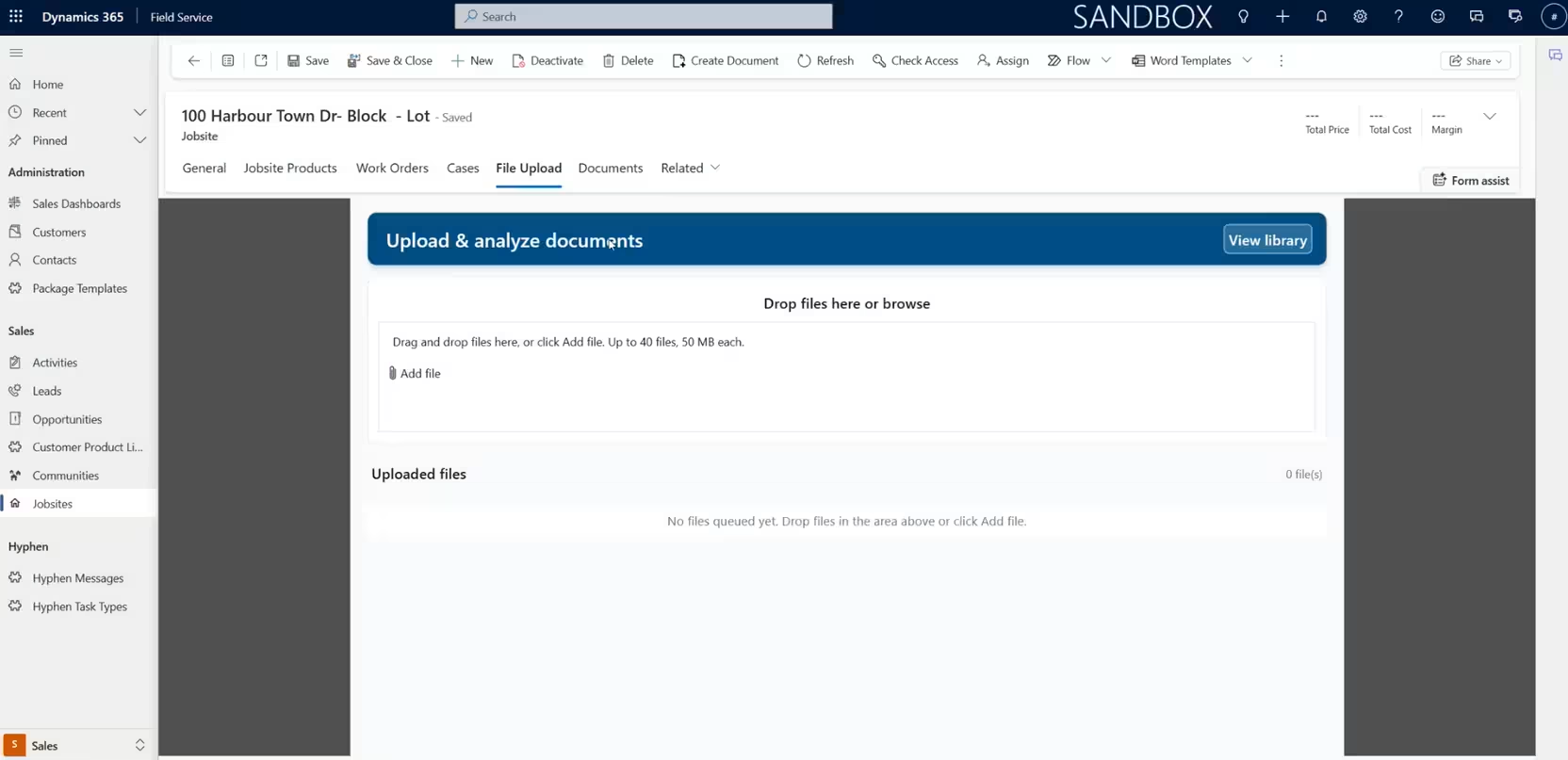
Extract key information from project documents automatically
The agent analyzes multiple uploaded project files and uses AI to identify important details within each document. Instead of opening files individually and entering information by hand, employees can upload documents and let the agent extract relevant metadata for their project records.
The agent can:
- Analyze multiple uploaded job-site documents in one workflow
- Extract builder names from project documents
- Identify job-site addresses and location information
- Capture purchase order numbers
- Classify document types, including floor plans and dimensional plans
- Extract relevant metadata from different project documents
- Reduce manual document review and data entry
Organize project information across Dynamics 365 and SharePoint
After extracting document information, the agent saves the metadata in Dynamics 365 Field Service and uploads the original files to SharePoint. This creates a connected document workflow that helps employees search for project information and locate the documents they need without manually organizing every file.
The agent can:
- Automatically store extracted document metadata in Dynamics 365 CRM
- Make project information searchable using stored metadata
- Upload processed documents to Microsoft SharePoint
- Reduce manual file uploads and document organization
- Maintain consistent metadata for project files
- Help employees locate documents using project details
- Connect document processing with existing Field Service workflows
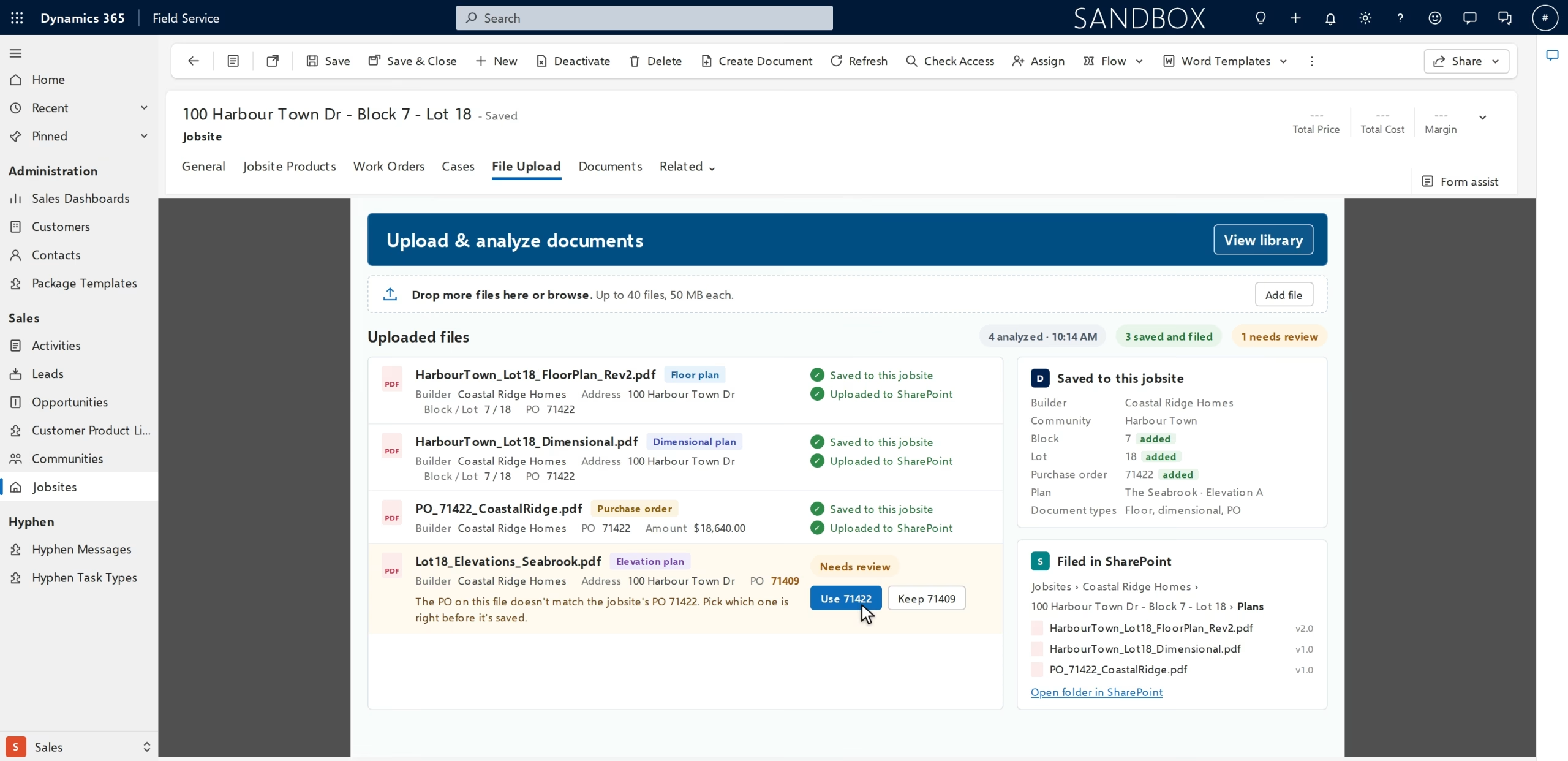

Simplify project document management with AI
Reduce the time your team spends reviewing documents, entering project information, and organizing files. Rand Group can help you implement the Project Document Intelligence Agent in Dynamics 365 Field Service to automate metadata extraction, connect your document workflows, and make job-site information easier to access.
How it works
From uploaded project files to searchable documents in five steps
The Project Document Intelligence Agent analyzes uploaded documents, extracts key information, and automatically organizes project metadata and files across Dynamics 365 Field Service and SharePoint.
Upload project documents
Users upload multiple job-site documents, such as floor plans, dimensional plans, and other project files, for AI analysis.
Analyze and classify files
The agent uses AI to review document contents and identify the type of project document being processed.
Extract project metadata
It identifies information such as the builder, job-site address, purchase order number, and document type.
Update Dynamics 365 records
The agent stores extracted metadata in Dynamics 365 CRM, making project information searchable for field service teams.
Upload documents to SharePoint
The agent uploads processed files to Microsoft SharePoint, completing the document management workflow without manual file handling.
Compatibility & requirements
Getting started with the Project Document Intelligence Agent
The Project Document Intelligence Agent is a custom AI solution built for Dynamics 365 Field Service and connected to Microsoft SharePoint. It uses AI-powered document analysis and automated workflows to extract and organize project information within your existing Microsoft environment.
Requirements may include:
- Microsoft Dynamics 365 Field Service
- Microsoft SharePoint for document storage
- Supported project documents, such as floor plans, dimensional plans, and other job-site files
- Configured Dynamics 365 fields for storing extracted metadata
- Appropriate user permissions for Dynamics 365 and SharePoint
- AI document analysis and workflow automation components configured for your environment
- Defined metadata requirements, including builder names, job-site addresses, purchase order numbers, and document types
- Applicable Microsoft platform, AI, and integration licensing based on the implementation

Why partner with Rand Group?
AI document workflows built around your projects
Rand Group builds custom AI agents around your document workflows and existing systems. We help define which project details to extract, how metadata should appear in Dynamics 365, and where documents should be stored in SharePoint, so the agent supports the way your teams already manage files.
Long-term support beyond implementation
With a 90% client retention rate, Rand Group focuses on helping customers improve their technology over time. After launch, we can refine document analysis prompts, adjust metadata fields, update integrations, and expand the agent as your project requirements change, keeping document processing aligned with your team’s needs.
Proven experience across 3,000+ engagements
With more than 3,000 successful engagements, Rand Group brings experience across CRM, system integration, and business process improvement. We apply that knowledge to help your organization connect project information, automate repetitive document tasks, and make important job-site details easier for employees to find and use.
Award-winning Microsoft technology expertise
Rand Group is a Microsoft Solutions Partner and the 2025 Microsoft Americas Channel Emerging Partner of the Year. We’ve also been named to Accounting Today’s VAR 100 and ERP Global Insights’ Top 100 VARs. Our experience across Dynamics 365, SharePoint, and AI supports connected document automation solutions.
Frequently asked questions (FAQs)
What is the Project Document Intelligence Agent?
The Project Document Intelligence Agent is a custom AI agent developed by Rand Group for Dynamics 365 Field Service. It analyzes uploaded project documents, extracts information such as builder names, job-site addresses, and purchase order numbers, and stores searchable metadata in Dynamics 365. The agent also uploads processed files to Microsoft SharePoint, reducing manual document handling.
How does the Project Document Intelligence Agent work?
Users upload project or job-site documents into the connected workflow. The agent uses AI to analyze each file, identify its document type, and extract relevant project metadata. It then stores that information in Dynamics 365 CRM and uploads the documents to SharePoint, making project information easier to find and manage.
What types of documents can the agent process?
The Project Document Intelligence Agent can process project and job-site documents, including floor plans, dimensional plans, and other files containing relevant project information. It can be configured to recognize different document types and extract the metadata your organization needs.
What information can the agent extract from project documents?
The agent can identify details such as builder names, job-site addresses, purchase order numbers, and document types. Rand Group can configure the extraction process around the information your team needs to manage and search project records in Dynamics 365 Field Service.
Can the agent analyze multiple documents at once?
Yes. The Project Document Intelligence Agent supports workflows where users upload multiple project documents for AI analysis. It processes the files to identify relevant metadata, reducing the need to open each document and manually enter its details.
Does the Project Document Intelligence Agent work with Dynamics 365 Field Service?
Yes. The Project Document Intelligence Agent is built for Dynamics 365 Field Service. It uses AI to analyze project files and stores extracted information in connected Dynamics 365 CRM records, helping field service teams access important job-site information through their existing business system.
Does the agent automatically upload documents to SharePoint?
Yes. After processing uploaded documents, the agent automatically uploads the files to Microsoft SharePoint. It also stores extracted metadata in Dynamics 365, connecting document storage with searchable project information.
Can employees search for project documents using extracted information?
Yes. The agent stores extracted metadata in Dynamics 365 CRM so employees can search for information associated with project documents. For example, a team member can use recorded builder names, job-site addresses, or purchase order numbers to help locate relevant project information.
Does the agent replace SharePoint or Dynamics 365 document management?
No. The Project Document Intelligence Agent works with Dynamics 365 Field Service and Microsoft SharePoint rather than replacing them. It automates document analysis, metadata extraction, CRM updates, and file uploads, helping organizations make better use of their existing systems.
Can the Project Document Intelligence Agent be customized?
Yes. Rand Group can configure the agent to recognize different project document types, extract additional metadata, and support your organization’s document management requirements. The solution can also be adapted as your business processes and project documentation needs change.