Top ERP and accounting software for small businesses in Canada

Choosing ERP software for small business operations in Canada requires more than comparing accounting features. Canadian companies need to consider taxes, CAD and USD transactions, payroll, bilingual requirements, reporting, integrations, and the operational processes that may become more complex as the business grows.
Dynamics 365 Business Central, Oracle NetSuite, and Sage Intacct are three platforms worth evaluating, but they solve different business challenges. A distributor managing inventory across locations may have very different requirements from a professional services firm managing multiple entities, projects, and financial reporting. The right choice starts with understanding those requirements before comparing software.
At a glance
Canadian small businesses have options ranging from cloud accounting applications to broader ERP platforms that connect finance with operations. Dynamics 365 Business Central, Oracle NetSuite, and Sage Intacct are particularly relevant when financial, operational, reporting, or multi-entity requirements have outgrown simpler accounting systems. Businesses with less complex requirements may also consider QuickBooks Online, SAP Business One or Odoo. The right platform depends on what the business needs to manage today and how those requirements are expected to change.
What is ERP for a small business in Canada?
ERP for a small business is software that connects financial and operational processes in one system. Depending on the platform, it can manage accounting, purchasing, inventory, sales, projects, manufacturing, warehouse operations, reporting, customer information, and other core business functions.
For Canadian businesses, ERP can also help support requirements such as GST, HST, PST, and QST, CAD and USD transactions, multi-currency reporting, payroll integrations, and bilingual operations. ERP goes beyond basic accounting software. Accounting systems primarily record and report financial transactions, while ERP connects those records with the business activities that create them. This gives employees across finance and operations access to shared data and a more complete view of the business.
What should Canadian small businesses look for in ERP and accounting software?
Canadian businesses should define their requirements before comparing platforms. Key considerations include:
- Canadian tax functionality: Determine how the system supports GST, HST, PST, QST, applicable provincial taxes, exemptions, and tax reporting.
- Multi-currency: Companies working with U.S. or international customers and suppliers should evaluate CAD/USD transactions, exchange-rate management, currency revaluation, gains and losses, and consolidated reporting.
- Canadian payroll: Determine whether Canadian payroll is built into the platform, available through another product from the same vendor, or handled through an integration with a payroll provider.
- Bilingual and French-language support: Businesses with French-speaking employees should evaluate whether the user interface supports English and French, including Canadian French where needed. Also check reports, customer-facing documents, integrations, customizations, and third-party applications.
- Financial reporting: Look at financial statements, dashboards, budgeting, forecasting, cash flow, management reporting, and the amount of spreadsheet work required outside the system.
- Multi-entity management: Businesses with subsidiaries or related companies should evaluate intercompany transactions, consolidations, eliminations, entity security, and multiple base currencies.
- Inventory and operations: Manufacturers, distributors, and product-based businesses may need purchasing, inventory, warehousing, manufacturing, order management, or service functionality connected to finance.
- Industry requirements: A manufacturer, nonprofit, professional services company, healthcare organization, and distributor may each need different workflows and integrations.
- Integrations: Identify requirements for CRM, ecommerce, banking, payroll, expense management, payments, Microsoft 365, reporting tools, and industry applications.
- AI and automation: Consider whether available automation and AI tools can reduce manual work, surface information, or improve high-volume processes.
- Scalability: Consider future entities, locations, users, transaction volume, inventory complexity, and international expansion.
- Implementation and support: Evaluate whether the implementation partner understands Canadian requirements, your industry, data migration, integrations, user training, and long-term system support.
ERP and accounting software comparison at a glance
Canadian small businesses can choose from accounting platforms designed for straightforward financial management and broader ERP systems that connect finance with operations. This high-level comparison can help narrow the options that deserve a closer look.

Know what to look for before selecting ERP software
Choosing ERP software starts with understanding your financial, operational, reporting, integration, and growth requirements. Use Rand Group’s checklist to identify the capabilities your business should evaluate before comparing platforms.
Top ERP and accounting software for small businesses in Canada
Business Central, NetSuite, and Sage Intacct overlap in several areas, but their design, ecosystems, and operational depth make them suitable for different requirements.
Microsoft Dynamics 365 Business Central
Microsoft Dynamics 365 Business Central is a comprehensive ERP designed for growing small and midsize businesses that want to connect financials, sales, purchasing, inventory, supply chain, projects, and other business processes within one platform. One of its biggest advantages is its connection to the Microsoft ecosystem. Business Central works with applications many companies already use, including Microsoft 365 and Microsoft Power Platform. Companies can use Power BI for business intelligence and reporting, Power Apps to extend processes, and Power Automate to automate workflows across applications.
For Canadian companies, Microsoft provides a Canadian version of Business Central with country-specific functionality. Business Central supports Canadian tax scenarios, including GST/HST and provincial sales tax requirements, as well as foreign-currency transactions. Users can also run the Canadian version with a French-language interface without changing the underlying Canadian localization.
Business Central also includes Copilot and AI agent capabilities in the online version. These tools can assist with activities such as finding information, analyzing data, and automating supported financial and operational tasks. Businesses interested in these capabilities can learn more about AI agents in Dynamics 365 Business Central. Business Central is also highly extensible. Organizations can use Power Platform, Microsoft Marketplace applications, integrations, and Dynamics 365 software engineering and custom development when standard functionality does not fully address a business requirement.
Best for: Growing small and midsize businesses that use Microsoft technology and need financial and operational processes in a connected ERP.
Key strengths:
- Broad financial and operational ERP capabilities
- Strong Microsoft 365 and Power Platform connections
- Inventory, project, supply chain, and warehouse functionality
- Manufacturing and service management with Premium
- Copilot and AI agent capabilities in Business Central online
- Large ecosystem of applications, integrations, and partners
Considerations:
- Specialized industry requirements may require configuration, Marketplace apps, integrations, or custom development.
- Canadian payroll is not a native payroll engine within Business Central, so businesses should evaluate available payroll integration options as part of their requirements.
- Organizations planning to use AI agents should also evaluate expected usage and related Copilot Credits.
For Canadian customers, Microsoft currently lists Business Central Essentials at CAD $108.50 per user, per month and Premium at CAD $149.20 per user, per month, paid yearly, plus applicable tax. Premium includes Essentials functionality plus enhanced manufacturing and service management capabilities. For a more detailed breakdown, see Rand Group’s Dynamics 365 Business Central pricing guide.

Oracle NetSuite
Oracle NetSuite ERP connects financial management with inventory, procurement, order management, projects, reporting, CRM and other business operations within one cloud platform. It is particularly relevant for organizations that expect their business structure to become more complex as they grow.
NetSuite has a localized Canadian edition with support for Canadian GST and provincial tax scenarios, including GST, PST, HST, and QST. NetSuite OneWorld can also support subsidiaries using different country editions within the same environment, which is useful when a Canadian organization expands into the United States or other countries.
Multi-entity and global management are major strengths. Organizations can manage subsidiaries, currencies, inventory, financial reporting, and operational processes without maintaining separate ERP environments for every company. This can make NetSuite relevant even for a smaller organization if it already has a complex legal or international structure. NetSuite also supports French (Canada) as a user-interface language. Companies with bilingual requirements should still test specialized SuiteApps, reports, templates, customizations, and customer-facing documents as part of the evaluation.
NetSuite includes embedded AI and automation capabilities across supported workflows. Newer experiences such as Ask Oracle can also help eligible users find information and interact with NetSuite data using natural language. For more detail, see Rand Group’s overview of NetSuite AI capabilities and Ask Oracle.
Best for: Growing companies with multi-entity, multi-currency, subsidiary, or international requirements that want financial and operational processes within one cloud ERP.
Key strengths:
- Strong multi-entity and subsidiary management
- Canadian tax localization
- Multi-currency and international operations
- Financial management, inventory, and order management
- Manufacturing functionality for organizations with production requirements
- Broad cloud ERP capabilities
Considerations:
- The breadth of the platform can add implementation and administration complexity if the business does not need its broader capabilities.
- NetSuite’s native SuitePeople Payroll supports U.S. payroll taxes rather than Canadian payroll. Canadian organizations need an external payroll solution or integration.
- Some newer AI functionality is being released in phases, so availability can differ between accounts.

Sage Intacct
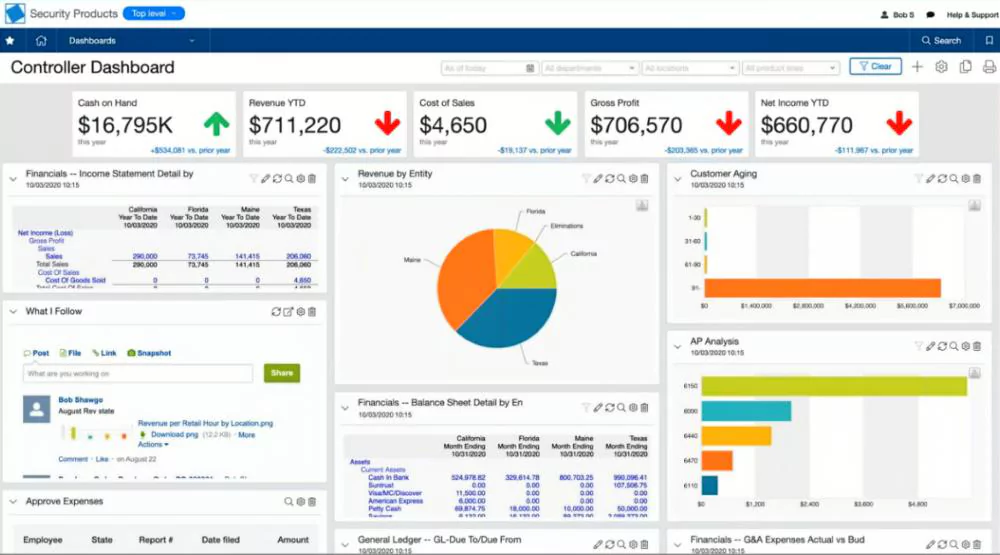
Sage Intacct is a cloud financial management platform designed for organizations that need stronger accounting, reporting, automation, and multi-entity capabilities. Sage Intacct puts financial management at the center of the platform. Its dimensional reporting lets organizations analyze financial and operational results using dimensions such as location, department, customer, project, vendor, and entity without building every reporting requirement into the chart of accounts.
Multi-entity accounting is another key strength. Companies can manage several entities within one environment, automate intercompany accounting, and consolidate results across entities and currencies. Sage also offers project accounting, inventory management, spend management, and other extended capabilities for organizations that need to go beyond core financials.
Sage Intacct also has a standard Canadian Sales Tax solution. It provides automated tax details and schedules for GST, HST, PST, and QST, helping organizations calculate and capture the appropriate Canadian sales taxes. The solution also supports customizable tax invoice templates, and Sage Regulatory Reporting can calculate GST34-2 reports used to prepare GST/HST returns. Sage maintains updates to the Canadian tax setup as tax rates and supported scenarios change.
For Canadian businesses with bilingual teams, Sage Intacct supports French-language settings for users in Canada. Sage is also adding AI and automation to finance workflows, including capabilities related to accounts payable, financial analysis, exception identification, and month-end processes. Businesses can learn more in Rand Group’s overview of Sage Copilot and Sage AI capabilities.
Canadian payroll is available through the Sage ecosystem. Sage Intacct Payroll powered by ADP connects payroll and HR information with Sage Intacct financial management.
Best for: Finance-led, project-based, and multi-entity organizations that prioritize financial reporting, accounting controls, automation, and consolidated visibility.
Key strengths:
- Strong multi-entity accounting and consolidation
- Dimensional financial reporting
- Canadian GST, HST, PST, and QST support
- Project accounting and financial management
- Financial automation capabilities
- Connected Canadian payroll and HCM options
- Open integration platform and application ecosystem
Considerations:
- Businesses should evaluate whether operational requirements such as manufacturing or complex warehousing can be addressed with Sage Intacct and connected solutions or whether a broader operational ERP is a better fit.
- Sage Intacct pricing is tailored to the modules and requirements selected rather than presented as one standard per-user package.
- Businesses with specialized tax scenarios should confirm how the standard Canadian tax configuration needs to be adjusted during implementation.
Dynamics 365 Business Central vs. NetSuite vs. Sage Intacct
Business Central, NetSuite, and Sage Intacct support many of the same core requirements, but the way those capabilities are delivered can differ. Use this table as a starting point before testing the workflows that matter to your organization.
The table is intended as a shortlist tool, not a substitute for requirements testing. Modules, licensing, configuration, integrations, localizations, and product availability can change how a capability works in a specific implementation.
Honorable mentions: Other ERP and accounting software for Canadian small businesses
Business Central, NetSuite, and Sage Intacct are not the only options available to Canadian businesses. Companies with simpler requirements or a different technology strategy may also consider these platforms.
QuickBooks Online
QuickBooks Online is a common option for Canadian small businesses focused primarily on bookkeeping, invoicing, expenses, financial reporting, and payroll.
The Canadian version supports GST/HST tracking and provides sales tax reporting to help businesses prepare for CRA filing requirements. Depending on the plan, it also supports features such as multi-currency, inventory tracking, project profitability, and workflow automation.
The platform also includes automation and AI-assisted capabilities that can help with activities such as transaction categorization, reconciliation, reporting, and finding financial information.
Best for: Smaller businesses with relatively straightforward accounting and financial management requirements.
SAP Business One
SAP Business One (SAP B1) is an ERP designed for small and midsize businesses that need to manage more than accounting alone. The platform connects financial management with purchasing, inventory, sales, customer relationships, reporting, manufacturing, and other business operations.
SAP B1 supports both cloud and on-premises deployment, which can appeal to organizations that want more flexibility in how their ERP is hosted. SAP also provides a Canadian localization with country-specific financial and tax configuration.
Best for: Small and midsize businesses that need an integrated ERP for financial management, inventory, purchasing, sales, manufacturing, and other operational processes.
Odoo
Odoo takes a modular approach, allowing companies to combine accounting with CRM, sales, inventory, manufacturing, ecommerce, projects, and other applications.
Its Canadian localization supports Canadian accounting and tax requirements, while newer versions also include AI-assisted tools across supported applications.
Best for: Businesses looking for a modular platform and willing to invest time in evaluating configuration, modules, and implementation requirements.
Common mistakes Canadian small businesses make when choosing ERP
ERP selection problems often start before implementation begins. Canadian small businesses can reduce risk by avoiding a few common mistakes:
- Choosing software before defining business processes: Start with how finance, sales, purchasing, inventory, projects, and reporting need to work rather than comparing feature lists first.
- Underestimating Canadian requirements: Document GST/HST/PST/QST, payroll, CAD/USD transactions, French-language needs, banking, and cross-border requirements early.
- Focusing too heavily on license price: Consider implementation, data migration, integrations, customization, training, support, and internal resources when comparing total cost.
- Selecting for today’s needs only: Think about future entities, locations, users, transaction volume, acquisitions, inventory complexity, and international growth.
- Treating implementation and partner selection as an afterthought: Evaluate product expertise, Canadian experience, industry knowledge, methodology, training, and long-term support before making a final decision.
How should a Canadian small business choose ERP software?
A structured selection process can help a small business compare ERP systems based on actual requirements instead of individual features or product demonstrations. Start with the processes that create the most operational or financial friction today, then evaluate Canadian requirements, future growth, costs, and the partner that will support the implementation.
- Map your current processes: Document finance, sales, purchasing, inventory, projects, and other important workflows.
- Define Canadian requirements: Identify taxes, CAD/USD transactions, payroll, banking, French-language needs, and legal entities.
- Identify industry needs: Document requirements specific to manufacturing, distribution, professional services, healthcare, nonprofit, or other operations.
- Plan three to five years ahead: Consider future users, entities, locations, acquisitions, inventory, and international expansion.
- Identify automation opportunities: Look for repetitive or manual processes that workflow automation or AI could simplify.
- Compare total cost of ownership: Include software, implementation, migration, integrations, customization, training, support, and internal resources.
- Evaluate the implementation partner: Review Canadian presence, product expertise, industry knowledge, methodology, training, and ongoing support.

Find the right ERP for your Canadian business
Choosing ERP affects finance, operations, reporting, employees, and the systems that connect them. Rand Group can help you compare your requirements against leading ERP platforms and determine which products deserve a deeper evaluation.
Choose ERP with an experienced Canadian technology partner
ERP selection is easier when the team helping evaluate the options understands both the software and the business processes it needs to support.
Rand Group brings more than 20 years of business technology experience, has worked with 1,200+ clients, and has completed 3,000+ successful engagements. Our multi-platform practice spans Microsoft, Oracle NetSuite, and Sage, allowing businesses to evaluate different approaches rather than beginning with one predetermined platform.
Rand Group also has a Canadian presence, including Toronto, Ottawa, and Vancouver. Our consultants can support ERP software evaluation, ERP implementation, data migration, software integrations, business reporting, ERP training, optimization, and ongoing ERP support.
That experience becomes especially valuable when a project involves tax requirements, multi-currency, bilingual users, cross-border processes, payroll integrations, industry applications, or long-term expansion plans.
Hear what our clients say
“Rand Group gives us the knowledge and the information to make the proper business decision to expand our business to that next level and open up new revenue opportunities. – Nigel Paskinov, Managing Director, Canadian Spa Company
“Business Central lets us automate workflows, integrate multiple apps, and scale operations quickly, while Rand Group guided us to adapt the platform exactly to our business needs. – Kenny Jeans, Vice President Corporate Services, AGT Products Inc.
“Business Central has transformed how we operate. Our workflows are fully digital, data is integrated, and staff can now focus on sales and customer service instead of manual, repetitive tasks.” – Wesam Khoury, President, Avandium Trading Ltd.
Key takeaways
- Canadian requirements such as taxes, payroll, currency, bilingual users, and cross-border operations should be defined before comparing software.
- Growing businesses should evaluate both current requirements and expected complexity over the next three to five years.
- Accounting platforms and broader ERP systems differ significantly in operational depth, integrations, scalability, and implementation requirements.
- Total cost should include licensing, implementation, migration, integrations, training, support, and internal resources.
- Requirements testing and implementation-partner experience are more useful than comparing products based only on feature counts.
Frequently asked questions
What is the best ERP software for small businesses in Canada?
There is no single ERP platform that fits every Canadian small business. The best ERP depends on the business:
- Dynamics 365 Business Central: Best for connected finance and operations within the Microsoft ecosystem.
- Oracle NetSuite: Best for multi-entity, multi-currency, and international growth.
- Sage Intacct: Best for advanced accounting, reporting, and multi-entity financial management.
Canadian businesses should compare each option against their tax, payroll, currency, integration, and growth requirements.
Does ERP software support GST, HST, PST, and QST?
Support varies by product and configuration. Dynamics 365 Business Central includes Canadian-specific tax functionality, NetSuite has a Canadian edition, and Sage Intacct offers a Canadian Sales Tax solution supporting GST, HST, PST, and QST. Businesses should still confirm their exact provincial, transaction, exemption, and reporting requirements during software evaluation.
Which ERP software supports multiple currencies?
Dynamics 365 Business Central, Oracle NetSuite, and Sage Intacct all support multi-currency scenarios. Canadian companies should go beyond asking whether multiple currencies are supported. Test the processes you actually need, such as invoicing U.S. customers, paying foreign suppliers, revaluing balances, managing exchange-rate gains and losses, and consolidating entities with different base currencies.
Does ERP software support French-speaking users in Canada?
Business Central can use a French interface while the company remains on the Canadian version. NetSuite supports French (Canada) as a UI language, and Sage Intacct supports French-language settings for users in Canada. Businesses should also test reports, custom fields, third-party applications, customer documents, and integrations because enabling a French interface does not automatically translate all business data or custom content.
How much does ERP software cost for a small business in Canada?
For many small businesses, ERP implementation costs can start around $25,000 and commonly reach $100,000 or more, depending on the software, implementation scope, number of users and entities, data migration, integrations, customizations, and training requirements. More complex implementations can exceed this range. Software licensing is only one part of the investment. Businesses should also budget for implementation services, data migration, integrations, project management, internal resources, training, support, and future optimization. A smaller company with several entities and complex integrations can require a larger investment than a bigger company with relatively straightforward processes.
When should a Canadian small business move to a more advanced ERP system?
Common warning signs include increasing spreadsheet dependence, duplicate data entry, disconnected systems, slow reporting, inventory problems, manual consolidations, and difficulty getting a consistent view of financial and operational performance. Starting the evaluation before the existing environment becomes unmanageable gives the business more time to define requirements, clean data, and plan the transition.
How long does ERP implementation take for a small business?
A simpler ERP implementation can often take about 6–12 weeks, while a more complex ERP project may take 3–6 months or longer. The actual timeline depends on factors such as data quality, number of entities, integrations, customization, process redesign, testing requirements, and employee availability. A focused implementation using mostly standard functionality can move faster than a project involving significant migration, integration, or custom development. Rand Group’s ERP implementation timeline guide explains the major phases and factors that affect project timing.
Choosing ERP software for your Canadian small business
Choosing ERP software starts with defining the financial, operational, Canadian localization, integration, and growth requirements that matter to your business. Comparing platforms against those requirements makes it easier to determine which options deserve a closer evaluation. If you need help building requirements, comparing platforms, or narrowing your shortlist, contact Rand Group for ERP evaluation assistance.